ELMERA JOY P. FAJARDO
KHYLA MARIE D. PUYING
GRADE 12- CSS 1
Input, Output
And Storage
Devices
•In computing, an input device is a piece
of computer hardware equipment used to
provide data and control signals to
an information processing system such as
a computer or information appliance
Input devices
EXAMPLES OF INPUT DEVICES
KEYBOARD
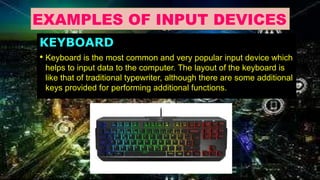
• Keyboard is the most common and very popular input device which
helps to input data to the computer. The layout of the keyboard is
like that of traditional typewriter, although there are some additional
keys provided for performing additional functions.
MOUSE
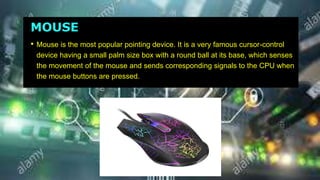
• Mouse is the most popular pointing device. It is a very famous cursor-control
device having a small palm size box with a round ball at its base, which senses
the movement of the mouse and sends corresponding signals to the CPU when
the mouse buttons are pressed.
JOYSTICK
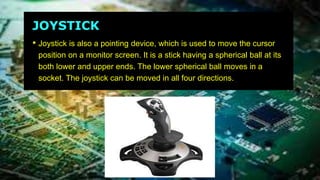
• Joystick is also a pointing device, which is used to move the cursor
position on a monitor screen. It is a stick having a spherical ball at its
both lower and upper ends. The lower spherical ball moves in a
socket. The joystick can be moved in all four directions.
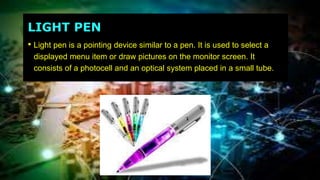
LIGHT PEN
• Light pen is a pointing device similar to a pen. It is used to select a
displayed menu item or draw pictures on the monitor screen. It
consists of a photocell and an optical system placed in a small tube.
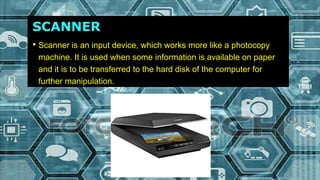
SCANNER
• Scanner is an input device, which works more like a photocopy
machine. It is used when some information is available on paper
and it is to be transferred to the hard disk of the computer for
further manipulation.
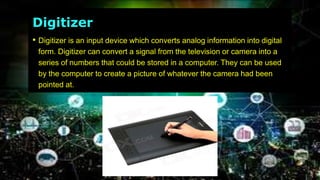
Digitizer
• Digitizer is an input device which converts analog information into digital
form. Digitizer can convert a signal from the television or camera into a
series of numbers that could be stored in a computer. They can be used
by the computer to create a picture of whatever the camera had been
pointed at.
OUTPUT DEVICES
•Computer output devices receive information
out of the computer, carrying data that has
been processed by the computer to the user.
Output devices provide data in different forms
like audio, visual and hard copy.
EXAMPLES OF OUTPUT DEVICES:
Monitor
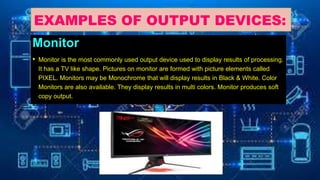
• Monitor is the most commonly used output device used to display results of processing.
It has a TV like shape. Pictures on monitor are formed with picture elements called
PIXEL. Monitors may be Monochrome that will display results in Black & White. Color
Monitors are also available. They display results in multi colors. Monitor produces soft
copy output.
Printers
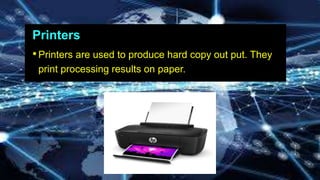
•Printers are used to produce hard copy out put. They
print processing results on paper.
SPEAKER
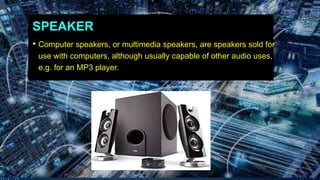
• Computer speakers, or multimedia speakers, are speakers sold for
use with computers, although usually capable of other audio uses,
e.g. for an MP3 player.
HEADPHONE
• Headphones (or head-phones in the early days of telephony and
radio) traditionally refer to a pair of small loudspeaker drivers worn
on or around the head over a user's ears.
PROJECTOR
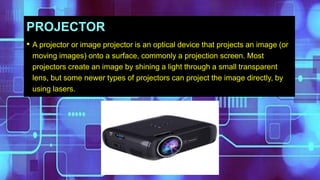
• A projector or image projector is an optical device that projects an image (or
moving images) onto a surface, commonly a projection screen. Most
projectors create an image by shining a light through a small transparent
lens, but some newer types of projectors can project the image directly, by
using lasers.
STORAGE DEVICES
•Storage Devices a piece of
computer equipment on which
information can be stored.
EXAMPLES OF STORAGE DEVICES
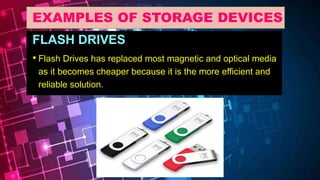
FLASH DRIVES
• Flash Drives has replaced most magnetic and optical media
as it becomes cheaper because it is the more efficient and
reliable solution.
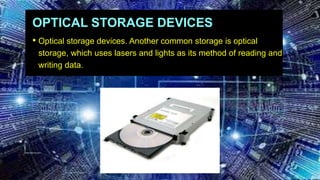
OPTICAL STORAGE DEVICES
• Optical storage devices. Another common storage is optical
storage, which uses lasers and lights as its method of reading and
writing data.
HARD DISK DRIVE
• A hard disk drive (HDD), hard disk, hard drive, or fixed disk,[b] is an electro-
mechanical data storage device that uses magnetic storage to store and
retrieve digital information using one or more rigid rapidly rotating disks (platters) coated
with magnetic material. The platters are paired with magnetic heads, usually arranged
on a moving actuator arm, which read and write data to the platter surfaces.[2] Data is
accessed in a random-access manner, meaning that individual blocks of data can be
stored or retrieved in any order and not only sequentially. HDDs are a type of non-
volatile storage, retaining stored data even when powered off.
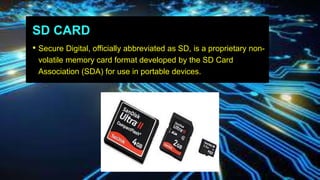
SD CARD
• Secure Digital, officially abbreviated as SD, is a proprietary non-
volatile memory card format developed by the SD Card
Association (SDA) for use in portable devices.
NOW LET US KNOW
MORE ABOUT INPUT,
OUTPUT AND
STORAGE DEVICES.
REFERENCES :
• https://www.google.com/url?sa=t&source+web&rct=j&url=%23&ved+2
ahUKEwjP2JiG-6TIAhWQd94KHcfnCm8Qxa8BMAF

Input, output and storage devices

  • 1.
    ELMERA JOY P.FAJARDO KHYLA MARIE D. PUYING GRADE 12- CSS 1 Input, Output And Storage Devices
  • 2.
    •In computing, aninput device is a piece of computer hardware equipment used to provide data and control signals to an information processing system such as a computer or information appliance Input devices
  • 3.
    EXAMPLES OF INPUTDEVICES KEYBOARD • Keyboard is the most common and very popular input device which helps to input data to the computer. The layout of the keyboard is like that of traditional typewriter, although there are some additional keys provided for performing additional functions.
  • 4.
    MOUSE • Mouse isthe most popular pointing device. It is a very famous cursor-control device having a small palm size box with a round ball at its base, which senses the movement of the mouse and sends corresponding signals to the CPU when the mouse buttons are pressed.
  • 5.
    JOYSTICK • Joystick isalso a pointing device, which is used to move the cursor position on a monitor screen. It is a stick having a spherical ball at its both lower and upper ends. The lower spherical ball moves in a socket. The joystick can be moved in all four directions.
  • 6.
    LIGHT PEN • Lightpen is a pointing device similar to a pen. It is used to select a displayed menu item or draw pictures on the monitor screen. It consists of a photocell and an optical system placed in a small tube.
  • 7.
    SCANNER • Scanner isan input device, which works more like a photocopy machine. It is used when some information is available on paper and it is to be transferred to the hard disk of the computer for further manipulation.
  • 8.
    Digitizer • Digitizer isan input device which converts analog information into digital form. Digitizer can convert a signal from the television or camera into a series of numbers that could be stored in a computer. They can be used by the computer to create a picture of whatever the camera had been pointed at.
  • 9.
    OUTPUT DEVICES •Computer outputdevices receive information out of the computer, carrying data that has been processed by the computer to the user. Output devices provide data in different forms like audio, visual and hard copy.
  • 10.
    EXAMPLES OF OUTPUTDEVICES: Monitor • Monitor is the most commonly used output device used to display results of processing. It has a TV like shape. Pictures on monitor are formed with picture elements called PIXEL. Monitors may be Monochrome that will display results in Black & White. Color Monitors are also available. They display results in multi colors. Monitor produces soft copy output.
  • 11.
    Printers •Printers are usedto produce hard copy out put. They print processing results on paper.
  • 12.
    SPEAKER • Computer speakers,or multimedia speakers, are speakers sold for use with computers, although usually capable of other audio uses, e.g. for an MP3 player.
  • 13.
    HEADPHONE • Headphones (orhead-phones in the early days of telephony and radio) traditionally refer to a pair of small loudspeaker drivers worn on or around the head over a user's ears.
  • 14.
    PROJECTOR • A projectoror image projector is an optical device that projects an image (or moving images) onto a surface, commonly a projection screen. Most projectors create an image by shining a light through a small transparent lens, but some newer types of projectors can project the image directly, by using lasers.
  • 15.
    STORAGE DEVICES •Storage Devicesa piece of computer equipment on which information can be stored.
  • 16.
    EXAMPLES OF STORAGEDEVICES FLASH DRIVES • Flash Drives has replaced most magnetic and optical media as it becomes cheaper because it is the more efficient and reliable solution.
  • 17.
    OPTICAL STORAGE DEVICES •Optical storage devices. Another common storage is optical storage, which uses lasers and lights as its method of reading and writing data.
  • 18.
    HARD DISK DRIVE •A hard disk drive (HDD), hard disk, hard drive, or fixed disk,[b] is an electro- mechanical data storage device that uses magnetic storage to store and retrieve digital information using one or more rigid rapidly rotating disks (platters) coated with magnetic material. The platters are paired with magnetic heads, usually arranged on a moving actuator arm, which read and write data to the platter surfaces.[2] Data is accessed in a random-access manner, meaning that individual blocks of data can be stored or retrieved in any order and not only sequentially. HDDs are a type of non- volatile storage, retaining stored data even when powered off.
  • 19.
    SD CARD • SecureDigital, officially abbreviated as SD, is a proprietary non- volatile memory card format developed by the SD Card Association (SDA) for use in portable devices.
  • 20.
    NOW LET USKNOW MORE ABOUT INPUT, OUTPUT AND STORAGE DEVICES.
  • 22.