Human Computer Interaction
Fulvio Corno, Luigi De Russis
Human Computer Interaction
2
Motivation
Human Computer Interaction
3
Motivation
Human Computer Interaction
4
• How to design the user experience when interacting with modern
applications, devices, environments?
• How to exploit the novel interaction methods provided by touch, voice,
natural interaction, gestures, …?
• How to ensure that people use such interfaces and systems with “joy”
rather than “frustration”?
Challenges
Human Computer Interaction
5
• Deep down inside every software developer, there's a budding graphic
designer waiting to get out. And if you let that happen, you're in trouble.
Or at least your users will be, anyway…
• The two hardest problems in computer science are: (i) people, (ii),
convincing computer scientists that the hardest problem in computer
science is people, and, (iii) off by one errors.
Jeff Atwood, Nov 2006
https://blog.codinghorror.com/this-is-what-happens-when-you-let-developers-create-ui/
Prof. Jeffrey P. Bigham, 2018
http://www.cs.cmu.edu/~jbigham/
Human Computer Interaction
6
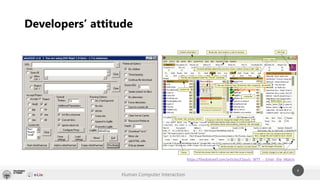
Developers’ attitude
https://thedailywtf.com/articles/Classic_WTF_-_Enter_the_Matrix
Human Computer Interaction
7
Course Objectives
Learn:
• Key concepts related to HCI
• User Experience, Usability
• Design Methods
• Evaluation Techniques
• User Centered Design Process
• New “modern” interaction
methods
• Not only web & mobile
Apply:
• Design and development of a
project
• Eliciting needs
• Following the process
• Developing a result
• Analysis and evaluation of
interfaces
Human Computer Interaction
8
Introduction to
Human-Computer
Interaction (10%)
History, the human, the computer, vision of the future
Building interactive
applications with a
human-centered
process (35%)
Main tasks and methods to design, develop, and evaluate an interactive application
Needfinding strategies, low- and high-fidelity prototypes, mental models and visual design, heuristic evaluation,
and basic concepts and methods for controlled experiments
Application & Projects
(30%)
Practical part on a specific application domain and interaction technology
Web applications
“Beyond WIMP”
paradigms (25%)
Tangible interaction, wearables, voice user interfaces, gestures, eye tracking, and interaction with IoT systems, …
Contemporary examples and development tools
Thematic seminars on emerging topics and case studies
Course Contents
Human Computer Interaction
9
• Learning method
• project-based → students learn by doing a project
• problem-based → the project work starts from elicited and real users’ needs
• Projects developed during the semester, with intermediate milestones and
deliverables
• Contemporary communications and project development tools and
technologies
• e.g., Slack, Git and GitHub, …
Methodology
Human Computer Interaction
10
• Written test
• Design methods, design processes, design and analysis instruments, …
• No coding
• Evaluation of the projects
• Deliverables
• Source code
The exam
Human Computer Interaction
11
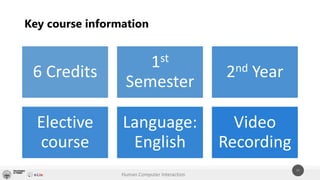
Key course information
6 Credits
1st
Semester
2nd Year
Elective
course
Language:
English
Video
Recording
Human Computer Interaction
12
Fulvio Corno
fulvio.corno@polito.it
@fulcorno
Luigi De Russis
luigi.derussis@polito.it
@luigidr
Contacts

Human Computer Interaction - Course Presentation

  • 1.
    Human Computer Interaction FulvioCorno, Luigi De Russis
  • 2.
  • 3.
  • 4.
    Human Computer Interaction 4 •How to design the user experience when interacting with modern applications, devices, environments? • How to exploit the novel interaction methods provided by touch, voice, natural interaction, gestures, …? • How to ensure that people use such interfaces and systems with “joy” rather than “frustration”? Challenges
  • 5.
    Human Computer Interaction 5 •Deep down inside every software developer, there's a budding graphic designer waiting to get out. And if you let that happen, you're in trouble. Or at least your users will be, anyway… • The two hardest problems in computer science are: (i) people, (ii), convincing computer scientists that the hardest problem in computer science is people, and, (iii) off by one errors. Jeff Atwood, Nov 2006 https://blog.codinghorror.com/this-is-what-happens-when-you-let-developers-create-ui/ Prof. Jeffrey P. Bigham, 2018 http://www.cs.cmu.edu/~jbigham/
  • 6.
    Human Computer Interaction 6 Developers’attitude https://thedailywtf.com/articles/Classic_WTF_-_Enter_the_Matrix
  • 7.
    Human Computer Interaction 7 CourseObjectives Learn: • Key concepts related to HCI • User Experience, Usability • Design Methods • Evaluation Techniques • User Centered Design Process • New “modern” interaction methods • Not only web & mobile Apply: • Design and development of a project • Eliciting needs • Following the process • Developing a result • Analysis and evaluation of interfaces
  • 8.
    Human Computer Interaction 8 Introductionto Human-Computer Interaction (10%) History, the human, the computer, vision of the future Building interactive applications with a human-centered process (35%) Main tasks and methods to design, develop, and evaluate an interactive application Needfinding strategies, low- and high-fidelity prototypes, mental models and visual design, heuristic evaluation, and basic concepts and methods for controlled experiments Application & Projects (30%) Practical part on a specific application domain and interaction technology Web applications “Beyond WIMP” paradigms (25%) Tangible interaction, wearables, voice user interfaces, gestures, eye tracking, and interaction with IoT systems, … Contemporary examples and development tools Thematic seminars on emerging topics and case studies Course Contents
  • 9.
    Human Computer Interaction 9 •Learning method • project-based → students learn by doing a project • problem-based → the project work starts from elicited and real users’ needs • Projects developed during the semester, with intermediate milestones and deliverables • Contemporary communications and project development tools and technologies • e.g., Slack, Git and GitHub, … Methodology
  • 10.
    Human Computer Interaction 10 •Written test • Design methods, design processes, design and analysis instruments, … • No coding • Evaluation of the projects • Deliverables • Source code The exam
  • 11.
    Human Computer Interaction 11 Keycourse information 6 Credits 1st Semester 2nd Year Elective course Language: English Video Recording
  • 12.
    Human Computer Interaction 12 FulvioCorno fulvio.corno@polito.it @fulcorno Luigi De Russis luigi.derussis@polito.it @luigidr Contacts