




Embedded & Tangible InteractionDavid Shaw“We live in a complex world, filled with myriad objects, tools, toys, and people. Our lives are spent in diverse interaction with this environment. Yet, for the most part, our computing takes place sitting in front of, and staring at, a single glowing screen attached to an array of buttons and a mouse.”Wellner, Mackay and Gold (1993)
IntroductionTalk is about Embedded & Tangible InteractionWhat it isRelated fieldsHistoryThe necessities to facilitate the technologyProblems and challenges
AboutTangible and Embedded interfaces allow us to move beyond being limited to mouse and keyboard input to interact with a computerWe are quickly moving towards a post-WIMP revolution Novel interaction devices are becoming commonplaceSimultaneously, computers are increasing being embedded in everyday objects and environments
What is Embedded Technology?“Embedded means enclosed; these chips and software are not considered computers. They are unseen parts of everyday things.”Malcolm McCullough, Digital Ground, 2004
What is Tangible Interaction?Tangible Interaction encompasses user interfaces and interaction that emphasizeTangibility and materiality of the interfacePhysical embodiment of dataWhole-body interactionThe embedding of the interface and the users’ interaction in real spaces and contexts.Eva Hornecker
What is Tangible Interaction?Tangible computing coversDistributing computation over many specialised and networked devices in the environmentAugmenting the everyday world computationally so that it is able to react to the userInteraction by manipulating physical objects
What is Tangible Interaction?Tangible computing shares these characteristicsNo single focus or interactionNo enforced sequentially or modal interactionInterface objects make intentional use of affordances
What is Tangible Interaction?Classifications of Tangible User Interfaces (TUIs)Interactive SurfacesTangible objects can be placed onto a surface and interpreted by the systemConstructive AssemblyModular and connectable elements attached to each otherToken & ConstraintToken represents an item, can be movedConstraints provide structure to limit positioning and give tactile guidance
Related fieldsTangible and Embedded Interaction Design is an interdisciplinary field that draws influence from: Ubiquitous ComputingThe Internet of ThingsIndustrial DesignActuation and Sensor based technologyRobotics and Mechanics
Technology That Disappears“We have been very good at putting computers into the environment, but we have been very bad at getting them out of the way.”“The most profound technologies are those that disappear”“They weave themselves into the fabric of everyday life until they are indistinguishable from it”Weiser (1991)The computer will “take on the appearance of the task; it can disappear behind a facade.”Norman (1990)
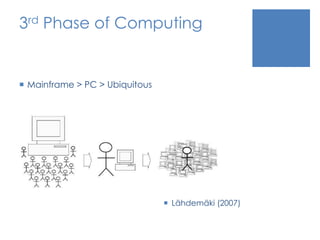
3rd Phase of ComputingMainframe > PC > UbiquitousLähdemäki (2007)
History of the TechnologyEmerged alongside Ubiquitous Computing as a research field philosophically opposed to Virtual Reality (VR) Approach to “retain the richness and situatedness of physical interaction” whilst simultaneously “embedding computing in existing environments”“Humans are of and in the everyday world”Shaer and Hornecker (2009)
Example Projects
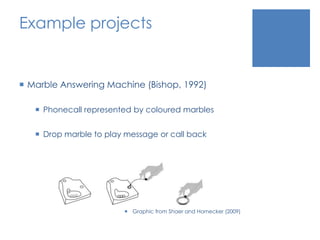
Example projectsMarble Answering Machine (Bishop, 1992)Phonecall represented by coloured marblesDrop marble to play message or call backGraphic from Shaer and Hornecker (2009)
Example projectsGraspable User Interface (Fitzmaurice, Ishii, Buxton, 1995)Uses wooden blocks as handles to manipulate digital objects, early form of multi-touchBlocks are placed on monitors
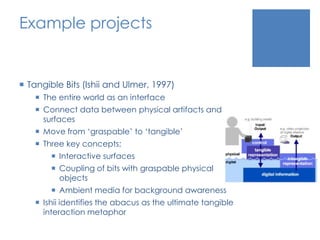
Example projectsTangible Bits (Ishii and Ulmer, 1997)The entire world as an interfaceConnect data between physical artifacts and surfacesMove from ‘graspable’ to ‘tangible’Three key concepts;Interactive surfacesCoupling of bits with graspable physical objectsAmbient media for background awarenessIshii identifies the abacus as the ultimate tangible interaction metaphor
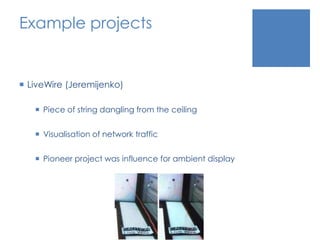
Example projectsLiveWire (Jeremijenko)Piece of string dangling from the ceilingVisualisation of network trafficPioneer project was influence for ambient display
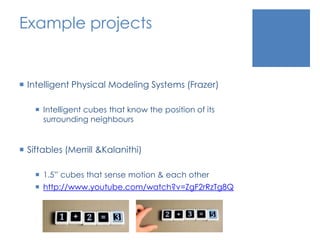
Example projectsIntelligent Physical Modeling Systems (Frazer)Intelligent cubes that know the position of its surrounding neighboursSiftables (Merrill & Kalanithi)1.5” cubes that sense motion & each otherhttp://www.youtube.com/watch?v=ZgF2rRzTg8Q
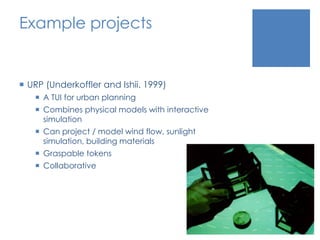
Example projectsURP (Underkoffler and Ishii. 1999)A TUI for urban planningCombines physical models with interactive simulationCan project / model wind flow, sunlight simulation, building materials Graspable tokensCollaborative
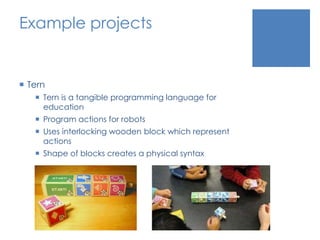
Example projectsTernTern is a tangible programming language for educationProgram actions for robotsUses interlocking wooden block which represent actionsShape of blocks creates a physical syntax
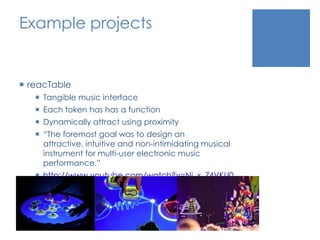
Example projectsreacTableTangible music interfaceEach token has has a functionDynamically attract using proximity“The foremost goal was to design an attractive, intuitive and non-intimidating musical instrument for multi-user electronic music performance.”http://www.youtube.com/watch?v=Ni_x_74VKU0
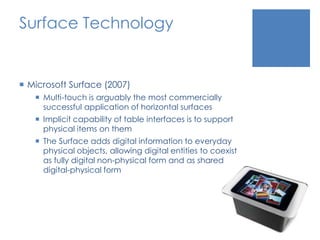
Surface TechnologyMicrosoft Surface (2007)Multi-touch is arguably the most commercially successful application of horizontal surfacesImplicit capability of table interfaces is to support physical items on themThe Surface adds digital information to everyday physical objects, allowing digital entities to coexist as fully digital non-physical form and as shared digital-physical form
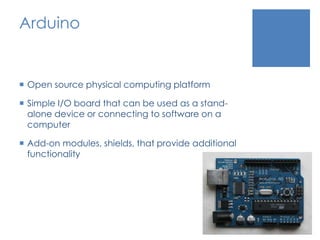
ArduinoOpen source physical computing platformSimple I/O board that can be used as a stand-alone device or connecting to software on a computerAdd-on modules, shields, that provide additional functionality
Benefits of Tangible UITangible User Interfaces (TUI) have many benefitsFacilitating the kinds of collaborative activities that are not possible or poorly supported by single user technologiesAppropriate for those who have lost their sight or have difficulty with motor controlAndrew Cyrus Smith, Interactions 09/10 – 2010Enhance learning - physical learning environments engage all sense and thereby support the child development. Lego Mindstorms and TopoboSupport ambient awarenessCan use tags to trigger digital information
Necessities to facilitate this technology McCullough (2004) suggests 10 essential building blocks to computing beyond the desktop
1. Sites and devices are embedded with microprocessors“Less than a quarter of the chips produced by Intel, the largest manufacturer, are put into desktop or laptop computer motherboards”“The rest are embedded into things you carry about, drive, or wear; or are embedded into physical locations.”More than 95% of devices containing microchips do not present themselves to their users as computers.
1. Sites and devices are embedded with microprocessorsPractical economies of engineering do not always warrant providing a full service network operating system; devices can communicate at lower levels without that kind overhead.With connectivity, embedded systems can communicate their status and receive ongoing instruction to and from their surroundings.
2. Sensors detect action“If technologies are to keep out of the way, they need to see us coming.”“If computationally embedded environments are to be useful yet unobtrusive, they have to recognise what is happening in them.”Examples of sensorsAccelerometerTilt sensorPressure sensorLight sensorMicrophone
2. Sensors detect actionSensors have become the ‘key enabling technology’ for computingA sensor responds to a change in stateContinuous sensor fieldWirelessly interlinked sensorsPassing or ‘hopping’ message directly amongst themselvesCompare to a typical setup – LAN -> Dedicated Network -> Hardwired
3. Communication links form ad hoc networks of devicesPervasive computing depends on unplanned communicationNot all linked objects will benefit from a full-featured web browser.  More will run slimmer set of communicationsDecentralised networking
4. Tags identify actorsContextual awareness begins from an ability to recognise who or what is presentRecognition is easy with the use of tagsSmart badgesRFID TagsProximity detectionPassive, Active, or Battery Assisted Passive (BAP)
5. Actuators close the loopA device to automatically control a system via motionOpen / close windows & doors, turn lights on / off, produce sound, motion or haptic feedbackBridges and dams can detect and identify deterioration, and signal for upkeep before failure occurs
6. Controls make it participatorySmart systems need to be operable where it is appropriateThis means providing an override facility
An example of a smart systemOutdoor wind sensor detects wind speed and directionIndoor temperature sensor monitors room temperatureBuilding Management System calculates that it can save energy by shutting off air conditioning system and opening windowsActuators physically open windows to allow air to flow into the buildingStaff may override system and close windows or turn AC system on, if they wish
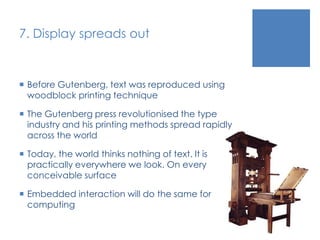
7. Display spreads outBefore Gutenberg, text was reproduced using woodblock printing techniqueThe Gutenberg press revolutionised the type industry and his printing methods spread rapidly across the worldToday, the world thinks nothing of text. It is practically everywhere we look. On every conceivable surfaceEmbedded interaction will do the same for computing
8. Fixed locations track mobile positions“Let’s put GPS in necklaces and dog collars. Everything that moves should have GPS.”KanwarChadha, CEO at SiRF“This kind of stuff has enormous potential for abuse by the authorities, or by anyone who can break into the information.”Emily Whitfield, spokesperson for the American Civil Liberties UnionPractical applications – GPS, Google Maps, Augmented Reality, Social Networks
Proximity“When you walk up to your computer, does the screensaver stop and the working windows reveal themselves?”Bill BuxtonImportant for context-aware properties of embedded interaction
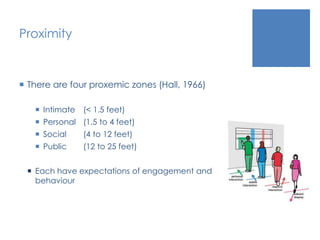
ProximityThere are four proxemic zones (Hall, 1966)Intimate 	(< 1.5 feet)Personal	(1.5 to 4 feet)Social	(4 to 12 feet)Public	(12 to 25 feet)Each have expectations of engagement and behaviour
9. Software models situationsSystem may begin to model a physically proximate area by polling local ad hoc links between known tags and devicesAs hardware becomes less expensive, more diverse, and more plentiful, software becomes more challenging“Who is here, and what are they doing?”
10. Tuning overcomes rigidityMuch of the place-centred character of situated interaction design comes from the fact that any fixed collection of devices has to be integratedQuestion arise pertaining to protocols, distributed object programming systemsThe challenge of embedded interaction design is how can we make these interactions meaningful.
Problems and challengesPrivacy
Security
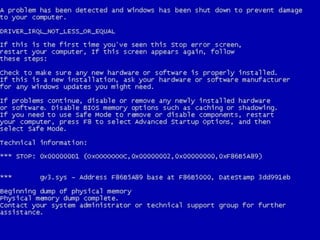
What if it breaks?
Social acceptance
Information overloadPrivacy“Hundreds of computers in every room, all capable of sensing people near them and linked by high-speed networks, have the potential to make totalitarianism up to now seem like sheerest anarchy.”Weiser“Shifts in technology require us to rethink our attitude towards privacy, as suddenly our abilities to see, hear, detect, record, find and manipulate others and their lives is greatly enhanced.”Langheinrich
How Important is Privacy?Sorry, Slide removed for privacy issuesIronic, I know…
SecurityPrivacy and Security are two different conceptsImplementation of security does not ensure privacyData collection and processing are core components of ubiquitous computing, and therefore embedded interactions
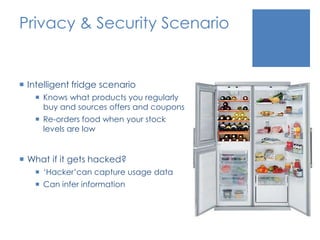
Privacy & Security ScenarioIntelligent fridge scenarioKnows what products you regularly buy and sources offers and couponsRe-orders food when your stock levels are lowWhat if it gets hacked?‘Hacker’can capture usage dataCan infer information
What if it breaks?What if
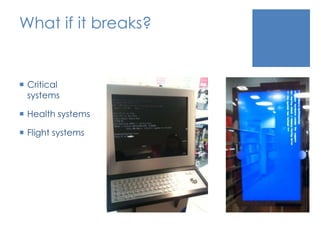
What if it breaks?Critical systemsHealth systemsFlight systems

Embedded & Tangible Interaction Design

  • 1.
    Embedded & TangibleInteractionDavid Shaw“We live in a complex world, filled with myriad objects, tools, toys, and people. Our lives are spent in diverse interaction with this environment. Yet, for the most part, our computing takes place sitting in front of, and staring at, a single glowing screen attached to an array of buttons and a mouse.”Wellner, Mackay and Gold (1993)
  • 2.
    IntroductionTalk is aboutEmbedded & Tangible InteractionWhat it isRelated fieldsHistoryThe necessities to facilitate the technologyProblems and challenges
  • 3.
    AboutTangible and Embeddedinterfaces allow us to move beyond being limited to mouse and keyboard input to interact with a computerWe are quickly moving towards a post-WIMP revolution Novel interaction devices are becoming commonplaceSimultaneously, computers are increasing being embedded in everyday objects and environments
  • 4.
    What is EmbeddedTechnology?“Embedded means enclosed; these chips and software are not considered computers. They are unseen parts of everyday things.”Malcolm McCullough, Digital Ground, 2004
  • 5.
    What is TangibleInteraction?Tangible Interaction encompasses user interfaces and interaction that emphasizeTangibility and materiality of the interfacePhysical embodiment of dataWhole-body interactionThe embedding of the interface and the users’ interaction in real spaces and contexts.Eva Hornecker
  • 6.
    What is TangibleInteraction?Tangible computing coversDistributing computation over many specialised and networked devices in the environmentAugmenting the everyday world computationally so that it is able to react to the userInteraction by manipulating physical objects
  • 7.
    What is TangibleInteraction?Tangible computing shares these characteristicsNo single focus or interactionNo enforced sequentially or modal interactionInterface objects make intentional use of affordances
  • 8.
    What is TangibleInteraction?Classifications of Tangible User Interfaces (TUIs)Interactive SurfacesTangible objects can be placed onto a surface and interpreted by the systemConstructive AssemblyModular and connectable elements attached to each otherToken & ConstraintToken represents an item, can be movedConstraints provide structure to limit positioning and give tactile guidance
  • 9.
    Related fieldsTangible andEmbedded Interaction Design is an interdisciplinary field that draws influence from: Ubiquitous ComputingThe Internet of ThingsIndustrial DesignActuation and Sensor based technologyRobotics and Mechanics
  • 10.
    Technology That Disappears“Wehave been very good at putting computers into the environment, but we have been very bad at getting them out of the way.”“The most profound technologies are those that disappear”“They weave themselves into the fabric of everyday life until they are indistinguishable from it”Weiser (1991)The computer will “take on the appearance of the task; it can disappear behind a facade.”Norman (1990)
  • 11.
    3rd Phase ofComputingMainframe > PC > UbiquitousLähdemäki (2007)
  • 12.
    History of theTechnologyEmerged alongside Ubiquitous Computing as a research field philosophically opposed to Virtual Reality (VR) Approach to “retain the richness and situatedness of physical interaction” whilst simultaneously “embedding computing in existing environments”“Humans are of and in the everyday world”Shaer and Hornecker (2009)
  • 13.
  • 14.
    Example projectsMarble AnsweringMachine (Bishop, 1992)Phonecall represented by coloured marblesDrop marble to play message or call backGraphic from Shaer and Hornecker (2009)
  • 15.
    Example projectsGraspable UserInterface (Fitzmaurice, Ishii, Buxton, 1995)Uses wooden blocks as handles to manipulate digital objects, early form of multi-touchBlocks are placed on monitors
  • 16.
    Example projectsTangible Bits(Ishii and Ulmer, 1997)The entire world as an interfaceConnect data between physical artifacts and surfacesMove from ‘graspable’ to ‘tangible’Three key concepts;Interactive surfacesCoupling of bits with graspable physical objectsAmbient media for background awarenessIshii identifies the abacus as the ultimate tangible interaction metaphor
  • 17.
    Example projectsLiveWire (Jeremijenko)Pieceof string dangling from the ceilingVisualisation of network trafficPioneer project was influence for ambient display
  • 18.
    Example projectsIntelligent PhysicalModeling Systems (Frazer)Intelligent cubes that know the position of its surrounding neighboursSiftables (Merrill & Kalanithi)1.5” cubes that sense motion & each otherhttp://www.youtube.com/watch?v=ZgF2rRzTg8Q
  • 19.
    Example projectsURP (Underkofflerand Ishii. 1999)A TUI for urban planningCombines physical models with interactive simulationCan project / model wind flow, sunlight simulation, building materials Graspable tokensCollaborative
  • 20.
    Example projectsTernTern isa tangible programming language for educationProgram actions for robotsUses interlocking wooden block which represent actionsShape of blocks creates a physical syntax
  • 21.
    Example projectsreacTableTangible musicinterfaceEach token has has a functionDynamically attract using proximity“The foremost goal was to design an attractive, intuitive and non-intimidating musical instrument for multi-user electronic music performance.”http://www.youtube.com/watch?v=Ni_x_74VKU0
  • 22.
    Surface TechnologyMicrosoft Surface(2007)Multi-touch is arguably the most commercially successful application of horizontal surfacesImplicit capability of table interfaces is to support physical items on themThe Surface adds digital information to everyday physical objects, allowing digital entities to coexist as fully digital non-physical form and as shared digital-physical form
  • 23.
    ArduinoOpen source physicalcomputing platformSimple I/O board that can be used as a stand-alone device or connecting to software on a computerAdd-on modules, shields, that provide additional functionality
  • 24.
    Benefits of TangibleUITangible User Interfaces (TUI) have many benefitsFacilitating the kinds of collaborative activities that are not possible or poorly supported by single user technologiesAppropriate for those who have lost their sight or have difficulty with motor controlAndrew Cyrus Smith, Interactions 09/10 – 2010Enhance learning - physical learning environments engage all sense and thereby support the child development. Lego Mindstorms and TopoboSupport ambient awarenessCan use tags to trigger digital information
  • 25.
    Necessities to facilitatethis technology McCullough (2004) suggests 10 essential building blocks to computing beyond the desktop
  • 26.
    1. Sites anddevices are embedded with microprocessors“Less than a quarter of the chips produced by Intel, the largest manufacturer, are put into desktop or laptop computer motherboards”“The rest are embedded into things you carry about, drive, or wear; or are embedded into physical locations.”More than 95% of devices containing microchips do not present themselves to their users as computers.
  • 27.
    1. Sites anddevices are embedded with microprocessorsPractical economies of engineering do not always warrant providing a full service network operating system; devices can communicate at lower levels without that kind overhead.With connectivity, embedded systems can communicate their status and receive ongoing instruction to and from their surroundings.
  • 28.
    2. Sensors detectaction“If technologies are to keep out of the way, they need to see us coming.”“If computationally embedded environments are to be useful yet unobtrusive, they have to recognise what is happening in them.”Examples of sensorsAccelerometerTilt sensorPressure sensorLight sensorMicrophone
  • 29.
    2. Sensors detectactionSensors have become the ‘key enabling technology’ for computingA sensor responds to a change in stateContinuous sensor fieldWirelessly interlinked sensorsPassing or ‘hopping’ message directly amongst themselvesCompare to a typical setup – LAN -> Dedicated Network -> Hardwired
  • 30.
    3. Communication linksform ad hoc networks of devicesPervasive computing depends on unplanned communicationNot all linked objects will benefit from a full-featured web browser. More will run slimmer set of communicationsDecentralised networking
  • 31.
    4. Tags identifyactorsContextual awareness begins from an ability to recognise who or what is presentRecognition is easy with the use of tagsSmart badgesRFID TagsProximity detectionPassive, Active, or Battery Assisted Passive (BAP)
  • 32.
    5. Actuators closethe loopA device to automatically control a system via motionOpen / close windows & doors, turn lights on / off, produce sound, motion or haptic feedbackBridges and dams can detect and identify deterioration, and signal for upkeep before failure occurs
  • 33.
    6. Controls makeit participatorySmart systems need to be operable where it is appropriateThis means providing an override facility
  • 34.
    An example ofa smart systemOutdoor wind sensor detects wind speed and directionIndoor temperature sensor monitors room temperatureBuilding Management System calculates that it can save energy by shutting off air conditioning system and opening windowsActuators physically open windows to allow air to flow into the buildingStaff may override system and close windows or turn AC system on, if they wish
  • 35.
    7. Display spreadsoutBefore Gutenberg, text was reproduced using woodblock printing techniqueThe Gutenberg press revolutionised the type industry and his printing methods spread rapidly across the worldToday, the world thinks nothing of text. It is practically everywhere we look. On every conceivable surfaceEmbedded interaction will do the same for computing
  • 36.
    8. Fixed locationstrack mobile positions“Let’s put GPS in necklaces and dog collars. Everything that moves should have GPS.”KanwarChadha, CEO at SiRF“This kind of stuff has enormous potential for abuse by the authorities, or by anyone who can break into the information.”Emily Whitfield, spokesperson for the American Civil Liberties UnionPractical applications – GPS, Google Maps, Augmented Reality, Social Networks
  • 37.
    Proximity“When you walkup to your computer, does the screensaver stop and the working windows reveal themselves?”Bill BuxtonImportant for context-aware properties of embedded interaction
  • 38.
    ProximityThere are fourproxemic zones (Hall, 1966)Intimate (< 1.5 feet)Personal (1.5 to 4 feet)Social (4 to 12 feet)Public (12 to 25 feet)Each have expectations of engagement and behaviour
  • 39.
    9. Software modelssituationsSystem may begin to model a physically proximate area by polling local ad hoc links between known tags and devicesAs hardware becomes less expensive, more diverse, and more plentiful, software becomes more challenging“Who is here, and what are they doing?”
  • 40.
    10. Tuning overcomesrigidityMuch of the place-centred character of situated interaction design comes from the fact that any fixed collection of devices has to be integratedQuestion arise pertaining to protocols, distributed object programming systemsThe challenge of embedded interaction design is how can we make these interactions meaningful.
  • 41.
  • 42.
  • 43.
    What if itbreaks?
  • 44.
  • 45.
    Information overloadPrivacy“Hundreds ofcomputers in every room, all capable of sensing people near them and linked by high-speed networks, have the potential to make totalitarianism up to now seem like sheerest anarchy.”Weiser“Shifts in technology require us to rethink our attitude towards privacy, as suddenly our abilities to see, hear, detect, record, find and manipulate others and their lives is greatly enhanced.”Langheinrich
  • 46.
    How Important isPrivacy?Sorry, Slide removed for privacy issuesIronic, I know…
  • 47.
    How Important isPrivacy?Sorry, Slide removed for privacy issuesIronic, I know…
  • 48.
    SecurityPrivacy and Securityare two different conceptsImplementation of security does not ensure privacyData collection and processing are core components of ubiquitous computing, and therefore embedded interactions
  • 49.
    Privacy & SecurityScenarioIntelligent fridge scenarioKnows what products you regularly buy and sources offers and couponsRe-orders food when your stock levels are lowWhat if it gets hacked?‘Hacker’can capture usage dataCan infer information
  • 50.
    What if itbreaks?What if
  • 51.
    What if itbreaks?Critical systemsHealth systemsFlight systems
  • 52.
    Social AcceptanceWill thegeneral public embrace an embedded / ubicomp future?
  • 53.
    If a systemis invisible, a user should still know it is thereInformation Overload“Ubiquitous systems must not introduce undue complications into ordinary operations”“You should be able to open a window, place a book upon a shelf, or boil a kettle of water without being asked if you ‘really want to do so.’”GreenfieldMore technology, more problemsPasswords for fridge doors?Pay to use doors?
  • 54.
    ReferencesBuxton, W. (1997)Living in augmented reality: Ubiquitous media and reactive environments. Video Mediated Communication. K. Finn, A. Sellen, and S. Wilber (eds.). Erlbaum, Hillsdale, N.J, 1997. Greenfield, A. (2006). Everywhere: The Dawning Age of Ubiquitous Computing, New Riders, Berkeley, CA, USAHall, E.T. (1966) The Hidden Dimension. Doubleday, New York,1966.Ishii, H. & Ullmer, B. (1997). Tangible Bits: Towards Seamless Interfaces between People, Bits and Atoms. Proc. CHI 1997, ACM Press (1997), p. 234-241.McCullough (2004). Digital Ground, MIT Press, London, EnglandNorman, D. (1990). The Design of Everyday Things. Doubleday/Currency, New York.Shaer, O., and Hornecker, E., (2009) “Tangible User Interfaces: Past, Present, and Future Directions” Foundations and Trends in Human-Computer Interaction, Vol. 3 Nos 1-2Underkoffler, J. and Ishii, H. (1999) , “Urp: A luminous-tangible workbench for urban planning and design,” in Proceedings of CHI ’99, pp. 386–393, NY: ACM,1999.Vogel, D. and Balakrishnan, R. (2004) Interactive public ambient displays: transitioning from implicit to explicit, public to personal, interaction with multiple users. Proc. of the 17th Annual ACM Symposium on User Interface Software and Technology. (Santa Fe, NM, Oct. 24-27). ACM, New York, 2004,137-146. Weiser, M. (1991). The Computer for the 21st Century. Scientific American. Sept, 94-104.Wellner, P., Mackay, W., and Gold, R., (1993) “Computer-augmented environments.Back to the real world,” Communications of the ACM, vol. 36, no. 7, pp. 24–26,1993.