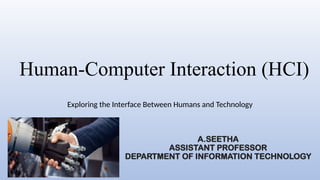
Human-Computer Interaction (HCI)
Exploring the Interface Between Humans and Technology
A.SEETHA
ASSISTANT PROFESSOR
DEPARTMENT OF INFORMATION TECHNOLOGY
Introduction to HCI:
• Human-Computer Interaction (HCI) is the study and practice of
designing, evaluating, and implementing interactive computing systems
for human use.
• Importance of Studying HCI: Enhances user satisfaction, improves
system usability, and ensures technology meets user needs effectively.
• History of HCI: Evolved from command-line interfaces to GUIs, then to
mobile and natural user interfaces, focusing on improving interaction
and usability.
Key Concepts in HCI
• User Interface (UI): The visual layout and elements users interact
with.
• User Experience (UX): The overall feel and satisfaction from using a
product or service.
• Usability: How effectively and efficiently users can achieve their goals
with a system.
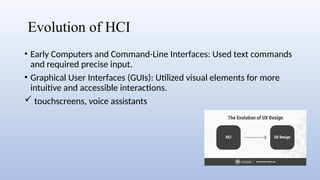
Evolution of HCI
• Early Computers and Command-Line Interfaces: Used text commands
and required precise input.
• Graphical User Interfaces (GUIs): Utilized visual elements for more
intuitive and accessible interactions.
 touchscreens, voice assistants
Principles of HCI
• Consistency: Ensures similar elements function similarly throughout
the interface, for helping users predict and understand interactions
easily.
• Provides users with immediate, clear responses to their actions.
• Design elements suggest their user appearance, guiding users
intuitively on how to interact with them.
Human Factors in HCI
• Cognitive Psychology in HCI: Examines how users perceive, process,
and recall information to design interfaces that match natural cognitive
processes and improve usability.
• Ergonomics: Focuses on designing interfaces and workspaces that fit
human physical and cognitive capabilities, enhancing comfort,
efficiency, and safety.
• Human Memory and Attention: Considers how users remember and
focus on information, aiming to design systems that reduce cognitive
load and minimize distractions.
Design Process in HCI
• User-Centered Design: Focuses on users throughout the design
process to ensure the product meets their needs and preferences.
• Iterative Design: Involves repeatedly refining and improving a product
based on user feedback and testing to enhance usability and
functionality.
• Prototyping and Testing: Creating early versions of a product to test
and gather feedback, allowing for adjustments and improvements
before final development.
Interaction Styles
• Command-Line Interfaces: Users interact by typing text commands,
requiring precise input.
• Menus and Forms: Users select options from menus or fill out forms,
simplifying interaction compared to command-line interfaces.
• Direct Manipulation Interfaces: Users interact with graphical elements
directly (e.g., dragging and dropping), visual way to interact.
Input and Output Devices
• Keyboard and mouse
• Touchscreens
• Emerging input methods: voice,
gestures, eye tracking
• Monitors and screens
• Printers
• Haptic feedback devices
Accessibility in HCI
• Importance of Accessibility: Ensures that digital content and interfaces
are usable by everyone, including those with disabilities.
• Assistive Technologies: Tools like screen readers and voice
recognition software that help users with disabilities interact with
digital content effectively.
Mobile HCI
• Differences from Desktop HCI: Smaller screens and touch
interactions.
• Challenges and Opportunities: Limited space vs. innovative touch and
context-aware features.
• Mobile Usability Principles: Touch-friendly design, responsive
layouts, and context optimization.
Web HCI
• Web Usability: Ensures websites are easy to navigate and use.
• Responsive Design: Adapts layouts to different screen sizes and
devices.
• Web Accessibility: Makes web content usable for people with
disabilities.
Social Aspects of HCI
• Social Computing: Integrates social interactions and networks into
computing systems.
• Collaborative Systems: Facilitate group work and communication
through shared tools and platforms.
• Social Media and HCI: Examines how social media platforms impact
user interaction and behavior.
Emotional Design
• Role of Emotions in HCI: Emotions influence user satisfaction and
engagement with a system.
• Designing for Positive User Experiences: Focus on creating interfaces
that evoke positive feelings and enhance overall satisfaction.
• Examples of Emotional Design: Delightful animations, personalized
greetings, and engaging feedback elements.
Virtual Reality (VR) and Augmented Reality
(AR)
• Definitions and Differences: VR (Virtual Reality) immerses users in a
fully virtual environment, while AR (Augmented Reality) overlays
digital information on the real world.
• Applications in HCI: VR is used for simulations and training, while
AR enhances real-world tasks and interactions with additional data.
Future Trends in HCI
• Artificial Intelligence in HCI
• Internet of Things (IoT)
• Brain-Computer Interfaces (BCIs)
Ethical Considerations in HCI
• Privacy concerns
• Ethical design practices
• User data protection
Case Studies in HCI
• Successful HCI Projects: Examples include Apple's iOS for its user-
friendly interface and Google Search for its simplicity and efficiency.
• Lessons Learned: Prioritize intuitive design, user feedback, and
continuous improvement.
• Key Takeaways: Effective HCI design enhances user satisfaction and
engagement, emphasizing the importance of usability and iterative
refinement.
HCI in Different Domains
• Healthcare: Enhances patient care through telemedicine, health
tracking apps, and user-friendly medical interfaces.
• Education: Facilitates learning with interactive tools, online platforms,
and adaptive learning systems.
• Entertainment: Improves user engagement with immersive games,
streaming services, and interactive media experiences.
HCI Research
• Current Research Topics: Includes AI-driven interfaces, emotion
recognition, and adaptive systems.
• Major Research Methodologies: Involves user studies, experimental
design, and data analysis.
• Impact of Research on Industry Practices: Drives innovation, improves
user experience, and shapes design standards.
Challenges in HCI
•Balancing usability and security
•Keeping up with technological advances
•Designing for a global audience
Conclusion
• Recap of Key Points: HCI encompasses UI, UX, and usability,
evolving from command-line interfaces to modern GUIs and mobile
designs.
• Essential for adapting to technological advances and improving user
experiences.
• Focuses on AI integration, immersive technologies, and enhanced
personalization for evolving user needs.
THANK YOU

Human-Computer Interaction between human and computer (HCI).pptx

  • 1.
    Human-Computer Interaction (HCI) Exploringthe Interface Between Humans and Technology A.SEETHA ASSISTANT PROFESSOR DEPARTMENT OF INFORMATION TECHNOLOGY
  • 2.
    Introduction to HCI: •Human-Computer Interaction (HCI) is the study and practice of designing, evaluating, and implementing interactive computing systems for human use. • Importance of Studying HCI: Enhances user satisfaction, improves system usability, and ensures technology meets user needs effectively. • History of HCI: Evolved from command-line interfaces to GUIs, then to mobile and natural user interfaces, focusing on improving interaction and usability.
  • 3.
    Key Concepts inHCI • User Interface (UI): The visual layout and elements users interact with. • User Experience (UX): The overall feel and satisfaction from using a product or service. • Usability: How effectively and efficiently users can achieve their goals with a system.
  • 4.
    Evolution of HCI •Early Computers and Command-Line Interfaces: Used text commands and required precise input. • Graphical User Interfaces (GUIs): Utilized visual elements for more intuitive and accessible interactions.  touchscreens, voice assistants
  • 5.
    Principles of HCI •Consistency: Ensures similar elements function similarly throughout the interface, for helping users predict and understand interactions easily. • Provides users with immediate, clear responses to their actions. • Design elements suggest their user appearance, guiding users intuitively on how to interact with them.
  • 6.
    Human Factors inHCI • Cognitive Psychology in HCI: Examines how users perceive, process, and recall information to design interfaces that match natural cognitive processes and improve usability. • Ergonomics: Focuses on designing interfaces and workspaces that fit human physical and cognitive capabilities, enhancing comfort, efficiency, and safety. • Human Memory and Attention: Considers how users remember and focus on information, aiming to design systems that reduce cognitive load and minimize distractions.
  • 7.
    Design Process inHCI • User-Centered Design: Focuses on users throughout the design process to ensure the product meets their needs and preferences. • Iterative Design: Involves repeatedly refining and improving a product based on user feedback and testing to enhance usability and functionality. • Prototyping and Testing: Creating early versions of a product to test and gather feedback, allowing for adjustments and improvements before final development.
  • 8.
    Interaction Styles • Command-LineInterfaces: Users interact by typing text commands, requiring precise input. • Menus and Forms: Users select options from menus or fill out forms, simplifying interaction compared to command-line interfaces. • Direct Manipulation Interfaces: Users interact with graphical elements directly (e.g., dragging and dropping), visual way to interact.
  • 9.
    Input and OutputDevices • Keyboard and mouse • Touchscreens • Emerging input methods: voice, gestures, eye tracking • Monitors and screens • Printers • Haptic feedback devices
  • 10.
    Accessibility in HCI •Importance of Accessibility: Ensures that digital content and interfaces are usable by everyone, including those with disabilities. • Assistive Technologies: Tools like screen readers and voice recognition software that help users with disabilities interact with digital content effectively.
  • 11.
    Mobile HCI • Differencesfrom Desktop HCI: Smaller screens and touch interactions. • Challenges and Opportunities: Limited space vs. innovative touch and context-aware features. • Mobile Usability Principles: Touch-friendly design, responsive layouts, and context optimization.
  • 12.
    Web HCI • WebUsability: Ensures websites are easy to navigate and use. • Responsive Design: Adapts layouts to different screen sizes and devices. • Web Accessibility: Makes web content usable for people with disabilities.
  • 13.
    Social Aspects ofHCI • Social Computing: Integrates social interactions and networks into computing systems. • Collaborative Systems: Facilitate group work and communication through shared tools and platforms. • Social Media and HCI: Examines how social media platforms impact user interaction and behavior.
  • 14.
    Emotional Design • Roleof Emotions in HCI: Emotions influence user satisfaction and engagement with a system. • Designing for Positive User Experiences: Focus on creating interfaces that evoke positive feelings and enhance overall satisfaction. • Examples of Emotional Design: Delightful animations, personalized greetings, and engaging feedback elements.
  • 15.
    Virtual Reality (VR)and Augmented Reality (AR) • Definitions and Differences: VR (Virtual Reality) immerses users in a fully virtual environment, while AR (Augmented Reality) overlays digital information on the real world. • Applications in HCI: VR is used for simulations and training, while AR enhances real-world tasks and interactions with additional data.
  • 16.
    Future Trends inHCI • Artificial Intelligence in HCI • Internet of Things (IoT) • Brain-Computer Interfaces (BCIs)
  • 17.
    Ethical Considerations inHCI • Privacy concerns • Ethical design practices • User data protection
  • 18.
    Case Studies inHCI • Successful HCI Projects: Examples include Apple's iOS for its user- friendly interface and Google Search for its simplicity and efficiency. • Lessons Learned: Prioritize intuitive design, user feedback, and continuous improvement. • Key Takeaways: Effective HCI design enhances user satisfaction and engagement, emphasizing the importance of usability and iterative refinement.
  • 19.
    HCI in DifferentDomains • Healthcare: Enhances patient care through telemedicine, health tracking apps, and user-friendly medical interfaces. • Education: Facilitates learning with interactive tools, online platforms, and adaptive learning systems. • Entertainment: Improves user engagement with immersive games, streaming services, and interactive media experiences.
  • 20.
    HCI Research • CurrentResearch Topics: Includes AI-driven interfaces, emotion recognition, and adaptive systems. • Major Research Methodologies: Involves user studies, experimental design, and data analysis. • Impact of Research on Industry Practices: Drives innovation, improves user experience, and shapes design standards.
  • 21.
    Challenges in HCI •Balancingusability and security •Keeping up with technological advances •Designing for a global audience
  • 22.
    Conclusion • Recap ofKey Points: HCI encompasses UI, UX, and usability, evolving from command-line interfaces to modern GUIs and mobile designs. • Essential for adapting to technological advances and improving user experiences. • Focuses on AI integration, immersive technologies, and enhanced personalization for evolving user needs.
  • 23.