HUMAN
COMPUTER
INTERACTION
CONTENTS
INTRODUCTION
ROLE OF HCI
GOALS OF HCI
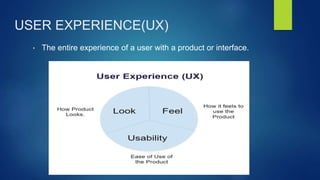
USER EXPERIENCE(UX)
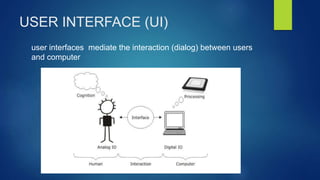
USER INTERFACE(UI)
BENEFITS AND CHALLENGES
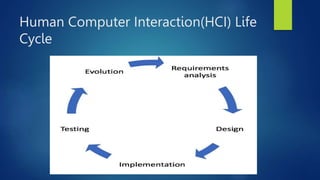
LIFE CYCLE OF HCI
EVOLUTION OF HCI
FUTURE PATHS OF HCI
INTRODUCTION
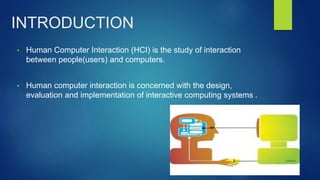
• Human Computer Interaction (HCI) is the study of interaction
between people(users) and computers.
• Human computer interaction is concerned with the design,
evaluation and implementation of interactive computing systems .
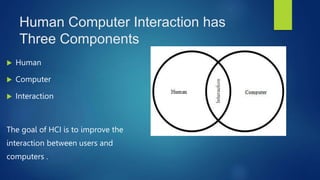
Human Computer Interaction has
Three Components
 Human
 Computer
 Interaction
The goal of HCI is to improve the
interaction between users and
computers .
MODEL HUMAN PROCESSOR
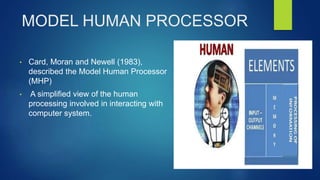
• Card, Moran and Newell (1983),
described the Model Human Processor
(MHP)
• A simplified view of the human
processing involved in interacting with
computer system.
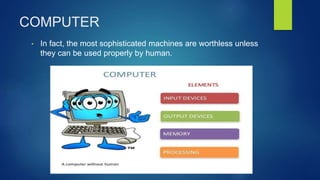
COMPUTER
• In fact, the most sophisticated machines are worthless unless
they can be used properly by human.
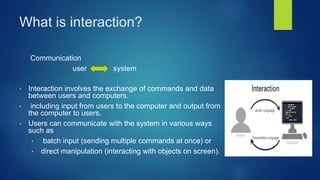
What is interaction?
Communication
user system
• Interaction involves the exchange of commands and data
between users and computers.
• including input from users to the computer and output from
the computer to users.
• Users can communicate with the system in various ways
such as
• batch input (sending multiple commands at once) or
• direct manipulation (interacting with objects on screen).
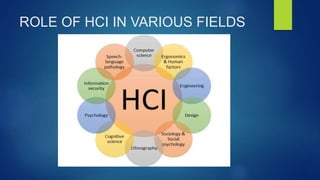
ROLE OF HCI IN VARIOUS FIELDS
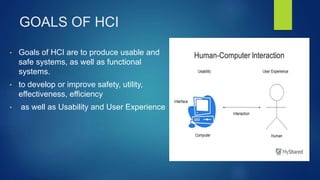
GOALS OF HCI
• Goals of HCI are to produce usable and
safe systems, as well as functional
systems.
• to develop or improve safety, utility,
effectiveness, efficiency
• as well as Usability and User Experience
USER EXPERIENCE(UX)
• The entire experience of a user with a product or interface.
USER INTERFACE (UI)
user interfaces mediate the interaction (dialog) between users
and computer
USER INTERFACE (UI)
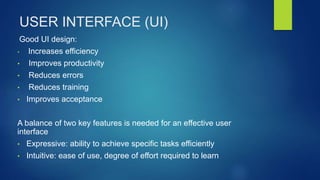
Good UI design:
• Increases efficiency
• Improves productivity
• Reduces errors
• Reduces training
• Improves acceptance
A balance of two key features is needed for an effective user
interface
• Expressive: ability to achieve specific tasks efficiently
• Intuitive: ease of use, degree of effort required to learn
EXAMPLES
• Smartphones
• Voice Assistants
• Wearable Fitness Trackers
• Smart Home Devices
• Car Infotainment Systems
These examples represent widely used technologies with
well-designed interfaces that enhance user experience and
accessibility.
BENEFITS
• Ease
• Efficiency
• Satisfaction
• Access
• Inclusivity
• Innovation
CHALLENGES
• Complexity
• Adaptation
• Integration
• Consistency
• Accessibility
• Maintenance
Human Computer Interaction(HCI) Life
Cycle
EVOLUTION OF HCI
• Early Days: Computers were hard to use in the beginning (1940s-1950s).
• GUI Revolution: Graphics made computers easier with things like the mouse
and icons (1970s-1980s).
• User Focus: They started focusing on what users needed (1980s).
• Everywhere Computers: Computers got smaller and were everywhere (1990s).
• Social and Sharing: People started using computers to connect and share
(2000s)
• New Tech: Now, they're exploring cool new stuff like VR and AI (2010s onwards).
FUTURE PATHS
• Wearable Devices
• Internet of Things (IoT) Devices
• Brain-Computer Interfaces (BCIs)
• Enhanced User Experience
• Ethical Considerations

human computer interaction presentation briefly

  • 1.
  • 2.
    CONTENTS INTRODUCTION ROLE OF HCI GOALSOF HCI USER EXPERIENCE(UX) USER INTERFACE(UI) BENEFITS AND CHALLENGES LIFE CYCLE OF HCI EVOLUTION OF HCI FUTURE PATHS OF HCI
  • 3.
    INTRODUCTION • Human ComputerInteraction (HCI) is the study of interaction between people(users) and computers. • Human computer interaction is concerned with the design, evaluation and implementation of interactive computing systems .
  • 4.
    Human Computer Interactionhas Three Components  Human  Computer  Interaction The goal of HCI is to improve the interaction between users and computers .
  • 5.
    MODEL HUMAN PROCESSOR •Card, Moran and Newell (1983), described the Model Human Processor (MHP) • A simplified view of the human processing involved in interacting with computer system.
  • 6.
    COMPUTER • In fact,the most sophisticated machines are worthless unless they can be used properly by human.
  • 7.
    What is interaction? Communication usersystem • Interaction involves the exchange of commands and data between users and computers. • including input from users to the computer and output from the computer to users. • Users can communicate with the system in various ways such as • batch input (sending multiple commands at once) or • direct manipulation (interacting with objects on screen).
  • 8.
    ROLE OF HCIIN VARIOUS FIELDS
  • 9.
    GOALS OF HCI •Goals of HCI are to produce usable and safe systems, as well as functional systems. • to develop or improve safety, utility, effectiveness, efficiency • as well as Usability and User Experience
  • 10.
    USER EXPERIENCE(UX) • Theentire experience of a user with a product or interface.
  • 11.
    USER INTERFACE (UI) userinterfaces mediate the interaction (dialog) between users and computer
  • 12.
    USER INTERFACE (UI) GoodUI design: • Increases efficiency • Improves productivity • Reduces errors • Reduces training • Improves acceptance A balance of two key features is needed for an effective user interface • Expressive: ability to achieve specific tasks efficiently • Intuitive: ease of use, degree of effort required to learn
  • 13.
    EXAMPLES • Smartphones • VoiceAssistants • Wearable Fitness Trackers • Smart Home Devices • Car Infotainment Systems These examples represent widely used technologies with well-designed interfaces that enhance user experience and accessibility.
  • 14.
    BENEFITS • Ease • Efficiency •Satisfaction • Access • Inclusivity • Innovation
  • 15.
    CHALLENGES • Complexity • Adaptation •Integration • Consistency • Accessibility • Maintenance
  • 16.
  • 17.
    EVOLUTION OF HCI •Early Days: Computers were hard to use in the beginning (1940s-1950s). • GUI Revolution: Graphics made computers easier with things like the mouse and icons (1970s-1980s). • User Focus: They started focusing on what users needed (1980s). • Everywhere Computers: Computers got smaller and were everywhere (1990s). • Social and Sharing: People started using computers to connect and share (2000s) • New Tech: Now, they're exploring cool new stuff like VR and AI (2010s onwards).
  • 18.
    FUTURE PATHS • WearableDevices • Internet of Things (IoT) Devices • Brain-Computer Interfaces (BCIs) • Enhanced User Experience • Ethical Considerations