HUMAN COMPUTER INTERACTION
PRESENTING
BEING HUMAN
Introduction
• The world we live in today has become saturated of
computer technologies. Not only in their respective
physical forms, but the computer has also started
ruling our minds.
• The aim of this report is to reflect upon the changes
afoot and outline a new paradigm for understanding
our relationship with technology.
• At the end, I post a conclusion as to how the Human
Computer Interaction will shape the world in the
next 15 years or so.
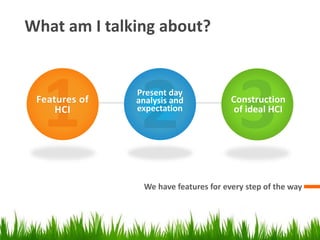
What am I talking about?
We have features for every step of the way
Features of
HCI
Present day
analysis and
expectation
Construction
of ideal HCI
INTRODUCTION TO HCI
AND ITS TYPES
Design, Organization and Featuring
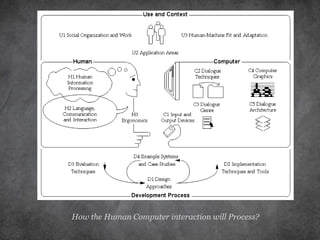
How the Human Computer interaction will Process?
Introduction to Part-1
GUIs to Gestures
 Making fancy presentations on PowerPoint, creating excel
sheets and use word to process documents is how we’ve
been using graphic user interface since always.
 The use of Gestures started with the degradation of mouse
and keyword input usage. Touch-screen and voice gestures
started replacing them.
 Systems have started allowing people with severe physical
disabilities to use their brain waves to interact with their
environment. Real-time brainwave activity is beginning to
be used to control digital movies, turn on music, and switch
the lights on and off.
 Gestures have hence started replacing our hardware input
techniques from GUIs.
Display Units to Smart Fabrics
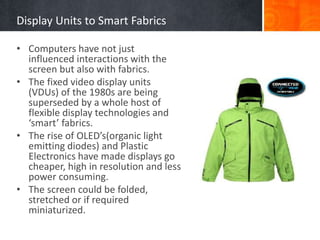
• Computers have not just
influenced interactions with the
screen but also with fabrics.
• The fixed video display units
(VDUs) of the 1980s are being
superseded by a whole host of
flexible display technologies and
‘smart’ fabrics.
• The rise of OLED’s(organic light
emitting diodes) and Plastic
Electronics have made displays go
cheaper, high in resolution and less
power consuming.
• The screen could be folded,
stretched or if required
miniaturized.
Handsets to Mobiles
• The telephone industry has transformed itself from brick to
iPhone. This has brought the most interactive and advanced
technology in our palms.
• We now use mobile devices to interact with objects in the
real world, acting more as if they are extensions of our own
hands, by pointing and gesturing with them.
While travelling travelling, we can gesture with our mobile
device at a historic building and be offered up an audio or
visual history of its architecture. Taking a picture of a product
in the supermarket can send us back information about where
the product came from, its associated air miles, and ecological
credentials.
Human Values in the face of Change
• The first has to do with how the proliferation and embedding of
technology has reshaped the way digital devices are presented to us, the
interface.
• Second, changes in how we live with and use technology have resulted in
us becoming ever more dependent upon computing.
• Third, the increasing importance of communication technologies in our
private and public lives has tied us together in new ways.
• Fourth, our desire to be in touch is equalled by our desire to capture
more information about our lives and our doings.
• Finally, the proliferation and appropriation of new kinds of digital tools by
people from all walks of life signals the growth of creative engagement
through technology.
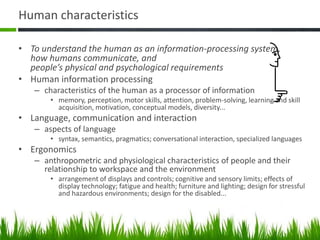
Human characteristics
• To understand the human as an information-processing system,
how humans communicate, and
people’s physical and psychological requirements
• Human information processing
– characteristics of the human as a processor of information
• memory, perception, motor skills, attention, problem-solving, learning and skill
acquisition, motivation, conceptual models, diversity...
• Language, communication and interaction
– aspects of language
• syntax, semantics, pragmatics; conversational interaction, specialized languages
• Ergonomics
– anthropometric and physiological characteristics of people and their
relationship to workspace and the environment
• arrangement of displays and controls; cognitive and sensory limits; effects of
display technology; fatigue and health; furniture and lighting; design for stressful
and hazardous environments; design for the disabled...
The Real-Time Usability of
HCI
Computations without data-sharing.
It’s not just about the USAGE, but strengthening
FUTURISTIC-BASE.
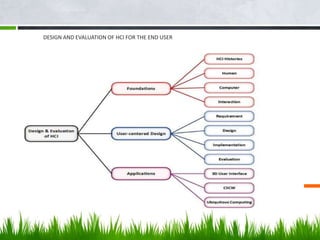
DESIGN AND EVALUATION OF HCI FOR THE END USER
What HCI includes?
• The Interdisciplinary Design Science of Human-
Computer Interaction (HCI) combines knowledge
and methods associated with professionals
including:
– Psychologists (incl. Experimental, Educational,
and Industrial Psychologists)
– Computer Scientists
– Instructional and Graphic Designers
– Technical Writers
– Human Factors and Ergonomics Experts
– Anthropologists and Sociologists
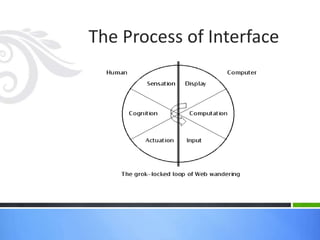
The Process of Interface
What types of Interfaces exist?
User Interfaces – 4 Types
• 1. Command Line Interface (CLI)
– A CLI displays a prompt, the user types a command on the keyboard and
executes the command. The computer executes the command, providing
textual output.
• 2. Menu Driven Interface
– The user has a list of items to choose from, and can make selections by
highlighting one.
User Interfaces – 4 Types
• 3. Graphical User Interface (GUI)
– Uses windows, icons, menus and pointers (WIMP) which can be manipulated
by a mouse (and often to an extent by a keyboard as well).
• 4. Natural Language Interface
– Can range from simple command systems to voice activated text processing.
Commands are spoken in “normal” language.
End of Interface Stability
• Our desire for vitality and independence as we grow
older might motivate us to place medical devices close
to or even within our bodies.
• The new relationships between digital devices and the
world will bring to the fore a host of human values that
hitherto have not been considered in relation to
technology – many of which are manifest in the nature
of the world we inhabit.
• The emergence of increasingly complex computational
ecosystems will also have significant impact on our
views of society and technology.
Extending the research and Design Cycle
• Stage 1: Understand
The initial – and new – stage we suggest is to focus on human values
and to pinpoint those that we wish to design for and to research.
• Stage 2: Study
This stage of research consists of developing a deeper understanding
of what factors are at play in how the values of interest are manifest in
the everyday world.
• Stage 3: Design
The third stage is primarily a design or creative phase and involves
reflecting on what the design goals should be.
• Stage 4: Build
This phase can involve anything from low-tech methods such as paper
prototypes and sketches, to more hi-tech and robust systems ready for
long-term field testing.
The ideal HCI with
recommendation for the
future
Broadcast and compress for seamless delivery
Explanation of what should be;
An Ideal Interface
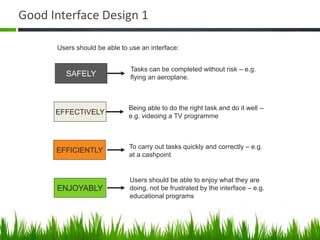
Good Interface Design 1
SAFELY
EFFECTIVELY
EFFICIENTLY
ENJOYABLY
Tasks can be completed without risk – e.g.
flying an aeroplane.
Being able to do the right task and do it well –
e.g. videoing a TV programme
To carry out tasks quickly and correctly – e.g.
at a cashpoint
Users should be able to enjoy what they are
doing, not be frustrated by the interface – e.g.
educational programs
Users should be able to use an interface:
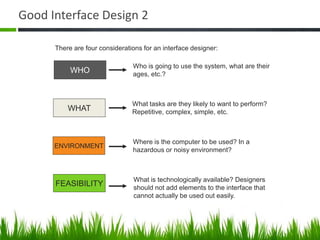
Good Interface Design 2
WHO
WHAT
ENVIRONMENT
FEASIBILITY
Who is going to use the system, what are their
ages, etc.?
What tasks are they likely to want to perform?
Repetitive, complex, simple, etc.
Where is the computer to be used? In a
hazardous or noisy environment?
What is technologically available? Designers
should not add elements to the interface that
cannot actually be used out easily.
There are four considerations for an interface designer:
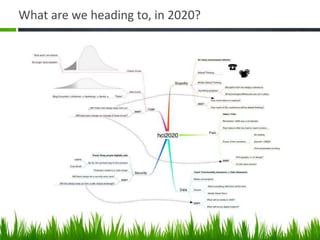
What are we heading to, in 2020?
What about the futuristic goals and
recommendations yet to mention?
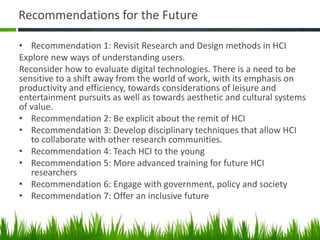
Recommendations for the Future
• Recommendation 1: Revisit Research and Design methods in HCI
Explore new ways of understanding users.
Reconsider how to evaluate digital technologies. There is a need to be
sensitive to a shift away from the world of work, with its emphasis on
productivity and efficiency, towards considerations of leisure and
entertainment pursuits as well as towards aesthetic and cultural systems
of value.
• Recommendation 2: Be explicit about the remit of HCI
• Recommendation 3: Develop disciplinary techniques that allow HCI
to collaborate with other research communities.
• Recommendation 4: Teach HCI to the young
• Recommendation 5: More advanced training for future HCI
researchers
• Recommendation 6: Engage with government, policy and society
• Recommendation 7: Offer an inclusive future
Goals for HCI Profession
1. Science vs. Intuition in interface Design
The biggest challenge stays to connect our exact
thoughts with the needed output in the computer.
2. Influencing academic and industrial researchers.
3. Providing tools, techniques, and knowledge for the
commercial designer.
Rapid prototyping is easy when using contemporary
tools.
To refine the systems, use feedback from individual or
groups of user.
4. Raising the computer consciousness of the general
public
?
But wait…
There’s More!
A Computer, whatever it be, remains a Computer.
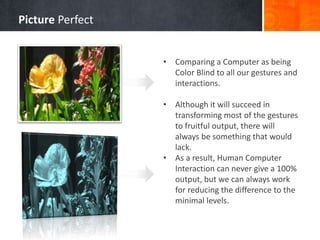
• Comparing a Computer as being
Color Blind to all our gestures and
interactions.
• Although it will succeed in
transforming most of the gestures
to fruitful output, there will
always be something that would
lack.
• As a result, Human Computer
Interaction can never give a 100%
output, but we can always work
for reducing the difference to the
minimal levels.
Picture Perfect
THANK YOU!
WISHES AND REGARDS!

Being human (Human Computer Interaction)

  • 1.
  • 2.
    Introduction • The worldwe live in today has become saturated of computer technologies. Not only in their respective physical forms, but the computer has also started ruling our minds. • The aim of this report is to reflect upon the changes afoot and outline a new paradigm for understanding our relationship with technology. • At the end, I post a conclusion as to how the Human Computer Interaction will shape the world in the next 15 years or so.
  • 3.
    What am Italking about? We have features for every step of the way Features of HCI Present day analysis and expectation Construction of ideal HCI
  • 4.
    INTRODUCTION TO HCI ANDITS TYPES Design, Organization and Featuring
  • 5.
    How the HumanComputer interaction will Process?
  • 6.
    Introduction to Part-1 GUIsto Gestures  Making fancy presentations on PowerPoint, creating excel sheets and use word to process documents is how we’ve been using graphic user interface since always.  The use of Gestures started with the degradation of mouse and keyword input usage. Touch-screen and voice gestures started replacing them.  Systems have started allowing people with severe physical disabilities to use their brain waves to interact with their environment. Real-time brainwave activity is beginning to be used to control digital movies, turn on music, and switch the lights on and off.  Gestures have hence started replacing our hardware input techniques from GUIs.
  • 7.
    Display Units toSmart Fabrics • Computers have not just influenced interactions with the screen but also with fabrics. • The fixed video display units (VDUs) of the 1980s are being superseded by a whole host of flexible display technologies and ‘smart’ fabrics. • The rise of OLED’s(organic light emitting diodes) and Plastic Electronics have made displays go cheaper, high in resolution and less power consuming. • The screen could be folded, stretched or if required miniaturized.
  • 8.
    Handsets to Mobiles •The telephone industry has transformed itself from brick to iPhone. This has brought the most interactive and advanced technology in our palms. • We now use mobile devices to interact with objects in the real world, acting more as if they are extensions of our own hands, by pointing and gesturing with them. While travelling travelling, we can gesture with our mobile device at a historic building and be offered up an audio or visual history of its architecture. Taking a picture of a product in the supermarket can send us back information about where the product came from, its associated air miles, and ecological credentials.
  • 9.
    Human Values inthe face of Change • The first has to do with how the proliferation and embedding of technology has reshaped the way digital devices are presented to us, the interface. • Second, changes in how we live with and use technology have resulted in us becoming ever more dependent upon computing. • Third, the increasing importance of communication technologies in our private and public lives has tied us together in new ways. • Fourth, our desire to be in touch is equalled by our desire to capture more information about our lives and our doings. • Finally, the proliferation and appropriation of new kinds of digital tools by people from all walks of life signals the growth of creative engagement through technology.
  • 10.
    Human characteristics • Tounderstand the human as an information-processing system, how humans communicate, and people’s physical and psychological requirements • Human information processing – characteristics of the human as a processor of information • memory, perception, motor skills, attention, problem-solving, learning and skill acquisition, motivation, conceptual models, diversity... • Language, communication and interaction – aspects of language • syntax, semantics, pragmatics; conversational interaction, specialized languages • Ergonomics – anthropometric and physiological characteristics of people and their relationship to workspace and the environment • arrangement of displays and controls; cognitive and sensory limits; effects of display technology; fatigue and health; furniture and lighting; design for stressful and hazardous environments; design for the disabled...
  • 11.
    The Real-Time Usabilityof HCI Computations without data-sharing.
  • 12.
    It’s not justabout the USAGE, but strengthening FUTURISTIC-BASE.
  • 13.
    DESIGN AND EVALUATIONOF HCI FOR THE END USER
  • 14.
    What HCI includes? •The Interdisciplinary Design Science of Human- Computer Interaction (HCI) combines knowledge and methods associated with professionals including: – Psychologists (incl. Experimental, Educational, and Industrial Psychologists) – Computer Scientists – Instructional and Graphic Designers – Technical Writers – Human Factors and Ergonomics Experts – Anthropologists and Sociologists
  • 15.
    The Process ofInterface
  • 16.
    What types ofInterfaces exist?
  • 17.
    User Interfaces –4 Types • 1. Command Line Interface (CLI) – A CLI displays a prompt, the user types a command on the keyboard and executes the command. The computer executes the command, providing textual output. • 2. Menu Driven Interface – The user has a list of items to choose from, and can make selections by highlighting one.
  • 18.
    User Interfaces –4 Types • 3. Graphical User Interface (GUI) – Uses windows, icons, menus and pointers (WIMP) which can be manipulated by a mouse (and often to an extent by a keyboard as well). • 4. Natural Language Interface – Can range from simple command systems to voice activated text processing. Commands are spoken in “normal” language.
  • 19.
    End of InterfaceStability • Our desire for vitality and independence as we grow older might motivate us to place medical devices close to or even within our bodies. • The new relationships between digital devices and the world will bring to the fore a host of human values that hitherto have not been considered in relation to technology – many of which are manifest in the nature of the world we inhabit. • The emergence of increasingly complex computational ecosystems will also have significant impact on our views of society and technology.
  • 20.
    Extending the researchand Design Cycle • Stage 1: Understand The initial – and new – stage we suggest is to focus on human values and to pinpoint those that we wish to design for and to research. • Stage 2: Study This stage of research consists of developing a deeper understanding of what factors are at play in how the values of interest are manifest in the everyday world. • Stage 3: Design The third stage is primarily a design or creative phase and involves reflecting on what the design goals should be. • Stage 4: Build This phase can involve anything from low-tech methods such as paper prototypes and sketches, to more hi-tech and robust systems ready for long-term field testing.
  • 21.
    The ideal HCIwith recommendation for the future Broadcast and compress for seamless delivery
  • 22.
    Explanation of whatshould be; An Ideal Interface
  • 23.
    Good Interface Design1 SAFELY EFFECTIVELY EFFICIENTLY ENJOYABLY Tasks can be completed without risk – e.g. flying an aeroplane. Being able to do the right task and do it well – e.g. videoing a TV programme To carry out tasks quickly and correctly – e.g. at a cashpoint Users should be able to enjoy what they are doing, not be frustrated by the interface – e.g. educational programs Users should be able to use an interface:
  • 24.
    Good Interface Design2 WHO WHAT ENVIRONMENT FEASIBILITY Who is going to use the system, what are their ages, etc.? What tasks are they likely to want to perform? Repetitive, complex, simple, etc. Where is the computer to be used? In a hazardous or noisy environment? What is technologically available? Designers should not add elements to the interface that cannot actually be used out easily. There are four considerations for an interface designer:
  • 25.
    What are weheading to, in 2020?
  • 26.
    What about thefuturistic goals and recommendations yet to mention?
  • 27.
    Recommendations for theFuture • Recommendation 1: Revisit Research and Design methods in HCI Explore new ways of understanding users. Reconsider how to evaluate digital technologies. There is a need to be sensitive to a shift away from the world of work, with its emphasis on productivity and efficiency, towards considerations of leisure and entertainment pursuits as well as towards aesthetic and cultural systems of value. • Recommendation 2: Be explicit about the remit of HCI • Recommendation 3: Develop disciplinary techniques that allow HCI to collaborate with other research communities. • Recommendation 4: Teach HCI to the young • Recommendation 5: More advanced training for future HCI researchers • Recommendation 6: Engage with government, policy and society • Recommendation 7: Offer an inclusive future
  • 28.
    Goals for HCIProfession 1. Science vs. Intuition in interface Design The biggest challenge stays to connect our exact thoughts with the needed output in the computer. 2. Influencing academic and industrial researchers. 3. Providing tools, techniques, and knowledge for the commercial designer. Rapid prototyping is easy when using contemporary tools. To refine the systems, use feedback from individual or groups of user. 4. Raising the computer consciousness of the general public
  • 29.
    ? But wait… There’s More! AComputer, whatever it be, remains a Computer.
  • 30.
    • Comparing aComputer as being Color Blind to all our gestures and interactions. • Although it will succeed in transforming most of the gestures to fruitful output, there will always be something that would lack. • As a result, Human Computer Interaction can never give a 100% output, but we can always work for reducing the difference to the minimal levels. Picture Perfect
  • 31.

Editor's Notes

  • #2 This presentation demonstrates the new capabilities of PowerPoint and it is best viewed in Slide Show. These slides are designed to give you great ideas for the presentations you’ll create in PowerPoint 2010! For more sample templates, click the File tab, and then on the New tab, click Sample Templates.