Whitney Quesenbery
Center for Civic Design
When usability
meets accessibility
Disability: the outcome of the
interaction between a person with
an impairment and the
environment and attitudinal
barriers she/he may face.
- International Classification of Functioning (ICF)
3
Usability
The effectiveness,
efficiency and
satisfaction with
which a specified set of
users can achieve a
specified set of tasks in
a particular
environment.
– ISO 9241-11
Accessibility
The usability of a product,
service, environment or
facility by people with the
widest range of capabilities
– ISO 9241-20
4
I feel like technology is
finally catching up with
what I truly need.
Glenda Watson Hyatt
DoItMyselfBlog.com
1876 2010200019901980
Telephone Fax Email
Walkman
Blackberry
iPod
iPhone
JAWS
VoiceOver
Facebook
Twitter
Google
Apple I
Macintosh
IBM PC
iPad
Android
2014
Uber
Square
Instagram
5
Let’s look at the numbers
This many Have disabilities that affect voting
19.1 M have trouble seeing
28.3 M have physical difficulty, including grasping and handling small objects
30.8 M have trouble hearing
17.8 M speak English “less than well”
9.2 M live in linguistically isolated households
Source: Brennan Center, The Machinery of Democracy: Accessibility, Usability, and Cost, 2006
Almost 20% of the voting age population has some
kind of disability
6
Add in the “curb cut effect”
This
many
Or this
%
Of this group of
potential voters
Have problems that affect voting
11 M or 22% adults over 65 Mobility, dexterity, vision or hearing
disability
30 M or 13% literate adults Read at “below basic levels”
63 M or 29% literate adults Read at “basic” levels
~45 M ~35% voters
(based on 130M
voters in
November 2016)
Are “low propensity “ or infrequent voters
Sources: Older Americans Month, 2017 – US Census Bureau, National Assessment of Adult Literacy, US. Dept of
Education, 2003
Engaging new voters, NonProfit Vote
Accessibility features help millions not officially
classified as having a disability.
7
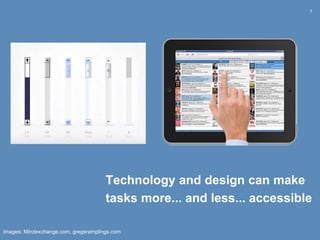
Technology and design can make
tasks more... and less... accessible
Images: Mindexchange.com, gregsramplings.com
8
Prioritize problems on the same scale
How likely is it that this problem will stop
someone from meeting their goals?
Priority Definition
Critical Barriers that make it impossible for someone to complete an
action or complete agoal
Serious Problems that can be solved only with complex or expert
work-arounds, or add time to the task
Annoying Interactions that are frustrating or annoying, but can be easily
worked around
Noisy Minor or cosmetic issues that degrade the experience
9
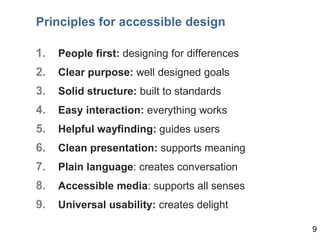
Principles for accessible design
1. People first: designing for differences
2. Clear purpose: well designed goals
3. Solid structure: built to standards
4. Easy interaction: everything works
5. Helpful wayfinding: guides users
6. Clean presentation: supports meaning
7. Plain language: creates conversation
8. Accessible media: supports all senses
9. Universal usability: creates delight
9
10
Ask a ^ question
different
11
Bringing diverse communities in
Getting out into the community
12
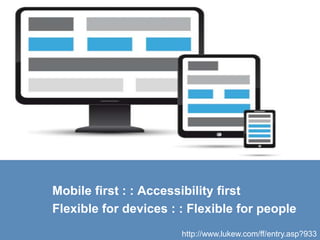
http://www.lukew.com/ff/entry.asp?933
Mobile first : : Accessibility first
Flexible for devices : : Flexible for people
13
Are two senses better than one?
14
Could a joystick be a
universal input for a voting
system?
Can a ballot be designed
around dual input?
MSU: testing a joystick.
CATEA: testing dual switch navigation on EZBallot.
15
Change
how
we think.
Photo: mtstcil.org
16
Whitney Quesenbery
Center for Civic Design
whitneyq@civicdesign
civicdesign.org
@civicdesign

When usability meets accessibility

  • 1.
    Whitney Quesenbery Center forCivic Design When usability meets accessibility
  • 2.
    Disability: the outcomeof the interaction between a person with an impairment and the environment and attitudinal barriers she/he may face. - International Classification of Functioning (ICF)
  • 3.
    3 Usability The effectiveness, efficiency and satisfactionwith which a specified set of users can achieve a specified set of tasks in a particular environment. – ISO 9241-11 Accessibility The usability of a product, service, environment or facility by people with the widest range of capabilities – ISO 9241-20
  • 4.
    4 I feel liketechnology is finally catching up with what I truly need. Glenda Watson Hyatt DoItMyselfBlog.com 1876 2010200019901980 Telephone Fax Email Walkman Blackberry iPod iPhone JAWS VoiceOver Facebook Twitter Google Apple I Macintosh IBM PC iPad Android 2014 Uber Square Instagram
  • 5.
    5 Let’s look atthe numbers This many Have disabilities that affect voting 19.1 M have trouble seeing 28.3 M have physical difficulty, including grasping and handling small objects 30.8 M have trouble hearing 17.8 M speak English “less than well” 9.2 M live in linguistically isolated households Source: Brennan Center, The Machinery of Democracy: Accessibility, Usability, and Cost, 2006 Almost 20% of the voting age population has some kind of disability
  • 6.
    6 Add in the“curb cut effect” This many Or this % Of this group of potential voters Have problems that affect voting 11 M or 22% adults over 65 Mobility, dexterity, vision or hearing disability 30 M or 13% literate adults Read at “below basic levels” 63 M or 29% literate adults Read at “basic” levels ~45 M ~35% voters (based on 130M voters in November 2016) Are “low propensity “ or infrequent voters Sources: Older Americans Month, 2017 – US Census Bureau, National Assessment of Adult Literacy, US. Dept of Education, 2003 Engaging new voters, NonProfit Vote Accessibility features help millions not officially classified as having a disability.
  • 7.
    7 Technology and designcan make tasks more... and less... accessible Images: Mindexchange.com, gregsramplings.com
  • 8.
    8 Prioritize problems onthe same scale How likely is it that this problem will stop someone from meeting their goals? Priority Definition Critical Barriers that make it impossible for someone to complete an action or complete agoal Serious Problems that can be solved only with complex or expert work-arounds, or add time to the task Annoying Interactions that are frustrating or annoying, but can be easily worked around Noisy Minor or cosmetic issues that degrade the experience
  • 9.
    9 Principles for accessibledesign 1. People first: designing for differences 2. Clear purpose: well designed goals 3. Solid structure: built to standards 4. Easy interaction: everything works 5. Helpful wayfinding: guides users 6. Clean presentation: supports meaning 7. Plain language: creates conversation 8. Accessible media: supports all senses 9. Universal usability: creates delight 9
  • 10.
    10 Ask a ^question different
  • 11.
    11 Bringing diverse communitiesin Getting out into the community
  • 12.
    12 http://www.lukew.com/ff/entry.asp?933 Mobile first :: Accessibility first Flexible for devices : : Flexible for people
  • 13.
    13 Are two sensesbetter than one?
  • 14.
    14 Could a joystickbe a universal input for a voting system? Can a ballot be designed around dual input? MSU: testing a joystick. CATEA: testing dual switch navigation on EZBallot.
  • 15.
  • 16.
    16 Whitney Quesenbery Center forCivic Design whitneyq@civicdesign civicdesign.org @civicdesign

Editor's Notes

  • #3 Switch to social model of disability critical in so many ways, but I want to suggest one that you may not have thought of: If disability is a medical condition, then design will always be a bandaid. But if disability is the outcome of an interaction, then it can be designed. And there are thousands of people around the world who want their work to change the world, to make better interactions. It seems to me that if we can recast accessibility into an aspect of innovation, we will have changed the dynamic, and given the people who create products a way to think about their work as making the world better for even more people.
  • #4 Because we both do usability testing, including people with disabilities, we have been thinking about what this relationship means when we are working with a project on the usabiity of the site. We want to report on both accessibility problems as well as usability problems.
  • #5 Another way to look at the pace of change and you can see that rapid, accellerating loopy journey of tecnology. But there's also the social impact of new technology and how it fits into our habits, attitudes and culture. Glenda W-H and that change that unobtrusive (and affordable) technology can bring to how we see the problem.
  • #6 But here’s the thing. Even with that disclaimer, there are still enough voters to worry about. In 2000 Brennan Adds up to 47M for the first 2, and 105M if we count hearing and language – a type of disability covered by the Voting Rights Act.
  • #7 The list of people with disabilities leaves out a lot of voters Older adults – 47.8 the number of people with 2 or more disabilities grows to 26.3% by age 75 and 55% by age 85 Literacy – the secret disability Low-propensity - more likely to be marginalized or minorities
  • #8 Scrolling on a computer screen vs scrolling on an ipad In 2005, when we wrote the voting system standards, we banned scrolling. For good reasons. Scroll bars are impossibly difficult, no matter how ubiquituous they are: far from the main visual field small control couinterintuitive motion requires dexterity control requires understanding that there can be more on the page than you can see But in ipads, it all changes.
  • #10 Review briefly.. And map UX principles to the standards.
  • #11 Ask a different question
  • #12 The first way is to find more ways to bring people with disabilities into the creative process. For me, this builds on an increasing emphasis on ethnographic methods of user research – seeing people in context – rather than bringing them in at the end of the process. The images reflect three different ways of doing this: - Innovation workshops as part of the AVTI research project 64 people in 2 workshops, included wide range of abilities - Going out into the community – testing forms at a school and at a library By the way the woman in the wheelchair is not a participant, but our Vietnamese and Chinese interpreter.
  • #13 Design for mobile first because... Mobile forces you to focus (November 2009) The idea of mobile first and responsive design sweeping the web design world. Like plain language, this is an opportunity for accessibility to meet forces at work in the general technology design space. It's not only a moment we can capitalize on, but one we can learn from. So when I talk about designing for extremes, I mean that the diversity of devices can also reflect the diversity of assistive technology – and of people
  • #14 Instead of designing specialized AT, or thinking of what we do as creating tools only for people with specific disabilities, it's perhaps more interesting to think about what we can learn from extreme needs that exposes solutions for everyone.
  • #16 (Yes, I know that's not the correct translation)