Copyright © 2013. Infor. All Rights Reserved. 1 
www.infor.com
Copyright © 2013. Infor. All Rights Reserved. 
2 
www.infor.com 
Learn Infor LN 10.2.1 
Invoicing 
Ramamurthy Mahesh
Copyright © 2013. Infor. All Rights Reserved. 3 
www.infor.com 
Agenda 
• Classic (Pre Infor ERP LN 10.2.1) and Enhanced (Infor ERP LN 
10.2.1) Invoicing Architecture - Overview 
• Differences – Classic and Enhanced Invoicing 
• Enhanced Invoicing 
• Invoicing from Invoicing 360 
• Invoicing from Sales Order – through Invoicing 360 
• Shipment based Invoicing 
• Questions and Answers
Copyright © 2013. Infor. All Rights Reserved. 4 
www.infor.com 
Classic Invoicing - Architecture 
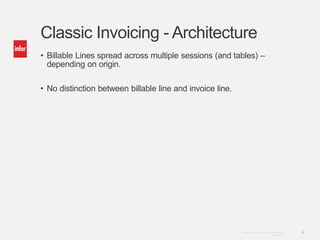
• Billable Lines spread across multiple sessions (and tables) – 
depending on origin. 
• No distinction between billable line and invoice line.
Copyright © 2013. Infor. All Rights Reserved. 5 
www.infor.com 
Classic Invoicing 
cisli205 
(Invoice-Source 
relations) 
cisli207 (Invoice Advances) 
cisli208 (Reference table – 
confirmed invoice lines) 
cisli209 (Tax Amnts by Tax Auth) 
Interest Invoice 
(cisli210) 
Manual Sales Invoice - 
header 
cisli220 
cisli225 
(Manual Sales Invoice – 
line) 
cisli230 
(Project Invoice - header) 
cisli235 
(Project Invoice – line) 
cisli226 
(Manual Sales Invoice – Int. 
Tax) 
cisli240 
(Sales Invoice - header) 
cisli245 
(Sales Invoice – line) 
cisli250 
(Service Invoice - header) 
cisli255 
(Service Invoice – line) 
cisli236 
(Project Invoice – notes) 
cisli246 
(Sales Invoice – COGS) 
cisli247 
(Sales Invoice – Component 
Lines) 
cisli260 
(Service Contracts - header) 
cisli265 
(Service Contracts – line) 
cisli270 
(Freight Invoice - header) 
cisli275 
(Freight Invoice – line) 
cisli256 
(Delivery Note by Service / 
Freight Invoice) 
cisli280 
(Debit/Credit Notes - 
Finance) 
cisli290 
(Rebate Invoice - header) 
cisli295 
(Rebate Invoice – line) 
cisli206 (Tax Amounts by Tax 
Codes)
Enhanced Invoicing - Architecture 
Copyright © 2013. Infor. All Rights Reserved. 6 
www.infor.com 
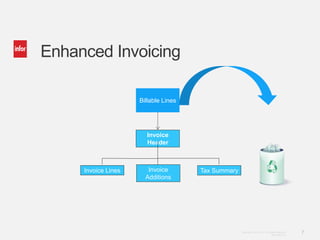
• Billable Lines stores billable lines of all origins. 
• Deleted after posting 
• Invoice Lines stored separately from billable lines. 
• Invoice consists of 
• Invoice Header (cisli305) 
• Invoice Lines (cisli310) 
• Invoice Lines – Additional Fields (cisli311) 
• Invoice Satellites (cisli312) 
• Invoice – Tax Details (cisli315) 
• Installment Invoice Settlements (cisli320)
Copyright © 2013. Infor. All Rights Reserved. 7 
www.infor.com 
Enhanced Invoicing 
Invoice 
Header 
Invoice Lines Invoice 
Additions 
Tax Summary 
Billable Lines
Copyright © 2013. Infor. All Rights Reserved. 8 
www.infor.com 
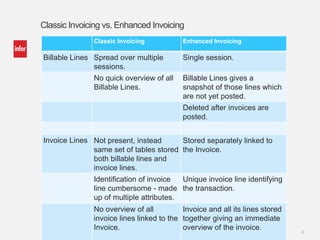
Classic Invoicing vs. Enhanced Invoicing 
Classic Invoicing Enhanced Invoicing 
Billable Lines Spread over multiple 
sessions. 
Single session. 
No quick overview of all 
Billable Lines. 
Billable Lines gives a 
snapshot of those lines which 
are not yet posted. 
Deleted after invoices are 
posted. 
Invoice Lines Not present, instead 
same set of tables stored 
both billable lines and 
invoice lines. 
Stored separately linked to 
the Invoice. 
Identification of invoice 
line cumbersome - made 
up of multiple attributes. 
Unique invoice line identifying 
the transaction. 
No overview of all 
invoice lines linked to the 
Invoice. 
Invoice and all its lines stored 
together giving an immediate 
overview of the invoice.
Copyright © 2013. Infor. All Rights Reserved. 9 
www.infor.com 
Classic Invoicing vs. Enhanced Invoicing 
Classic Invoicing Enhanced Invoicing 
Tax Lines No session available. Tax Details linked to Invoice 
session to give an overview of 
tax lines. 
Installment 
Settlements 
No session available. Installment Invoice 
Settlements linked to the 
Invoice Session to give an 
overview of Installment 
Settlements. 
Related 
invoices 
No session available. Related invoices session 
integrated with Invoices 
Session to show an overview 
of Related Invoices. (Example 
Credit note of a return order 
linked to the original Invoice).
Copyright © 2013. Infor. All Rights Reserved. 10 
www.infor.com 
Classic Invoicing vs. Enhanced Invoicing 
Classic Invoicing Enhanced Invoicing 
User profile No defaulting 
mechanism (No user 
profile). 
Defaulting mechanism and 
authorizations based on user 
profile. 
Tax Rate 
Changes 
No possibility to 
influence tax rates after 
billable lines are 
released to invoicing. 
Tax Codes can be changed in 
Billable Lines (On Hold status) 
based on authorization from 
user profile. 
Possibility to change the 
Invoice date of a Composed 
Invoice and recalculate 
amounts based on the 
changed tax and currency 
rates. 
Invoicing 360 No Invoicing Dashboard. Invoicing 360 available which 
gives an overview of all 
Billable Lines and Invoices. 
Easy filtering on both Billable
Copyright © 2013. Infor. All Rights Reserved. 11 
www.infor.com 
Classic Invoicing vs. Enhanced Invoicing 
Classic Invoicing Enhanced Invoicing 
Invoicing Billing Request need to 
be created before 
invoicing can be started. 
No manual creation of Billing 
Request needed. 
Invoicing non-consecutive 
billable lines 
were tricky. 
Billable lines can be marked 
and user can create invoice 
with a single click. 
Possibility that more 
billable lines are invoiced 
than intended. 
What you see is what you get. 
Multiple user action 
before invoicing can be 
complete. 
Fewer user actions to 
complete invoicing. 
Composing Composing multiple 
origins (fe. Sales and 
Freight) not possible. 
Composing multiple origins 
easy to set up. 
No clarity of why Billable 
Lines were not 
composed together. 
Fixed and variable composing 
criteria in the Invoices session 
show the reason for why
Copyright © 2013. Infor. All Rights Reserved. 12 
www.infor.com 
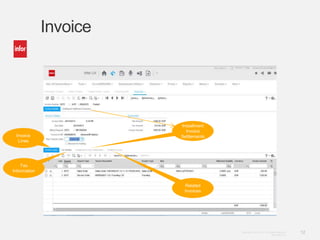
Invoice 
Invoice 
Lines 
Tax 
Information 
Installment 
Invoice 
Settlements 
Related 
Invoices
Copyright © 2013. Infor. All Rights Reserved. 13 
www.infor.com 
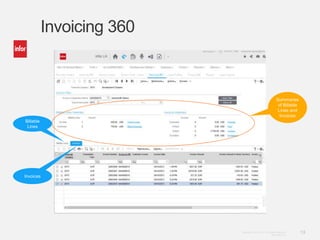
Invoicing 360 
Billable 
Lines 
Invoices 
Summaries 
of Billable 
Lines and 
Invoices
Copyright © 2013. Infor. All Rights Reserved. 14 
www.infor.com 
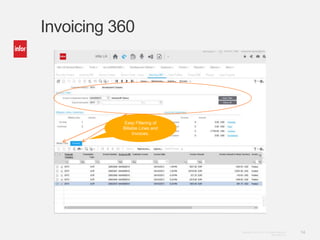
Invoicing 360 
Easy Filtering of 
Billable Lines and 
Invoices.
Copyright © 2013. Infor. All Rights Reserved. 15 
www.infor.com 
Scenarios 
• Invoicing from Invoicing 360 
• Invoicing from Sales Orders – Zooming to Invoicing 360 
• Shipment Based Invoicing (Contracts)
Copyright © 2013. Infor. All Rights Reserved. 16 
www.infor.com 
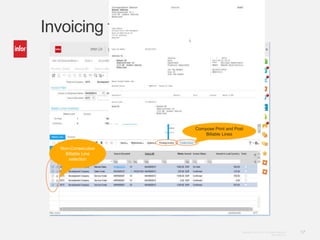
Invoicing from Invoicing 360 
• Use Filtering option to select Billable lines to be invoiced 
• Filtering option from Invoicing 360 
• Filtering option in Workspace 
• Select Lines to be invoiced. 
• Option – Preview Invoice to see the draft Invoice. 
• Option – Create Invoice to compose, print and post invoice. 
• Option – Compose Invoice to check composing criteria.
Copyright © 2013. Infor. All Rights Reserved. 17 
www.infor.com 
Invoicing from Invoicing 360 
Compose Print and Post 
Billable Lines 
Non-Consecutive 
Billable Line 
selection
Copyright © 2013. Infor. All Rights Reserved. 18 
www.infor.com 
Invoicing from Sales Orders 
• Zoom to Invoicing 360 via specific option Sales and Warehouse 
Invoice data. 
• Switch to financial company done automatically. 
• Sales Order pre-filtered in Invoicing 360. 
• Option – Preview Invoice to see the draft Invoice. 
• Option – Create Invoice to compose, print and post invoice. 
• Option – Compose Invoice to check composing criteria.
Copyright © 2013. Infor. All Rights Reserved. 19 
www.infor.com 
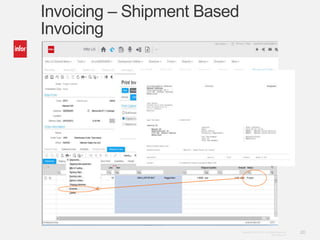
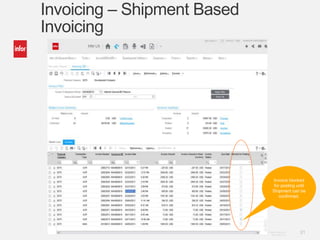
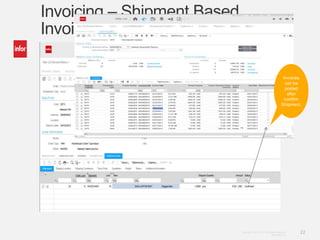
Invoicing – Shipment Based 
Invoicing 
• Applicable only for Contract Deliverables. 
• When Shipment is frozen: 
• Original Invoice can be printed ( Invoice in a box). 
• Draft Invoice can be printed. 
• The invoice will have status “Printed” and will be blocked for 
posting. 
• When the shipment is confirmed, the Invoice will no longer be 
blocked for posting.
Copyright © 2013. Infor. All Rights Reserved. 20 
www.infor.com 
Invoicing – Shipment Based 
Invoicing
Copyright © 2013. Infor. All Rights Reserved. 21 
www.infor.com 
Invoicing – Shipment Based 
Invoicing 
Invoice blocked 
for posting until 
Shipment can be 
confirmed.
Copyright © 2013. Infor. All Rights Reserved. 22 
www.infor.com 
Invoicing – Shipment Based 
Invoicing 
Invoices 
can be 
posted 
after 
confirm 
Shipment.
Copyright © 2013. Infor. All Rights Reserved. 23 
www.infor.com 
Questions ?

http://inforln.com: Infor ERP LN Training - Learn New Central Invoicing Functionality

  • 1.
    Copyright © 2013.Infor. All Rights Reserved. 1 www.infor.com
  • 2.
    Copyright © 2013.Infor. All Rights Reserved. 2 www.infor.com Learn Infor LN 10.2.1 Invoicing Ramamurthy Mahesh
  • 3.
    Copyright © 2013.Infor. All Rights Reserved. 3 www.infor.com Agenda • Classic (Pre Infor ERP LN 10.2.1) and Enhanced (Infor ERP LN 10.2.1) Invoicing Architecture - Overview • Differences – Classic and Enhanced Invoicing • Enhanced Invoicing • Invoicing from Invoicing 360 • Invoicing from Sales Order – through Invoicing 360 • Shipment based Invoicing • Questions and Answers
  • 4.
    Copyright © 2013.Infor. All Rights Reserved. 4 www.infor.com Classic Invoicing - Architecture • Billable Lines spread across multiple sessions (and tables) – depending on origin. • No distinction between billable line and invoice line.
  • 5.
    Copyright © 2013.Infor. All Rights Reserved. 5 www.infor.com Classic Invoicing cisli205 (Invoice-Source relations) cisli207 (Invoice Advances) cisli208 (Reference table – confirmed invoice lines) cisli209 (Tax Amnts by Tax Auth) Interest Invoice (cisli210) Manual Sales Invoice - header cisli220 cisli225 (Manual Sales Invoice – line) cisli230 (Project Invoice - header) cisli235 (Project Invoice – line) cisli226 (Manual Sales Invoice – Int. Tax) cisli240 (Sales Invoice - header) cisli245 (Sales Invoice – line) cisli250 (Service Invoice - header) cisli255 (Service Invoice – line) cisli236 (Project Invoice – notes) cisli246 (Sales Invoice – COGS) cisli247 (Sales Invoice – Component Lines) cisli260 (Service Contracts - header) cisli265 (Service Contracts – line) cisli270 (Freight Invoice - header) cisli275 (Freight Invoice – line) cisli256 (Delivery Note by Service / Freight Invoice) cisli280 (Debit/Credit Notes - Finance) cisli290 (Rebate Invoice - header) cisli295 (Rebate Invoice – line) cisli206 (Tax Amounts by Tax Codes)
  • 6.
    Enhanced Invoicing -Architecture Copyright © 2013. Infor. All Rights Reserved. 6 www.infor.com • Billable Lines stores billable lines of all origins. • Deleted after posting • Invoice Lines stored separately from billable lines. • Invoice consists of • Invoice Header (cisli305) • Invoice Lines (cisli310) • Invoice Lines – Additional Fields (cisli311) • Invoice Satellites (cisli312) • Invoice – Tax Details (cisli315) • Installment Invoice Settlements (cisli320)
  • 7.
    Copyright © 2013.Infor. All Rights Reserved. 7 www.infor.com Enhanced Invoicing Invoice Header Invoice Lines Invoice Additions Tax Summary Billable Lines
  • 8.
    Copyright © 2013.Infor. All Rights Reserved. 8 www.infor.com Classic Invoicing vs. Enhanced Invoicing Classic Invoicing Enhanced Invoicing Billable Lines Spread over multiple sessions. Single session. No quick overview of all Billable Lines. Billable Lines gives a snapshot of those lines which are not yet posted. Deleted after invoices are posted. Invoice Lines Not present, instead same set of tables stored both billable lines and invoice lines. Stored separately linked to the Invoice. Identification of invoice line cumbersome - made up of multiple attributes. Unique invoice line identifying the transaction. No overview of all invoice lines linked to the Invoice. Invoice and all its lines stored together giving an immediate overview of the invoice.
  • 9.
    Copyright © 2013.Infor. All Rights Reserved. 9 www.infor.com Classic Invoicing vs. Enhanced Invoicing Classic Invoicing Enhanced Invoicing Tax Lines No session available. Tax Details linked to Invoice session to give an overview of tax lines. Installment Settlements No session available. Installment Invoice Settlements linked to the Invoice Session to give an overview of Installment Settlements. Related invoices No session available. Related invoices session integrated with Invoices Session to show an overview of Related Invoices. (Example Credit note of a return order linked to the original Invoice).
  • 10.
    Copyright © 2013.Infor. All Rights Reserved. 10 www.infor.com Classic Invoicing vs. Enhanced Invoicing Classic Invoicing Enhanced Invoicing User profile No defaulting mechanism (No user profile). Defaulting mechanism and authorizations based on user profile. Tax Rate Changes No possibility to influence tax rates after billable lines are released to invoicing. Tax Codes can be changed in Billable Lines (On Hold status) based on authorization from user profile. Possibility to change the Invoice date of a Composed Invoice and recalculate amounts based on the changed tax and currency rates. Invoicing 360 No Invoicing Dashboard. Invoicing 360 available which gives an overview of all Billable Lines and Invoices. Easy filtering on both Billable
  • 11.
    Copyright © 2013.Infor. All Rights Reserved. 11 www.infor.com Classic Invoicing vs. Enhanced Invoicing Classic Invoicing Enhanced Invoicing Invoicing Billing Request need to be created before invoicing can be started. No manual creation of Billing Request needed. Invoicing non-consecutive billable lines were tricky. Billable lines can be marked and user can create invoice with a single click. Possibility that more billable lines are invoiced than intended. What you see is what you get. Multiple user action before invoicing can be complete. Fewer user actions to complete invoicing. Composing Composing multiple origins (fe. Sales and Freight) not possible. Composing multiple origins easy to set up. No clarity of why Billable Lines were not composed together. Fixed and variable composing criteria in the Invoices session show the reason for why
  • 12.
    Copyright © 2013.Infor. All Rights Reserved. 12 www.infor.com Invoice Invoice Lines Tax Information Installment Invoice Settlements Related Invoices
  • 13.
    Copyright © 2013.Infor. All Rights Reserved. 13 www.infor.com Invoicing 360 Billable Lines Invoices Summaries of Billable Lines and Invoices
  • 14.
    Copyright © 2013.Infor. All Rights Reserved. 14 www.infor.com Invoicing 360 Easy Filtering of Billable Lines and Invoices.
  • 15.
    Copyright © 2013.Infor. All Rights Reserved. 15 www.infor.com Scenarios • Invoicing from Invoicing 360 • Invoicing from Sales Orders – Zooming to Invoicing 360 • Shipment Based Invoicing (Contracts)
  • 16.
    Copyright © 2013.Infor. All Rights Reserved. 16 www.infor.com Invoicing from Invoicing 360 • Use Filtering option to select Billable lines to be invoiced • Filtering option from Invoicing 360 • Filtering option in Workspace • Select Lines to be invoiced. • Option – Preview Invoice to see the draft Invoice. • Option – Create Invoice to compose, print and post invoice. • Option – Compose Invoice to check composing criteria.
  • 17.
    Copyright © 2013.Infor. All Rights Reserved. 17 www.infor.com Invoicing from Invoicing 360 Compose Print and Post Billable Lines Non-Consecutive Billable Line selection
  • 18.
    Copyright © 2013.Infor. All Rights Reserved. 18 www.infor.com Invoicing from Sales Orders • Zoom to Invoicing 360 via specific option Sales and Warehouse Invoice data. • Switch to financial company done automatically. • Sales Order pre-filtered in Invoicing 360. • Option – Preview Invoice to see the draft Invoice. • Option – Create Invoice to compose, print and post invoice. • Option – Compose Invoice to check composing criteria.
  • 19.
    Copyright © 2013.Infor. All Rights Reserved. 19 www.infor.com Invoicing – Shipment Based Invoicing • Applicable only for Contract Deliverables. • When Shipment is frozen: • Original Invoice can be printed ( Invoice in a box). • Draft Invoice can be printed. • The invoice will have status “Printed” and will be blocked for posting. • When the shipment is confirmed, the Invoice will no longer be blocked for posting.
  • 20.
    Copyright © 2013.Infor. All Rights Reserved. 20 www.infor.com Invoicing – Shipment Based Invoicing
  • 21.
    Copyright © 2013.Infor. All Rights Reserved. 21 www.infor.com Invoicing – Shipment Based Invoicing Invoice blocked for posting until Shipment can be confirmed.
  • 22.
    Copyright © 2013.Infor. All Rights Reserved. 22 www.infor.com Invoicing – Shipment Based Invoicing Invoices can be posted after confirm Shipment.
  • 23.
    Copyright © 2013.Infor. All Rights Reserved. 23 www.infor.com Questions ?

Editor's Notes

  • #23 Invoicing – Shipment Based Invoicing