
1Copyright © 2014. Infor. All Rights Reserved. www.infor.comCopyright © 2014. Infor. All Rights Reserved. www.infor.com 1
Infor LN: v10.3 - v10.4
Estimating Differences
Rollout training
Campus Course Code: 02_0021040_EEN0434_ELN
August 2014
Henk Otjens
2Copyright © 2014. Infor. All Rights Reserved. www.infor.com
Agenda
• Line Details
• Cost and Service Items
• Surcharges
• Requests for Quotation
• Note:
Knowledge of the Estimating module as present in LN 10.3 is assumed
3Copyright © 2014. Infor. All Rights Reserved. www.infor.com
Line Details
Why and How
4Copyright © 2014. Infor. All Rights Reserved. www.infor.com
Why
• On the overview session for Estimating Lines often scrolling is required to
get visibility of all the information as part of one line
• This is not very intuitive
5Copyright © 2014. Infor. All Rights Reserved. www.infor.com
How
• To improve usability we introduce an option to view the details of one
specific estimate line
• This to make it easier to check the available information
6Copyright © 2014. Infor. All Rights Reserved. www.infor.com
Cost and Service Items
Why and How
7Copyright © 2014. Infor. All Rights Reserved. www.infor.com
Why
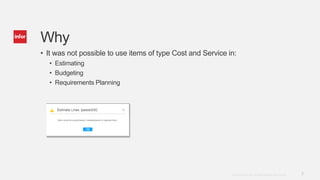
• It was not possible to use items of type Cost and Service in:
• Estimating
• Budgeting
• Requirements Planning
8Copyright © 2014. Infor. All Rights Reserved. www.infor.com
How
• We allow the item types Cost and Service in the domains mentioned
• They will be handled as part of the cost type Material
• Note:
Project specific Cost or Service items are not possible!
9Copyright © 2014. Infor. All Rights Reserved. www.infor.com
Surcharges
• Why
• Business value
• Pain & perspective
• Business Requirement
• How
• Solution Overview
• Solution Process
• What
• Solution Details
• Solution Aspects
• Summary
• Demo
10Copyright © 2014. Infor. All Rights Reserved. www.infor.com
Why
• Some estimating scenarios require the calculation of cost or sales value
based on direct cost elements
• Surcharges in LN Estimating always had to be manually entered or
required the use of Microsoft Excel®
11Copyright © 2014. Infor. All Rights Reserved. www.infor.com
How
• Calculation of indirect lines also to be possible in LN to eliminate the risk of
possible errors and missing updates
12Copyright © 2014. Infor. All Rights Reserved. www.infor.com
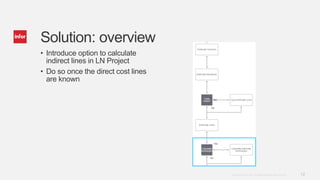
• Introduce option to calculate
indirect lines in LN Project
• Do so once the direct cost lines
are known
Solution: overview
13Copyright © 2014. Infor. All Rights Reserved. www.infor.com
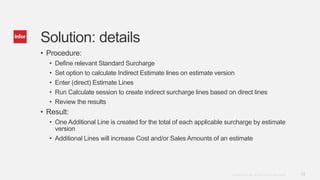
Solution: details
• Procedure:
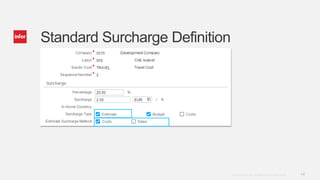
• Define relevant Standard Surcharge
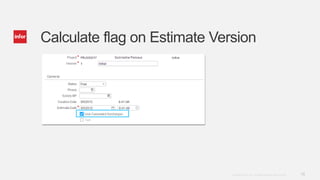
• Set option to calculate Indirect Estimate lines on estimate version
• Enter (direct) Estimate Lines
• Run Calculate session to create indirect surcharge lines based on direct lines
• Review the results
• Result:
• One Additional Line is created for the total of each applicable surcharge by estimate
version
• Additional Lines will increase Cost and/or Sales Amounts of an estimate
14Copyright © 2014. Infor. All Rights Reserved. www.infor.com
Standard Surcharge Definition
15Copyright © 2014. Infor. All Rights Reserved. www.infor.com
Calculate flag on Estimate Version
16Copyright © 2014. Infor. All Rights Reserved. www.infor.com
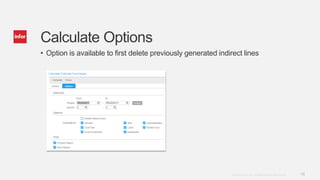
Calculate Options
• Option is available to first delete previously generated indirect lines
17Copyright © 2014. Infor. All Rights Reserved. www.infor.com
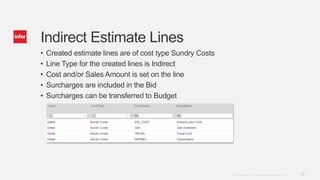
Indirect Estimate Lines
• Created estimate lines are of cost type Sundry Costs
• Line Type for the created lines is Indirect
• Cost and/or Sales Amount is set on the line
• Surcharges are included in the Bid
• Surcharges can be transferred to Budget
18Copyright © 2014. Infor. All Rights Reserved. www.infor.com
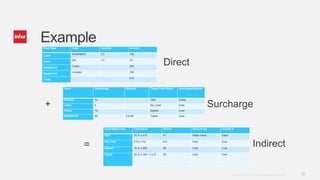
ExampleCost Type Code Quantity Amount
Labor
ENGINEER 2 h 100
Labor
QA 1 h 10
Equipment
Crane 200
Equipment
<empty> 100
Total
410
Level Percentage Amount Target Cost Object Surcharge Method
General 10 G&A Sales
Labor 5 Ind_Cost Cost
Crane 10 Deprec Cost
ENGINEER 20 2 EUR Travel Cost
Cost Object Line Calculation Result Amount set Include in
G&A 10 % x 410 41 Sales Value Sales
Ind_Cost 5 % x 110 5.5 Cost Cost
Deprec 10 % x 200 20 Cost Cost
Travel 20 % x 100 + 2 x 2 24 Cost Cost
+
=
Direct
Indirect
Surcharge
19Copyright © 2014. Infor. All Rights Reserved. www.infor.com
Summary
• Option in LN Estimating to calculate indirect cost and sales based on direct
cost / sales and surcharges
20Copyright © 2014. Infor. All Rights Reserved. www.infor.com
Estimate and Requests for Quotation
• Why
• Business value
• Pain & perspective
• Business Requirement
• How
• Solution Overview
• Solution Process
• What
• Solution Details
• Solution Aspects
• Summary
• Demo
21Copyright © 2014. Infor. All Rights Reserved. www.infor.com
Why
• In the estimating phase prices for items or services considered need to be
(re)established
• For (new) items or services information of possible suppliers might be
required
• Previously there was no provision for this, this could result in incorrect
prices being used
22Copyright © 2014. Infor. All Rights Reserved. www.infor.com
How
• Requests for Quotation can be created and reviewed for selected estimate
line(s)
• Relevant information used for the estimate line
• Directly: Update based on the RfQ
• Indirectly: Use RfQ to update Price Book
23Copyright © 2014. Infor. All Rights Reserved. www.infor.com
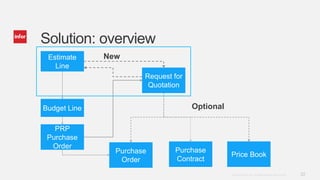
Solution: overview
Estimate
Line
Request for
Quotation
Purchase
Contract
Purchase
Order
Price Book
Budget Line
New
PRP
Purchase
Order
Optional
24Copyright © 2014. Infor. All Rights Reserved. www.infor.com
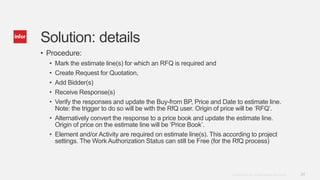
Solution: details
• Procedure:
• Mark the estimate line(s) for which an RFQ is required and
• Create Request for Quotation,
• Add Bidder(s)
• Receive Response(s)
• Verify the responses and update the Buy-from BP, Price and Date to estimate line.
Note: the trigger to do so will be with the RfQ user. Origin of price will be ‘RFQ’.
• Alternatively convert the response to a price book and update the estimate line.
Origin of price on the estimate line will be ‘Price Book’.
• Element and/or Activity are required on estimate line(s). This according to project
settings. The Work Authorization Status can still be Free (for the RfQ process)
25Copyright © 2014. Infor. All Rights Reserved. www.infor.com
Solution: aspects
• The Create Request for Quotation is part of the Compute Prices set of
actions on the Estimating line
• An RfQ can have relevance for multiple estimate versions
26Copyright © 2014. Infor. All Rights Reserved. www.infor.com
Summary
• Option in LN Estimating to use the capabilities on Requests for Quotation
that LN Procurement offers
27Copyright © 2014. Infor. All Rights Reserved. www.infor.com
Topics
• Line Details
• Cost and Service Items
• Surcharges
• Requests for Quotation
28Copyright © 2014. Infor. All Rights Reserved. www.infor.com

Inforln.com ERP 10.3 &10.4 Estimating Differences

  • 1.
    1Copyright © 2014.Infor. All Rights Reserved. www.infor.comCopyright © 2014. Infor. All Rights Reserved. www.infor.com 1 Infor LN: v10.3 - v10.4 Estimating Differences Rollout training Campus Course Code: 02_0021040_EEN0434_ELN August 2014 Henk Otjens
  • 2.
    2Copyright © 2014.Infor. All Rights Reserved. www.infor.com Agenda • Line Details • Cost and Service Items • Surcharges • Requests for Quotation • Note: Knowledge of the Estimating module as present in LN 10.3 is assumed
  • 3.
    3Copyright © 2014.Infor. All Rights Reserved. www.infor.com Line Details Why and How
  • 4.
    4Copyright © 2014.Infor. All Rights Reserved. www.infor.com Why • On the overview session for Estimating Lines often scrolling is required to get visibility of all the information as part of one line • This is not very intuitive
  • 5.
    5Copyright © 2014.Infor. All Rights Reserved. www.infor.com How • To improve usability we introduce an option to view the details of one specific estimate line • This to make it easier to check the available information
  • 6.
    6Copyright © 2014.Infor. All Rights Reserved. www.infor.com Cost and Service Items Why and How
  • 7.
    7Copyright © 2014.Infor. All Rights Reserved. www.infor.com Why • It was not possible to use items of type Cost and Service in: • Estimating • Budgeting • Requirements Planning
  • 8.
    8Copyright © 2014.Infor. All Rights Reserved. www.infor.com How • We allow the item types Cost and Service in the domains mentioned • They will be handled as part of the cost type Material • Note: Project specific Cost or Service items are not possible!
  • 9.
    9Copyright © 2014.Infor. All Rights Reserved. www.infor.com Surcharges • Why • Business value • Pain & perspective • Business Requirement • How • Solution Overview • Solution Process • What • Solution Details • Solution Aspects • Summary • Demo
  • 10.
    10Copyright © 2014.Infor. All Rights Reserved. www.infor.com Why • Some estimating scenarios require the calculation of cost or sales value based on direct cost elements • Surcharges in LN Estimating always had to be manually entered or required the use of Microsoft Excel®
  • 11.
    11Copyright © 2014.Infor. All Rights Reserved. www.infor.com How • Calculation of indirect lines also to be possible in LN to eliminate the risk of possible errors and missing updates
  • 12.
    12Copyright © 2014.Infor. All Rights Reserved. www.infor.com • Introduce option to calculate indirect lines in LN Project • Do so once the direct cost lines are known Solution: overview
  • 13.
    13Copyright © 2014.Infor. All Rights Reserved. www.infor.com Solution: details • Procedure: • Define relevant Standard Surcharge • Set option to calculate Indirect Estimate lines on estimate version • Enter (direct) Estimate Lines • Run Calculate session to create indirect surcharge lines based on direct lines • Review the results • Result: • One Additional Line is created for the total of each applicable surcharge by estimate version • Additional Lines will increase Cost and/or Sales Amounts of an estimate
  • 14.
    14Copyright © 2014.Infor. All Rights Reserved. www.infor.com Standard Surcharge Definition
  • 15.
    15Copyright © 2014.Infor. All Rights Reserved. www.infor.com Calculate flag on Estimate Version
  • 16.
    16Copyright © 2014.Infor. All Rights Reserved. www.infor.com Calculate Options • Option is available to first delete previously generated indirect lines
  • 17.
    17Copyright © 2014.Infor. All Rights Reserved. www.infor.com Indirect Estimate Lines • Created estimate lines are of cost type Sundry Costs • Line Type for the created lines is Indirect • Cost and/or Sales Amount is set on the line • Surcharges are included in the Bid • Surcharges can be transferred to Budget
  • 18.
    18Copyright © 2014.Infor. All Rights Reserved. www.infor.com ExampleCost Type Code Quantity Amount Labor ENGINEER 2 h 100 Labor QA 1 h 10 Equipment Crane 200 Equipment <empty> 100 Total 410 Level Percentage Amount Target Cost Object Surcharge Method General 10 G&A Sales Labor 5 Ind_Cost Cost Crane 10 Deprec Cost ENGINEER 20 2 EUR Travel Cost Cost Object Line Calculation Result Amount set Include in G&A 10 % x 410 41 Sales Value Sales Ind_Cost 5 % x 110 5.5 Cost Cost Deprec 10 % x 200 20 Cost Cost Travel 20 % x 100 + 2 x 2 24 Cost Cost + = Direct Indirect Surcharge
  • 19.
    19Copyright © 2014.Infor. All Rights Reserved. www.infor.com Summary • Option in LN Estimating to calculate indirect cost and sales based on direct cost / sales and surcharges
  • 20.
    20Copyright © 2014.Infor. All Rights Reserved. www.infor.com Estimate and Requests for Quotation • Why • Business value • Pain & perspective • Business Requirement • How • Solution Overview • Solution Process • What • Solution Details • Solution Aspects • Summary • Demo
  • 21.
    21Copyright © 2014.Infor. All Rights Reserved. www.infor.com Why • In the estimating phase prices for items or services considered need to be (re)established • For (new) items or services information of possible suppliers might be required • Previously there was no provision for this, this could result in incorrect prices being used
  • 22.
    22Copyright © 2014.Infor. All Rights Reserved. www.infor.com How • Requests for Quotation can be created and reviewed for selected estimate line(s) • Relevant information used for the estimate line • Directly: Update based on the RfQ • Indirectly: Use RfQ to update Price Book
  • 23.
    23Copyright © 2014.Infor. All Rights Reserved. www.infor.com Solution: overview Estimate Line Request for Quotation Purchase Contract Purchase Order Price Book Budget Line New PRP Purchase Order Optional
  • 24.
    24Copyright © 2014.Infor. All Rights Reserved. www.infor.com Solution: details • Procedure: • Mark the estimate line(s) for which an RFQ is required and • Create Request for Quotation, • Add Bidder(s) • Receive Response(s) • Verify the responses and update the Buy-from BP, Price and Date to estimate line. Note: the trigger to do so will be with the RfQ user. Origin of price will be ‘RFQ’. • Alternatively convert the response to a price book and update the estimate line. Origin of price on the estimate line will be ‘Price Book’. • Element and/or Activity are required on estimate line(s). This according to project settings. The Work Authorization Status can still be Free (for the RfQ process)
  • 25.
    25Copyright © 2014.Infor. All Rights Reserved. www.infor.com Solution: aspects • The Create Request for Quotation is part of the Compute Prices set of actions on the Estimating line • An RfQ can have relevance for multiple estimate versions
  • 26.
    26Copyright © 2014.Infor. All Rights Reserved. www.infor.com Summary • Option in LN Estimating to use the capabilities on Requests for Quotation that LN Procurement offers
  • 27.
    27Copyright © 2014.Infor. All Rights Reserved. www.infor.com Topics • Line Details • Cost and Service Items • Surcharges • Requests for Quotation
  • 28.
    28Copyright © 2014.Infor. All Rights Reserved. www.infor.com