Tables are used on websites for two major
purposes:
The obvious purpose of arranging
information in a table
The less obvious - but more widely used -
purpose of creating a page layout with the
use of hidden tables.
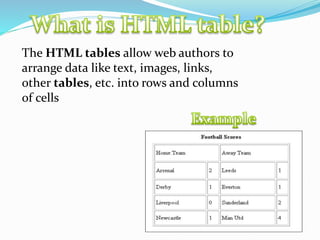
The HTML tables allow web authors to
arrange data like text, images, links,
other tables, etc. into rows and columns
of cells
The <table> tag defines an HTML table.
An HTML table consists of the <table> element
and one or more <tr>, <th>, and <td> elements.
The <tr> element defines a table row, the <th>
element defines a table header, and the <td>
element defines a table cell.
A more complex HTML table may also include
<caption>, <col>, <colgroup>, <thead>, <tfoot>,
and <tbody> elements.
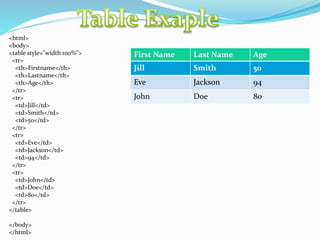
<html>
<body>
<table style="width:100%">
<tr>
<th>Firstname</th>
<th>Lastname</th>
<th>Age</th>
</tr>
<tr>
<td>Jill</td>
<td>Smith</td>
<td>50</td>
</tr>
<tr>
<td>Eve</td>
<td>Jackson</td>
<td>94</td>
</tr>
<tr>
<td>John</td>
<td>Doe</td>
<td>80</td>
</tr>
</table>
</body>
</html>
First Name Last Name Age
Jill Smith 50
Eve Jackson 94
John Doe 80
1. First advantage it is widely used.
2. Every browser supports HTML
language.
3. Easy to learn and use.
4. It is by default in every windows so you
don't need to purchase extra software
1. It can create only static and plain pages so if we
need dynamic pages then HTML
is not useful.
2. Need to write lot of code for making simple
webpage.
3. Security features are not good in HTML.
4. If we need to write long code for making a
webpage then it produces some complexit
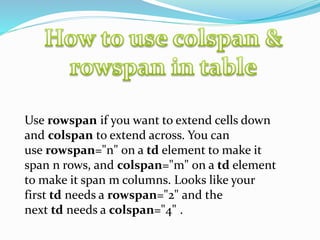
Use rowspan if you want to extend cells down
and colspan to extend across. You can
use rowspan="n" on a td element to make it
span n rows, and colspan="m" on a td element
to make it span m columns. Looks like your
first td needs a rowspan="2" and the
next td needs a colspan="4" .
Attribute Value
bgcolor rgb(x,x,x) #xxxxxx colorname
border 1 0
cellpadding pixels
cellspacing pixels
Html Table

Html Table