Chapter 1
Introduction to the
Internet and Web Design
Web Design with
HTML5 & CSS3
8th Edition
• Define the Internet and associated key terms
• Recognize Internet protocols
• Discuss web browsers and identify their main features
• Describe the types and purposes of websites
• Plan a website for a target audience
• Define a wireframe and a site map
• Explain how websites use graphics, navigation tools,
typography, and color
• Design for accessibility and multiplatform display
Chapter 1: Introduction to the Internet and Web Design 2
Chapter Objectives
• Define Hypertext Markup Language (HTML) and HTML
elements
• Recognize HTML versions and web
• Identify web authoring tools
• Download and use a web authoring tool
• Create and view a basic HTML webpage
Chapter 1: Introduction to the Internet and Web Design 3
Chapter Objectives
• The Internet is a worldwide collection of computers linked
together for use by organizations, and individuals using
communications devices and media
• A node is any device, such as a computer, tablet, or
smartphone, connected to a network
• A network is a collection of two or more computers linked
together to share resources and information
• The Internet of Things describes the ever-growing number of
devices connecting to a network, including televisions and
appliances
Chapter 1: Introduction to the Internet and Web Design 4
Exploring the Internet
• Data lines that connect networks allow data to move from
one computer to another
• The Internet backbone is a collection of high-speed data lines
that connect major computer systems located around the
world
• An Internet Service Provider (ISP) is a company that has a
permanent connection to the Internet backbone
Chapter 1: Introduction to the Internet and Web Design 5
Exploring the Internet
• The World Wide Web, also called the web, is the service that
provides access to information stored on web servers
• The web consists of a collection of linked files known as
webpages
• A website is a related collection of webpages created and
maintained by a person, company, educational institution, or
other organization
Chapter 1: Introduction to the Internet and Web Design 6
World Wide Web
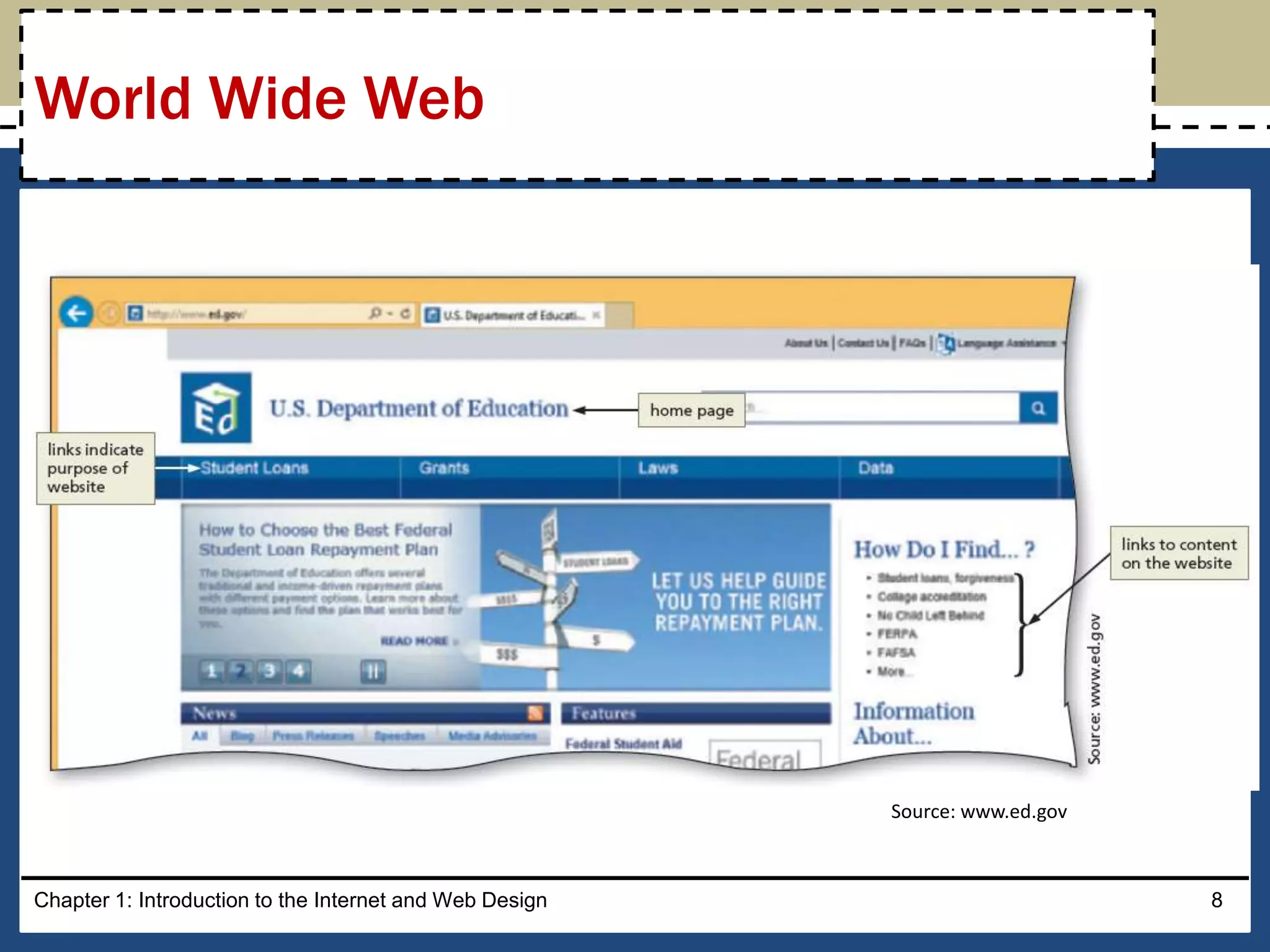
• A home page is the first document users see when they
access a website
• A hyperlink, commonly called a link, is an element that
connects one webpage to another webpage on the same
server or to any other web server in the world
Chapter 1: Introduction to HTML, XHTML, and CSS 7
World Wide Web
Chapter 1: Introduction to the Internet and Web Design 8
World Wide Web
Source: www.ed.gov
• A protocol is a set of rules that defines how a client
workstation can communicate with a server
• A server is the host computer that stores resources and files
for websites
• Hypertext Transfer Protocol (HTTP) is a set of rules for
exchanging text, graphics, audio, video, and other multimedia
files on the web
• File Transfer Protocol (FTP) is used to exchange files from one
computer to another over the Internet
– This protocol does not provide a way to view a webpage
Chapter 1: Introduction to the Internet and Web Design 9
Protocols
• Transmission Control Protocol/Internet Protocol (TCP/IP) is a
pair of protocols used to transfer data efficiently over the
Internet by properly routing it to its destination
• Internet Protocol (IP) ensures data is sent to the correct
location
• The Domain Name System (DNS) associates an IP address
with a domain name
Chapter 1: Introduction to the Internet and Web Design 10
Protocols
• A web browser is a program that interprets and displays Web
pages and enables you to view and interact with a Web page
– Microsoft Internet Explorer, Mozilla Firefox, Google Chrome,
and Apple Safari
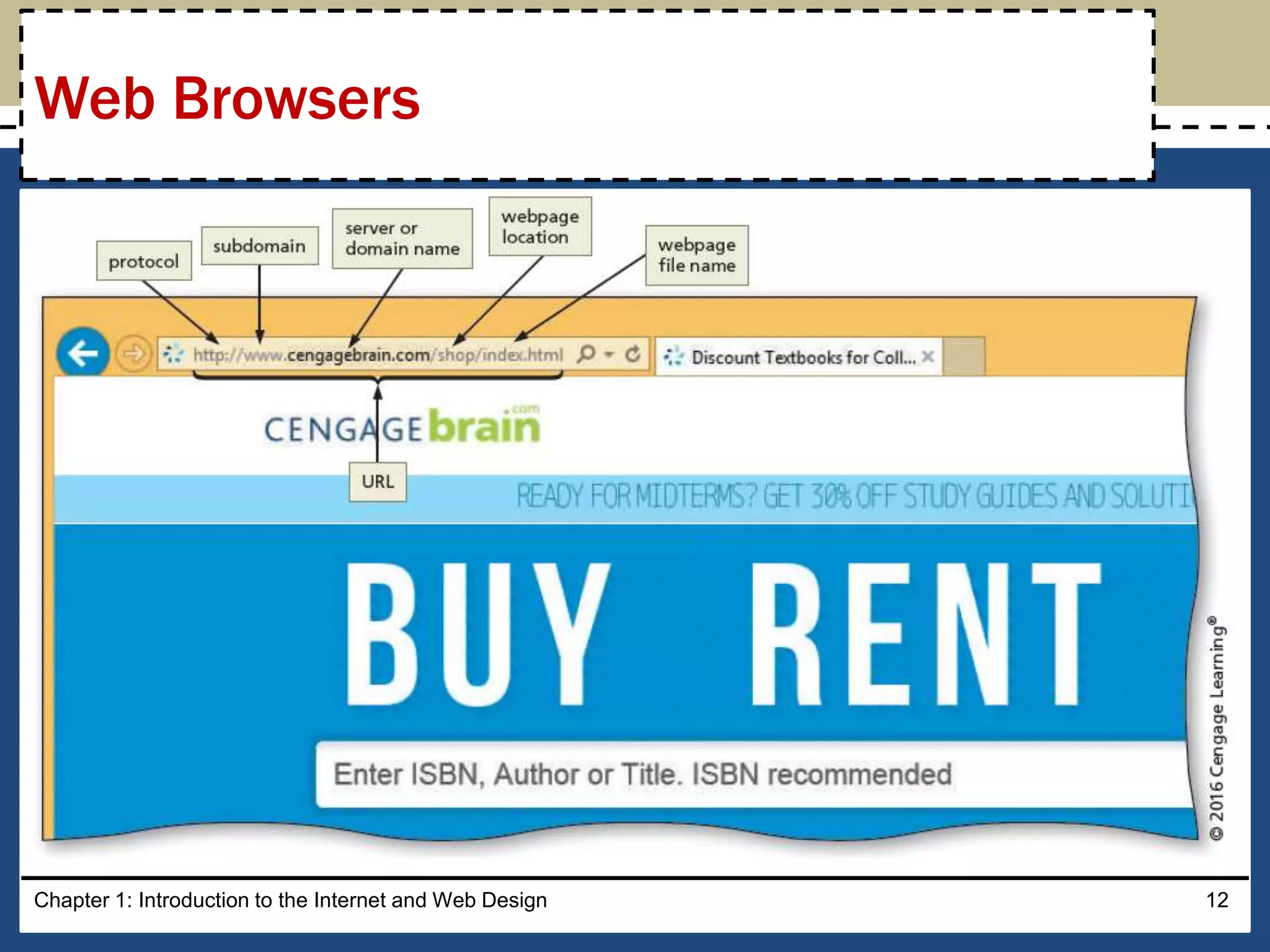
• A Uniform Resource Locator (URL) is the address of a
document or other file accessible on the Internet
– http://www.cengagebrain.com/shop/index.html
• A domain is an area of the Internet a particular organization
or person manages.
Chapter 1: Introduction to the Internet and Web Design 11
Web Browsers
Chapter 1: Introduction to the Internet and Web Design 12
Web Browsers
• An Internet site is another term for a website that is generally
available to anyone with an Internet connection
• An intranet is a private network that uses Internet
technologies to share company information among
employees
• An extranet is a private network that uses Internet
technologies to share business information with select
corporate partners or key customers
Chapter 1: Introduction to the Internet and Web Design 13
Types of Websites
• Many company websites also support electronic commerce
(e-commerce), which is the buying and selling of goods and
services on the Internet
• Educational institutions use a Learning Management System
(LMS) to simplify course management
– An LMS is a web-based software application designed to
facilitate online learning
Chapter 1: Introduction to the Internet and Web Design 14
Types of Websites
• Purpose of the website — The purpose of a commercial
business website is related to the goal of selling products or
services
• Target Audience — The people who use the website are
known as the target audience
– Knowing their general demographic background will help to
design a website appropriate for them
• Multiplatform Display —A responsive design of a website
must be created that provides an optimal viewing experience
across a range of devices
Chapter 1: Introduction to the Internet and Web Design 15
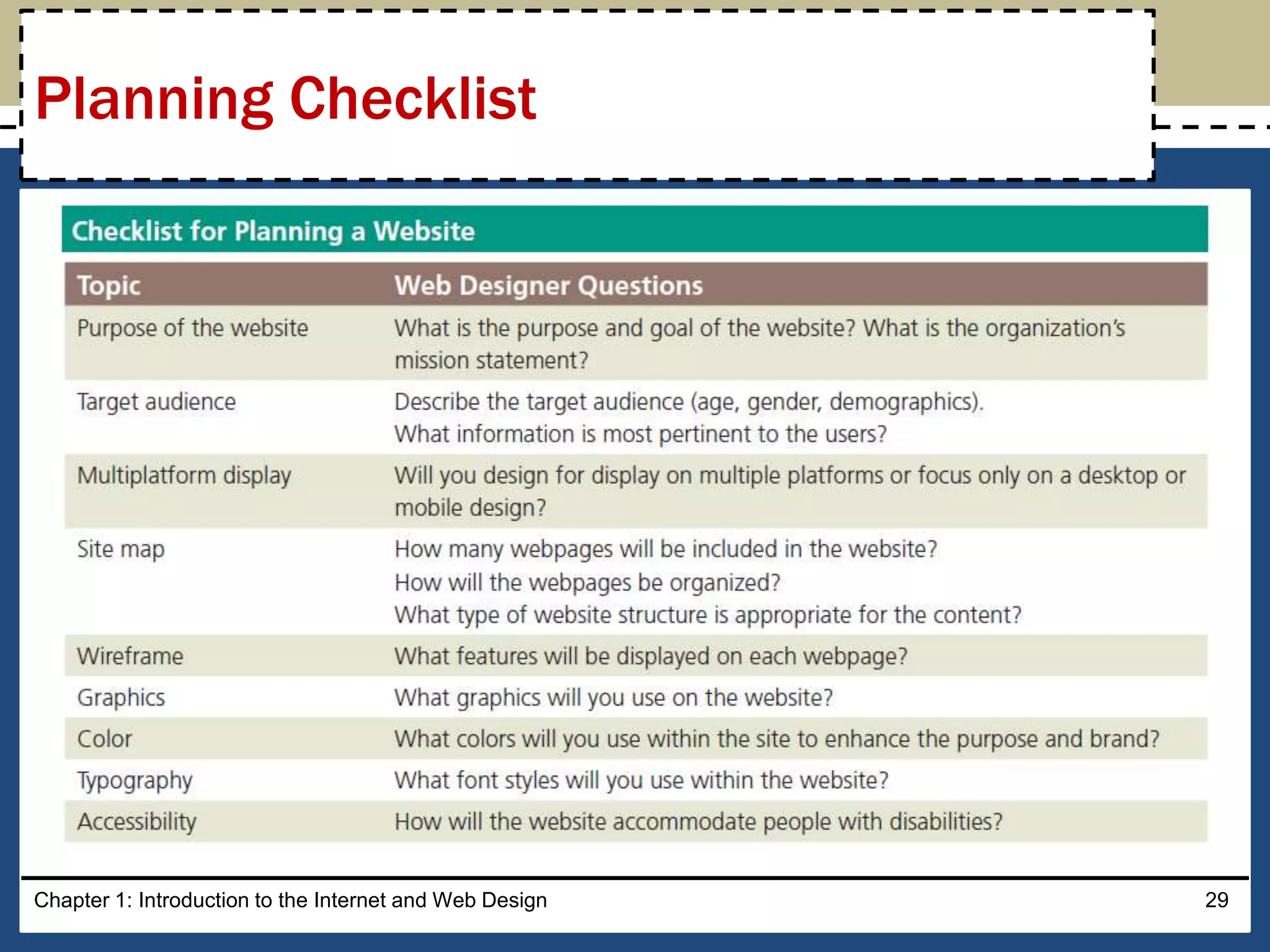
Planning a Website
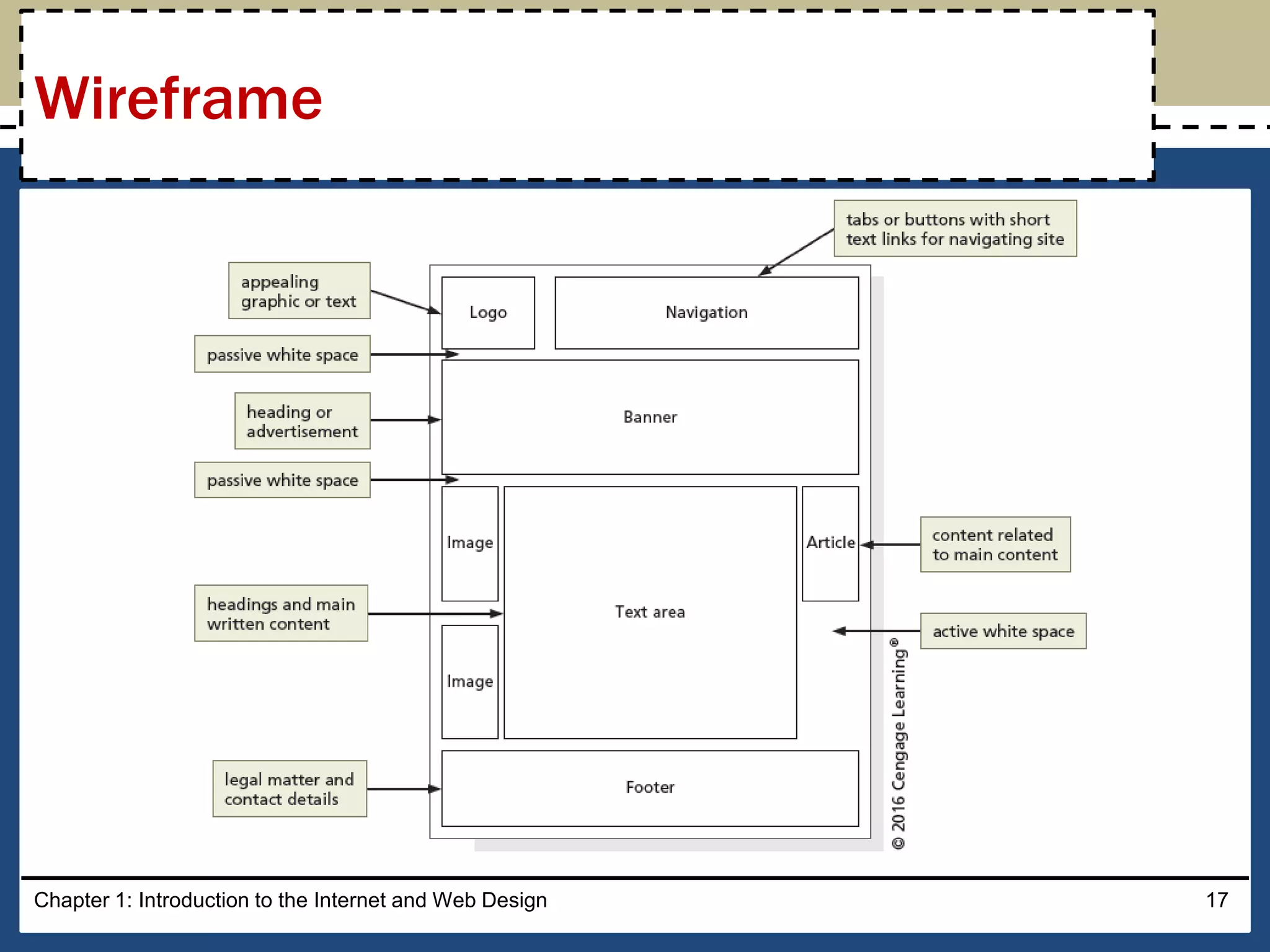
• A wireframe is a simple, visual guide that clearly identifies the
location of main webpage elements
• Active white space is an area on the page that is intentionally
left blank
• Passive white space is the space between content areas
– Helps a user focus on one part of the page
Chapter 1: Introduction to the Internet and Web Design 16
Wireframe
Chapter 1: Introduction to the Internet and Web Design 17
Wireframe
• A site map is a planning tool that lists or displays all the pages
on a website and indicates how they are related to each other
– It shows the structure of a website
Chapter 1: Introduction to the Internet and Web Design 18
Site Map
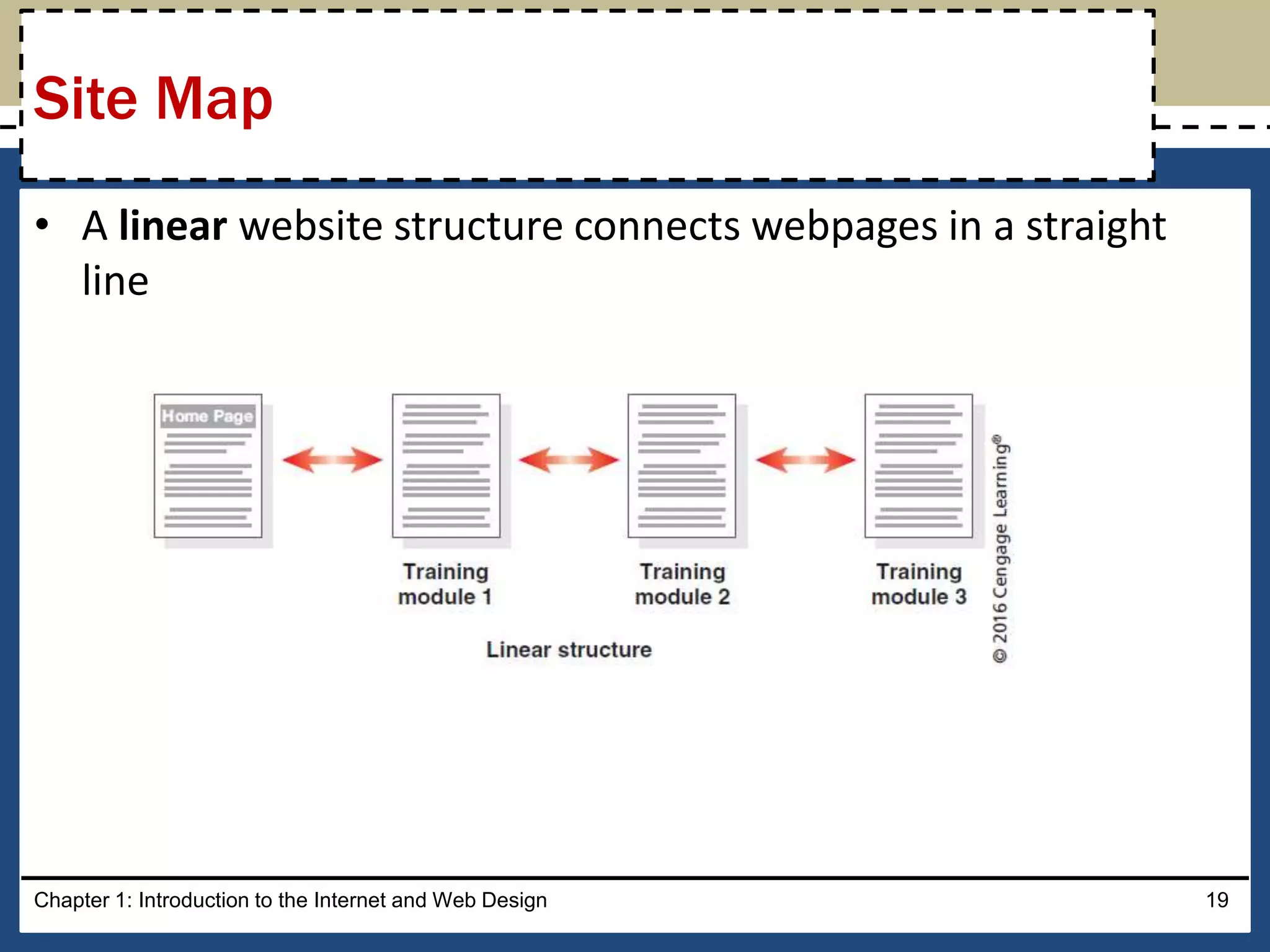
• A linear website structure connects webpages in a straight
line
Chapter 1: Introduction to the Internet and Web Design 19
Site Map
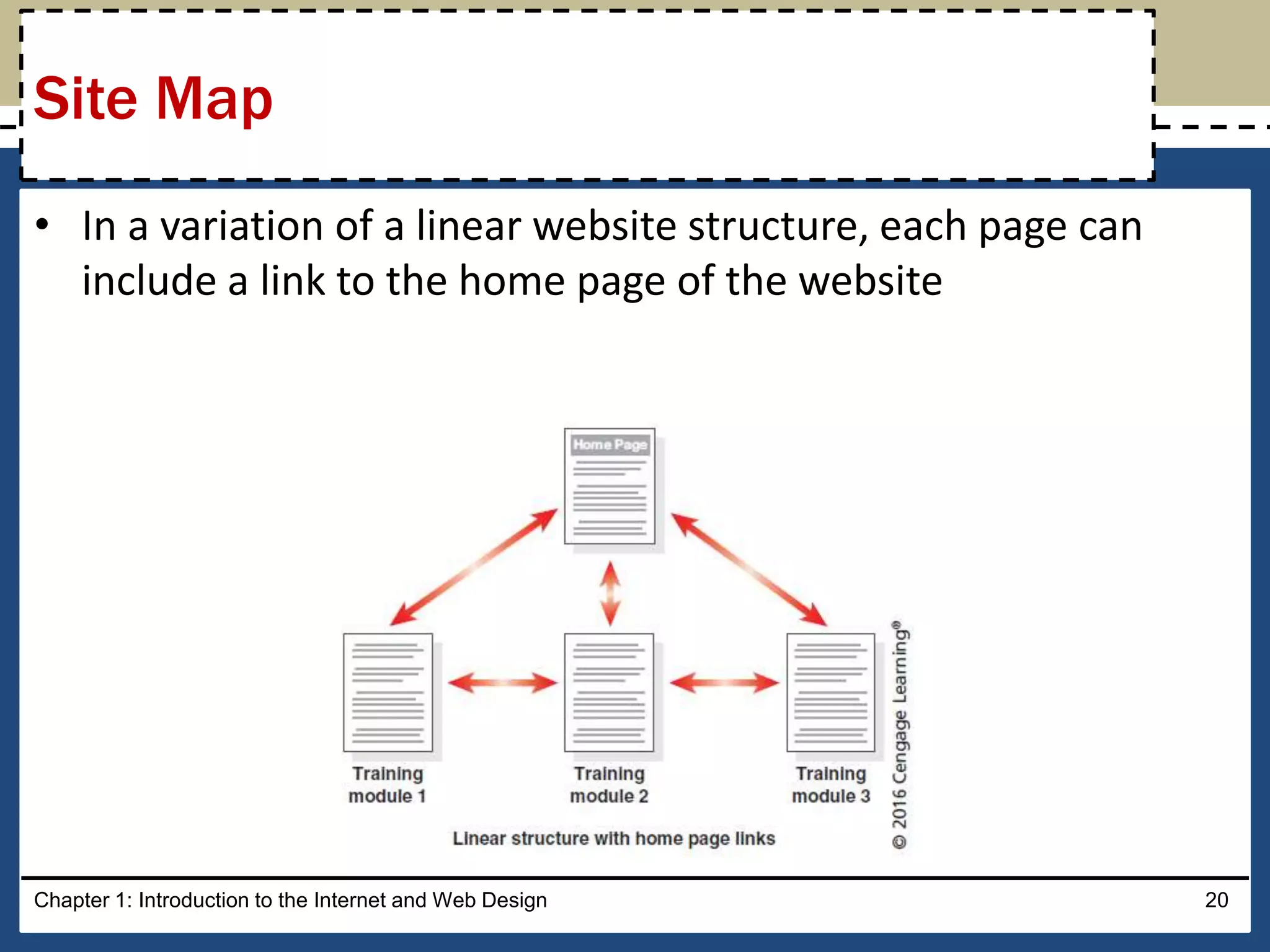
• In a variation of a linear website structure, each page can
include a link to the home page of the website
Chapter 1: Introduction to the Internet and Web Design 20
Site Map
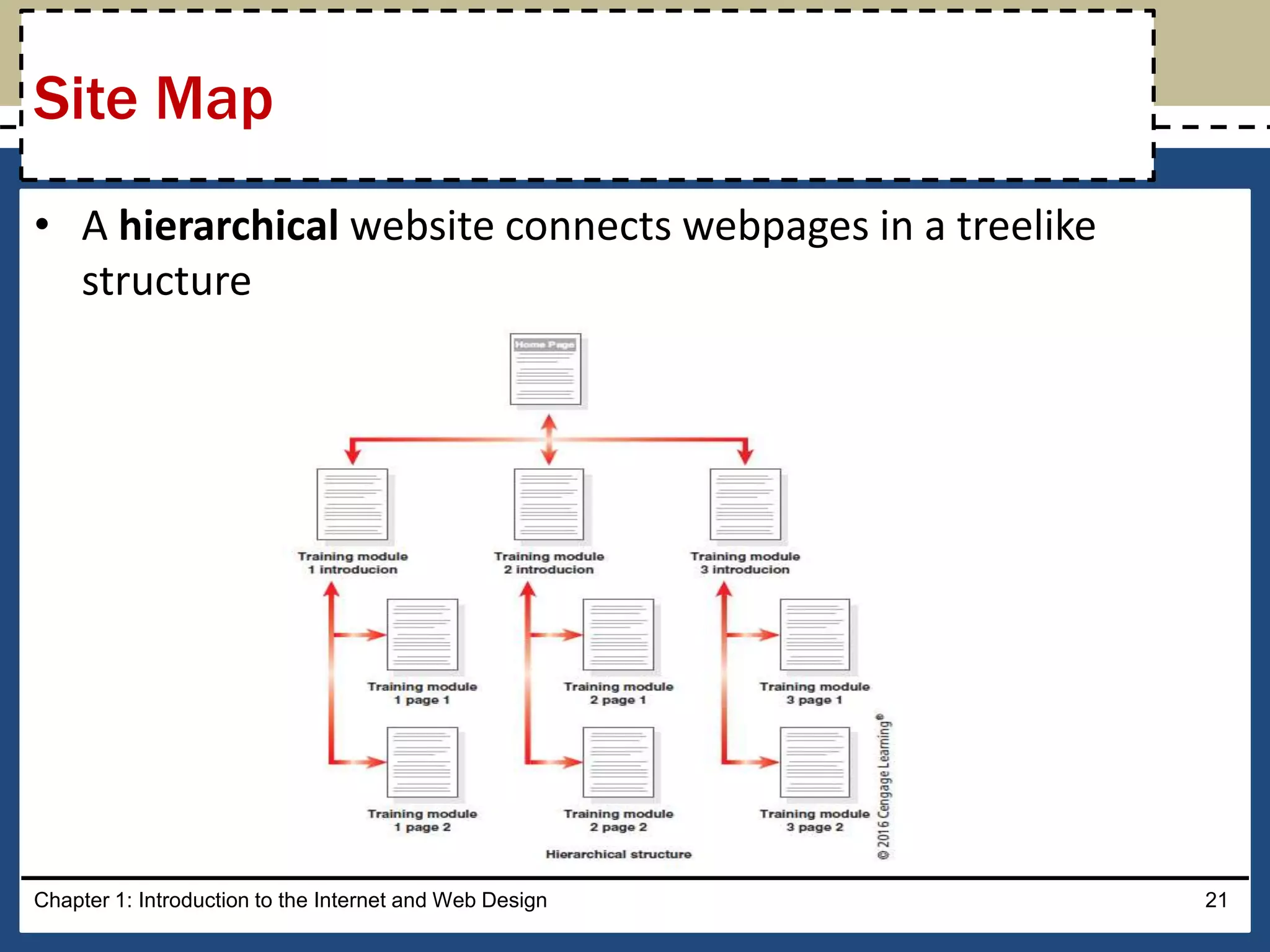
• A hierarchical website connects webpages in a treelike
structure
Chapter 1: Introduction to the Internet and Web Design 21
Site Map
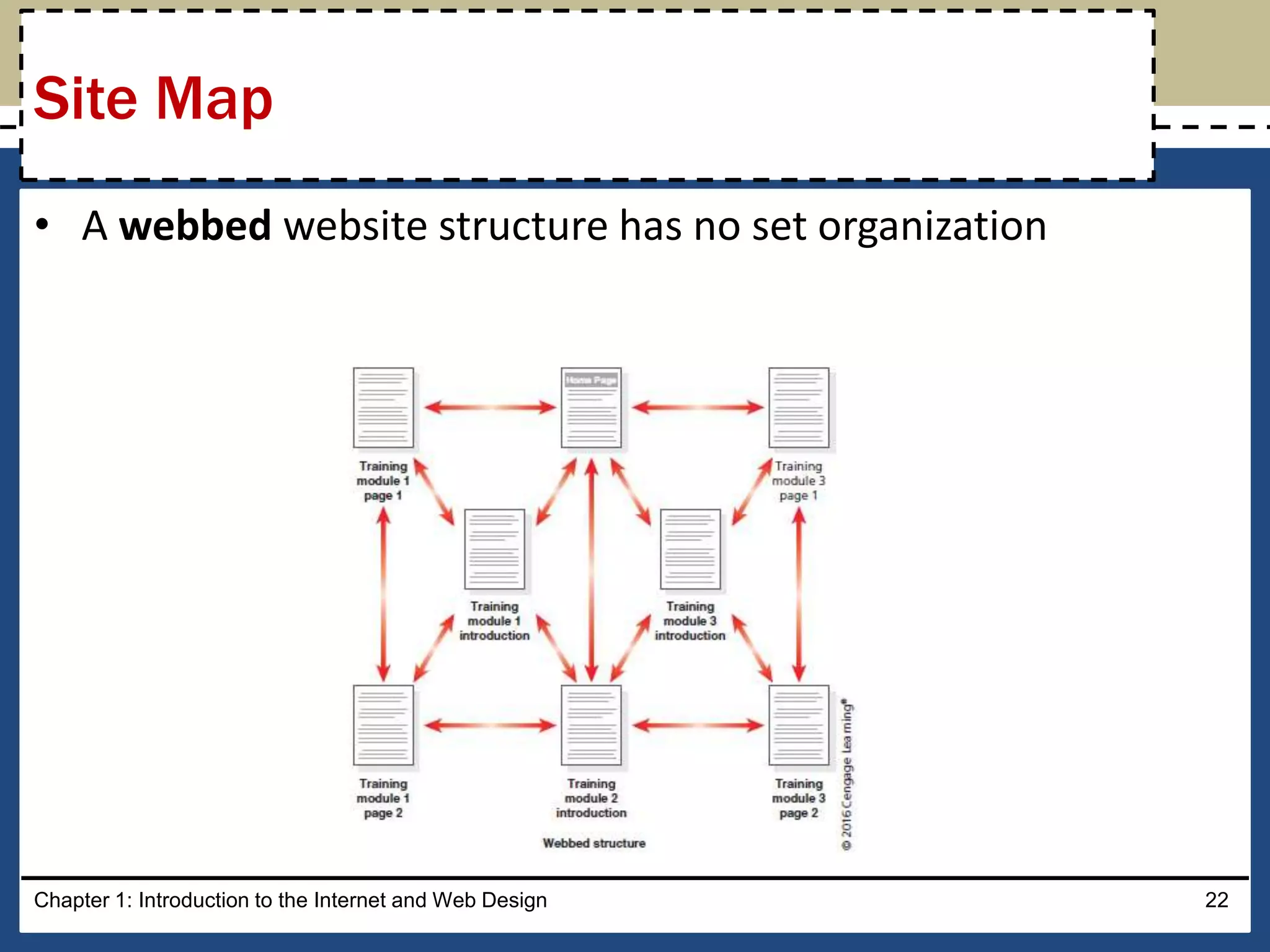
• A webbed website structure has no set organization
Chapter 1: Introduction to the Internet and Web Design 22
Site Map
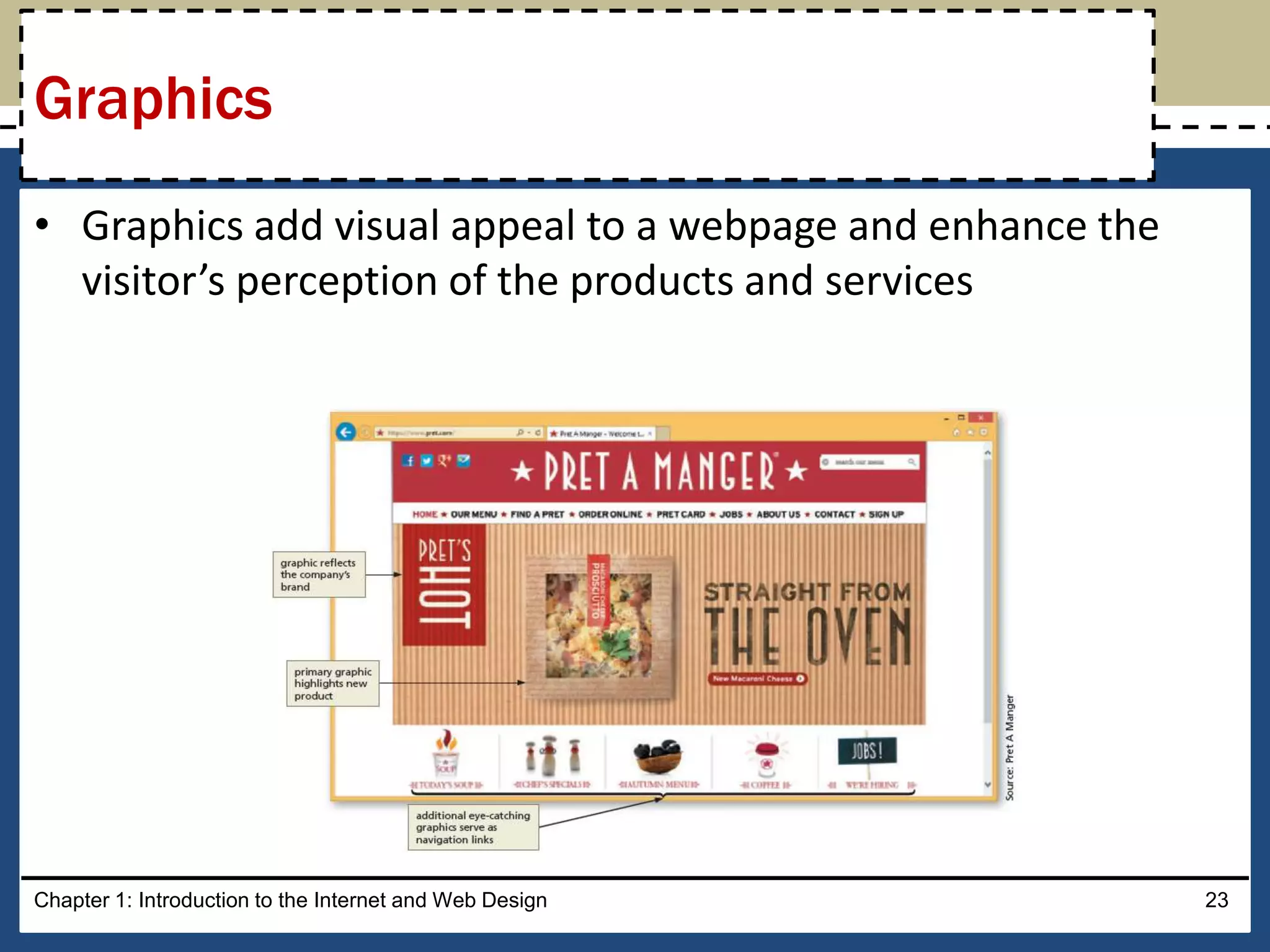
• Graphics add visual appeal to a webpage and enhance the
visitor’s perception of the products and services
Chapter 1: Introduction to the Internet and Web Design 23
Graphics
• The navigation of a website should be clear and concise
• Each webpage should have a designated navigation area with
links to other pages in the site
• The navigation area should be prominent and easy to use
Chapter 1: Introduction to the Internet and Web Design 24
Navigation
• The use of effective typography, or fonts and font styles,
enhances the visual appeal of a website
• Typography also should promote the purpose and goal of the
website
Chapter 1: Introduction to the Internet and Web Design 25
Typography
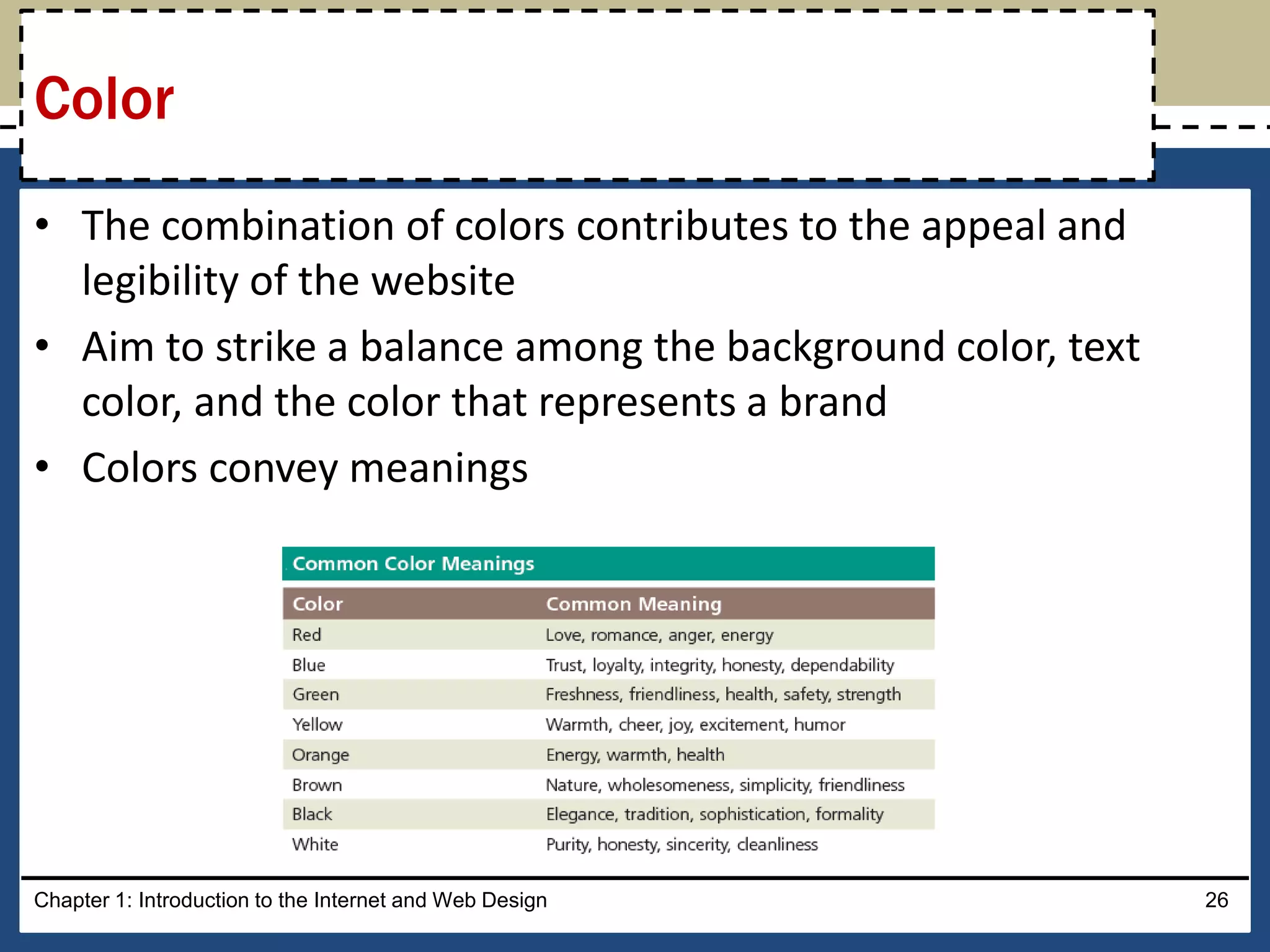
• The combination of colors contributes to the appeal and
legibility of the website
• Aim to strike a balance among the background color, text
color, and the color that represents a brand
• Colors convey meanings
Chapter 1: Introduction to the Internet and Web Design 26
Color
• A web designer should create pages for viewing by a diverse
audience, including people with physical impairments and
global users
• The World Wide Web Consortium (W3C) develops and
maintains web standards, language specifications, and
accessibility recommendations.
Chapter 1: Introduction to the Internet and Web Design 27
Accessibility
• Navigation, typography, color, and accessibility are the basic
web page design criteria to consider when developing a
website
• A sophisticated website requires additional design
considerations and research of the business, its competition,
and a complete business analysis
Chapter 1: Introduction to the Internet and Web Design 28
Planning Checklist
Chapter 1: Introduction to the Internet and Web Design 29
Planning Checklist
• Webpages are created using Hypertext Markup Language
(HTML), which is an authoring language used to create
documents for the web
• HTML consists of a set of special instructions called tags to
define the structure and layout of content in a webpage
• The HTML tags define or “mark up” the content on the
webpage, due to which it is considered a markup language
rather than a traditional programming language
Chapter 1: Introduction to the Internet and Web Design 30
Understanding the Basics of HTML
• A webpage is a text file that contains both content and HTML
tags and is saved as an HTML document
• An HTML element consists of everything from the start tag to
the end tag
• HTML elements can be enhanced by using attributes, which
define additional characteristics, or properties, of an element
Chapter 1: Introduction to the Internet and Web Design 31
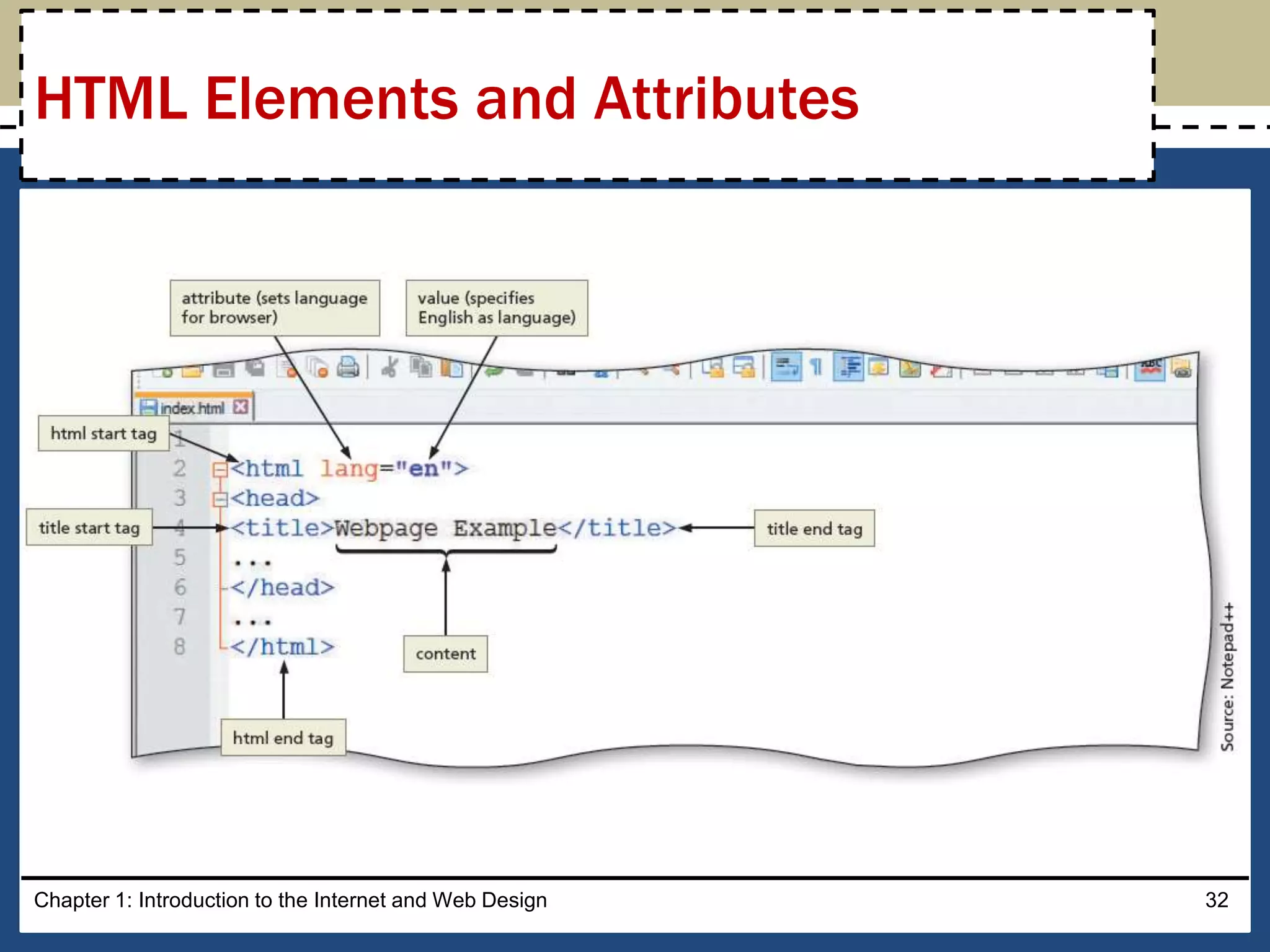
HTML Elements and Attributes
Chapter 1: Introduction to the Internet and Web Design 32
HTML Elements and Attributes
• HTML combines tags and descriptive attributes that define
how a document should appear in a web browser
• HTML elements include headings, paragraphs, hyperlinks,
lists, and images
• HTML elements have a start tag and an end tag and follow the
same rules, or syntax
Chapter 1: Introduction to the Internet and Web Design 33
HTML Elements and Attributes
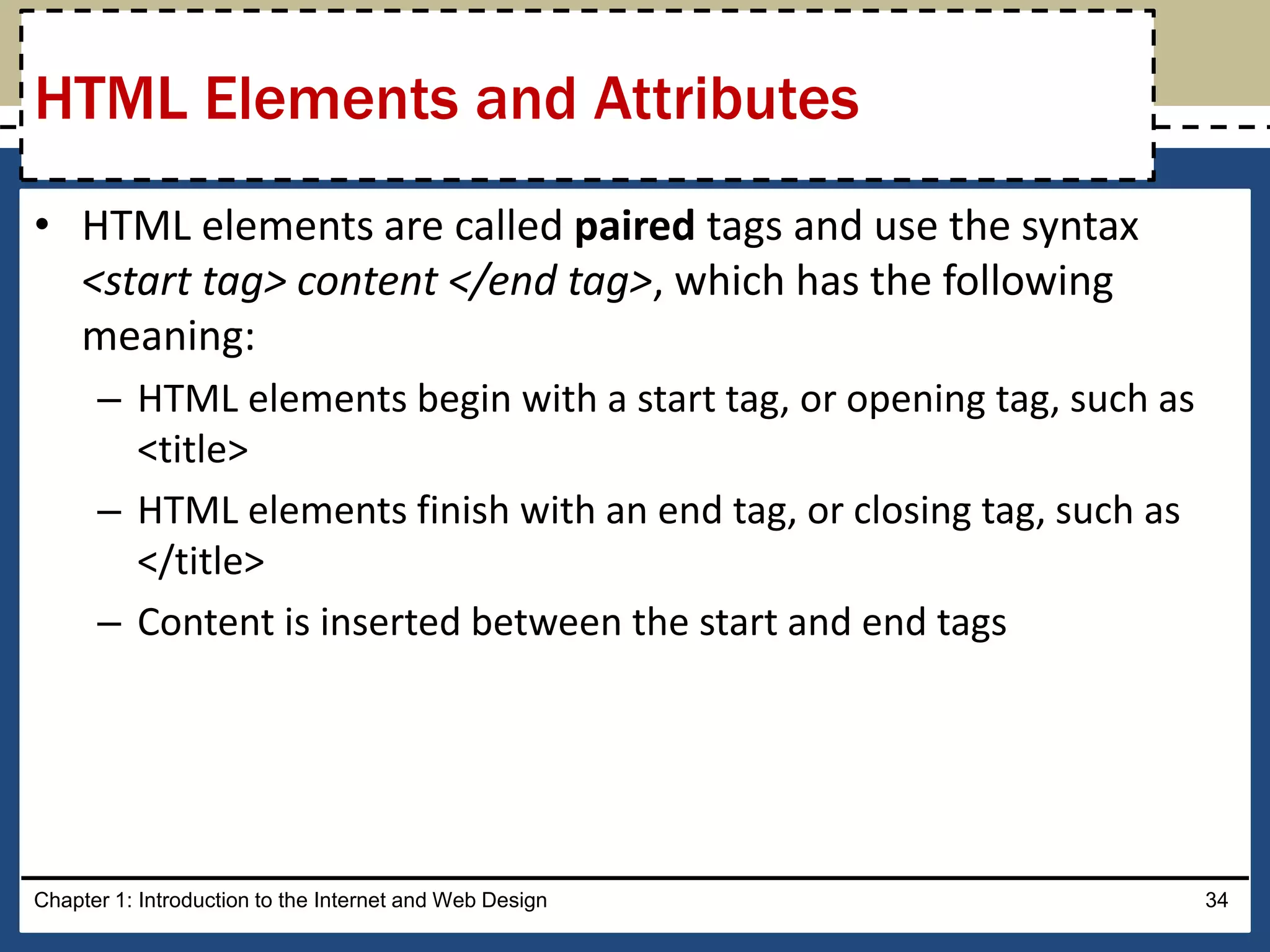
• HTML elements are called paired tags and use the syntax
<start tag> content </end tag>, which has the following
meaning:
– HTML elements begin with a start tag, or opening tag, such as
<title>
– HTML elements finish with an end tag, or closing tag, such as
</title>
– Content is inserted between the start and end tags
Chapter 1: Introduction to the Internet and Web Design 34
HTML Elements and Attributes
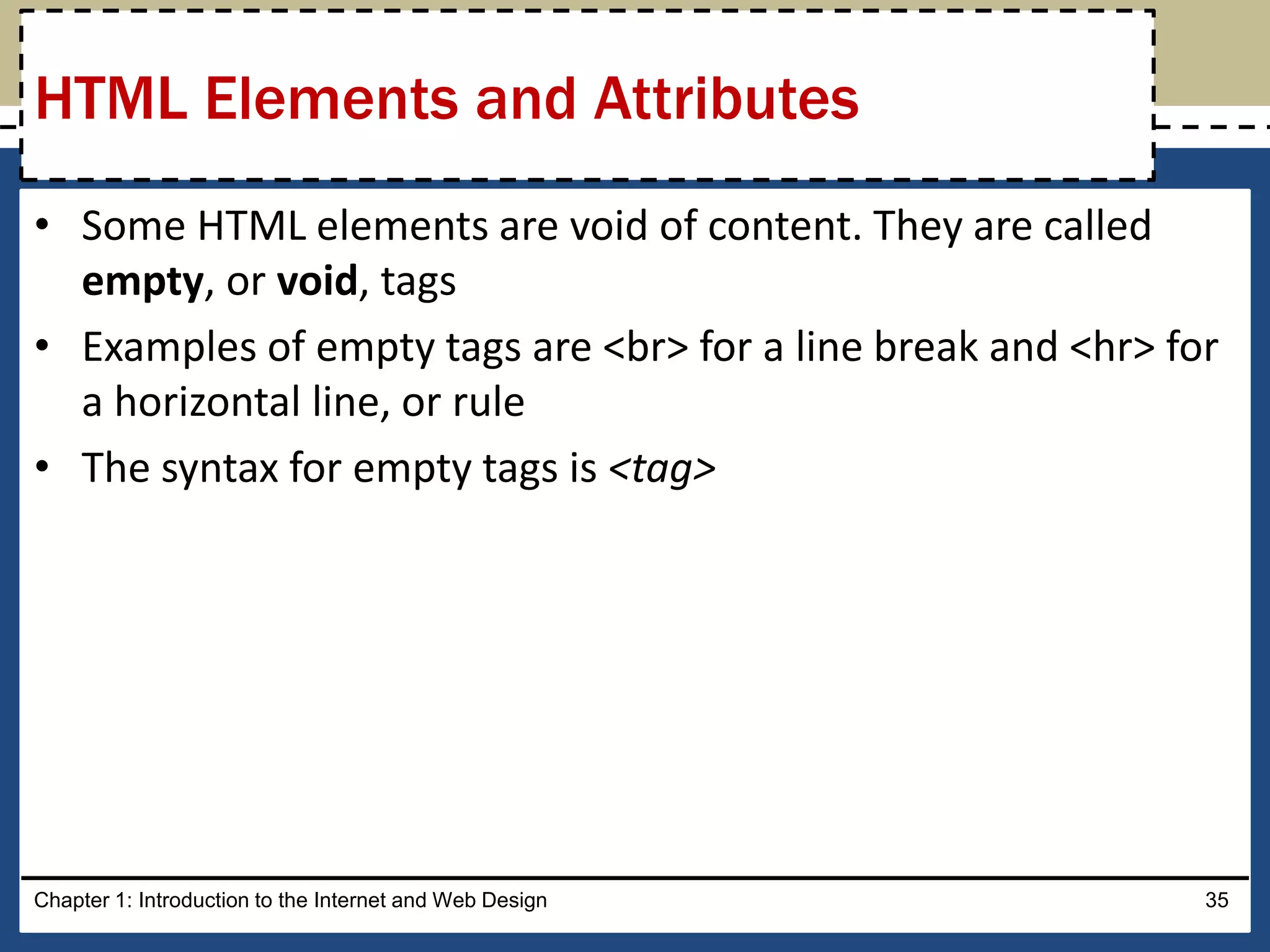
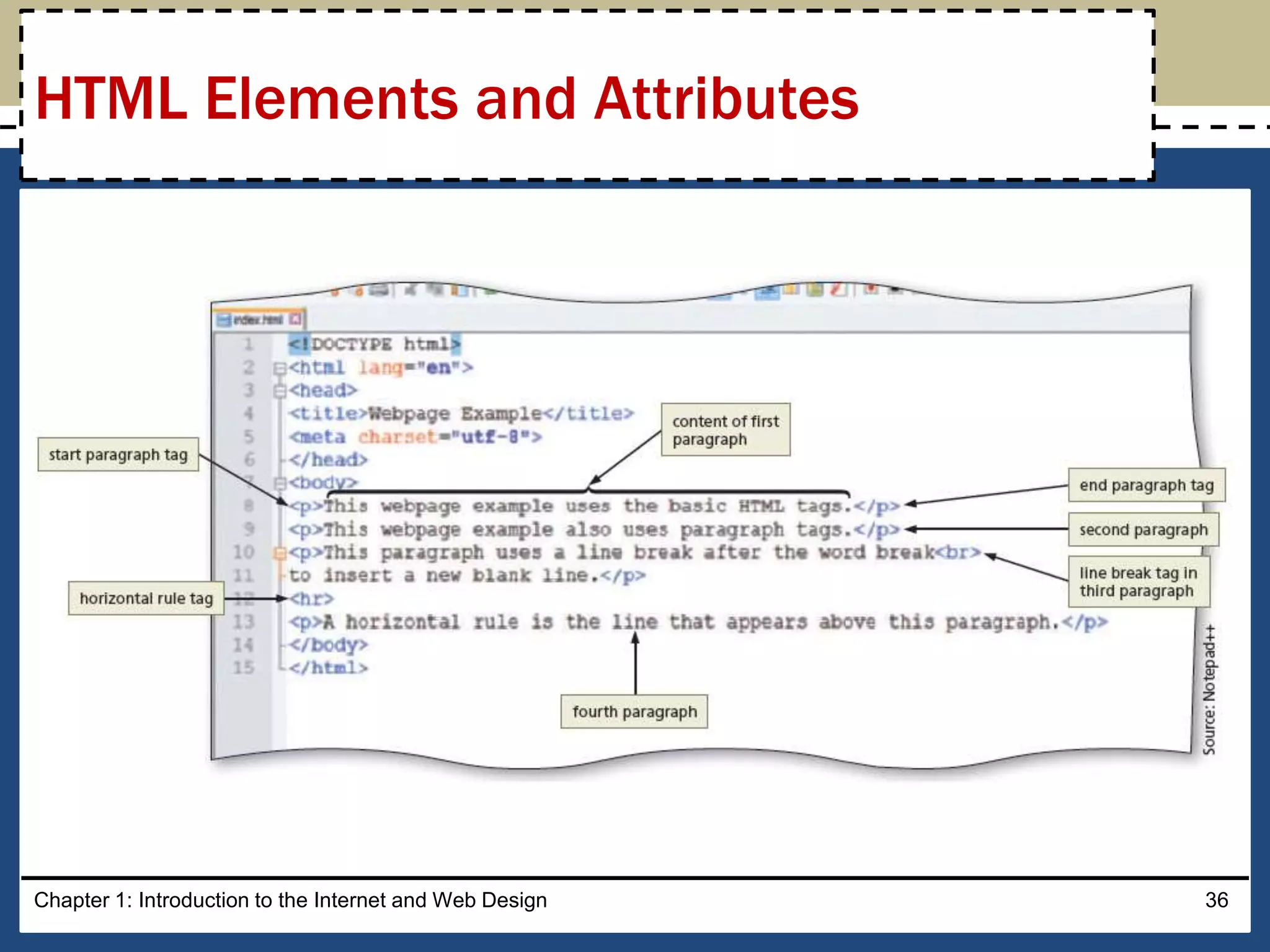
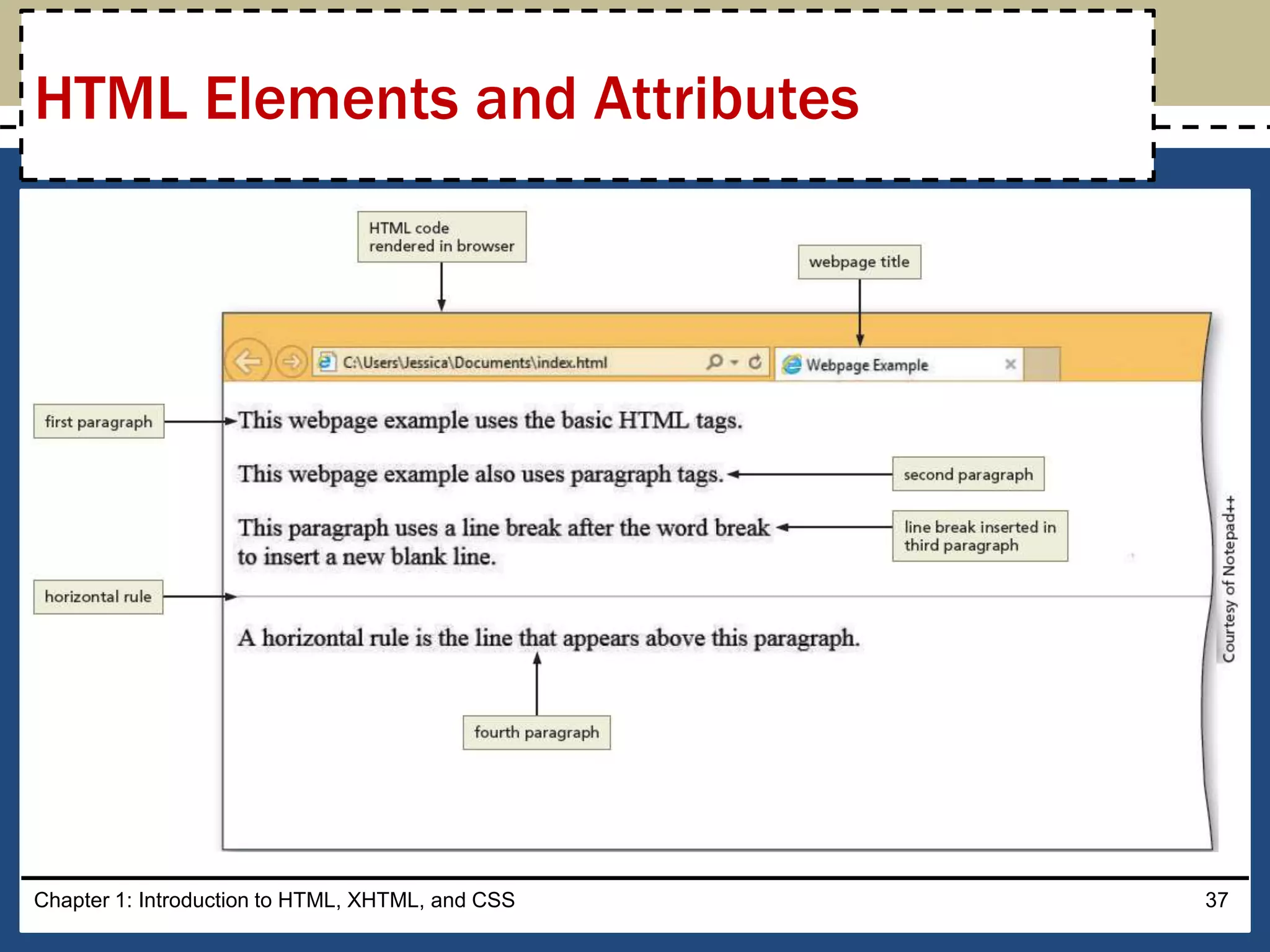
• Some HTML elements are void of content. They are called
empty, or void, tags
• Examples of empty tags are <br> for a line break and <hr> for
a horizontal line, or rule
• The syntax for empty tags is <tag>
Chapter 1: Introduction to the Internet and Web Design 35
HTML Elements and Attributes
Chapter 1: Introduction to the Internet and Web Design 36
HTML Elements and Attributes
Chapter 1: Introduction to HTML, XHTML, and CSS 37
HTML Elements and Attributes
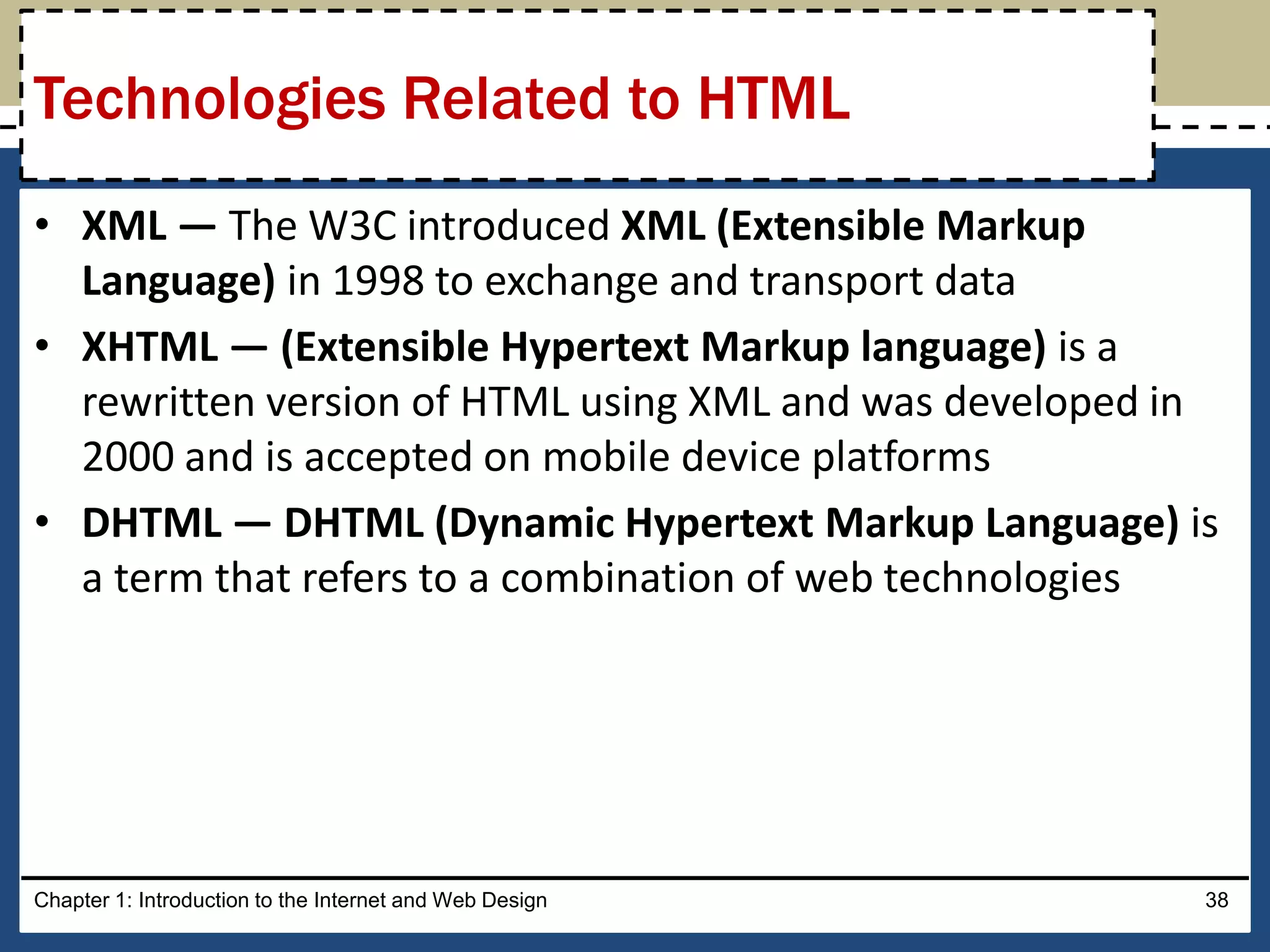
• XML — The W3C introduced XML (Extensible Markup
Language) in 1998 to exchange and transport data
• XHTML — (Extensible Hypertext Markup language) is a
rewritten version of HTML using XML and was developed in
2000 and is accepted on mobile device platforms
• DHTML — DHTML (Dynamic Hypertext Markup Language) is
a term that refers to a combination of web technologies
Chapter 1: Introduction to the Internet and Web Design 38
Technologies Related to HTML
• It is the most recent version of HTML
• It introduces several new elements such as header, nav, main,
and footer to better define the areas of a webpage
• They are known as semantic HTML elements because they
provide meaning about the content of the tags
• It provides a more flexible approach to web development
Chapter 1: Introduction to the Internet and Web Design 39
HTML5
• JavaScript — It is a popular client-side scripting language
used to create interactivity within a web browser
– The web pages that contain JavaScript are named with an .htm
or .html extension
• jQuery — It is a library of JavaScript programs designed for
easy integration onto a webpage
– It makes it easy for web developers to add JavaScript to a
webpage
Chapter 1: Introduction to the Internet and Web Design 40
Understanding the Role of Other Web
Programming Languages
• PHP (Hypertext Preprocessor) — It is an open-source server-
side scripting language used for common tasks such as
writing to or querying a database located on a central server
– Pages that contain PHP scripts must have file names that end
with the file extension .php
• ASP (Active Server Pages) — is a server-side scripting
technology
– Pages that contain ASP scripts must have file names that end
with the file extension .asp
Chapter 1: Introduction to HTML, XHTML, and CSS 41
Understanding the Role of Other Web
Programming Languages
• Webpages can be created using HTML with a simple text
editor, such as Notepad, Notepad++, Sublime, Programmer’s
Notepad, TextEdit, and TextWrangler
• A text editor is a program that allows one to enter, change,
save, and print text, which includes HTML tags
• An HTML editor is a program that provides basic text-editing
functions, and advanced features such as color-coding for
various HTML tags, menus to insert HTML tags, and a spelling
checker
• HTML is platform independent
Chapter 1: Introduction to the Internet and Web Design 42
Using Web Authoring Tools
• Notepad++ is a free, open-source text editor. It is used to
create files in several markup, scripting, and programming
languages, including HTML, CSS, JavaScript, PHP, Java, C#, and
Visual Basic
• Programmer’s Notepad is a free, open-source text editor
used to create webpages, and files in several markup,
scripting, and programming languages as well
• Sublime is a cross-platform text editor
• TextWrangler is a free, open-source text editor. It is used to
create files in many formats, including HTML and CSS
Chapter 1: Introduction to the Internet and Web Design 43
Text Editors
• WYSIWYG Editors – Stands for What You See Is What You Get
– These editors provide a graphical user interface to design a
webpage
– It allows to drag HTML elements onto the page while the editor
writes the code
• Adobe Dreamweaver is a popular WYSIWYG editor
• Microsoft Expression Web 4 is a WYSIWYG webpage editor
from Microsoft
Chapter 1: Introduction to the Internet and Web Design 44
Text Editors
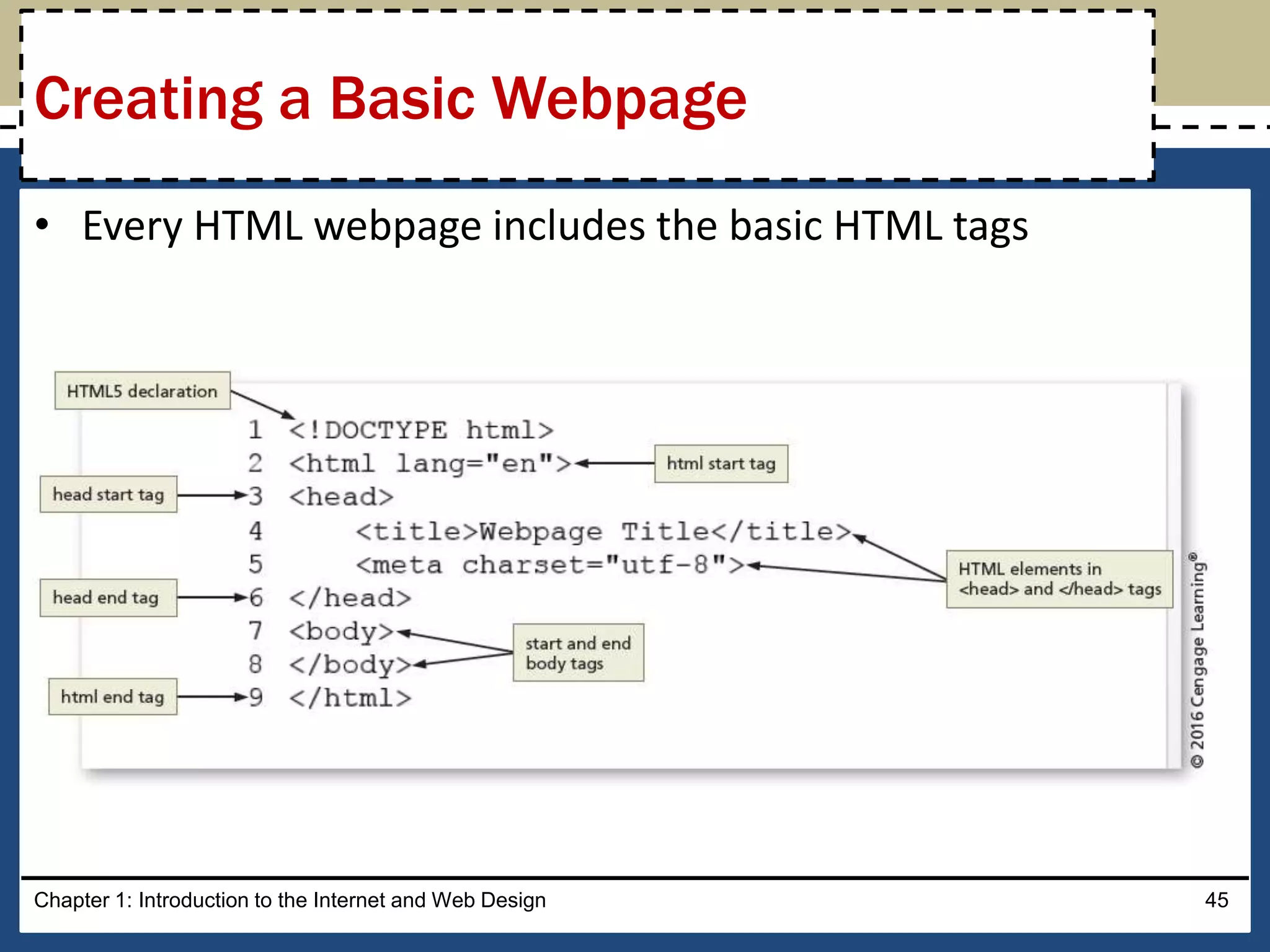
• Every HTML webpage includes the basic HTML tags
Chapter 1: Introduction to the Internet and Web Design 45
Creating a Basic Webpage
Chapter 1 Complete
HTML
8th Edition

HTML: Chapter 01

  • 1.
    Chapter 1 Introduction tothe Internet and Web Design Web Design with HTML5 & CSS3 8th Edition
  • 2.
    • Define theInternet and associated key terms • Recognize Internet protocols • Discuss web browsers and identify their main features • Describe the types and purposes of websites • Plan a website for a target audience • Define a wireframe and a site map • Explain how websites use graphics, navigation tools, typography, and color • Design for accessibility and multiplatform display Chapter 1: Introduction to the Internet and Web Design 2 Chapter Objectives
  • 3.
    • Define HypertextMarkup Language (HTML) and HTML elements • Recognize HTML versions and web • Identify web authoring tools • Download and use a web authoring tool • Create and view a basic HTML webpage Chapter 1: Introduction to the Internet and Web Design 3 Chapter Objectives
  • 4.
    • The Internetis a worldwide collection of computers linked together for use by organizations, and individuals using communications devices and media • A node is any device, such as a computer, tablet, or smartphone, connected to a network • A network is a collection of two or more computers linked together to share resources and information • The Internet of Things describes the ever-growing number of devices connecting to a network, including televisions and appliances Chapter 1: Introduction to the Internet and Web Design 4 Exploring the Internet
  • 5.
    • Data linesthat connect networks allow data to move from one computer to another • The Internet backbone is a collection of high-speed data lines that connect major computer systems located around the world • An Internet Service Provider (ISP) is a company that has a permanent connection to the Internet backbone Chapter 1: Introduction to the Internet and Web Design 5 Exploring the Internet
  • 6.
    • The WorldWide Web, also called the web, is the service that provides access to information stored on web servers • The web consists of a collection of linked files known as webpages • A website is a related collection of webpages created and maintained by a person, company, educational institution, or other organization Chapter 1: Introduction to the Internet and Web Design 6 World Wide Web
  • 7.
    • A homepage is the first document users see when they access a website • A hyperlink, commonly called a link, is an element that connects one webpage to another webpage on the same server or to any other web server in the world Chapter 1: Introduction to HTML, XHTML, and CSS 7 World Wide Web
  • 8.
    Chapter 1: Introductionto the Internet and Web Design 8 World Wide Web Source: www.ed.gov
  • 9.
    • A protocolis a set of rules that defines how a client workstation can communicate with a server • A server is the host computer that stores resources and files for websites • Hypertext Transfer Protocol (HTTP) is a set of rules for exchanging text, graphics, audio, video, and other multimedia files on the web • File Transfer Protocol (FTP) is used to exchange files from one computer to another over the Internet – This protocol does not provide a way to view a webpage Chapter 1: Introduction to the Internet and Web Design 9 Protocols
  • 10.
    • Transmission ControlProtocol/Internet Protocol (TCP/IP) is a pair of protocols used to transfer data efficiently over the Internet by properly routing it to its destination • Internet Protocol (IP) ensures data is sent to the correct location • The Domain Name System (DNS) associates an IP address with a domain name Chapter 1: Introduction to the Internet and Web Design 10 Protocols
  • 11.
    • A webbrowser is a program that interprets and displays Web pages and enables you to view and interact with a Web page – Microsoft Internet Explorer, Mozilla Firefox, Google Chrome, and Apple Safari • A Uniform Resource Locator (URL) is the address of a document or other file accessible on the Internet – http://www.cengagebrain.com/shop/index.html • A domain is an area of the Internet a particular organization or person manages. Chapter 1: Introduction to the Internet and Web Design 11 Web Browsers
  • 12.
    Chapter 1: Introductionto the Internet and Web Design 12 Web Browsers
  • 13.
    • An Internetsite is another term for a website that is generally available to anyone with an Internet connection • An intranet is a private network that uses Internet technologies to share company information among employees • An extranet is a private network that uses Internet technologies to share business information with select corporate partners or key customers Chapter 1: Introduction to the Internet and Web Design 13 Types of Websites
  • 14.
    • Many companywebsites also support electronic commerce (e-commerce), which is the buying and selling of goods and services on the Internet • Educational institutions use a Learning Management System (LMS) to simplify course management – An LMS is a web-based software application designed to facilitate online learning Chapter 1: Introduction to the Internet and Web Design 14 Types of Websites
  • 15.
    • Purpose ofthe website — The purpose of a commercial business website is related to the goal of selling products or services • Target Audience — The people who use the website are known as the target audience – Knowing their general demographic background will help to design a website appropriate for them • Multiplatform Display —A responsive design of a website must be created that provides an optimal viewing experience across a range of devices Chapter 1: Introduction to the Internet and Web Design 15 Planning a Website
  • 16.
    • A wireframeis a simple, visual guide that clearly identifies the location of main webpage elements • Active white space is an area on the page that is intentionally left blank • Passive white space is the space between content areas – Helps a user focus on one part of the page Chapter 1: Introduction to the Internet and Web Design 16 Wireframe
  • 17.
    Chapter 1: Introductionto the Internet and Web Design 17 Wireframe
  • 18.
    • A sitemap is a planning tool that lists or displays all the pages on a website and indicates how they are related to each other – It shows the structure of a website Chapter 1: Introduction to the Internet and Web Design 18 Site Map
  • 19.
    • A linearwebsite structure connects webpages in a straight line Chapter 1: Introduction to the Internet and Web Design 19 Site Map
  • 20.
    • In avariation of a linear website structure, each page can include a link to the home page of the website Chapter 1: Introduction to the Internet and Web Design 20 Site Map
  • 21.
    • A hierarchicalwebsite connects webpages in a treelike structure Chapter 1: Introduction to the Internet and Web Design 21 Site Map
  • 22.
    • A webbedwebsite structure has no set organization Chapter 1: Introduction to the Internet and Web Design 22 Site Map
  • 23.
    • Graphics addvisual appeal to a webpage and enhance the visitor’s perception of the products and services Chapter 1: Introduction to the Internet and Web Design 23 Graphics
  • 24.
    • The navigationof a website should be clear and concise • Each webpage should have a designated navigation area with links to other pages in the site • The navigation area should be prominent and easy to use Chapter 1: Introduction to the Internet and Web Design 24 Navigation
  • 25.
    • The useof effective typography, or fonts and font styles, enhances the visual appeal of a website • Typography also should promote the purpose and goal of the website Chapter 1: Introduction to the Internet and Web Design 25 Typography
  • 26.
    • The combinationof colors contributes to the appeal and legibility of the website • Aim to strike a balance among the background color, text color, and the color that represents a brand • Colors convey meanings Chapter 1: Introduction to the Internet and Web Design 26 Color
  • 27.
    • A webdesigner should create pages for viewing by a diverse audience, including people with physical impairments and global users • The World Wide Web Consortium (W3C) develops and maintains web standards, language specifications, and accessibility recommendations. Chapter 1: Introduction to the Internet and Web Design 27 Accessibility
  • 28.
    • Navigation, typography,color, and accessibility are the basic web page design criteria to consider when developing a website • A sophisticated website requires additional design considerations and research of the business, its competition, and a complete business analysis Chapter 1: Introduction to the Internet and Web Design 28 Planning Checklist
  • 29.
    Chapter 1: Introductionto the Internet and Web Design 29 Planning Checklist
  • 30.
    • Webpages arecreated using Hypertext Markup Language (HTML), which is an authoring language used to create documents for the web • HTML consists of a set of special instructions called tags to define the structure and layout of content in a webpage • The HTML tags define or “mark up” the content on the webpage, due to which it is considered a markup language rather than a traditional programming language Chapter 1: Introduction to the Internet and Web Design 30 Understanding the Basics of HTML
  • 31.
    • A webpageis a text file that contains both content and HTML tags and is saved as an HTML document • An HTML element consists of everything from the start tag to the end tag • HTML elements can be enhanced by using attributes, which define additional characteristics, or properties, of an element Chapter 1: Introduction to the Internet and Web Design 31 HTML Elements and Attributes
  • 32.
    Chapter 1: Introductionto the Internet and Web Design 32 HTML Elements and Attributes
  • 33.
    • HTML combinestags and descriptive attributes that define how a document should appear in a web browser • HTML elements include headings, paragraphs, hyperlinks, lists, and images • HTML elements have a start tag and an end tag and follow the same rules, or syntax Chapter 1: Introduction to the Internet and Web Design 33 HTML Elements and Attributes
  • 34.
    • HTML elementsare called paired tags and use the syntax <start tag> content </end tag>, which has the following meaning: – HTML elements begin with a start tag, or opening tag, such as <title> – HTML elements finish with an end tag, or closing tag, such as </title> – Content is inserted between the start and end tags Chapter 1: Introduction to the Internet and Web Design 34 HTML Elements and Attributes
  • 35.
    • Some HTMLelements are void of content. They are called empty, or void, tags • Examples of empty tags are <br> for a line break and <hr> for a horizontal line, or rule • The syntax for empty tags is <tag> Chapter 1: Introduction to the Internet and Web Design 35 HTML Elements and Attributes
  • 36.
    Chapter 1: Introductionto the Internet and Web Design 36 HTML Elements and Attributes
  • 37.
    Chapter 1: Introductionto HTML, XHTML, and CSS 37 HTML Elements and Attributes
  • 38.
    • XML —The W3C introduced XML (Extensible Markup Language) in 1998 to exchange and transport data • XHTML — (Extensible Hypertext Markup language) is a rewritten version of HTML using XML and was developed in 2000 and is accepted on mobile device platforms • DHTML — DHTML (Dynamic Hypertext Markup Language) is a term that refers to a combination of web technologies Chapter 1: Introduction to the Internet and Web Design 38 Technologies Related to HTML
  • 39.
    • It isthe most recent version of HTML • It introduces several new elements such as header, nav, main, and footer to better define the areas of a webpage • They are known as semantic HTML elements because they provide meaning about the content of the tags • It provides a more flexible approach to web development Chapter 1: Introduction to the Internet and Web Design 39 HTML5
  • 40.
    • JavaScript —It is a popular client-side scripting language used to create interactivity within a web browser – The web pages that contain JavaScript are named with an .htm or .html extension • jQuery — It is a library of JavaScript programs designed for easy integration onto a webpage – It makes it easy for web developers to add JavaScript to a webpage Chapter 1: Introduction to the Internet and Web Design 40 Understanding the Role of Other Web Programming Languages
  • 41.
    • PHP (HypertextPreprocessor) — It is an open-source server- side scripting language used for common tasks such as writing to or querying a database located on a central server – Pages that contain PHP scripts must have file names that end with the file extension .php • ASP (Active Server Pages) — is a server-side scripting technology – Pages that contain ASP scripts must have file names that end with the file extension .asp Chapter 1: Introduction to HTML, XHTML, and CSS 41 Understanding the Role of Other Web Programming Languages
  • 42.
    • Webpages canbe created using HTML with a simple text editor, such as Notepad, Notepad++, Sublime, Programmer’s Notepad, TextEdit, and TextWrangler • A text editor is a program that allows one to enter, change, save, and print text, which includes HTML tags • An HTML editor is a program that provides basic text-editing functions, and advanced features such as color-coding for various HTML tags, menus to insert HTML tags, and a spelling checker • HTML is platform independent Chapter 1: Introduction to the Internet and Web Design 42 Using Web Authoring Tools
  • 43.
    • Notepad++ isa free, open-source text editor. It is used to create files in several markup, scripting, and programming languages, including HTML, CSS, JavaScript, PHP, Java, C#, and Visual Basic • Programmer’s Notepad is a free, open-source text editor used to create webpages, and files in several markup, scripting, and programming languages as well • Sublime is a cross-platform text editor • TextWrangler is a free, open-source text editor. It is used to create files in many formats, including HTML and CSS Chapter 1: Introduction to the Internet and Web Design 43 Text Editors
  • 44.
    • WYSIWYG Editors– Stands for What You See Is What You Get – These editors provide a graphical user interface to design a webpage – It allows to drag HTML elements onto the page while the editor writes the code • Adobe Dreamweaver is a popular WYSIWYG editor • Microsoft Expression Web 4 is a WYSIWYG webpage editor from Microsoft Chapter 1: Introduction to the Internet and Web Design 44 Text Editors
  • 45.
    • Every HTMLwebpage includes the basic HTML tags Chapter 1: Introduction to the Internet and Web Design 45 Creating a Basic Webpage
  • 46.