2
HOW THE WEB WORKS
OVERVIEW
• The internet vs. the web
• History of the web
• What servers do
• What browsers do
• URLs
• How web pages are constructed
Internet vs. Web
internet
International network of connected computers
protocol
A standardized method for transferring data or documents over a
network (for example, FTP, STMP, HTTP)
web
Information shared over the internet using the Hypertext Transfer
Protocol (HTTP), which is one of many ways to share information
over the internet
A Brief History of the Web
• Started at CERN, a particle physics lab in Geneva,
Switzerland
• 1989: Tim Berners-Lee proposed a system for sharing
documents via “hyperlinks”
• 1990: Prototypes built, first by Tim B-L, then Robert Cailliau
• 1992: Approximately 25 servers worldwide
• 1993: Web opened up for commercial use
The Web Server
server
A program that delivers documents and data on
request
web server
Any computer running web server software
.
IP address
A unique number assigned to a device connected to the internet (IP =
Internet Protocol). Example: 199.27.145.64
Domain Name System (DNS)
A system that allows internet users to refer to servers by name rather
than number
Domain name
A name assigned to a web server (easier to use than IP numbers).
Example: oreilly.com
DNS server
A server that matches domain names to their respective IP addresses
The Web Server (cont’d)
The Browser
• The software that requests data or documents from the web
server
• Also referred to as the client or user agent
• Could be on a desktop machine, smartphone, other
connected device, or an assistive device such as a screen
reader
• The program in the browser that interprets
HTML/CSS/JavaScript is called the rendering engine
Server-side vs. Client-side
Indicates which machine is doing the processing:
• Client-side applications run on the user’s
machine
• Server-side applications use the processing
power of the server
Web Page Addresses (URLs)
URL = Uniform Resource Locator
Every page and resource on the web
has its own URL
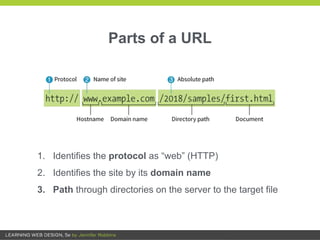
1. Identifies the protocol as “web” (HTTP)
2. Identifies the site by its domain name
3. Path through directories on the server to the target file
Parts of a URL
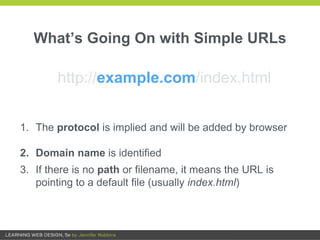
1. The protocol is implied and will be added by browser
2. Domain name is identified
3. If there is no path or filename, it means the URL is
pointing to a default file (usually index.html)
What’s Going On with Simple URLs
http://example.com/index.html
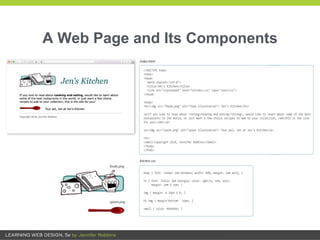
Anatomy of a Web Page
The page you see in the browser window is nearly always made
up of multiple files, including:
• An HTML document (gives the content structure)
• Style sheets (describes how it should look)
• Images and other media (embedded on the page on the fly)
• Scripts (add behaviors and functionality)
A Web Page and Its Components
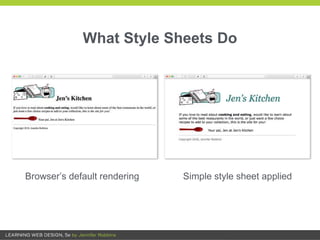
What Style Sheets Do
Browser’s default rendering Simple style sheet applied
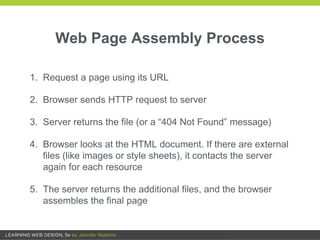
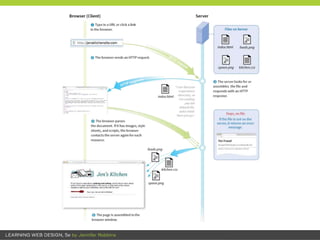
Web Page Assembly Process
1. Request a page using its URL
2. Browser sends HTTP request to server
3. Server returns the file (or a “404 Not Found” message)
4. Browser looks at the HTML document. If there are external
files (like images or style sheets), it contacts the server
again for each resource
5. The server returns the additional files, and the browser
assembles the final page
Ch 2: How the Web Works

Ch 2: How the Web Works

  • 1.
  • 2.
    OVERVIEW • The internetvs. the web • History of the web • What servers do • What browsers do • URLs • How web pages are constructed
  • 3.
    Internet vs. Web internet Internationalnetwork of connected computers protocol A standardized method for transferring data or documents over a network (for example, FTP, STMP, HTTP) web Information shared over the internet using the Hypertext Transfer Protocol (HTTP), which is one of many ways to share information over the internet
  • 4.
    A Brief Historyof the Web • Started at CERN, a particle physics lab in Geneva, Switzerland • 1989: Tim Berners-Lee proposed a system for sharing documents via “hyperlinks” • 1990: Prototypes built, first by Tim B-L, then Robert Cailliau • 1992: Approximately 25 servers worldwide • 1993: Web opened up for commercial use
  • 5.
    The Web Server server Aprogram that delivers documents and data on request web server Any computer running web server software
  • 6.
    . IP address A uniquenumber assigned to a device connected to the internet (IP = Internet Protocol). Example: 199.27.145.64 Domain Name System (DNS) A system that allows internet users to refer to servers by name rather than number Domain name A name assigned to a web server (easier to use than IP numbers). Example: oreilly.com DNS server A server that matches domain names to their respective IP addresses The Web Server (cont’d)
  • 7.
    The Browser • Thesoftware that requests data or documents from the web server • Also referred to as the client or user agent • Could be on a desktop machine, smartphone, other connected device, or an assistive device such as a screen reader • The program in the browser that interprets HTML/CSS/JavaScript is called the rendering engine
  • 8.
    Server-side vs. Client-side Indicateswhich machine is doing the processing: • Client-side applications run on the user’s machine • Server-side applications use the processing power of the server
  • 9.
    Web Page Addresses(URLs) URL = Uniform Resource Locator Every page and resource on the web has its own URL
  • 10.
    1. Identifies theprotocol as “web” (HTTP) 2. Identifies the site by its domain name 3. Path through directories on the server to the target file Parts of a URL
  • 11.
    1. The protocolis implied and will be added by browser 2. Domain name is identified 3. If there is no path or filename, it means the URL is pointing to a default file (usually index.html) What’s Going On with Simple URLs http://example.com/index.html
  • 12.
    Anatomy of aWeb Page The page you see in the browser window is nearly always made up of multiple files, including: • An HTML document (gives the content structure) • Style sheets (describes how it should look) • Images and other media (embedded on the page on the fly) • Scripts (add behaviors and functionality)
  • 13.
    A Web Pageand Its Components
  • 14.
    What Style SheetsDo Browser’s default rendering Simple style sheet applied
  • 15.
    Web Page AssemblyProcess 1. Request a page using its URL 2. Browser sends HTTP request to server 3. Server returns the file (or a “404 Not Found” message) 4. Browser looks at the HTML document. If there are external files (like images or style sheets), it contacts the server again for each resource 5. The server returns the additional files, and the browser assembles the final page