Agenda

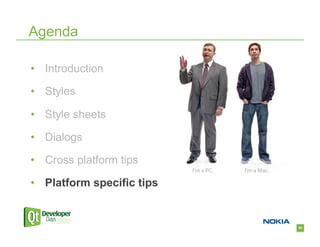
•  Introduction

•  Styles

•  Style sheets

•  Dialogs

•  Cross platform tips

•  Platform specific tips


                            1
Who am I?

•  Jens Bache-Wiig
  –  Qt developer since 2005

  –  Works on look and feel


                               2
3
Introduction

“Media reviews of your product will be more
  positive…”

                         Apple Interface Guidelines


                                                      4
Introduction

•  Platform guidelines
  –  Windows User Experience Interaction Guidelines

  –  Apple Human Interface Guidelines

  –  KDE User Interface Guidelines

  –  GNOME HIG


                                                      5
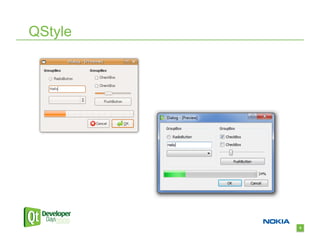
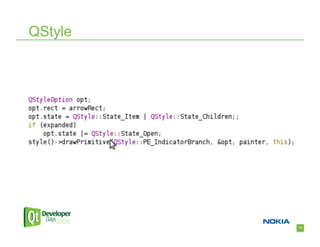
QStyle


         6
QStyle

•  Appearance

•  Size and shape

•  Any platform specific behavior


                                    7
QStyle

•  Do not force a specific style

•  Ship all available styles
   –  Make sure to compile with GTK+ headers on X11 and
     the Windows Vista SDK on windows

•  Always use the style when implementing custom
  widgets


                                                          8
9
10
QStyle


         11
QStyle

•  What if I need to modify a style?


                                       12
QStyle

•  Don’t subclass it!

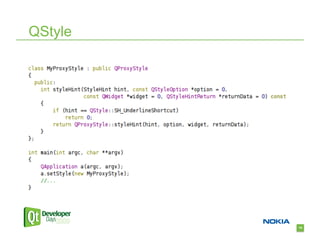
•  Use a proxy style


                        13
QStyle

•  QProxyStyle introduced in 4.6
  –  Makes it easy to customize the platform style

  –  Without breaking it 


                                                     14
QStyle


         15
Agenda

•  Introduction

•  Styles

•  Style sheets

•  Dialogs

•  Cross platform tips

•  Platform specific tips


                            16
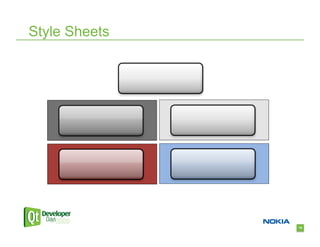
Style Sheets

•  Use carefully

•  Tends to break look and feel

•  Try to blend with system palette
   –  Use transparency

   –  Use palette colors


                                      17
Style Sheets


               18
Style Sheets

Avoid hardcoding colors
  QString css = "QLabel { color:palette(highlight); }”;

If you need completely custom colors
  QColor color(255, 0, 0);

  QString css = QString("QLabel { color: %1; }").arg(color.name());


                                                                      19
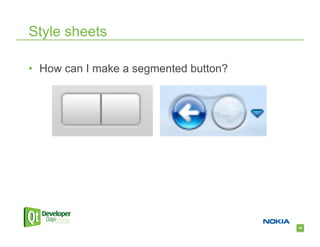
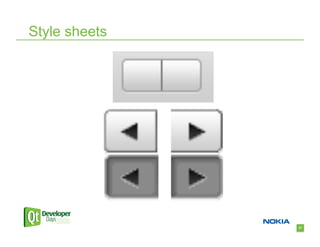
Style sheets

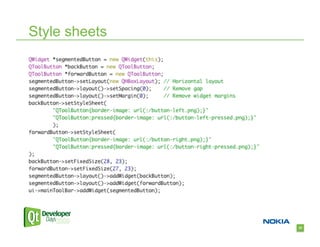
•  How can I make a segmented button?


                                        20
Style sheets


               21
Style sheets


               22
Style sheets

•  Attach a style sheet to a particular style:
QToolButton[style=QMacStyle] {

    border-image: url(:/button_mac.png);

}

QToolButton[style=QWindowsVistaStyle] {

    border-image: url(:/button_vista.png);

}


                                                 23
Style sheets


               24
Agenda

•  Introduction

•  Styles

•  Style sheets

•  Dialogs

•  Cross platform tips

•  Platform specific tips


                            25
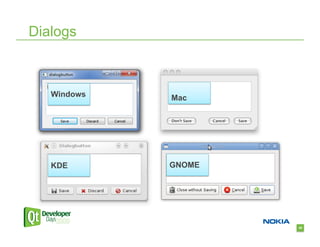
Dialogs


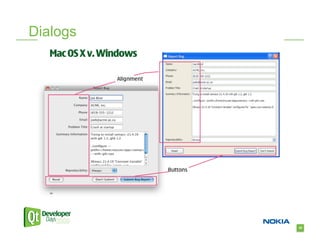
   Windows   Mac


   KDE       GNOME


                     26
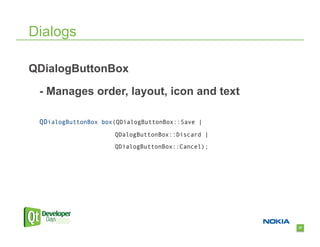
Dialogs

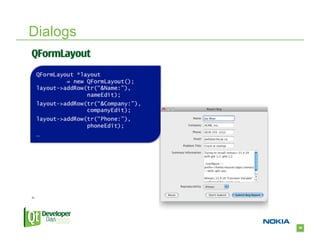
QDialogButtonBox

 - Manages order, layout, icon and text

 QDialogButtonBox box(QDialogButtonBox::Save |
                     QDalogButtonBox::Discard |
                     QDialogButtonBox::Cancel);


                                                  27
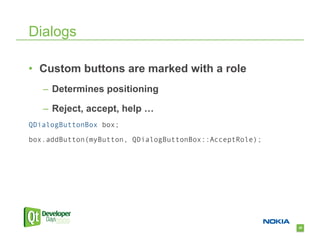
Dialogs

•  Custom buttons are marked with a role
   –  Determines positioning

   –  Reject, accept, help …
QDialogButtonBox box;

box.addButton(myButton, QDialogButtonBox::AcceptRole);


                                                         28
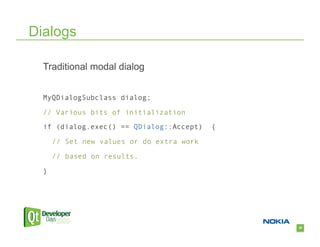
Dialogs

  Traditional modal dialog


  MyQDialogSubclass dialog;

  // Various bits of initialization

  if (dialog.exec() == QDialog::Accept)    {
      // Set new values or do extra work

      // based on results.

  }


                                               29
Dialogs

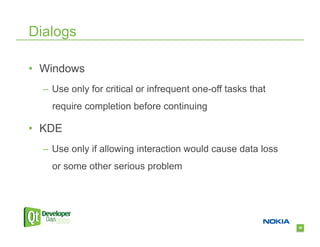
•  Windows
  –  Use only for critical or infrequent one-off tasks that
    require completion before continuing

•  KDE
  –  Use only if allowing interaction would cause data loss
    or some other serious problem


                                                              30
Dialogs

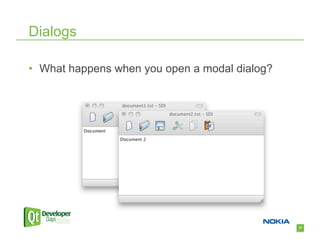
•  What happens when you open a modal dialog?


                                                31
Dialogs

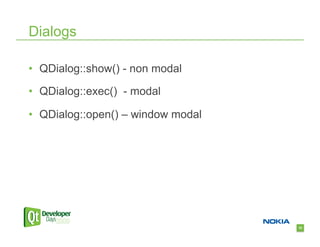
•  QDialog::show() - non modal

•  QDialog::exec() - modal

•  QDialog::open() – window modal


                                    32
Dialogs

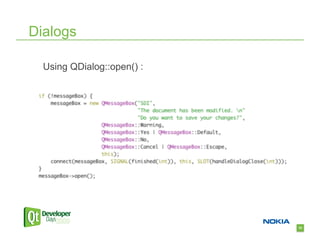
  Using QDialog::open() :


                            33
Dialogs


          34
Dialogs


          35
Dialogs


          36
Agenda

•  Introduction

•  Styles

•  Style sheets

•  Dialogs

•  Cross platform tips

•  Platform specific tips


                            37
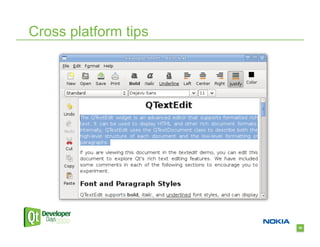
Cross platform tips

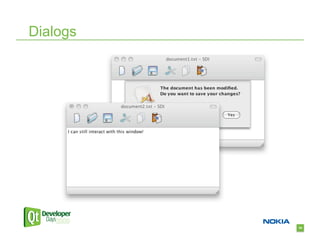
  How do you tell the user that the current document was
    modified?


                                                           38
Cross platform tips

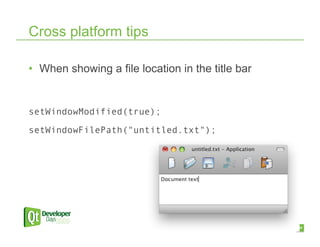
•  When showing a file location in the title bar


setWindowModified(true);

setWindowFilePath("untitled.txt");


                                                   39
Cross platform tips


                      40
Cross platform tips

  How can your application ask for attention?


                                                41
Cross platform tips

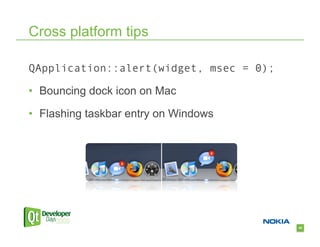
QApplication::alert(widget, msec = 0);

•  Bouncing dock icon on Mac

•  Flashing taskbar entry on Windows


                                         42
Cross platform tips

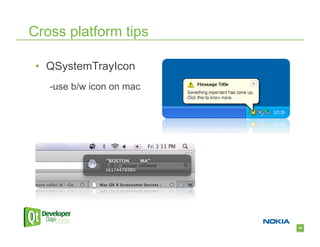
 •  QSystemTrayIcon
   -use b/w icon on mac


                          43
Cross platform tips

  Where do you store your documents?


                                       44
Cross platform tips

•  QDesktopServices::storageLocation()
  –  gives you default system directories such as
    Desktop, Music, Pictures, Applications, Temp and
    Cache


                                                       45
Cross platform tips

  How can you open an e-mail using your standard e-mail
    application?


                                                          46
Cross platform tips

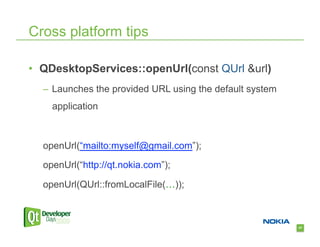
•  QDesktopServices::openUrl(const QUrl &url)
  –  Launches the provided URL using the default system
    application


  openUrl(“mailto:myself@gmail.com”);

  openUrl(“http://qt.nokia.com”);

  openUrl(QUrl::fromLocalFile(…));


                                                          47
Cross platform tips


  Which shortcut do I use for “find” in a document?


                                                      48
Cross platform tips

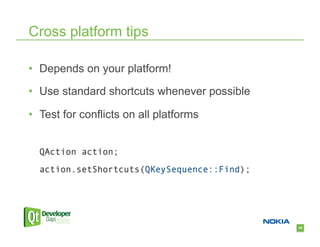
•  Depends on your platform!

•  Use standard shortcuts whenever possible

•  Test for conflicts on all platforms


  QAction action;

  action.setShortcuts(QKeySequence::Find);


                                              49
Cross platform tips

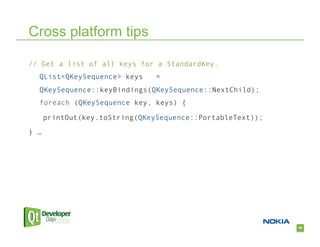
// Get a list of all keys for a StandardKey.
  QList<QKeySequence> keys      =
  QKeySequence::keyBindings(QKeySequence::NextChild);
  foreach (QKeySequence key, keys) {

      printOut(key.toString(QKeySequence::PortableText));

} …


                                                            50
Cross platform tips

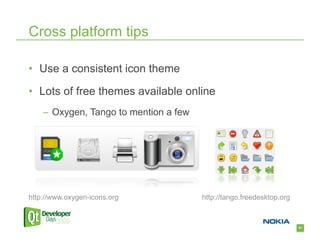
•  Use a consistent icon theme

•  Lots of free themes available online
    –  Oxygen, Tango to mention a few


http://www.oxygen-icons.org             http://tango.freedesktop.org


                                                                       51
Cross platform tips

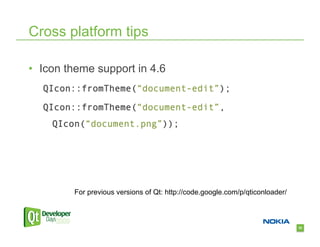
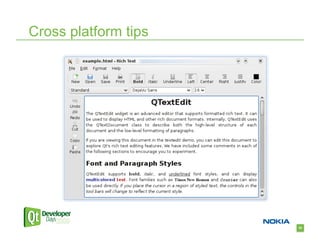
•  Icon theme support in 4.6
  QIcon::fromTheme(“document-edit”);

  QIcon::fromTheme(“document-edit”,
    QIcon(“document.png”));


         For previous versions of Qt: http://code.google.com/p/qticonloader/


                                                                               52
Cross platform tips


                      53
Cross platform tips


                      54
Cross platform tips

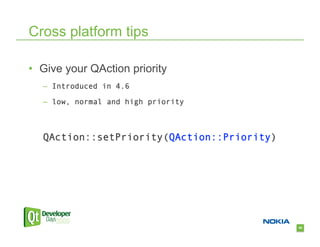
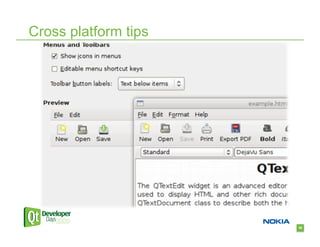
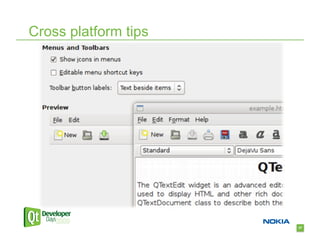
•  Give your QAction priority
   –  Introduced in 4.6

   –  low, normal and high priority


   QAction::setPriority(QAction::Priority)


                                             55
Cross platform tips


                      56
Cross platform tips


                      57
Cross platform tips

•  Icons in menus
   –  Not visible on Mac

   –  Visible on Windows and KDE

   –  Depends on the system setting in GNOME

•  Override with
   –  QAction::setIconVisibleInMenu(bool)

   –  QApplication::setAttribute(Qt::AA_DontShowIconsInMenus)


                                                                58
Cross platform tips - Dialogs

•  Preferences on GNOME/Mac
  –  Applies immediately

•  Preferences on Windows/KDE
  –  Apply/Cancel


                                59
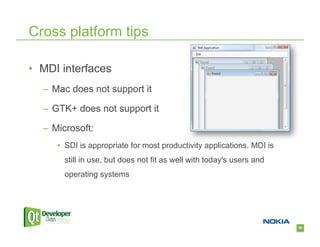
Cross platform tips

•  MDI interfaces
  –  Mac does not support it

  –  GTK+ does not support it

  –  Microsoft:
     •  SDI is appropriate for most productivity applications. MDI is
       still in use, but does not fit as well with today's users and
       operating systems


                                                                        60
Go native!

•  Ifdef is evil but sometimes useful…
  –  Q_WS_WIN

  –  Q_WS_MAC

  –  Q_WS_X11


                                         61
The window id

  –  QWidget::winId()

  –  Returns a native window handle
     •  HWND on Windows

     •  NSView* on Cocoa

     •  X11 handle

  –  Allows using native API
     •  Windows Vista or Windows 7 specific features


                                                       62
Agenda

•  Introduction

•  Styles

•  Style sheets

•  Dialogs

•  Cross platform tips

•  Platform specific tips


                            63
Platform specific tips


                         64
Mac

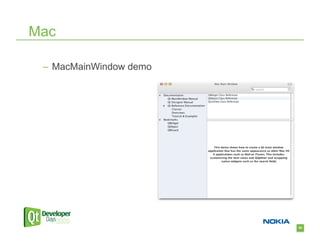
 –  MacMainWindow demo


                         65
Mac

•  Icons
   –  Use a high-resolution application icon

   –  Use a b/w system tray icon


                                               66
Mac

•  QMenuBar can stand on it’s own!
  –  Create it without a parent

  –  The first menu bar created will be the default menu bar


                                                               67
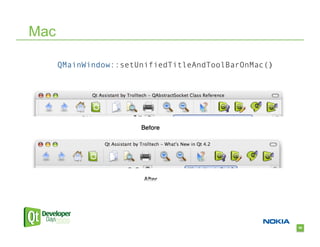
Mac

      QMainWindow::setUnifiedTitleAndToolBarOnMac()


                                                      68
Mac

•  Why not allways set it?
   –  Not movable

   –  No breaks are respected

   –  Custom widgets hidden when small

   –  Toolbar hidden in fullscreen


                                         69
Mac

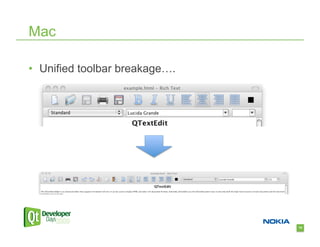
•  Unified toolbar breakage….


                                70
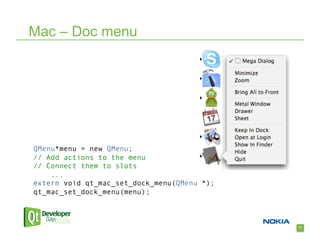
Mac – Doc menu


QMenu*menu = new QMenu;
// Add actions to the menu
// Connect them to slots
    ...
extern void qt_mac_set_dock_menu(QMenu *);
qt_mac_set_dock_menu(menu);


                                             71
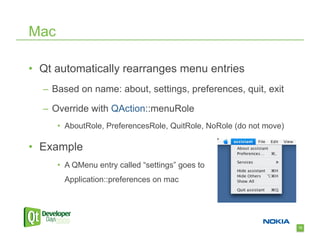
Mac

•  Qt automatically rearranges menu entries
  –  Based on name: about, settings, preferences, quit, exit

  –  Override with QAction::menuRole
      •  AboutRole, PreferencesRole, QuitRole, NoRole (do not move)

•  Example
      •  A QMenu entry called “settings” goes to
        Application::preferences on mac


                                                                      72
X11


      73
X11

•  Follow freedesktop.org standards if possible
  –  Menu specs

  –  Icon themes

  –  Autostart

  –  Bookmarks

  –  .desktop file


                                                  74
X11

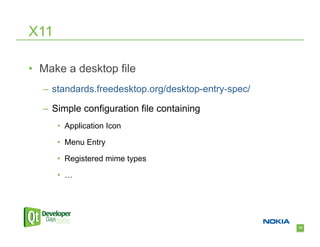
•  Make a desktop file
  –  standards.freedesktop.org/desktop-entry-spec/

  –  Simple configuration file containing
      •  Application Icon

      •  Menu Entry

      •  Registered mime types

      •  …


                                                     75
X11

•  How do you know if you are running KDE or
  GNOME?
  –  No 100% reliable way of doing it

  –  You can try the “DESKTOP_SESSION” env. variable
      •  “kde”, “gnome”


                                                       76
X11

•  Test on both KDE and GNOME
  –  Different shortcuts

  –  Different themes

  –  Window behavior


                                77
78
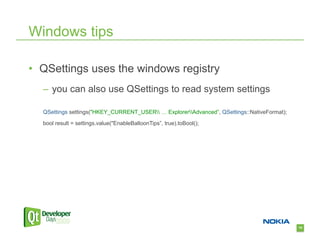
Windows tips

•  QSettings uses the windows registry
  –  you can also use QSettings to read system settings

  QSettings settings("HKEY_CURRENT_USER … ExplorerAdvanced”, QSettings::NativeFormat);
  bool result = settings.value("EnableBalloonTips”, true).toBool();


                                                                                             79
Windows tips

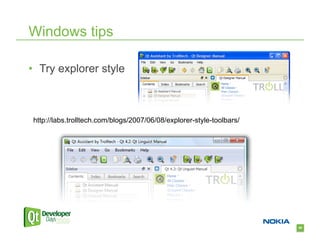
•  Try explorer style


 http://labs.trolltech.com/blogs/2007/06/08/explorer-style-toolbars/


                                                                       80
Windows tips

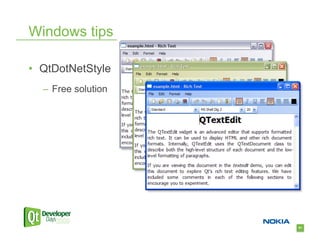
•  QtDotNetStyle
  –  Free solution


                     81
Windows tips

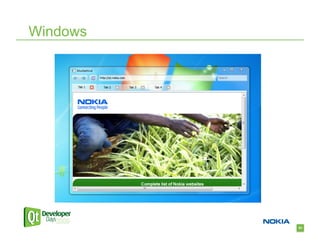
•  Enable blur behind on Vista or windows 7
  –  No API in Qt for this yet

  –  However you can use the windows API directly if you
    set WA_TranslucentBackground and
    WA_NoSystemBackground on the widget!


                                                           82
Windows


          83
Conclusion


             84

How to Make Your Qt App Look Native

  • 1.
    Agenda •  Introduction •  Styles • Style sheets •  Dialogs •  Cross platform tips •  Platform specific tips 1
  • 2.
    Who am I? • Jens Bache-Wiig –  Qt developer since 2005 –  Works on look and feel 2
  • 3.
  • 4.
    Introduction “Media reviews ofyour product will be more positive…” Apple Interface Guidelines 4
  • 5.
    Introduction •  Platform guidelines –  Windows User Experience Interaction Guidelines –  Apple Human Interface Guidelines –  KDE User Interface Guidelines –  GNOME HIG 5
  • 6.
  • 7.
    QStyle •  Appearance •  Sizeand shape •  Any platform specific behavior 7
  • 8.
    QStyle •  Do notforce a specific style •  Ship all available styles –  Make sure to compile with GTK+ headers on X11 and the Windows Vista SDK on windows •  Always use the style when implementing custom widgets 8
  • 9.
  • 10.
  • 11.
  • 12.
    QStyle •  What ifI need to modify a style? 12
  • 13.
    QStyle •  Don’t subclassit! •  Use a proxy style 13
  • 14.
    QStyle •  QProxyStyle introducedin 4.6 –  Makes it easy to customize the platform style –  Without breaking it  14
  • 15.
  • 16.
    Agenda •  Introduction •  Styles • Style sheets •  Dialogs •  Cross platform tips •  Platform specific tips 16
  • 17.
    Style Sheets •  Usecarefully •  Tends to break look and feel •  Try to blend with system palette –  Use transparency –  Use palette colors 17
  • 18.
  • 19.
    Style Sheets Avoid hardcodingcolors QString css = "QLabel { color:palette(highlight); }”; If you need completely custom colors QColor color(255, 0, 0); QString css = QString("QLabel { color: %1; }").arg(color.name()); 19
  • 20.
    Style sheets •  Howcan I make a segmented button? 20
  • 21.
  • 22.
  • 23.
    Style sheets •  Attacha style sheet to a particular style: QToolButton[style=QMacStyle] { border-image: url(:/button_mac.png); } QToolButton[style=QWindowsVistaStyle] { border-image: url(:/button_vista.png); } 23
  • 24.
  • 25.
    Agenda •  Introduction •  Styles • Style sheets •  Dialogs •  Cross platform tips •  Platform specific tips 25
  • 26.
    Dialogs Windows Mac KDE GNOME 26
  • 27.
    Dialogs QDialogButtonBox - Managesorder, layout, icon and text QDialogButtonBox box(QDialogButtonBox::Save | QDalogButtonBox::Discard | QDialogButtonBox::Cancel); 27
  • 28.
    Dialogs •  Custom buttonsare marked with a role –  Determines positioning –  Reject, accept, help … QDialogButtonBox box; box.addButton(myButton, QDialogButtonBox::AcceptRole); 28
  • 29.
    Dialogs Traditionalmodal dialog MyQDialogSubclass dialog; // Various bits of initialization if (dialog.exec() == QDialog::Accept) { // Set new values or do extra work // based on results. } 29
  • 30.
    Dialogs •  Windows –  Use only for critical or infrequent one-off tasks that require completion before continuing •  KDE –  Use only if allowing interaction would cause data loss or some other serious problem 30
  • 31.
    Dialogs •  What happenswhen you open a modal dialog? 31
  • 32.
    Dialogs •  QDialog::show() -non modal •  QDialog::exec() - modal •  QDialog::open() – window modal 32
  • 33.
    Dialogs UsingQDialog::open() : 33
  • 34.
  • 35.
  • 36.
  • 37.
    Agenda •  Introduction •  Styles • Style sheets •  Dialogs •  Cross platform tips •  Platform specific tips 37
  • 38.
    Cross platform tips How do you tell the user that the current document was modified? 38
  • 39.
    Cross platform tips • When showing a file location in the title bar setWindowModified(true); setWindowFilePath("untitled.txt"); 39
  • 40.
  • 41.
    Cross platform tips How can your application ask for attention? 41
  • 42.
    Cross platform tips QApplication::alert(widget,msec = 0); •  Bouncing dock icon on Mac •  Flashing taskbar entry on Windows 42
  • 43.
    Cross platform tips •  QSystemTrayIcon -use b/w icon on mac 43
  • 44.
    Cross platform tips Where do you store your documents? 44
  • 45.
    Cross platform tips • QDesktopServices::storageLocation() –  gives you default system directories such as Desktop, Music, Pictures, Applications, Temp and Cache 45
  • 46.
    Cross platform tips How can you open an e-mail using your standard e-mail application? 46
  • 47.
    Cross platform tips • QDesktopServices::openUrl(const QUrl &url) –  Launches the provided URL using the default system application openUrl(“mailto:myself@gmail.com”); openUrl(“http://qt.nokia.com”); openUrl(QUrl::fromLocalFile(…)); 47
  • 48.
    Cross platform tips Which shortcut do I use for “find” in a document? 48
  • 49.
    Cross platform tips • Depends on your platform! •  Use standard shortcuts whenever possible •  Test for conflicts on all platforms QAction action; action.setShortcuts(QKeySequence::Find); 49
  • 50.
    Cross platform tips //Get a list of all keys for a StandardKey. QList<QKeySequence> keys = QKeySequence::keyBindings(QKeySequence::NextChild); foreach (QKeySequence key, keys) { printOut(key.toString(QKeySequence::PortableText)); } … 50
  • 51.
    Cross platform tips • Use a consistent icon theme •  Lots of free themes available online –  Oxygen, Tango to mention a few http://www.oxygen-icons.org http://tango.freedesktop.org 51
  • 52.
    Cross platform tips • Icon theme support in 4.6 QIcon::fromTheme(“document-edit”); QIcon::fromTheme(“document-edit”, QIcon(“document.png”)); For previous versions of Qt: http://code.google.com/p/qticonloader/ 52
  • 53.
  • 54.
  • 55.
    Cross platform tips • Give your QAction priority –  Introduced in 4.6 –  low, normal and high priority QAction::setPriority(QAction::Priority) 55
  • 56.
  • 57.
  • 58.
    Cross platform tips • Icons in menus –  Not visible on Mac –  Visible on Windows and KDE –  Depends on the system setting in GNOME •  Override with –  QAction::setIconVisibleInMenu(bool) –  QApplication::setAttribute(Qt::AA_DontShowIconsInMenus) 58
  • 59.
    Cross platform tips- Dialogs •  Preferences on GNOME/Mac –  Applies immediately •  Preferences on Windows/KDE –  Apply/Cancel 59
  • 60.
    Cross platform tips • MDI interfaces –  Mac does not support it –  GTK+ does not support it –  Microsoft: •  SDI is appropriate for most productivity applications. MDI is still in use, but does not fit as well with today's users and operating systems 60
  • 61.
    Go native! •  Ifdefis evil but sometimes useful… –  Q_WS_WIN –  Q_WS_MAC –  Q_WS_X11 61
  • 62.
    The window id –  QWidget::winId() –  Returns a native window handle •  HWND on Windows •  NSView* on Cocoa •  X11 handle –  Allows using native API •  Windows Vista or Windows 7 specific features 62
  • 63.
    Agenda •  Introduction •  Styles • Style sheets •  Dialogs •  Cross platform tips •  Platform specific tips 63
  • 64.
  • 65.
  • 66.
    Mac •  Icons –  Use a high-resolution application icon –  Use a b/w system tray icon 66
  • 67.
    Mac •  QMenuBar canstand on it’s own! –  Create it without a parent –  The first menu bar created will be the default menu bar 67
  • 68.
    Mac QMainWindow::setUnifiedTitleAndToolBarOnMac() 68
  • 69.
    Mac •  Why notallways set it? –  Not movable –  No breaks are respected –  Custom widgets hidden when small –  Toolbar hidden in fullscreen 69
  • 70.
  • 71.
    Mac – Docmenu QMenu*menu = new QMenu; // Add actions to the menu // Connect them to slots ... extern void qt_mac_set_dock_menu(QMenu *); qt_mac_set_dock_menu(menu); 71
  • 72.
    Mac •  Qt automaticallyrearranges menu entries –  Based on name: about, settings, preferences, quit, exit –  Override with QAction::menuRole •  AboutRole, PreferencesRole, QuitRole, NoRole (do not move) •  Example •  A QMenu entry called “settings” goes to Application::preferences on mac 72
  • 73.
    X11 73
  • 74.
    X11 •  Follow freedesktop.orgstandards if possible –  Menu specs –  Icon themes –  Autostart –  Bookmarks –  .desktop file 74
  • 75.
    X11 •  Make adesktop file –  standards.freedesktop.org/desktop-entry-spec/ –  Simple configuration file containing •  Application Icon •  Menu Entry •  Registered mime types •  … 75
  • 76.
    X11 •  How doyou know if you are running KDE or GNOME? –  No 100% reliable way of doing it –  You can try the “DESKTOP_SESSION” env. variable •  “kde”, “gnome” 76
  • 77.
    X11 •  Test onboth KDE and GNOME –  Different shortcuts –  Different themes –  Window behavior 77
  • 78.
  • 79.
    Windows tips •  QSettingsuses the windows registry –  you can also use QSettings to read system settings QSettings settings("HKEY_CURRENT_USER … ExplorerAdvanced”, QSettings::NativeFormat); bool result = settings.value("EnableBalloonTips”, true).toBool(); 79
  • 80.
    Windows tips •  Tryexplorer style http://labs.trolltech.com/blogs/2007/06/08/explorer-style-toolbars/ 80
  • 81.
    Windows tips •  QtDotNetStyle –  Free solution 81
  • 82.
    Windows tips •  Enableblur behind on Vista or windows 7 –  No API in Qt for this yet –  However you can use the windows API directly if you set WA_TranslucentBackground and WA_NoSystemBackground on the widget! 82
  • 83.
  • 84.