
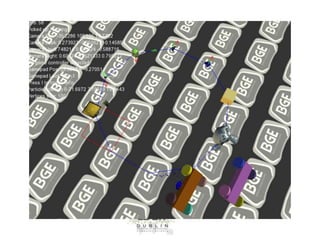
BGE OpenGL &
Component Based Games Engines
Dr Bryan Duggan
DIT School of Computing
bryan.duggan@dit.ie
@ditcomputing
http://facebook.com/ditschoolofcomputing
Questions we will answer today
•
•
•
•
•
•
•
•

How does BGE work?
How are 3D Graphics rendered?
Calculating the world transform
Calculating the view & projection transforms
Component based development
Examples in BGE
Generating the world transform
Generating the view & projection transforms
How does BGE Work?
• OpenGL for rendering
– Vertex shaders & Fragment shaders (OpenGL 4)

• GLEW
– The OpenGL Extension Wrangler Library (GLEW) is a crossplatform open-source C/C++ extension loading library.
GLEW provides efficient run-time mechanisms for
determining which OpenGL extensions are supported on
the target platform. OpenGL core and extension
functionality is exposed in a single header file. GLEW has
been tested on a variety of operating systems, including
Windows, Linux, Mac OS X, FreeBSD, Irix, and Solaris.

• GLM
– OpenGL Maths Library
• SDL - Simple DirectMedia Library
– A cross-platform multimedia library designed to provide fast access to
the graphics framebuffer and audio device.
– Initialises OpenGL
– Creates the OpenGL context
– Provides an abstraction for keyboard/mouse/joystick
– SDL_TTF for TTF Font support

• FMOD – Closed source Xplatform audio library
– FMOD is a programming library and toolkit for the creation and
playback of interactive audio.
– MP3/WAV/MIDI playback
– 3D Audio
– Occlusion/doppler/effects etc
– Free for non-commercial use
• Bullet
– Bullet 3D Game Multiphysics Library provides
state of the art collision detection, soft body and
rigid body dynamics.
– Rigid bodies, constraints etc
– A solver
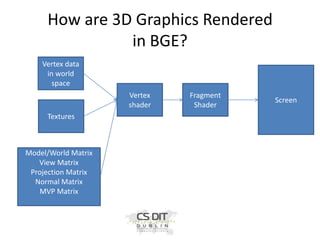
How are 3D Graphics Rendered
in BGE?
Vertex data
in world
space
Vertex
shader
Textures

Model/World Matrix
View Matrix
Projection Matrix
Normal Matrix
MVP Matrix

Fragment
Shader

Screen
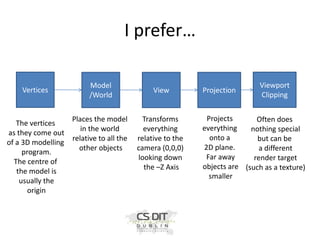
I prefer…
Vertices

The vertices
as they come out
of a 3D modelling
program.
The centre of
the model is
usually the
origin

Model
/World

Places the model
in the world
relative to all the
other objects

View

Transforms
everything
relative to the
camera (0,0,0)
looking down
the –Z Axis

Projection

Viewport
Clipping

Projects
Often does
everything
nothing special
onto a
but can be
2D plane.
a different
Far away
render target
objects are (such as a texture)
smaller
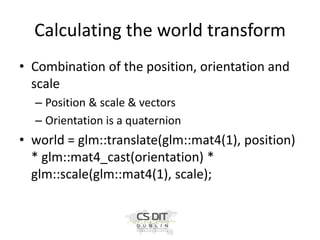
Calculating the world transform
• Combination of the position, orientation and
scale
– Position & scale & vectors
– Orientation is a quaternion

• world = glm::translate(glm::mat4(1), position)
* glm::mat4_cast(orientation) *
glm::scale(glm::mat4(1), scale);
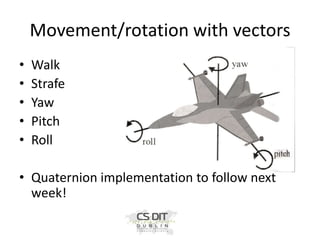
Movement/rotation with vectors
•
•
•
•
•

Walk
Strafe
Yaw
Pitch
Roll

• Quaternion implementation to follow next
week!
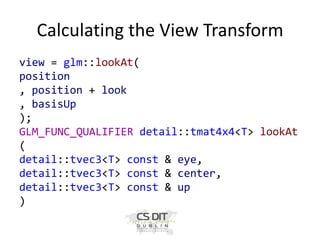
Calculating the View Transform
view = glm::lookAt(
position
, position + look
, basisUp
);
GLM_FUNC_QUALIFIER detail::tmat4x4<T> lookAt
(
detail::tvec3<T> const & eye,
detail::tvec3<T> const & center,
detail::tvec3<T> const & up
)
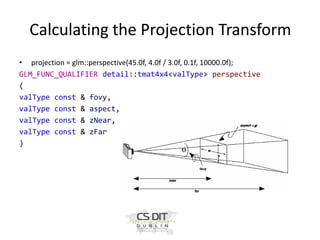
Calculating the Projection Transform
• projection = glm::perspective(45.0f, 4.0f / 3.0f, 0.1f, 10000.0f);
GLM_FUNC_QUALIFIER detail::tmat4x4<valType> perspective
(
valType const & fovy,
valType const & aspect,
valType const & zNear,
valType const & zFar
)
The Game loop
• Initialise()
• While (true)
– Update(timeDelta)
– Draw()

• End while
• Cleanup()
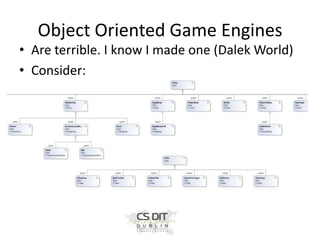
Object Oriented Game Engines
• Are terrible. I know I made one (Dalek World)
• Consider:
Problems!
• Each new piece of functionality you want to
add to a class becomes a new (more specific
class)
• Too many classes
• No flexibility
• Tight coupling
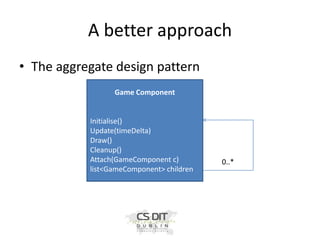
A better approach
• The aggregate design pattern
Game Component

Initialise()
Update(timeDelta)
Draw()
Cleanup()
Attach(GameComponent c)
list<GameComponent> children

0..*
Component Based Games Engines
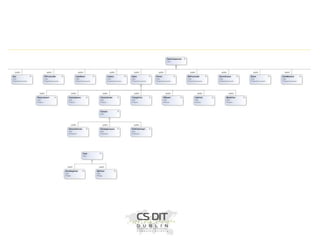
• Everything in BGE is a component
• Most things extend GameComponent
–
–
–
–

virtual bool Initialise();
virtual void Update(float timeDelta);
virtual void Draw();
virtual void Cleanup();

• GameComponent’s keep track of a list of children
components & parent component
– std::list<std::shared_ptr<GameComponent>>
children;

• This is known as the aggregate design pattern
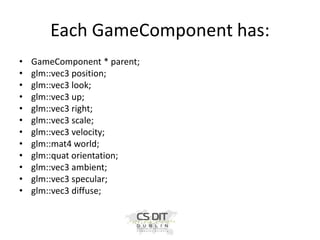
Each GameComponent has:
•
•
•
•
•
•
•
•
•
•
•
•

GameComponent * parent;
glm::vec3 position;
glm::vec3 look;
glm::vec3 up;
glm::vec3 right;
glm::vec3 scale;
glm::vec3 velocity;
glm::mat4 world;
glm::quat orientation;
glm::vec3 ambient;
glm::vec3 specular;
glm::vec3 diffuse;
The base class GameComponent
•
•
•
•
•

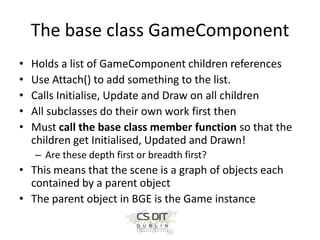
Holds a list of GameComponent children references
Use Attach() to add something to the list.
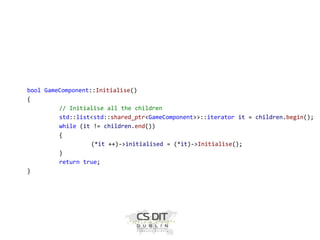
Calls Initialise, Update and Draw on all children
All subclasses do their own work first then
Must call the base class member function so that the
children get Initialised, Updated and Drawn!
– Are these depth first or breadth first?

• This means that the scene is a graph of objects each
contained by a parent object
• The parent object in BGE is the Game instance
bool GameComponent::Initialise()
{
// Initialise all the children
std::list<std::shared_ptr<GameComponent>>::iterator it = children.begin();
while (it != children.end())
{
(*it ++)->initialised = (*it)->Initialise();
}
return true;
}
void GameComponent::Cleanup()
{
// Cleanup all the children
std::list<std::shared_ptr<GameComponent>>::iterator it =
children.begin();
while (it != children.end())
{
(*it ++)->Cleanup();
}
}
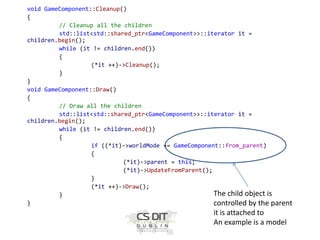
void GameComponent::Draw()
{
// Draw all the children
std::list<std::shared_ptr<GameComponent>>::iterator it =
children.begin();
while (it != children.end())
{
if ((*it)->worldMode == GameComponent::from_parent)
{
(*it)->parent = this;
(*it)->UpdateFromParent();
}
(*it ++)->Draw();
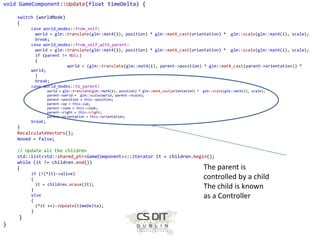
The child object is
}
}
controlled by the parent

it is attached to
An example is a model
void GameComponent::Update(float timeDelta) {
switch (worldMode)
{
case world_modes::from_self:
world = glm::translate(glm::mat4(1), position) * glm::mat4_cast(orientation) * glm::scale(glm::mat4(1), scale);
break;
case world_modes::from_self_with_parent:
world = glm::translate(glm::mat4(1), position) * glm::mat4_cast(orientation) * glm::scale(glm::mat4(1), scale);
if (parent != NULL)
{
world = (glm::translate(glm::mat4(1), parent->position) * glm::mat4_cast(parent->orientation)) *
world;
}
break;
case world_modes::to_parent:
world = glm::translate(glm::mat4(1), position) * glm::mat4_cast(orientation) *
parent->world = glm::scale(world, parent->scale);
parent->position = this->position;
parent->up = this->up;
parent->look = this->look;
parent->right = this->right;
parent->orientation = this->orientation;

glm::scale(glm::mat4(1), scale);

break;

}
RecalculateVectors();
moved = false;
// Update all the children
std::list<std::shared_ptr<GameComponent>>::iterator it = children.begin();
while (it != children.end())
{
if (!(*it)->alive)
{
it = children.erase(it);
}
else
{
(*it ++)->Update(timeDelta);
}

}
}

The parent is
controlled by a child
The child is known
as a Controller
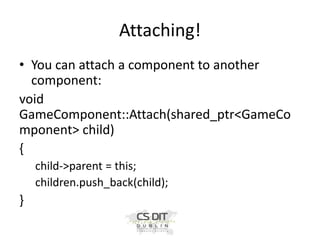
Attaching!
• You can attach a component to another
component:
void
GameComponent::Attach(shared_ptr<GameCo
mponent> child)
{
child->parent = this;
children.push_back(child);

}
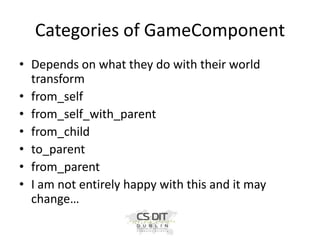
Categories of GameComponent
• Depends on what they do with their world
transform
• from_self
• from_self_with_parent
• from_child
• to_parent
• from_parent
• I am not entirely happy with this and it may
change…
from_self
• The default!
• The components world transform is generated
from its OWN:
– Scale vector
– Position vector
– Quaternion

• world = glm::translate(glm::mat4(1), position)
* glm::mat4_cast(orientation) *
glm::scale(glm::mat4(1), scale);
from_self_with_parent
• The component is attached to a parent
• The parent is updated first
• The components world transform is combined with the
parents world transform
• When the parent moves, the component moves
relative to it
• When the parent rotates, the component rotates
relative to the parent
• This is the standard in games engines such as Unity
• We don’t want to include the parent’s scaling
to_parent, from_child
• The to_parent components are known as
controllers
–
–
–
–

FPSController
XBOXController
SteeringController – Implements Steering behaviours
Steerable3DController – Implements the forward
Euler/Hamiltonian Integrator
– RiftController
– PhysicsController – Rigid body physics
from_parent
• Models encapsulate
–
–
–
–

Vertexbuffer
Texture
Texels
Diffuse colours

• We only load one instance of each model, regardless of
how many are drawn
• This is called instancing
• Created from the Content pipeline (static functions on the
Content class)
• Models can be attached to several different parents
• Models always get their state from the parent
Making game objects from
components
• You can use these rules to assemble
composite objects together. For example:
– A component with a model attached and a
steeringcontroller attached
– The steeringcontroller sets the parent world
transform
– The model gets its world from the parent
– You can attach different controllers to get different
effects.
– Examples…
Examples
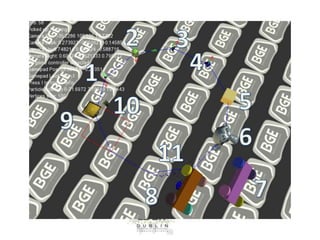
• 1- from_self
– GameComponent – from_self
– Model – from_parent
– VectorDrawer – from_parent

• 2 – a parent child
–
–
–
–
–

this is the standard implementation of a scene graph
GameComponent – from_self
Model- from_parent
VectorDrawer – from_parent
GameComponent – from_self_with_parent
• A child that incorporates the parents position and orientation!
More examples
• 3 – A component with an XBOX Controller
attached
– GameComponent – from_child
– XBOXController – to_parent
– Model – from_parent

• 4 - A component with a Steerable3D controller
attached
– GameComponent – from_child
– Steerable3DController – to_parent
– Model – from_parent
More examples – using the
PhysicsFactory
• 5 & 6 – Physics objects made with the
PhysicsFactory
• 5 Box prefab – from_child
– Model – from_parent
– PhysicsController – to_parent
• PhysicsControllers require some Bullet physics properties
set. See later notes for info on these!

• 6 – A physics object made from a mesh
– GameComponent – from_child
– Model – from_parent
– PhysicsController – to_parent
Using Physics constraints
• 7&8
– Are boxes & cylinders made the same way as 5
– The cylinders are attached via a hinge joint so that
they wan rotate
– 8 has a model attached to the chassis via a
from_self_with_parent relationship
Using steeringbehaviours
• SteeringController implements lots of cool
steering behaviours such as follow_path, seek,
obstacle_avoidance
• Its rule is to_parent so it is a Controller
• Can be attached to anything and it will update
the world transform of the thing it’s attached to
• See 9 & 11 for examples
• 12 is just a textured model. Nothing special
• An example in code…
•
•
•
•
•
•
•
•
•
•

•
•
•
•
•
•
•
•
•

//// from_self_with_parent
station = make_shared<GameComponent>();
station->worldMode = world_modes::from_self;
station->ambient = glm::vec3(0.2f, 0.2, 0.2f);
station->specular = glm::vec3(0,0,0);
station->scale = glm::vec3(1,1,1);
std::shared_ptr<Model> cmodel = Content::LoadModel("coriolis", glm::rotate(glm::mat4(1),
90.0f, GameComponent::basisUp));
station->Attach(cmodel);
station->Attach(make_shared<VectorDrawer>(glm::vec3(5,5,5)));
Attach(station);

// Add a child to the station and update by including the parent's world transform
std::shared_ptr<GameComponent> ship1 = make_shared<GameComponent>();
ship1->worldMode = world_modes::from_self_with_parent;
ship1->ambient = glm::vec3(0.2f, 0.2, 0.2f);
ship1->specular = glm::vec3(1.2f, 1.2f, 1.2f);
std::shared_ptr<Model> ana = Content::LoadModel("anaconda", glm::rotate(glm::mat4(1),
180.0f, GameComponent::basisUp));
ship1->Attach(ana);
ship1->position = glm::vec3(0, 0, -10); // NOTE the ship is attached to the station at an offset
of 10
station->Attach(ship1);.

Scene Graphs & Component Based Game Engines

  • 1.
    BGE OpenGL & ComponentBased Games Engines Dr Bryan Duggan DIT School of Computing bryan.duggan@dit.ie @ditcomputing http://facebook.com/ditschoolofcomputing
  • 2.
    Questions we willanswer today • • • • • • • • How does BGE work? How are 3D Graphics rendered? Calculating the world transform Calculating the view & projection transforms Component based development Examples in BGE Generating the world transform Generating the view & projection transforms
  • 3.
    How does BGEWork? • OpenGL for rendering – Vertex shaders & Fragment shaders (OpenGL 4) • GLEW – The OpenGL Extension Wrangler Library (GLEW) is a crossplatform open-source C/C++ extension loading library. GLEW provides efficient run-time mechanisms for determining which OpenGL extensions are supported on the target platform. OpenGL core and extension functionality is exposed in a single header file. GLEW has been tested on a variety of operating systems, including Windows, Linux, Mac OS X, FreeBSD, Irix, and Solaris. • GLM – OpenGL Maths Library
  • 4.
    • SDL -Simple DirectMedia Library – A cross-platform multimedia library designed to provide fast access to the graphics framebuffer and audio device. – Initialises OpenGL – Creates the OpenGL context – Provides an abstraction for keyboard/mouse/joystick – SDL_TTF for TTF Font support • FMOD – Closed source Xplatform audio library – FMOD is a programming library and toolkit for the creation and playback of interactive audio. – MP3/WAV/MIDI playback – 3D Audio – Occlusion/doppler/effects etc – Free for non-commercial use
  • 5.
    • Bullet – Bullet3D Game Multiphysics Library provides state of the art collision detection, soft body and rigid body dynamics. – Rigid bodies, constraints etc – A solver
  • 6.
    How are 3DGraphics Rendered in BGE? Vertex data in world space Vertex shader Textures Model/World Matrix View Matrix Projection Matrix Normal Matrix MVP Matrix Fragment Shader Screen
  • 7.
    I prefer… Vertices The vertices asthey come out of a 3D modelling program. The centre of the model is usually the origin Model /World Places the model in the world relative to all the other objects View Transforms everything relative to the camera (0,0,0) looking down the –Z Axis Projection Viewport Clipping Projects Often does everything nothing special onto a but can be 2D plane. a different Far away render target objects are (such as a texture) smaller
  • 8.
    Calculating the worldtransform • Combination of the position, orientation and scale – Position & scale & vectors – Orientation is a quaternion • world = glm::translate(glm::mat4(1), position) * glm::mat4_cast(orientation) * glm::scale(glm::mat4(1), scale);
  • 9.
  • 10.
    Calculating the ViewTransform view = glm::lookAt( position , position + look , basisUp ); GLM_FUNC_QUALIFIER detail::tmat4x4<T> lookAt ( detail::tvec3<T> const & eye, detail::tvec3<T> const & center, detail::tvec3<T> const & up )
  • 11.
    Calculating the ProjectionTransform • projection = glm::perspective(45.0f, 4.0f / 3.0f, 0.1f, 10000.0f); GLM_FUNC_QUALIFIER detail::tmat4x4<valType> perspective ( valType const & fovy, valType const & aspect, valType const & zNear, valType const & zFar )
  • 12.
    The Game loop •Initialise() • While (true) – Update(timeDelta) – Draw() • End while • Cleanup()
  • 13.
    Object Oriented GameEngines • Are terrible. I know I made one (Dalek World) • Consider:
  • 14.
    Problems! • Each newpiece of functionality you want to add to a class becomes a new (more specific class) • Too many classes • No flexibility • Tight coupling
  • 15.
    A better approach •The aggregate design pattern Game Component Initialise() Update(timeDelta) Draw() Cleanup() Attach(GameComponent c) list<GameComponent> children 0..*
  • 16.
    Component Based GamesEngines • Everything in BGE is a component • Most things extend GameComponent – – – – virtual bool Initialise(); virtual void Update(float timeDelta); virtual void Draw(); virtual void Cleanup(); • GameComponent’s keep track of a list of children components & parent component – std::list<std::shared_ptr<GameComponent>> children; • This is known as the aggregate design pattern
  • 17.
    Each GameComponent has: • • • • • • • • • • • • GameComponent* parent; glm::vec3 position; glm::vec3 look; glm::vec3 up; glm::vec3 right; glm::vec3 scale; glm::vec3 velocity; glm::mat4 world; glm::quat orientation; glm::vec3 ambient; glm::vec3 specular; glm::vec3 diffuse;
  • 18.
    The base classGameComponent • • • • • Holds a list of GameComponent children references Use Attach() to add something to the list. Calls Initialise, Update and Draw on all children All subclasses do their own work first then Must call the base class member function so that the children get Initialised, Updated and Drawn! – Are these depth first or breadth first? • This means that the scene is a graph of objects each contained by a parent object • The parent object in BGE is the Game instance
  • 19.
    bool GameComponent::Initialise() { // Initialiseall the children std::list<std::shared_ptr<GameComponent>>::iterator it = children.begin(); while (it != children.end()) { (*it ++)->initialised = (*it)->Initialise(); } return true; }
  • 20.
    void GameComponent::Cleanup() { // Cleanupall the children std::list<std::shared_ptr<GameComponent>>::iterator it = children.begin(); while (it != children.end()) { (*it ++)->Cleanup(); } } void GameComponent::Draw() { // Draw all the children std::list<std::shared_ptr<GameComponent>>::iterator it = children.begin(); while (it != children.end()) { if ((*it)->worldMode == GameComponent::from_parent) { (*it)->parent = this; (*it)->UpdateFromParent(); } (*it ++)->Draw(); The child object is } } controlled by the parent it is attached to An example is a model
  • 21.
    void GameComponent::Update(float timeDelta){ switch (worldMode) { case world_modes::from_self: world = glm::translate(glm::mat4(1), position) * glm::mat4_cast(orientation) * glm::scale(glm::mat4(1), scale); break; case world_modes::from_self_with_parent: world = glm::translate(glm::mat4(1), position) * glm::mat4_cast(orientation) * glm::scale(glm::mat4(1), scale); if (parent != NULL) { world = (glm::translate(glm::mat4(1), parent->position) * glm::mat4_cast(parent->orientation)) * world; } break; case world_modes::to_parent: world = glm::translate(glm::mat4(1), position) * glm::mat4_cast(orientation) * parent->world = glm::scale(world, parent->scale); parent->position = this->position; parent->up = this->up; parent->look = this->look; parent->right = this->right; parent->orientation = this->orientation; glm::scale(glm::mat4(1), scale); break; } RecalculateVectors(); moved = false; // Update all the children std::list<std::shared_ptr<GameComponent>>::iterator it = children.begin(); while (it != children.end()) { if (!(*it)->alive) { it = children.erase(it); } else { (*it ++)->Update(timeDelta); } } } The parent is controlled by a child The child is known as a Controller
  • 23.
    Attaching! • You canattach a component to another component: void GameComponent::Attach(shared_ptr<GameCo mponent> child) { child->parent = this; children.push_back(child); }
  • 24.
    Categories of GameComponent •Depends on what they do with their world transform • from_self • from_self_with_parent • from_child • to_parent • from_parent • I am not entirely happy with this and it may change…
  • 26.
    from_self • The default! •The components world transform is generated from its OWN: – Scale vector – Position vector – Quaternion • world = glm::translate(glm::mat4(1), position) * glm::mat4_cast(orientation) * glm::scale(glm::mat4(1), scale);
  • 27.
    from_self_with_parent • The componentis attached to a parent • The parent is updated first • The components world transform is combined with the parents world transform • When the parent moves, the component moves relative to it • When the parent rotates, the component rotates relative to the parent • This is the standard in games engines such as Unity • We don’t want to include the parent’s scaling
  • 28.
    to_parent, from_child • Theto_parent components are known as controllers – – – – FPSController XBOXController SteeringController – Implements Steering behaviours Steerable3DController – Implements the forward Euler/Hamiltonian Integrator – RiftController – PhysicsController – Rigid body physics
  • 30.
    from_parent • Models encapsulate – – – – Vertexbuffer Texture Texels Diffusecolours • We only load one instance of each model, regardless of how many are drawn • This is called instancing • Created from the Content pipeline (static functions on the Content class) • Models can be attached to several different parents • Models always get their state from the parent
  • 31.
    Making game objectsfrom components • You can use these rules to assemble composite objects together. For example: – A component with a model attached and a steeringcontroller attached – The steeringcontroller sets the parent world transform – The model gets its world from the parent – You can attach different controllers to get different effects. – Examples…
  • 33.
    Examples • 1- from_self –GameComponent – from_self – Model – from_parent – VectorDrawer – from_parent • 2 – a parent child – – – – – this is the standard implementation of a scene graph GameComponent – from_self Model- from_parent VectorDrawer – from_parent GameComponent – from_self_with_parent • A child that incorporates the parents position and orientation!
  • 34.
    More examples • 3– A component with an XBOX Controller attached – GameComponent – from_child – XBOXController – to_parent – Model – from_parent • 4 - A component with a Steerable3D controller attached – GameComponent – from_child – Steerable3DController – to_parent – Model – from_parent
  • 35.
    More examples –using the PhysicsFactory • 5 & 6 – Physics objects made with the PhysicsFactory • 5 Box prefab – from_child – Model – from_parent – PhysicsController – to_parent • PhysicsControllers require some Bullet physics properties set. See later notes for info on these! • 6 – A physics object made from a mesh – GameComponent – from_child – Model – from_parent – PhysicsController – to_parent
  • 36.
    Using Physics constraints •7&8 – Are boxes & cylinders made the same way as 5 – The cylinders are attached via a hinge joint so that they wan rotate – 8 has a model attached to the chassis via a from_self_with_parent relationship
  • 37.
    Using steeringbehaviours • SteeringControllerimplements lots of cool steering behaviours such as follow_path, seek, obstacle_avoidance • Its rule is to_parent so it is a Controller • Can be attached to anything and it will update the world transform of the thing it’s attached to • See 9 & 11 for examples • 12 is just a textured model. Nothing special • An example in code…
  • 38.
    • • • • • • • • • • • • • • • • • • • //// from_self_with_parent station =make_shared<GameComponent>(); station->worldMode = world_modes::from_self; station->ambient = glm::vec3(0.2f, 0.2, 0.2f); station->specular = glm::vec3(0,0,0); station->scale = glm::vec3(1,1,1); std::shared_ptr<Model> cmodel = Content::LoadModel("coriolis", glm::rotate(glm::mat4(1), 90.0f, GameComponent::basisUp)); station->Attach(cmodel); station->Attach(make_shared<VectorDrawer>(glm::vec3(5,5,5))); Attach(station); // Add a child to the station and update by including the parent's world transform std::shared_ptr<GameComponent> ship1 = make_shared<GameComponent>(); ship1->worldMode = world_modes::from_self_with_parent; ship1->ambient = glm::vec3(0.2f, 0.2, 0.2f); ship1->specular = glm::vec3(1.2f, 1.2f, 1.2f); std::shared_ptr<Model> ana = Content::LoadModel("anaconda", glm::rotate(glm::mat4(1), 180.0f, GameComponent::basisUp)); ship1->Attach(ana); ship1->position = glm::vec3(0, 0, -10); // NOTE the ship is attached to the station at an offset of 10 station->Attach(ship1);.