Qt Quick – Qt C++ programming basics
            SERIOUS ABOUT SOFTWARE
Timo Strömmer, Jan 7, 2011
                                       1
Contents
 •   Qt C++ projects
      • Project example
      • Project file format
      • Building projects
      • Shared libraries
 •   C++ introduction
      • Basics of C++ object-oriented programming
Contents
 •   Qt core features
      • Shared data objects
      • Object model
      • Signals & slots
      • Object properties


                              3
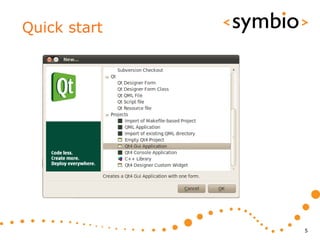
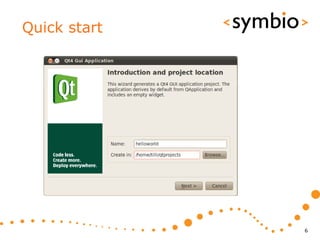
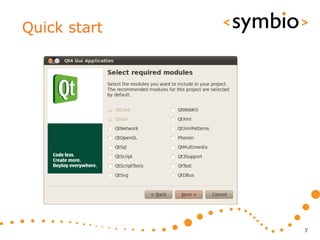
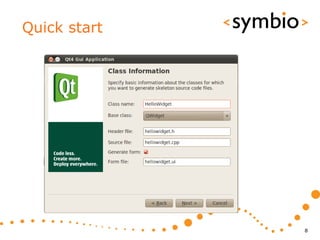
Creating a C++ project

QT C++ QUICK START


                         4
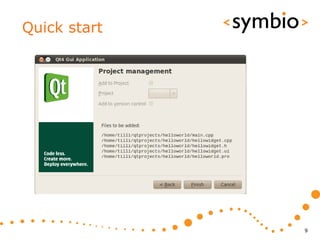
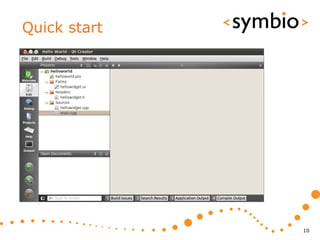
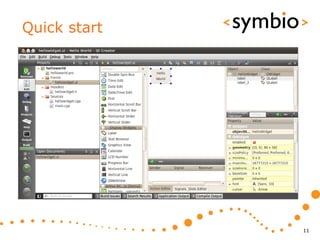
Quick start


              5
Quick start


              6
Quick start


              7
Quick start


              8
Quick start


              9
Quick start


              10
Quick start


              11
Quick start
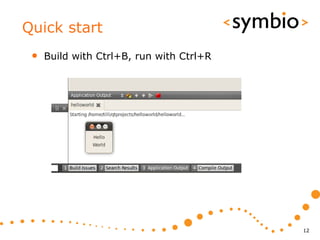
 •   Build with Ctrl+B, run with Ctrl+R


                                          12
Project files overview

QT C++ PROJECTS


                         13
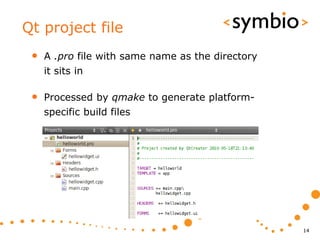
Qt project file
 •   A .pro file with same name as the directory
     it sits in

 •   Processed by qmake to generate platform-
     specific build files


                                                   14
Qt project basics
 •   Project name and type

      • TARGET, TEMPLATE

 •   Project files

      • SOURCES, HEADERS, FORMS

 •   Project configuration

      • CONFIG, QT


                                  15
Project templates
 •   Basic TEMPLATE types: app, lib, subdirs

      • Executable files (console or GUI) are created
         with the app type

            • GUI is default, console needs CONFIG += console

      • Libraries (static and shared) are created with lib
         type

            • Shared default, static needs CONFIG += staticlib

      • Sub-directory template is used to structure
         large projects into hierarchies


                                                                 16
Project name
 •   Project TARGET specifies the output file
     name

      • TARGET = helloworld

 •   Affected by template and platform

      • Executable name (name, name.exe etc.)

      • Library name (libname.so, name.dll etc.)


                                                   17
Project files
 •   SOURCES are obviously needed

 •   HEADERS also, as they are processed by Qt
     meta-object compiler

 •   UI form data (.ui files) are included with
     FORMS directive


                                                  18
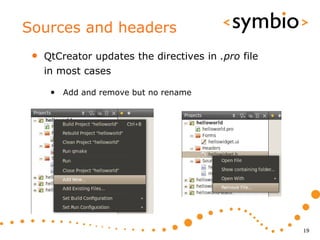
Sources and headers
 •   QtCreator updates the directives in .pro file
     in most cases

      • Add and remove but no rename


                                                     19
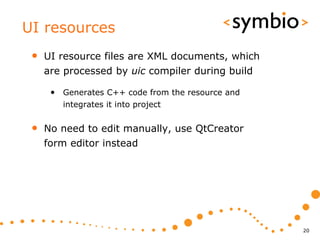
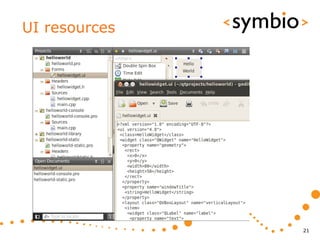
UI resources
 •   UI resource files are XML documents, which
     are processed by uic compiler during build

      • Generates C++ code from the resource and
        integrates it into project


 •   No need to edit manually, use QtCreator
     form editor instead


                                                   20
UI resources


               21
Other resources
 •   Resource file specifies a collection of data
     that should be bundled into the binary file

      • For example pictures and QML files

 •   QtCreator can help add resources to
     project

      • Qt project file has RESOURCES statement,
         which contains a list of .qrc files

      • qrc file is a text file, which is parsed by resource
         compiler during project build


                                                               22
Resource files


                 23
Resource files


                 24
Resource files
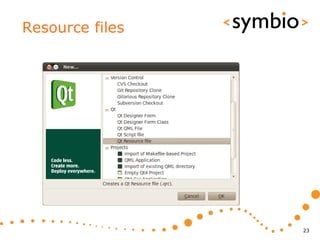
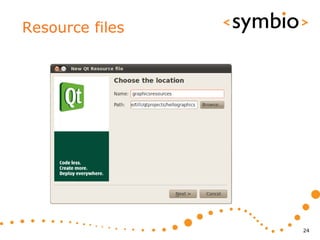
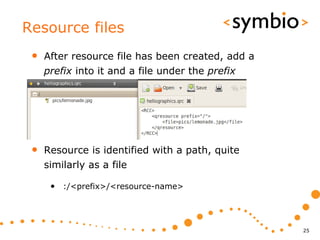
 •   After resource file has been created, add a
     prefix into it and a file under the prefix


 •   Resource is identified with a path, quite
     similarly as a file

      • :/<prefix>/<resource-name>


                                                   25
Building a Qt project

QT C++ PROJECTS


                        26
Build from command line
 •   Run qmake in the directory, which contains
     the .pro file

      • Generates project Makefile

 •   Run make to build project

      • Runs uic, moc and rc to generate ui_<form>.h,
         moc_<class>.cpp and rc_<resource>.cpp files

      • Compiles the sources to object .o files

      • Links the object files together and with Qt
         modules to produce the project target


                                                        27
Shadow builds
 •   Interactive part

      • Qt creator project properties

      • Shadow build output in file system


                                             28
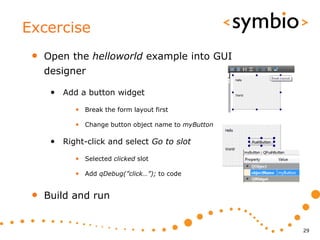
Excercise
 •   Open the helloworld example into GUI
     designer

      • Add a button widget
            • Break the form layout first

            • Change button object name to myButton

      • Right-click and select Go to slot
            • Selected clicked slot

            • Add qDebug(”click…”); to code


 •   Build and run


                                                      29
Shared libraries

QT C++ PROJECTS


                   30
Shared libraries
 •   A shared library contains code that is
     loaded once and shared by all executables
     that use it

 •   Saves resources compared to a static
     library, which is especially important in
     mobile devices


                                                 31
Exporting from project
 •   In order to be used, a library needs to
     provide an API

      • Public headers are included into client project

      • Client is linked against the library

 •   Project contents are exported with help of
     makefiles

      • Run make install in project directory
            • Files and paths need to be specified first


                                                           32
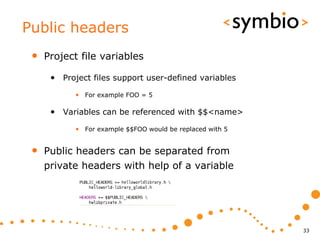
Public headers
 •   Project file variables

      • Project files support user-defined variables
            • For example FOO = 5

      • Variables can be referenced with $$<name>
            • For example $$FOO would be replaced with 5


 •   Public headers can be separated from
     private headers with help of a variable


                                                           33
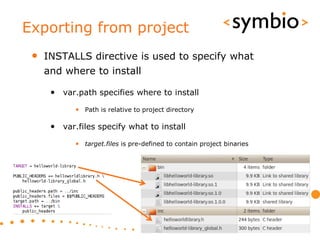
Exporting from project
 •   INSTALLS directive is used to specify what
     and where to install

      • var.path specifies where to install
            • Path is relative to project directory

      • var.files specify what to install
            • target.files is pre-defined to contain project binaries


                                                                        34
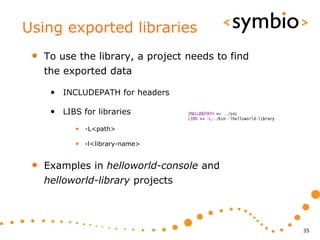
Using exported libraries
 •   To use the library, a project needs to find
     the exported data

      • INCLUDEPATH for headers

      • LIBS for libraries
            • -L<path>

            • -l<library-name>


 •   Examples in helloworld-console and
     helloworld-library projects


                                                   35
Object-oriented programming with Qt/C++

C++ INTRODUCTION


                                          36
C++ OOP basics
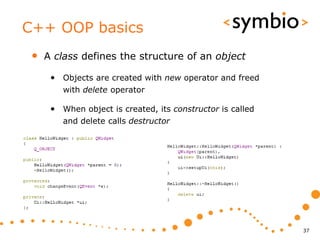
 •   A class defines the structure of an object

      • Objects are created with new operator and freed
         with delete operator

      • When object is created, its constructor is called
         and delete calls destructor


                                                            37
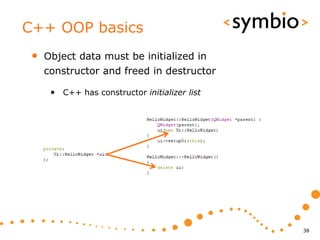
C++ OOP basics
 •   Object data must be initialized in
     constructor and freed in destructor

      • C++ has constructor initializer list


                                               38
C++ OOP basics
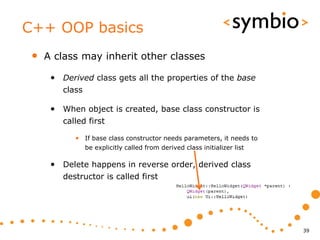
 •   A class may inherit other classes

      • Derived class gets all the properties of the base
         class

      • When object is created, base class constructor is
         called first

            • If base class constructor needs parameters, it needs to
                 be explicitly called from derived class initializer list

      • Delete happens in reverse order, derived class
         destructor is called first


                                                                            39
Memory management
•   Calling new reserves an area of memory
    for the object

     • The area will stay reserved until delete is called
        or the program terminates


•   If objects are not deleted, the program has
    memory leaks

     • Severity of the leaks depend on allocation size,
        number of allocations and life-time of program

     • Debugging can be costly


                                                            40
Memory management
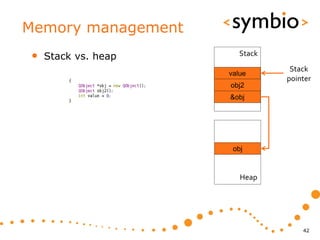
•   Objects allocated with new are reserved
    from program heap

•   Other option is to allocate objects from
    program stack

     • Stack variables are automatically deleted when
        leaving the current program scope


•   In general, anything based on QObject is
    allocated with new

     • Some exceptions of course…

                                                        41
Memory management
•   Stack vs. heap      Stack
                                 Stack
                     value
                                pointer
                     obj2
                     &obj


                      obj


                        Heap


                                    42
Pointers and references
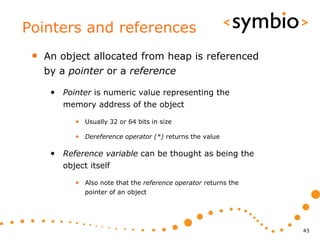
 •   An object allocated from heap is referenced
     by a pointer or a reference

      • Pointer is numeric value representing the
         memory address of the object

            • Usually 32 or 64 bits in size

            • Dereference operator (*) returns the value

      • Reference variable can be thought as being the
         object itself

            • Also note that the reference operator returns the
               pointer of an object


                                                                  43
Pointers and references
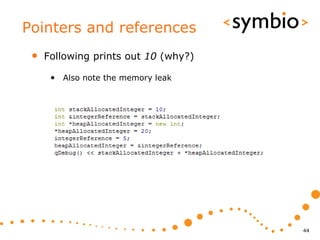
 •   Following prints out 10 (why?)

      • Also note the memory leak


                                      44
Pointers and references
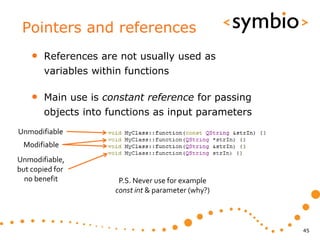
    •   References are not usually used as
        variables within functions

    •   Main use is constant reference for passing
        objects into functions as input parameters
Unmodifiable
 Modifiable
Unmodifiable,
but copied for
  no benefit           P.S. Never use for example
                      const int & parameter (why?)


                                                     45
Function return values
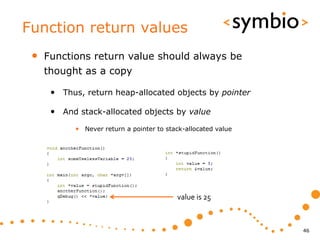
 •   Functions return value should always be
     thought as a copy

      • Thus, return heap-allocated objects by pointer

      • And stack-allocated objects by value
            • Never return a pointer to stack-allocated value


                                           value is 25


                                                                46
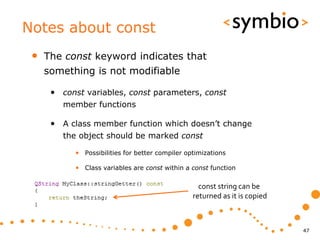
Notes about const
 •   The const keyword indicates that
     something is not modifiable

      • const variables, const parameters, const
         member functions

      • A class member function which doesn’t change
         the object should be marked const

           • Possibilities for better compiler optimizations

           • Class variables are const within a const function

                                                   const string can be
                                                 returned as it is copied


                                                                            47
C++ hands-on
 •   Create a new Console Application project

      • Add a class, which doesn’t inherit anything

      • Add a QString member

      • Add get and set functions for the member
            • Note: Qt naming conventions don’t have get
                 - setFoo is matched by foo

      • In main function, create instance from heap and
         set the member to some string value


                                                           48
Shared data objects

CORE FEATURES


                      49
Shared data objects
 •   A shared data object doesn’t store the
     object data by itself

      • Instead, data is implicitly shared
            • With copy-on-write semantics

      • Easier to use that just pointers
            • The object can be thought as simple value type


 •   Examples:

      • Strings, images, collections


                                                               50
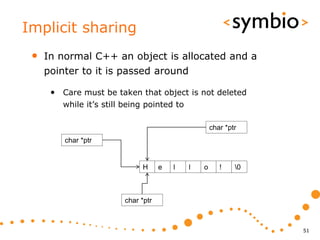
Implicit sharing
 •   In normal C++ an object is allocated and a
     pointer to it is passed around

      • Care must be taken that object is not deleted
         while it’s still being pointed to

                                                     char *ptr
         char *ptr


                              H      e   l   l   o      !    0


                         char *ptr


                                                                  51
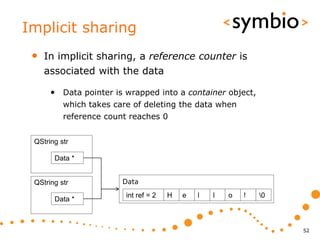
Implicit sharing
 •   In implicit sharing, a reference counter is
     associated with the data

      • Data pointer is wrapped into a container object,
          which takes care of deleting the data when
          reference count reaches 0


 QString str

       Data *


 QString str            Data
                         int ref = 2   H   e   l   l   o   !   0
       Data *


                                                                    52
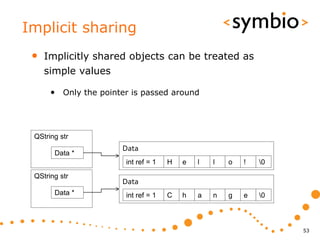
Implicit sharing
 •   Implicitly shared objects can be treated as
     simple values

      • Only the pointer is passed around


 QString str
                      Data
       Data *
                       int ref = 1   H   e   l   l   o   !   0
 QString str
                      Data
       Data *          int ref = 1   C   h   a   n   g   e   0


                                                                  53
Terminology
 •   Copy-on-write

      • Make a shallow copy until something is changed

 •   Shallow copy

      • Copy just the pointer, not actual data

 •   Deep copy

      • Create a copy of the data


                                                         54
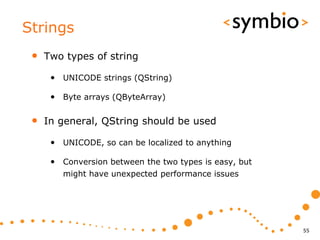
Strings
 •   Two types of string

      • UNICODE strings (QString)

      • Byte arrays (QByteArray)

 •   In general, QString should be used

      • UNICODE, so can be localized to anything

      • Conversion between the two types is easy, but
        might have unexpected performance issues


                                                        55
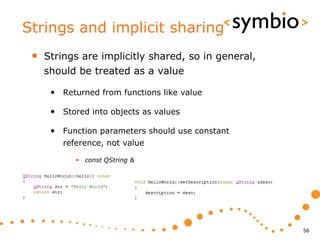
Strings and implicit sharing
 •   Strings are implicitly shared, so in general,
     should be treated as a value

      • Returned from functions like value

      • Stored into objects as values

      • Function parameters should use constant
         reference, not value

            • const QString &


                                                     56
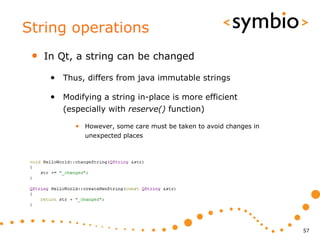
String operations
 •   In Qt, a string can be changed

      • Thus, differs from java immutable strings

      • Modifying a string in-place is more efficient
         (especially with reserve() function)

            • However, some care must be taken to avoid changes in
              unexpected places


                                                                     57
String operations
 •   QString supports various operators

      • ’+’, ’+=’, ’>’, ’<’, ’<=’, ’>=’, ’==’, ’!=’

      • Also work with literals

      • Character access with []


                                                      58
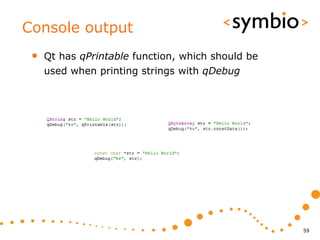
Console output
 •   Qt has qPrintable function, which should be
     used when printing strings with qDebug


                                                   59
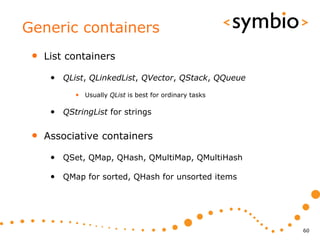
Generic containers
 •   List containers

      • QList, QLinkedList, QVector, QStack, QQueue
            • Usually QList is best for ordinary tasks

      • QStringList for strings

 •   Associative containers

      • QSet, QMap, QHash, QMultiMap, QMultiHash

      • QMap for sorted, QHash for unsorted items


                                                         60
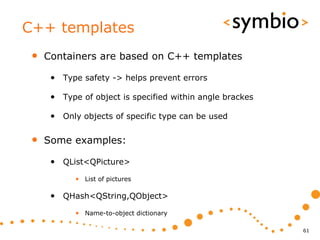
C++ templates
 •   Containers are based on C++ templates

      • Type safety -> helps prevent errors

      • Type of object is specified within angle brackes

      • Only objects of specific type can be used

 •   Some examples:

      • QList<QPicture>
            • List of pictures

      • QHash<QString,QObject>
            • Name-to-object dictionary

                                                           61
List containers
 •   Lists are index-based, starting from 0

      • Fast access if index is known, slow to search

 •   Adding and removing items

      • append, insert, ’+=’, ’<<’

 •   Accessing items

      • at, ’[]’


                                                        62
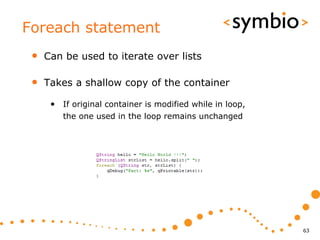
Foreach statement
 •   Can be used to iterate over lists

 •   Takes a shallow copy of the container

      • If original container is modified while in loop,
         the one used in the loop remains unchanged


                                                           63
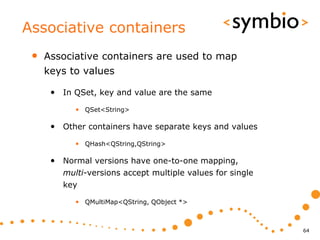
Associative containers
 •   Associative containers are used to map
     keys to values

      • In QSet, key and value are the same
           • QSet<String>

      • Other containers have separate keys and values
           • QHash<QString,QString>

      • Normal versions have one-to-one mapping,
        multi-versions accept multiple values for single
        key

           • QMultiMap<QString, QObject *>


                                                           64
Object model and signals & slots

CORE FEATURES


                                   65
Object model
 •   Usual Qt program is based around a tree-
     based hierarchy of objects

      • Designed to help with C++ memory
         management

      • Based on QObject class

      • Do not confuse with class inheritance


                                                66
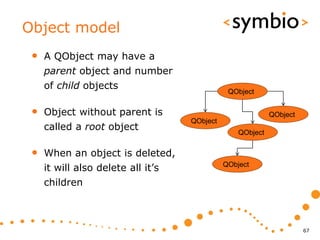
Object model
 •   A QObject may have a
     parent object and number
     of child objects
                                               QObject


 •   Object without parent is                               QObject
                                    QObject
     called a root object                         QObject


 •   When an object is deleted,
     it will also delete all it’s             QObject

     children


                                                                      67
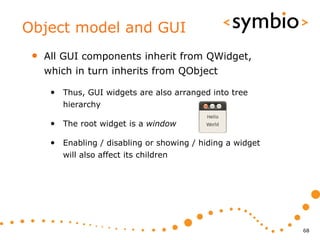
Object model and GUI
 •   All GUI components inherit from QWidget,
     which in turn inherits from QObject

      • Thus, GUI widgets are also arranged into tree
         hierarchy

      • The root widget is a window

      • Enabling / disabling or showing / hiding a widget
         will also affect its children


                                                            68
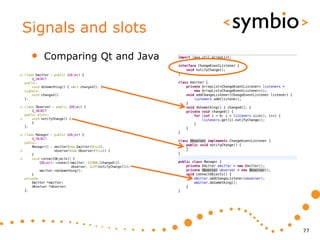
Signals and slots
 •   Qt way of making callback functions simple

      • Example cases
            • What happens when user presses a GUI button

            • What happens when data arrives from network

      • Similar semantics as with Java listeners

 •   A signal is emitted, which results in a
     function call to all slots that have been
     connected to the signal

      • i.e. onSignal: slot() in QML code


                                                            69
Signals and slots
 •   Code to support signal-slot connections is
     generated by the moc tool when project is
     compiled

 •   Special keywords are used, which are
     interpreted by moc

      • Q_OBJECT, signals, slots, emit


                                                  70
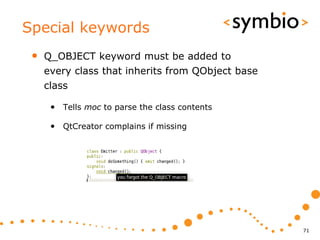
Special keywords
 •   Q_OBJECT keyword must be added to
     every class that inherits from QObject base
     class

      • Tells moc to parse the class contents

      • QtCreator complains if missing


                                                   71
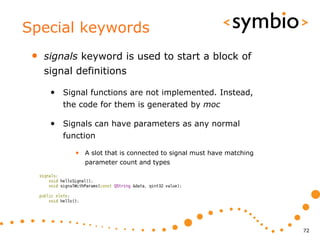
Special keywords
 •   signals keyword is used to start a block of
     signal definitions

      • Signal functions are not implemented. Instead,
         the code for them is generated by moc

      • Signals can have parameters as any normal
         function

            • A slot that is connected to signal must have matching
              parameter count and types


                                                                      72
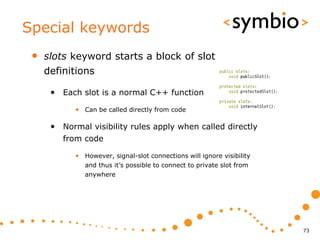
Special keywords
 •   slots keyword starts a block of slot
     definitions

      • Each slot is a normal C++ function
            • Can be called directly from code

      • Normal visibility rules apply when called directly
         from code

            • However, signal-slot connections will ignore visibility
               and thus it’s possible to connect to private slot from
               anywhere


                                                                        73
Special keywords
 •   emit keyword is used to send a notification
     to all slots that have been connected to the
     signal

      • Object framework code loops over the slots that
         have been connected to the signal and makes a
         regular function call to each


                                                          74
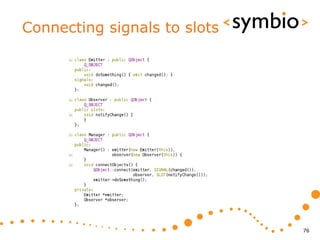
Connecting signals to slots
 •   Connections are made with
     QObject::connect static functions

      • No access control, anyone can connect anything

      • Class headers are not needed if signal and slot
         function signatures are known


 •   Component-based approach

      • Components provide services

      • Controller makes the connections between
         components


                                                          75
Connecting signals to slots


                              76
Signals and slots
 •   Comparing Qt and Java


                             77
Trying it out
 •   Open the hellosignalslot example

 •   Build and run


                                        78
What was done?
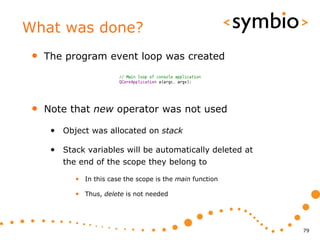
 •   The program event loop was created


 •   Note that new operator was not used

      • Object was allocated on stack

      • Stack variables will be automatically deleted at
         the end of the scope they belong to

            • In this case the scope is the main function

            • Thus, delete is not needed


                                                            79
What was done?
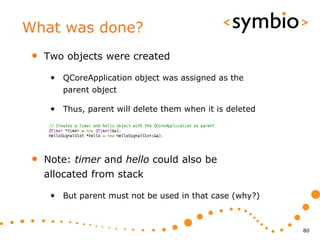
 •   Two objects were created

      • QCoreApplication object was assigned as the
         parent object

      • Thus, parent will delete them when it is deleted


 •   Note: timer and hello could also be
     allocated from stack

      • But parent must not be used in that case (why?)


                                                           80
What was done?
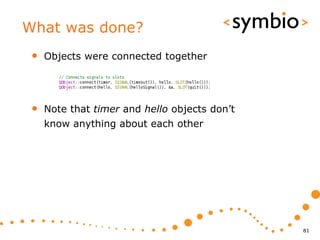
 •   Objects were connected together


 •   Note that timer and hello objects don’t
     know anything about each other


                                               81
What was done?
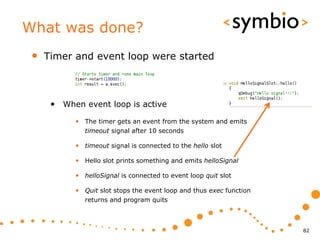
 •   Timer and event loop were started


      • When event loop is active
           • The timer gets an event from the system and emits
              timeout signal after 10 seconds

           • timeout signal is connected to the hello slot

           • Hello slot prints something and emits helloSignal

           • helloSignal is connected to event loop quit slot

           • Quit slot stops the event loop and thus exec function
              returns and program quits


                                                                     82
Short exercise
 •   Open the hellosignalslot example that
     presented in previous slides

 •   Change it so that it prints ”Hello” and
     ”World” with 5-second interval and quits
     after the second print


                                                83
Object properties

CORE FEATURES


                    84
Object properties
 •   All QObject-based classes support
     properties

      • A property is QVariant type, which is stored in a
         dictionary that uses C-style zero-terminated
         character arrays as keys

            • i.e. name-value pair

      • Properties can be dynamic or static
            • Dynamic properties are assigned at run-time

            • Static properties are defined at compile time and
               processed by the meta-object compiler


                                                                  85
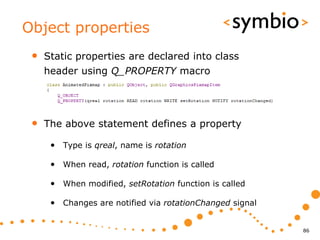
Object properties
 •   Static properties are declared into class
     header using Q_PROPERTY macro


 •   The above statement defines a property

      • Type is qreal, name is rotation

      • When read, rotation function is called

      • When modified, setRotation function is called

      • Changes are notified via rotationChanged signal


                                                          86
Object properties
 •   Properties are used in QML/C++ hybrid
     programming

      • Object properties are mapped into QML

 •   Monday’s topics

      • QML plug-in’s

      • Exposing C++ objects to QML


                                                87
88

QtQuick Day 3

  • 1.
    Qt Quick –Qt C++ programming basics SERIOUS ABOUT SOFTWARE Timo Strömmer, Jan 7, 2011 1
  • 2.
    Contents • Qt C++ projects • Project example • Project file format • Building projects • Shared libraries • C++ introduction • Basics of C++ object-oriented programming
  • 3.
    Contents • Qt core features • Shared data objects • Object model • Signals & slots • Object properties 3
  • 4.
    Creating a C++project QT C++ QUICK START 4
  • 5.
  • 6.
  • 7.
  • 8.
  • 9.
  • 10.
  • 11.
  • 12.
    Quick start • Build with Ctrl+B, run with Ctrl+R 12
  • 13.
  • 14.
    Qt project file • A .pro file with same name as the directory it sits in • Processed by qmake to generate platform- specific build files 14
  • 15.
    Qt project basics • Project name and type • TARGET, TEMPLATE • Project files • SOURCES, HEADERS, FORMS • Project configuration • CONFIG, QT 15
  • 16.
    Project templates • Basic TEMPLATE types: app, lib, subdirs • Executable files (console or GUI) are created with the app type • GUI is default, console needs CONFIG += console • Libraries (static and shared) are created with lib type • Shared default, static needs CONFIG += staticlib • Sub-directory template is used to structure large projects into hierarchies 16
  • 17.
    Project name • Project TARGET specifies the output file name • TARGET = helloworld • Affected by template and platform • Executable name (name, name.exe etc.) • Library name (libname.so, name.dll etc.) 17
  • 18.
    Project files • SOURCES are obviously needed • HEADERS also, as they are processed by Qt meta-object compiler • UI form data (.ui files) are included with FORMS directive 18
  • 19.
    Sources and headers • QtCreator updates the directives in .pro file in most cases • Add and remove but no rename 19
  • 20.
    UI resources • UI resource files are XML documents, which are processed by uic compiler during build • Generates C++ code from the resource and integrates it into project • No need to edit manually, use QtCreator form editor instead 20
  • 21.
  • 22.
    Other resources • Resource file specifies a collection of data that should be bundled into the binary file • For example pictures and QML files • QtCreator can help add resources to project • Qt project file has RESOURCES statement, which contains a list of .qrc files • qrc file is a text file, which is parsed by resource compiler during project build 22
  • 23.
  • 24.
  • 25.
    Resource files • After resource file has been created, add a prefix into it and a file under the prefix • Resource is identified with a path, quite similarly as a file • :/<prefix>/<resource-name> 25
  • 26.
    Building a Qtproject QT C++ PROJECTS 26
  • 27.
    Build from commandline • Run qmake in the directory, which contains the .pro file • Generates project Makefile • Run make to build project • Runs uic, moc and rc to generate ui_<form>.h, moc_<class>.cpp and rc_<resource>.cpp files • Compiles the sources to object .o files • Links the object files together and with Qt modules to produce the project target 27
  • 28.
    Shadow builds • Interactive part • Qt creator project properties • Shadow build output in file system 28
  • 29.
    Excercise • Open the helloworld example into GUI designer • Add a button widget • Break the form layout first • Change button object name to myButton • Right-click and select Go to slot • Selected clicked slot • Add qDebug(”click…”); to code • Build and run 29
  • 30.
  • 31.
    Shared libraries • A shared library contains code that is loaded once and shared by all executables that use it • Saves resources compared to a static library, which is especially important in mobile devices 31
  • 32.
    Exporting from project • In order to be used, a library needs to provide an API • Public headers are included into client project • Client is linked against the library • Project contents are exported with help of makefiles • Run make install in project directory • Files and paths need to be specified first 32
  • 33.
    Public headers • Project file variables • Project files support user-defined variables • For example FOO = 5 • Variables can be referenced with $$<name> • For example $$FOO would be replaced with 5 • Public headers can be separated from private headers with help of a variable 33
  • 34.
    Exporting from project • INSTALLS directive is used to specify what and where to install • var.path specifies where to install • Path is relative to project directory • var.files specify what to install • target.files is pre-defined to contain project binaries 34
  • 35.
    Using exported libraries • To use the library, a project needs to find the exported data • INCLUDEPATH for headers • LIBS for libraries • -L<path> • -l<library-name> • Examples in helloworld-console and helloworld-library projects 35
  • 36.
    Object-oriented programming withQt/C++ C++ INTRODUCTION 36
  • 37.
    C++ OOP basics • A class defines the structure of an object • Objects are created with new operator and freed with delete operator • When object is created, its constructor is called and delete calls destructor 37
  • 38.
    C++ OOP basics • Object data must be initialized in constructor and freed in destructor • C++ has constructor initializer list 38
  • 39.
    C++ OOP basics • A class may inherit other classes • Derived class gets all the properties of the base class • When object is created, base class constructor is called first • If base class constructor needs parameters, it needs to be explicitly called from derived class initializer list • Delete happens in reverse order, derived class destructor is called first 39
  • 40.
    Memory management • Calling new reserves an area of memory for the object • The area will stay reserved until delete is called or the program terminates • If objects are not deleted, the program has memory leaks • Severity of the leaks depend on allocation size, number of allocations and life-time of program • Debugging can be costly 40
  • 41.
    Memory management • Objects allocated with new are reserved from program heap • Other option is to allocate objects from program stack • Stack variables are automatically deleted when leaving the current program scope • In general, anything based on QObject is allocated with new • Some exceptions of course… 41
  • 42.
    Memory management • Stack vs. heap Stack Stack value pointer obj2 &obj obj Heap 42
  • 43.
    Pointers and references • An object allocated from heap is referenced by a pointer or a reference • Pointer is numeric value representing the memory address of the object • Usually 32 or 64 bits in size • Dereference operator (*) returns the value • Reference variable can be thought as being the object itself • Also note that the reference operator returns the pointer of an object 43
  • 44.
    Pointers and references • Following prints out 10 (why?) • Also note the memory leak 44
  • 45.
    Pointers and references • References are not usually used as variables within functions • Main use is constant reference for passing objects into functions as input parameters Unmodifiable Modifiable Unmodifiable, but copied for no benefit P.S. Never use for example const int & parameter (why?) 45
  • 46.
    Function return values • Functions return value should always be thought as a copy • Thus, return heap-allocated objects by pointer • And stack-allocated objects by value • Never return a pointer to stack-allocated value value is 25 46
  • 47.
    Notes about const • The const keyword indicates that something is not modifiable • const variables, const parameters, const member functions • A class member function which doesn’t change the object should be marked const • Possibilities for better compiler optimizations • Class variables are const within a const function const string can be returned as it is copied 47
  • 48.
    C++ hands-on • Create a new Console Application project • Add a class, which doesn’t inherit anything • Add a QString member • Add get and set functions for the member • Note: Qt naming conventions don’t have get - setFoo is matched by foo • In main function, create instance from heap and set the member to some string value 48
  • 49.
  • 50.
    Shared data objects • A shared data object doesn’t store the object data by itself • Instead, data is implicitly shared • With copy-on-write semantics • Easier to use that just pointers • The object can be thought as simple value type • Examples: • Strings, images, collections 50
  • 51.
    Implicit sharing • In normal C++ an object is allocated and a pointer to it is passed around • Care must be taken that object is not deleted while it’s still being pointed to char *ptr char *ptr H e l l o ! 0 char *ptr 51
  • 52.
    Implicit sharing • In implicit sharing, a reference counter is associated with the data • Data pointer is wrapped into a container object, which takes care of deleting the data when reference count reaches 0 QString str Data * QString str Data int ref = 2 H e l l o ! 0 Data * 52
  • 53.
    Implicit sharing • Implicitly shared objects can be treated as simple values • Only the pointer is passed around QString str Data Data * int ref = 1 H e l l o ! 0 QString str Data Data * int ref = 1 C h a n g e 0 53
  • 54.
    Terminology • Copy-on-write • Make a shallow copy until something is changed • Shallow copy • Copy just the pointer, not actual data • Deep copy • Create a copy of the data 54
  • 55.
    Strings • Two types of string • UNICODE strings (QString) • Byte arrays (QByteArray) • In general, QString should be used • UNICODE, so can be localized to anything • Conversion between the two types is easy, but might have unexpected performance issues 55
  • 56.
    Strings and implicitsharing • Strings are implicitly shared, so in general, should be treated as a value • Returned from functions like value • Stored into objects as values • Function parameters should use constant reference, not value • const QString & 56
  • 57.
    String operations • In Qt, a string can be changed • Thus, differs from java immutable strings • Modifying a string in-place is more efficient (especially with reserve() function) • However, some care must be taken to avoid changes in unexpected places 57
  • 58.
    String operations • QString supports various operators • ’+’, ’+=’, ’>’, ’<’, ’<=’, ’>=’, ’==’, ’!=’ • Also work with literals • Character access with [] 58
  • 59.
    Console output • Qt has qPrintable function, which should be used when printing strings with qDebug 59
  • 60.
    Generic containers • List containers • QList, QLinkedList, QVector, QStack, QQueue • Usually QList is best for ordinary tasks • QStringList for strings • Associative containers • QSet, QMap, QHash, QMultiMap, QMultiHash • QMap for sorted, QHash for unsorted items 60
  • 61.
    C++ templates • Containers are based on C++ templates • Type safety -> helps prevent errors • Type of object is specified within angle brackes • Only objects of specific type can be used • Some examples: • QList<QPicture> • List of pictures • QHash<QString,QObject> • Name-to-object dictionary 61
  • 62.
    List containers • Lists are index-based, starting from 0 • Fast access if index is known, slow to search • Adding and removing items • append, insert, ’+=’, ’<<’ • Accessing items • at, ’[]’ 62
  • 63.
    Foreach statement • Can be used to iterate over lists • Takes a shallow copy of the container • If original container is modified while in loop, the one used in the loop remains unchanged 63
  • 64.
    Associative containers • Associative containers are used to map keys to values • In QSet, key and value are the same • QSet<String> • Other containers have separate keys and values • QHash<QString,QString> • Normal versions have one-to-one mapping, multi-versions accept multiple values for single key • QMultiMap<QString, QObject *> 64
  • 65.
    Object model andsignals & slots CORE FEATURES 65
  • 66.
    Object model • Usual Qt program is based around a tree- based hierarchy of objects • Designed to help with C++ memory management • Based on QObject class • Do not confuse with class inheritance 66
  • 67.
    Object model • A QObject may have a parent object and number of child objects QObject • Object without parent is QObject QObject called a root object QObject • When an object is deleted, it will also delete all it’s QObject children 67
  • 68.
    Object model andGUI • All GUI components inherit from QWidget, which in turn inherits from QObject • Thus, GUI widgets are also arranged into tree hierarchy • The root widget is a window • Enabling / disabling or showing / hiding a widget will also affect its children 68
  • 69.
    Signals and slots • Qt way of making callback functions simple • Example cases • What happens when user presses a GUI button • What happens when data arrives from network • Similar semantics as with Java listeners • A signal is emitted, which results in a function call to all slots that have been connected to the signal • i.e. onSignal: slot() in QML code 69
  • 70.
    Signals and slots • Code to support signal-slot connections is generated by the moc tool when project is compiled • Special keywords are used, which are interpreted by moc • Q_OBJECT, signals, slots, emit 70
  • 71.
    Special keywords • Q_OBJECT keyword must be added to every class that inherits from QObject base class • Tells moc to parse the class contents • QtCreator complains if missing 71
  • 72.
    Special keywords • signals keyword is used to start a block of signal definitions • Signal functions are not implemented. Instead, the code for them is generated by moc • Signals can have parameters as any normal function • A slot that is connected to signal must have matching parameter count and types 72
  • 73.
    Special keywords • slots keyword starts a block of slot definitions • Each slot is a normal C++ function • Can be called directly from code • Normal visibility rules apply when called directly from code • However, signal-slot connections will ignore visibility and thus it’s possible to connect to private slot from anywhere 73
  • 74.
    Special keywords • emit keyword is used to send a notification to all slots that have been connected to the signal • Object framework code loops over the slots that have been connected to the signal and makes a regular function call to each 74
  • 75.
    Connecting signals toslots • Connections are made with QObject::connect static functions • No access control, anyone can connect anything • Class headers are not needed if signal and slot function signatures are known • Component-based approach • Components provide services • Controller makes the connections between components 75
  • 76.
  • 77.
    Signals and slots • Comparing Qt and Java 77
  • 78.
    Trying it out • Open the hellosignalslot example • Build and run 78
  • 79.
    What was done? • The program event loop was created • Note that new operator was not used • Object was allocated on stack • Stack variables will be automatically deleted at the end of the scope they belong to • In this case the scope is the main function • Thus, delete is not needed 79
  • 80.
    What was done? • Two objects were created • QCoreApplication object was assigned as the parent object • Thus, parent will delete them when it is deleted • Note: timer and hello could also be allocated from stack • But parent must not be used in that case (why?) 80
  • 81.
    What was done? • Objects were connected together • Note that timer and hello objects don’t know anything about each other 81
  • 82.
    What was done? • Timer and event loop were started • When event loop is active • The timer gets an event from the system and emits timeout signal after 10 seconds • timeout signal is connected to the hello slot • Hello slot prints something and emits helloSignal • helloSignal is connected to event loop quit slot • Quit slot stops the event loop and thus exec function returns and program quits 82
  • 83.
    Short exercise • Open the hellosignalslot example that presented in previous slides • Change it so that it prints ”Hello” and ”World” with 5-second interval and quits after the second print 83
  • 84.
  • 85.
    Object properties • All QObject-based classes support properties • A property is QVariant type, which is stored in a dictionary that uses C-style zero-terminated character arrays as keys • i.e. name-value pair • Properties can be dynamic or static • Dynamic properties are assigned at run-time • Static properties are defined at compile time and processed by the meta-object compiler 85
  • 86.
    Object properties • Static properties are declared into class header using Q_PROPERTY macro • The above statement defines a property • Type is qreal, name is rotation • When read, rotation function is called • When modified, setRotation function is called • Changes are notified via rotationChanged signal 86
  • 87.
    Object properties • Properties are used in QML/C++ hybrid programming • Object properties are mapped into QML • Monday’s topics • QML plug-in’s • Exposing C++ objects to QML 87
  • 88.