Intro to Qt
      GUI programming with C++

                         by Đức Phạm
                Organized by


Qt is a registered product of Digia
Đức Phạm


   Email: inducpham@gmail.com
   Bachelor of IT since 2009
   Linux enthusiast
   Worked in Gameloft and now is East Agile
   Interest in Game and Web development
History


   Developed by Trolltech
   Acquired by Nokia
   Commercial license took over by Digia
In a nutshell


   Qt is ‘cute’
   Cross-platform GUI library for the C++
    programming language
   A complete interface environment with support
    for Webkit API, media streamer, file system
    browser, OpenGL API, etc.
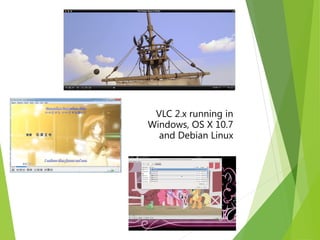
VLC 2.x running in
Windows, OS X 10.7
  and Debian Linux
In a nutshell (continue)


   Support embedded Linux
   Smart phones: Maemo, Meego, etc.
   Electronic devices: Car, TV, etc.
   Feature road map including support for
    popular mobile platforms such as
    Android and iOS.
Legal stuff


   Qt offers three licenses:
       GPL v3
       lGPL
       Digia commercial license
Installation


   Official download: http://qt-project.org/downloads
       Official IDE: QtCreator
       Visual Studio add-in


   Debian repository:
       sudo apt-get install qtcreator qtcreator-dbg
Technical features


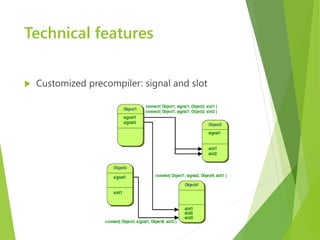
   Customized precompiler: signal and slot
Technical features (continue)


   Signals don’t need to be implemented, but
    rather called


   Signals and slots can be connected:
       Regardless of which object
       Many-many relationship
       Could be disconnected
Technical features (continue)


Features the parent-child relationship
   A child widget when created could reference to
    a parent widget. This allows:
       Hierarchy search: findChild() and
        findChildren()
       Chain destructor on parent de-allocating
Tech demo
Qt in the world


   Industrial
        Skype
        VirtualBox
        Maya
        Opera
        Various embedded software
Qt in the world (continue)


KDE
   Complete desktop environment in Qt
   Including the Plasma Window manager


   Projects including Office Applications
   Development suite: Kdevelop
   Common desktop applications
Qt in the world (continue)


Open source projects
   Qt razor
    http://qt-apps.org/
Further references


   http://qt-project.org/doc/qt-4.8/
   http://www.youtube.com/user/VoidRealms
   http://www.kde.org/developerplatform/
   http://qt-apps.org/
Questions?
Thank you!

Qt Tutorial - Part 1

  • 1.
    Intro to Qt GUI programming with C++ by Đức Phạm Organized by Qt is a registered product of Digia
  • 2.
    Đức Phạm  Email: inducpham@gmail.com  Bachelor of IT since 2009  Linux enthusiast  Worked in Gameloft and now is East Agile  Interest in Game and Web development
  • 3.
    History  Developed by Trolltech  Acquired by Nokia  Commercial license took over by Digia
  • 4.
    In a nutshell  Qt is ‘cute’  Cross-platform GUI library for the C++ programming language  A complete interface environment with support for Webkit API, media streamer, file system browser, OpenGL API, etc.
  • 5.
    VLC 2.x runningin Windows, OS X 10.7 and Debian Linux
  • 6.
    In a nutshell(continue)  Support embedded Linux  Smart phones: Maemo, Meego, etc.  Electronic devices: Car, TV, etc.  Feature road map including support for popular mobile platforms such as Android and iOS.
  • 7.
    Legal stuff  Qt offers three licenses:  GPL v3  lGPL  Digia commercial license
  • 8.
    Installation  Official download: http://qt-project.org/downloads  Official IDE: QtCreator  Visual Studio add-in  Debian repository:  sudo apt-get install qtcreator qtcreator-dbg
  • 9.
    Technical features  Customized precompiler: signal and slot
  • 10.
    Technical features (continue)  Signals don’t need to be implemented, but rather called  Signals and slots can be connected:  Regardless of which object  Many-many relationship  Could be disconnected
  • 11.
    Technical features (continue) Featuresthe parent-child relationship  A child widget when created could reference to a parent widget. This allows:  Hierarchy search: findChild() and findChildren()  Chain destructor on parent de-allocating
  • 12.
  • 13.
    Qt in theworld  Industrial  Skype  VirtualBox  Maya  Opera  Various embedded software
  • 14.
    Qt in theworld (continue) KDE  Complete desktop environment in Qt  Including the Plasma Window manager  Projects including Office Applications  Development suite: Kdevelop  Common desktop applications
  • 15.
    Qt in theworld (continue) Open source projects  Qt razor http://qt-apps.org/
  • 16.
    Further references  http://qt-project.org/doc/qt-4.8/  http://www.youtube.com/user/VoidRealms  http://www.kde.org/developerplatform/  http://qt-apps.org/
  • 17.
  • 18.