How Adobe Does 2 Million
Records Per Second using
Apache Spark!
Yeshwanth Vijayakumar
Project Lead/ Architect – Adobe Experience Platform
Goals
Share tips/experiences from our usecases
Hopefully saves atleast an hour of your time! J
What do you mean by Processing? Agenda!
Ingestion
▪ Structured Streaming - Know thy Lag
▪ Mircobatch the right way
Evaluation
▪ The Art of How I learned to cache my physical Plans
▪ Know Thy Join
▪ Skew Phew! And Sample Sample Sample
Redis – The Ultimate Swiss Army Knife!
Ingestion Scenario
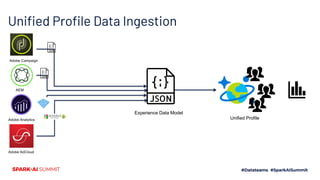
Unified Profile Data Ingestion
Unified Profile
Experience Data Model
Adobe Campaign
AEM
Adobe Analytics
Adobe AdCloud
Structured Streaming - Know thy Lag
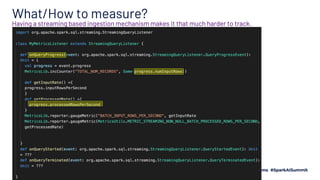
What/How to measure?
Having a streaming based ingestion mechanism makes it that much harder to track.
Is that enough?
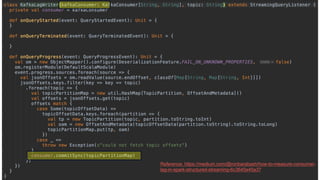
Reference: https://medium.com/@ronbarabash/how-to-measure-consumer-
lag-in-spark-structured-streaming-6c3645e45a37
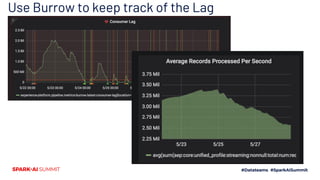
Use Burrow to keep track of the Lag
Structured Streaming
Optimizing The Ingestion
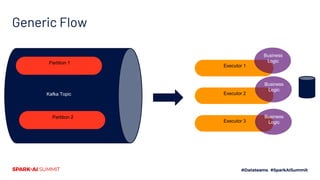
Generic Flow
Partition 1
Partition 2
Kafka Topic
Executor 1
Executor 2
Executor 3
Business
Logic
Business
Logic
Business
Logic
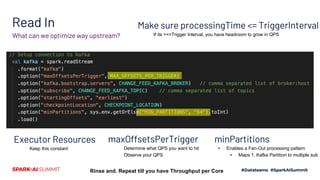
Read In
What can we optimize way upstream?
maxOffsetsPerTrigger
Determine what QPS you want to hit
Observe your QPS
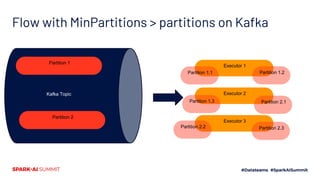
minPartitions
▪ Enables a Fan-Out processing pattern
▪ Maps 1. Kafka Partition to multiple sub
Executor Resources
Keep this constant
Rinse and. Repeat till you have Throughput per Core
Make sure processingTime <= TriggerInterval
If its <<<Trigger Interval, you have headroom to grow in QPS
Flow with MinPartitions > partitions on Kafka
Partition 1
Partition 2
Kafka Topic
Executor 1
Executor 2
Executor 3
Partition 1.1 Partition 1.2
Partition 1.3 Partition 2.1
Partition 2.2 Partition 2.3
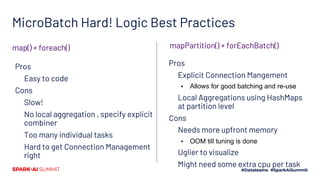
MicroBatch Hard! Logic Best Practices
Pros
Easy to code
Cons
Slow!
No local aggregation , specify explicit
combiner
Too many individual tasks
Hard to get Connection Management
right
Pros
Explicit Connection Mangement
▪ Allows for good batching and re-use
Local Aggregations using HashMaps
at partition level
Cons
Needs more upfront memory
▪ OOM till tuning is done
Uglier to visualize
Might need some extra cpu per task
mapPartition() + forEachBatch()map() + foreach()
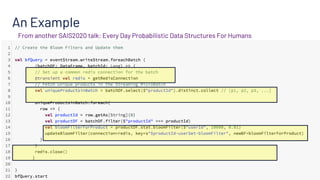
An Example
From another SAIS2020 talk: Every Day Probabilistic Data Structures For Humans
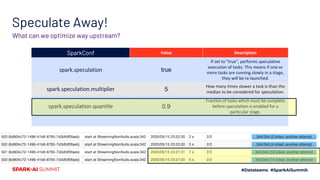
Speculate Away!
What can we optimize way upstream?
SparkConf Value Description
spark.speculation true
If set to "true", performs speculative
execution of tasks. This means if one or
more tasks are running slowly in a stage,
they will be re-launched.
spark.speculation.multiplier 5
How many times slower a task is than the
median to be considered for speculation.
spark.speculation.quantile 0.9
Fraction of tasks which must be complete
before speculation is enabled for a
particular stage.
Evaluation Scenario
What are we processing?
Run as many queries as possible in parallel on top a denormalized dataframe
Query 1
Query 2
Query 3
Query 1000
ProfileIds field1 field1000 eventsArray
a@a.com a x [e1,2,3]
b@g.com b x [e1]
d@d.com d y [e1,2,3]
z@z.com z y [e1,2,3,5,7]
Interactive Processing!
The Art of How I learned to
Cache My Physical Plans
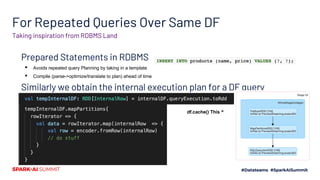
For Repeated Queries Over Same DF
Prepared Statements in RDBMS
▪ Avoids repeated query Planning by taking in a template
▪ Compile (parse->optimize/translate to plan) ahead of time
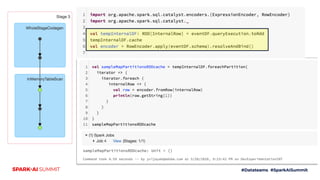
Similarly we obtain the internal execution plan for a DF query
Taking inspiration from RDBMS Land
df.cache() This ^
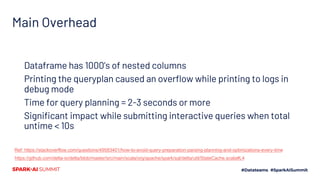
Main Overhead
Dataframe has 1000’s of nested columns
Printing the queryplan caused an overflow while printing to logs in
debug mode
Time for query planning = 2-3 seconds or more
Significant impact while submitting interactive queries when total
untime < 10s
Ref: https://stackoverflow.com/questions/49583401/how-to-avoid-query-preparation-parsing-planning-and-optimizations-every-time
https://github.com/delta-io/delta/blob/master/src/main/scala/org/apache/spark/sql/delta/util/StateCache.scala#L4
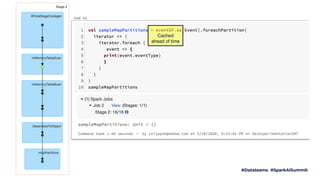
Cached
ahead of time
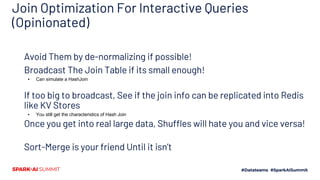
Know thy Join
Join Optimization For Interactive Queries
(Opinionated)
Avoid Them by de-normalizing if possible!
Broadcast The Join Table if its small enough!
▪ Can simulate a HashJoin
If too big to broadcast, See if the join info can be replicated into Redis
like KV Stores
▪ You still get the characteristics of Hash Join
Once you get into real large data, Shuffles will hate you and vice versa!
Sort-Merge is your friend Until it isn’t
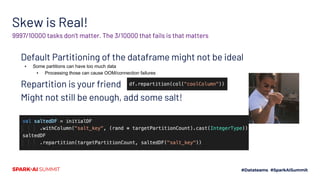
Skew! Phew!
Skew is Real!
Default Partitioning of the dataframe might not be ideal
▪ Some partitions can have too much data
▪ Processing those can cause OOM/connection failures
Repartition is your friend
Might not still be enough, add some salt!
9997/10000 tasks don’t matter. The 3/10000 that fails is that matters
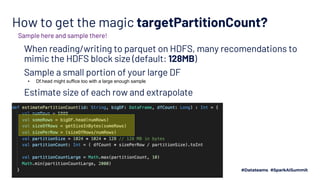
How to get the magic targetPartitionCount?
When reading/writing to parquet on HDFS, many recomendations to
mimic the HDFS block size (default: 128MB)
Sample a small portion of your large DF
▪ Df.head might suffice too with a large enough sample
Estimate size of each row and extrapolate
Sample here and sample there!
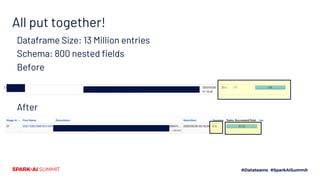
All put together!
Dataframe Size: 13 Million entries
Schema: 800 nested fields
Before
After
Redis – The Ultimate Swiss Army Knife!
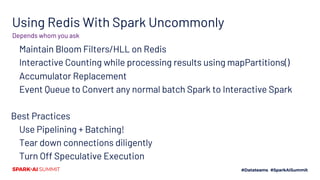
Using Redis With Spark Uncommonly
Maintain Bloom Filters/HLL on Redis
Interactive Counting while processing results using mapPartitions()
Accumulator Replacement
Event Queue to Convert any normal batch Spark to Interactive Spark
Best Practices
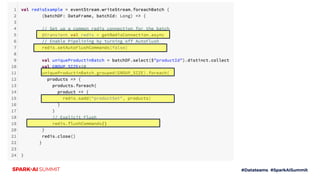
Use Pipelining + Batching!
Tear down connections diligently
Turn Off Speculative Execution
Depends whom you ask
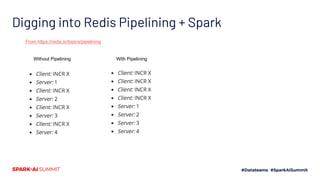
Digging into Redis Pipelining + Spark
From https://redis.io/topics/pipelining
Without Pipelining With Pipelining
More Questions?
https://www.linkedin.com/in/yeshwanth-vijayakumar-75599431
yvijayak@adobe.com
Feel free to reach out to me at
How Adobe Does 2 Million Records Per Second Using Apache Spark!

How Adobe Does 2 Million Records Per Second Using Apache Spark!

  • 2.
    How Adobe Does2 Million Records Per Second using Apache Spark! Yeshwanth Vijayakumar Project Lead/ Architect – Adobe Experience Platform
  • 3.
    Goals Share tips/experiences fromour usecases Hopefully saves atleast an hour of your time! J
  • 4.
    What do youmean by Processing? Agenda! Ingestion ▪ Structured Streaming - Know thy Lag ▪ Mircobatch the right way Evaluation ▪ The Art of How I learned to cache my physical Plans ▪ Know Thy Join ▪ Skew Phew! And Sample Sample Sample Redis – The Ultimate Swiss Army Knife!
  • 5.
  • 6.
    Unified Profile DataIngestion Unified Profile Experience Data Model Adobe Campaign AEM Adobe Analytics Adobe AdCloud
  • 7.
  • 8.
    What/How to measure? Havinga streaming based ingestion mechanism makes it that much harder to track.
  • 9.
    Is that enough? Reference:https://medium.com/@ronbarabash/how-to-measure-consumer- lag-in-spark-structured-streaming-6c3645e45a37
  • 10.
    Use Burrow tokeep track of the Lag
  • 11.
  • 12.
    Generic Flow Partition 1 Partition2 Kafka Topic Executor 1 Executor 2 Executor 3 Business Logic Business Logic Business Logic
  • 13.
    Read In What canwe optimize way upstream? maxOffsetsPerTrigger Determine what QPS you want to hit Observe your QPS minPartitions ▪ Enables a Fan-Out processing pattern ▪ Maps 1. Kafka Partition to multiple sub Executor Resources Keep this constant Rinse and. Repeat till you have Throughput per Core Make sure processingTime <= TriggerInterval If its <<<Trigger Interval, you have headroom to grow in QPS
  • 14.
    Flow with MinPartitions> partitions on Kafka Partition 1 Partition 2 Kafka Topic Executor 1 Executor 2 Executor 3 Partition 1.1 Partition 1.2 Partition 1.3 Partition 2.1 Partition 2.2 Partition 2.3
  • 15.
    MicroBatch Hard! LogicBest Practices Pros Easy to code Cons Slow! No local aggregation , specify explicit combiner Too many individual tasks Hard to get Connection Management right Pros Explicit Connection Mangement ▪ Allows for good batching and re-use Local Aggregations using HashMaps at partition level Cons Needs more upfront memory ▪ OOM till tuning is done Uglier to visualize Might need some extra cpu per task mapPartition() + forEachBatch()map() + foreach()
  • 16.
    An Example From anotherSAIS2020 talk: Every Day Probabilistic Data Structures For Humans
  • 17.
    Speculate Away! What canwe optimize way upstream? SparkConf Value Description spark.speculation true If set to "true", performs speculative execution of tasks. This means if one or more tasks are running slowly in a stage, they will be re-launched. spark.speculation.multiplier 5 How many times slower a task is than the median to be considered for speculation. spark.speculation.quantile 0.9 Fraction of tasks which must be complete before speculation is enabled for a particular stage.
  • 18.
  • 19.
    What are weprocessing? Run as many queries as possible in parallel on top a denormalized dataframe Query 1 Query 2 Query 3 Query 1000 ProfileIds field1 field1000 eventsArray a@a.com a x [e1,2,3] b@g.com b x [e1] d@d.com d y [e1,2,3] z@z.com z y [e1,2,3,5,7] Interactive Processing!
  • 20.
    The Art ofHow I learned to Cache My Physical Plans
  • 21.
    For Repeated QueriesOver Same DF Prepared Statements in RDBMS ▪ Avoids repeated query Planning by taking in a template ▪ Compile (parse->optimize/translate to plan) ahead of time Similarly we obtain the internal execution plan for a DF query Taking inspiration from RDBMS Land df.cache() This ^
  • 22.
    Main Overhead Dataframe has1000’s of nested columns Printing the queryplan caused an overflow while printing to logs in debug mode Time for query planning = 2-3 seconds or more Significant impact while submitting interactive queries when total untime < 10s Ref: https://stackoverflow.com/questions/49583401/how-to-avoid-query-preparation-parsing-planning-and-optimizations-every-time https://github.com/delta-io/delta/blob/master/src/main/scala/org/apache/spark/sql/delta/util/StateCache.scala#L4
  • 23.
  • 25.
  • 26.
    Join Optimization ForInteractive Queries (Opinionated) Avoid Them by de-normalizing if possible! Broadcast The Join Table if its small enough! ▪ Can simulate a HashJoin If too big to broadcast, See if the join info can be replicated into Redis like KV Stores ▪ You still get the characteristics of Hash Join Once you get into real large data, Shuffles will hate you and vice versa! Sort-Merge is your friend Until it isn’t
  • 27.
  • 28.
    Skew is Real! DefaultPartitioning of the dataframe might not be ideal ▪ Some partitions can have too much data ▪ Processing those can cause OOM/connection failures Repartition is your friend Might not still be enough, add some salt! 9997/10000 tasks don’t matter. The 3/10000 that fails is that matters
  • 29.
    How to getthe magic targetPartitionCount? When reading/writing to parquet on HDFS, many recomendations to mimic the HDFS block size (default: 128MB) Sample a small portion of your large DF ▪ Df.head might suffice too with a large enough sample Estimate size of each row and extrapolate Sample here and sample there!
  • 30.
    All put together! DataframeSize: 13 Million entries Schema: 800 nested fields Before After
  • 31.
    Redis – TheUltimate Swiss Army Knife!
  • 32.
    Using Redis WithSpark Uncommonly Maintain Bloom Filters/HLL on Redis Interactive Counting while processing results using mapPartitions() Accumulator Replacement Event Queue to Convert any normal batch Spark to Interactive Spark Best Practices Use Pipelining + Batching! Tear down connections diligently Turn Off Speculative Execution Depends whom you ask
  • 33.
    Digging into RedisPipelining + Spark From https://redis.io/topics/pipelining Without Pipelining With Pipelining
  • 35.