Spark Gotchas and Lessons Learned
Jen Waller, Ph.D.
Boulder/Denver Big Data Meetup
Feb 20, 2020
Boulder, CO
Overview
● Overall Dev Approach
● Useful Spark Built-Ins
● How to Fail at Scale
● Resource Utilization
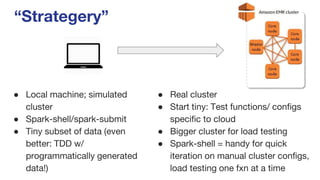
“Strategery”
● Local machine; simulated
cluster
● Spark-shell/spark-submit
● Tiny subset of data (even
better: TDD w/
programmatically generated
data!)
● Real cluster
● Start tiny: Test functions/ configs
specific to cloud
● Bigger cluster for load testing
● Spark-shell = handy for quick
iteration on manual cluster configs,
load testing one fxn at a time
What about notebooks?
By Sam Shere (1905–1982) - Zeppelin-ramp de Hindenburg / Hindenburg
zeppelin disaster, Public Domain,
https://commons.wikimedia.org/w/index.php?curid=19329337
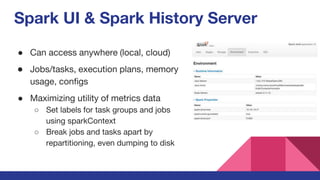
Spark UI & Spark History Server
● Can access anywhere (local, cloud)
● Jobs/tasks, execution plans, memory
usage, configs
● Maximizing utility of metrics data
○ Set labels for task groups and jobs
using sparkContext
○ Break jobs and tasks apart by
repartitioning, even dumping to disk
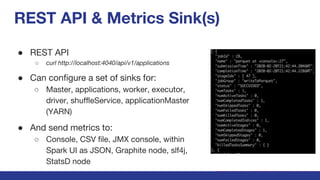
REST API & Metrics Sink(s)
● REST API
○ curl http://localhost:4040/api/v1/applications
● Can configure a set of sinks for:
○ Master, applications, worker, executor,
driver, shuffleService, applicationMaster
(YARN)
● And send metrics to:
○ Console, CSV file, JMX console, within
Spark UI as JSON, Graphite node, slf4j,
StatsD node
“It worked locally!”
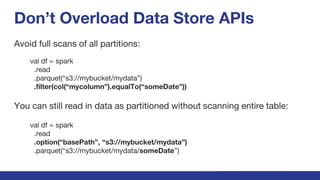
Don’t Overload Data Store APIs
Avoid full scans of all partitions:
val df = spark
.read
.parquet(“s3://mybucket/mydata”)
.filter(col(“mycolumn”).equalTo(“someDate”))
You can still read in data as partitioned without scanning entire table:
val df = spark
.read
.option(“basePath”, “s3://mybucket/mydata”)
.parquet(“s3://mybucket/mydata/someDate”)
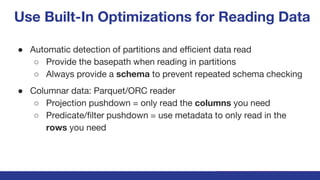
Use Built-In Optimizations for Reading Data
● Automatic detection of partitions and efficient data read
○ Provide the basepath when reading in partitions
○ Always provide a schema to prevent repeated schema checking
● Columnar data: Parquet/ORC reader
○ Projection pushdown = only read the columns you need
○ Predicate/filter pushdown = use metadata to only read in the
rows you need
Beware the Shuffle!
● GroupBy, Join, Distinct…
● Amazon suggests avoiding shuffle
entirely.
● Do that! Find another way to aggregate
your data (i.e., aggregate it upstream in
Kafka/Kinesis/Flink, index it in
ElasticSearch - there are many good
options)
If you must shuffle… Know your data.
● Check for repeated values, nulls on join columns
○ Joining data with repeated values on both sides → gigantic result
○ Joining cols with nulls → massive skew.
■ Can “salt” nulls by pre-filling arbitrary values into empty cells
○ Cluster resource use could be throttling broadcast joins (check it!)
● Check for skew
○ Grouping by skewed column → Spark naively assigns rows to executors
based on level of skewed column
■ Application == dead (out of memory, network timeouts, lost nodes,
processes that never end)
Controlling Spark Shuffles
● Partition your data so it’s mapped across cluster evenly
○ Partition by unique ID
○ Avoid partitioning on cols with a lot of nulls, missing or skewed values
● Partition data to match job you’re running
○ Parallel transforms on many datasets: 200 partitions
○ Billions of pairwise comparisons: 4-10k partitions
○ Tests on single server/locally: 1 partition
Hacks for Shuffling Skewed Data
● Limit the job to a single level of skewed variable at a time
(serialize).
● Manually set a small broadcast blockSize to fit the size of the
instance types in your cluster.
● Salt the data
Optimizing Resources
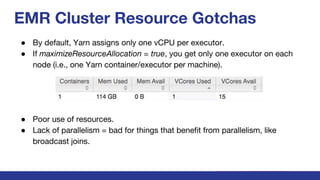
EMR Cluster Resource Gotchas
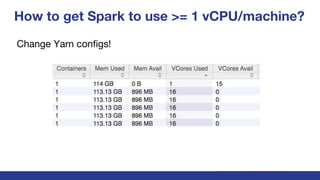
● By default, Yarn assigns only one vCPU per executor.
● If maximizeResourceAllocation = true, you get only one executor on each
node (i.e., one Yarn container/executor per machine).
● Poor use of resources.
● Lack of parallelism = bad for things that benefit from parallelism, like
broadcast joins.
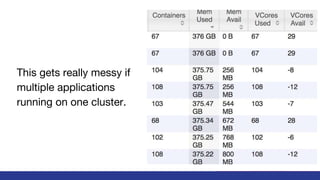
This gets really messy if
multiple applications
running on one cluster.
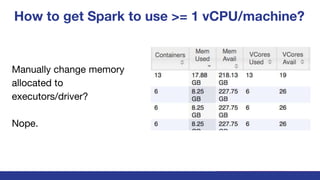
How to get Spark to use >= 1 vCPU/machine?
Manually change memory
allocated to
executors/driver?
Nope.
How to get Spark to use >= 1 vCPU/machine?
Change Yarn configs!
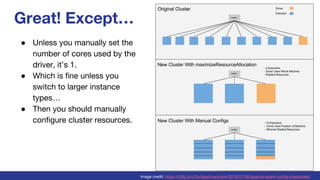
Great! Except…
● Unless you manually set the
number of cores used by the
driver, it’s 1.
● Which is fine unless you
switch to larger instance
types…
● Then you should manually
configure cluster resources.
Image credit: https://c2fo.io/c2fo/spark/aws/emr/2016/07/06/apache-spark-config-cheatsheet/
Summary
● Spark is awesome, but can be tricky.
● Read the docs! Use those helpful Spark built-ins.
● Avoid/manage shuffling.
● Use the Hadoop UI to check your resource utilization.

Spark Gotchas and Lessons Learned

  • 1.
    Spark Gotchas andLessons Learned Jen Waller, Ph.D. Boulder/Denver Big Data Meetup Feb 20, 2020 Boulder, CO
  • 2.
    Overview ● Overall DevApproach ● Useful Spark Built-Ins ● How to Fail at Scale ● Resource Utilization
  • 3.
    “Strategery” ● Local machine;simulated cluster ● Spark-shell/spark-submit ● Tiny subset of data (even better: TDD w/ programmatically generated data!) ● Real cluster ● Start tiny: Test functions/ configs specific to cloud ● Bigger cluster for load testing ● Spark-shell = handy for quick iteration on manual cluster configs, load testing one fxn at a time
  • 4.
  • 5.
    What about notebooks? BySam Shere (1905–1982) - Zeppelin-ramp de Hindenburg / Hindenburg zeppelin disaster, Public Domain, https://commons.wikimedia.org/w/index.php?curid=19329337
  • 6.
    Spark UI &Spark History Server ● Can access anywhere (local, cloud) ● Jobs/tasks, execution plans, memory usage, configs ● Maximizing utility of metrics data ○ Set labels for task groups and jobs using sparkContext ○ Break jobs and tasks apart by repartitioning, even dumping to disk
  • 7.
    REST API &Metrics Sink(s) ● REST API ○ curl http://localhost:4040/api/v1/applications ● Can configure a set of sinks for: ○ Master, applications, worker, executor, driver, shuffleService, applicationMaster (YARN) ● And send metrics to: ○ Console, CSV file, JMX console, within Spark UI as JSON, Graphite node, slf4j, StatsD node
  • 8.
  • 9.
    Don’t Overload DataStore APIs Avoid full scans of all partitions: val df = spark .read .parquet(“s3://mybucket/mydata”) .filter(col(“mycolumn”).equalTo(“someDate”)) You can still read in data as partitioned without scanning entire table: val df = spark .read .option(“basePath”, “s3://mybucket/mydata”) .parquet(“s3://mybucket/mydata/someDate”)
  • 10.
    Use Built-In Optimizationsfor Reading Data ● Automatic detection of partitions and efficient data read ○ Provide the basepath when reading in partitions ○ Always provide a schema to prevent repeated schema checking ● Columnar data: Parquet/ORC reader ○ Projection pushdown = only read the columns you need ○ Predicate/filter pushdown = use metadata to only read in the rows you need
  • 11.
    Beware the Shuffle! ●GroupBy, Join, Distinct… ● Amazon suggests avoiding shuffle entirely. ● Do that! Find another way to aggregate your data (i.e., aggregate it upstream in Kafka/Kinesis/Flink, index it in ElasticSearch - there are many good options)
  • 12.
    If you mustshuffle… Know your data. ● Check for repeated values, nulls on join columns ○ Joining data with repeated values on both sides → gigantic result ○ Joining cols with nulls → massive skew. ■ Can “salt” nulls by pre-filling arbitrary values into empty cells ○ Cluster resource use could be throttling broadcast joins (check it!) ● Check for skew ○ Grouping by skewed column → Spark naively assigns rows to executors based on level of skewed column ■ Application == dead (out of memory, network timeouts, lost nodes, processes that never end)
  • 13.
    Controlling Spark Shuffles ●Partition your data so it’s mapped across cluster evenly ○ Partition by unique ID ○ Avoid partitioning on cols with a lot of nulls, missing or skewed values ● Partition data to match job you’re running ○ Parallel transforms on many datasets: 200 partitions ○ Billions of pairwise comparisons: 4-10k partitions ○ Tests on single server/locally: 1 partition
  • 14.
    Hacks for ShufflingSkewed Data ● Limit the job to a single level of skewed variable at a time (serialize). ● Manually set a small broadcast blockSize to fit the size of the instance types in your cluster. ● Salt the data
  • 15.
  • 16.
    EMR Cluster ResourceGotchas ● By default, Yarn assigns only one vCPU per executor. ● If maximizeResourceAllocation = true, you get only one executor on each node (i.e., one Yarn container/executor per machine). ● Poor use of resources. ● Lack of parallelism = bad for things that benefit from parallelism, like broadcast joins.
  • 17.
    This gets reallymessy if multiple applications running on one cluster.
  • 18.
    How to getSpark to use >= 1 vCPU/machine? Manually change memory allocated to executors/driver? Nope.
  • 19.
    How to getSpark to use >= 1 vCPU/machine? Change Yarn configs!
  • 20.
    Great! Except… ● Unlessyou manually set the number of cores used by the driver, it’s 1. ● Which is fine unless you switch to larger instance types… ● Then you should manually configure cluster resources. Image credit: https://c2fo.io/c2fo/spark/aws/emr/2016/07/06/apache-spark-config-cheatsheet/
  • 21.
    Summary ● Spark isawesome, but can be tricky. ● Read the docs! Use those helpful Spark built-ins. ● Avoid/manage shuffling. ● Use the Hadoop UI to check your resource utilization.