Hardware Basics:
 Inside the Box
          Miguel Rebollo

 Introduction to Computer Science
             2009-2010
Aims
• Know how information is stored and
  handled into a computer
• Describe the basic structure of a computer
• Functions and interactions of computer’s
  internal components
• Difference memory types and storage
  devices

              4626. Introd to Computer Science
Outline

1. What computers do
2. A bit about bits
3. The computer core: CPU and memory
4. Buses, ports and peripherals


               4626. Introd to Computer Science
What computers do
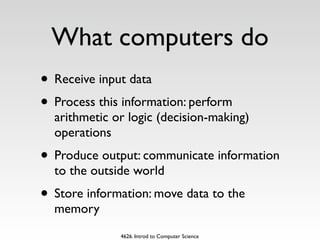
• Receive input data
• Process this information: perform
  arithmetic or logic (decision-making)
  operations
• Produce output: communicate information
  to the outside world
• Store information: move data to the
  memory
              4626. Introd to Computer Science
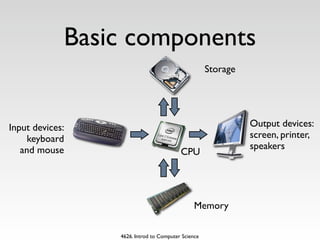
Basic components
                                                    Storage


Input devices:                                                Output devices:
     keyboard                                                 screen, printer,
   and mouse                                                  speakers
                                         CPU


                                               Memory

                 4626. Introd to Computer Science
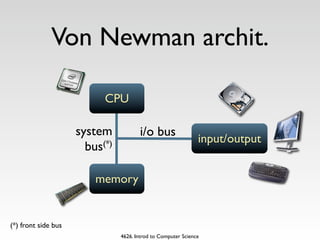
Von Newman archit.

                           CPU

                     system            i/o bus
                                                               input/output
                       bus(*)

                         memory


(*) front side bus
                                4626. Introd to Computer Science
A bit about bits

• computer’s information is digital
• Bits can represent letters, numbers,
  instructions, codes, colours and so on
• 8 bits = 1 byte (256 different values)

               4626. Introd to Computer Science
Bits as numbers

        There are only
10 types of people in the world:
 those who understand binary
     and those who don’t

          4626. Introd to Computer Science
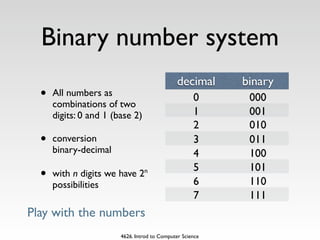
Binary number system
                                               decimal     binary
  •   All numbers as                                 0      000
      combinations of two
      digits: 0 and 1 (base 2)                       1      001
                                                     2      010
  •   conversion                                     3      011
      binary-decimal                                 4      100
                                                     5      101
  •   with n digits we have 2n
                                                     6      110
      possibilities
                                                     7      111
Play with the numbers
                        4626. Introd to Computer Science
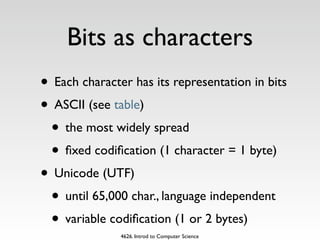
Bits as characters
• Each character has its representation in bits
• ASCII (see table)
 • the most widely spread
 • fixed codification (1 character = 1 byte)
• Unicode (UTF)
 • until 65,000 char., language independent
 • variable codification (1 or 2 bytes)
               4626. Introd to Computer Science
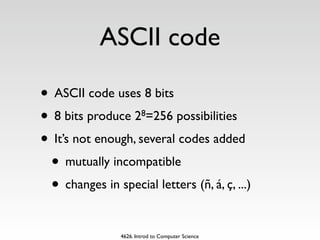
ASCII code

• ASCII code uses 8 bits
• 8 bits produce 2 =256 possibilities
                        8


• It’s not enough, several codes added
 • mutually incompatible
 • changes in special letters (ñ, á, ç, ...)

                4626. Introd to Computer Science
Bits, bytes and
          buzzwords
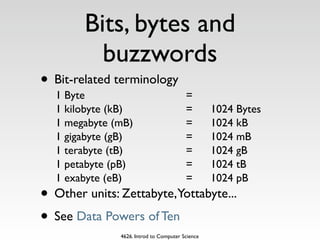
• Bit-related terminology
  1 Byte                                 =
  1 kilobyte (kB)                        =        1024 Bytes
  1 megabyte (mB)                        =        1024 kB
  1 gigabyte (gB)                        =        1024 mB
  1 terabyte (tB)                        =        1024 gB
  1 petabyte (pB)                        =        1024 tB
  1 exabyte (eB)                         =        1024 pB
• Other units: Zettabyte,Yottabyte...
• See Data Powers of Ten
               4626. Introd to Computer Science
The computer’s core:
        CPU
• It’s the main component of the computer
• Executes program’s instructions
• Instructions are stored in memory
• Input data and results are stored in
  memory too


              4626. Introd to Computer Science
Evolution of Intel proc.


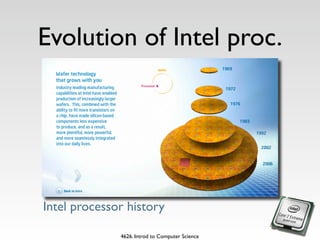
Intel processor history

              4626. Introd to Computer Science
CPU equivalence
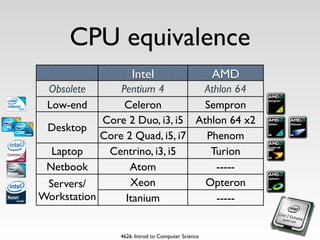
                    Intel                          AMD
 Obsolete       Pentium 4       Athlon 64
 Low-end         Celeron         Sempron
            Core 2 Duo, i3, i5 Athlon 64 x2
 Desktop
            Core 2 Quad, i5, i7  Phenom
  Laptop     Centrino, i3, i5     Turion
 Netbook          Atom             -----
 Servers/         Xeon           Opteron
Workstation      Itanium           -----


                4626. Introd to Computer Science
CPU performance
• The computer’s overall performance is
  determined by (among others)
 • the internal clock (gHz): cycles per
    second
 • the internal architecture
• Two technologies: CISC and RISC
• Multiple core and Hyperthreading tech.
              4626. Introd to Computer Science
CPU compatibility
• Each CPU has its own instruction set
  depending on the manufacturer (Intel,
  Alpha...)
• CPUs in the same family are designed to
  maintain backwards compatibility (new
  models interprets all instructions from
  earlier CPU)


              4626. Introd to Computer Science
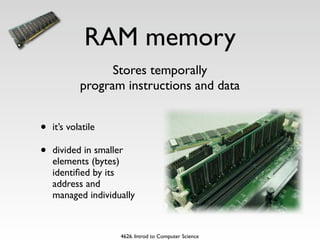
RAM memory
                  Stores temporally
            program instructions and data


•   it’s volatile

•   divided in smaller
    elements (bytes)
    identified by its
    address and
    managed individually


                    4626. Introd to Computer Science
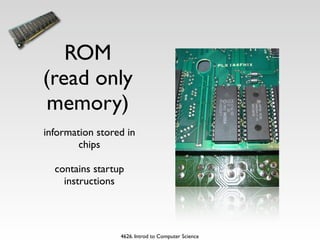
ROM
(read only
 memory)
information stored in
        chips

  contains startup
    instructions


                 4626. Introd to Computer Science
Other memories
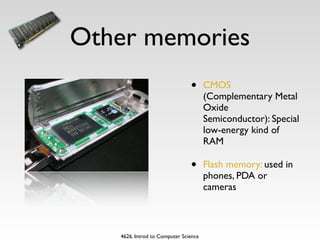
                               •      CMOS
                                      (Complementary Metal
                                      Oxide
                                      Semiconductor): Special
                                      low-energy kind of
                                      RAM

                               •      Flash memory: used in
                                      phones, PDA or
                                      cameras


   4626. Introd to Computer Science
Buses, ports and
        peripherals
• Information travels between components
  on the motherboard through groups of
  wires called system buses (or just
  buses)
• They have 32 or 64 parallel wires
• Expansion slots, bays and ports: connect
  additional devices

              4626. Introd to Computer Science

Hardware basics: inside the box

  • 1.
    Hardware Basics: Insidethe Box Miguel Rebollo Introduction to Computer Science 2009-2010
  • 2.
    Aims • Know howinformation is stored and handled into a computer • Describe the basic structure of a computer • Functions and interactions of computer’s internal components • Difference memory types and storage devices 4626. Introd to Computer Science
  • 3.
    Outline 1. What computersdo 2. A bit about bits 3. The computer core: CPU and memory 4. Buses, ports and peripherals 4626. Introd to Computer Science
  • 4.
    What computers do •Receive input data • Process this information: perform arithmetic or logic (decision-making) operations • Produce output: communicate information to the outside world • Store information: move data to the memory 4626. Introd to Computer Science
  • 5.
    Basic components Storage Input devices: Output devices: keyboard screen, printer, and mouse speakers CPU Memory 4626. Introd to Computer Science
  • 6.
    Von Newman archit. CPU system i/o bus input/output bus(*) memory (*) front side bus 4626. Introd to Computer Science
  • 7.
    A bit aboutbits • computer’s information is digital • Bits can represent letters, numbers, instructions, codes, colours and so on • 8 bits = 1 byte (256 different values) 4626. Introd to Computer Science
  • 8.
    Bits as numbers There are only 10 types of people in the world: those who understand binary and those who don’t 4626. Introd to Computer Science
  • 9.
    Binary number system decimal binary • All numbers as 0 000 combinations of two digits: 0 and 1 (base 2) 1 001 2 010 • conversion 3 011 binary-decimal 4 100 5 101 • with n digits we have 2n 6 110 possibilities 7 111 Play with the numbers 4626. Introd to Computer Science
  • 10.
    Bits as characters •Each character has its representation in bits • ASCII (see table) • the most widely spread • fixed codification (1 character = 1 byte) • Unicode (UTF) • until 65,000 char., language independent • variable codification (1 or 2 bytes) 4626. Introd to Computer Science
  • 11.
    ASCII code • ASCIIcode uses 8 bits • 8 bits produce 2 =256 possibilities 8 • It’s not enough, several codes added • mutually incompatible • changes in special letters (ñ, á, ç, ...) 4626. Introd to Computer Science
  • 12.
    Bits, bytes and buzzwords • Bit-related terminology 1 Byte = 1 kilobyte (kB) = 1024 Bytes 1 megabyte (mB) = 1024 kB 1 gigabyte (gB) = 1024 mB 1 terabyte (tB) = 1024 gB 1 petabyte (pB) = 1024 tB 1 exabyte (eB) = 1024 pB • Other units: Zettabyte,Yottabyte... • See Data Powers of Ten 4626. Introd to Computer Science
  • 13.
    The computer’s core: CPU • It’s the main component of the computer • Executes program’s instructions • Instructions are stored in memory • Input data and results are stored in memory too 4626. Introd to Computer Science
  • 14.
    Evolution of Intelproc. Intel processor history 4626. Introd to Computer Science
  • 15.
    CPU equivalence Intel AMD Obsolete Pentium 4 Athlon 64 Low-end Celeron Sempron Core 2 Duo, i3, i5 Athlon 64 x2 Desktop Core 2 Quad, i5, i7 Phenom Laptop Centrino, i3, i5 Turion Netbook Atom ----- Servers/ Xeon Opteron Workstation Itanium ----- 4626. Introd to Computer Science
  • 16.
    CPU performance • Thecomputer’s overall performance is determined by (among others) • the internal clock (gHz): cycles per second • the internal architecture • Two technologies: CISC and RISC • Multiple core and Hyperthreading tech. 4626. Introd to Computer Science
  • 17.
    CPU compatibility • EachCPU has its own instruction set depending on the manufacturer (Intel, Alpha...) • CPUs in the same family are designed to maintain backwards compatibility (new models interprets all instructions from earlier CPU) 4626. Introd to Computer Science
  • 18.
    RAM memory Stores temporally program instructions and data • it’s volatile • divided in smaller elements (bytes) identified by its address and managed individually 4626. Introd to Computer Science
  • 19.
    ROM (read only memory) informationstored in chips contains startup instructions 4626. Introd to Computer Science
  • 20.
    Other memories • CMOS (Complementary Metal Oxide Semiconductor): Special low-energy kind of RAM • Flash memory: used in phones, PDA or cameras 4626. Introd to Computer Science
  • 21.
    Buses, ports and peripherals • Information travels between components on the motherboard through groups of wires called system buses (or just buses) • They have 32 or 64 parallel wires • Expansion slots, bays and ports: connect additional devices 4626. Introd to Computer Science