 A hard disk drive (HDD), hard disk, hard
drive or fixed disk[b] is a data storage
device used for storing and
retrieving digital information using one or
more rigid rapidly rotating disks (platters)
coated with magnetic material. The platters
are paired with magnetic heads arranged on
a moving actuator arm, which read and write
data to the platter surfaces
 The two most common form factors for
modern HDDs are 3.5-inch, for desktop
computers, and 2.5-inch, primarily for
laptops. HDDs are connected to systems by
standard interface cables such
as PATA (Parallel ATA), SATA (Serial
ATA), USBor SAS (Serial attached SCSI)
cables.
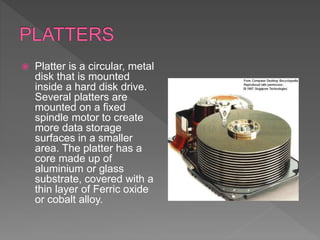
 Platter is a circular, metal
disk that is mounted
inside a hard disk drive.
Several platters are
mounted on a fixed
spindle motor to create
more data storage
surfaces in a smaller
area. The platter has a
core made up of
aluminium or glass
substrate, covered with a
thin layer of Ferric oxide
or cobalt alloy.
 The bulk material of which platters are made
up, forms the base on which media layer is
deposited. The substrate has no specific
function but to support the media layer. The
most commonly used material for making
this physical layer is an Aluminium alloy
 The substrate material forms the base upon
which actual recording media is deposited.
The media layer is a thin coating of magnetic
material applied to the surface of the platters
and where the actual data is stored. Its
thickness is only a few millionths of an inch.
 On the top of the magnetic media, is applied
a super-thin, protective, lubricating layer.
This layer is called the protective layer
because it protects the disk from damage
caused by accidental contact from the
heads, “head crash” or other foreign material
from entering the drive
 In order to get maintain the organized
storage and retrieval of data the platters are
organized into specific structures. These
specific structures include tracks, sectors,
and clusters.
 Each platter is broken into thousands of tightly
packed concentric circles, known as tracks.
These tracks resemble the structure of annual
rings of a tree. All the information stored on the
hard disk is recorded in tracks. Starting from
zero at the outer side of the platter, the number
of tracks goes on increasing to the inner side.
Each track can hold a large amount of data
counting to thousands of bytes.
 Each track is further broken down into
smaller units called sectors. As sector is the
basic unit of data storage on a hard disk. A
single track typically can have thousands of
sectors and each sector can hold more than
512 bytes of data. A few additional bytes are
required for control structures and error
detection and correction.
Sectors are often grouped
together to form Clusters.
 The heads are an interface between the
magnetic media where the data is stored and
electronic components in the hard disk. The
heads convert the information, which is in
the form of bits to magnetic pulses when it is
to be stored on the platter and reverses the
process while reading.

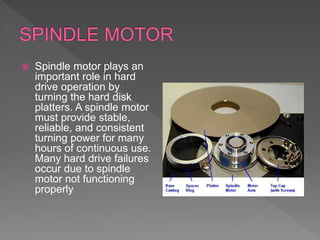
 Spindle motor plays an
important role in hard
drive operation by
turning the hard disk
platters. A spindle motor
must provide stable,
reliable, and consistent
turning power for many
hours of continuous use.
Many hard drive failures
occur due to spindle
motor not functioning
properly
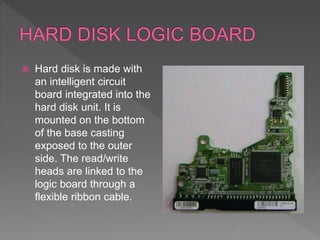
 Hard disk is made with
an intelligent circuit
board integrated into the
hard disk unit. It is
mounted on the bottom
of the base casting
exposed to the outer
side. The read/write
heads are linked to the
logic board through a
flexible ribbon cable.
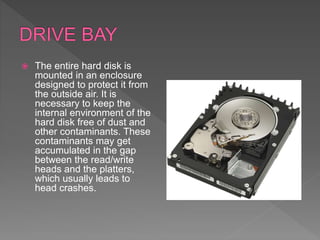
 The entire hard disk is
mounted in an enclosure
designed to protect it from
the outside air. It is
necessary to keep the
internal environment of the
hard disk free of dust and
other contaminants. These
contaminants may get
accumulated in the gap
between the read/write
heads and the platters,
which usually leads to
head crashes.
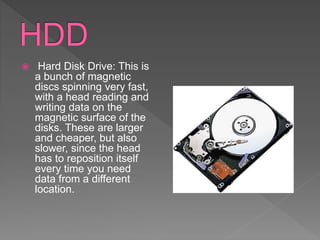
 Hard Disk Drive: This is
a bunch of magnetic
discs spinning very fast,
with a head reading and
writing data on the
magnetic surface of the
disks. These are larger
and cheaper, but also
slower, since the head
has to reposition itself
every time you need
data from a different
location.
 Solid State Drives: You
can consider these as
bigger version of pen
drives. They store data
in memory (flash) chips,
and this means they
don't have any moving
parts. This allows higher
speeds, but also makes
them expensive. Also,
they don't come in the
capacities HDDs come
in.
 This is the most
common connector used
in laptops. These come
in SATA 2 and SATA 3
versions, supporting 3.0
and 6.0 Gbps
respectively.
SATA drives come in two
form factors. 2.5" which
goes into laptops and
looks like this when it is
magnetic
 This is a very recent
technology which comes
in select Ultrabooks like
the Macbook Air. You
can buy these for
desktops, but they are
quite expensive.
However, they are
insanely quick. I know of
some that can hit 24
Gbps, and there are
even faster versions
available.
 Hard disk drives were introduced in 1956 as
data storage for an IBM real-timetransaction
processing computer and were developed for
use with general-
purposemainframe and minicomputers. The first
IBM drive, the 350 RAMAC, was approximately
the size of two medium-sized refrigerators and
stored five million six-bit characters
(3.75 megabytes)[9] on a stack of 50 disks.
 In 1962, IBM introduced the model 1311 disk
drive, which was about the size of a washing
machine and stored two million characters on a
removable disk pack. Users could buy
additional packs and interchange them as
needed, much like reels of magnetic tape. Later
models of removable pack drives, from IBM and
others, became the norm in most computer
installations and reached capacities of 300
megabytes by the early 1980s. Non-removable
HDDs were called "fixed disk" drives.
PATRICIA NICOLE DRIZ
LEONIN DE LEON
RIZZA MAY PINEDA

Hard Disk Drive.pptx

  • 2.
     A harddisk drive (HDD), hard disk, hard drive or fixed disk[b] is a data storage device used for storing and retrieving digital information using one or more rigid rapidly rotating disks (platters) coated with magnetic material. The platters are paired with magnetic heads arranged on a moving actuator arm, which read and write data to the platter surfaces
  • 3.
     The twomost common form factors for modern HDDs are 3.5-inch, for desktop computers, and 2.5-inch, primarily for laptops. HDDs are connected to systems by standard interface cables such as PATA (Parallel ATA), SATA (Serial ATA), USBor SAS (Serial attached SCSI) cables.
  • 5.
     Platter isa circular, metal disk that is mounted inside a hard disk drive. Several platters are mounted on a fixed spindle motor to create more data storage surfaces in a smaller area. The platter has a core made up of aluminium or glass substrate, covered with a thin layer of Ferric oxide or cobalt alloy.
  • 6.
     The bulkmaterial of which platters are made up, forms the base on which media layer is deposited. The substrate has no specific function but to support the media layer. The most commonly used material for making this physical layer is an Aluminium alloy
  • 7.
     The substratematerial forms the base upon which actual recording media is deposited. The media layer is a thin coating of magnetic material applied to the surface of the platters and where the actual data is stored. Its thickness is only a few millionths of an inch.
  • 8.
     On thetop of the magnetic media, is applied a super-thin, protective, lubricating layer. This layer is called the protective layer because it protects the disk from damage caused by accidental contact from the heads, “head crash” or other foreign material from entering the drive
  • 9.
     In orderto get maintain the organized storage and retrieval of data the platters are organized into specific structures. These specific structures include tracks, sectors, and clusters.
  • 10.
     Each platteris broken into thousands of tightly packed concentric circles, known as tracks. These tracks resemble the structure of annual rings of a tree. All the information stored on the hard disk is recorded in tracks. Starting from zero at the outer side of the platter, the number of tracks goes on increasing to the inner side. Each track can hold a large amount of data counting to thousands of bytes.
  • 11.
     Each trackis further broken down into smaller units called sectors. As sector is the basic unit of data storage on a hard disk. A single track typically can have thousands of sectors and each sector can hold more than 512 bytes of data. A few additional bytes are required for control structures and error detection and correction.
  • 12.
    Sectors are oftengrouped together to form Clusters.
  • 13.
     The headsare an interface between the magnetic media where the data is stored and electronic components in the hard disk. The heads convert the information, which is in the form of bits to magnetic pulses when it is to be stored on the platter and reverses the process while reading. 
  • 14.
     Spindle motorplays an important role in hard drive operation by turning the hard disk platters. A spindle motor must provide stable, reliable, and consistent turning power for many hours of continuous use. Many hard drive failures occur due to spindle motor not functioning properly
  • 15.
     Hard diskis made with an intelligent circuit board integrated into the hard disk unit. It is mounted on the bottom of the base casting exposed to the outer side. The read/write heads are linked to the logic board through a flexible ribbon cable.
  • 16.
     The entirehard disk is mounted in an enclosure designed to protect it from the outside air. It is necessary to keep the internal environment of the hard disk free of dust and other contaminants. These contaminants may get accumulated in the gap between the read/write heads and the platters, which usually leads to head crashes.
  • 18.
     Hard DiskDrive: This is a bunch of magnetic discs spinning very fast, with a head reading and writing data on the magnetic surface of the disks. These are larger and cheaper, but also slower, since the head has to reposition itself every time you need data from a different location.
  • 19.
     Solid StateDrives: You can consider these as bigger version of pen drives. They store data in memory (flash) chips, and this means they don't have any moving parts. This allows higher speeds, but also makes them expensive. Also, they don't come in the capacities HDDs come in.
  • 20.
     This isthe most common connector used in laptops. These come in SATA 2 and SATA 3 versions, supporting 3.0 and 6.0 Gbps respectively. SATA drives come in two form factors. 2.5" which goes into laptops and looks like this when it is magnetic
  • 21.
     This isa very recent technology which comes in select Ultrabooks like the Macbook Air. You can buy these for desktops, but they are quite expensive. However, they are insanely quick. I know of some that can hit 24 Gbps, and there are even faster versions available.
  • 23.
     Hard diskdrives were introduced in 1956 as data storage for an IBM real-timetransaction processing computer and were developed for use with general- purposemainframe and minicomputers. The first IBM drive, the 350 RAMAC, was approximately the size of two medium-sized refrigerators and stored five million six-bit characters (3.75 megabytes)[9] on a stack of 50 disks.
  • 24.
     In 1962,IBM introduced the model 1311 disk drive, which was about the size of a washing machine and stored two million characters on a removable disk pack. Users could buy additional packs and interchange them as needed, much like reels of magnetic tape. Later models of removable pack drives, from IBM and others, became the norm in most computer installations and reached capacities of 300 megabytes by the early 1980s. Non-removable HDDs were called "fixed disk" drives.
  • 25.
    PATRICIA NICOLE DRIZ LEONINDE LEON RIZZA MAY PINEDA