drtamil@gmail.com
Content Creation - Video
• For e-learning
enthusiast, just handing
out PowerPoint files is
not enough, somehow
we would like to include
• Some apps that were
covered in brief during
class;
– TouchCast #9
– Spark Video #10
we would like to include
the explanation by the
lecturer along with the
slides.
• So apps that enable us
to do so easily are
greatly appreciated.
– Spark Video #10
– Doceri #11
– iMovie #12
– Explain Everything
#13
drtamil@gmail.com
Video Creation – Touch Cast
• A touchcast video is a
video that is fully
browseable, responsive,
and interactive.
• You can combine various
• You can annotate a;
– webpage
– Video
– Images
– Map• You can combine various
materials such as
Keynote, .pdf files, web
links then annotate them
as you create an
interactive video.
– Map
– Presentation
– Or any of them together to
create either a touchcast
or an interactive video.
• Just put them into DropBox
& import into Touch Cast.
drtamil@gmail.com
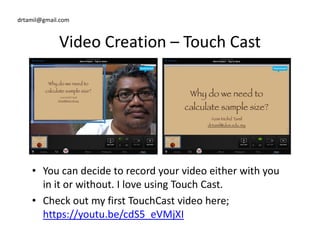
Video Creation – Touch Cast
• You can decide to record your video either with you
in it or without. I love using Touch Cast.
• Check out my first TouchCast video here;
https://youtu.be/cdS5_eVMjXI
drtamil@gmail.com
Video Creation – Spark Video
• Spark Video is a free iOS
app that lets you make
an impact with an
amazing animated
video.
• Start by creating a slide,
record your voice, select a
image for background,
add graphics then add
some music. Do this again
and again until you finish
video.
• Something like a
combination of Haiku
Deck & Prezi but you
end up with a beautiful
animated video of your
slides.
some music. Do this again
and again until you finish
telling your story.
• Check out this video on
its predecessor; Adobe
Voice
https://youtu.be/I6f0XM
OHzoM
drtamil@gmail.com
Video Creation – Doceri
• Doceri is an interactive
whiteboard and
screencast recorder
with tools for hand-
drawn graphics.
• Very easy to use. Just
import the image, press
record and start
explaining. Draw lines
on the images as youdrawn graphics.
• You can import a series
of images into Doceri
then record your
explanation as you draw
upon the images to
illustrate your point.
on the images as you
talk.
• Check out my video
produced using Doceri
https://youtu.be/3Klg3v
JUIBU
drtamil@gmail.com
Video Creation – iMovie
• iMovie is a video editing
software application sold
by Apple Inc. for the Mac
and iOS (iPhone, iPad,
iPad Mini and iPod
Touch).
• It is very easy and fun to
use. Just pick a template,
insert or record the
relevant clips/images, put
in the explanatory titles
or text, then compile the
iPad Mini and iPod
Touch).
• It was originally released
in 1999 as a Mac OS 8
application bundled with
the first FireWire-enabled
consumer Mac model –
the iMac DV.
in the explanatory titles
or text, then compile the
video. Good for selling
your course.
• Check out my video
produced using iMovie
https://youtu.be/4ZeFPzR
nDuA
drtamil@gmail.com
Video Creation – Explain Everything
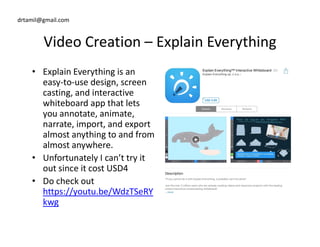
• Explain Everything is an
easy-to-use design, screen
casting, and interactive
whiteboard app that lets
you annotate, animate,
narrate, import, and exportnarrate, import, and export
almost anything to and from
almost anywhere.
• Unfortunately I can’t try it
out since it cost USD4
• Do check out
https://youtu.be/WdzTSeRY
kwg

Hack#9 video creation apps for iPad

  • 1.
    drtamil@gmail.com Content Creation -Video • For e-learning enthusiast, just handing out PowerPoint files is not enough, somehow we would like to include • Some apps that were covered in brief during class; – TouchCast #9 – Spark Video #10 we would like to include the explanation by the lecturer along with the slides. • So apps that enable us to do so easily are greatly appreciated. – Spark Video #10 – Doceri #11 – iMovie #12 – Explain Everything #13
  • 2.
    drtamil@gmail.com Video Creation –Touch Cast • A touchcast video is a video that is fully browseable, responsive, and interactive. • You can combine various • You can annotate a; – webpage – Video – Images – Map• You can combine various materials such as Keynote, .pdf files, web links then annotate them as you create an interactive video. – Map – Presentation – Or any of them together to create either a touchcast or an interactive video. • Just put them into DropBox & import into Touch Cast.
  • 3.
    drtamil@gmail.com Video Creation –Touch Cast • You can decide to record your video either with you in it or without. I love using Touch Cast. • Check out my first TouchCast video here; https://youtu.be/cdS5_eVMjXI
  • 4.
    drtamil@gmail.com Video Creation –Spark Video • Spark Video is a free iOS app that lets you make an impact with an amazing animated video. • Start by creating a slide, record your voice, select a image for background, add graphics then add some music. Do this again and again until you finish video. • Something like a combination of Haiku Deck & Prezi but you end up with a beautiful animated video of your slides. some music. Do this again and again until you finish telling your story. • Check out this video on its predecessor; Adobe Voice https://youtu.be/I6f0XM OHzoM
  • 5.
    drtamil@gmail.com Video Creation –Doceri • Doceri is an interactive whiteboard and screencast recorder with tools for hand- drawn graphics. • Very easy to use. Just import the image, press record and start explaining. Draw lines on the images as youdrawn graphics. • You can import a series of images into Doceri then record your explanation as you draw upon the images to illustrate your point. on the images as you talk. • Check out my video produced using Doceri https://youtu.be/3Klg3v JUIBU
  • 6.
    drtamil@gmail.com Video Creation –iMovie • iMovie is a video editing software application sold by Apple Inc. for the Mac and iOS (iPhone, iPad, iPad Mini and iPod Touch). • It is very easy and fun to use. Just pick a template, insert or record the relevant clips/images, put in the explanatory titles or text, then compile the iPad Mini and iPod Touch). • It was originally released in 1999 as a Mac OS 8 application bundled with the first FireWire-enabled consumer Mac model – the iMac DV. in the explanatory titles or text, then compile the video. Good for selling your course. • Check out my video produced using iMovie https://youtu.be/4ZeFPzR nDuA
  • 7.
    drtamil@gmail.com Video Creation –Explain Everything • Explain Everything is an easy-to-use design, screen casting, and interactive whiteboard app that lets you annotate, animate, narrate, import, and exportnarrate, import, and export almost anything to and from almost anywhere. • Unfortunately I can’t try it out since it cost USD4 • Do check out https://youtu.be/WdzTSeRY kwg