Graphic Design
Basics
Four principles that govern page design
FOUR PRINCIPLES OF PAGE DESIGN
•PROXIMITY
•ALINGMENT
•REPETITION
•CONTRAST
PROXIMITY
• When several items are close to each other they
become one visual unit
• Be aware of what path the eye follows
• You should be able to create a logical progression
from beginning to end
• The basic purpose of proximity is to organize.
• Organized information is more likely to be read
and remembered
How to create Proximity
• Squint
o Count the number of visual elements by
the number of times your eye stops
when reading.
• If you have more than 5 elements,
see which ones can be grouped to
make one unit.
Avoid
• Too many elements
• Sticking stuff in the corners and the
middle
• Leaving equal amounts of white
space between elements.
• Creating relationships with elements
that don’t belong together
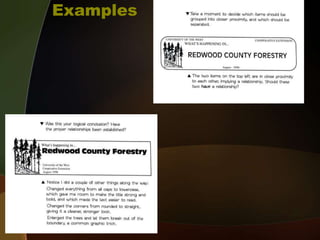
Examples
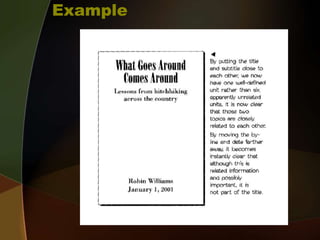
Example
ALIGNMENT
• Every Element should have some
visual connection with another
element on the page
• The basic purpose is to unify and
organize the page
• Even if the separate elements are
not physically close on the page,
they can appear connected.
How to Create Alignment
• Be conscious of where elements are
placed.
• Always find something else on the
page to align with, even if they are
far away from each other on the
page.
o Find a strong line and use it, such as a
photo or graphic.
• Use one text alignment for the
whole page, all left, center or right.
Never mix.
Alignment problems to avoid
• Avoid using more than one text
alignment on the page (don’t center
some and right-align other texts)
• Try hard to break away from a
centered alignment unless your are
trying to create a more formal
presentation
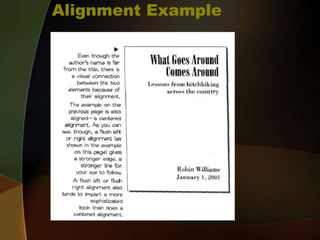
Alignment Example
REPITITION
• Repetition of visual elements
throughout the design unifies a
piece by tying together
otherwise separate parts.
• The purpose of repetition is to
unify and to add visual interest
How to create repetition
• Be consistent
• Find repeated elements such as lines
or boxes and make them stronger &
more dramatic
• Add repeating elements such as
numbered lists.
• Use contrast to accent repetitions.
Avoid
• Repeating too much
o Having every 3rd item in bold type will
be distracting and boring.
CONTRAST
• In order for contrast to work it must
be strong.
• Don’t Be A Wimp. If two items are not
exactly the same, then make them
different. REALLY DIFFERENT.
• Contrast adds interest to the page.
CREATING CONTRAST
• Add contrast with typeface choices,
line thicknesses, colors, shapes,
sizes, and space.
• Make it strong, make it noticeable.
• Avoid using two or more typefaces
that are similar.
• If items are not exactly the same,
make them different.
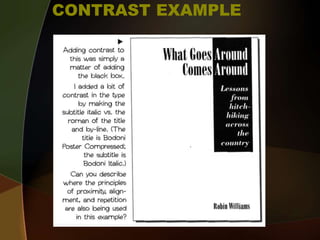
CONTRAST EXAMPLE
Assignment: Graphic Design
o Create a Poster to Illustrate each
of the 4 Principles: Contrast,
Repetition, Alignment, and
Proximity
o Set Your image size to
8.25"x10.25" at 300 ppi.
o You may use text, shapes, images
& fonts to illustrate your
understanding of each principle.

Graphics Design Basics

  • 1.
  • 2.
    FOUR PRINCIPLES OFPAGE DESIGN •PROXIMITY •ALINGMENT •REPETITION •CONTRAST
  • 3.
    PROXIMITY • When severalitems are close to each other they become one visual unit • Be aware of what path the eye follows • You should be able to create a logical progression from beginning to end • The basic purpose of proximity is to organize. • Organized information is more likely to be read and remembered
  • 4.
    How to createProximity • Squint o Count the number of visual elements by the number of times your eye stops when reading. • If you have more than 5 elements, see which ones can be grouped to make one unit.
  • 5.
    Avoid • Too manyelements • Sticking stuff in the corners and the middle • Leaving equal amounts of white space between elements. • Creating relationships with elements that don’t belong together
  • 6.
  • 7.
  • 8.
    ALIGNMENT • Every Elementshould have some visual connection with another element on the page • The basic purpose is to unify and organize the page • Even if the separate elements are not physically close on the page, they can appear connected.
  • 9.
    How to CreateAlignment • Be conscious of where elements are placed. • Always find something else on the page to align with, even if they are far away from each other on the page. o Find a strong line and use it, such as a photo or graphic. • Use one text alignment for the whole page, all left, center or right. Never mix.
  • 10.
    Alignment problems toavoid • Avoid using more than one text alignment on the page (don’t center some and right-align other texts) • Try hard to break away from a centered alignment unless your are trying to create a more formal presentation
  • 11.
  • 12.
    REPITITION • Repetition ofvisual elements throughout the design unifies a piece by tying together otherwise separate parts. • The purpose of repetition is to unify and to add visual interest
  • 13.
    How to createrepetition • Be consistent • Find repeated elements such as lines or boxes and make them stronger & more dramatic • Add repeating elements such as numbered lists. • Use contrast to accent repetitions.
  • 14.
    Avoid • Repeating toomuch o Having every 3rd item in bold type will be distracting and boring.
  • 15.
    CONTRAST • In orderfor contrast to work it must be strong. • Don’t Be A Wimp. If two items are not exactly the same, then make them different. REALLY DIFFERENT. • Contrast adds interest to the page.
  • 16.
    CREATING CONTRAST • Addcontrast with typeface choices, line thicknesses, colors, shapes, sizes, and space. • Make it strong, make it noticeable. • Avoid using two or more typefaces that are similar. • If items are not exactly the same, make them different.
  • 17.
  • 18.
    Assignment: Graphic Design oCreate a Poster to Illustrate each of the 4 Principles: Contrast, Repetition, Alignment, and Proximity o Set Your image size to 8.25"x10.25" at 300 ppi. o You may use text, shapes, images & fonts to illustrate your understanding of each principle.