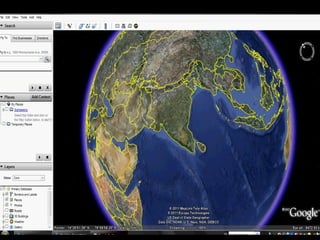
INTRODUCTION Google Earth  is a virtual globe, map and geographic information program that was originally called Earth Viewer. It was created by Keyhole, Inc. Developed by  Google. OS  Windows 2000, XP & Vista, Mac OS X, iPhone OS, Linux
 
OVERVIEW Google Earth displays satellite images of varying resolution of the Earth's surface  allowing users to visually see things like cities and houses from a bird's eye view.  Google Earth allows users to search for addresses for some countries, enter coordinates, or simply use the mouse to browse to a location.  Google Earth also uses data collected by NASA's Shuttle Radar Topography Mission (SRTM).
Google Earth supports managing three-dimensional Geospatial data through Keyhole Markup Language (KML).  Google Earth has the capability to show 3D buildings and structures (such as bridges), which consist of users' submissions using SketchUp, a 3D modeling program.  Google added a feature that allow users to monitor traffic speeds at loops located every 200 yards in real-time.  Google Street View was fully integrated into the program allowing the program to provide an on the street level view in many locations.
Arabic,  Chinese,  Czech,  Danish,  Dutch,  English,  Finnish,  French,  German,  Google Earth is now also available in 23 languages: Hebrew,  Indonesian,  Italian,  Japanese,  Korean,  Norwegian,  Polish,  Portuguese,  Romanian,  Russian,  Spanish,  Swedish,  Thai,  Turkish.
FEATURES Sky mode  Google Earth added a Sky tool for viewing stars and astronomical images.  Google Sky  is produced by Google through a partnership with the Space Telescope Science Institute in Baltimore - Hubble Space Telescope.  Google's Earth maps are being updated each 5 minutes. Google Sky will face competition  from the upcoming product WorldWide Telescope from Microsoft, anticipated soon.
Google Earth in Sky Viewing Mode
Street View  Google fully integrated its Street View into Google Earth. Google Street View provides 360° panoramic street-level views and allows users to view parts of selected cities and their surrounding metropolitan areas at ground level. Google Street View, when operated, displays photos that were previously taken by a camera, and can be navigated by using the mouse to click on photograph icons displayed on the screen in your direction of travel.
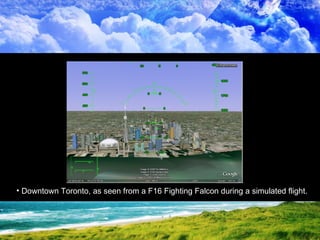
Flight simulator   a flight simulator has been included as a hidden feature.  Depending on the system, it can be accessed by pressing Control+Alt+A, After this feature has been activated at least once it appears under the tools menu. the option is  hidden by default. Currently the F-16 Fighting Falcon and the Cirrus SR-22 are the only aircraft that can be used, in addition to a few airports.
Downtown Toronto, as seen from a F16 Fighting Falcon during a simulated flight.
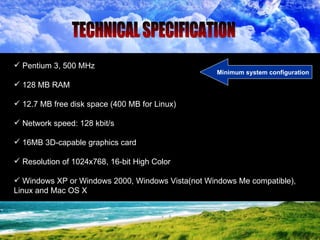
Pentium 3, 500 MHz  128 MB RAM  12.7 MB free disk space (400 MB for Linux)  Network speed: 128 kbit/s  16MB 3D-capable graphics card  Resolution of 1024x768, 16-bit High Color  Windows XP or Windows 2000, Windows Vista(not Windows Me compatible), Linux and Mac OS X  TECHNICAL SPECIFICATION Minimum system configuration
Most land areas are covered in satellite imagery with a resolution of about  15 m per pixel.  Some population centers are also covered by aircraft imagery (orthophotography) with several pixels per meter.  Oceans are covered at a much lower resolution  Resolution Lower Resolution High resolution
Google Earth Plus Google Earth Pro   versions
Google Earth vs. Plus vs. Pro
Save view as jpeg Exporting from Google Earth
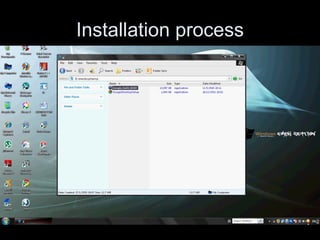
Installation process
 
Combines satellite imagery, maps and Google Search to put the world's geographic information at your fingertips. Conclusion


Google earth

  • 1.
  • 2.
  • 3.
    INTRODUCTION Google Earth is a virtual globe, map and geographic information program that was originally called Earth Viewer. It was created by Keyhole, Inc. Developed by Google. OS Windows 2000, XP & Vista, Mac OS X, iPhone OS, Linux
  • 4.
  • 5.
    OVERVIEW Google Earthdisplays satellite images of varying resolution of the Earth's surface allowing users to visually see things like cities and houses from a bird's eye view. Google Earth allows users to search for addresses for some countries, enter coordinates, or simply use the mouse to browse to a location. Google Earth also uses data collected by NASA's Shuttle Radar Topography Mission (SRTM).
  • 6.
    Google Earth supportsmanaging three-dimensional Geospatial data through Keyhole Markup Language (KML). Google Earth has the capability to show 3D buildings and structures (such as bridges), which consist of users' submissions using SketchUp, a 3D modeling program. Google added a feature that allow users to monitor traffic speeds at loops located every 200 yards in real-time. Google Street View was fully integrated into the program allowing the program to provide an on the street level view in many locations.
  • 7.
    Arabic, Chinese, Czech, Danish, Dutch, English, Finnish, French, German, Google Earth is now also available in 23 languages: Hebrew, Indonesian, Italian, Japanese, Korean, Norwegian, Polish, Portuguese, Romanian, Russian, Spanish, Swedish, Thai, Turkish.
  • 8.
    FEATURES Sky mode Google Earth added a Sky tool for viewing stars and astronomical images. Google Sky is produced by Google through a partnership with the Space Telescope Science Institute in Baltimore - Hubble Space Telescope. Google's Earth maps are being updated each 5 minutes. Google Sky will face competition from the upcoming product WorldWide Telescope from Microsoft, anticipated soon.
  • 9.
    Google Earth inSky Viewing Mode
  • 10.
    Street View Google fully integrated its Street View into Google Earth. Google Street View provides 360° panoramic street-level views and allows users to view parts of selected cities and their surrounding metropolitan areas at ground level. Google Street View, when operated, displays photos that were previously taken by a camera, and can be navigated by using the mouse to click on photograph icons displayed on the screen in your direction of travel.
  • 11.
    Flight simulator a flight simulator has been included as a hidden feature. Depending on the system, it can be accessed by pressing Control+Alt+A, After this feature has been activated at least once it appears under the tools menu. the option is hidden by default. Currently the F-16 Fighting Falcon and the Cirrus SR-22 are the only aircraft that can be used, in addition to a few airports.
  • 12.
    Downtown Toronto, asseen from a F16 Fighting Falcon during a simulated flight.
  • 13.
    Pentium 3, 500MHz 128 MB RAM 12.7 MB free disk space (400 MB for Linux) Network speed: 128 kbit/s 16MB 3D-capable graphics card Resolution of 1024x768, 16-bit High Color Windows XP or Windows 2000, Windows Vista(not Windows Me compatible), Linux and Mac OS X TECHNICAL SPECIFICATION Minimum system configuration
  • 14.
    Most land areasare covered in satellite imagery with a resolution of about 15 m per pixel. Some population centers are also covered by aircraft imagery (orthophotography) with several pixels per meter. Oceans are covered at a much lower resolution Resolution Lower Resolution High resolution
  • 15.
    Google Earth PlusGoogle Earth Pro versions
  • 16.
    Google Earth vs.Plus vs. Pro
  • 17.
    Save view asjpeg Exporting from Google Earth
  • 18.
  • 19.
  • 20.
    Combines satellite imagery,maps and Google Search to put the world's geographic information at your fingertips. Conclusion
  • 21.
  • 22.