Web spoofing
Web Spoofing : Allows an attacker to create a “shadow copy” of the entire World Wide Web. Attacker creates misleading context in order to trick the victim.  Attack is like a con game. Online fraud. Web spoofing
STEPS INVOLVED:  URL Rewriting Forms “ Secure” Connections Web spoofing
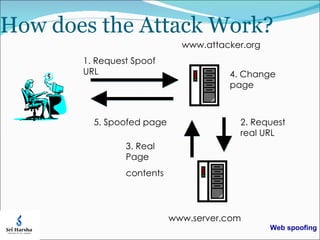
URL REWRITING: The attacker’s first trick is to rewrite all of the URLs on some web page so that they point to the attacker’s server rather than the real server.. Once the  attacker’s server has fetched the real document needed to satisfy the request, the attacker rewrites all of the URLs. in the document into the same special form. Then the attacker’s server provides the rewritten page to the victim’s browser. If the victim fallows a link on the new page, the victim remains trapped in the attacker’s false web. Web spoofing
FORMS: When the victim submits a form, the submitted data goes to the attacker’s server. The attacker’s server can observe and even modify the submitted data, doing whatever malicious editing desired, before passing it on to the real server.  Web spoofing
Spoofing attacks in the physical world as well as the electronic world In the physical world  For example, there have been several incidents in which criminals set up bogus automated teller machines. the criminal copy the victim’s card and use the duplicate. In the these attack people were fooled for the context  what they saw. The location of the machine and The appearance of their electronic displays. People using computer system often makes security relevant decisions based on contextual cues they see. For example you might decide to type in you account number because you believe you are visiting your bank’s web page. This belief might arise because the page has a familiar look.  Web spoofing
CONTEXT: A browser presents many types of context that users might rely on to make decisions. Appearance – the appearance of an object might convey  a certain impressions.  Name of Objects – people often deduce what is in a file by its name.  Timing of Events – if 2 things happen at the same time, the user might think they are related. Web spoofing
Consequences Surveillance  –  the attacker can passively watch the traffic, recording which pages the victim visits and the contacts of those pages.  ( This allows the attacker to observe any account numbers or passwords the victim enters .) Tampering  –  the attacker can modify any of the data traveling in either direction between the victim and the Web.  ( The attacker would change the product number, quantity or ship to address .) Web spoofing
SECURE” CONNECTIONS: The victim’s browser says it has secure connection because it does have one. Unfortunately the secure connection I to the and not the place the victim is think it is. The victim’s browser think everything is fine: it was told to the secure connection indicator only gives the victim a false sense of security. Web spoofing
How does the Attack Work? 1 . Request Spoof URL www.attacker.org www.server.com 2.  Request real URL 3.  Real Page contents 4.  Change page 5.  Spoofed page Web spoofing
STARTING THE ATTACK: The attacker must somehow lure the victim into the attacker’s false web. there are several ways to do this. An attacker could put a link to false Web onto popular Web page. If the victim is using Web-enabled email, the attacker could email the victim a pointer to false Web. Finally, the attacker could trick a web search engine into indexing part of a false Web. Web spoofing
REMEDIES :  Follows  three part strategy Disable java script in your browser so the attacker will be unable to hide the evidence of the attack. make sure your browser’s location line is always visible. Pay attention to the URL’s. displayed on sure your browser’s  location line,making sure they always point to the server. u think ur connected to protecting.
Protecting yourself against e-mail or online fraud Don’t take anything for granted.  Do not click on links you receive in an e-mail message asking for sensitive personal, financial or account information. Call the company directly to confirm requests for updating or verifying personal or account information. Do not share your ID’s or pass codes with anyone. Look for secure connections on Web sites. Always sign off Web sites or secure areas of Web Sites. When your computer is not in use, shut it down or disconnect it from the Internet. Web spoofing
CONCLUSION Use the technology in a proper way Do not encourage the people for finding such kind of harmful technologies Web spoofing
Web spoofing
A. sai Kumar Web spoofing

Web spoofing

  • 1.
  • 2.
    Web Spoofing :Allows an attacker to create a “shadow copy” of the entire World Wide Web. Attacker creates misleading context in order to trick the victim. Attack is like a con game. Online fraud. Web spoofing
  • 3.
    STEPS INVOLVED: URL Rewriting Forms “ Secure” Connections Web spoofing
  • 4.
    URL REWRITING: Theattacker’s first trick is to rewrite all of the URLs on some web page so that they point to the attacker’s server rather than the real server.. Once the attacker’s server has fetched the real document needed to satisfy the request, the attacker rewrites all of the URLs. in the document into the same special form. Then the attacker’s server provides the rewritten page to the victim’s browser. If the victim fallows a link on the new page, the victim remains trapped in the attacker’s false web. Web spoofing
  • 5.
    FORMS: When thevictim submits a form, the submitted data goes to the attacker’s server. The attacker’s server can observe and even modify the submitted data, doing whatever malicious editing desired, before passing it on to the real server. Web spoofing
  • 6.
    Spoofing attacks inthe physical world as well as the electronic world In the physical world For example, there have been several incidents in which criminals set up bogus automated teller machines. the criminal copy the victim’s card and use the duplicate. In the these attack people were fooled for the context what they saw. The location of the machine and The appearance of their electronic displays. People using computer system often makes security relevant decisions based on contextual cues they see. For example you might decide to type in you account number because you believe you are visiting your bank’s web page. This belief might arise because the page has a familiar look. Web spoofing
  • 7.
    CONTEXT: A browserpresents many types of context that users might rely on to make decisions. Appearance – the appearance of an object might convey a certain impressions. Name of Objects – people often deduce what is in a file by its name. Timing of Events – if 2 things happen at the same time, the user might think they are related. Web spoofing
  • 8.
    Consequences Surveillance – the attacker can passively watch the traffic, recording which pages the victim visits and the contacts of those pages. ( This allows the attacker to observe any account numbers or passwords the victim enters .) Tampering – the attacker can modify any of the data traveling in either direction between the victim and the Web. ( The attacker would change the product number, quantity or ship to address .) Web spoofing
  • 9.
    SECURE” CONNECTIONS: Thevictim’s browser says it has secure connection because it does have one. Unfortunately the secure connection I to the and not the place the victim is think it is. The victim’s browser think everything is fine: it was told to the secure connection indicator only gives the victim a false sense of security. Web spoofing
  • 10.
    How does theAttack Work? 1 . Request Spoof URL www.attacker.org www.server.com 2. Request real URL 3. Real Page contents 4. Change page 5. Spoofed page Web spoofing
  • 11.
    STARTING THE ATTACK:The attacker must somehow lure the victim into the attacker’s false web. there are several ways to do this. An attacker could put a link to false Web onto popular Web page. If the victim is using Web-enabled email, the attacker could email the victim a pointer to false Web. Finally, the attacker could trick a web search engine into indexing part of a false Web. Web spoofing
  • 12.
    REMEDIES : Follows three part strategy Disable java script in your browser so the attacker will be unable to hide the evidence of the attack. make sure your browser’s location line is always visible. Pay attention to the URL’s. displayed on sure your browser’s location line,making sure they always point to the server. u think ur connected to protecting.
  • 13.
    Protecting yourself againste-mail or online fraud Don’t take anything for granted. Do not click on links you receive in an e-mail message asking for sensitive personal, financial or account information. Call the company directly to confirm requests for updating or verifying personal or account information. Do not share your ID’s or pass codes with anyone. Look for secure connections on Web sites. Always sign off Web sites or secure areas of Web Sites. When your computer is not in use, shut it down or disconnect it from the Internet. Web spoofing
  • 14.
    CONCLUSION Use thetechnology in a proper way Do not encourage the people for finding such kind of harmful technologies Web spoofing
  • 15.
  • 16.
    A. sai KumarWeb spoofing

Editor's Notes

  • #8 The text and pictures on a Web page might give some impression about where the page came from – corporate logo implies it came from a certain corporation.