

Google Analytics Magic Script
Created By: Keshav Kashyap
Agenda:-
 What is Google Analytics?
 Why Google Analytics?
 How to use GA in Application
 Key Features of GA
 Advantages and Disadvantages
 How to setup
 Metrics and Dimensions
 Automation of GA
 Sample Report & Demo
What is Google Analytics?
Free Service Offered by Google for Website
Statistics.
Daily, monthly, yearly tracking of web visits
Graphed over time
Which pages they go to, how long they stay
Bounce rate
Entrance pages
How they got there
Search engines and Search terms used
Location, operating system, monitor resolution
How it works ?
 Sign up for Google Analytics
https://www.google.com/analytics/
 They return code to you
 You paste the code just below the </body> tag
 Put it on EVERY page
Edit>Find and Replace is easiest option
 Put it in your template pages, so it will be
automatically on every page
 Go to the Analytics dashboard page to see daily
metrics
What it does?
Daily, monthly, yearly tracking of web visits
Graphed over time
Which pages they go to, how long they stay
Bounce rate
Entrance pages
How they got there
Search engines and Search terms used
Location, operating system, monitor resolution
Key Features of Google Analytics:-
 It helps in Website Trafficking.
Where the visitors came from?
How they are navigating through site?
 Conversion
Downloads
Page Views
Registration
 E-Commerce
 Ad-Words Performance
Advantages :-
 Free
 Sufficiant possibilities for most companies
 Easy to implement
 Easy to use
 Easy to understand
Dis-advantages :-
 URL and title based
 No data history
 Privacy ?
 JavaScript and cookies
 Only visitors, no crawlers or bots
What is Google Analytics Report Automation?
Google Analytics Report Automation (Magic) is
an integration that reduces the work required to
put Google Analytics data into any Apps Script
supported product, such as Google Docs, Sites,
or Spreadsheets.
How Google Analytics Report Automation Works?
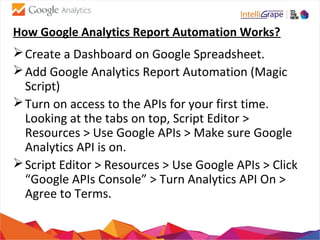
Create a Dashboard on Google Spreadsheet.
Add Google Analytics Report Automation (Magic
Script)
Turn on access to the APIs for your first time.
Looking at the tabs on top, Script Editor >
Resources > Use Google APIs > Make sure Google
Analytics API is on.
Script Editor > Resources > Use Google APIs > Click
“Google APIs Console” > Turn Analytics API On >
Agree to Terms.
How Google Analytics Report Automation Works?
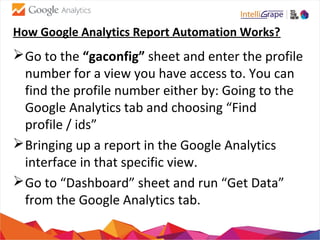
Go to the “gaconfig” sheet and enter the profile
number for a view you have access to. You can
find the profile number either by: Going to the
Google Analytics tab and choosing “Find
profile / ids”
Bringing up a report in the Google Analytics
interface in that specific view.
Go to “Dashboard” sheet and run “Get Data”
from the Google Analytics tab.
Required Inputs or Query Parameter Details:-
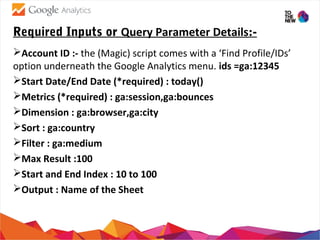
Account ID :- the (Magic) script comes with a ‘Find Profile/IDs’
option underneath the Google Analytics menu. ids =ga:12345
Start Date/End Date (*required) : today()
Metrics (*required) : ga:session,ga:bounces
Dimension : ga:browser,ga:city
Sort : ga:country
Filter : ga:medium
Max Result :100
Start and End Index : 10 to 100
Output : Name of the Sheet
Some Sample Metrics and Dimensions :-
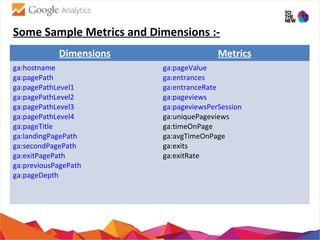
Dimensions Metrics
ga:hostname
ga:pagePath
ga:pagePathLevel1
ga:pagePathLevel2
ga:pagePathLevel3
ga:pagePathLevel4
ga:pageTitle
ga:landingPagePath
ga:secondPagePath
ga:exitPagePath
ga:previousPagePath
ga:pageDepth
ga:pageValue
ga:entrances
ga:entranceRate
ga:pageviews
ga:pageviewsPerSession
ga:uniquePageviews
ga:timeOnPage
ga:avgTimeOnPage
ga:exits
ga:exitRate
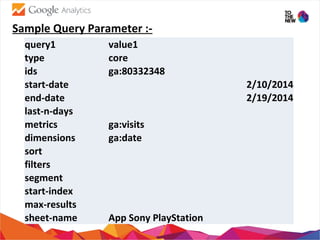
Sample Query Parameter :-
query1 value1
type core
ids ga:80332348
start-date 2/10/2014
end-date 2/19/2014
last-n-days
metrics ga:visits
dimensions ga:date
sort
filters
segment
start-index
max-results
sheet-name App Sony PlayStation
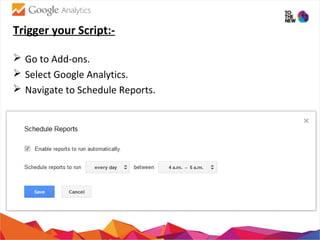
Trigger your Script:-
 Go to Add-ons.
 Select Google Analytics.
 Navigate to Schedule Reports.
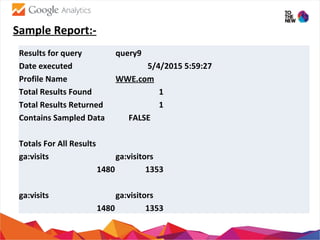
Sample Report:-
Results for query query9
Date executed 5/4/2015 5:59:27
Profile Name WWE.com
Total Results Found 1
Total Results Returned 1
Contains Sampled Data FALSE
Totals For All Results
ga:visits ga:visitors
1480 1353
ga:visits ga:visitors
1480 1353
Google Analytics Report Automation (Magic)

Google Analytics Report Automation (Magic)

  • 1.
    Google Analytics MagicScript Created By: Keshav Kashyap
  • 2.
    Agenda:-  What isGoogle Analytics?  Why Google Analytics?  How to use GA in Application  Key Features of GA  Advantages and Disadvantages  How to setup  Metrics and Dimensions  Automation of GA  Sample Report & Demo
  • 3.
    What is GoogleAnalytics? Free Service Offered by Google for Website Statistics. Daily, monthly, yearly tracking of web visits Graphed over time Which pages they go to, how long they stay Bounce rate Entrance pages How they got there Search engines and Search terms used Location, operating system, monitor resolution
  • 4.
    How it works?  Sign up for Google Analytics https://www.google.com/analytics/  They return code to you  You paste the code just below the </body> tag  Put it on EVERY page Edit>Find and Replace is easiest option  Put it in your template pages, so it will be automatically on every page  Go to the Analytics dashboard page to see daily metrics
  • 5.
    What it does? Daily,monthly, yearly tracking of web visits Graphed over time Which pages they go to, how long they stay Bounce rate Entrance pages How they got there Search engines and Search terms used Location, operating system, monitor resolution
  • 6.
    Key Features ofGoogle Analytics:-  It helps in Website Trafficking. Where the visitors came from? How they are navigating through site?  Conversion Downloads Page Views Registration  E-Commerce  Ad-Words Performance
  • 7.
    Advantages :-  Free Sufficiant possibilities for most companies  Easy to implement  Easy to use  Easy to understand
  • 8.
    Dis-advantages :-  URLand title based  No data history  Privacy ?  JavaScript and cookies  Only visitors, no crawlers or bots
  • 9.
    What is GoogleAnalytics Report Automation? Google Analytics Report Automation (Magic) is an integration that reduces the work required to put Google Analytics data into any Apps Script supported product, such as Google Docs, Sites, or Spreadsheets.
  • 10.
    How Google AnalyticsReport Automation Works? Create a Dashboard on Google Spreadsheet. Add Google Analytics Report Automation (Magic Script) Turn on access to the APIs for your first time. Looking at the tabs on top, Script Editor > Resources > Use Google APIs > Make sure Google Analytics API is on. Script Editor > Resources > Use Google APIs > Click “Google APIs Console” > Turn Analytics API On > Agree to Terms.
  • 11.
    How Google AnalyticsReport Automation Works? Go to the “gaconfig” sheet and enter the profile number for a view you have access to. You can find the profile number either by: Going to the Google Analytics tab and choosing “Find profile / ids” Bringing up a report in the Google Analytics interface in that specific view. Go to “Dashboard” sheet and run “Get Data” from the Google Analytics tab.
  • 12.
    Required Inputs orQuery Parameter Details:- Account ID :- the (Magic) script comes with a ‘Find Profile/IDs’ option underneath the Google Analytics menu. ids =ga:12345 Start Date/End Date (*required) : today() Metrics (*required) : ga:session,ga:bounces Dimension : ga:browser,ga:city Sort : ga:country Filter : ga:medium Max Result :100 Start and End Index : 10 to 100 Output : Name of the Sheet
  • 13.
    Some Sample Metricsand Dimensions :- Dimensions Metrics ga:hostname ga:pagePath ga:pagePathLevel1 ga:pagePathLevel2 ga:pagePathLevel3 ga:pagePathLevel4 ga:pageTitle ga:landingPagePath ga:secondPagePath ga:exitPagePath ga:previousPagePath ga:pageDepth ga:pageValue ga:entrances ga:entranceRate ga:pageviews ga:pageviewsPerSession ga:uniquePageviews ga:timeOnPage ga:avgTimeOnPage ga:exits ga:exitRate
  • 14.
    Sample Query Parameter:- query1 value1 type core ids ga:80332348 start-date 2/10/2014 end-date 2/19/2014 last-n-days metrics ga:visits dimensions ga:date sort filters segment start-index max-results sheet-name App Sony PlayStation
  • 15.
    Trigger your Script:- Go to Add-ons.  Select Google Analytics.  Navigate to Schedule Reports.
  • 16.
    Sample Report:- Results forquery query9 Date executed 5/4/2015 5:59:27 Profile Name WWE.com Total Results Found 1 Total Results Returned 1 Contains Sampled Data FALSE Totals For All Results ga:visits ga:visitors 1480 1353 ga:visits ga:visitors 1480 1353