GLSL II
Objectives
• Coupling GLSL to Applications
• Example applications
2
Linking Shaders to OpenGL
• OpenGL Extensions
• ARB_shader_objects
• ARB_vertex_shader
• ARB_fragment_shader
• OpenGL 2.0
• Almost identical to using extensions
• Avoids extension suffixes on function names
3
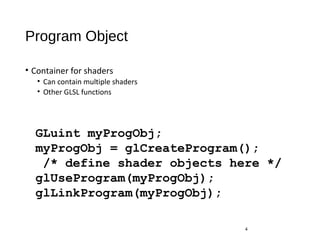
Program Object
• Container for shaders
• Can contain multiple shaders
• Other GLSL functions
4
GLuint myProgObj;
myProgObj = glCreateProgram();
/* define shader objects here */
glUseProgram(myProgObj);
glLinkProgram(myProgObj);
Reading a Shader
• Shader are added to the program object and compiled
• Usual method of passing a shader is as a null-terminated string using
the function glShaderSource
• If the shader is in a file, we can write a reader to convert the file to a
string
5
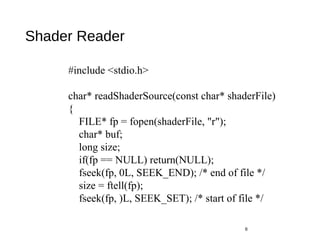
Shader Reader
6
#include <stdio.h>
char* readShaderSource(const char* shaderFile)
{
FILE* fp = fopen(shaderFile, "r");
char* buf;
long size;
if(fp == NULL) return(NULL);
fseek(fp, 0L, SEEK_END); /* end of file */
size = ftell(fp);
fseek(fp, )L, SEEK_SET); /* start of file */
Shader Reader (cont)
•
7
buf = (char*) malloc(statBuf.st_size + 1 * sizeof(char));
fread(buf, 1, size, fp);
buf[size] = '0'; /null termination */
fclose(fp);
return buf;
}
Adding a Vertex Shader
8
GLint vShader;
GLunit myVertexObj;
GLchar vShaderfile[] = “my_vertex_shader”;
GLchar* vSource =
readShaderSource(vShaderFile);
glShaderSource(myVertexObj,
1, &vertexShaderFile, NULL);
myVertexObj =
glCreateShader(GL_VERTEX_SHADER);
glCompileShader(myVertexObj);
glAttachObject(myProgObj, myVertexObj);
Vertex Attributes
• Vertex attributes are named in the shaders
• Linker forms a table
• Application can get index from table and tie it to an application
variable
• Similar process for uniform variables
9
Vertex Attribute Example
10
GLint colorAttr;
colorAttr = glGetAttribLocation(myProgObj,
"myColor");
/* myColor is name in shader */
GLfloat color[4];
glVertexAttrib4fv(colorAttrib, color);
/* color is variable in application */
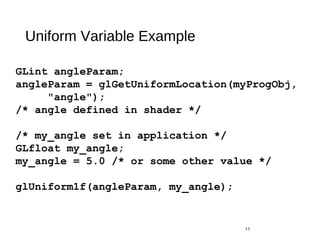
Uniform Variable Example
11
GLint angleParam;
angleParam = glGetUniformLocation(myProgObj,
"angle");
/* angle defined in shader */
/* my_angle set in application */
GLfloat my_angle;
my_angle = 5.0 /* or some other value */
glUniform1f(angleParam, my_angle);
Vertex Shader Applications
• Moving vertices
• Morphing
• Wave motion
• Fractals
• Lighting
• More realistic models
• Cartoon shaders
12
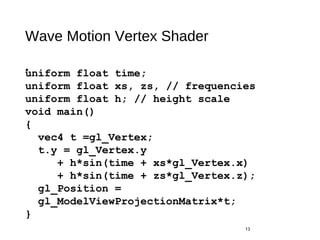
Wave Motion Vertex Shader
•
13
uniform float time;
uniform float xs, zs, // frequencies
uniform float h; // height scale
void main()
{
vec4 t =gl_Vertex;
t.y = gl_Vertex.y
+ h*sin(time + xs*gl_Vertex.x)
+ h*sin(time + zs*gl_Vertex.z);
gl_Position =
gl_ModelViewProjectionMatrix*t;
}
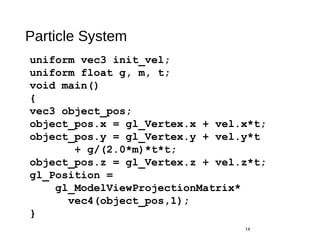
Particle System
14
uniform vec3 init_vel;
uniform float g, m, t;
void main()
{
vec3 object_pos;
object_pos.x = gl_Vertex.x + vel.x*t;
object_pos.y = gl_Vertex.y + vel.y*t
+ g/(2.0*m)*t*t;
object_pos.z = gl_Vertex.z + vel.z*t;
gl_Position =
gl_ModelViewProjectionMatrix*
vec4(object_pos,1);
}
Modified Phong Vertex Shader I
15
void main(void)
/* modified Phong vertex shader (without distance term) */
{
gl_Position = gl_ModelViewProjectionMatrix * gl_Vertex;
vec4 ambient, diffuse, specular;
vec4 eyePosition = gl_ModelViewMatrix * gl_Vertex;
vec4 eyeLightPos = gl_LightSource[0].position;
vec3 N = normalize(gl_NormalMatrix * gl_Normal);
vec3 L = normalize(eyeLightPos.xyz - eyePosition.xyz);
vec3 E = -normalize(eyePosition.xyz);
vec3 H = normalize(L + E);
Modified Phong Vertex Shader II
16
/* compute diffuse, ambient, and specular contributions */
float Kd = max(dot(L, N), 0.0);
float Ks = pow(max(dot(N, H), 0.0), gl_FrontMaterial.shininess);
float Ka = 0.0;
ambient = Ka*gl_FrontLightProduct[0].ambient;
diffuse = Kd*gl_FrontLightProduct[0].diffuse;
specular = Ks*gl_FrontLightProduct[0].specular;
gl_FrontColor = ambient+diffuse+specular;
}
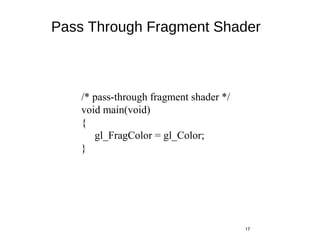
Pass Through Fragment Shader
17
/* pass-through fragment shader */
void main(void)
{
gl_FragColor = gl_Color;
}
Vertex Shader for per Fragment Lighting
18
varying vec3 N, L, E, H;
void main()
{
gl_Position = gl_ModelViewProjectionMatrix * gl_Vertex;
vec4 eyePosition = gl_ModelViewMatrix * gl_Vertex;
vec4 eyeLightPos = gl_LightSource[0].position;
N = normalize(gl_NormalMatrix * gl_Normal);
L = normalize(eyeLightPos.xyz - eyePosition.xyz);
E = -normalize(eyePosition.xyz);
H = normalize(L + E);
}
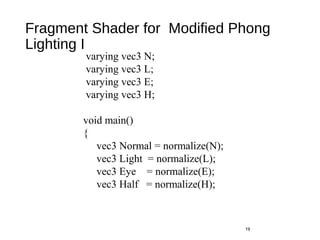
Fragment Shader for Modified Phong
Lighting I
19
varying vec3 N;
varying vec3 L;
varying vec3 E;
varying vec3 H;
void main()
{
vec3 Normal = normalize(N);
vec3 Light = normalize(L);
vec3 Eye = normalize(E);
vec3 Half = normalize(H);
Fragment Shader for Modified Phong
Lighting II
20
float Kd = max(dot(Normal, Light), 0.0);
float Ks = pow(max(dot(Half, Normal), 0.0),
gl_FrontMaterial.shininess);
float Ka = 0.0;
vec4 diffuse = Kd * gl_FrontLightProduct[0].diffuse;
vec4 specular = Ks * gl_FrontLightProduct[0].specular;
vec4 ambient = Ka * gl_FrontLightProduct[0].ambient;
gl_FragColor = ambient + diffuse + specular;
}
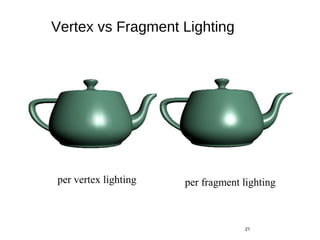
Vertex vs Fragment Lighting
21
per vertex lighting per fragment lighting
Samplers
•Provides access to a texture object
•Defined for 1, 2, and 3 dimensional textures and for
cube maps
•In shader:
uniform sampler2D myTexture;
Vec2 texcoord;
Vec4 texcolor = texture2D(mytexture, texcoord);
•In application:
texMapLocation =
glGetUniformLocation(myProg,“myTexture”);
glUniform1i(texMapLocation, 0);
/* assigns to texture unit 0 */
22
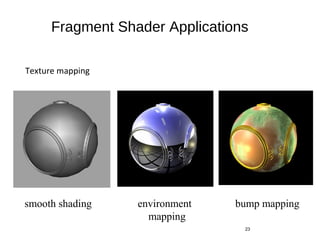
Fragment Shader Applications
Texture mapping
23
smooth shading environment
mapping
bump mapping
Cube Maps
• We can form a cube map texture by defining six 2D texture maps
that correspond to the sides of a box
• Supported by OpenGL
• Also supported in GLSL through cubemap sampler
vec4 texColor = textureCube(mycube, texcoord);
• Texture coordinates must be 3D
24
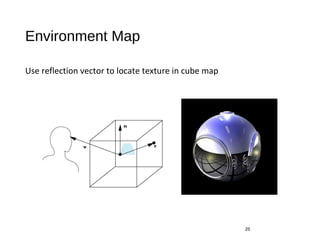
Environment Map
Use reflection vector to locate texture in cube map
25
Environment Maps with Shaders
• Environment map usually computed in world coordinates which can
differ from object coordinates because of modeling matrix
• May have to keep track of modeling matrix and pass it shader as a uniform
variable
• Can also use reflection map or refraction map (for example to
simulate water)
26
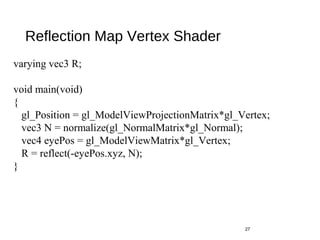
Reflection Map Vertex Shader
27
varying vec3 R;
void main(void)
{
gl_Position = gl_ModelViewProjectionMatrix*gl_Vertex;
vec3 N = normalize(gl_NormalMatrix*gl_Normal);
vec4 eyePos = gl_ModelViewMatrix*gl_Vertex;
R = reflect(-eyePos.xyz, N);
}
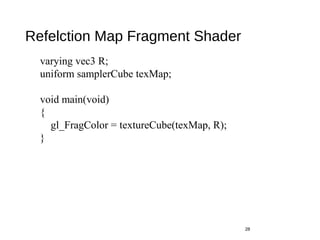
Refelction Map Fragment Shader
28
varying vec3 R;
uniform samplerCube texMap;
void main(void)
{
gl_FragColor = textureCube(texMap, R);
}
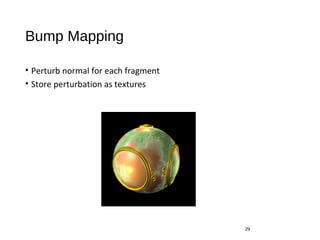
Bump Mapping
• Perturb normal for each fragment
• Store perturbation as textures
29
Normalization Maps
• Cube maps can be viewed as lookup tables 1-4 dimensional variables
• Vector from origin is pointer into table
• Example: store normalized value of vector in the map
• Same for all points on that vector
• Use “normalization map” instead of normalization function
• Lookup replaces sqrt, mults and adds
30

GLSL

  • 1.
  • 2.
    Objectives • Coupling GLSLto Applications • Example applications 2
  • 3.
    Linking Shaders toOpenGL • OpenGL Extensions • ARB_shader_objects • ARB_vertex_shader • ARB_fragment_shader • OpenGL 2.0 • Almost identical to using extensions • Avoids extension suffixes on function names 3
  • 4.
    Program Object • Containerfor shaders • Can contain multiple shaders • Other GLSL functions 4 GLuint myProgObj; myProgObj = glCreateProgram(); /* define shader objects here */ glUseProgram(myProgObj); glLinkProgram(myProgObj);
  • 5.
    Reading a Shader •Shader are added to the program object and compiled • Usual method of passing a shader is as a null-terminated string using the function glShaderSource • If the shader is in a file, we can write a reader to convert the file to a string 5
  • 6.
    Shader Reader 6 #include <stdio.h> char*readShaderSource(const char* shaderFile) { FILE* fp = fopen(shaderFile, "r"); char* buf; long size; if(fp == NULL) return(NULL); fseek(fp, 0L, SEEK_END); /* end of file */ size = ftell(fp); fseek(fp, )L, SEEK_SET); /* start of file */
  • 7.
    Shader Reader (cont) • 7 buf= (char*) malloc(statBuf.st_size + 1 * sizeof(char)); fread(buf, 1, size, fp); buf[size] = '0'; /null termination */ fclose(fp); return buf; }
  • 8.
    Adding a VertexShader 8 GLint vShader; GLunit myVertexObj; GLchar vShaderfile[] = “my_vertex_shader”; GLchar* vSource = readShaderSource(vShaderFile); glShaderSource(myVertexObj, 1, &vertexShaderFile, NULL); myVertexObj = glCreateShader(GL_VERTEX_SHADER); glCompileShader(myVertexObj); glAttachObject(myProgObj, myVertexObj);
  • 9.
    Vertex Attributes • Vertexattributes are named in the shaders • Linker forms a table • Application can get index from table and tie it to an application variable • Similar process for uniform variables 9
  • 10.
    Vertex Attribute Example 10 GLintcolorAttr; colorAttr = glGetAttribLocation(myProgObj, "myColor"); /* myColor is name in shader */ GLfloat color[4]; glVertexAttrib4fv(colorAttrib, color); /* color is variable in application */
  • 11.
    Uniform Variable Example 11 GLintangleParam; angleParam = glGetUniformLocation(myProgObj, "angle"); /* angle defined in shader */ /* my_angle set in application */ GLfloat my_angle; my_angle = 5.0 /* or some other value */ glUniform1f(angleParam, my_angle);
  • 12.
    Vertex Shader Applications •Moving vertices • Morphing • Wave motion • Fractals • Lighting • More realistic models • Cartoon shaders 12
  • 13.
    Wave Motion VertexShader • 13 uniform float time; uniform float xs, zs, // frequencies uniform float h; // height scale void main() { vec4 t =gl_Vertex; t.y = gl_Vertex.y + h*sin(time + xs*gl_Vertex.x) + h*sin(time + zs*gl_Vertex.z); gl_Position = gl_ModelViewProjectionMatrix*t; }
  • 14.
    Particle System 14 uniform vec3init_vel; uniform float g, m, t; void main() { vec3 object_pos; object_pos.x = gl_Vertex.x + vel.x*t; object_pos.y = gl_Vertex.y + vel.y*t + g/(2.0*m)*t*t; object_pos.z = gl_Vertex.z + vel.z*t; gl_Position = gl_ModelViewProjectionMatrix* vec4(object_pos,1); }
  • 15.
    Modified Phong VertexShader I 15 void main(void) /* modified Phong vertex shader (without distance term) */ { gl_Position = gl_ModelViewProjectionMatrix * gl_Vertex; vec4 ambient, diffuse, specular; vec4 eyePosition = gl_ModelViewMatrix * gl_Vertex; vec4 eyeLightPos = gl_LightSource[0].position; vec3 N = normalize(gl_NormalMatrix * gl_Normal); vec3 L = normalize(eyeLightPos.xyz - eyePosition.xyz); vec3 E = -normalize(eyePosition.xyz); vec3 H = normalize(L + E);
  • 16.
    Modified Phong VertexShader II 16 /* compute diffuse, ambient, and specular contributions */ float Kd = max(dot(L, N), 0.0); float Ks = pow(max(dot(N, H), 0.0), gl_FrontMaterial.shininess); float Ka = 0.0; ambient = Ka*gl_FrontLightProduct[0].ambient; diffuse = Kd*gl_FrontLightProduct[0].diffuse; specular = Ks*gl_FrontLightProduct[0].specular; gl_FrontColor = ambient+diffuse+specular; }
  • 17.
    Pass Through FragmentShader 17 /* pass-through fragment shader */ void main(void) { gl_FragColor = gl_Color; }
  • 18.
    Vertex Shader forper Fragment Lighting 18 varying vec3 N, L, E, H; void main() { gl_Position = gl_ModelViewProjectionMatrix * gl_Vertex; vec4 eyePosition = gl_ModelViewMatrix * gl_Vertex; vec4 eyeLightPos = gl_LightSource[0].position; N = normalize(gl_NormalMatrix * gl_Normal); L = normalize(eyeLightPos.xyz - eyePosition.xyz); E = -normalize(eyePosition.xyz); H = normalize(L + E); }
  • 19.
    Fragment Shader forModified Phong Lighting I 19 varying vec3 N; varying vec3 L; varying vec3 E; varying vec3 H; void main() { vec3 Normal = normalize(N); vec3 Light = normalize(L); vec3 Eye = normalize(E); vec3 Half = normalize(H);
  • 20.
    Fragment Shader forModified Phong Lighting II 20 float Kd = max(dot(Normal, Light), 0.0); float Ks = pow(max(dot(Half, Normal), 0.0), gl_FrontMaterial.shininess); float Ka = 0.0; vec4 diffuse = Kd * gl_FrontLightProduct[0].diffuse; vec4 specular = Ks * gl_FrontLightProduct[0].specular; vec4 ambient = Ka * gl_FrontLightProduct[0].ambient; gl_FragColor = ambient + diffuse + specular; }
  • 21.
    Vertex vs FragmentLighting 21 per vertex lighting per fragment lighting
  • 22.
    Samplers •Provides access toa texture object •Defined for 1, 2, and 3 dimensional textures and for cube maps •In shader: uniform sampler2D myTexture; Vec2 texcoord; Vec4 texcolor = texture2D(mytexture, texcoord); •In application: texMapLocation = glGetUniformLocation(myProg,“myTexture”); glUniform1i(texMapLocation, 0); /* assigns to texture unit 0 */ 22
  • 23.
    Fragment Shader Applications Texturemapping 23 smooth shading environment mapping bump mapping
  • 24.
    Cube Maps • Wecan form a cube map texture by defining six 2D texture maps that correspond to the sides of a box • Supported by OpenGL • Also supported in GLSL through cubemap sampler vec4 texColor = textureCube(mycube, texcoord); • Texture coordinates must be 3D 24
  • 25.
    Environment Map Use reflectionvector to locate texture in cube map 25
  • 26.
    Environment Maps withShaders • Environment map usually computed in world coordinates which can differ from object coordinates because of modeling matrix • May have to keep track of modeling matrix and pass it shader as a uniform variable • Can also use reflection map or refraction map (for example to simulate water) 26
  • 27.
    Reflection Map VertexShader 27 varying vec3 R; void main(void) { gl_Position = gl_ModelViewProjectionMatrix*gl_Vertex; vec3 N = normalize(gl_NormalMatrix*gl_Normal); vec4 eyePos = gl_ModelViewMatrix*gl_Vertex; R = reflect(-eyePos.xyz, N); }
  • 28.
    Refelction Map FragmentShader 28 varying vec3 R; uniform samplerCube texMap; void main(void) { gl_FragColor = textureCube(texMap, R); }
  • 29.
    Bump Mapping • Perturbnormal for each fragment • Store perturbation as textures 29
  • 30.
    Normalization Maps • Cubemaps can be viewed as lookup tables 1-4 dimensional variables • Vector from origin is pointer into table • Example: store normalized value of vector in the map • Same for all points on that vector • Use “normalization map” instead of normalization function • Lookup replaces sqrt, mults and adds 30