Sci-Prog seminar series
Talks on computing and programming related topics ranging from basic to
                           advanced levels.


                Talk: Using GPUs for parallel processing
                          A. Stephen McGough


        Website: http://conferences.ncl.ac.uk/sciprog/index.php
   Research community site: contact Matt Wade for access
            Alerts mailing list: sci-prog-seminars@ncl.ac.uk
                   (sign up at http://lists.ncl.ac.uk )

Organisers: Dr Liz Petrie, Dr Matt Wade, Dr Stephen McGough,
                 Dr Ben Allen and Gregg Iceton
Using GPUs for parallel processing

         A. Stephen McGough
Why?
       observation
• Moore’s XXXX is dead?
          law
     • “the number of transistors on integrated circuits
       doubles approximately every two years”
        – Processors aren’t getting faster… They’re getting fatter

                                  Processor Speed and Energy

                                  Assume 1 GHz Core consumes 1watt

                                  A 4GHz Core consumes ~64watts

                                  Four 1GHz cores consume ~4watts

                                  Power ~frequency3

                             Computers are going many-core
What?
• Games industry is multi-billion dollar
• Gamers want photo-realistic games
  – Computationally expensive
  – Requires complex physics calculations
• Latest generation of Graphical Processing Units
  are therefore many core parallel processors
  – General Purpose Graphical Processing Units - GPGPUs
Not just normal processors
• 1000’s of cores
  – But cores are simpler than a normal processor
  – Multiple cores perform the same action at the same
    time – Single Instruction Multiple Data – SIMD
• Conventional processor -> Minimize latency
  – Of a single program
• GPU -> Maximize throughput of all cores
• Potential for orders of magnitude speed-up
“If you were plowing a field, which would you
        rather use: two strong oxen or 1024 chicken?”

• Famous quote from Seymour Cray arguing for
  small numbers of processors
  – But the chickens are now winning
• Need a new way to think about programming
  – Need hugely parallel algorithms
     • Many existing algorithms won’t work (efficiently)
Some Issues with GPGPUs
• Cores are slower than a standard CPU
   – But you have lots more
• No direct control on when your code runs on a core
   – GPGPU decides where and when
      • Can’t communicate between cores
      • Order of execution is ‘random’
   – Synchronization is through exiting parallel GPU code
• SIMD only works (efficiently) if all cores are doing the
  same thing
   – NVIDIA GPU’s have Warps of 32 cores working together
      • Code divergence leads to more Warps
• Cores can interfere with each other
   – Overwriting each others memory
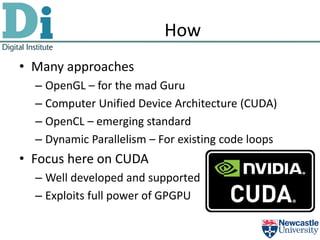
How
• Many approaches
  – OpenGL – for the mad Guru
  – Computer Unified Device Architecture (CUDA)
  – OpenCL – emerging standard
  – Dynamic Parallelism – For existing code loops
• Focus here on CUDA
  – Well developed and supported
  – Exploits full power of GPGPU
CUDA
• CUDA is a set of extensions to C/C++
   – (and Fortran)
• Code consists of sequential and parallel parts
   – Parallel parts are written as kernels
           • Describe what one thread of the code will do
 Start               Sequential code


                   Transfer data to card

                      Execute Kernel


                  Transfer data from card

  Finish             Sequential code
Example: Vector Addition
• One dimensional data
• Add two vectors (A,B) together to produce C
• Need to define the kernel to run and the main
  code
• Each thread can compute a single value for C
Example: Vector Addition
• Pseudo code for the kernel:
  – Identify which element in the vector I’m computing
     •i
  – Compute C[i] = A[i] + B[i]


• How do we identify our index (i)?
Blocks and Threads
• In CUDA the whole data
  space is the Grid
   – Divided into a number
     of blocks
      • Divided into a number of
        threads
• Blocks can be executed
  in any order
• Threads in a block are
  executed together
• Blocks and Threads can
  be 1D, 2D or 3D
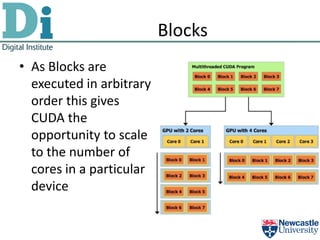
Blocks
• As Blocks are
  executed in arbitrary
  order this gives
  CUDA the
  opportunity to scale
  to the number of
  cores in a particular
  device
Thread id
• CUDA provides three pieces of data for
  identifying a thread
  – BlockIdx – block identity
  – BlockDim – the size of a block (no of threads in block)
  – ThreadIdx – identity of a thread in a block
• Can use these to compute the absolute thread id
        id = BlockIdx * BlockDim + ThreadIdx
• EG: BlockIdx = 2, BlockDim = 3, ThreadIdx = 1
• id = 2 * 3 + 1 = 7
        Thread index 0 1 2 0 1 2 0 1 2
                     0 1 2 3 4 5 6 7 8

                   Block0 Block1 Block2
Example: Vector Addition
                         Kernel code
                Entry point for a
                                              Normal function
                     kernel
                                                 definition


 __global__ void vector_add(double *A, double *B,
                            double* C, int N) {
   // Find my thread id - block and thread
   int id = blockDim.x * blockIdx.x + threadIdx.x;
   if (id >= N) {return;} // I'm not a valid ID
   C[id] = A[id] + B[id]; // do my work
 }                                             Compute my
                                                                absolute thread id
We might be
 invalid – if
data size not                   Do the work
 completely
 divisible by
    blocks
Example: Vector Addition
         Pseudo code for sequential code
• Create Data on Host Computer

• Create space on device

• Copy data to device
• Run Kernel
• Copy data back to host and do something with it
• Clean up
Host and Device
• Data needs copying to / from the GPU (device)
• Often end up with same data on both
  – Postscript variable names with _device or _host
     • To help identify where data is
        A_host                          A_device


         Host                           Device
Example: Vector Addition
int N = 2000;
double *A_host = new double[N]; // Create data on host computer
double *B_host = new double[N]; double *C_host = new double[N];
for(int i=0; i<N; i++) {    A_host[i] = i; B_host[i] = (double)i/N; }
double *A_device, *B_device, *C_device; // allocate space on device GPGPU
cudaMalloc((void**) &A_device, N*sizeof(double));
cudaMalloc((void**) &B_device, N*sizeof(double));
cudaMalloc((void**) &C_device, N*sizeof(double));
// Copy data from host memory to device memory
cudaMemcpy(A_device, A_host, N*sizeof(double), cudaMemcpyHostToDevice);
cudaMemcpy(B_device, B_host, N*sizeof(double), cudaMemcpyHostToDevice);
// How many blocks will we need? Choose block size of 256
int blocks = (N - 0.5)/256 + 1;
vector_add<<<blocks, 256>>>(A_device, B_device, C_device, N); // run kernel
// Copy data back
cudaMemcpy(C_host, C_device, N*sizeof(double), cudaMemcpyDeviceToHost);
// do something with result

// free device memory
cudaFree(A_device); cudaFree(B_device); cudaFree(C_device);
free(A_host); free(B_host); free(C_host); // free host memory
More Complex: Matrix Addition
• Now a 2D problem
  – BlockIdx, BlockDim, ThreadIdx now have x and y
• But general principles hold
  – For kernel
     • Compute location in matrix of two diminutions
  – For main code
     • Define and transmit data
• But keep data 1D
  – Why?
Why data in 1D?
• If you define data as 2D there is no guarantee
  that data will be a contiguous block of memory
  – Can’t be transmitted to card in one command


                    X X

                       Some other
                          data
Faking 2D data
• 2D data size N*M
• Define 1D array of size N*M
• Index element at [x,y] as
                    x*N+y
• Then can transfer to device in one go


          Row 1   Row 2   Row 3   Row 4
Example: Matrix Add
                              Kernel
__global__ void matrix_add(double *A, double *B, double* C, int N, int M)
{
  // Find my thread id - block and thread
                                                                  Both
  int idX = blockDim.x * blockIdx.x + threadIdx.x;
                                                               dimensions
  int idY = blockDim.y * blockIdx.y + threadIdx.y;
  if (idX >= N || idY >= M) {return;} // I'm not a valid ID
  int id = idY * N + idX;
                                                     Get both
  C[id] = A[id] + B[id]; // do my work
                                                    dimensions
}
                           Compute
                          1D location
Example: Matrix Addition
                              Main Code
int N = 20;
int M = 10;
double *A_host = new double[N * M]; // Create data on host computer
double *B_host = new double[N * M];
double *C_host = new double[N * M];                                         Define matrices
for(int i=0; i<N; i++) {
  for (int j = 0; j < M; j++) {
                                                                                on host
    A_host[i + j * N] = i; B_host[i + j * N] = (double)j/M;
  }
}

double *A_device, *B_device, *C_device; // allocate space on device GPGPU
cudaMalloc((void**) &A_device, N*M*sizeof(double));
                                                                                Define space on
cudaMalloc((void**) &B_device, N*M*sizeof(double));                                  device
cudaMalloc((void**) &C_device, N*M*sizeof(double));

// Copy data from host memory to device memory
cudaMemcpy(A_device, A_host, N*M*sizeof(double), cudaMemcpyHostToDevice);
cudaMemcpy(B_device, B_host, N*M*sizeof(double), cudaMemcpyHostToDevice);
                                                                                  Copy data to
                                                                                    device
// How many blocks will we need? Choose block size of 16
int blocksX = (N - 0.5)/16 + 1;
int blocksY = (M - 0.5)/16 + 1;
dim3 dimGrid(blocksX, blocksY);
dim3 dimBlocks(16, 16);                                                           Run Kernel
matrix_add<<<dimGrid, dimBlocks>>>(A_device, B_device, C_device, N, M);

// Copy data back from device to host
cudaMemcpy(C_host, C_device, N*M*sizeof(double), cudaMemcpyDeviceToHost);       Bring data back
// Free device
//for (int i = 0; i < N*M; i++) printf("C[%d,%d] = %fn", i/N, i%N, C_host[i]);
cudaFree(A_device); cudaFree(B_device); cudaFree(C_device);
free(A_host); free(B_host); free(C_host);                                                Tidy up
Running Example
• Computer: condor-gpu01
  – Set path
     • set path = ( $path /usr/local/cuda/bin/ )
• Compile command nvcc
• Then just run the binary file

• C2050, 440 cores, 3GB RAM
  – Single precision flops 1.03Tflops
  – Double precision flops 515Gflops
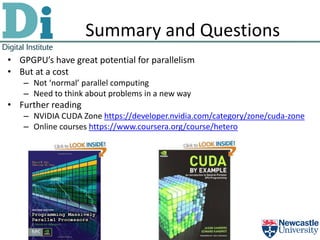
Summary and Questions
• GPGPU’s have great potential for parallelism
• But at a cost
   – Not ‘normal’ parallel computing
   – Need to think about problems in a new way
• Further reading
   – NVIDIA CUDA Zone https://developer.nvidia.com/category/zone/cuda-zone
   – Online courses https://www.coursera.org/course/hetero
Sci-Prog seminar series
Talks on computing and programming related topics ranging from basic to
                           advanced levels.


                Talk: Using GPUs for parallel processing
                          A. Stephen McGough


        Website: http://conferences.ncl.ac.uk/sciprog/index.php
   Research community site: contact Matt Wade for access
            Alerts mailing list: sci-prog-seminars@ncl.ac.uk
                   (sign up at http://lists.ncl.ac.uk )

Organisers: Dr Liz Petrie, Dr Matt Wade, Dr Stephen McGough,
                 Dr Ben Allen and Gregg Iceton

Using GPUs for parallel processing

  • 1.
    Sci-Prog seminar series Talkson computing and programming related topics ranging from basic to advanced levels. Talk: Using GPUs for parallel processing A. Stephen McGough Website: http://conferences.ncl.ac.uk/sciprog/index.php Research community site: contact Matt Wade for access Alerts mailing list: sci-prog-seminars@ncl.ac.uk (sign up at http://lists.ncl.ac.uk ) Organisers: Dr Liz Petrie, Dr Matt Wade, Dr Stephen McGough, Dr Ben Allen and Gregg Iceton
  • 2.
    Using GPUs forparallel processing A. Stephen McGough
  • 3.
    Why? observation • Moore’s XXXX is dead? law • “the number of transistors on integrated circuits doubles approximately every two years” – Processors aren’t getting faster… They’re getting fatter Processor Speed and Energy Assume 1 GHz Core consumes 1watt A 4GHz Core consumes ~64watts Four 1GHz cores consume ~4watts Power ~frequency3 Computers are going many-core
  • 4.
    What? • Games industryis multi-billion dollar • Gamers want photo-realistic games – Computationally expensive – Requires complex physics calculations • Latest generation of Graphical Processing Units are therefore many core parallel processors – General Purpose Graphical Processing Units - GPGPUs
  • 5.
    Not just normalprocessors • 1000’s of cores – But cores are simpler than a normal processor – Multiple cores perform the same action at the same time – Single Instruction Multiple Data – SIMD • Conventional processor -> Minimize latency – Of a single program • GPU -> Maximize throughput of all cores • Potential for orders of magnitude speed-up
  • 6.
    “If you wereplowing a field, which would you rather use: two strong oxen or 1024 chicken?” • Famous quote from Seymour Cray arguing for small numbers of processors – But the chickens are now winning • Need a new way to think about programming – Need hugely parallel algorithms • Many existing algorithms won’t work (efficiently)
  • 7.
    Some Issues withGPGPUs • Cores are slower than a standard CPU – But you have lots more • No direct control on when your code runs on a core – GPGPU decides where and when • Can’t communicate between cores • Order of execution is ‘random’ – Synchronization is through exiting parallel GPU code • SIMD only works (efficiently) if all cores are doing the same thing – NVIDIA GPU’s have Warps of 32 cores working together • Code divergence leads to more Warps • Cores can interfere with each other – Overwriting each others memory
  • 8.
    How • Many approaches – OpenGL – for the mad Guru – Computer Unified Device Architecture (CUDA) – OpenCL – emerging standard – Dynamic Parallelism – For existing code loops • Focus here on CUDA – Well developed and supported – Exploits full power of GPGPU
  • 9.
    CUDA • CUDA isa set of extensions to C/C++ – (and Fortran) • Code consists of sequential and parallel parts – Parallel parts are written as kernels • Describe what one thread of the code will do Start Sequential code Transfer data to card Execute Kernel Transfer data from card Finish Sequential code
  • 10.
    Example: Vector Addition •One dimensional data • Add two vectors (A,B) together to produce C • Need to define the kernel to run and the main code • Each thread can compute a single value for C
  • 11.
    Example: Vector Addition •Pseudo code for the kernel: – Identify which element in the vector I’m computing •i – Compute C[i] = A[i] + B[i] • How do we identify our index (i)?
  • 12.
    Blocks and Threads •In CUDA the whole data space is the Grid – Divided into a number of blocks • Divided into a number of threads • Blocks can be executed in any order • Threads in a block are executed together • Blocks and Threads can be 1D, 2D or 3D
  • 13.
    Blocks • As Blocksare executed in arbitrary order this gives CUDA the opportunity to scale to the number of cores in a particular device
  • 14.
    Thread id • CUDAprovides three pieces of data for identifying a thread – BlockIdx – block identity – BlockDim – the size of a block (no of threads in block) – ThreadIdx – identity of a thread in a block • Can use these to compute the absolute thread id id = BlockIdx * BlockDim + ThreadIdx • EG: BlockIdx = 2, BlockDim = 3, ThreadIdx = 1 • id = 2 * 3 + 1 = 7 Thread index 0 1 2 0 1 2 0 1 2 0 1 2 3 4 5 6 7 8 Block0 Block1 Block2
  • 15.
    Example: Vector Addition Kernel code Entry point for a Normal function kernel definition __global__ void vector_add(double *A, double *B, double* C, int N) { // Find my thread id - block and thread int id = blockDim.x * blockIdx.x + threadIdx.x; if (id >= N) {return;} // I'm not a valid ID C[id] = A[id] + B[id]; // do my work } Compute my absolute thread id We might be invalid – if data size not Do the work completely divisible by blocks
  • 16.
    Example: Vector Addition Pseudo code for sequential code • Create Data on Host Computer • Create space on device • Copy data to device • Run Kernel • Copy data back to host and do something with it • Clean up
  • 17.
    Host and Device •Data needs copying to / from the GPU (device) • Often end up with same data on both – Postscript variable names with _device or _host • To help identify where data is A_host A_device Host Device
  • 18.
    Example: Vector Addition intN = 2000; double *A_host = new double[N]; // Create data on host computer double *B_host = new double[N]; double *C_host = new double[N]; for(int i=0; i<N; i++) { A_host[i] = i; B_host[i] = (double)i/N; } double *A_device, *B_device, *C_device; // allocate space on device GPGPU cudaMalloc((void**) &A_device, N*sizeof(double)); cudaMalloc((void**) &B_device, N*sizeof(double)); cudaMalloc((void**) &C_device, N*sizeof(double)); // Copy data from host memory to device memory cudaMemcpy(A_device, A_host, N*sizeof(double), cudaMemcpyHostToDevice); cudaMemcpy(B_device, B_host, N*sizeof(double), cudaMemcpyHostToDevice); // How many blocks will we need? Choose block size of 256 int blocks = (N - 0.5)/256 + 1; vector_add<<<blocks, 256>>>(A_device, B_device, C_device, N); // run kernel // Copy data back cudaMemcpy(C_host, C_device, N*sizeof(double), cudaMemcpyDeviceToHost); // do something with result // free device memory cudaFree(A_device); cudaFree(B_device); cudaFree(C_device); free(A_host); free(B_host); free(C_host); // free host memory
  • 19.
    More Complex: MatrixAddition • Now a 2D problem – BlockIdx, BlockDim, ThreadIdx now have x and y • But general principles hold – For kernel • Compute location in matrix of two diminutions – For main code • Define and transmit data • But keep data 1D – Why?
  • 20.
    Why data in1D? • If you define data as 2D there is no guarantee that data will be a contiguous block of memory – Can’t be transmitted to card in one command X X Some other data
  • 21.
    Faking 2D data •2D data size N*M • Define 1D array of size N*M • Index element at [x,y] as x*N+y • Then can transfer to device in one go Row 1 Row 2 Row 3 Row 4
  • 22.
    Example: Matrix Add Kernel __global__ void matrix_add(double *A, double *B, double* C, int N, int M) { // Find my thread id - block and thread Both int idX = blockDim.x * blockIdx.x + threadIdx.x; dimensions int idY = blockDim.y * blockIdx.y + threadIdx.y; if (idX >= N || idY >= M) {return;} // I'm not a valid ID int id = idY * N + idX; Get both C[id] = A[id] + B[id]; // do my work dimensions } Compute 1D location
  • 23.
    Example: Matrix Addition Main Code int N = 20; int M = 10; double *A_host = new double[N * M]; // Create data on host computer double *B_host = new double[N * M]; double *C_host = new double[N * M]; Define matrices for(int i=0; i<N; i++) { for (int j = 0; j < M; j++) { on host A_host[i + j * N] = i; B_host[i + j * N] = (double)j/M; } } double *A_device, *B_device, *C_device; // allocate space on device GPGPU cudaMalloc((void**) &A_device, N*M*sizeof(double)); Define space on cudaMalloc((void**) &B_device, N*M*sizeof(double)); device cudaMalloc((void**) &C_device, N*M*sizeof(double)); // Copy data from host memory to device memory cudaMemcpy(A_device, A_host, N*M*sizeof(double), cudaMemcpyHostToDevice); cudaMemcpy(B_device, B_host, N*M*sizeof(double), cudaMemcpyHostToDevice); Copy data to device // How many blocks will we need? Choose block size of 16 int blocksX = (N - 0.5)/16 + 1; int blocksY = (M - 0.5)/16 + 1; dim3 dimGrid(blocksX, blocksY); dim3 dimBlocks(16, 16); Run Kernel matrix_add<<<dimGrid, dimBlocks>>>(A_device, B_device, C_device, N, M); // Copy data back from device to host cudaMemcpy(C_host, C_device, N*M*sizeof(double), cudaMemcpyDeviceToHost); Bring data back // Free device //for (int i = 0; i < N*M; i++) printf("C[%d,%d] = %fn", i/N, i%N, C_host[i]); cudaFree(A_device); cudaFree(B_device); cudaFree(C_device); free(A_host); free(B_host); free(C_host); Tidy up
  • 24.
    Running Example • Computer:condor-gpu01 – Set path • set path = ( $path /usr/local/cuda/bin/ ) • Compile command nvcc • Then just run the binary file • C2050, 440 cores, 3GB RAM – Single precision flops 1.03Tflops – Double precision flops 515Gflops
  • 25.
    Summary and Questions •GPGPU’s have great potential for parallelism • But at a cost – Not ‘normal’ parallel computing – Need to think about problems in a new way • Further reading – NVIDIA CUDA Zone https://developer.nvidia.com/category/zone/cuda-zone – Online courses https://www.coursera.org/course/hetero
  • 26.
    Sci-Prog seminar series Talkson computing and programming related topics ranging from basic to advanced levels. Talk: Using GPUs for parallel processing A. Stephen McGough Website: http://conferences.ncl.ac.uk/sciprog/index.php Research community site: contact Matt Wade for access Alerts mailing list: sci-prog-seminars@ncl.ac.uk (sign up at http://lists.ncl.ac.uk ) Organisers: Dr Liz Petrie, Dr Matt Wade, Dr Stephen McGough, Dr Ben Allen and Gregg Iceton