Continuous Delivery in OSS
Using Shipkit
Marcin Stachniuk
Marcin Stachniuk
mstachniuk.github.io
/mstachniuk/shipkit-workshop
@MarcinStachniuk
wroclaw.jug.pl
shipkit.org
About you!
● Who is developer of Open Source Software?
● How do you release new version?
● Do you plan to contribute to Open Source?
Do you like manage releases?
● To include a feature in a release or not?
● Am I ready to release or should I test more?
● Oh no… release notes…
● Build, sign, release, tag, etc.
Shipkit
Shipkit - main principles
● Almost every merged pull request lands new version in JCenter / Maven Central
● Easy to use
● Configure once and use all the time
● Smart defaults
● Automate as much as possible
● Don’t need to manage CI server
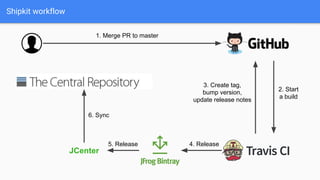
Shipkit workflow
JCenter
1. Merge PR to master
2. Start
a build
3. Create tag,
bump version,
update release notes
4. Release5. Release
6. Sync
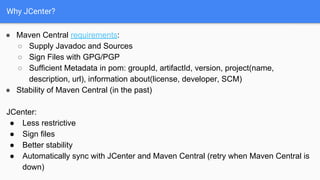
Why JCenter?
● Maven Central requirements:
○ Supply Javadoc and Sources
○ Sign Files with GPG/PGP
○ Sufficient Metadata in pom: groupId, artifactId, version, project(name,
description, url), information about(license, developer, SCM)
● Stability of Maven Central (in the past)
JCenter:
● Less restrictive
● Sign files
● Better stability
● Automatically sync with JCenter and Maven Central (retry when Maven Central is
down)
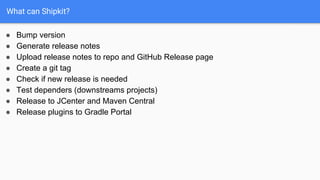
What can Shipkit?
● Bump version
● Generate release notes
● Upload release notes to repo and GitHub Release page
● Create a git tag
● Check if new release is needed
● Test dependers (downstreams projects)
● Release to JCenter and Maven Central
● Release plugins to Gradle Portal
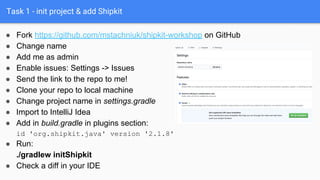
Task 1 - init project & add Shipkit
● Fork https://github.com/mstachniuk/shipkit-workshop on GitHub
● Change name
● Add me as admin
● Enable issues: Settings -> Issues
● Send the link to the repo to me!
● Clone your repo to local machine
● Change project name in settings.gradle
● Import to IntelliJ Idea
● Add in build.gradle in plugins section:
id 'org.shipkit.java' version '2.1.8'
● Run:
./gradlew initShipkit
● Check a diff in your IDE
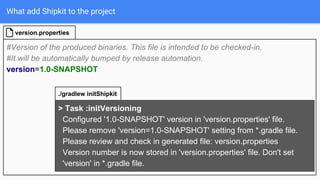
What add Shipkit to the project
#Version of the produced binaries. This file is intended to be checked-in.
#It will be automatically bumped by release automation.
version=1.0-SNAPSHOT
version.properties
> Task :initVersioning
Configured '1.0-SNAPSHOT' version in 'version.properties' file.
Please remove 'version=1.0-SNAPSHOT' setting from *.gradle file.
Please review and check in generated file: version.properties
Version number is now stored in 'version.properties' file. Don't set
'version' in *.gradle file.
./gradlew initShipkit
What add Shipkit to the project
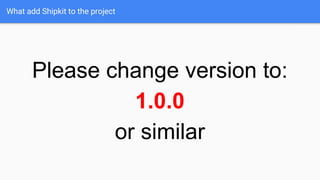
Please change version to:
1.0.0
or similar
What add Shipkit to the project
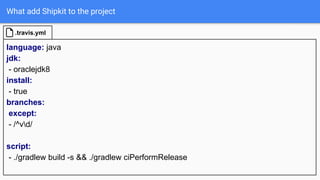
language: java
jdk:
- oraclejdk8
install:
- true
branches:
except:
- /^vd/
script:
- ./gradlew build -s && ./gradlew ciPerformRelease
.travis.yml
What add Shipkit to the project
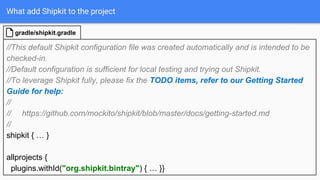
//This default Shipkit configuration file was created automatically and is intended to be
checked-in.
//Default configuration is sufficient for local testing and trying out Shipkit.
//To leverage Shipkit fully, please fix the TODO items, refer to our Getting Started
Guide for help:
//
// https://github.com/mockito/shipkit/blob/master/docs/getting-started.md
//
shipkit { … }
allprojects {
plugins.withId("org.shipkit.bintray") { … }}
gradle/shipkit.gradle
What add Shipkit to the project
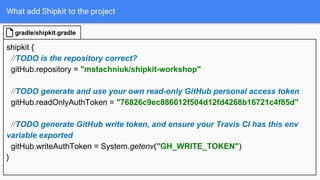
shipkit {
//TODO is the repository correct?
gitHub.repository = "mstachniuk/shipkit-workshop"
//TODO generate and use your own read-only GitHub personal access token
gitHub.readOnlyAuthToken = "76826c9ec886612f504d12fd4268b16721c4f85d"
//TODO generate GitHub write token, and ensure your Travis CI has this env
variable exported
gitHub.writeAuthToken = System.getenv("GH_WRITE_TOKEN")
}
gradle/shipkit.gradle
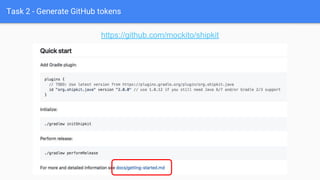
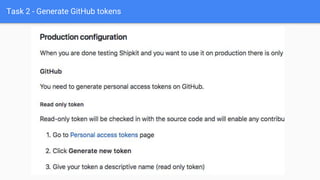
Task 2 - Generate GitHub tokens
https://github.com/mockito/shipkit
Task 2 - Generate GitHub tokens
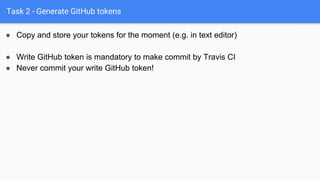
● Copy and store your tokens for the moment (e.g. in text editor)
● Write GitHub token is mandatory to make commit by Travis CI
● Never commit your write GitHub token!
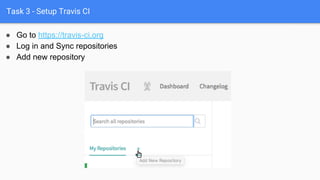
Task 3 - Setup Travis CI
● Go to https://travis-ci.org
● Log in and Sync repositories
● Add new repository
Task 3 - Setup Travis CI
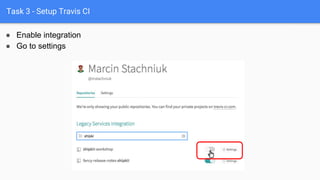
● Enable integration
● Go to settings
Task 3 - Setup Travis CI
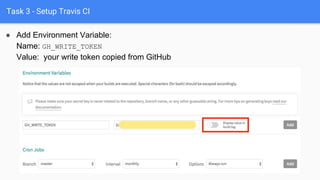
● Add Environment Variable:
Name: GH_WRITE_TOKEN
Value: your write token copied from GitHub
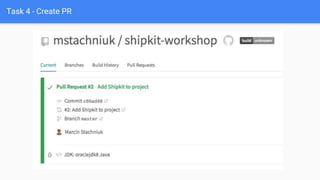
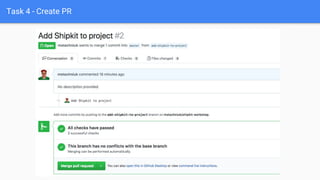
Task 4 - Create PR
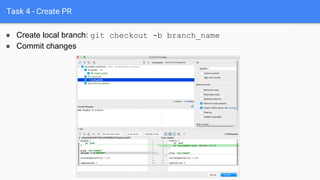
● Create local branch: git checkout -b branch_name
● Commit changes
Task 4 - Create PR
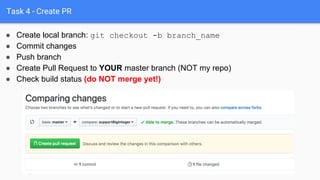
● Push branch
● Create Pull Request to YOUR master branch (NOT my repo)
● Check build status (do NOT merge yet!)
● Create local branch: git checkout -b branch_name
● Commit changes
Task 4 - Create PR
Task 4 - Create PR
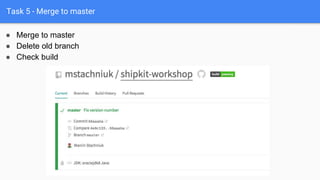
Task 5 - Merge to master
● Merge to master
● Delete old branch
● Check build
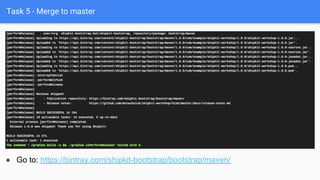
Task 5 - Merge to master
● Go to: https://bintray.com/shipkit-bootstrap/bootstrap/maven/
Success - your first release to JFrog Repository!
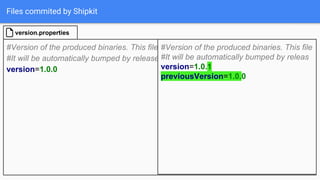
Files commited by Shipkit
<sup><sup>*Release notes were automatically generated by [Shipkit](http://shipkit.org/)*</sup></sup>
#### 1.0.0
- 2019-01-06 - 4 commits by [Marcin Stachniuk](https://github.com/mstachniuk) - published to
[![Bintray](https://img.shields.io/badge/Bintray-1.0.0-green.svg)](https://bintray.com/shipkit-bootstrap/bootstrap/maven/1.0.0)
- Add Shipkit to project [(#2)](https://github.com/mstachniuk/shipkit-workshop/pull/2)
docs/release-notes.md
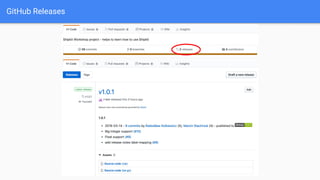
GitHub Releases
Files commited by Shipkit
#Version of the produced binaries. This file is intended to be checked-in.
#It will be automatically bumped by release automation.
version=1.0.0
version.properties
#Version of the produced binaries. This file
#It will be automatically bumped by releas
version=1.0.1
previousVersion=1.0.0
Versioning by Shipkit
● Shipkit use property version in version.properties as current version
● The previous version is useful for:
○ Compare current and previous version (check if something was changed)
● Those properties are updated during release
● No SNAPSHOTS, -beta, RC1 versions!
● Shipkit prefers semantic versioning (simplifed)
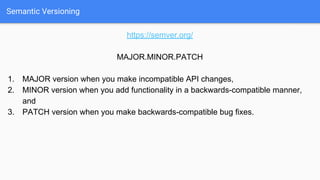
Semantic Versioning
https://semver.org/
MAJOR.MINOR.PATCH
1. MAJOR version when you make incompatible API changes,
2. MINOR version when you add functionality in a backwards-compatible manner,
and
3. PATCH version when you make backwards-compatible bug fixes.
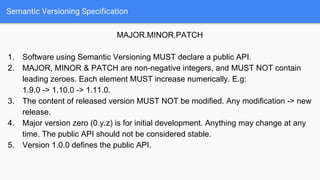
Semantic Versioning Specification
MAJOR.MINOR.PATCH
1. Software using Semantic Versioning MUST declare a public API.
2. MAJOR, MINOR & PATCH are non-negative integers, and MUST NOT contain
leading zeroes. Each element MUST increase numerically. E.g:
1.9.0 -> 1.10.0 -> 1.11.0.
3. The content of released version MUST NOT be modified. Any modification -> new
release.
4. Major version zero (0.y.z) is for initial development. Anything may change at any
time. The public API should not be considered stable.
5. Version 1.0.0 defines the public API.
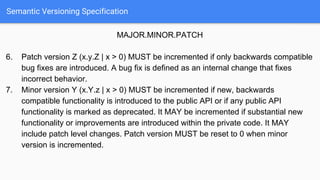
Semantic Versioning Specification
MAJOR.MINOR.PATCH
6. Patch version Z (x.y.Z | x > 0) MUST be incremented if only backwards compatible
bug fixes are introduced. A bug fix is defined as an internal change that fixes
incorrect behavior.
7. Minor version Y (x.Y.z | x > 0) MUST be incremented if new, backwards
compatible functionality is introduced to the public API or if any public API
functionality is marked as deprecated. It MAY be incremented if substantial new
functionality or improvements are introduced within the private code. It MAY
include patch level changes. Patch version MUST be reset to 0 when minor
version is incremented.
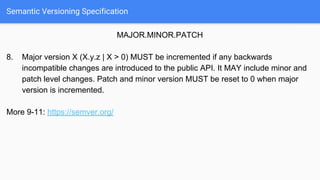
Semantic Versioning Specification
MAJOR.MINOR.PATCH
8. Major version X (X.y.z | X > 0) MUST be incremented if any backwards
incompatible changes are introduced to the public API. It MAY include minor and
patch level changes. Patch and minor version MUST be reset to 0 when major
version is incremented.
More 9-11: https://semver.org/
Semantic Versioning - Quiz
It’s time for:
QUIZ
Can be multichoice ;-)
Task 6: Configure Release Notes
● Add to Shipkit configuration:
releaseNotes.labelMapping = [
'enhancement': 'New feature',
'bug': 'Bug',
'docs': 'Documentation'
]
team.developers = ['mstachniuk:Marcin Stachniuk',
'<GH-login>:<GH-name>']
team.contributors = ['mstachniuk:Marcin Stachniuk',
'<GH-login>:<GH-name>']
team.ignoredContributors = ['mstachniuk:Marcin Stachniuk',
'<GH-login>:<GH-name>']
● Create PR, but NOT merge yet!
Task 6: Configure Release Notes
● Merge PR and add to message: [ci skip-release]
Task 6: Configure Release Notes
[ci skip-release] at the end of commit message prevent:
● publish release
● create tag
● update release notes
[ci skip] at the end of commit message prevent:
● execute a build
● add PR to release notes
It’s useful for commits made automatically by Shipkit
You can configure that by:
git.commitMessagePostfix = "[ci skip]"
releaseNotes.ignoreCommitsContaining = ["[ci skip]"]
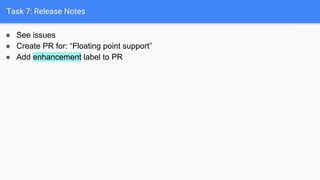
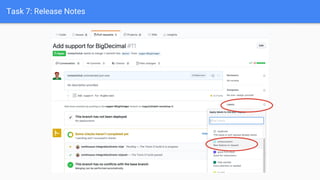
Task 7: Release Notes
● See issues
● Create PR for: “Floating point support”
● Add enhancement label to PR
Task 7: Release Notes
● Merge adding [ci skip-release]
● Remember about good PR name i.e.: Fix #NUMBER long support
● See issues
● Create PR for: “Long support”
● Add enhancement label to PR
● Repeat for: float, BigInteger and BigDecimal (the last one - no [ci skip-release])
Task 7: Release Notes
● Merge PR and see release notes:
releaseNotes.labelMapping = [
'enhancement': 'New features',
'bug': 'Bug',
]
Task 7: Release Notes
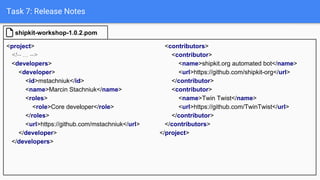
<project>
<!-- ... -->
<developers>
<developer>
<id>mstachniuk</id>
<name>Marcin Stachniuk</name>
<roles>
<role>Core developer</role>
</roles>
<url>https://github.com/mstachniuk</url>
</developer>
</developers>
shipkit-workshop-1.0.2.pom
<contributors>
<contributor>
<name>shipkit.org automated bot</name>
<url>https://github.com/shipkit-org</url>
</contributor>
<contributor>
<name>Twin Twist</name>
<url>https://github.com/TwinTwist</url>
</contributor>
</contributors>
</project>
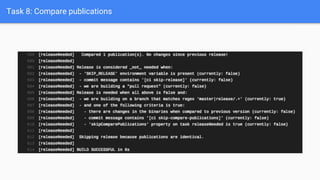
Task 8: Compare publications
● See issues
● Create PR for: “Readme file is missing” - Please don’t change anything outside
Readme.md
● Merge and see build output
Task 8: Compare publications
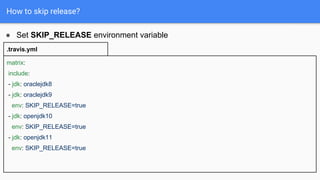
How to skip release?
● Set SKIP_RELEASE environment variable
matrix:
include:
- jdk: oraclejdk8
- jdk: oraclejdk9
env: SKIP_RELEASE=true
- jdk: openjdk10
env: SKIP_RELEASE=true
- jdk: openjdk11
env: SKIP_RELEASE=true
.travis.yml
How to skip release?
● Add to commit message suffix: [ci skip-release]
● When Pull Request is build
● Building on NOT release branch, default: master|release/.+
○ Can be changed by: git.releasableBranchRegex = "branch_regex"
● No changes in binaries
○ Source jars
○ dependency-info.json (file generated by Shipkit and store in source jar)
● Commit contains suffix: [ci skip-compare-publications]
● Set property 'skipComparePublications' on task releaseNeeded to true (see
Mockito release model)
● Set SKIP_RELEASE environment variable
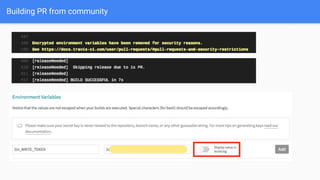
Building PR from community
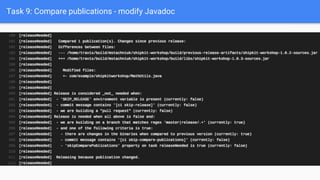
Task 9: Compare publications - modify Javadoc
● See issues
● Create PR for: “Javadoc for MathUtils class is missing”
● Merge and see build output
Task 9: Compare publications - modify Javadoc
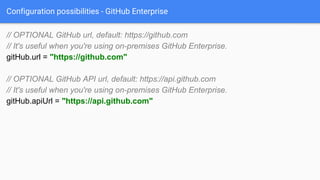
Configuration possibilities - GitHub Enterprise
// OPTIONAL GitHub url, default: https://github.com
// It's useful when you're using on-premises GitHub Enterprise.
gitHub.url = "https://github.com"
// OPTIONAL GitHub API url, default: https://api.github.com
// It's useful when you're using on-premises GitHub Enterprise.
gitHub.apiUrl = "https://api.github.com"
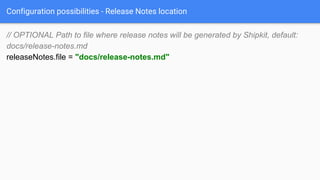
Configuration possibilities - Release Notes location
// OPTIONAL Path to file where release notes will be generated by Shipkit, default:
docs/release-notes.md
releaseNotes.file = "docs/release-notes.md"
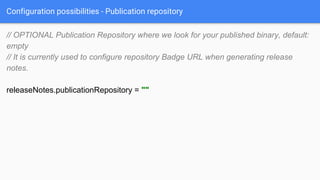
Configuration possibilities - Publication repository
// OPTIONAL Publication Repository where we look for your published binary, default:
empty
// It is currently used to configure repository Badge URL when generating release
notes.
releaseNotes.publicationRepository = ""
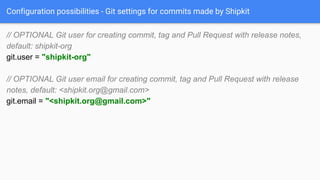
Configuration possibilities - Git settings for commits made by Shipkit
// OPTIONAL Git user for creating commit, tag and Pull Request with release notes,
default: shipkit-org
git.user = "shipkit-org"
// OPTIONAL Git user email for creating commit, tag and Pull Request with release
notes, default: <shipkit.org@gmail.com>
git.email = "<shipkit.org@gmail.com>"
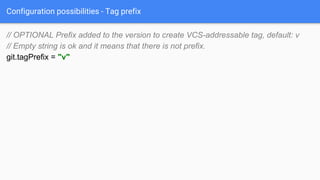
Configuration possibilities - Tag prefix
// OPTIONAL Prefix added to the version to create VCS-addressable tag, default: v
// Empty string is ok and it means that there is not prefix.
git.tagPrefix = "v"
Publish to Maven Central
How to publish to Maven Central?
Publish to Maven Central
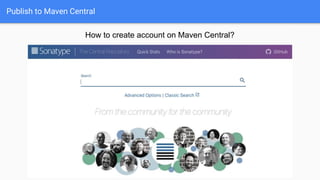
How to create account on Maven Central?
Publish to Maven Central
● Create account: https://issues.sonatype.org/
● Create new issue
● Generate tokens:
https://solidsoft.wordpress.com/2015/09/08/deploy-to-maven-central-using-api-key-
aka-auth-token/
● Set tokens in TravisCI
Publish to Maven Central
bintray {
key = '7ea297848ca948adb7d3ee92a83292112d7ae989'
pkg {
//TODO configure Bintray settings per your project (https://github.com/bintray/gradle-bintray-plugin)
repo = 'bootstrap'
user = 'shipkit-bootstrap-bot'
userOrg = 'shipkit-bootstrap'
name = 'maven'
licenses = ['MIT']
labels = ['continuous delivery', 'release automation', 'shipkit']
}
}
gradle/shipkit.gradle
bintray {
key = System.getenv("BINTRAY_API_KEY")
pkg {
repo = 'mstachniuk-maven-repo'
user = 'mstachniuk'
name = 'maven'
licenses = ['MIT']
labels = ['graphql', 'kotlin', 'java', 'schema']
version {
mavenCentralSync {
sync = true
user = System.env.NEXUS_TOKEN_USER
password = System.env.NEXUS_TOKEN_PWD
}
}
}
}
How to deliver Gradle plugin?
● The best example is Shipkit project itself
● In your build.gradle:
apply plugin: 'com.gradle.plugin-publish'
Incubating Features - upgrade downstream
● Check if new version works with dependers (child / downstream projects)
apply plugin: 'org.shipkit.ci-upgrade-downstream'
upgradeDownstream {
repositories = ['mockito/shipkit-example', 'mockito/shipkit']
}
Incubating Features - upgrade dependency
Child depends on parent project.
In child project you can execute:
./gradlew performVersionUpgrade
-Pdependency=parentGroup:parentArtifactName:parentVersion
It will create PR for you. When all check are green you can merge it.
More info:
https://github.com/mockito/shipkit/blob/master/docs/gradle-plugins/upgrade-dependen
cy-plugin.md
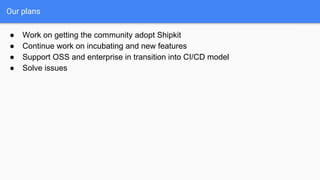
Our plans
● Work on getting the community adopt Shipkit
● Continue work on incubating and new features
● Support OSS and enterprise in transition into CI/CD model
● Solve issues
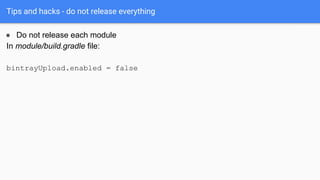
Tips and hacks - do not release everything
● Do not release each module
In module/build.gradle file:
bintrayUpload.enabled = false
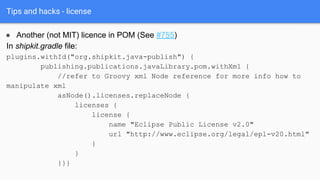
Tips and hacks - license
● Another (not MIT) licence in POM (See #755)
In shipkit.gradle file:
plugins.withId("org.shipkit.java-publish") {
publishing.publications.javaLibrary.pom.withXml {
//refer to Groovy xml Node reference for more info how to
manipulate xml
asNode().licenses.replaceNode {
licenses {
license {
name "Eclipse Public License v2.0"
url "http://www.eclipse.org/legal/epl-v20.html"
}
}
}}}
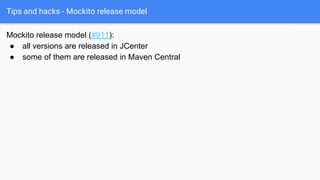
Tips and hacks - Mockito release model
Mockito release model (#911):
● all versions are released in JCenter
● some of them are released in Maven Central
Tips and hacks - Mockito release model
boolean centralRelease = System.getenv("TRAVIS_COMMIT_MESSAGE")
?.contains("[ci maven-central-release]")
mavenCentralSync {
sync = centralRelease
}
afterEvaluate {
[assertReleaseNeeded, releaseNeeded].each {
it.skipComparePublications = centralRelease
}
}
More: https://github.com/mockito/mockito/blob/release/2.x/gradle/shipkit.gradle
Alternatives
https://github.com/CloudPipelines/
https://github.com/szpak/CDeliveryBoy
https://github.com/allegro/axion-release-plugin
https://github.com/nemerosa/versioning
Continuous Delivery in OSS
Using Shipkit
Marcin Stachniuk

Continuous Delivery in OSS using Shipkit.org

  • 1.
    Continuous Delivery inOSS Using Shipkit Marcin Stachniuk
  • 2.
  • 3.
    About you! ● Whois developer of Open Source Software? ● How do you release new version? ● Do you plan to contribute to Open Source?
  • 4.
    Do you likemanage releases? ● To include a feature in a release or not? ● Am I ready to release or should I test more? ● Oh no… release notes… ● Build, sign, release, tag, etc.
  • 5.
  • 6.
    Shipkit - mainprinciples ● Almost every merged pull request lands new version in JCenter / Maven Central ● Easy to use ● Configure once and use all the time ● Smart defaults ● Automate as much as possible ● Don’t need to manage CI server
  • 7.
    Shipkit workflow JCenter 1. MergePR to master 2. Start a build 3. Create tag, bump version, update release notes 4. Release5. Release 6. Sync
  • 8.
    Why JCenter? ● MavenCentral requirements: ○ Supply Javadoc and Sources ○ Sign Files with GPG/PGP ○ Sufficient Metadata in pom: groupId, artifactId, version, project(name, description, url), information about(license, developer, SCM) ● Stability of Maven Central (in the past) JCenter: ● Less restrictive ● Sign files ● Better stability ● Automatically sync with JCenter and Maven Central (retry when Maven Central is down)
  • 9.
    What can Shipkit? ●Bump version ● Generate release notes ● Upload release notes to repo and GitHub Release page ● Create a git tag ● Check if new release is needed ● Test dependers (downstreams projects) ● Release to JCenter and Maven Central ● Release plugins to Gradle Portal
  • 10.
    Task 1 -init project & add Shipkit ● Fork https://github.com/mstachniuk/shipkit-workshop on GitHub ● Change name ● Add me as admin ● Enable issues: Settings -> Issues ● Send the link to the repo to me! ● Clone your repo to local machine ● Change project name in settings.gradle ● Import to IntelliJ Idea ● Add in build.gradle in plugins section: id 'org.shipkit.java' version '2.1.8' ● Run: ./gradlew initShipkit ● Check a diff in your IDE
  • 11.
    What add Shipkitto the project #Version of the produced binaries. This file is intended to be checked-in. #It will be automatically bumped by release automation. version=1.0-SNAPSHOT version.properties > Task :initVersioning Configured '1.0-SNAPSHOT' version in 'version.properties' file. Please remove 'version=1.0-SNAPSHOT' setting from *.gradle file. Please review and check in generated file: version.properties Version number is now stored in 'version.properties' file. Don't set 'version' in *.gradle file. ./gradlew initShipkit
  • 12.
    What add Shipkitto the project Please change version to: 1.0.0 or similar
  • 13.
    What add Shipkitto the project language: java jdk: - oraclejdk8 install: - true branches: except: - /^vd/ script: - ./gradlew build -s && ./gradlew ciPerformRelease .travis.yml
  • 14.
    What add Shipkitto the project //This default Shipkit configuration file was created automatically and is intended to be checked-in. //Default configuration is sufficient for local testing and trying out Shipkit. //To leverage Shipkit fully, please fix the TODO items, refer to our Getting Started Guide for help: // // https://github.com/mockito/shipkit/blob/master/docs/getting-started.md // shipkit { … } allprojects { plugins.withId("org.shipkit.bintray") { … }} gradle/shipkit.gradle
  • 15.
    What add Shipkitto the project shipkit { //TODO is the repository correct? gitHub.repository = "mstachniuk/shipkit-workshop" //TODO generate and use your own read-only GitHub personal access token gitHub.readOnlyAuthToken = "76826c9ec886612f504d12fd4268b16721c4f85d" //TODO generate GitHub write token, and ensure your Travis CI has this env variable exported gitHub.writeAuthToken = System.getenv("GH_WRITE_TOKEN") } gradle/shipkit.gradle
  • 16.
    Task 2 -Generate GitHub tokens https://github.com/mockito/shipkit
  • 17.
    Task 2 -Generate GitHub tokens
  • 18.
    Task 2 -Generate GitHub tokens ● Copy and store your tokens for the moment (e.g. in text editor) ● Write GitHub token is mandatory to make commit by Travis CI ● Never commit your write GitHub token!
  • 19.
    Task 3 -Setup Travis CI ● Go to https://travis-ci.org ● Log in and Sync repositories ● Add new repository
  • 20.
    Task 3 -Setup Travis CI ● Enable integration ● Go to settings
  • 21.
    Task 3 -Setup Travis CI ● Add Environment Variable: Name: GH_WRITE_TOKEN Value: your write token copied from GitHub
  • 22.
    Task 4 -Create PR ● Create local branch: git checkout -b branch_name ● Commit changes
  • 23.
    Task 4 -Create PR ● Push branch ● Create Pull Request to YOUR master branch (NOT my repo) ● Check build status (do NOT merge yet!) ● Create local branch: git checkout -b branch_name ● Commit changes
  • 24.
    Task 4 -Create PR
  • 25.
    Task 4 -Create PR
  • 26.
    Task 5 -Merge to master ● Merge to master ● Delete old branch ● Check build
  • 27.
    Task 5 -Merge to master ● Go to: https://bintray.com/shipkit-bootstrap/bootstrap/maven/
  • 28.
    Success - yourfirst release to JFrog Repository!
  • 29.
    Files commited byShipkit <sup><sup>*Release notes were automatically generated by [Shipkit](http://shipkit.org/)*</sup></sup> #### 1.0.0 - 2019-01-06 - 4 commits by [Marcin Stachniuk](https://github.com/mstachniuk) - published to [![Bintray](https://img.shields.io/badge/Bintray-1.0.0-green.svg)](https://bintray.com/shipkit-bootstrap/bootstrap/maven/1.0.0) - Add Shipkit to project [(#2)](https://github.com/mstachniuk/shipkit-workshop/pull/2) docs/release-notes.md
  • 30.
  • 31.
    Files commited byShipkit #Version of the produced binaries. This file is intended to be checked-in. #It will be automatically bumped by release automation. version=1.0.0 version.properties #Version of the produced binaries. This file #It will be automatically bumped by releas version=1.0.1 previousVersion=1.0.0
  • 32.
    Versioning by Shipkit ●Shipkit use property version in version.properties as current version ● The previous version is useful for: ○ Compare current and previous version (check if something was changed) ● Those properties are updated during release ● No SNAPSHOTS, -beta, RC1 versions! ● Shipkit prefers semantic versioning (simplifed)
  • 33.
    Semantic Versioning https://semver.org/ MAJOR.MINOR.PATCH 1. MAJORversion when you make incompatible API changes, 2. MINOR version when you add functionality in a backwards-compatible manner, and 3. PATCH version when you make backwards-compatible bug fixes.
  • 34.
    Semantic Versioning Specification MAJOR.MINOR.PATCH 1.Software using Semantic Versioning MUST declare a public API. 2. MAJOR, MINOR & PATCH are non-negative integers, and MUST NOT contain leading zeroes. Each element MUST increase numerically. E.g: 1.9.0 -> 1.10.0 -> 1.11.0. 3. The content of released version MUST NOT be modified. Any modification -> new release. 4. Major version zero (0.y.z) is for initial development. Anything may change at any time. The public API should not be considered stable. 5. Version 1.0.0 defines the public API.
  • 35.
    Semantic Versioning Specification MAJOR.MINOR.PATCH 6.Patch version Z (x.y.Z | x > 0) MUST be incremented if only backwards compatible bug fixes are introduced. A bug fix is defined as an internal change that fixes incorrect behavior. 7. Minor version Y (x.Y.z | x > 0) MUST be incremented if new, backwards compatible functionality is introduced to the public API or if any public API functionality is marked as deprecated. It MAY be incremented if substantial new functionality or improvements are introduced within the private code. It MAY include patch level changes. Patch version MUST be reset to 0 when minor version is incremented.
  • 36.
    Semantic Versioning Specification MAJOR.MINOR.PATCH 8.Major version X (X.y.z | X > 0) MUST be incremented if any backwards incompatible changes are introduced to the public API. It MAY include minor and patch level changes. Patch and minor version MUST be reset to 0 when major version is incremented. More 9-11: https://semver.org/
  • 37.
    Semantic Versioning -Quiz It’s time for: QUIZ Can be multichoice ;-)
  • 38.
    Task 6: ConfigureRelease Notes ● Add to Shipkit configuration: releaseNotes.labelMapping = [ 'enhancement': 'New feature', 'bug': 'Bug', 'docs': 'Documentation' ] team.developers = ['mstachniuk:Marcin Stachniuk', '<GH-login>:<GH-name>'] team.contributors = ['mstachniuk:Marcin Stachniuk', '<GH-login>:<GH-name>'] team.ignoredContributors = ['mstachniuk:Marcin Stachniuk', '<GH-login>:<GH-name>'] ● Create PR, but NOT merge yet!
  • 39.
    Task 6: ConfigureRelease Notes ● Merge PR and add to message: [ci skip-release]
  • 40.
    Task 6: ConfigureRelease Notes [ci skip-release] at the end of commit message prevent: ● publish release ● create tag ● update release notes [ci skip] at the end of commit message prevent: ● execute a build ● add PR to release notes It’s useful for commits made automatically by Shipkit You can configure that by: git.commitMessagePostfix = "[ci skip]" releaseNotes.ignoreCommitsContaining = ["[ci skip]"]
  • 41.
    Task 7: ReleaseNotes ● See issues ● Create PR for: “Floating point support” ● Add enhancement label to PR
  • 42.
  • 43.
    Task 7: ReleaseNotes ● Merge adding [ci skip-release] ● Remember about good PR name i.e.: Fix #NUMBER long support ● See issues ● Create PR for: “Long support” ● Add enhancement label to PR ● Repeat for: float, BigInteger and BigDecimal (the last one - no [ci skip-release])
  • 44.
    Task 7: ReleaseNotes ● Merge PR and see release notes: releaseNotes.labelMapping = [ 'enhancement': 'New features', 'bug': 'Bug', ]
  • 45.
    Task 7: ReleaseNotes <project> <!-- ... --> <developers> <developer> <id>mstachniuk</id> <name>Marcin Stachniuk</name> <roles> <role>Core developer</role> </roles> <url>https://github.com/mstachniuk</url> </developer> </developers> shipkit-workshop-1.0.2.pom <contributors> <contributor> <name>shipkit.org automated bot</name> <url>https://github.com/shipkit-org</url> </contributor> <contributor> <name>Twin Twist</name> <url>https://github.com/TwinTwist</url> </contributor> </contributors> </project>
  • 46.
    Task 8: Comparepublications ● See issues ● Create PR for: “Readme file is missing” - Please don’t change anything outside Readme.md ● Merge and see build output
  • 47.
    Task 8: Comparepublications
  • 48.
    How to skiprelease? ● Set SKIP_RELEASE environment variable matrix: include: - jdk: oraclejdk8 - jdk: oraclejdk9 env: SKIP_RELEASE=true - jdk: openjdk10 env: SKIP_RELEASE=true - jdk: openjdk11 env: SKIP_RELEASE=true .travis.yml
  • 49.
    How to skiprelease? ● Add to commit message suffix: [ci skip-release] ● When Pull Request is build ● Building on NOT release branch, default: master|release/.+ ○ Can be changed by: git.releasableBranchRegex = "branch_regex" ● No changes in binaries ○ Source jars ○ dependency-info.json (file generated by Shipkit and store in source jar) ● Commit contains suffix: [ci skip-compare-publications] ● Set property 'skipComparePublications' on task releaseNeeded to true (see Mockito release model) ● Set SKIP_RELEASE environment variable
  • 50.
  • 51.
    Task 9: Comparepublications - modify Javadoc ● See issues ● Create PR for: “Javadoc for MathUtils class is missing” ● Merge and see build output
  • 52.
    Task 9: Comparepublications - modify Javadoc
  • 53.
    Configuration possibilities -GitHub Enterprise // OPTIONAL GitHub url, default: https://github.com // It's useful when you're using on-premises GitHub Enterprise. gitHub.url = "https://github.com" // OPTIONAL GitHub API url, default: https://api.github.com // It's useful when you're using on-premises GitHub Enterprise. gitHub.apiUrl = "https://api.github.com"
  • 54.
    Configuration possibilities -Release Notes location // OPTIONAL Path to file where release notes will be generated by Shipkit, default: docs/release-notes.md releaseNotes.file = "docs/release-notes.md"
  • 55.
    Configuration possibilities -Publication repository // OPTIONAL Publication Repository where we look for your published binary, default: empty // It is currently used to configure repository Badge URL when generating release notes. releaseNotes.publicationRepository = ""
  • 56.
    Configuration possibilities -Git settings for commits made by Shipkit // OPTIONAL Git user for creating commit, tag and Pull Request with release notes, default: shipkit-org git.user = "shipkit-org" // OPTIONAL Git user email for creating commit, tag and Pull Request with release notes, default: <shipkit.org@gmail.com> git.email = "<shipkit.org@gmail.com>"
  • 57.
    Configuration possibilities -Tag prefix // OPTIONAL Prefix added to the version to create VCS-addressable tag, default: v // Empty string is ok and it means that there is not prefix. git.tagPrefix = "v"
  • 58.
    Publish to MavenCentral How to publish to Maven Central?
  • 59.
    Publish to MavenCentral How to create account on Maven Central?
  • 60.
    Publish to MavenCentral ● Create account: https://issues.sonatype.org/ ● Create new issue ● Generate tokens: https://solidsoft.wordpress.com/2015/09/08/deploy-to-maven-central-using-api-key- aka-auth-token/ ● Set tokens in TravisCI
  • 61.
    Publish to MavenCentral bintray { key = '7ea297848ca948adb7d3ee92a83292112d7ae989' pkg { //TODO configure Bintray settings per your project (https://github.com/bintray/gradle-bintray-plugin) repo = 'bootstrap' user = 'shipkit-bootstrap-bot' userOrg = 'shipkit-bootstrap' name = 'maven' licenses = ['MIT'] labels = ['continuous delivery', 'release automation', 'shipkit'] } } gradle/shipkit.gradle bintray { key = System.getenv("BINTRAY_API_KEY") pkg { repo = 'mstachniuk-maven-repo' user = 'mstachniuk' name = 'maven' licenses = ['MIT'] labels = ['graphql', 'kotlin', 'java', 'schema'] version { mavenCentralSync { sync = true user = System.env.NEXUS_TOKEN_USER password = System.env.NEXUS_TOKEN_PWD } } } }
  • 62.
    How to deliverGradle plugin? ● The best example is Shipkit project itself ● In your build.gradle: apply plugin: 'com.gradle.plugin-publish'
  • 63.
    Incubating Features -upgrade downstream ● Check if new version works with dependers (child / downstream projects) apply plugin: 'org.shipkit.ci-upgrade-downstream' upgradeDownstream { repositories = ['mockito/shipkit-example', 'mockito/shipkit'] }
  • 64.
    Incubating Features -upgrade dependency Child depends on parent project. In child project you can execute: ./gradlew performVersionUpgrade -Pdependency=parentGroup:parentArtifactName:parentVersion It will create PR for you. When all check are green you can merge it. More info: https://github.com/mockito/shipkit/blob/master/docs/gradle-plugins/upgrade-dependen cy-plugin.md
  • 65.
    Our plans ● Workon getting the community adopt Shipkit ● Continue work on incubating and new features ● Support OSS and enterprise in transition into CI/CD model ● Solve issues
  • 66.
    Tips and hacks- do not release everything ● Do not release each module In module/build.gradle file: bintrayUpload.enabled = false
  • 67.
    Tips and hacks- license ● Another (not MIT) licence in POM (See #755) In shipkit.gradle file: plugins.withId("org.shipkit.java-publish") { publishing.publications.javaLibrary.pom.withXml { //refer to Groovy xml Node reference for more info how to manipulate xml asNode().licenses.replaceNode { licenses { license { name "Eclipse Public License v2.0" url "http://www.eclipse.org/legal/epl-v20.html" } } }}}
  • 68.
    Tips and hacks- Mockito release model Mockito release model (#911): ● all versions are released in JCenter ● some of them are released in Maven Central
  • 69.
    Tips and hacks- Mockito release model boolean centralRelease = System.getenv("TRAVIS_COMMIT_MESSAGE") ?.contains("[ci maven-central-release]") mavenCentralSync { sync = centralRelease } afterEvaluate { [assertReleaseNeeded, releaseNeeded].each { it.skipComparePublications = centralRelease } } More: https://github.com/mockito/mockito/blob/release/2.x/gradle/shipkit.gradle
  • 70.
  • 71.
    Continuous Delivery inOSS Using Shipkit Marcin Stachniuk