GIS Solutions
Mobile Systems Research Labs has developed its own GIS solution integrated with C4I software.
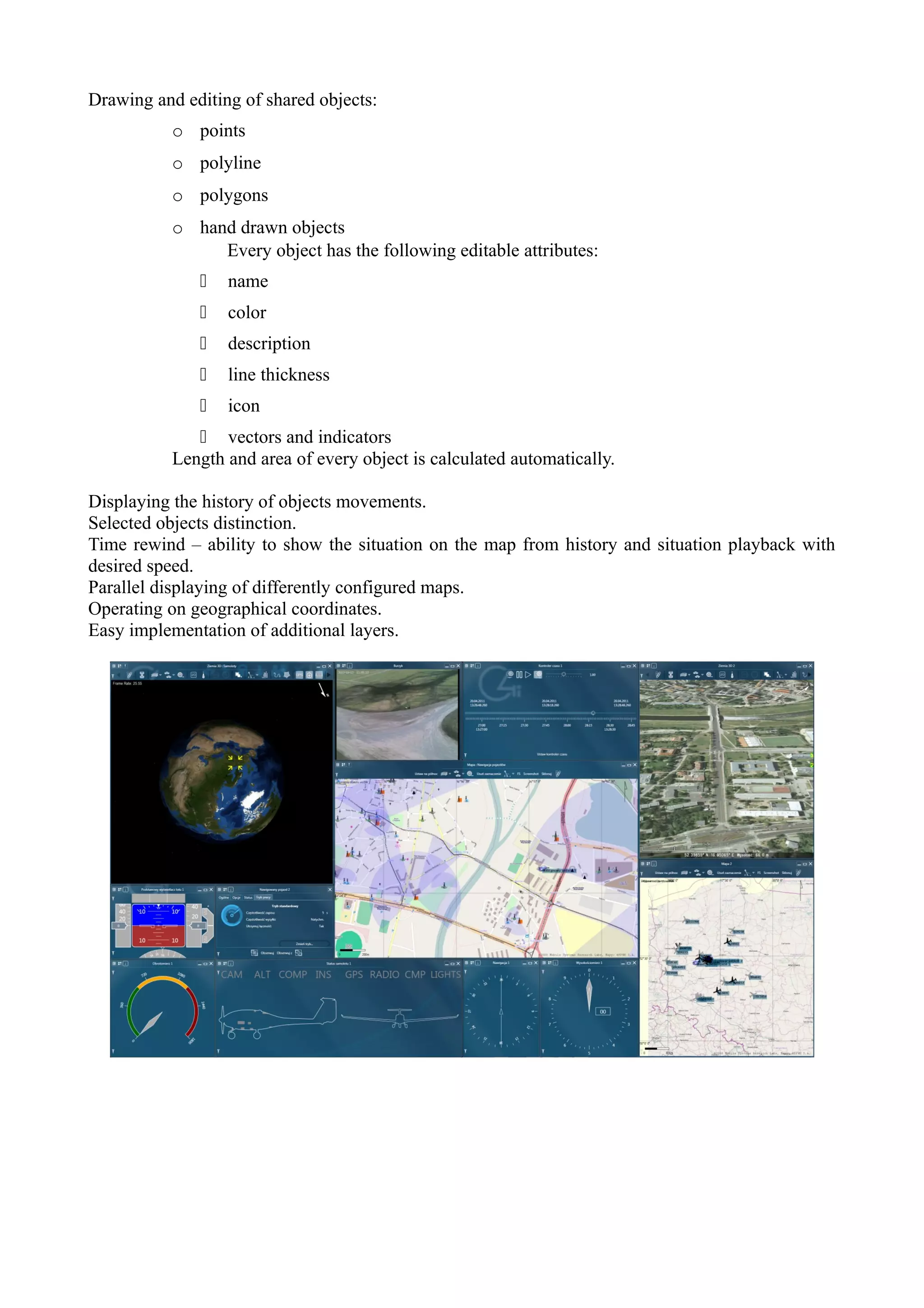
There are modules for tactical data visualization in a 2D (Map) and 3D (Earth 3D) environments.


Map – 2D tactical data visualization module
Map module is used to display geographical data and objects in order to clearly visualize tactical
situation.
Data are displayed in two categories: map and objects. Data which change rarely and are static are
called map. In most cases these are road networks, parks, forests, water and urban areas. Depending
on the source of these data they are organized into different layers: administrative distribution,
police station areas, postal code zoning, noise maps, physical management plans, satellite or aerial
photographs and many others. This module can display data from any global standard.
Basic map data source is Return application server, which modules support information about
objects and geographical data. However it is possible to import data from other data sources found
in C4I software. Like in any C4I element this Map application is fully modular and it can import
new data sources and implement new layers. The following list is just an example of already
implemented layers: traffic intensity, UAV mission planning, dangerous areas, vehicle navigation.


Most important features:
Integration with layer manager which allows to add new layers easily and select already existing
layers.
Integration with object manager which allows to chose which objects will be displayed and in what
form.
Vector and raster layers can be displayed simultaneously.
User can choose layer order and transparency.
Various zoom levels, up to one dpi.
Automatic scale adjusting to zoom level.
Ergonomic map zoom and rotation.
Supports 3D manipulators.
Automatically follows selected objects or group of objects. If objects go out of bounds Map module
automatically zooms out to ensure all objects are shown.
Various map orientation e.g. north orientation or selected objects movement orientation.
Displaying of objects icons and descriptions.
Drawing and editing of shared objects:
           o points
           o polyline
           o polygons
           o hand drawn objects
                Every object has the following editable attributes:
                 name
                 color
                 description
                 line thickness
                 icon
               vectors and indicators
           Length and area of every object is calculated automatically.

Displaying the history of objects movements.
Selected objects distinction.
Time rewind – ability to show the situation on the map from history and situation playback with
desired speed.
Parallel displaying of differently configured maps.
Operating on geographical coordinates.
Easy implementation of additional layers.
Earth 3D - tactical data visualization module in 3D
                                             Earth 3D is a module that was developed on the basis of
                                             UAV visualization modules – Spirit, Spirit 2 and Ghost
                                             developed for C4I system at Mobile Systems Research
                                             Labs. It is a modern application that allows users in the
                                             Command Center or Mobile Command Center to display
                                             various data about vehicles, forces and objects taking part
                                             in a mission.
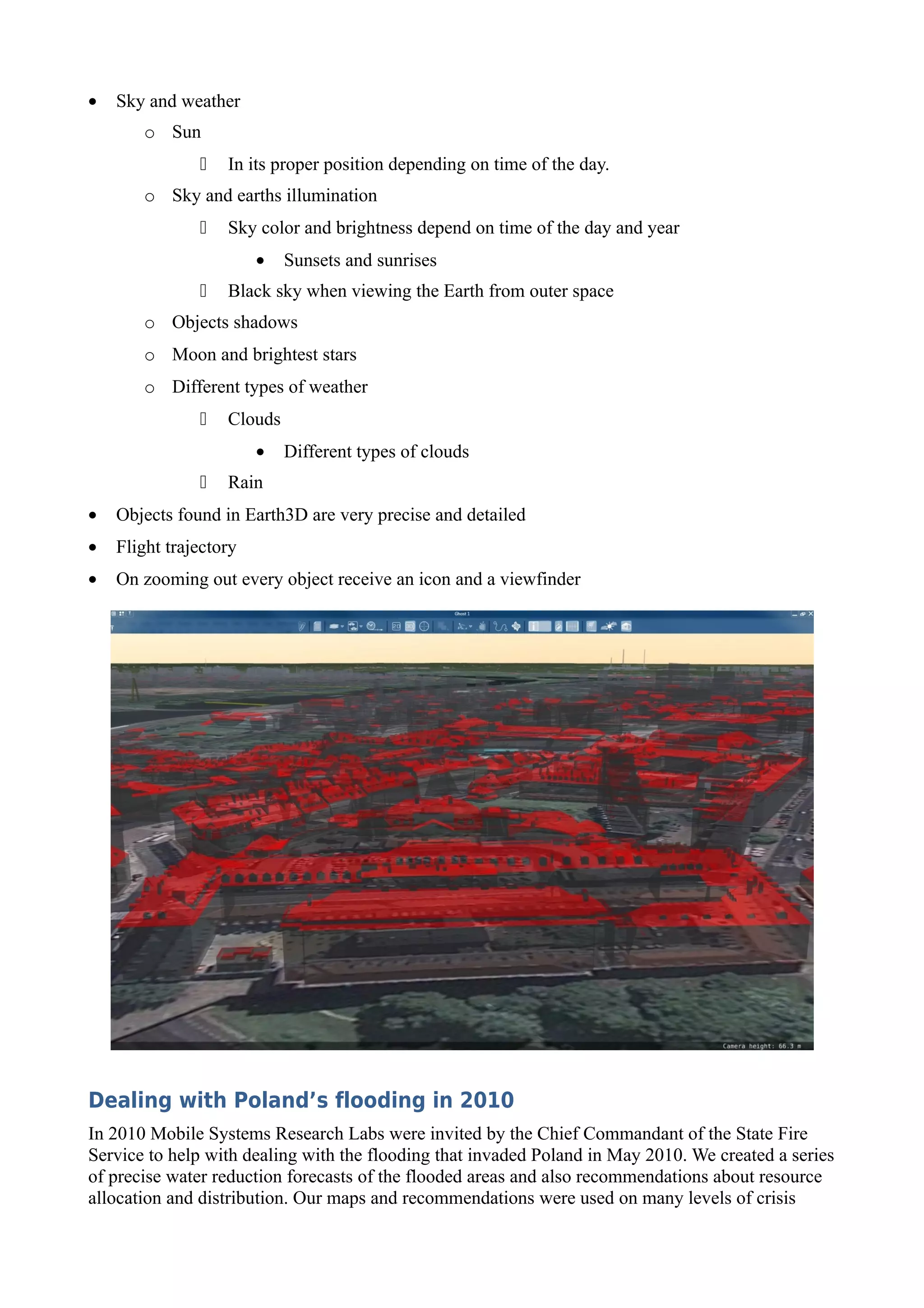
                                             One of the most important features is very precise and
                                             detailed object and terrain visualization in 3D and like
with Map module it is possible to apply various layers on the modeled terrain. Earth 3D also allows
to study and create missions algorithms for UAVs and UAV swarms.
Earth 3D uses most modern technologies found in computer graphics. Skillful selection and
integration of available programming libraries one coherent system has been created. Thanks to this
tactical situation live preview and historical playback (objects positions and states) is possible. Data
from the system are processed and recorded on Return application server and they are also logged
on various nodes connected to the system. This allows to playback historical data of UAVs or other
objects which lost connection or went out of range. It greatly enhances post mission analysis.
Most important features:
•   Playback control:
       o Start/Pause
       o Speed control
       o Historical data selection
•   Visualization of various objects:
       o Flying ones (UAVs, airline planes)
       o Ground ones (tracking devices, airfield, vehicles, personal devices, public transport
         vehicles, POI, traffic lights, buildings, etc.)
•   Various camera positions:
       o Satellite – camera is high above the ground and faces is in right angle
       o Bird view – used to follow objects
       o Pilot view - used to follow objects
       o Free view
       o Observer view – locked on to the object
•   Maps and sceneries:
       o Orthophoto
       o Land relief
       o Raster data formats WMS and TMS
       o GIS visualization (SHP format)
       o Layer management
•   Sky and weather
       o Sun
                  In its proper position depending on time of the day.
       o Sky and earths illumination
                  Sky color and brightness depend on time of the day and year
                        •   Sunsets and sunrises
                  Black sky when viewing the Earth from outer space
       o Objects shadows
       o Moon and brightest stars
       o Different types of weather
                  Clouds
                        •   Different types of clouds
                  Rain
•   Objects found in Earth3D are very precise and detailed
•   Flight trajectory
•   On zooming out every object receive an icon and a viewfinder


Dealing with Poland’s flooding in 2010
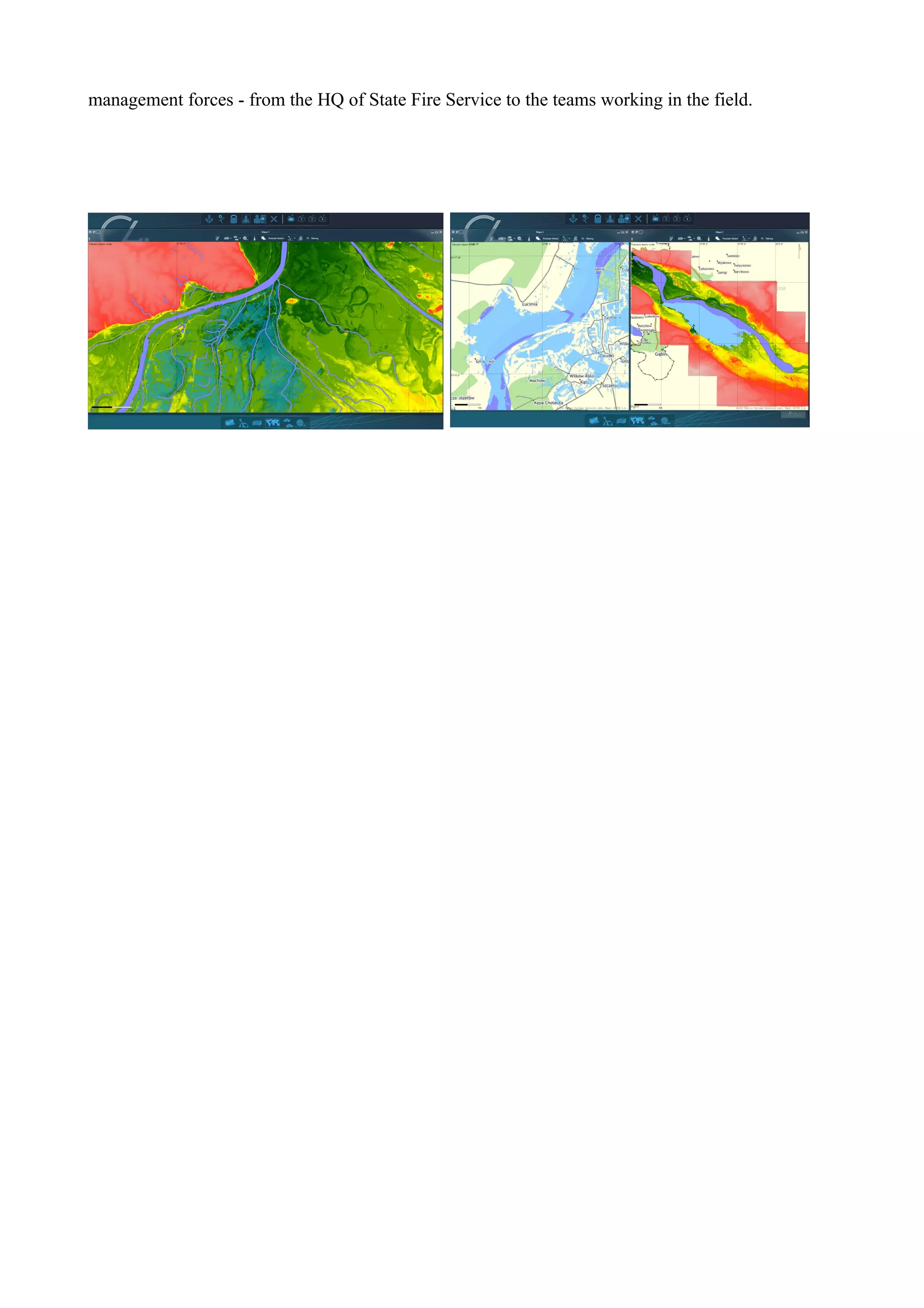
In 2010 Mobile Systems Research Labs were invited by the Chief Commandant of the State Fire
Service to help with dealing with the flooding that invaded Poland in May 2010. We created a series
of precise water reduction forecasts of the flooded areas and also recommendations about resource
allocation and distribution. Our maps and recommendations were used on many levels of crisis
management forces - from the HQ of State Fire Service to the teams working in the field.

Gi sdoc

  • 1.
    GIS Solutions Mobile SystemsResearch Labs has developed its own GIS solution integrated with C4I software. There are modules for tactical data visualization in a 2D (Map) and 3D (Earth 3D) environments. Map – 2D tactical data visualization module Map module is used to display geographical data and objects in order to clearly visualize tactical situation. Data are displayed in two categories: map and objects. Data which change rarely and are static are called map. In most cases these are road networks, parks, forests, water and urban areas. Depending on the source of these data they are organized into different layers: administrative distribution, police station areas, postal code zoning, noise maps, physical management plans, satellite or aerial photographs and many others. This module can display data from any global standard. Basic map data source is Return application server, which modules support information about objects and geographical data. However it is possible to import data from other data sources found in C4I software. Like in any C4I element this Map application is fully modular and it can import new data sources and implement new layers. The following list is just an example of already implemented layers: traffic intensity, UAV mission planning, dangerous areas, vehicle navigation. Most important features: Integration with layer manager which allows to add new layers easily and select already existing layers. Integration with object manager which allows to chose which objects will be displayed and in what form. Vector and raster layers can be displayed simultaneously. User can choose layer order and transparency. Various zoom levels, up to one dpi. Automatic scale adjusting to zoom level. Ergonomic map zoom and rotation. Supports 3D manipulators. Automatically follows selected objects or group of objects. If objects go out of bounds Map module automatically zooms out to ensure all objects are shown. Various map orientation e.g. north orientation or selected objects movement orientation. Displaying of objects icons and descriptions.
  • 2.
    Drawing and editingof shared objects: o points o polyline o polygons o hand drawn objects Every object has the following editable attributes:  name  color  description  line thickness  icon  vectors and indicators Length and area of every object is calculated automatically. Displaying the history of objects movements. Selected objects distinction. Time rewind – ability to show the situation on the map from history and situation playback with desired speed. Parallel displaying of differently configured maps. Operating on geographical coordinates. Easy implementation of additional layers.
  • 3.
    Earth 3D -tactical data visualization module in 3D Earth 3D is a module that was developed on the basis of UAV visualization modules – Spirit, Spirit 2 and Ghost developed for C4I system at Mobile Systems Research Labs. It is a modern application that allows users in the Command Center or Mobile Command Center to display various data about vehicles, forces and objects taking part in a mission. One of the most important features is very precise and detailed object and terrain visualization in 3D and like with Map module it is possible to apply various layers on the modeled terrain. Earth 3D also allows to study and create missions algorithms for UAVs and UAV swarms. Earth 3D uses most modern technologies found in computer graphics. Skillful selection and integration of available programming libraries one coherent system has been created. Thanks to this tactical situation live preview and historical playback (objects positions and states) is possible. Data from the system are processed and recorded on Return application server and they are also logged on various nodes connected to the system. This allows to playback historical data of UAVs or other objects which lost connection or went out of range. It greatly enhances post mission analysis.
  • 4.
    Most important features: • Playback control: o Start/Pause o Speed control o Historical data selection • Visualization of various objects: o Flying ones (UAVs, airline planes) o Ground ones (tracking devices, airfield, vehicles, personal devices, public transport vehicles, POI, traffic lights, buildings, etc.) • Various camera positions: o Satellite – camera is high above the ground and faces is in right angle o Bird view – used to follow objects o Pilot view - used to follow objects o Free view o Observer view – locked on to the object • Maps and sceneries: o Orthophoto o Land relief o Raster data formats WMS and TMS o GIS visualization (SHP format) o Layer management
  • 5.
    Sky and weather o Sun  In its proper position depending on time of the day. o Sky and earths illumination  Sky color and brightness depend on time of the day and year • Sunsets and sunrises  Black sky when viewing the Earth from outer space o Objects shadows o Moon and brightest stars o Different types of weather  Clouds • Different types of clouds  Rain • Objects found in Earth3D are very precise and detailed • Flight trajectory • On zooming out every object receive an icon and a viewfinder Dealing with Poland’s flooding in 2010 In 2010 Mobile Systems Research Labs were invited by the Chief Commandant of the State Fire Service to help with dealing with the flooding that invaded Poland in May 2010. We created a series of precise water reduction forecasts of the flooded areas and also recommendations about resource allocation and distribution. Our maps and recommendations were used on many levels of crisis
  • 6.
    management forces -from the HQ of State Fire Service to the teams working in the field.