Developed by:
Under Supervision:
Engineer Hamid RazaEngineer Hamid Raza
Head of Electronics & Telecom Department
Comwave Institute of Science & IT, Islamabad
ZEESHAN AHMED FAROOQIZEESHAN AHMED FAROOQI
Reg. No: SUIT–06-03-77058
Roll No. SU-06-05414
B-Tech Honor (E&T)
• Background.
• Objective of Project.
• Scope of Project.
BackgroundBackground
DC motor plays a significant role in modern industrial world. There
are several types of applications where the load on the DC motor
varies over a speed range.
In home appliances, washers, dryers and compressors are good
examples. In automotive, fuel pump control, electronic steering
control, engine control and electric vehicle control are good
examples of these. In aerospace, there are a number of
applications, like centrifuges, pumps, robotic arm controls,
gyroscope controls and so on.
In all above examples, these applications may demand high
speed control accuracy and good dynamic responses.
Objective of Project
The main core of this project is to design a speed control
system of DC Motor by using microcontroller. This system
will be able to control the DC motor speed at desired speed
regardless the changes of load. More over time-base
functions are also implemented in his project.
Scope of Project
In order to achieve the objective of the project, there are
several scope had been outlined. The scope of this project
includes using KEIL uVision to program microcontroller
AT89C52, build hardware for the system, and interface the
hardware to LCD & Keypad.
Components of DAQComponents of DAQ
1. DC Motor
2. Optical Encoder
3. Microcontroller
Application of DAQApplication of DAQ
1. Unattended weather station recording (such as wind
speed / direction, temperature, relative humidity etc.
2. Unattended hydrographic recording (such as water level,
water depth, flow, temperature etc.
3. Unattended soil moisture level recording.
4. Unattended gas pressure recording.
5. Road traffic counting.
6. Process monitoring for maintenance and troubleshooting
applications and much more.
7. Black-Box is also an example of DAQ.
Block DiagramBlock Diagram
Hardware ComponentsHardware Components
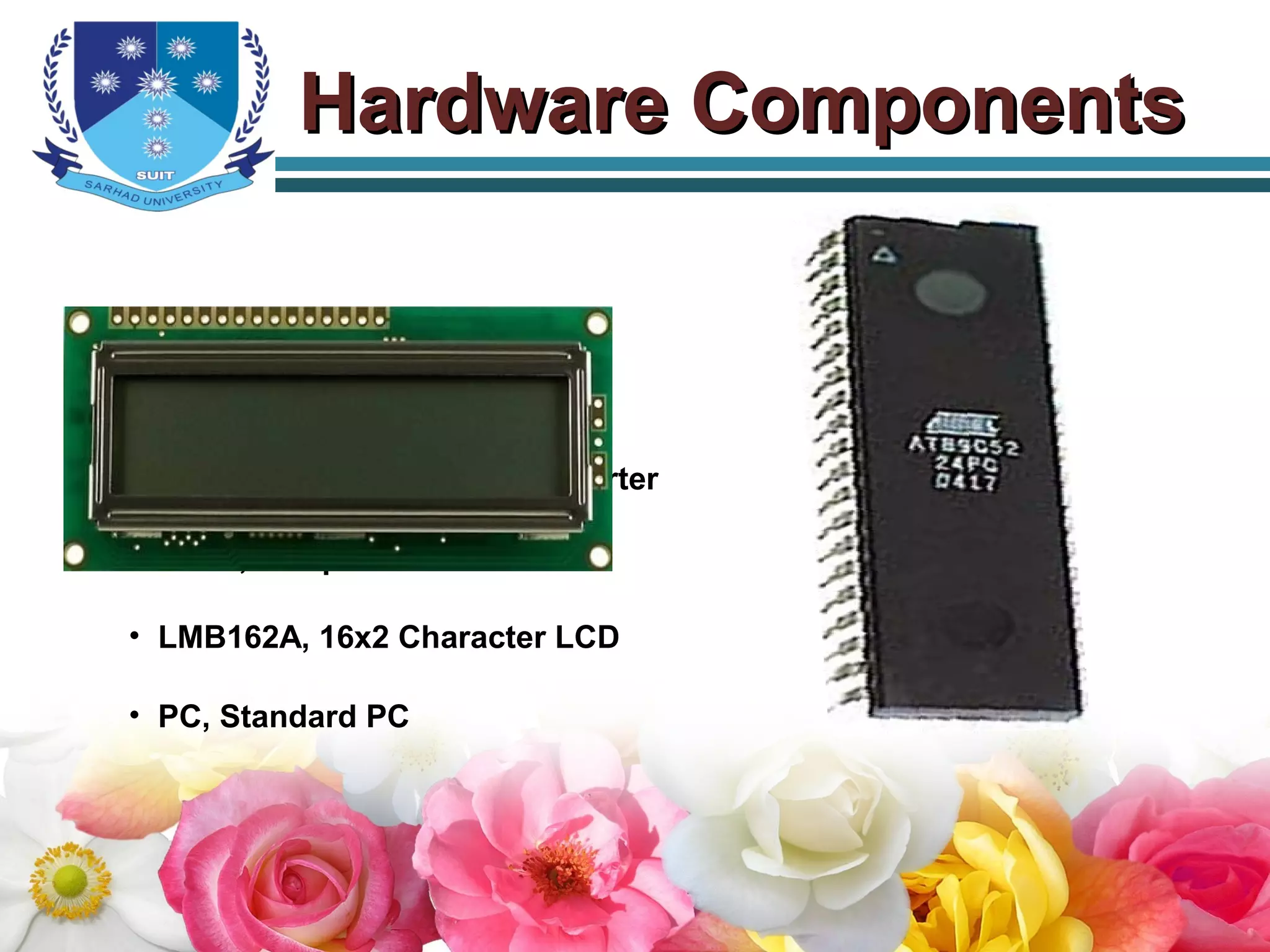
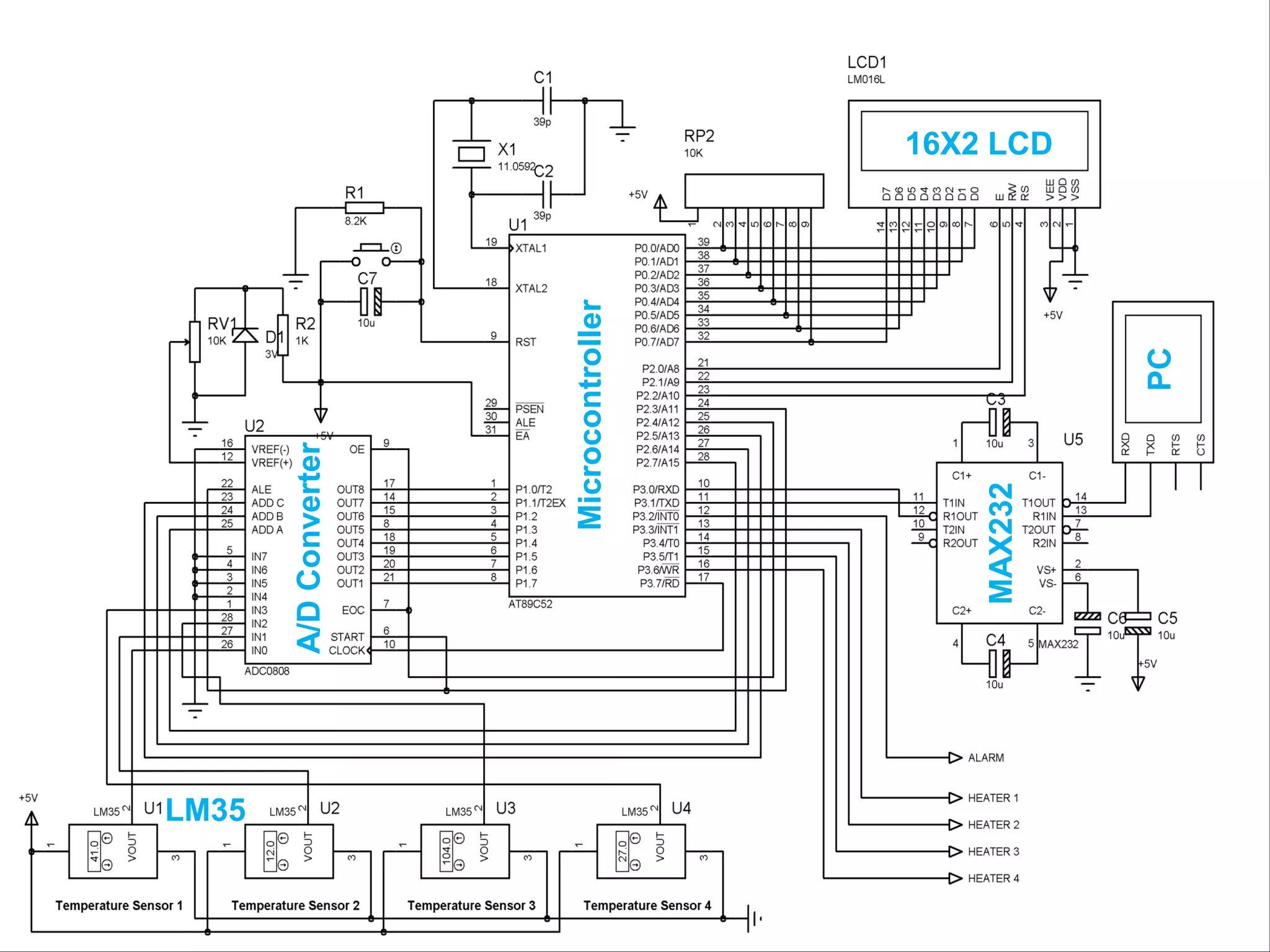
• AT89C52, Microcontroller
• ADC0808, A/D Converter
• MAX232, TTL to RS232 Converter
• LM35, Temperature Sensor
• LMB162A, 16x2 Character LCD
• PC, Standard PC
Microcontroller
A/DConverter
MAX232
16X2 LCD
PC
LM35
SOFTWARE SECTIONSOFTWARE SECTIONMicrocontroller CodeMicrocontroller Code
Development ToolsDevelopment Tools
1. Keil uVision 3
For Code Development
2. Proteus 7 Professional
For code Simulation
3. Visual Basic 6
For Application Software Development
Problem:
With continuous data logging;
Size of database file becomes larger over
passage of time.
Communication link remain busy all the time.
Solution:
This problem is solved with the following
technique;
First time, data is sent to logging server &
saved temporarily.
After this, data is continuously sampled, and
compared with previously temporarily saved.
If there is change in any individual temperature
value, only then this data is sent to logging
server.
LCD RoutinesLCD Routines
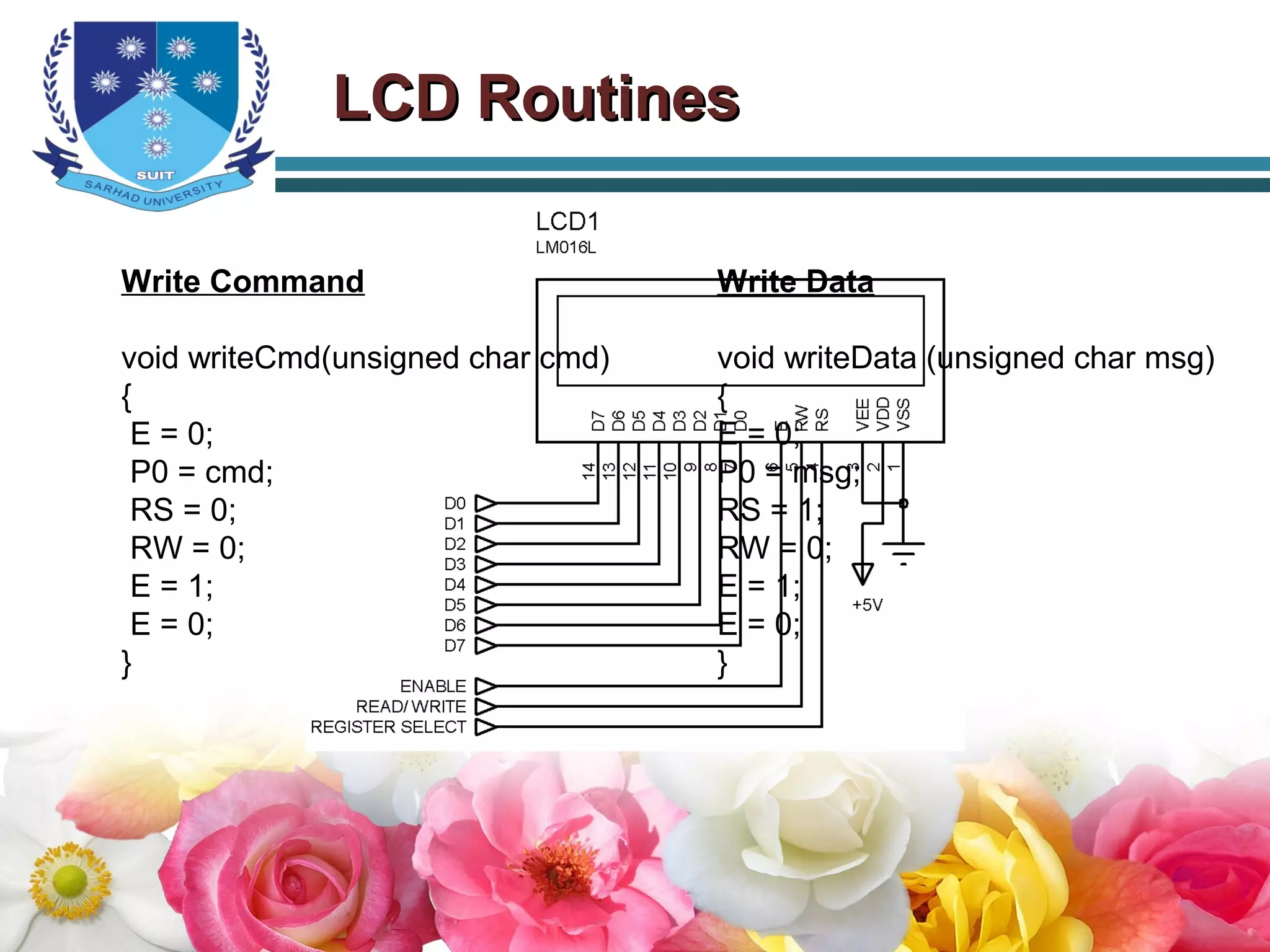
Write Command
void writeCmd(unsigned char cmd)
{
E = 0;
P0 = cmd;
RS = 0;
RW = 0;
E = 1;
E = 0;
}
Write Data
void writeData (unsigned char msg)
{
E = 0;
P0 = msg;
RS = 1;
RW = 0;
E = 1;
E = 0;
}
LCD RoutinesLCD Routines
Write Character String
void writeStr (unsigned char msg [])
{
unsigned char i;
E = 0;
for(i=0;msg[i]!='0';i++)
{
P0=msg[i];
RS = 1;
RW = 0;
E = 1;
E = 0;
}
}
Goto at a Position
void gotoXY (unsigned char a, b)
{
if (a == 1)
{
b = 0x80 + b;
writeCmd (b);
}
else if (a == 2)
{
b = 0xC0 + b;
writeCmd (b);
}
}
LCD RoutinesLCD Routines
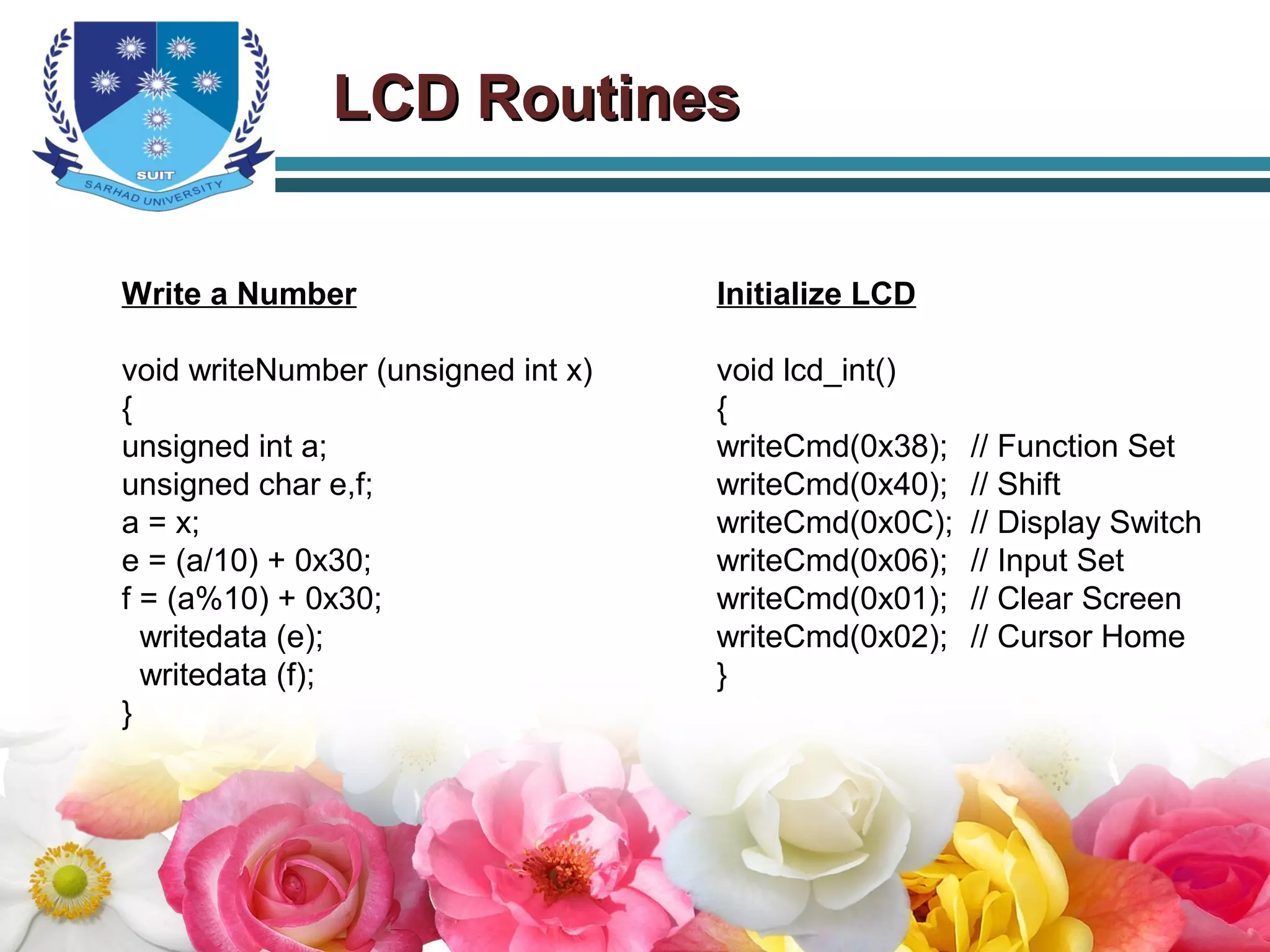
Write a Number
void writeNumber (unsigned int x)
{
unsigned int a;
unsigned char e,f;
a = x;
e = (a/10) + 0x30;
f = (a%10) + 0x30;
writedata (e);
writedata (f);
}
Initialize LCD
void lcd_int()
{
writeCmd(0x38); // Function Set
writeCmd(0x40); // Shift
writeCmd(0x0C); // Display Switch
writeCmd(0x06); // Input Set
writeCmd(0x01); // Clear Screen
writeCmd(0x02); // Cursor Home
}
ADC RoutinesADC Routines
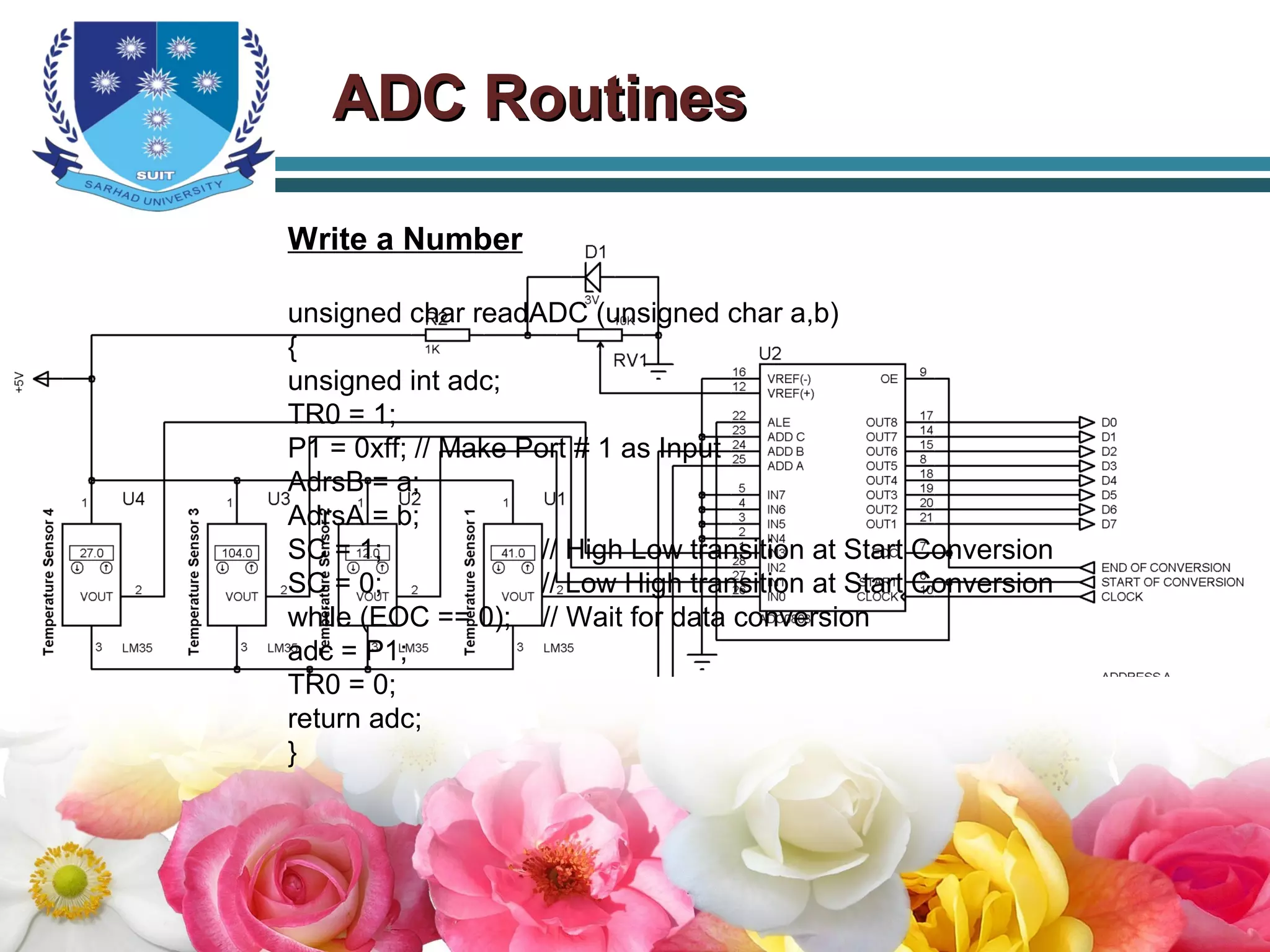
Write a Number
unsigned char readADC (unsigned char a,b)
{
unsigned int adc;
TR0 = 1;
P1 = 0xff; // Make Port # 1 as Input
AdrsB = a;
AdrsA = b;
SC = 1; // High Low transition at Start Conversion
SC = 0; // Low High transition at Start Conversion
while (EOC == 0); // Wait for data conversion
adc = P1;
TR0 = 0;
return adc;
}
Serial Communication RoutinesSerial Communication Routines
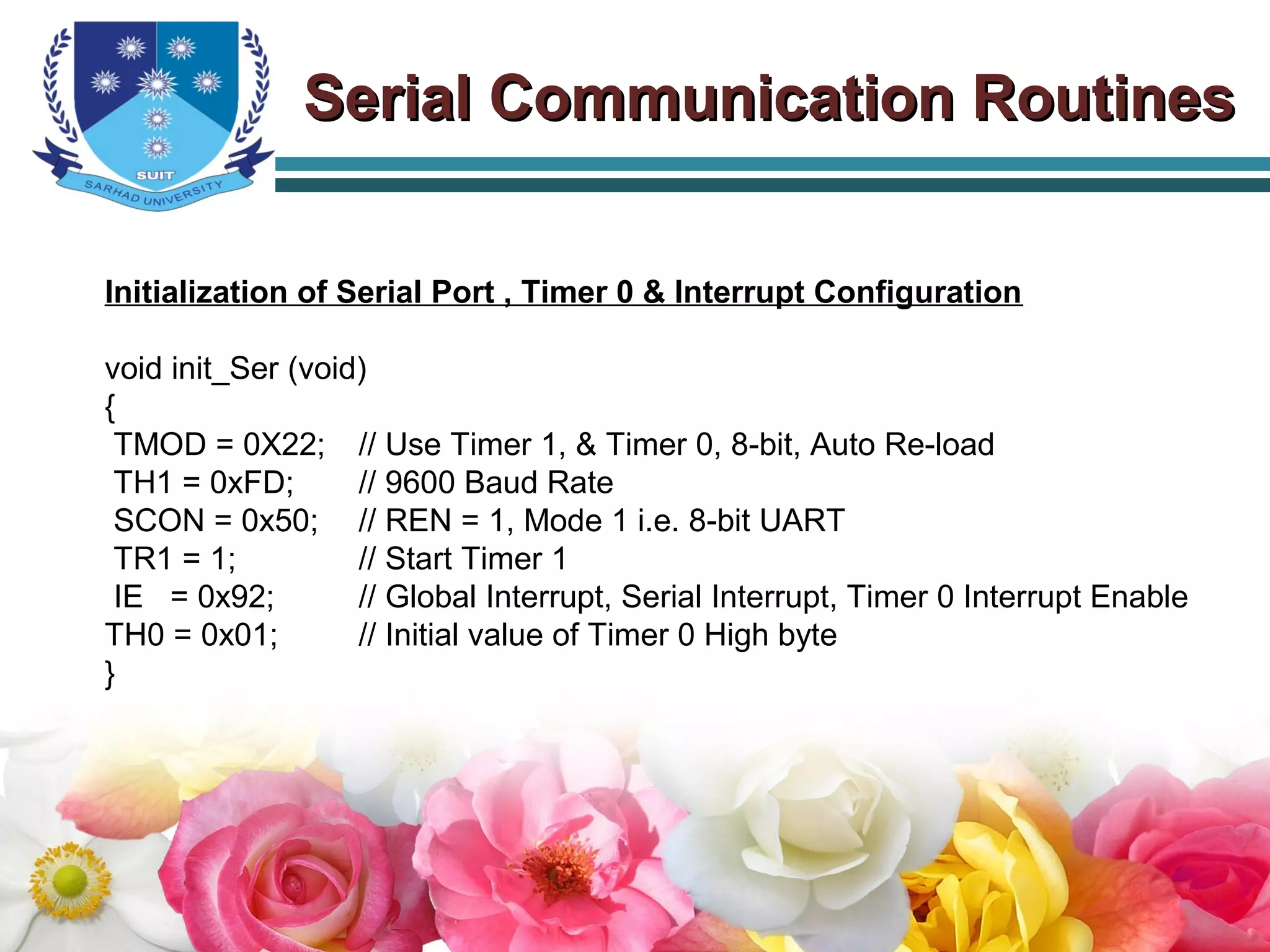
Initialization of Serial Port , Timer 0 & Interrupt Configuration
void init_Ser (void)
{
TMOD = 0X22; // Use Timer 1, & Timer 0, 8-bit, Auto Re-load
TH1 = 0xFD; // 9600 Baud Rate
SCON = 0x50; // REN = 1, Mode 1 i.e. 8-bit UART
TR1 = 1; // Start Timer 1
IE = 0x92; // Global Interrupt, Serial Interrupt, Timer 0 Interrupt Enable
TH0 = 0x01; // Initial value of Timer 0 High byte
}
Serial CommSerial Comm
Transmitt Character & String
void SerTx (unsigned char x)
{
SBUF = x;
while (TI == 0);
TI = 0;
}
void TX_String(unsigned char msg [])
{
char z;
for (z = 0; msg[z]!='0'; z++)
{
SBUF = msg [z];
while (TI == 0);
TI = 0;
}}
Transmitt a Number
void TX_number (unsigned int x)
{
unsigned int a;
unsigned char e,f;
e = (a/10) + 0x30;
f = (a%10) + 0x30;
SBUF = e;
while (TI == 0);
TI = 0;
SBUF = f;
while (TI == 0);
TI = 0;
}}
MAINMAIN
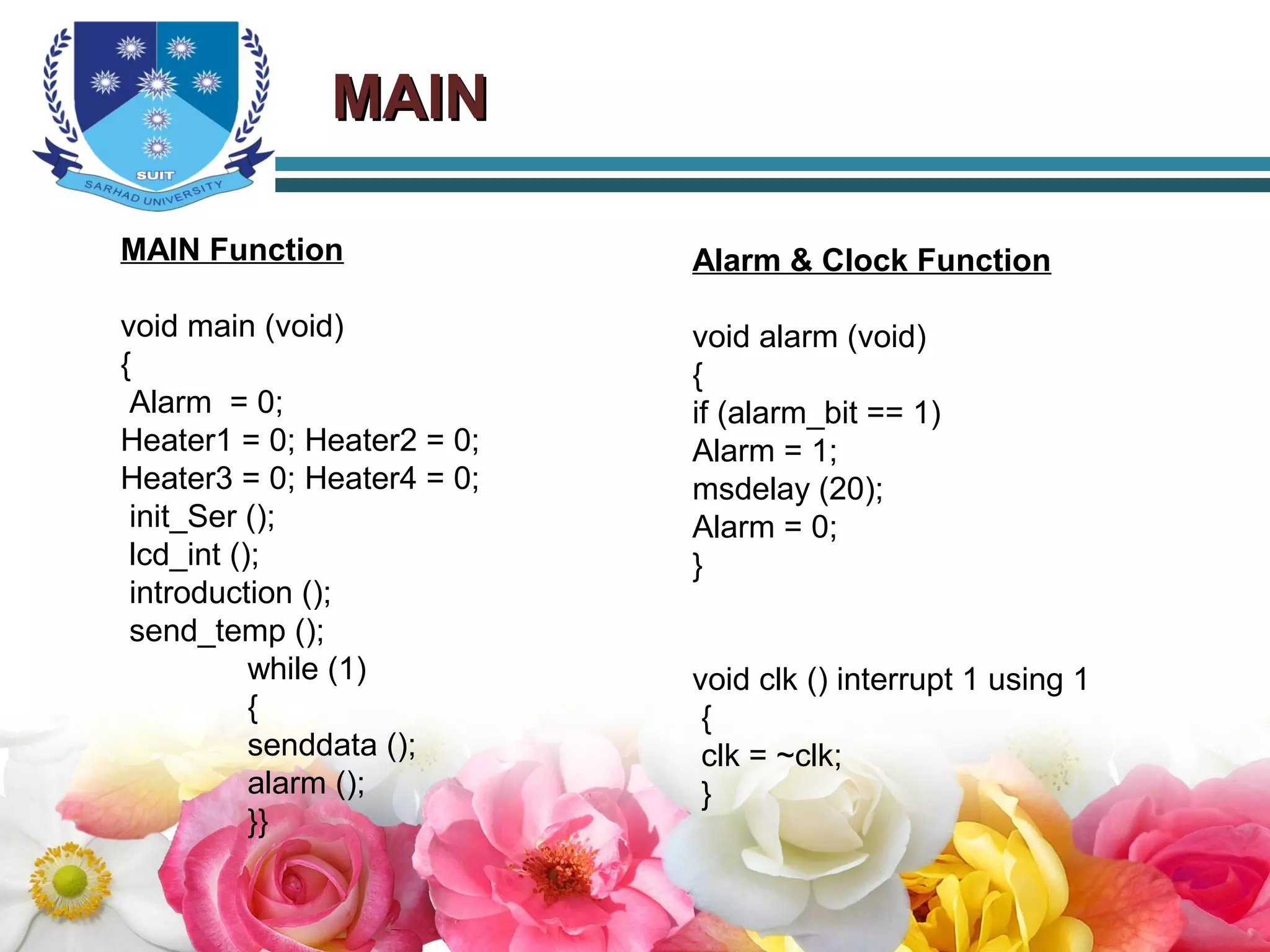
MAIN Function
void main (void)
{
Alarm = 0;
Heater1 = 0; Heater2 = 0;
Heater3 = 0; Heater4 = 0;
init_Ser ();
lcd_int ();
introduction ();
send_temp ();
while (1)
{
senddata ();
alarm ();
}}
Alarm & Clock Function
void alarm (void)
{
if (alarm_bit == 1)
Alarm = 1;
msdelay (20);
Alarm = 0;
}
void clk () interrupt 1 using 1
{
clk = ~clk;
}
MAINMAIN
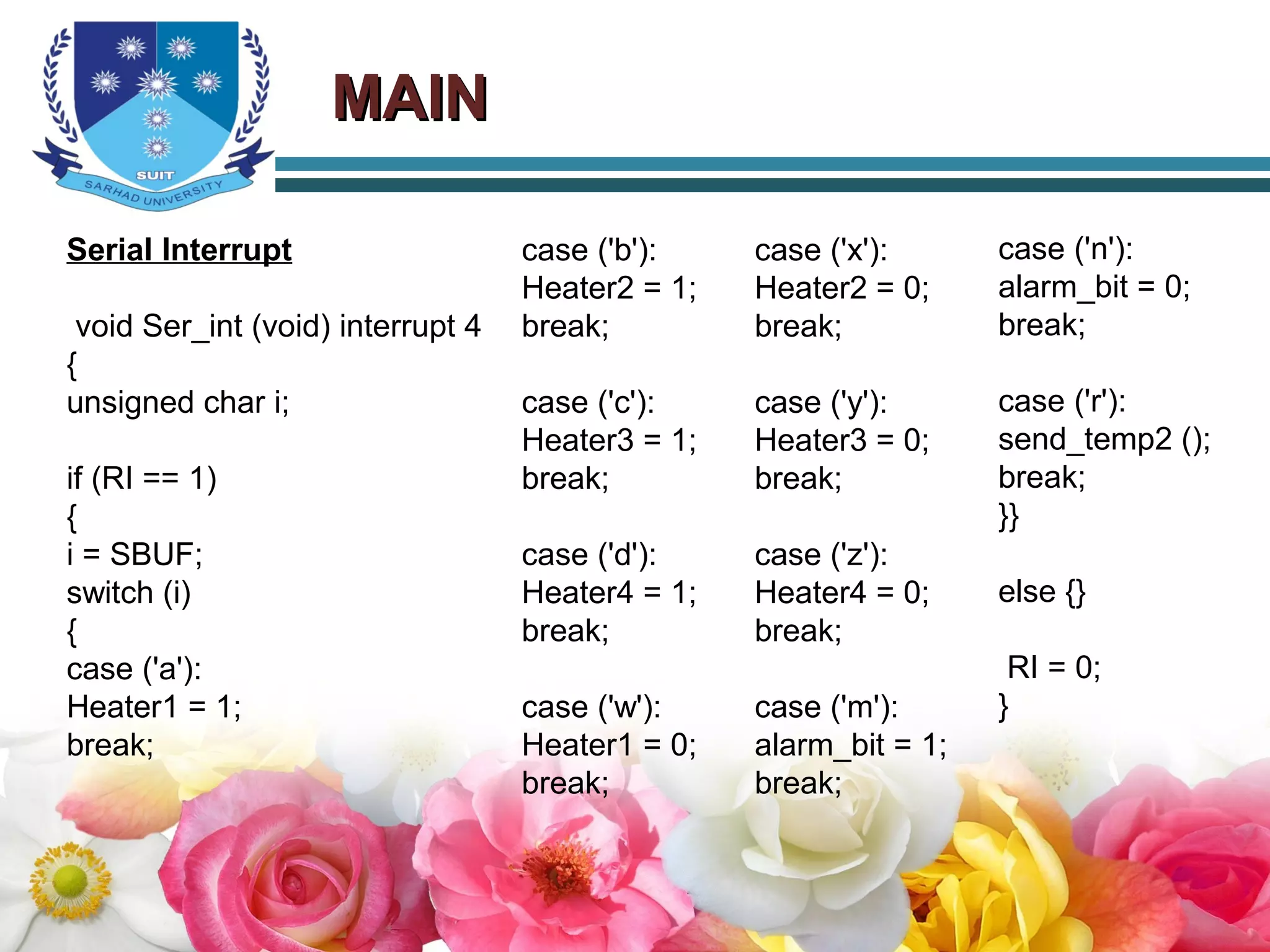
Serial Interrupt
void Ser_int (void) interrupt 4
{
unsigned char i;
if (RI == 1)
{
i = SBUF;
switch (i)
{
case ('a'):
Heater1 = 1;
break;
case ('b'):
Heater2 = 1;
break;
case ('c'):
Heater3 = 1;
break;
case ('d'):
Heater4 = 1;
break;
case ('w'):
Heater1 = 0;
break;
case ('x'):
Heater2 = 0;
break;
case ('y'):
Heater3 = 0;
break;
case ('z'):
Heater4 = 0;
break;
case ('m'):
alarm_bit = 1;
break;
case ('n'):
alarm_bit = 0;
break;
case ('r'):
send_temp2 ();
break;
}}
else {}
RI = 0;
}
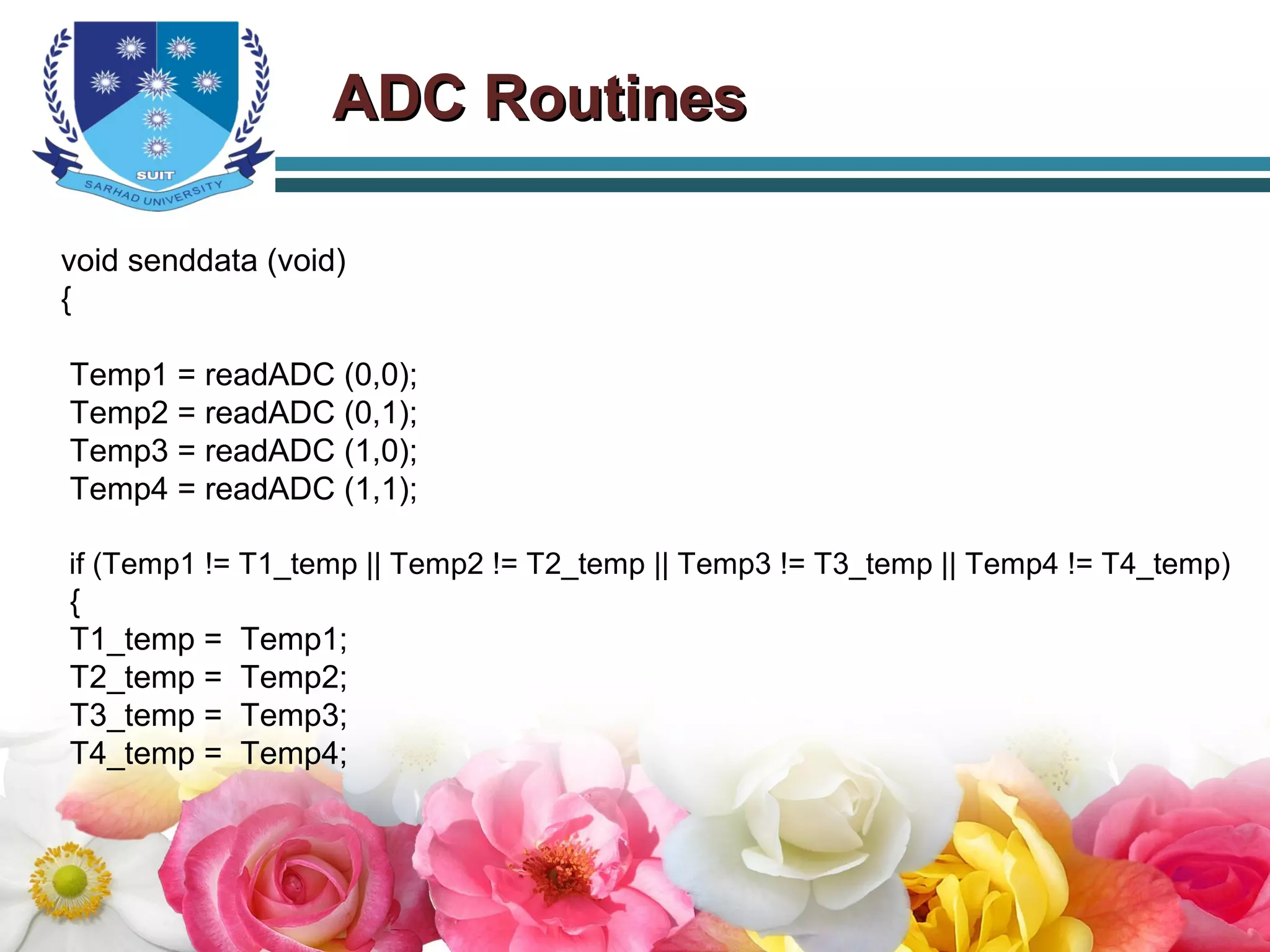
ADC RoutinesADC Routines
void senddata (void)
{
Temp1 = readADC (0,0);
Temp2 = readADC (0,1);
Temp3 = readADC (1,0);
Temp4 = readADC (1,1);
if (Temp1 != T1_temp || Temp2 != T2_temp || Temp3 != T3_temp || Temp4 != T4_temp)
{
T1_temp = Temp1;
T2_temp = Temp2;
T3_temp = Temp3;
T4_temp = Temp4;
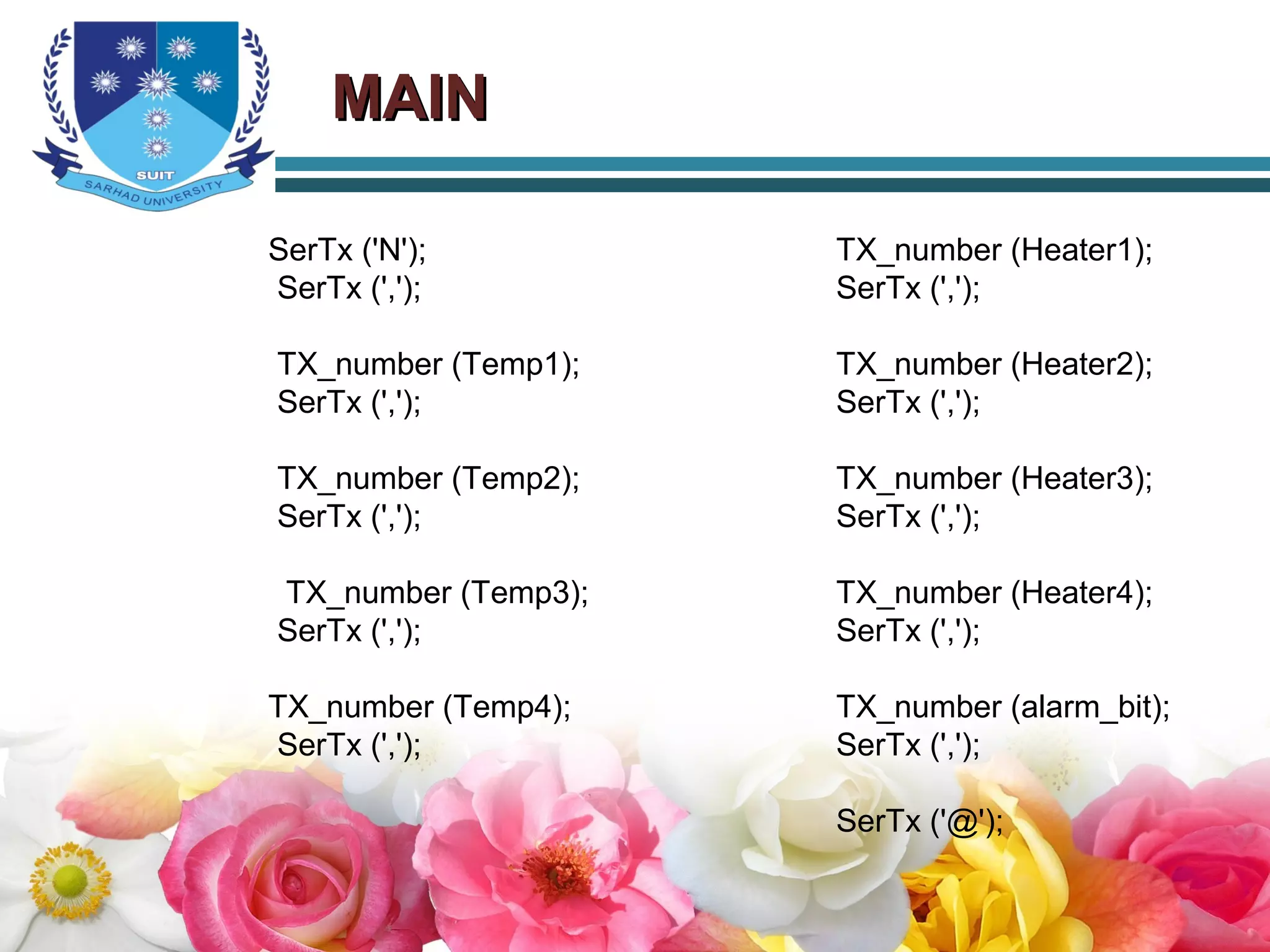
MAINMAIN
SerTx ('N');
SerTx (',');
TX_number (Temp1);
SerTx (',');
TX_number (Temp2);
SerTx (',');
TX_number (Temp3);
SerTx (',');
TX_number (Temp4);
SerTx (',');
TX_number (Heater1);
SerTx (',');
TX_number (Heater2);
SerTx (',');
TX_number (Heater3);
SerTx (',');
TX_number (Heater4);
SerTx (',');
TX_number (alarm_bit);
SerTx (',');
SerTx ('@');
MAINMAIN
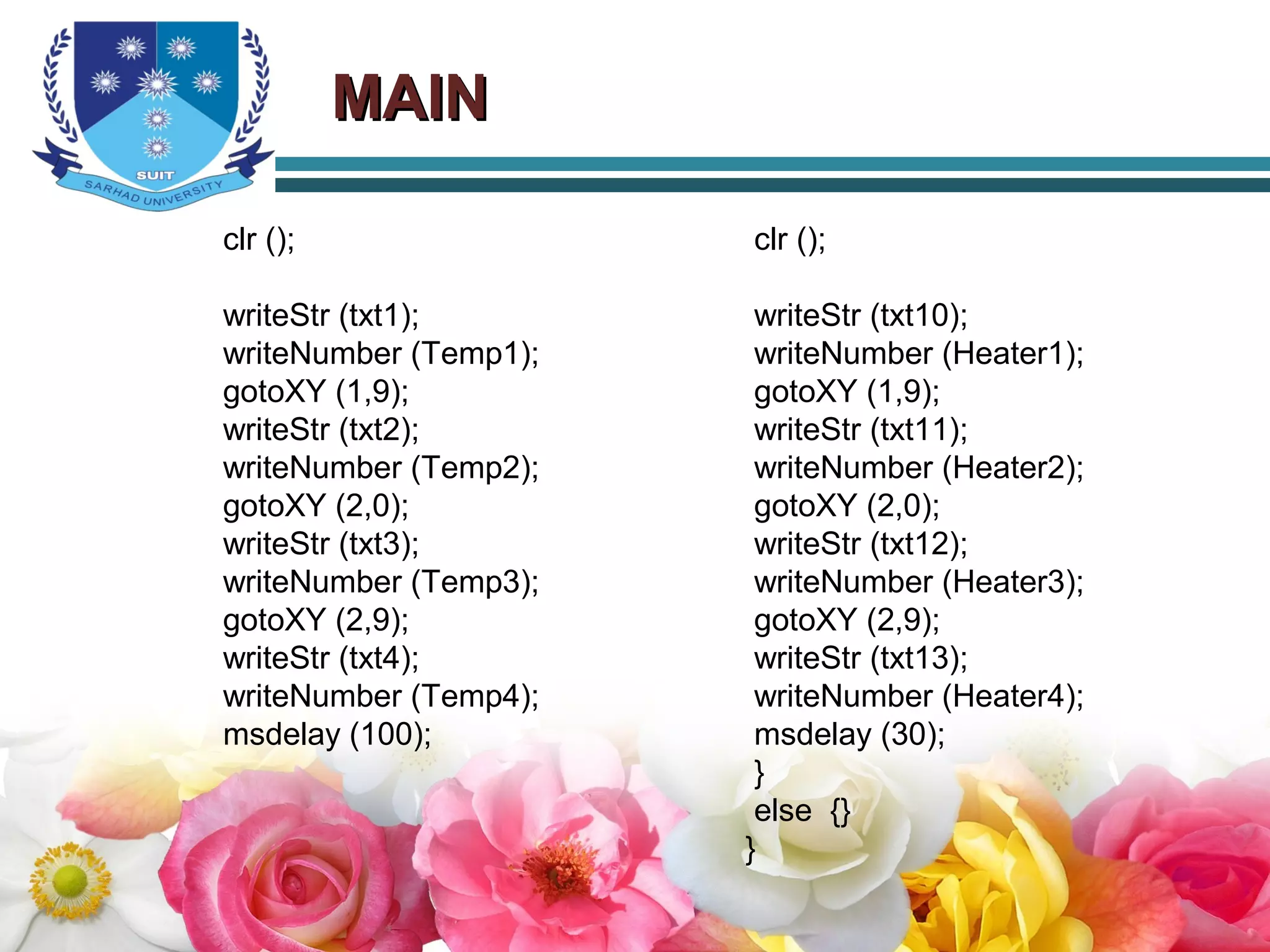
clr ();
writeStr (txt1);
writeNumber (Temp1);
gotoXY (1,9);
writeStr (txt2);
writeNumber (Temp2);
gotoXY (2,0);
writeStr (txt3);
writeNumber (Temp3);
gotoXY (2,9);
writeStr (txt4);
writeNumber (Temp4);
msdelay (100);
clr ();
writeStr (txt10);
writeNumber (Heater1);
gotoXY (1,9);
writeStr (txt11);
writeNumber (Heater2);
gotoXY (2,0);
writeStr (txt12);
writeNumber (Heater3);
gotoXY (2,9);
writeStr (txt13);
writeNumber (Heater4);
msdelay (30);
}
else {}
}
Application SoftwareApplication Software
Development Plate formDevelopment Plate form
Visual Basic 6Visual Basic 6
Application Software CodeApplication Software Code
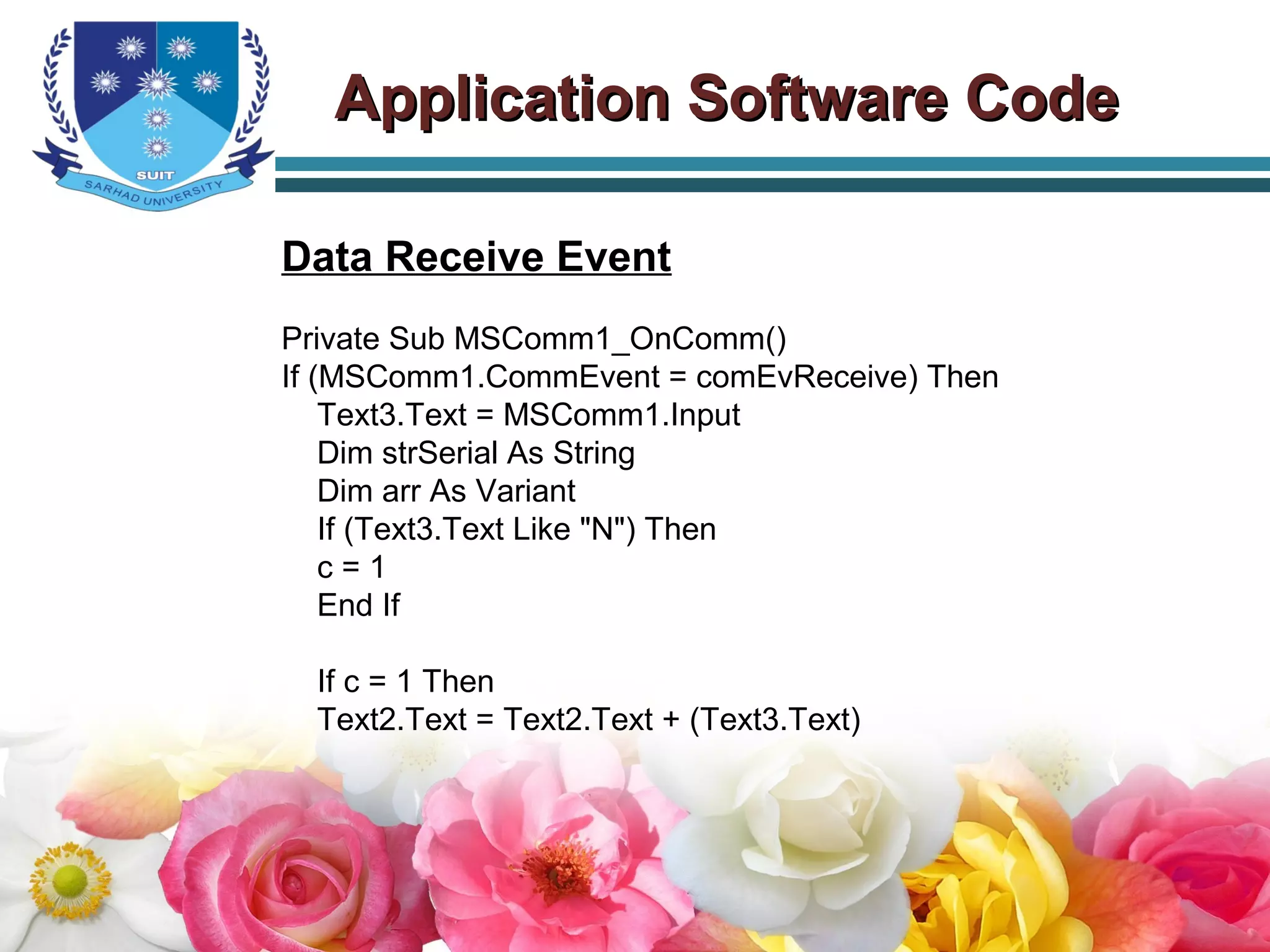
Data Receive Event
Private Sub MSComm1_OnComm()
If (MSComm1.CommEvent = comEvReceive) Then
Text3.Text = MSComm1.Input
Dim strSerial As String
Dim arr As Variant
If (Text3.Text Like "N") Then
c = 1
End If
If c = 1 Then
Text2.Text = Text2.Text + (Text3.Text)
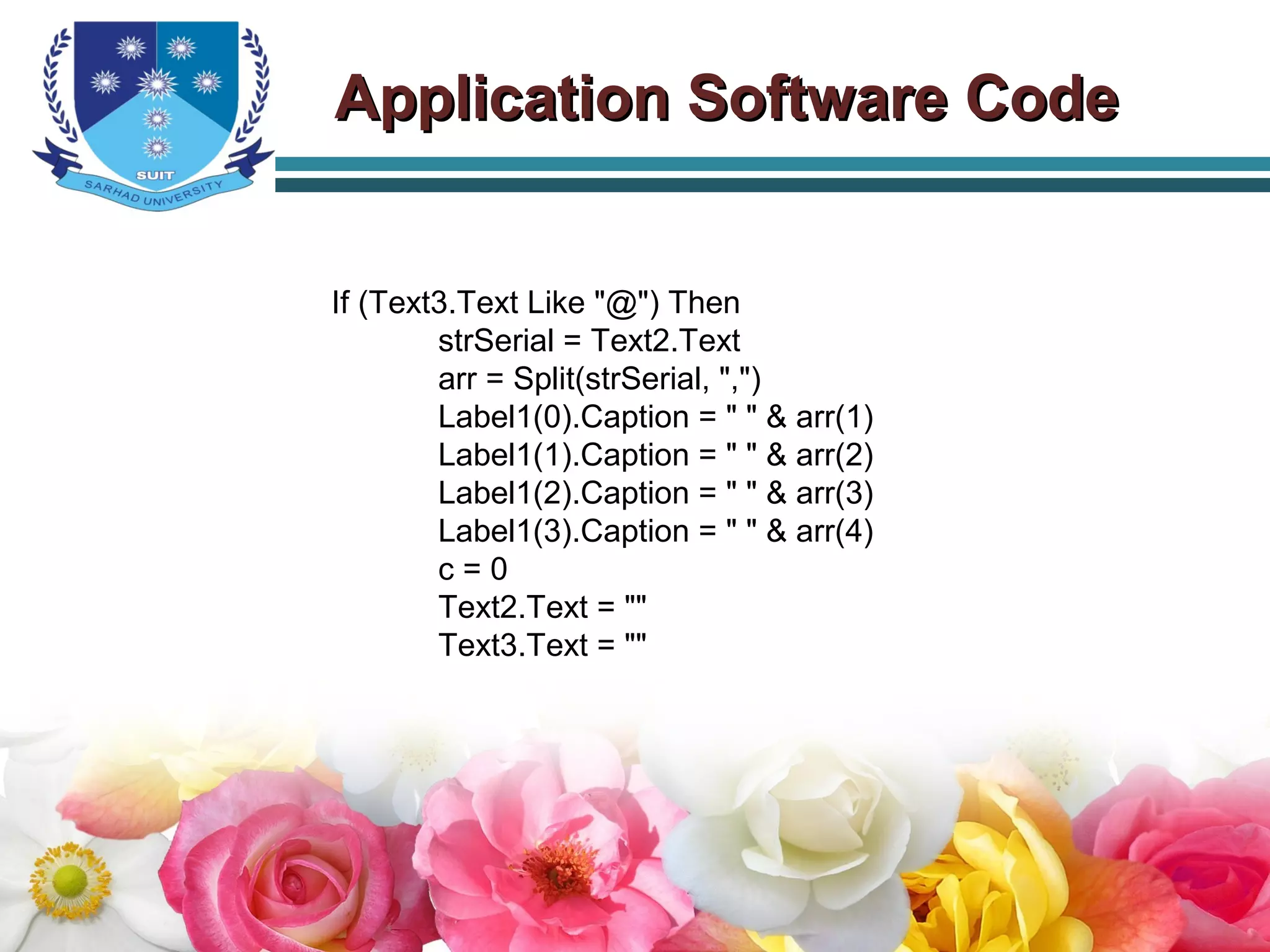
If (Text3.Text Like "@") Then
strSerial = Text2.Text
arr = Split(strSerial, ",")
Label1(0).Caption = " " & arr(1)
Label1(1).Caption = " " & arr(2)
Label1(2).Caption = " " & arr(3)
Label1(3).Caption = " " & arr(4)
c = 0
Text2.Text = ""
Text3.Text = ""
Application Software CodeApplication Software Code
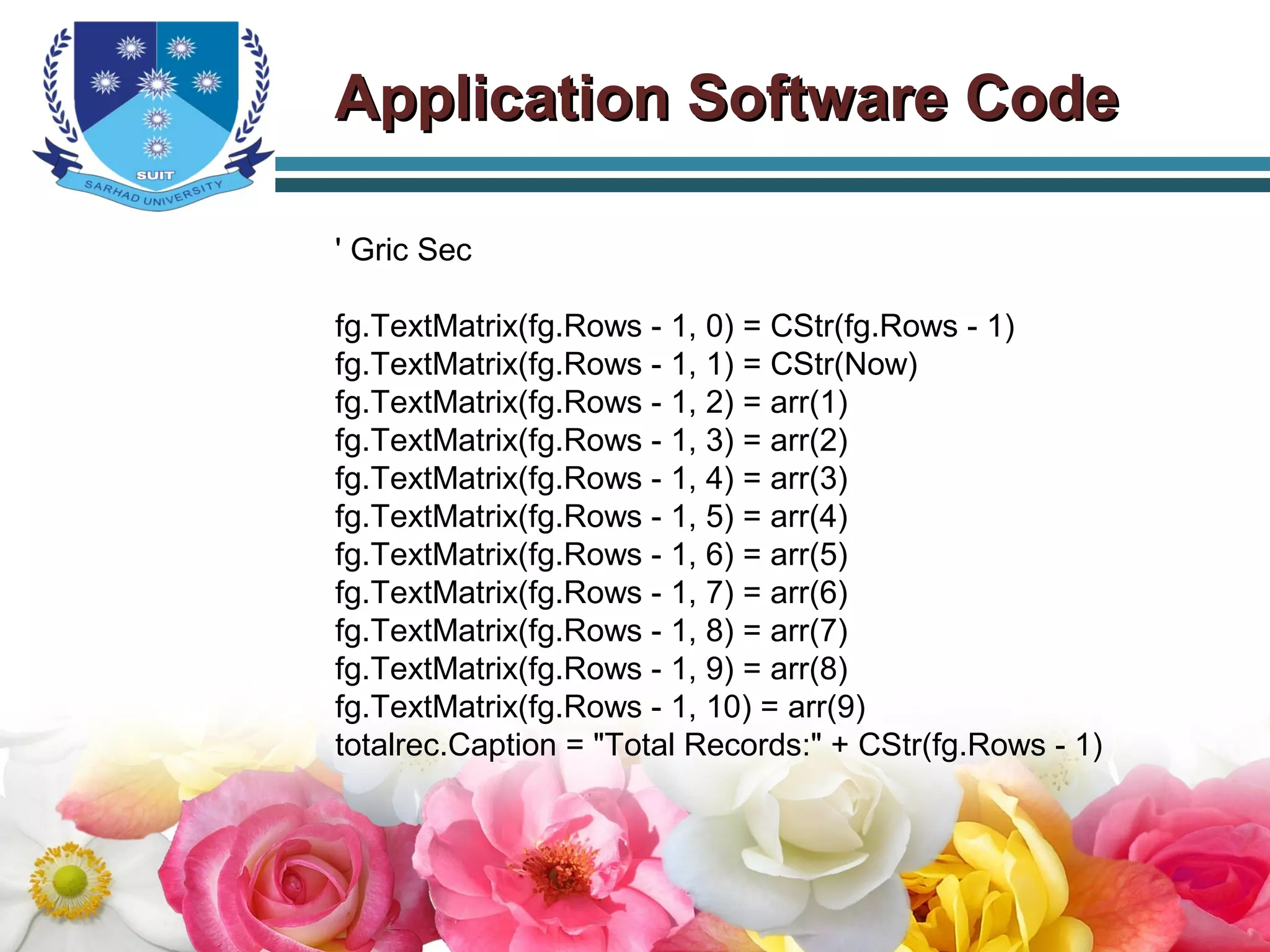
' Gric Sec
fg.TextMatrix(fg.Rows - 1, 0) = CStr(fg.Rows - 1)
fg.TextMatrix(fg.Rows - 1, 1) = CStr(Now)
fg.TextMatrix(fg.Rows - 1, 2) = arr(1)
fg.TextMatrix(fg.Rows - 1, 3) = arr(2)
fg.TextMatrix(fg.Rows - 1, 4) = arr(3)
fg.TextMatrix(fg.Rows - 1, 5) = arr(4)
fg.TextMatrix(fg.Rows - 1, 6) = arr(5)
fg.TextMatrix(fg.Rows - 1, 7) = arr(6)
fg.TextMatrix(fg.Rows - 1, 8) = arr(7)
fg.TextMatrix(fg.Rows - 1, 9) = arr(8)
fg.TextMatrix(fg.Rows - 1, 10) = arr(9)
totalrec.Caption = "Total Records:" + CStr(fg.Rows - 1)
Application Software CodeApplication Software Code
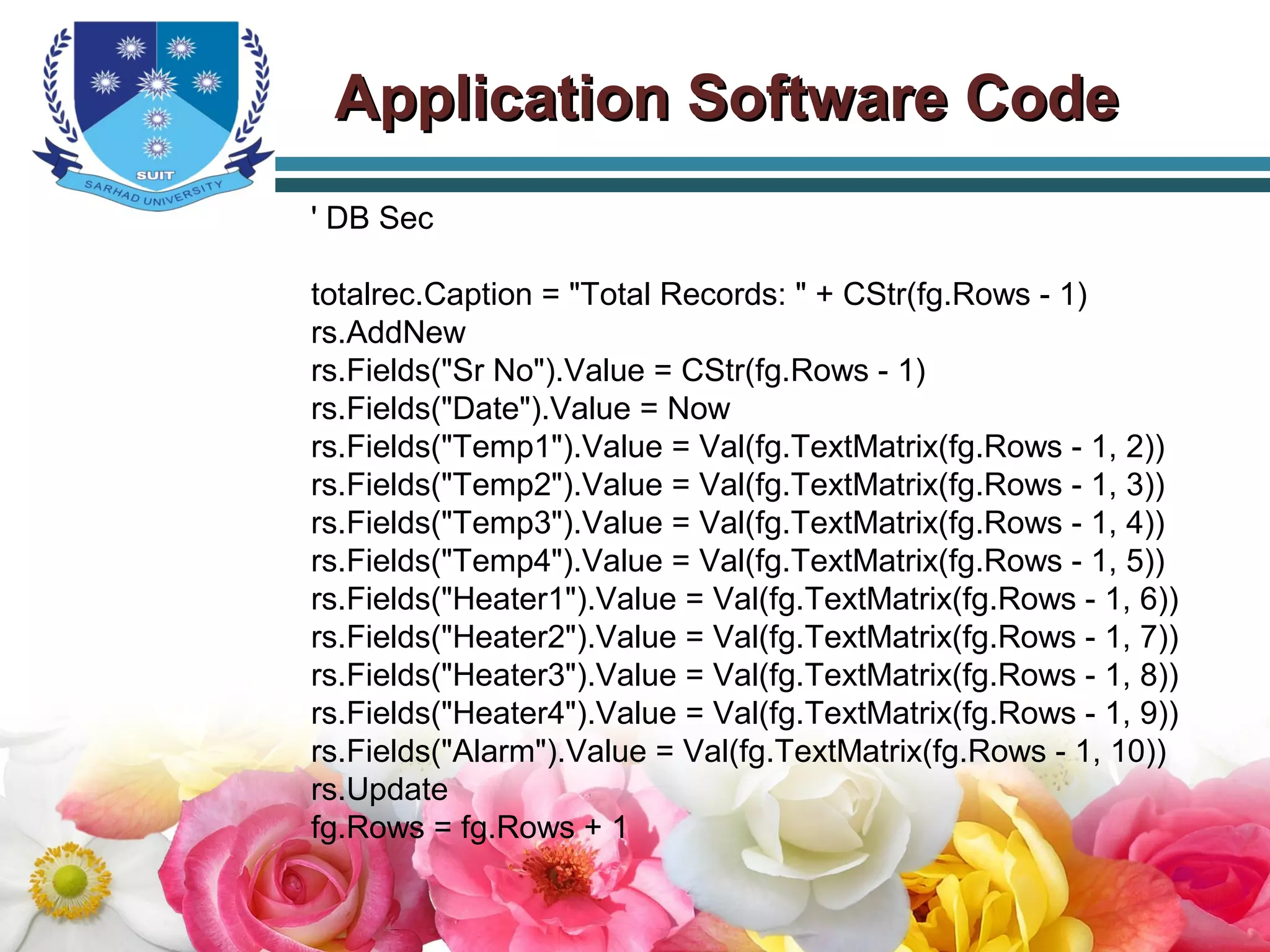
' DB Sec
totalrec.Caption = "Total Records: " + CStr(fg.Rows - 1)
rs.AddNew
rs.Fields("Sr No").Value = CStr(fg.Rows - 1)
rs.Fields("Date").Value = Now
rs.Fields("Temp1").Value = Val(fg.TextMatrix(fg.Rows - 1, 2))
rs.Fields("Temp2").Value = Val(fg.TextMatrix(fg.Rows - 1, 3))
rs.Fields("Temp3").Value = Val(fg.TextMatrix(fg.Rows - 1, 4))
rs.Fields("Temp4").Value = Val(fg.TextMatrix(fg.Rows - 1, 5))
rs.Fields("Heater1").Value = Val(fg.TextMatrix(fg.Rows - 1, 6))
rs.Fields("Heater2").Value = Val(fg.TextMatrix(fg.Rows - 1, 7))
rs.Fields("Heater3").Value = Val(fg.TextMatrix(fg.Rows - 1, 8))
rs.Fields("Heater4").Value = Val(fg.TextMatrix(fg.Rows - 1, 9))
rs.Fields("Alarm").Value = Val(fg.TextMatrix(fg.Rows - 1, 10))
rs.Update
fg.Rows = fg.Rows + 1
Application Software CodeApplication Software Code
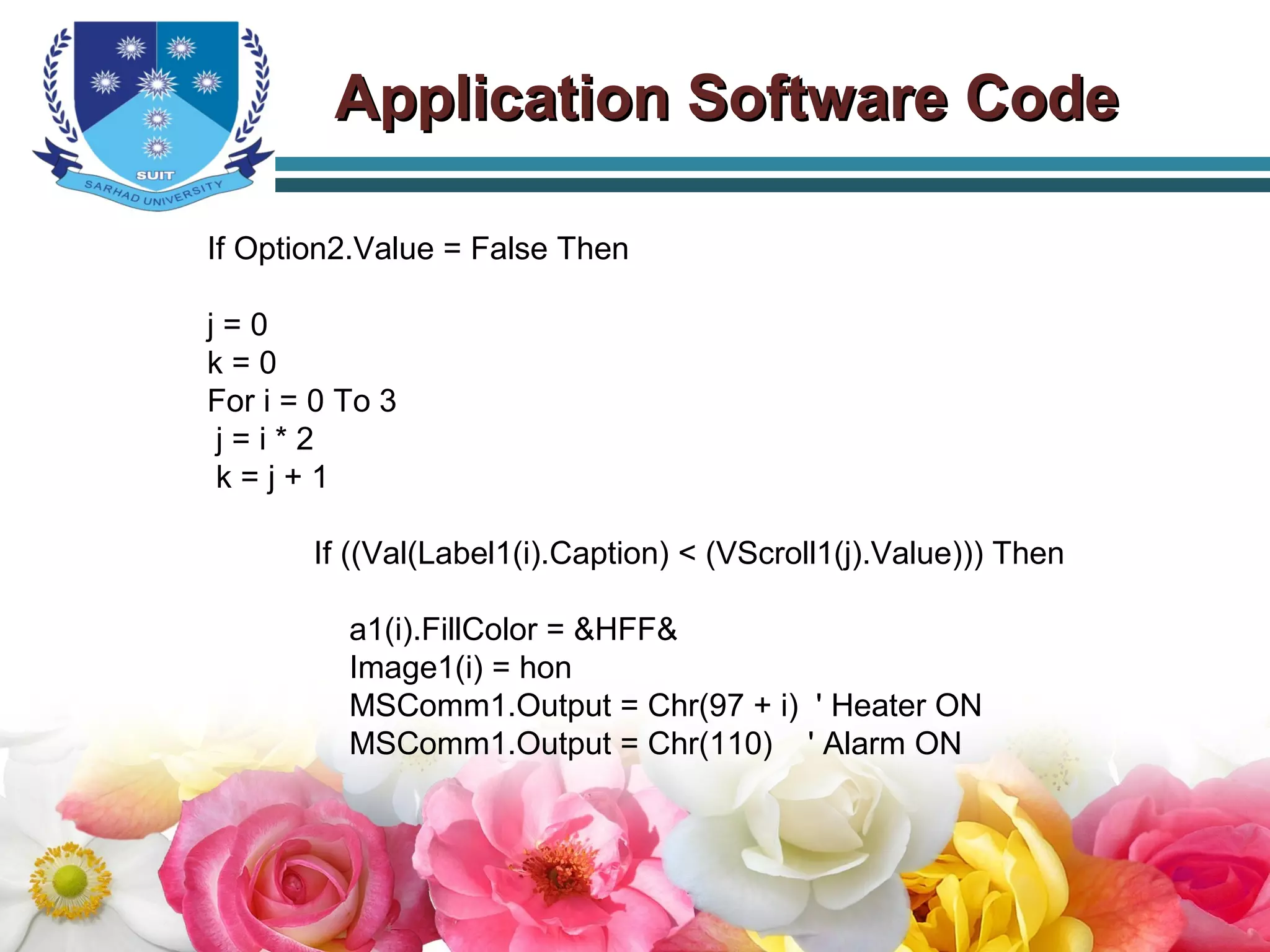
If Option2.Value = False Then
j = 0
k = 0
For i = 0 To 3
j = i * 2
k = j + 1
If ((Val(Label1(i).Caption) < (VScroll1(j).Value))) Then
a1(i).FillColor = &HFF&
Image1(i) = hon
MSComm1.Output = Chr(97 + i) ' Heater ON
MSComm1.Output = Chr(110) ' Alarm ON
Application Software CodeApplication Software Code
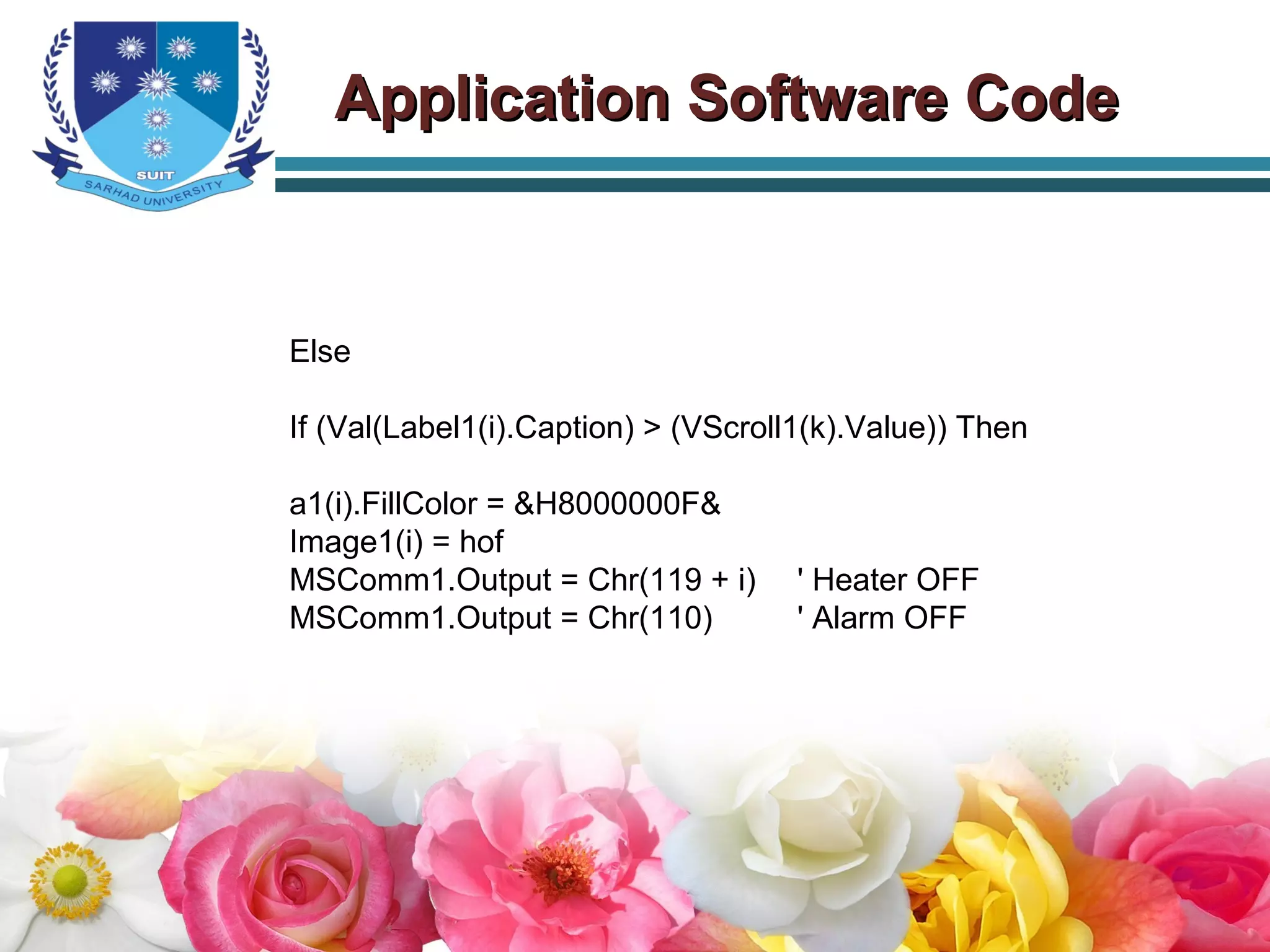
Else
If (Val(Label1(i).Caption) > (VScroll1(k).Value)) Then
a1(i).FillColor = &H8000000F&
Image1(i) = hof
MSComm1.Output = Chr(119 + i) ' Heater OFF
MSComm1.Output = Chr(110) ' Alarm OFF
Application Software CodeApplication Software Code
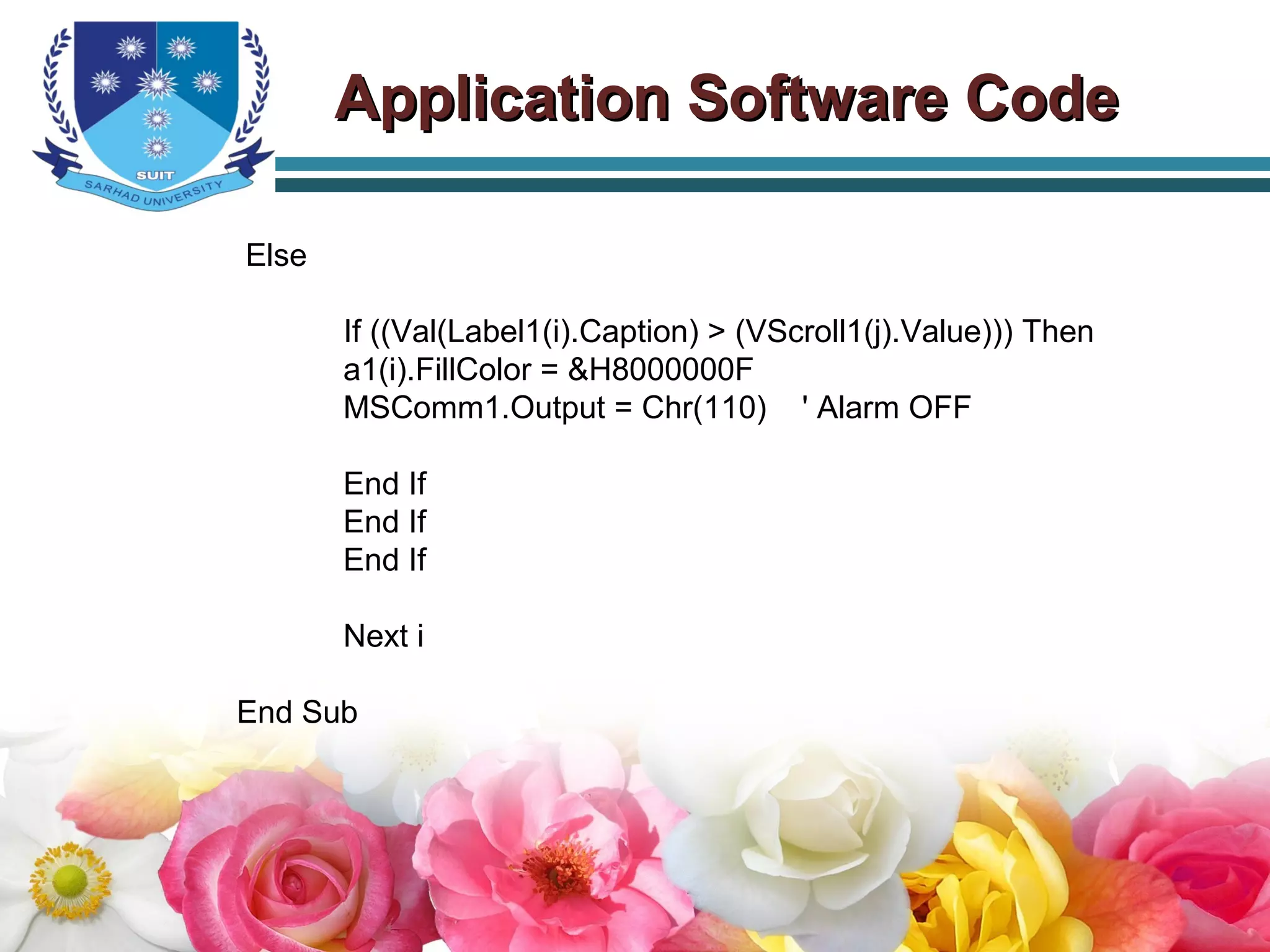
Else
If ((Val(Label1(i).Caption) > (VScroll1(j).Value))) Then
a1(i).FillColor = &H8000000F
MSComm1.Output = Chr(110) ' Alarm OFF
End If
End If
End If
Next i
End Sub
Application Software CodeApplication Software Code
Data Acquisition

Data Acquisition

  • 1.
    Developed by: Under Supervision: EngineerHamid RazaEngineer Hamid Raza Head of Electronics & Telecom Department Comwave Institute of Science & IT, Islamabad ZEESHAN AHMED FAROOQIZEESHAN AHMED FAROOQI Reg. No: SUIT–06-03-77058 Roll No. SU-06-05414 B-Tech Honor (E&T)
  • 2.
    • Background. • Objectiveof Project. • Scope of Project.
  • 3.
    BackgroundBackground DC motor playsa significant role in modern industrial world. There are several types of applications where the load on the DC motor varies over a speed range. In home appliances, washers, dryers and compressors are good examples. In automotive, fuel pump control, electronic steering control, engine control and electric vehicle control are good examples of these. In aerospace, there are a number of applications, like centrifuges, pumps, robotic arm controls, gyroscope controls and so on. In all above examples, these applications may demand high speed control accuracy and good dynamic responses.
  • 4.
    Objective of Project Themain core of this project is to design a speed control system of DC Motor by using microcontroller. This system will be able to control the DC motor speed at desired speed regardless the changes of load. More over time-base functions are also implemented in his project.
  • 5.
    Scope of Project Inorder to achieve the objective of the project, there are several scope had been outlined. The scope of this project includes using KEIL uVision to program microcontroller AT89C52, build hardware for the system, and interface the hardware to LCD & Keypad.
  • 6.
    Components of DAQComponentsof DAQ 1. DC Motor 2. Optical Encoder 3. Microcontroller
  • 7.
    Application of DAQApplicationof DAQ 1. Unattended weather station recording (such as wind speed / direction, temperature, relative humidity etc. 2. Unattended hydrographic recording (such as water level, water depth, flow, temperature etc. 3. Unattended soil moisture level recording. 4. Unattended gas pressure recording. 5. Road traffic counting. 6. Process monitoring for maintenance and troubleshooting applications and much more. 7. Black-Box is also an example of DAQ.
  • 9.
  • 10.
    Hardware ComponentsHardware Components •AT89C52, Microcontroller • ADC0808, A/D Converter • MAX232, TTL to RS232 Converter • LM35, Temperature Sensor • LMB162A, 16x2 Character LCD • PC, Standard PC
  • 11.
  • 12.
  • 13.
    Development ToolsDevelopment Tools 1.Keil uVision 3 For Code Development 2. Proteus 7 Professional For code Simulation 3. Visual Basic 6 For Application Software Development
  • 14.
    Problem: With continuous datalogging; Size of database file becomes larger over passage of time. Communication link remain busy all the time. Solution: This problem is solved with the following technique; First time, data is sent to logging server & saved temporarily. After this, data is continuously sampled, and compared with previously temporarily saved. If there is change in any individual temperature value, only then this data is sent to logging server.
  • 15.
    LCD RoutinesLCD Routines WriteCommand void writeCmd(unsigned char cmd) { E = 0; P0 = cmd; RS = 0; RW = 0; E = 1; E = 0; } Write Data void writeData (unsigned char msg) { E = 0; P0 = msg; RS = 1; RW = 0; E = 1; E = 0; }
  • 16.
    LCD RoutinesLCD Routines WriteCharacter String void writeStr (unsigned char msg []) { unsigned char i; E = 0; for(i=0;msg[i]!='0';i++) { P0=msg[i]; RS = 1; RW = 0; E = 1; E = 0; } } Goto at a Position void gotoXY (unsigned char a, b) { if (a == 1) { b = 0x80 + b; writeCmd (b); } else if (a == 2) { b = 0xC0 + b; writeCmd (b); } }
  • 17.
    LCD RoutinesLCD Routines Writea Number void writeNumber (unsigned int x) { unsigned int a; unsigned char e,f; a = x; e = (a/10) + 0x30; f = (a%10) + 0x30; writedata (e); writedata (f); } Initialize LCD void lcd_int() { writeCmd(0x38); // Function Set writeCmd(0x40); // Shift writeCmd(0x0C); // Display Switch writeCmd(0x06); // Input Set writeCmd(0x01); // Clear Screen writeCmd(0x02); // Cursor Home }
  • 18.
    ADC RoutinesADC Routines Writea Number unsigned char readADC (unsigned char a,b) { unsigned int adc; TR0 = 1; P1 = 0xff; // Make Port # 1 as Input AdrsB = a; AdrsA = b; SC = 1; // High Low transition at Start Conversion SC = 0; // Low High transition at Start Conversion while (EOC == 0); // Wait for data conversion adc = P1; TR0 = 0; return adc; }
  • 19.
    Serial Communication RoutinesSerialCommunication Routines Initialization of Serial Port , Timer 0 & Interrupt Configuration void init_Ser (void) { TMOD = 0X22; // Use Timer 1, & Timer 0, 8-bit, Auto Re-load TH1 = 0xFD; // 9600 Baud Rate SCON = 0x50; // REN = 1, Mode 1 i.e. 8-bit UART TR1 = 1; // Start Timer 1 IE = 0x92; // Global Interrupt, Serial Interrupt, Timer 0 Interrupt Enable TH0 = 0x01; // Initial value of Timer 0 High byte }
  • 20.
    Serial CommSerial Comm TransmittCharacter & String void SerTx (unsigned char x) { SBUF = x; while (TI == 0); TI = 0; } void TX_String(unsigned char msg []) { char z; for (z = 0; msg[z]!='0'; z++) { SBUF = msg [z]; while (TI == 0); TI = 0; }} Transmitt a Number void TX_number (unsigned int x) { unsigned int a; unsigned char e,f; e = (a/10) + 0x30; f = (a%10) + 0x30; SBUF = e; while (TI == 0); TI = 0; SBUF = f; while (TI == 0); TI = 0; }}
  • 21.
    MAINMAIN MAIN Function void main(void) { Alarm = 0; Heater1 = 0; Heater2 = 0; Heater3 = 0; Heater4 = 0; init_Ser (); lcd_int (); introduction (); send_temp (); while (1) { senddata (); alarm (); }} Alarm & Clock Function void alarm (void) { if (alarm_bit == 1) Alarm = 1; msdelay (20); Alarm = 0; } void clk () interrupt 1 using 1 { clk = ~clk; }
  • 22.
    MAINMAIN Serial Interrupt void Ser_int(void) interrupt 4 { unsigned char i; if (RI == 1) { i = SBUF; switch (i) { case ('a'): Heater1 = 1; break; case ('b'): Heater2 = 1; break; case ('c'): Heater3 = 1; break; case ('d'): Heater4 = 1; break; case ('w'): Heater1 = 0; break; case ('x'): Heater2 = 0; break; case ('y'): Heater3 = 0; break; case ('z'): Heater4 = 0; break; case ('m'): alarm_bit = 1; break; case ('n'): alarm_bit = 0; break; case ('r'): send_temp2 (); break; }} else {} RI = 0; }
  • 23.
    ADC RoutinesADC Routines voidsenddata (void) { Temp1 = readADC (0,0); Temp2 = readADC (0,1); Temp3 = readADC (1,0); Temp4 = readADC (1,1); if (Temp1 != T1_temp || Temp2 != T2_temp || Temp3 != T3_temp || Temp4 != T4_temp) { T1_temp = Temp1; T2_temp = Temp2; T3_temp = Temp3; T4_temp = Temp4;
  • 24.
    MAINMAIN SerTx ('N'); SerTx (','); TX_number(Temp1); SerTx (','); TX_number (Temp2); SerTx (','); TX_number (Temp3); SerTx (','); TX_number (Temp4); SerTx (','); TX_number (Heater1); SerTx (','); TX_number (Heater2); SerTx (','); TX_number (Heater3); SerTx (','); TX_number (Heater4); SerTx (','); TX_number (alarm_bit); SerTx (','); SerTx ('@');
  • 25.
    MAINMAIN clr (); writeStr (txt1); writeNumber(Temp1); gotoXY (1,9); writeStr (txt2); writeNumber (Temp2); gotoXY (2,0); writeStr (txt3); writeNumber (Temp3); gotoXY (2,9); writeStr (txt4); writeNumber (Temp4); msdelay (100); clr (); writeStr (txt10); writeNumber (Heater1); gotoXY (1,9); writeStr (txt11); writeNumber (Heater2); gotoXY (2,0); writeStr (txt12); writeNumber (Heater3); gotoXY (2,9); writeStr (txt13); writeNumber (Heater4); msdelay (30); } else {} }
  • 26.
    Application SoftwareApplication Software DevelopmentPlate formDevelopment Plate form Visual Basic 6Visual Basic 6
  • 27.
    Application Software CodeApplicationSoftware Code Data Receive Event Private Sub MSComm1_OnComm() If (MSComm1.CommEvent = comEvReceive) Then Text3.Text = MSComm1.Input Dim strSerial As String Dim arr As Variant If (Text3.Text Like "N") Then c = 1 End If If c = 1 Then Text2.Text = Text2.Text + (Text3.Text)
  • 28.
    If (Text3.Text Like"@") Then strSerial = Text2.Text arr = Split(strSerial, ",") Label1(0).Caption = " " & arr(1) Label1(1).Caption = " " & arr(2) Label1(2).Caption = " " & arr(3) Label1(3).Caption = " " & arr(4) c = 0 Text2.Text = "" Text3.Text = "" Application Software CodeApplication Software Code
  • 29.
    ' Gric Sec fg.TextMatrix(fg.Rows- 1, 0) = CStr(fg.Rows - 1) fg.TextMatrix(fg.Rows - 1, 1) = CStr(Now) fg.TextMatrix(fg.Rows - 1, 2) = arr(1) fg.TextMatrix(fg.Rows - 1, 3) = arr(2) fg.TextMatrix(fg.Rows - 1, 4) = arr(3) fg.TextMatrix(fg.Rows - 1, 5) = arr(4) fg.TextMatrix(fg.Rows - 1, 6) = arr(5) fg.TextMatrix(fg.Rows - 1, 7) = arr(6) fg.TextMatrix(fg.Rows - 1, 8) = arr(7) fg.TextMatrix(fg.Rows - 1, 9) = arr(8) fg.TextMatrix(fg.Rows - 1, 10) = arr(9) totalrec.Caption = "Total Records:" + CStr(fg.Rows - 1) Application Software CodeApplication Software Code
  • 30.
    ' DB Sec totalrec.Caption= "Total Records: " + CStr(fg.Rows - 1) rs.AddNew rs.Fields("Sr No").Value = CStr(fg.Rows - 1) rs.Fields("Date").Value = Now rs.Fields("Temp1").Value = Val(fg.TextMatrix(fg.Rows - 1, 2)) rs.Fields("Temp2").Value = Val(fg.TextMatrix(fg.Rows - 1, 3)) rs.Fields("Temp3").Value = Val(fg.TextMatrix(fg.Rows - 1, 4)) rs.Fields("Temp4").Value = Val(fg.TextMatrix(fg.Rows - 1, 5)) rs.Fields("Heater1").Value = Val(fg.TextMatrix(fg.Rows - 1, 6)) rs.Fields("Heater2").Value = Val(fg.TextMatrix(fg.Rows - 1, 7)) rs.Fields("Heater3").Value = Val(fg.TextMatrix(fg.Rows - 1, 8)) rs.Fields("Heater4").Value = Val(fg.TextMatrix(fg.Rows - 1, 9)) rs.Fields("Alarm").Value = Val(fg.TextMatrix(fg.Rows - 1, 10)) rs.Update fg.Rows = fg.Rows + 1 Application Software CodeApplication Software Code
  • 31.
    If Option2.Value =False Then j = 0 k = 0 For i = 0 To 3 j = i * 2 k = j + 1 If ((Val(Label1(i).Caption) < (VScroll1(j).Value))) Then a1(i).FillColor = &HFF& Image1(i) = hon MSComm1.Output = Chr(97 + i) ' Heater ON MSComm1.Output = Chr(110) ' Alarm ON Application Software CodeApplication Software Code
  • 32.
    Else If (Val(Label1(i).Caption) >(VScroll1(k).Value)) Then a1(i).FillColor = &H8000000F& Image1(i) = hof MSComm1.Output = Chr(119 + i) ' Heater OFF MSComm1.Output = Chr(110) ' Alarm OFF Application Software CodeApplication Software Code
  • 33.
    Else If ((Val(Label1(i).Caption) >(VScroll1(j).Value))) Then a1(i).FillColor = &H8000000F MSComm1.Output = Chr(110) ' Alarm OFF End If End If End If Next i End Sub Application Software CodeApplication Software Code