© Integrated Computer Solutions, Inc. All Rights Reserved
So I Downloaded Qt, Now What?
June 7, 2018
Qt for Beginners Summer Webinar Series
Part I
Copyright 2018, Integrated Computers Solutions, Inc.
This work may not be reproduced in whole or in part without the express written consent of Integrated
Computer Solutions, Inc.
© Integrated Computer Solutions, Inc. All Rights Reserved
Where to Download Qt?
- Commercial and open source licenses available
- https://www.qt.io/download (Online Installer)
- http://download.qt.io/official_releases/qt/5.11/5.11.0/single
(Source and instructions on how to build)
- Be aware of license requirements
© Integrated Computer Solutions, Inc. All Rights Reserved
What is Qt?
- Cross-Platform Software Toolkit and API that allows
to develop World-Class Desktop and Embedded
Devices applications
- Spelled Qt and not QT-
- Pronounced “cute”
- Is owned by The Qt Company
- The Qt Company is responsible for all Qt activities
including product development
- https://resources.qt.io/customer-stories-all
© Integrated Computer Solutions, Inc. All Rights Reserved
Companies Using Qt
© Integrated Computer Solutions, Inc. All Rights Reserved
Where to Get Help?
- Documentation in Qt Assistant or Qt Creator
- Qt's examples: $QTSRC/Examples
- Qt Project: http://www.qt.io/developers/
- Qt Centre Forum: http://www.qtcentre.org/
- Mailing lists: http://lists.qt-project.org
- IRC: irc.freenode.org channel: #qt
- Bug Report: https://bugreports.qt.io
- Tutorials: http://wiki.qt.io/Developer-Guides
- Video tutorials: www.youtube.com/user/QtStudios
© Integrated Computer Solutions, Inc. All Rights Reserved
Widgets vs Qt Quick (QML)
- Two ways of writing GUI
- The QWidget API is in C++, compiled and more
suitable for Desktop Applications
- QML is a markup language which uses Javascript
and is interpreted at run -time. More suitable for
embedded devices.
© 2018 Integrated Computer Solutions, Inc., The Qt Company
All Rights Reserved
Starting Your Project with Widgets
Program consists of:
• main.cpp – application code
• helloworld.pro – project file
#include <QtWidgets>
int main(int argc, char *argv[])
{
QApplication app(argc, argv);
QPushButton button("Hello world"); // Creates a widget
button.show();
return app.exec(); // Starts the event loop
}
7
© 2018 Integrated Computer Solutions, Inc., The Qt Company
All Rights Reserved
Starting Your Project with Qt Quick
Program consists of:
main.cpp – creation and startup of the QML engine
helloworld.pro – project file
qml.qrc – resource files, consisting main.qml
main.qml – application code
#include <QGuiApplication>
#include <QQmlApplicationEngine>
int main(int argc, char *argv[])
{
QGuiApplication app(argc, argv);
QQmlApplicationEngine engine;
engine.load(QUrl(QStringLiteral("qrc:/main.qml")));
return app.exec();
}
8
© 2018 Integrated Computer Solutions, Inc., The Qt Company
All Rights Reserved
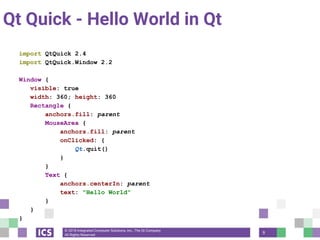
import QtQuick 2.4
import QtQuick.Window 2.2
Window {
visible: true
width: 360; height: 360
Rectangle {
anchors.fill: parent
MouseArea {
anchors.fill: parent
onClicked: {
Qt.quit()
}
}
Text {
anchors.centerIn: parent
text: "Hello World"
}
}
}
Qt Quick - Hello World in Qt
9
© 2018 Integrated Computer Solutions, Inc., The Qt Company
All Rights Reserved
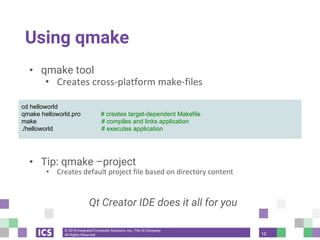
Using qmake
• qmake tool
• Creates cross-platform make-files
• Build project using qmake
• Tip: qmake –project
• Creates default project file based on directory content
Qt Creator IDE does it all for you
cd helloworld
qmake helloworld.pro # creates target-dependent Makefile
make # compiles and links application
./helloworld # executes application
10
© 2018 Integrated Computer Solutions, Inc., The Qt Company
All Rights Reserved
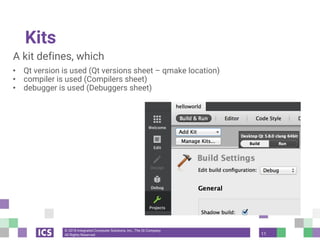
Kits
A kit defines, which
• Qt version is used (Qt versions sheet – qmake location)
• compiler is used (Compilers sheet)
• debugger is used (Debuggers sheet)
11
© 2018 Integrated Computer Solutions, Inc., The Qt Company
All Rights Reserved
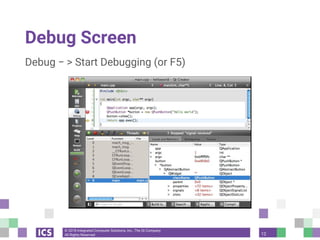
Debug Screen
Debug − > Start Debugging (or F5)
12
© 2018 Integrated Computer Solutions, Inc., The Qt Company
All Rights Reserved
Qt Creator Shortcut Keys
Locator Prefixes
• F2 - Go to a symbol definition
• l <line number> - Go to a line in the current document
• ? <help topic> - Go to a help topic
• o <open document> - Go to an opened document
• https://www.kdab.com/development-resources/qtcreator/
13
© 2018 Integrated Computer Solutions, Inc., The Qt Company
All Rights Reserved
Qt Books
- C++ GUI Programming with Qt 4 (2nd Edition) (Prentice Hall
Open Source Software Development Series), Jasmin
Blanchette and Mark Summerfield
- Practical Qt: Real World Solutions to Real World Problems,
Matthias Kalle Dalheimer and Jesper Pederson
- An Introduction to Design Patterns in C++ with Qt 4, Alan
Ezust and Paul Ezust
14
© 2018 Integrated Computer Solutions, Inc., The Qt Company
All Rights Reserved
In the Next Webinar
This five-part webinar series will also cover:
• QVariant, QObject — June 26 - (Tuesday)
• QML — July 19
• QWidgets — August 2
• Model/View — August 16
So Tune in, Same Qt Channel, Same Qt Time!
15
© Integrated Computer Solutions, Inc. All Rights Reserved
© Integrated Computer Solutions
This document is based on a Creative Commons training course, written by a
community of Certified Qt Training Partners. It is provided "as is" with no
warranty whatsoever.
Prior to 2012, parts of this document were written or further developed by people
who are or were employed by Trolltech, KDAB, Nokia, ICS, and possibly others.
Since 2013, this particular fork is maintained by ICS.
Qt is developed by The Qt Company (a subsidiary of Digia) together with the Qt
Project under open governance.

So I downloaded Qt, Now What?

  • 1.
    © Integrated ComputerSolutions, Inc. All Rights Reserved So I Downloaded Qt, Now What? June 7, 2018 Qt for Beginners Summer Webinar Series Part I Copyright 2018, Integrated Computers Solutions, Inc. This work may not be reproduced in whole or in part without the express written consent of Integrated Computer Solutions, Inc.
  • 2.
    © Integrated ComputerSolutions, Inc. All Rights Reserved Where to Download Qt? - Commercial and open source licenses available - https://www.qt.io/download (Online Installer) - http://download.qt.io/official_releases/qt/5.11/5.11.0/single (Source and instructions on how to build) - Be aware of license requirements
  • 3.
    © Integrated ComputerSolutions, Inc. All Rights Reserved What is Qt? - Cross-Platform Software Toolkit and API that allows to develop World-Class Desktop and Embedded Devices applications - Spelled Qt and not QT- - Pronounced “cute” - Is owned by The Qt Company - The Qt Company is responsible for all Qt activities including product development - https://resources.qt.io/customer-stories-all
  • 4.
    © Integrated ComputerSolutions, Inc. All Rights Reserved Companies Using Qt
  • 5.
    © Integrated ComputerSolutions, Inc. All Rights Reserved Where to Get Help? - Documentation in Qt Assistant or Qt Creator - Qt's examples: $QTSRC/Examples - Qt Project: http://www.qt.io/developers/ - Qt Centre Forum: http://www.qtcentre.org/ - Mailing lists: http://lists.qt-project.org - IRC: irc.freenode.org channel: #qt - Bug Report: https://bugreports.qt.io - Tutorials: http://wiki.qt.io/Developer-Guides - Video tutorials: www.youtube.com/user/QtStudios
  • 6.
    © Integrated ComputerSolutions, Inc. All Rights Reserved Widgets vs Qt Quick (QML) - Two ways of writing GUI - The QWidget API is in C++, compiled and more suitable for Desktop Applications - QML is a markup language which uses Javascript and is interpreted at run -time. More suitable for embedded devices.
  • 7.
    © 2018 IntegratedComputer Solutions, Inc., The Qt Company All Rights Reserved Starting Your Project with Widgets Program consists of: • main.cpp – application code • helloworld.pro – project file #include <QtWidgets> int main(int argc, char *argv[]) { QApplication app(argc, argv); QPushButton button("Hello world"); // Creates a widget button.show(); return app.exec(); // Starts the event loop } 7
  • 8.
    © 2018 IntegratedComputer Solutions, Inc., The Qt Company All Rights Reserved Starting Your Project with Qt Quick Program consists of: main.cpp – creation and startup of the QML engine helloworld.pro – project file qml.qrc – resource files, consisting main.qml main.qml – application code #include <QGuiApplication> #include <QQmlApplicationEngine> int main(int argc, char *argv[]) { QGuiApplication app(argc, argv); QQmlApplicationEngine engine; engine.load(QUrl(QStringLiteral("qrc:/main.qml"))); return app.exec(); } 8
  • 9.
    © 2018 IntegratedComputer Solutions, Inc., The Qt Company All Rights Reserved import QtQuick 2.4 import QtQuick.Window 2.2 Window { visible: true width: 360; height: 360 Rectangle { anchors.fill: parent MouseArea { anchors.fill: parent onClicked: { Qt.quit() } } Text { anchors.centerIn: parent text: "Hello World" } } } Qt Quick - Hello World in Qt 9
  • 10.
    © 2018 IntegratedComputer Solutions, Inc., The Qt Company All Rights Reserved Using qmake • qmake tool • Creates cross-platform make-files • Build project using qmake • Tip: qmake –project • Creates default project file based on directory content Qt Creator IDE does it all for you cd helloworld qmake helloworld.pro # creates target-dependent Makefile make # compiles and links application ./helloworld # executes application 10
  • 11.
    © 2018 IntegratedComputer Solutions, Inc., The Qt Company All Rights Reserved Kits A kit defines, which • Qt version is used (Qt versions sheet – qmake location) • compiler is used (Compilers sheet) • debugger is used (Debuggers sheet) 11
  • 12.
    © 2018 IntegratedComputer Solutions, Inc., The Qt Company All Rights Reserved Debug Screen Debug − > Start Debugging (or F5) 12
  • 13.
    © 2018 IntegratedComputer Solutions, Inc., The Qt Company All Rights Reserved Qt Creator Shortcut Keys Locator Prefixes • F2 - Go to a symbol definition • l <line number> - Go to a line in the current document • ? <help topic> - Go to a help topic • o <open document> - Go to an opened document • https://www.kdab.com/development-resources/qtcreator/ 13
  • 14.
    © 2018 IntegratedComputer Solutions, Inc., The Qt Company All Rights Reserved Qt Books - C++ GUI Programming with Qt 4 (2nd Edition) (Prentice Hall Open Source Software Development Series), Jasmin Blanchette and Mark Summerfield - Practical Qt: Real World Solutions to Real World Problems, Matthias Kalle Dalheimer and Jesper Pederson - An Introduction to Design Patterns in C++ with Qt 4, Alan Ezust and Paul Ezust 14
  • 15.
    © 2018 IntegratedComputer Solutions, Inc., The Qt Company All Rights Reserved In the Next Webinar This five-part webinar series will also cover: • QVariant, QObject — June 26 - (Tuesday) • QML — July 19 • QWidgets — August 2 • Model/View — August 16 So Tune in, Same Qt Channel, Same Qt Time! 15
  • 16.
    © Integrated ComputerSolutions, Inc. All Rights Reserved © Integrated Computer Solutions This document is based on a Creative Commons training course, written by a community of Certified Qt Training Partners. It is provided "as is" with no warranty whatsoever. Prior to 2012, parts of this document were written or further developed by people who are or were employed by Trolltech, KDAB, Nokia, ICS, and possibly others. Since 2013, this particular fork is maintained by ICS. Qt is developed by The Qt Company (a subsidiary of Digia) together with the Qt Project under open governance.