INTRODUCTION TO E-BUSINESS
 E-Business is a superset of business cases which have been digitized and work on the internet.
 E-Business is the process of buying and selling or exchanging of products, services and
information through telecommunication and computer networks including the internet.
 The business in developing countries that want to increase their export potential using the internet
should build their website to serve their customers.
 E-Business = Anytime, Anywhere Business / Shopping.
 These days’ businesses are using electronic medium to distribute information and provide
customer support. These activities are not termed as “Commerce” activities but “business”
activities. Thus, E-Business includes e-commerce along with other applications such as:
1. Re-engineer internal Business Processes.
2. Implement e-commerce system with their customers and Suppliers.
3. Promote enterprise collaboration among business terms and work groups.
E-COMMERCE
 E-commerce is a subset of E-Business.
 Is the act of buying and selling of goods over the internet.
 E-commerce is the use of technology towards the automation of business transactions and
workflow.
Forms of E-commerce:
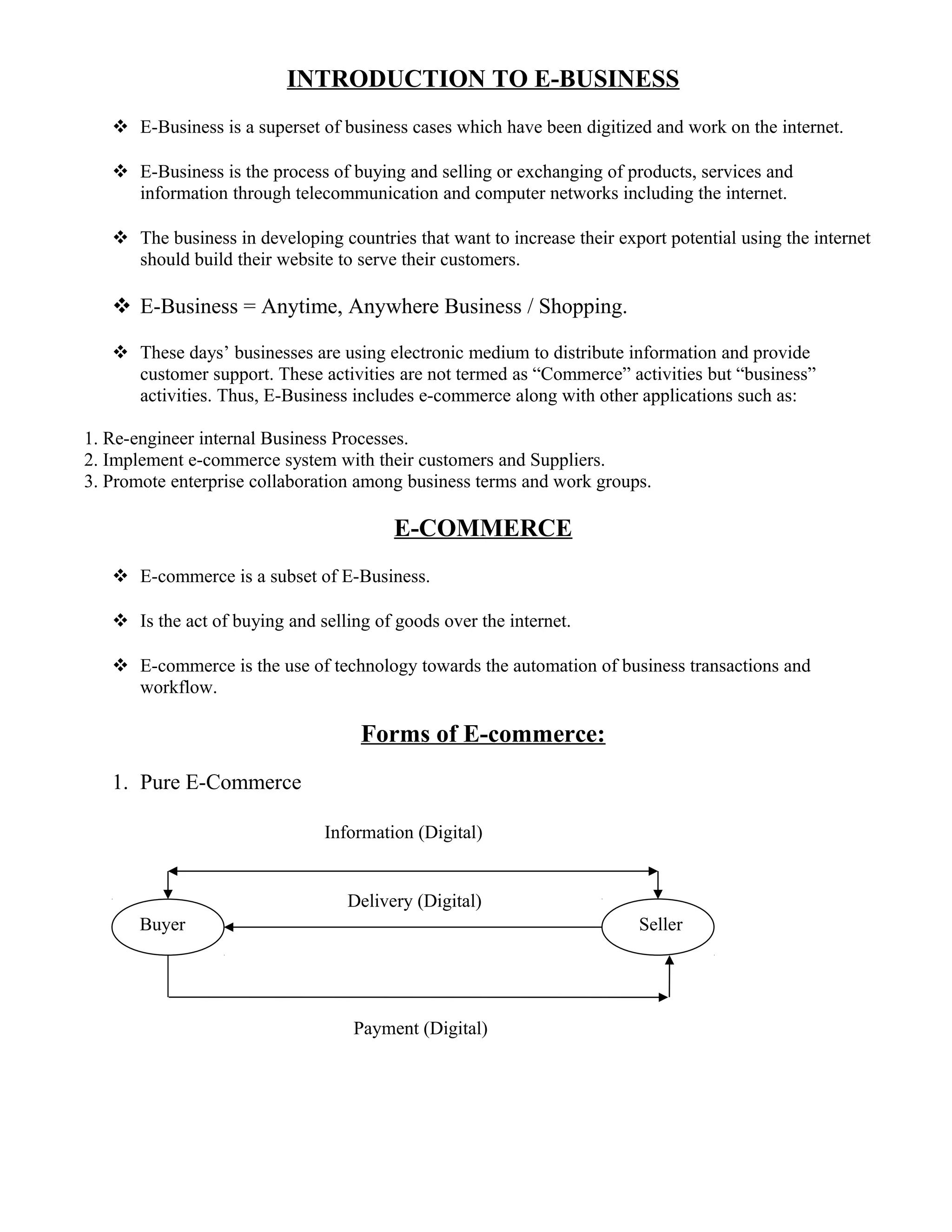
1. Pure E-Commerce
Buyer Seller
Information (Digital)
Delivery (Digital)
Payment (Digital)
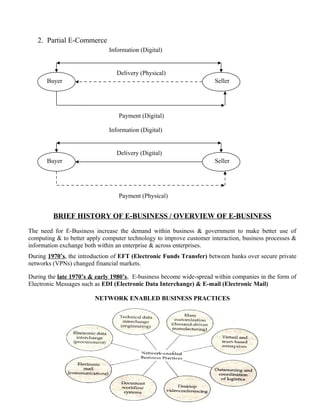
2. Partial E-Commerce
BRIEF HISTORY OF E-BUSINESS / OVERVIEW OF E-BUSINESS
The need for E-Business increase the demand within business & government to make better use of
computing & to better apply computer technology to improve customer interaction, business processes &
information exchange both within an enterprise & across enterprises.
During 1970’s, the introduction of EFT (Electronic Funds Transfer) between banks over secure private
networks (VPNs) changed financial markets.
During the late 1970’s & early 1980’s, E-business become wide-spread within companies in the form of
Electronic Messages such as EDI (Electronic Data Interchange) & E-mail (Electronic Mail)
NETWORK ENABLED BUSINESS PRACTICES
Buyer Seller
Information (Digital)
Delivery (Physical)
Payment (Digital)
Buyer Seller
Information (Digital)
Delivery (Digital)
Payment (Physical)
EDI technology has improved buying practices & reduced costs for both manufactures & retailers.
In the late 1980’s & early 1990’s electronic messaging technologies came up with GROUPWARE.
E.g. LOTUS Notes (Taking existing Non Electronic Methods & grafting them onto an electronic platform
for improved business process efficiency)
In 1990’s Internet (WWW) has rapid growth to millions of potential customers, the term electronic
commerce was coined and e-business applications expanded rapidly. The main reason for the rapid
application was the development of networks, protocols, software and specifications for e-business
activities.
CATEGORIES / APPLICATIONS OF E-BUSINESS
1. E-Commerce
2. E-Auctioning
3. E-Banking & E-Payment
4. E-Directories
5. E-Engineering
6. E-Gambling
7. E-Learning
8. E-Mailing
9. E-Marketing
10. E-Supply
11. E-Trading
12. E-Jobsearch
13. E-Traveling
14. E-Matrimonial
15. E-Fashion
REQUIREMENT OF E-BUSINESS
1. Requirement of Networking, preferable Internet.
2. Requirement of Web management
3. Requirement of Hardware
4. Requirement of Software
5. Requirement of Database Management System
6. Requirement of Electronic Payment Modes, Digital Signature, Digital Currency Etc.
7. Requirement of Obeying Business Regulations.
8. Requirement for Arranging Delivery of Goods.
REQUIREMENT OF SUBSIDARY ITEMS FOR E-BUSINESS
1. CONSUMABLES
A. Computer Stationary – Paper Rolls, Printer Ribbons, Coated Papers.
B. Refills & Inkjet
C. Toner Cartridges
D. Laser Toner
E. Computer Paper Data Binder.
2. COMPUTER ACCERORIES & SPARES
A. Mouse Pad
B. CD Storage boxes
C. Dust Cover
D. Sticker & Transparencies
3. STAND BY EQUIPMENTS
A. Stabilizer
B. Inverter / UPS
C. Generator.
BENEFITS / NEEDS / ADVANTAGES OF E-COMMERCE
Benefits / Needs / Advantages of E-Commerce to Businesses
1. Global Reach: Helps to reach a more geographical customer based and more business partners as
compared to the traditional business methods.
2. Reduction in Paper Costs: Through the use of EDI it has reduced the cost for paper and become
more secure.
3. Reduction in Inventories: A reduction in inventory is desirable to enable reductions in storage,
handling, insurance and administrative costs.
4. Faster Access to Information: Because of Internet the information can spread faster and easily.
5. Lower Telecommunication Costs: Low cost of connecting to the internet, small and medium
businesses can easily afford business on the internet.
6. Improved Customer Service: Helping the customer to access information before, during and after
a sale.
7. New Found Business Partners: Internet based E-commerce enables businesses to find new
business partners globally on the web, thus not restricting themselves to a specific choice of
suppliers.
8. Reduced Production Cycle Time: By allowing teams to electronically share design specifications
and refinement processes.
Benefits / Needs / Advantages of E-Commerce to Customers:
1. Convenience of shopping at Home: Anytime the customer can shop without considering the store
hours.
2. Virtual Auctions: E-commerce has made it possible for customers to participate in virtual auctions
for buying and selling.
3. Increased Choice of vendors and Products: Customers can have an increased choice of vendors
or products because they are no longer geographically constrained to reach a vendor or a product.
E.g. Amazon.com, epaper.timesofindia.com etc.
4. More Competitive Prices and Increased Price Comparison Capabilities
5. Access to Greater Amounts of Information on Demand
6. Quick Delivery of Digitized Products / Services: E-commerce allows quick delivery in the case of
digitized products such as music, software etc.
Others Benefits / Needs / Advantages of E-Commerce
1. Economy
2. Better Customer Service
3. Greater Profit Margin
4. Knowledge Markets
5. Information Sharing & control.
6. Better Team Work.
7. Increase Margins
8. Faster Business Transactions
9. New Services
10. Lower Business Setup & Transaction Cost.
11. 365 Days, 24 X 7 Open.
LIMITATIONS / DRAWBACKS / ISSUES OF E-COMMERCE
1. E-Commerce is not suitable for every kind of Business: E.g. Perishable Goods, Hospitals etc.
2. Incorrect Cost Estimations: Lack of experience of Virtual Cost
3. Problems with Online Environment: Merchant & customers can be both fake.
4. Increased Competition: Can be seen by customers but also to competitors.
5. Expensive Security
KEY SUCCESS FACTORS IN E-COMMERCE
1. Providing value to customers:
2. Providing Service and Performance
3. Providing an attractive website.
4. Providing an incentive for customers to buy and to return
5. Helping customers do their job consuming.
6. Letting customers help themselves.
7. Providing a sense of community: Chat room, discussion boards, soliciting customers input,
loyalty schemes can help in this respect
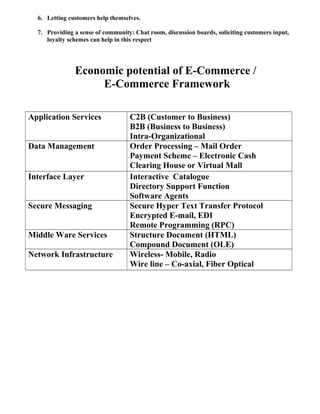
Economic potential of E-Commerce /
E-Commerce Framework
Application Services C2B (Customer to Business)
B2B (Business to Business)
Intra-Organizational
Data Management Order Processing – Mail Order
Payment Scheme – Electronic Cash
Clearing House or Virtual Mall
Interface Layer Interactive Catalogue
Directory Support Function
Software Agents
Secure Messaging Secure Hyper Text Transfer Protocol
Encrypted E-mail, EDI
Remote Programming (RPC)
Middle Ware Services Structure Document (HTML)
Compound Document (OLE)
Network Infrastructure Wireless- Mobile, Radio
Wire line – Co-axial, Fiber Optical
Categories of E-Business / E-Commerce Models
A company’s business model is the way in which it conducts business in order to
generate revenue / profit.
In the new economy, companies are creating new business models and reinventing
old models. Based on these categories of e-business models are divided into two
broad categories:-
A. E-business model based on the relationship of transaction parties.
B. E-business model based on the relationship of transaction types.
A. E-business model based on the relationship of transaction parties.
1.Business-to-Business (B2B): Inter-Organizational
transactions and electronic market transactions between organizations
or businesses. E.g. www.shop2gether.com, www.ICICIDirect.com,
www.cisco.com
2. Business-to-Consumer (B2C): Retailing transactions
E.g. www.Amazon.com
3. Consumer-to-Consumer (C2C): A consumer or
individual sells directly to another consumer or individuals. E.g.
www.buynsell.com, www.ebay.com
4. Consumer-to-Business (C2B): Individuals Sells
products and services to organizations E.g. www.priceline.com,
www.direct-marketing.net
5. Business-to-Government (B2G): Business selling to
local, state & central govt. E.g. www.Igov.com
B. E-business model based on the relationship of transaction types.
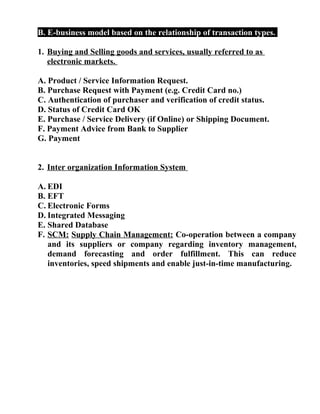
1. Buying and Selling goods and services, usually referred to as
electronic markets.
A. Product / Service Information Request.
B. Purchase Request with Payment (e.g. Credit Card no.)
C. Authentication of purchaser and verification of credit status.
D. Status of Credit Card OK
E. Purchase / Service Delivery (if Online) or Shipping Document.
F. Payment Advice from Bank to Supplier
G. Payment
2. Inter organization Information System
A. EDI
B. EFT
C. Electronic Forms
D. Integrated Messaging
E. Shared Database
F. SCM: Supply Chain Management: Co-operation between a company
and its suppliers or company regarding inventory management,
demand forecasting and order fulfillment. This can reduce
inventories, speed shipments and enable just-in-time manufacturing.
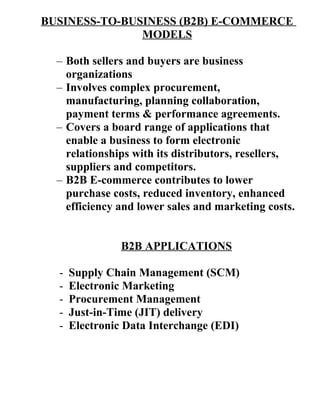
BUSINESS-TO-BUSINESS (B2B) E-COMMERCE
MODELS
– Both sellers and buyers are business
organizations
– Involves complex procurement,
manufacturing, planning collaboration,
payment terms & performance agreements.
– Covers a board range of applications that
enable a business to form electronic
relationships with its distributors, resellers,
suppliers and competitors.
– B2B E-commerce contributes to lower
purchase costs, reduced inventory, enhanced
efficiency and lower sales and marketing costs.
B2B APPLICATIONS
- Supply Chain Management (SCM)
- Electronic Marketing
- Procurement Management
- Just-in-Time (JIT) delivery
- Electronic Data Interchange (EDI)
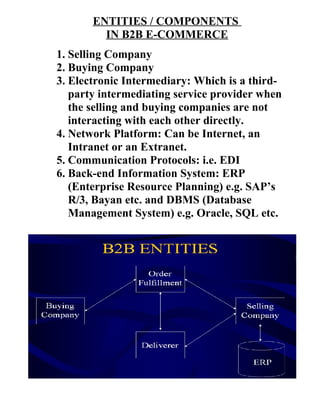
ENTITIES / COMPONENTS
IN B2B E-COMMERCE
1. Selling Company
2. Buying Company
3. Electronic Intermediary: Which is a third-
party intermediating service provider when
the selling and buying companies are not
interacting with each other directly.
4. Network Platform: Can be Internet, an
Intranet or an Extranet.
5. Communication Protocols: i.e. EDI
6. Back-end Information System: ERP
(Enterprise Resource Planning) e.g. SAP’s
R/3, Bayan etc. and DBMS (Database
Management System) e.g. Oracle, SQL etc.
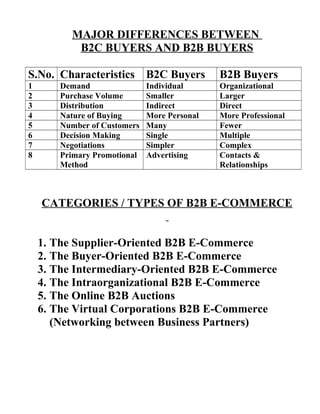
MAJOR DIFFERENCES BETWEEN
B2C BUYERS AND B2B BUYERS
S.No. Characteristics B2C Buyers B2B Buyers
1 Demand Individual Organizational
2 Purchase Volume Smaller Larger
3 Distribution Indirect Direct
4 Nature of Buying More Personal More Professional
5 Number of Customers Many Fewer
6 Decision Making Single Multiple
7 Negotiations Simpler Complex
8 Primary Promotional
Method
Advertising Contacts &
Relationships
CATEGORIES / TYPES OF B2B E-COMMERCE
1. The Supplier-Oriented B2B E-Commerce
2. The Buyer-Oriented B2B E-Commerce
3. The Intermediary-Oriented B2B E-Commerce
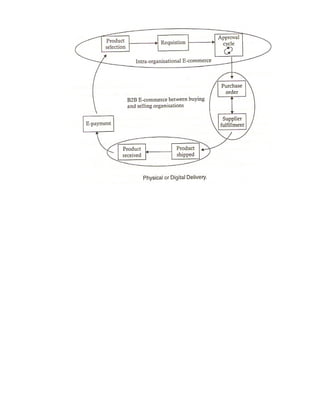
4. The Intraorganizational B2B E-Commerce
5. The Online B2B Auctions
6. The Virtual Corporations B2B E-Commerce
(Networking between Business Partners)
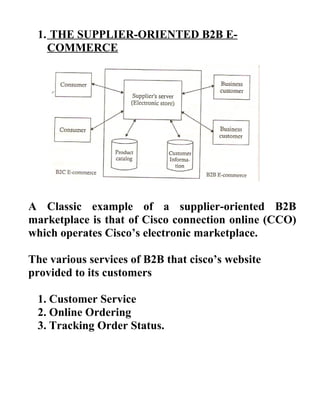
1. THE SUPPLIER-ORIENTED B2B E-
COMMERCE
A Classic example of a supplier-oriented B2B
marketplace is that of Cisco connection online (CCO)
which operates Cisco’s electronic marketplace.
The various services of B2B that cisco’s website
provided to its customers
1. Customer Service
2. Online Ordering
3. Tracking Order Status.
Advantages / Benefits of B2B for Supply Oriented
Marketplaces:-
1. Reduced Operating Costs.
2. Enhanced technical support & Customer Service.
3. Reduced Technical Support staff cost.
4. Reduced distribution cost for digital products.
5. Greater Customer loyalty.
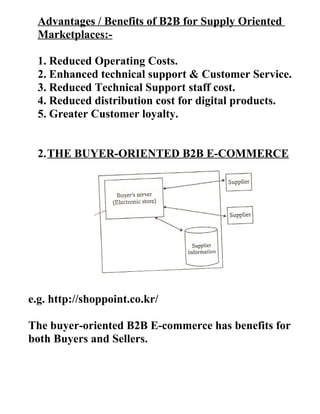
2.THE BUYER-ORIENTED B2B E-COMMERCE
e.g. http://shoppoint.co.kr/
The buyer-oriented B2B E-commerce has benefits for
both Buyers and Sellers.
The advantages to the buyers are:
1. Identifying and building relationships with new
suppliers worldwide.
2. Cutting down sourcing cycle times and reducing
the costs of sourced goods.
3. Transmitting information to multiple suppliers
simultaneously and quickly.
4. Quickly receiving and comparing offers from a
large number of suppliers to get the best deal.
The advantages to the Sellers are:
1.Access to global buyers
2.Boosted Sales
3.Lowered costs for sales and marketing activities
4.Improved sales productivity
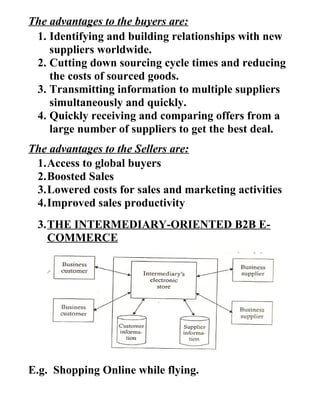
3.THE INTERMEDIARY-ORIENTED B2B E-
COMMERCE
E.g. Shopping Online while flying.
4.THE INTRAORGANIZATIONAL B2B E-
COMMERCE
e.g. Tricon Restaurant International which operates
10,000 KFC, Pizza Hut etc. in 83 countries.
5.THE ONLINE B2B AUCTIONS
B2B auctions can be categorized into three major
types:
A. Independent Auctions: A co. may use a third-
party auctioner to create the site and sell its
goods. E.g. www.fairmarket.com
B. Commodity Auctions: Many buyers and sellers
come together to a third-party web site for the
auction of the same product. E.g.
www.fastparts.com
C. Private Auctions: Many co’s auction their
products themselves on their own sites, without
taking the help of intermediaries. Such auctions
may be open or by invitation only. E.g.
www.auctionblock.com
6.THE VIRTUAL CORPORATIONS B2B E-
COMMERCE (Networking between Business
Partners)
A Virtual corporation is an organization consisting of
several business partners or businesses which are
sharing costs and resources for the purpose of
producing a product or service.
Businesses may agree to enter into virtual corporation
alliances for many reasons:
1. Excellence
2. Utilization
3. Low Cost
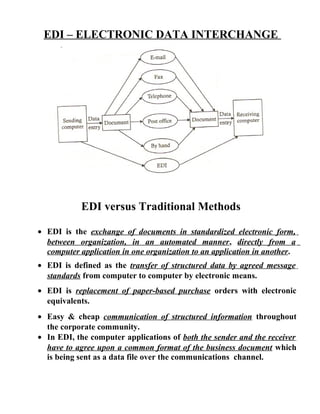
EDI – ELECTRONIC DATA INTERCHANGE
EDI versus Traditional Methods
• EDI is the exchange of documents in standardized electronic form,
between organization, in an automated manner, directly from a
computer application in one organization to an application in another.
• EDI is defined as the transfer of structured data by agreed message
standards from computer to computer by electronic means.
• EDI is replacement of paper-based purchase orders with electronic
equivalents.
• Easy & cheap communication of structured information throughout
the corporate community.
• In EDI, the computer applications of both the sender and the receiver
have to agree upon a common format of the business document which
is being sent as a data file over the communications channel.
Issues with Traditional Methods of Exchange of Business
1. Increased Time
2. Low Accuracy
3. More Chances of Errors
4. High Labour Charges
5. Increased Uncertainty
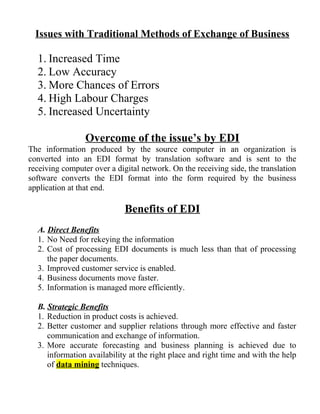
Overcome of the issue’s by EDI
The information produced by the source computer in an organization is
converted into an EDI format by translation software and is sent to the
receiving computer over a digital network. On the receiving side, the translation
software converts the EDI format into the form required by the business
application at that end.
Benefits of EDI
A. Direct Benefits
1. No Need for rekeying the information
2. Cost of processing EDI documents is much less than that of processing
the paper documents.
3. Improved customer service is enabled.
4. Business documents move faster.
5. Information is managed more efficiently.
B. Strategic Benefits
1. Reduction in product costs is achieved.
2. Better customer and supplier relations through more effective and faster
communication and exchange of information.
3. More accurate forecasting and business planning is achieved due to
information availability at the right place and right time and with the help
of data mining techniques.
DRAWBACKS of EDI
1. Unpopular
2. Expensive
3. Point-to-point
4. Requires expensive VAN networking
5. Not easy to use, learn, or implement
Components of EDI Systems
1. EDI Standards: E.g. UN/EDI FACT(The United Nations Standards for
EDI for Administration Commerce and Transport)
2. EDI Software:
Major Functions of the EDI Software are Data Conversion, Data formatting
& Message Communication.
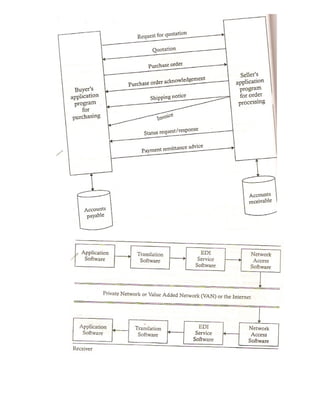
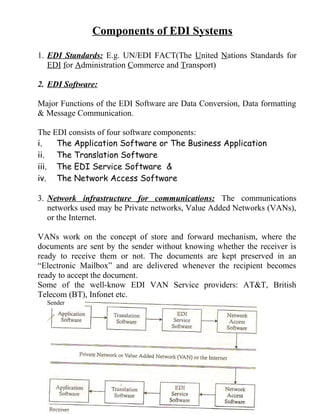
The EDI consists of four software components:
i. The Application Software or The Business Application
ii. The Translation Software
iii. The EDI Service Software &
iv. The Network Access Software
3. Network infrastructure for communications: The communications
networks used may be Private networks, Value Added Networks (VANs),
or the Internet.
VANs work on the concept of store and forward mechanism, where the
documents are sent by the sender without knowing whether the receiver is
ready to receive them or not. The documents are kept preserved in an
“Electronic Mailbox” and are delivered whenever the recipient becomes
ready to accept the document.
Some of the well-know EDI VAN Service providers: AT&T, British
Telecom (BT), Infonet etc.
Sender
FINANCIAL EDI
• Electronic transmission of payments between a payee and a payer via
their respective banks
• Allows businesses to replace labor-intensive activities of collecting,
disbursing & processing payments
• Improves certainty of payment flows
The three principal types of Non-Cash Payment instruments used for B2B
Payments are:
1. Cheques
2. EFT (Electronic Fund Transfer)
3. ACH (Automated Clearing House)
EFT (Electronic Fund Transfer)
Are credit transfers between banks where funds flow directly from the payer’s
bank to the payee’s bank based on the instructions to the payers. EFT ensures
timeliness and certainty of Payments.
ACH (Automated Clearing House)
Are used for services such as preauthorized credits (e.g. Direct Deposit of Pay
Rolls), Pre authorized Debits (e.g. Repetitive Bill Payments) and Consumer
Initiated Payment.
STRATEGIES IN E-COMMERCE
1. SCM (Supply Chain Management)
2. JIT (Just-in-time Manufacturing)
3. Procurement Management
1. SCM (Supply Chain Management)
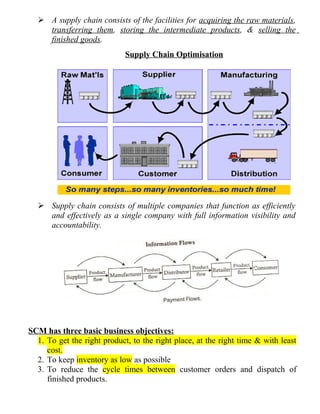
 A supply chain consists of the facilities for acquiring the raw materials,
transferring them, storing the intermediate products, & selling the
finished goods.
Supply Chain Optimisation
 Supply chain consists of multiple companies that function as efficiently
and effectively as a single company with full information visibility and
accountability.
SCM has three basic business objectives:
1. To get the right product, to the right place, at the right time & with least
cost.
2. To keep inventory as low as possible
3. To reduce the cycle times between customer orders and dispatch of
finished products.
SCM consists of the following Components:
1. Supplier Management: Geographically discrete Suppliers & reducing the
number of suppliers.
2. Inventory Management: Shortening the cycle time between order and
dispatch and keeping the inventory levels to a minimum.
3. Distribution Management: Using EDI to move documents, such as order,
purchase bills, shipment notices etc.
4. Channel Management: Distribute the information about changing
operation conditions (Policies, Prices, Delivery Schedules etc.) to trading
partners
5. Payment Management: through EFT.
6. Sales Force Management: Improving the communication & flow of
information among the sales, customer service & production functions
through automation.
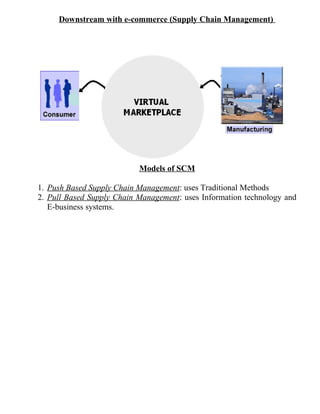
Downstream with e-commerce (Supply Chain Management)
Models of SCM
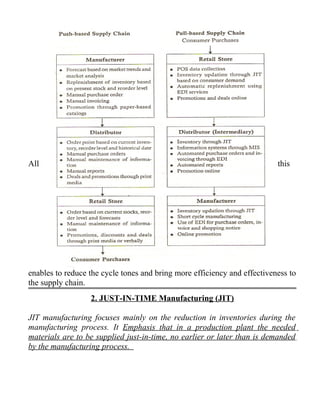
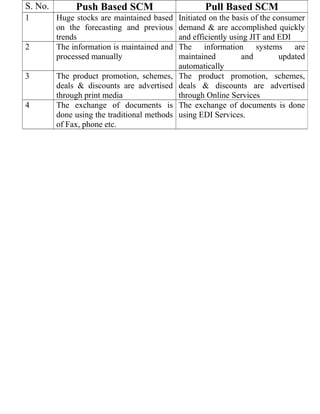
1. Push Based Supply Chain Management: uses Traditional Methods
2. Pull Based Supply Chain Management: uses Information technology and
E-business systems.
All this
enables to reduce the cycle tones and bring more efficiency and effectiveness to
the supply chain.
2. JUST-IN-TIME Manufacturing (JIT)
JIT manufacturing focuses mainly on the reduction in inventories during the
manufacturing process. It Emphasis that in a production plant the needed
materials are to be supplied just-in-time, no earlier or later than is demanded
by the manufacturing process.
Benefits of JIT:
1. Production costs will decrease as the stock is redcued and hence
overheads of maintaining large inventories are reduced.
2. Materials from the suppliers are ordered only if the production plant can
sell its products.
3. Quality control of production is considerably enhanced.
3. Procurement Management
Procurement in the traditional business consisted of inefficient buying,
redundant processes, and non-strategic sourcing resulting in long and costly
procurement processes.
With the increase use of the e-commerce, easy-to-use web based procurement
applications have helped to make the procurement process more efficient and
less costly.
E-Procurement has shifted from paper-based processes to automation, thereby
increasing efficiency and effectiveness.
E-PROCUREMENT CHAIN
S. No. Push Based SCM Pull Based SCM
1 Huge stocks are maintained based
on the forecasting and previous
trends
Initiated on the basis of the consumer
demand & are accomplished quickly
and efficiently using JIT and EDI
2 The information is maintained and
processed manually
The information systems are
maintained and updated
automatically
3 The product promotion, schemes,
deals & discounts are advertised
through print media
The product promotion, schemes,
deals & discounts are advertised
through Online Services
4 The exchange of documents is
done using the traditional methods
of Fax, phone etc.
The exchange of documents is done
using EDI Services.
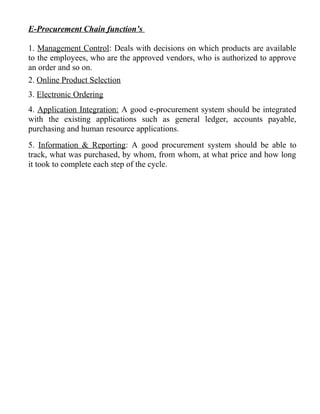
E-Procurement Chain function’s
1. Management Control: Deals with decisions on which products are available
to the employees, who are the approved vendors, who is authorized to approve
an order and so on.
2. Online Product Selection
3. Electronic Ordering
4. Application Integration: A good e-procurement system should be integrated
with the existing applications such as general ledger, accounts payable,
purchasing and human resource applications.
5. Information & Reporting: A good procurement system should be able to
track, what was purchased, by whom, from whom, at what price and how long
it took to complete each step of the cycle.
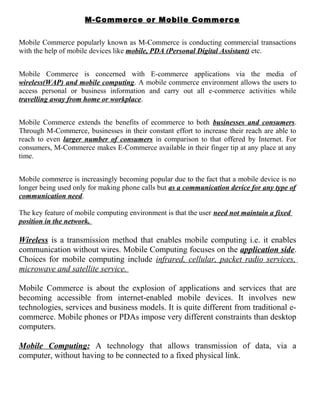
M-Commerce or Mobile Commerce
Mobile Commerce popularly known as M-Commerce is conducting commercial transactions
with the help of mobile devices like mobile, PDA (Personal Digital Assistant) etc.
Mobile Commerce is concerned with E-commerce applications via the media of
wireless(WAP) and mobile computing. A mobile commerce environment allows the users to
access personal or business information and carry out all e-commerce activities while
travelling away from home or workplace.
Mobile Commerce extends the benefits of ecommerce to both businesses and consumers.
Through M-Commerce, businesses in their constant effort to increase their reach are able to
reach to even larger number of consumers in comparison to that offered by Internet. For
consumers, M-Commerce makes E-Commerce available in their finger tip at any place at any
time.
Mobile commerce is increasingly becoming popular due to the fact that a mobile device is no
longer being used only for making phone calls but as a communication device for any type of
communication need.
The key feature of mobile computing environment is that the user need not maintain a fixed
position in the network.
Wireless is a transmission method that enables mobile computing i.e. it enables
communication without wires. Mobile Computing focuses on the application side.
Choices for mobile computing include infrared, cellular, packet radio services,
microwave and satellite service.
Mobile Commerce is about the explosion of applications and services that are
becoming accessible from internet-enabled mobile devices. It involves new
technologies, services and business models. It is quite different from traditional e-
commerce. Mobile phones or PDAs impose very different constraints than desktop
computers.
Mobile Computing: A technology that allows transmission of data, via a
computer, without having to be connected to a fixed physical link.
MOBILE COMPUTING connects mobile people to the information and
applications they need-anytime, anywhere on demand. Move the workplace to any
space, using wireless and voice middleware on the server side to support the
broadest spectrum of mobile networks and a wide array of devices on the client
side. Enable users of telephones, wired or wireless, to conduct business
transactions or access information simply by speaking.
Benefits of Wireless and Mobile Computing
1 Mobility
2 Ease of Installation in difficult-to-wire areas
3 Reduced installation time
4 Increased reliability
5 Long-term cost savings.
APPLICATIONS OF MOBILE COMMERCE
Ideally any application that is offered on PC based E-Commerce can also be
offered through Mobile Commerce; but it will depend on usefulness of the
application whether it will be successful on Mobile commerce.
The key factors which will dictate the success of an M-Commerce application are:
1) Urgency of the online service/information
2) Convenience and
3) Location based information/service requirement.
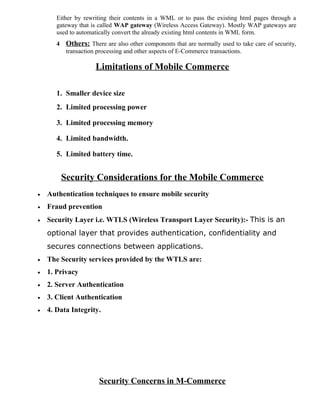
So far the following applications have been created in M-Commerce arena.
1. Mobile Advertising 6. Mobile Portals
2. Mobile Banking & Bill Payment 7. Mobilizing enterprise Applications
3. Music Purchase 8. Home Automation
4. Notifications 9. Other common applications
5. Tickets Reservation
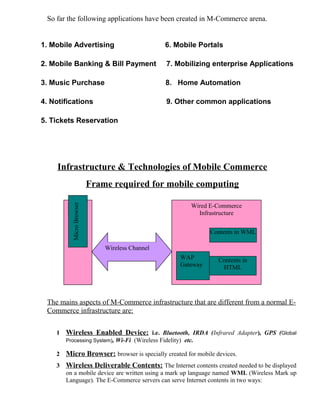
Infrastructure & Technologies of Mobile Commerce
Frame required for mobile computing
The mains aspects of M-Commerce infrastructure that are different from a normal E-
Commerce infrastructure are:
1 Wireless Enabled Device: i.e. Bluetooth, IRDA (Infrared Adapter), GPS (Global
Processing System), Wi-Fi (Wireless Fidelity) etc.
2 Micro Browser: browser is specially created for mobile devices.
3 Wireless Deliverable Contents: The Internet contents created needed to be displayed
on a mobile device are written using a mark up language named WML (Wireless Mark up
Language). The E-Commerce servers can serve Internet contents in two ways:
Wired E-Commerce
Infrastructure
Mobile
Device
Contents in WML
Wireless Channel
MicroBrowser
Contents in
HTML
WAP
Gateway
Either by rewriting their contents in a WML or to pass the existing html pages through a
gateway that is called WAP gateway (Wireless Access Gateway). Mostly WAP gateways are
used to automatically convert the already existing html contents in WML form.
4 Others: There are also other components that are normally used to take care of security,
transaction processing and other aspects of E-Commerce transactions.
Limitations of Mobile Commerce
1. Smaller device size
2. Limited processing power
3. Limited processing memory
4. Limited bandwidth.
5. Limited battery time.
Security Considerations for the Mobile Commerce
• Authentication techniques to ensure mobile security
• Fraud prevention
• Security Layer i.e. WTLS (Wireless Transport Layer Security):- This is an
optional layer that provides authentication, confidentiality and
secures connections between applications.
• The Security services provided by the WTLS are:
• 1. Privacy
• 2. Server Authentication
• 3. Client Authentication
• 4. Data Integrity.
Security Concerns in M-Commerce
The role of Security Mechanisms is to ensure the
 Privacy
 Integrity of data
 Authenticity of parties involved in a transaction.
 In addition, it is also desirable to provide functionality such as copy protection,
preventing denial of service attacks, filtering to viruses & malicious code and in
some cases anonymous communication.
Some of the Major Security Concerns from the perspective of M-Commerce:-
1) User Identification: Attempts to ensure that only authorized entities can use the appliances.
2) Secure Storage: The Security of sensitive information such as passwords, PINs, Keys etc are
reside in secondary storage of the Mobile Appliance.
3) Secure Network Access: That only authorized device can connect to a network or service.
4) Secure Data Communication: Considers the privacy & integrity of data communicated to /
from the mobile appliance.
5) Secure Content: Content that is downloaded or stored in the appliance is used in accordance
with the terms set forth by the content provides (e.g. read only, no copying etc)
6) Secure Software Execution: Ensure security of the hardware implementation from various
physical and electrical attacks.
ELEMENTS OF A SECURE MOBILE APPLIANCE ARCHITECTURE
Network Technologies
 GSM - General System for Mobile Communication.
The Subscriber Identify Module (SIM) is used for storing the cryptographic keys; of its
unique identify called International Mobile Subscriber Identify (IMSI). The Authentication
server of the wireless GSM network stores the matching key and the IMSI of the subscriber
as well.
Much any European nations and, the Asia Pacific Region using GSM
 TDMA – Time Division of Multiple Access – In US we are using this kind of Network
Technologies for Mobile Communications.
 CDMA – Code Division of Multiple Access – Reliance InfoComm, is using CDMA
and US.
 FDMA – Frequency Division of Multiple Access
 GPRS – Global Packet Radio Service
 AMPS – Advanced Mobile Phone System
 WCDMA – Wide Band Code Division Multiple Access
 EDGE – Enhanced Data Rates for GSM Evolution.
 EGPRS – Enhanced Global Packet Radio Service.
Service Technologies
Generation Channels Switching Mode Examples Data Rates
1G Analog Voice Circuit Switched AMPS N/A
2G Digital Circuit Switched GSM 9.6 Kbps
Packet Switched CDMA
2.5G Digital
Packet Switched
GPRS 171.2 Kbps
EDGE 384 Kbps
3G Digital Packet Switched CDMA2000
WCDMA
Mobile Commerce
In the traditional computing environment it was necessary to come to the computer to do
some work on it.
All computers were connected to each other, to networks, servers, etc. Via Wires.
Mobile Computing
 The first phase was to make computers small enough so they can be easily carried-
Mobile devices
 The Second solution to the need for mobile computing was to replace wires with
wireless communication media.
 The third phase was a combination of the first two, namely to use mobile devices in
a wireless environment. Referred to as wireless mobile computing, this combination
enables real-time connections between mobile devices and other computing
environments.
M-Commerce and M-Business is any E-Commerce or E-Business activities performed in a
wireless environment. It is not merely a variation on existing Internet services; it is a
natural extension of e-business creating new opportunities.
Typical Applications Include:
- Financial Applications
- Inventory Management
- Field Services Management
- Product Locating
- Real Estate
MOBILE COMPUTING APPLICATIONS
1. Remote Communications
2. Remote Data Access
E.g. Mobile Workers such as field sales personnel will need access of libraries of reference files
containing product and price information.
There are several mobile computing applications
1. Sales & Retailing
• Accounting
• Non-Sales
• Order-Entry
• Duty Free Sales on Aircraft
2. Manufacturing
• Receiving and shipping goods
• Time and Attendance
• Inventory Control
3. Services
• Electricity, Gas & Water meter reading
• Parking fine issuing
• Customer field service
4. Other Applications
• Agricultural and forestry data collection
• Travel ticket issuing.
Mobile Computing Basic Terminology
 Personal digital Assistant (PDA): A small portable computer, such as palm handhelds and pocket
PC devices.
 Short Message Services (SMS): A technology, in existence since 1991, that allows sending short
text messages.
 Enhanced Messaging Service (EMS): The next generation of wireless messaging, this
technology will be able to deliver rich media.
 Wireless Application Protocol (WAP): A technology that offers Internet browsing from wireless
devices.
 Smart Phones: Internet-enabled cell phones that can support mobile applications.
 Wi-Fi (Wireless Fidelity): Refers to a standard 802.11b which most of the wireless local area
networks are based on.
 Global Positioning System (GPS): A satellite based tracking system that enables the
determination of a GPS device’s location.
 WLAN: Wireless local area network.
Mobile computing has two major characteristics that differentiate it from other forms of
computing: Mobility and Broad Reach.
 Mobility (and localization) implies portability based on the fact that user carry a mobile device
everywhere they go. Therefore, users can initiate real-time contact with other systems from
wherever they happen to be.
 Broad reach: is the characteristic that describes the accessibility of people. They can be reached at
any time.
BUSINESS MODELS
 A Buyer-oriented e-commerce system.
 A Seller-oriented e-commerce system.
 A virtual market place with multiple buyers and
sellers.
I Buyer-oriented E-commerce models suit large volumes of items
of different types:
 Maintenance, repair, and operating goods;
 Products needed to service a given product;
 Components of raw materials used in a manufacture;
 Goods traded by a wholesaler;
 Large, less frequently ordered capital items.
E-Procurement (Starts with purchase requisition and involves):
 Different levels of authorization;
 Selection of suppliers;
 Requests for quotations;
 Monitoring the order fulfilment;
 Payment.
Two distinct classes of activities:
 Intra-company activities;
 Inter-company activities.
Integration Issues
B2B requires that companies integrate their systems:
 Intercompany Integration
– Need of standards and overcome problems with EDI and
VPNs.
– Interoperation using XML (which acts as a business
connector).
 Intracompany Integration
– Seamless integration of orders and back-end systems;
– Standardisation of information processes (e.g. through ERPs)
• Order entry & fulfilment.
• Logistics.
• Inventory.
• Production planning and monitoring.
• Accounting entry and financial systems
• Human resources and payrolls.
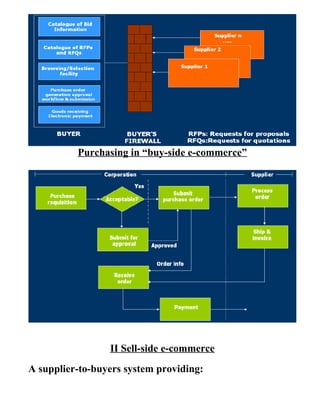
Buy-side e-commerce system
Purchasing in “buy-side e-commerce”
II Sell-side e-commerce
A supplier-to-buyers system providing:
 Product catalogue;
 Product configuration;
 Business roles (for automating approval & ordering);
 Customer service;
 Fulfilment and shipping;
 Accounts receivable/invoicing and e-payments;
 Monitoring of order status and history.
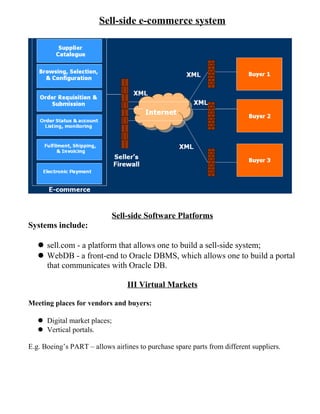
Sell-side e-commerce system
Sell-side Software Platforms
Systems include:
sell.com - a platform that allows one to build a sell-side system;
WebDB - a front-end to Oracle DBMS, which allows one to build a portal
that communicates with Oracle DB.
III Virtual Markets
Meeting places for vendors and buyers:
 Digital market places;
 Vertical portals.
E.g. Boeing’s PART – allows airlines to purchase spare parts from different suppliers.
Virtual Organization (VO) or Company is one whose members are geographically
apart, usually working by computer e-mail & groupware while appearing to others to be a
single, unified organization with a real physical location.
A Virtual Organization is a temporary network of independent companies having several
different roles connected through a communication network in order to share skills and
competencies to access new markets. Virtual Organization will only exist for a temporary
time limit that is the time needed to satisfy its purpose.
Features of Virtual Organization
• It removes many barriers-especially that of time & location.
• It emphasizes concentrating on new services and products, especially those with
intensive information and knowledge characteristics, rather than concentrating on cost
savings made possible by removing the barriers.
• It goes beyond outsourcing and strategic alliances & is more flexible in:
 That has continuously changing partners.
 The arrangements are looses and goal oriented.
 Emphasizes the use of knowledge to create new products and services.
 Its processes can change quickly by agreement of the partners.
Reasons for Organizations becoming Virtual
• Globalization, with growing trends to include global customers.
• Ability to quickly pool expert resources.
• Creation of Communities of excellence.
• Rapidly changing needs.
• Increasingly specialized products and services.
• Increasing required to use specialized knowledge.
Scope of Virtual Organization
In India VO is still in its nascent stage. It will take a couple of years for India to Start
competing for Virtual Offices.
Electronic Payments
The Electronic Payments allow sellers and consumers to clear payments, dues
and engage in cash payments, dues and engage in cashless trading on the
internet. Electronic payment is a financial exchange that takes place online
between buyer & seller. The information as a financial exchange is usually
some form of digital financial instrument (Electronic Cash, Electronic checks &
encrypted plastic card numbers) that is indirectly produced by a bank or an
intermediary.
Electronic Payment System [EPS]
o Electronic Payment Systems are indispensable in today’s business process as
companies are looking for innovating ideas to serve customers faster and at
low cost.
o Prompt and secure payment, clearing and settlement of credit or debit claims
are the important aspects of electronic payment system.
o E-commerce capability of reducing transaction time, its cost and providing
security is the main reason of its growth.
Issues while designing e-payment system
1. Payment instruments must be secure, have a low processing cost and be
accepted widely as global currency tender.
2. The forms and characters of payment instrument e.g. electronic cash,
credit/debit cards should be desirable to consumer.
3. The issues regarding privacy, fraud, mistakes, bank features should be
guarded by proper security features as authentication / privacy etc.
4. The issues regarding the protocols that connect one financial institution to
the other.
Types of Electronic Payment System:
Electronic Payment System (EPS) or Electronic Funds Transfer (EFT) can be divided into
three broad categories:
1. Large Scale and Financial Payments
o Whole Sale Payments (e.g. Bank to Bank Transfer)
o Retail Payments (e.g. ATM)
2. Retailing Payments
o Credit Cards (e.g. Visa, Master Card, Maestro)
o Private Level Cards (e.g. JC Penney Card)
3. On Line Electronic Commerce Payment
I. Token Based
oElectronic Cash e.g. Digi Cash
oE-checks e.g. Net Cheque
oSmart Cards e.g. Mondex Card.
II. Credit Card-based E-Payment System
o Encrypted Credit Cards (e.g. WWW Form Based)
o Third Party Authorization numbers (e.g. First Virtual)
Digital / Electronic Token based Electronic Payment System
1. Cash or real time:. The transactions are settled with the exchange of electronic
currency
2. Debit or Prepaid: Users pay in advance for privilege of getting information.
3. Credit or Postpaid: The Customer purchases goods first, which is authenticated by
server. The value of purchase is deposited later in bank.
SMART CARDS
Smart Cards are credit, debit cards & other card products enhanced with microprocessors
capable of holding information. E.g. (Metro Card) Smart Cards are basically of two types.
1. Relationship Based Smart Cards: A relationship based smart card is an enhancement
of existing card service that a financial institution delivers to its customers via a chip
based card. The new services may include. The new services may include:
o Access to Multiple Financial Accounts.
o Value Added Market etc.
o A Variety of functions, such as cash access, bill payments, balance inquiry or funds transfer.
2. Electronic Purses Based Smart Cards: The Electronic Purses are Wallet size smart cards
embedded with programmable microchips that store sums of money for people to use instead of
cash.
Working of a Smart Card?
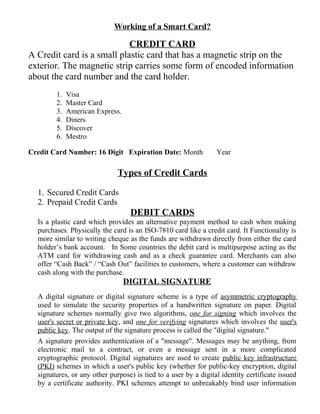
CREDIT CARD
A Credit card is a small plastic card that has a magnetic strip on the
exterior. The magnetic strip carries some form of encoded information
about the card number and the card holder.
1. Visa
2. Master Card
3. American Express.
4. Diners
5. Discover
6. Mestro
Credit Card Number: 16 Digit Expiration Date: Month Year
Types of Credit Cards
1. Secured Credit Cards
2. Prepaid Credit Cards
DEBIT CARDS
Is a plastic card which provides an alternative payment method to cash when making
purchases. Physically the card is an ISO-7810 card like a credit card. It Functionality is
more similar to writing cheque as the funds are withdrawn directly from either the card
holder’s bank account. In Some countries the debit card is multipurpose acting as the
ATM card for withdrawing cash and as a check guarantee card. Merchants can also
offer “Cash Back” / “Cash Out” facilities to customers, where a customer can withdraw
cash along with the purchase.
DIGITAL SIGNATURE
A digital signature or digital signature scheme is a type of asymmetric cryptography
used to simulate the security properties of a handwritten signature on paper. Digital
signature schemes normally give two algorithms, one for signing which involves the
user's secret or private key, and one for verifying signatures which involves the user's
public key. The output of the signature process is called the "digital signature."
A signature provides authentication of a "message". Messages may be anything, from
electronic mail to a contract, or even a message sent in a more complicated
cryptographic protocol. Digital signatures are used to create public key infrastructure
(PKI) schemes in which a user's public key (whether for public-key encryption, digital
signatures, or any other purpose) is tied to a user by a digital identity certificate issued
by a certificate authority. PKI schemes attempt to unbreakably bind user information
(name, address, phone number, etc.) to a public key, so that public keys can be used as a
form of identification.
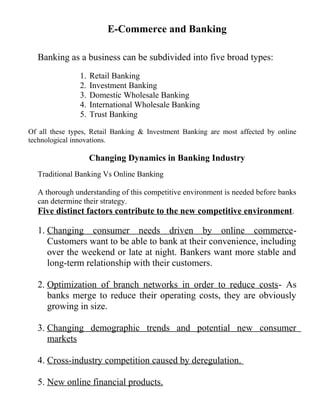
E-Commerce and Banking
Banking as a business can be subdivided into five broad types:
1. Retail Banking
2. Investment Banking
3. Domestic Wholesale Banking
4. International Wholesale Banking
5. Trust Banking
Of all these types, Retail Banking & Investment Banking are most affected by online
technological innovations.
Changing Dynamics in Banking Industry
Traditional Banking Vs Online Banking
A thorough understanding of this competitive environment is needed before banks
can determine their strategy.
Five distinct factors contribute to the new competitive environment.
1. Changing consumer needs driven by online commerce-
Customers want to be able to bank at their convenience, including
over the weekend or late at night. Bankers want more stable and
long-term relationship with their customers.
2. Optimization of branch networks in order to reduce costs- As
banks merge to reduce their operating costs, they are obviously
growing in size.
3. Changing demographic trends and potential new consumer
markets
4. Cross-industry competition caused by deregulation.
5. New online financial products.
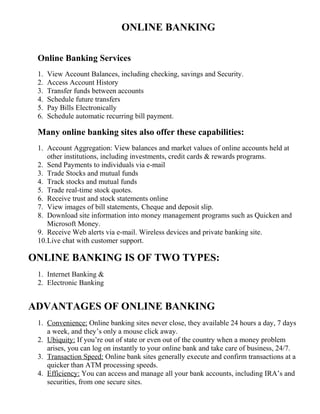
ONLINE BANKING
Online Banking Services
1. View Account Balances, including checking, savings and Security.
2. Access Account History
3. Transfer funds between accounts
4. Schedule future transfers
5. Pay Bills Electronically
6. Schedule automatic recurring bill payment.
Many online banking sites also offer these capabilities:
1. Account Aggregation: View balances and market values of online accounts held at
other institutions, including investments, credit cards & rewards programs.
2. Send Payments to individuals via e-mail
3. Trade Stocks and mutual funds
4. Track stocks and mutual funds
5. Trade real-time stock quotes.
6. Receive trust and stock statements online
7. View images of bill statements, Cheque and deposit slip.
8. Download site information into money management programs such as Quicken and
Microsoft Money.
9. Receive Web alerts via e-mail. Wireless devices and private banking site.
10.Live chat with customer support.
ONLINE BANKING IS OF TWO TYPES:
1. Internet Banking &
2. Electronic Banking
ADVANTAGES OF ONLINE BANKING
1. Convenience: Online banking sites never close, they available 24 hours a day, 7 days
a week, and they’s only a mouse click away.
2. Ubiquity: If you’re out of state or even out of the country when a money problem
arises, you can log on instantly to your online bank and take care of business, 24/7.
3. Transaction Speed: Online bank sites generally execute and confirm transactions at a
quicker than ATM processing speeds.
4. Efficiency: You can access and manage all your bank accounts, including IRA’s and
securities, from one secure sites.
5. Effectiveness: Many online banking sites now offer sophisticated tools, including
account aggregation, stock quotes, rate alerts and portfolio managing programs to
help you manage all your assets more effectively. Most of also compatible with
money managing programs such as Quicken and Microsoft Money.
DISADVANTAGES OF ONLINE BANKING
1. Start-up may take time
2. Learning Curve
3. Bank Site Changes
4. Trusting
HOME BANKING
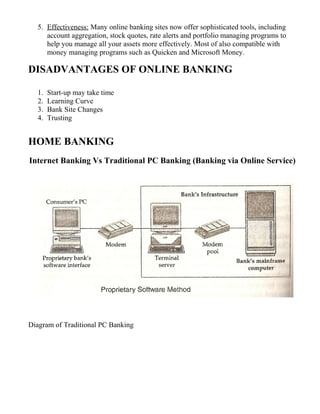
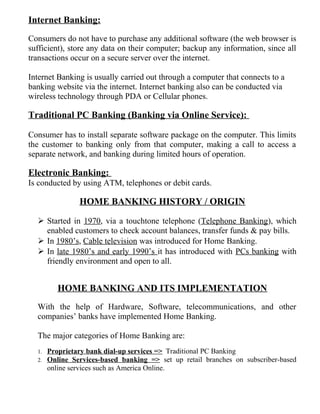
Internet Banking Vs Traditional PC Banking (Banking via Online Service)
Diagram of Traditional PC Banking
Internet Banking:
Consumers do not have to purchase any additional software (the web browser is
sufficient), store any data on their computer; backup any information, since all
transactions occur on a secure server over the internet.
Internet Banking is usually carried out through a computer that connects to a
banking website via the internet. Internet banking also can be conducted via
wireless technology through PDA or Cellular phones.
Traditional PC Banking (Banking via Online Service):
Consumer has to install separate software package on the computer. This limits
the customer to banking only from that computer, making a call to access a
separate network, and banking during limited hours of operation.
Electronic Banking:
Is conducted by using ATM, telephones or debit cards.
HOME BANKING HISTORY / ORIGIN
 Started in 1970, via a touchtone telephone (Telephone Banking), which
enabled customers to check account balances, transfer funds & pay bills.
 In 1980’s, Cable television was introduced for Home Banking.
 In late 1980’s and early 1990’s it has introduced with PCs banking with
friendly environment and open to all.
HOME BANKING AND ITS IMPLEMENTATION
With the help of Hardware, Software, telecommunications, and other
companies’ banks have implemented Home Banking.
The major categories of Home Banking are:
1. Proprietary bank dial-up services => Traditional PC Banking
2. Online Services-based banking => set up retail branches on subscriber-based
online services such as America Online.
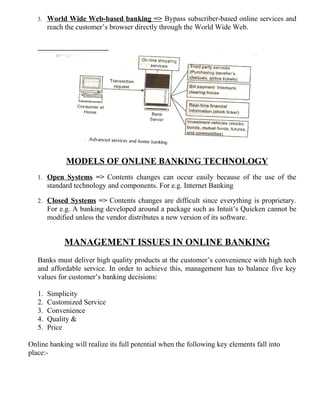
3. World Wide Web-based banking => Bypass subscriber-based online services and
reach the customer’s browser directly through the World Wide Web.
MODELS OF ONLINE BANKING TECHNOLOGY
1. Open Systems => Contents changes can occur easily because of the use of the
standard technology and components. For e.g. Internet Banking
2. Closed Systems => Contents changes are difficult since everything is proprietary.
For e.g. A banking developed around a package such as Intuit’s Quicken cannot be
modified unless the vendor distributes a new version of its software.
MANAGEMENT ISSUES IN ONLINE BANKING
Banks must deliver high quality products at the customer’s convenience with high tech
and affordable service. In order to achieve this, management has to balance five key
values for customer’s banking decisions:
1. Simplicity
2. Customized Service
3. Convenience
4. Quality &
5. Price
Online banking will realize its full potential when the following key elements fall into
place:-
1. Differentiating Products & Services => The development of an interesting
portfolio of products and services that are attractive to customers and sufficiently
differentiated from competitions.
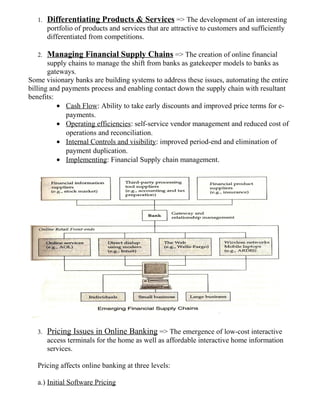
2. Managing Financial Supply Chains => The creation of online financial
supply chains to manage the shift from banks as gatekeeper models to banks as
gateways.
Some visionary banks are building systems to address these issues, automating the entire
billing and payments process and enabling contact down the supply chain with resultant
benefits:
• Cash Flow: Ability to take early discounts and improved price terms for e-
payments.
• Operating efficiencies: self-service vendor management and reduced cost of
operations and reconciliation.
• Internal Controls and visibility: improved period-end and elimination of
payment duplication.
• Implementing: Financial Supply chain management.
3. Pricing Issues in Online Banking => The emergence of low-cost interactive
access terminals for the home as well as affordable interactive home information
services.
Pricing affects online banking at three levels:
a.) Initial Software Pricing
b.) Financial Product Pricing: is based on three major costs-
I. Developmental Costs: which include costs associated with the design,
implementation, testing & commercialization of a financial product.
II. Marketing Costs: which include costs of lunching the new product and
maintaining it throughout its initial stage.
III. Support Costs: which include the costs of providing and delivering the product
and maintaining it via back-office systems.
c.) Usage Pricing
4. Marketing Issues: Attracting Customers => The identification of new market
segments with untapped needs such as the willingness to pay for the convenience of
remote banking.
5. Marketing Issues: Keeping Customers => The establishment of good customer
service on the part of banks. The fact that technology increases the ease of switching
from one bank to another means that banks that do not offer superior customer
service may see low levels of customer loyalty.
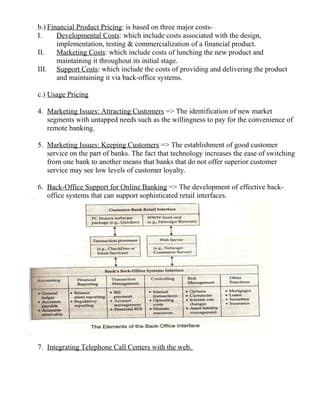
6. Back-Office Support for Online Banking => The development of effective back-
office systems that can support sophisticated retail interfaces.
7. Integrating Telephone Call Centers with the web.
E-COMMERCE AND RETAILING
Retail Industry – Traditionally, retailing essentially involves selling to a final customer
through a physical outlet or direct physical communication. This normally involves a
fairly extensive chain starting from a manufacture to a wholesales & then to the retailer
who through a physical outlet has direct contact with the final customer.
Traditional to e-retailing:
Specialized Stores - Specialized e-stores
Generalized Stores – Generalized e-stores
Malls – E-malls
New form of business – E Broker.
ON-LINE RETAIL INDUSTRY DYNAMICS
• Overbuilding and excess supply
• Changes in consumer demographics, with more premium placed on efficient use of
time.
• Changes in consumer behavior, with less focus on brand name and more on lowest
prices.
• Technology improvements that provide greater convenience and more information
than traditional retailing.
Features of E-Retailing –
1. A method for selecting your purchases (eg Amazon.com & shopping chart
facility)
2. A mechanism for creating & Submitting on order.
3. A secure e-payment facility for your purchases.
4. An appropriate distribution mechanism, which has to be carefully thought out
for the particular category of goods that are being sold.
5. A browsing facility, normally by subject or by category.
6. A searching facility, which will search for a particulars good that you need.
7. A mechanism for customer service & feedback.
CHANGING RETAIL INDUSTRY DYNAMICS AND THE VARIOUS
MANAGEMENT CHALLENGES IN ONLINE RETAILING.
Changing Roles: To the customer:
E-Commerce and on-line publishing
A publication is information, regardless of its format or method of delivery
that is made available to the general public, or to an identified public, either
free of charged or for charged. In theory, these include everything publicly
available via the internet.
Types of online / Web publishing
8. Online Newspaper publishing
9. Online Magazines publishing
10. Online Journal publishing
11. Online Book publishing
12. Online Article publishing
How does online publishing works?
Once the sales are made the publishers create username and password for
the customer so that the customer can login to the publisher’s site and
access the contents. The customers uses the username and password and
can creates more user accounts for there staff or students so that they can
access the material online and can take the tests online, and their results are
automatically captured and analyzed.
Advantages / Need of online Publishing
1. Brings the publishers to mass market
2. Widespread use of web throughout globe
3. Infrastructure expenses are not required, as others have already
made them.
4. Rapidly evolving technology
5. The publishers can reach customers in unique ways.
6. Easy reach the interaction between students and teacher.
But gradually the publishers started realizing that presence on web was not
sufficient to make money, they had to develop business model that:-
 Allows company to offer unique, valuable content to customers.
 Online material related services
 Good Packaging
 Efficient deliver system
 To charge customers directly and convincing them of the price.
Strategies in Online Publishing
1. Early Movers – High rated publishers who are skilled and experienced in their
job and have good system of direct marketing and efficient order fulfillment capability
are able to tap the new media of internet, They act as initiators of online publishing.
They understand and learn the tricks of online publishing and selling and are able to
develop required business model for online publishing.
2. Watchers – big traditional publishing houses which are doubtful about online
publishing in the initial years wait and watch. When channel costs become economical
and distribution system efficient they enter online publishing business. These publishers
generally are not established brand and cannot bear the heavy expenses involved in
starting the online publishing.
3. Testers – these are publishers who are eager to compete in the online medium and
ready to take the challenge. Such publishers are generally established brand and take
the web medium as an alternative to beat their competitors.
Approaches in Online Publishing
1. The Online archive approach: This is new to the web, but is a logical
extension of the trends in electronic delivery over the past several years.
Those publishers who have an existing digital archive turn to web to provide electronic
material of the same, besides utilizing the other medium like print media, CD-ROM etc.
Example: the library catalogues databases are made online. Many websites offer these
databases free of cost to the users. Many magazines, library catalogues, full text search
providers are now on the Internet providing easy access to users.
2. The new medium approach: This is more troublesome and more difficult to
implement, but also more exciting.
Many print publishers have taken Internet as a complete medium and are providing
personalized news delivery and entertainment to the users. Web as a medium requires its
own material and acts as an alternative to print media not a replacement. However
technology is a constraint for such customized web pages, unlike print media formatting
becomes difficult in web media.
3. The publishing intermediation approach: This is an online extension of
the third-party publisher role off-line.
Many publishers understand the need for providing intermediation on web. With the
difficulty in locating specific web services and sites and e-markets on Internet many
publishers houses have turned to act as intermediary service providers on net. For
example Yahoo.com providing additional information for books, games, brands,
services, products etc.
4. The dynamic and just-in-time approach: in this approach, content is
assembled in real-time and transmitted in the format best suited to the user’s tastes
and preferences.
The online content can be created in real time and transmitted to desired location and
can be varied according to user requirements and preferences. The dynamism is added
as web pages customize according individual taste and needs.
Personalized and Customized News
Some of the online news papers site:
CNN.com
Aajtak.com
Starnews.com
NDTV.com
LiveIndia.tv
ShahraSamay.com
BBCWorld.com
But above these excellent news sites the online news was failure.
A dynamic news delivery system requires:
1. Time critical alerts – the timeliness of the information/news provided.
2. Delivery control – The transmission or delivery of specific news to target
users should be easy and smooth.
3. Aging and Archival – there should be system to discard unimportant
information and save important information on regular basis.
4. Dynamic user preference – the flow of information must be smooth and
dynamic corresponding to the changing need of the users.
EDUTAINMENT = EDUCATION + ENTERTAINMENT
1. The act of learning through a medium that both educates and entertains.
2. Any of various media, such computer software, that educate and entertain.
INTERCAST TECHNOLOGY = INTERNET + BROADCAST
The Intercast medium gives you the power to:
1. View detailed background information on a breaking news story instantly
2. See status or feature reports on a sports figure, entertainer or TV event.
3. Join other viewers for a real-time Internet chat about your favorite television
program.
4. Select your viewing choice from 250 channels.
5. Jump instantly to detailed reports on sports, finance or other news topics.
ADVERTISING AND ONLINE PUBLISHING
There are five reasons for the growth of online advertising:
1. Internet audience is growing
2. Spend more time online
3. The growth in broadband connection of internet.
4. Increase in the numbers of buyers and sellers online.
5. Advertisement online by big companies.
DIGITAL COPYRIGHTS AND ELECTRONIC PUBLISHING
Features of Digital Technology:
1. Easy to manipulate
2. Inexpensive to duplicate
3. Easily reproduced with no loss in quality
4. Easily distributed across the Internet.
Online Copyright Protection Methods
Different technical ways of restricting access to web
1. Identifying users and controlling which objects they can access (Host based
access control)
2. Username / Password Restriction
3. Setting up the restricted directory.
Management Issues with Online Publishing
1. Technical Issues
2. Organization Issues
3. Financial Issues
4. Political Issues
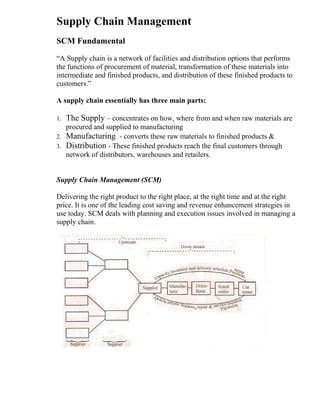
Supply Chain Management
SCM Fundamental
“A Supply chain is a network of facilities and distribution options that performs
the functions of procurement of material, transformation of these materials into
intermediate and finished products, and distribution of these finished products to
customers.”
A supply chain essentially has three main parts:
1. The Supply – concentrates on how, where from and when raw materials are
procured and supplied to manufacturing
2. Manufacturing - converts these raw materials to finished products &
3. Distribution - These finished products reach the final customers through
network of distributors, warehouses and retailers.
Supply Chain Management (SCM)
Delivering the right product to the right place, at the right time and at the right
price. It is one of the leading cost saving and revenue enhancement strategies in
use today. SCM deals with planning and execution issues involved in managing a
supply chain.
Functions of SCM
1. Supplier Management
2. Inventory Management
3. Distribution Management
4. Channel Management
5. Payment Management
6. Financial Management
7. Sales force productivity
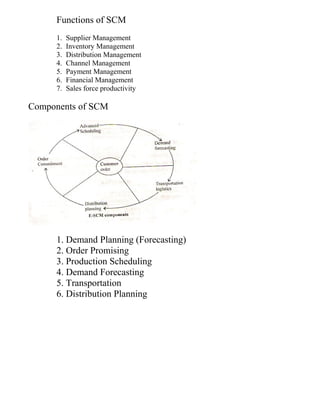
Components of SCM
1. Demand Planning (Forecasting)
2. Order Promising
3. Production Scheduling
4. Demand Forecasting
5. Transportation
6. Distribution Planning
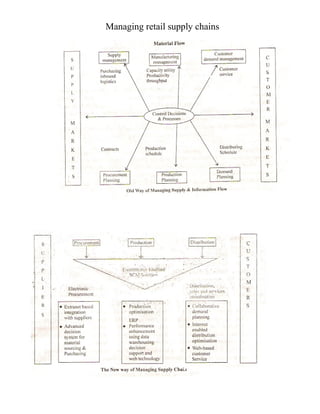
Managing retail supply chains
Full Notes on E-Commerce | Study Material for E-Commerce

Full Notes on E-Commerce | Study Material for E-Commerce

  • 1.
    INTRODUCTION TO E-BUSINESS E-Business is a superset of business cases which have been digitized and work on the internet.  E-Business is the process of buying and selling or exchanging of products, services and information through telecommunication and computer networks including the internet.  The business in developing countries that want to increase their export potential using the internet should build their website to serve their customers.  E-Business = Anytime, Anywhere Business / Shopping.  These days’ businesses are using electronic medium to distribute information and provide customer support. These activities are not termed as “Commerce” activities but “business” activities. Thus, E-Business includes e-commerce along with other applications such as: 1. Re-engineer internal Business Processes. 2. Implement e-commerce system with their customers and Suppliers. 3. Promote enterprise collaboration among business terms and work groups. E-COMMERCE  E-commerce is a subset of E-Business.  Is the act of buying and selling of goods over the internet.  E-commerce is the use of technology towards the automation of business transactions and workflow. Forms of E-commerce: 1. Pure E-Commerce Buyer Seller Information (Digital) Delivery (Digital) Payment (Digital)
  • 2.
    2. Partial E-Commerce BRIEFHISTORY OF E-BUSINESS / OVERVIEW OF E-BUSINESS The need for E-Business increase the demand within business & government to make better use of computing & to better apply computer technology to improve customer interaction, business processes & information exchange both within an enterprise & across enterprises. During 1970’s, the introduction of EFT (Electronic Funds Transfer) between banks over secure private networks (VPNs) changed financial markets. During the late 1970’s & early 1980’s, E-business become wide-spread within companies in the form of Electronic Messages such as EDI (Electronic Data Interchange) & E-mail (Electronic Mail) NETWORK ENABLED BUSINESS PRACTICES Buyer Seller Information (Digital) Delivery (Physical) Payment (Digital) Buyer Seller Information (Digital) Delivery (Digital) Payment (Physical)
  • 3.
    EDI technology hasimproved buying practices & reduced costs for both manufactures & retailers. In the late 1980’s & early 1990’s electronic messaging technologies came up with GROUPWARE. E.g. LOTUS Notes (Taking existing Non Electronic Methods & grafting them onto an electronic platform for improved business process efficiency) In 1990’s Internet (WWW) has rapid growth to millions of potential customers, the term electronic commerce was coined and e-business applications expanded rapidly. The main reason for the rapid application was the development of networks, protocols, software and specifications for e-business activities. CATEGORIES / APPLICATIONS OF E-BUSINESS 1. E-Commerce 2. E-Auctioning 3. E-Banking & E-Payment 4. E-Directories 5. E-Engineering 6. E-Gambling 7. E-Learning 8. E-Mailing 9. E-Marketing 10. E-Supply 11. E-Trading 12. E-Jobsearch 13. E-Traveling 14. E-Matrimonial 15. E-Fashion REQUIREMENT OF E-BUSINESS 1. Requirement of Networking, preferable Internet. 2. Requirement of Web management 3. Requirement of Hardware 4. Requirement of Software 5. Requirement of Database Management System 6. Requirement of Electronic Payment Modes, Digital Signature, Digital Currency Etc. 7. Requirement of Obeying Business Regulations. 8. Requirement for Arranging Delivery of Goods. REQUIREMENT OF SUBSIDARY ITEMS FOR E-BUSINESS 1. CONSUMABLES A. Computer Stationary – Paper Rolls, Printer Ribbons, Coated Papers. B. Refills & Inkjet C. Toner Cartridges
  • 4.
    D. Laser Toner E.Computer Paper Data Binder. 2. COMPUTER ACCERORIES & SPARES A. Mouse Pad B. CD Storage boxes C. Dust Cover D. Sticker & Transparencies 3. STAND BY EQUIPMENTS A. Stabilizer B. Inverter / UPS C. Generator. BENEFITS / NEEDS / ADVANTAGES OF E-COMMERCE Benefits / Needs / Advantages of E-Commerce to Businesses 1. Global Reach: Helps to reach a more geographical customer based and more business partners as compared to the traditional business methods. 2. Reduction in Paper Costs: Through the use of EDI it has reduced the cost for paper and become more secure. 3. Reduction in Inventories: A reduction in inventory is desirable to enable reductions in storage, handling, insurance and administrative costs. 4. Faster Access to Information: Because of Internet the information can spread faster and easily. 5. Lower Telecommunication Costs: Low cost of connecting to the internet, small and medium businesses can easily afford business on the internet. 6. Improved Customer Service: Helping the customer to access information before, during and after a sale. 7. New Found Business Partners: Internet based E-commerce enables businesses to find new business partners globally on the web, thus not restricting themselves to a specific choice of suppliers. 8. Reduced Production Cycle Time: By allowing teams to electronically share design specifications and refinement processes. Benefits / Needs / Advantages of E-Commerce to Customers: 1. Convenience of shopping at Home: Anytime the customer can shop without considering the store hours. 2. Virtual Auctions: E-commerce has made it possible for customers to participate in virtual auctions for buying and selling.
  • 5.
    3. Increased Choiceof vendors and Products: Customers can have an increased choice of vendors or products because they are no longer geographically constrained to reach a vendor or a product. E.g. Amazon.com, epaper.timesofindia.com etc. 4. More Competitive Prices and Increased Price Comparison Capabilities 5. Access to Greater Amounts of Information on Demand 6. Quick Delivery of Digitized Products / Services: E-commerce allows quick delivery in the case of digitized products such as music, software etc. Others Benefits / Needs / Advantages of E-Commerce 1. Economy 2. Better Customer Service 3. Greater Profit Margin 4. Knowledge Markets 5. Information Sharing & control. 6. Better Team Work. 7. Increase Margins 8. Faster Business Transactions 9. New Services 10. Lower Business Setup & Transaction Cost. 11. 365 Days, 24 X 7 Open. LIMITATIONS / DRAWBACKS / ISSUES OF E-COMMERCE 1. E-Commerce is not suitable for every kind of Business: E.g. Perishable Goods, Hospitals etc. 2. Incorrect Cost Estimations: Lack of experience of Virtual Cost 3. Problems with Online Environment: Merchant & customers can be both fake. 4. Increased Competition: Can be seen by customers but also to competitors. 5. Expensive Security KEY SUCCESS FACTORS IN E-COMMERCE 1. Providing value to customers: 2. Providing Service and Performance 3. Providing an attractive website. 4. Providing an incentive for customers to buy and to return 5. Helping customers do their job consuming.
  • 6.
    6. Letting customershelp themselves. 7. Providing a sense of community: Chat room, discussion boards, soliciting customers input, loyalty schemes can help in this respect Economic potential of E-Commerce / E-Commerce Framework Application Services C2B (Customer to Business) B2B (Business to Business) Intra-Organizational Data Management Order Processing – Mail Order Payment Scheme – Electronic Cash Clearing House or Virtual Mall Interface Layer Interactive Catalogue Directory Support Function Software Agents Secure Messaging Secure Hyper Text Transfer Protocol Encrypted E-mail, EDI Remote Programming (RPC) Middle Ware Services Structure Document (HTML) Compound Document (OLE) Network Infrastructure Wireless- Mobile, Radio Wire line – Co-axial, Fiber Optical
  • 7.
    Categories of E-Business/ E-Commerce Models A company’s business model is the way in which it conducts business in order to generate revenue / profit. In the new economy, companies are creating new business models and reinventing old models. Based on these categories of e-business models are divided into two broad categories:- A. E-business model based on the relationship of transaction parties. B. E-business model based on the relationship of transaction types. A. E-business model based on the relationship of transaction parties. 1.Business-to-Business (B2B): Inter-Organizational transactions and electronic market transactions between organizations or businesses. E.g. www.shop2gether.com, www.ICICIDirect.com, www.cisco.com 2. Business-to-Consumer (B2C): Retailing transactions E.g. www.Amazon.com 3. Consumer-to-Consumer (C2C): A consumer or individual sells directly to another consumer or individuals. E.g. www.buynsell.com, www.ebay.com 4. Consumer-to-Business (C2B): Individuals Sells products and services to organizations E.g. www.priceline.com, www.direct-marketing.net 5. Business-to-Government (B2G): Business selling to local, state & central govt. E.g. www.Igov.com
  • 8.
    B. E-business modelbased on the relationship of transaction types. 1. Buying and Selling goods and services, usually referred to as electronic markets. A. Product / Service Information Request. B. Purchase Request with Payment (e.g. Credit Card no.) C. Authentication of purchaser and verification of credit status. D. Status of Credit Card OK E. Purchase / Service Delivery (if Online) or Shipping Document. F. Payment Advice from Bank to Supplier G. Payment 2. Inter organization Information System A. EDI B. EFT C. Electronic Forms D. Integrated Messaging E. Shared Database F. SCM: Supply Chain Management: Co-operation between a company and its suppliers or company regarding inventory management, demand forecasting and order fulfillment. This can reduce inventories, speed shipments and enable just-in-time manufacturing.
  • 9.
    BUSINESS-TO-BUSINESS (B2B) E-COMMERCE MODELS –Both sellers and buyers are business organizations – Involves complex procurement, manufacturing, planning collaboration, payment terms & performance agreements. – Covers a board range of applications that enable a business to form electronic relationships with its distributors, resellers, suppliers and competitors. – B2B E-commerce contributes to lower purchase costs, reduced inventory, enhanced efficiency and lower sales and marketing costs. B2B APPLICATIONS - Supply Chain Management (SCM) - Electronic Marketing - Procurement Management - Just-in-Time (JIT) delivery - Electronic Data Interchange (EDI)
  • 10.
    ENTITIES / COMPONENTS INB2B E-COMMERCE 1. Selling Company 2. Buying Company 3. Electronic Intermediary: Which is a third- party intermediating service provider when the selling and buying companies are not interacting with each other directly. 4. Network Platform: Can be Internet, an Intranet or an Extranet. 5. Communication Protocols: i.e. EDI 6. Back-end Information System: ERP (Enterprise Resource Planning) e.g. SAP’s R/3, Bayan etc. and DBMS (Database Management System) e.g. Oracle, SQL etc.
  • 11.
    MAJOR DIFFERENCES BETWEEN B2CBUYERS AND B2B BUYERS S.No. Characteristics B2C Buyers B2B Buyers 1 Demand Individual Organizational 2 Purchase Volume Smaller Larger 3 Distribution Indirect Direct 4 Nature of Buying More Personal More Professional 5 Number of Customers Many Fewer 6 Decision Making Single Multiple 7 Negotiations Simpler Complex 8 Primary Promotional Method Advertising Contacts & Relationships CATEGORIES / TYPES OF B2B E-COMMERCE 1. The Supplier-Oriented B2B E-Commerce 2. The Buyer-Oriented B2B E-Commerce 3. The Intermediary-Oriented B2B E-Commerce 4. The Intraorganizational B2B E-Commerce 5. The Online B2B Auctions 6. The Virtual Corporations B2B E-Commerce (Networking between Business Partners)
  • 12.
    1. THE SUPPLIER-ORIENTEDB2B E- COMMERCE A Classic example of a supplier-oriented B2B marketplace is that of Cisco connection online (CCO) which operates Cisco’s electronic marketplace. The various services of B2B that cisco’s website provided to its customers 1. Customer Service 2. Online Ordering 3. Tracking Order Status.
  • 13.
    Advantages / Benefitsof B2B for Supply Oriented Marketplaces:- 1. Reduced Operating Costs. 2. Enhanced technical support & Customer Service. 3. Reduced Technical Support staff cost. 4. Reduced distribution cost for digital products. 5. Greater Customer loyalty. 2.THE BUYER-ORIENTED B2B E-COMMERCE e.g. http://shoppoint.co.kr/ The buyer-oriented B2B E-commerce has benefits for both Buyers and Sellers.
  • 14.
    The advantages tothe buyers are: 1. Identifying and building relationships with new suppliers worldwide. 2. Cutting down sourcing cycle times and reducing the costs of sourced goods. 3. Transmitting information to multiple suppliers simultaneously and quickly. 4. Quickly receiving and comparing offers from a large number of suppliers to get the best deal. The advantages to the Sellers are: 1.Access to global buyers 2.Boosted Sales 3.Lowered costs for sales and marketing activities 4.Improved sales productivity 3.THE INTERMEDIARY-ORIENTED B2B E- COMMERCE E.g. Shopping Online while flying.
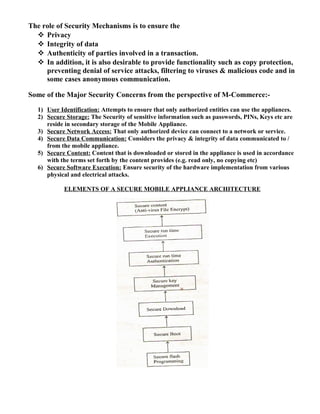
  • 15.
    4.THE INTRAORGANIZATIONAL B2BE- COMMERCE e.g. Tricon Restaurant International which operates 10,000 KFC, Pizza Hut etc. in 83 countries. 5.THE ONLINE B2B AUCTIONS B2B auctions can be categorized into three major types: A. Independent Auctions: A co. may use a third- party auctioner to create the site and sell its goods. E.g. www.fairmarket.com B. Commodity Auctions: Many buyers and sellers come together to a third-party web site for the auction of the same product. E.g. www.fastparts.com C. Private Auctions: Many co’s auction their products themselves on their own sites, without taking the help of intermediaries. Such auctions may be open or by invitation only. E.g. www.auctionblock.com
  • 16.
    6.THE VIRTUAL CORPORATIONSB2B E- COMMERCE (Networking between Business Partners) A Virtual corporation is an organization consisting of several business partners or businesses which are sharing costs and resources for the purpose of producing a product or service. Businesses may agree to enter into virtual corporation alliances for many reasons: 1. Excellence 2. Utilization 3. Low Cost
  • 17.
    EDI – ELECTRONICDATA INTERCHANGE EDI versus Traditional Methods • EDI is the exchange of documents in standardized electronic form, between organization, in an automated manner, directly from a computer application in one organization to an application in another. • EDI is defined as the transfer of structured data by agreed message standards from computer to computer by electronic means. • EDI is replacement of paper-based purchase orders with electronic equivalents. • Easy & cheap communication of structured information throughout the corporate community. • In EDI, the computer applications of both the sender and the receiver have to agree upon a common format of the business document which is being sent as a data file over the communications channel.
  • 19.
    Issues with TraditionalMethods of Exchange of Business 1. Increased Time 2. Low Accuracy 3. More Chances of Errors 4. High Labour Charges 5. Increased Uncertainty Overcome of the issue’s by EDI The information produced by the source computer in an organization is converted into an EDI format by translation software and is sent to the receiving computer over a digital network. On the receiving side, the translation software converts the EDI format into the form required by the business application at that end. Benefits of EDI A. Direct Benefits 1. No Need for rekeying the information 2. Cost of processing EDI documents is much less than that of processing the paper documents. 3. Improved customer service is enabled. 4. Business documents move faster. 5. Information is managed more efficiently. B. Strategic Benefits 1. Reduction in product costs is achieved. 2. Better customer and supplier relations through more effective and faster communication and exchange of information. 3. More accurate forecasting and business planning is achieved due to information availability at the right place and right time and with the help of data mining techniques.
  • 20.
    DRAWBACKS of EDI 1.Unpopular 2. Expensive 3. Point-to-point 4. Requires expensive VAN networking 5. Not easy to use, learn, or implement
  • 21.
    Components of EDISystems 1. EDI Standards: E.g. UN/EDI FACT(The United Nations Standards for EDI for Administration Commerce and Transport) 2. EDI Software: Major Functions of the EDI Software are Data Conversion, Data formatting & Message Communication. The EDI consists of four software components: i. The Application Software or The Business Application ii. The Translation Software iii. The EDI Service Software & iv. The Network Access Software 3. Network infrastructure for communications: The communications networks used may be Private networks, Value Added Networks (VANs), or the Internet. VANs work on the concept of store and forward mechanism, where the documents are sent by the sender without knowing whether the receiver is ready to receive them or not. The documents are kept preserved in an “Electronic Mailbox” and are delivered whenever the recipient becomes ready to accept the document. Some of the well-know EDI VAN Service providers: AT&T, British Telecom (BT), Infonet etc. Sender
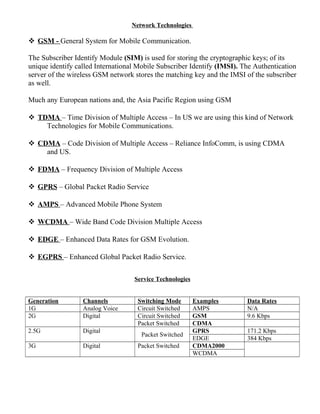
  • 22.
    FINANCIAL EDI • Electronictransmission of payments between a payee and a payer via their respective banks • Allows businesses to replace labor-intensive activities of collecting, disbursing & processing payments • Improves certainty of payment flows The three principal types of Non-Cash Payment instruments used for B2B Payments are: 1. Cheques 2. EFT (Electronic Fund Transfer) 3. ACH (Automated Clearing House) EFT (Electronic Fund Transfer) Are credit transfers between banks where funds flow directly from the payer’s bank to the payee’s bank based on the instructions to the payers. EFT ensures timeliness and certainty of Payments. ACH (Automated Clearing House) Are used for services such as preauthorized credits (e.g. Direct Deposit of Pay Rolls), Pre authorized Debits (e.g. Repetitive Bill Payments) and Consumer Initiated Payment. STRATEGIES IN E-COMMERCE 1. SCM (Supply Chain Management) 2. JIT (Just-in-time Manufacturing) 3. Procurement Management 1. SCM (Supply Chain Management)
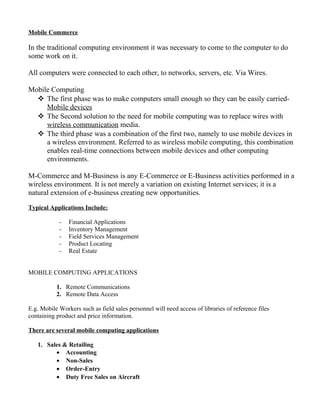
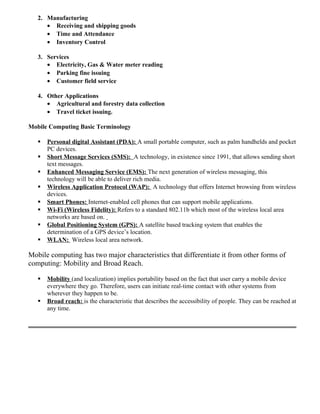
  • 23.
     A supplychain consists of the facilities for acquiring the raw materials, transferring them, storing the intermediate products, & selling the finished goods. Supply Chain Optimisation  Supply chain consists of multiple companies that function as efficiently and effectively as a single company with full information visibility and accountability. SCM has three basic business objectives: 1. To get the right product, to the right place, at the right time & with least cost. 2. To keep inventory as low as possible 3. To reduce the cycle times between customer orders and dispatch of finished products.
  • 24.
    SCM consists ofthe following Components: 1. Supplier Management: Geographically discrete Suppliers & reducing the number of suppliers. 2. Inventory Management: Shortening the cycle time between order and dispatch and keeping the inventory levels to a minimum. 3. Distribution Management: Using EDI to move documents, such as order, purchase bills, shipment notices etc. 4. Channel Management: Distribute the information about changing operation conditions (Policies, Prices, Delivery Schedules etc.) to trading partners 5. Payment Management: through EFT. 6. Sales Force Management: Improving the communication & flow of information among the sales, customer service & production functions through automation.
  • 25.
    Downstream with e-commerce(Supply Chain Management) Models of SCM 1. Push Based Supply Chain Management: uses Traditional Methods 2. Pull Based Supply Chain Management: uses Information technology and E-business systems.
  • 26.
    All this enables toreduce the cycle tones and bring more efficiency and effectiveness to the supply chain. 2. JUST-IN-TIME Manufacturing (JIT) JIT manufacturing focuses mainly on the reduction in inventories during the manufacturing process. It Emphasis that in a production plant the needed materials are to be supplied just-in-time, no earlier or later than is demanded by the manufacturing process.
  • 27.
    Benefits of JIT: 1.Production costs will decrease as the stock is redcued and hence overheads of maintaining large inventories are reduced. 2. Materials from the suppliers are ordered only if the production plant can sell its products. 3. Quality control of production is considerably enhanced. 3. Procurement Management Procurement in the traditional business consisted of inefficient buying, redundant processes, and non-strategic sourcing resulting in long and costly procurement processes. With the increase use of the e-commerce, easy-to-use web based procurement applications have helped to make the procurement process more efficient and less costly. E-Procurement has shifted from paper-based processes to automation, thereby increasing efficiency and effectiveness. E-PROCUREMENT CHAIN
  • 29.
    S. No. PushBased SCM Pull Based SCM 1 Huge stocks are maintained based on the forecasting and previous trends Initiated on the basis of the consumer demand & are accomplished quickly and efficiently using JIT and EDI 2 The information is maintained and processed manually The information systems are maintained and updated automatically 3 The product promotion, schemes, deals & discounts are advertised through print media The product promotion, schemes, deals & discounts are advertised through Online Services 4 The exchange of documents is done using the traditional methods of Fax, phone etc. The exchange of documents is done using EDI Services.
  • 30.
    E-Procurement Chain function’s 1.Management Control: Deals with decisions on which products are available to the employees, who are the approved vendors, who is authorized to approve an order and so on. 2. Online Product Selection 3. Electronic Ordering 4. Application Integration: A good e-procurement system should be integrated with the existing applications such as general ledger, accounts payable, purchasing and human resource applications. 5. Information & Reporting: A good procurement system should be able to track, what was purchased, by whom, from whom, at what price and how long it took to complete each step of the cycle.
  • 31.
    M-Commerce or MobileCommerce Mobile Commerce popularly known as M-Commerce is conducting commercial transactions with the help of mobile devices like mobile, PDA (Personal Digital Assistant) etc. Mobile Commerce is concerned with E-commerce applications via the media of wireless(WAP) and mobile computing. A mobile commerce environment allows the users to access personal or business information and carry out all e-commerce activities while travelling away from home or workplace. Mobile Commerce extends the benefits of ecommerce to both businesses and consumers. Through M-Commerce, businesses in their constant effort to increase their reach are able to reach to even larger number of consumers in comparison to that offered by Internet. For consumers, M-Commerce makes E-Commerce available in their finger tip at any place at any time. Mobile commerce is increasingly becoming popular due to the fact that a mobile device is no longer being used only for making phone calls but as a communication device for any type of communication need. The key feature of mobile computing environment is that the user need not maintain a fixed position in the network. Wireless is a transmission method that enables mobile computing i.e. it enables communication without wires. Mobile Computing focuses on the application side. Choices for mobile computing include infrared, cellular, packet radio services, microwave and satellite service. Mobile Commerce is about the explosion of applications and services that are becoming accessible from internet-enabled mobile devices. It involves new technologies, services and business models. It is quite different from traditional e- commerce. Mobile phones or PDAs impose very different constraints than desktop computers. Mobile Computing: A technology that allows transmission of data, via a computer, without having to be connected to a fixed physical link.
  • 32.
    MOBILE COMPUTING connectsmobile people to the information and applications they need-anytime, anywhere on demand. Move the workplace to any space, using wireless and voice middleware on the server side to support the broadest spectrum of mobile networks and a wide array of devices on the client side. Enable users of telephones, wired or wireless, to conduct business transactions or access information simply by speaking. Benefits of Wireless and Mobile Computing 1 Mobility 2 Ease of Installation in difficult-to-wire areas 3 Reduced installation time 4 Increased reliability 5 Long-term cost savings. APPLICATIONS OF MOBILE COMMERCE Ideally any application that is offered on PC based E-Commerce can also be offered through Mobile Commerce; but it will depend on usefulness of the application whether it will be successful on Mobile commerce. The key factors which will dictate the success of an M-Commerce application are: 1) Urgency of the online service/information 2) Convenience and 3) Location based information/service requirement.
  • 33.
    So far thefollowing applications have been created in M-Commerce arena. 1. Mobile Advertising 6. Mobile Portals 2. Mobile Banking & Bill Payment 7. Mobilizing enterprise Applications 3. Music Purchase 8. Home Automation 4. Notifications 9. Other common applications 5. Tickets Reservation Infrastructure & Technologies of Mobile Commerce Frame required for mobile computing The mains aspects of M-Commerce infrastructure that are different from a normal E- Commerce infrastructure are: 1 Wireless Enabled Device: i.e. Bluetooth, IRDA (Infrared Adapter), GPS (Global Processing System), Wi-Fi (Wireless Fidelity) etc. 2 Micro Browser: browser is specially created for mobile devices. 3 Wireless Deliverable Contents: The Internet contents created needed to be displayed on a mobile device are written using a mark up language named WML (Wireless Mark up Language). The E-Commerce servers can serve Internet contents in two ways: Wired E-Commerce Infrastructure Mobile Device Contents in WML Wireless Channel MicroBrowser Contents in HTML WAP Gateway
  • 34.
    Either by rewritingtheir contents in a WML or to pass the existing html pages through a gateway that is called WAP gateway (Wireless Access Gateway). Mostly WAP gateways are used to automatically convert the already existing html contents in WML form. 4 Others: There are also other components that are normally used to take care of security, transaction processing and other aspects of E-Commerce transactions. Limitations of Mobile Commerce 1. Smaller device size 2. Limited processing power 3. Limited processing memory 4. Limited bandwidth. 5. Limited battery time. Security Considerations for the Mobile Commerce • Authentication techniques to ensure mobile security • Fraud prevention • Security Layer i.e. WTLS (Wireless Transport Layer Security):- This is an optional layer that provides authentication, confidentiality and secures connections between applications. • The Security services provided by the WTLS are: • 1. Privacy • 2. Server Authentication • 3. Client Authentication • 4. Data Integrity. Security Concerns in M-Commerce
  • 35.
    The role ofSecurity Mechanisms is to ensure the  Privacy  Integrity of data  Authenticity of parties involved in a transaction.  In addition, it is also desirable to provide functionality such as copy protection, preventing denial of service attacks, filtering to viruses & malicious code and in some cases anonymous communication. Some of the Major Security Concerns from the perspective of M-Commerce:- 1) User Identification: Attempts to ensure that only authorized entities can use the appliances. 2) Secure Storage: The Security of sensitive information such as passwords, PINs, Keys etc are reside in secondary storage of the Mobile Appliance. 3) Secure Network Access: That only authorized device can connect to a network or service. 4) Secure Data Communication: Considers the privacy & integrity of data communicated to / from the mobile appliance. 5) Secure Content: Content that is downloaded or stored in the appliance is used in accordance with the terms set forth by the content provides (e.g. read only, no copying etc) 6) Secure Software Execution: Ensure security of the hardware implementation from various physical and electrical attacks. ELEMENTS OF A SECURE MOBILE APPLIANCE ARCHITECTURE
  • 36.
    Network Technologies  GSM- General System for Mobile Communication. The Subscriber Identify Module (SIM) is used for storing the cryptographic keys; of its unique identify called International Mobile Subscriber Identify (IMSI). The Authentication server of the wireless GSM network stores the matching key and the IMSI of the subscriber as well. Much any European nations and, the Asia Pacific Region using GSM  TDMA – Time Division of Multiple Access – In US we are using this kind of Network Technologies for Mobile Communications.  CDMA – Code Division of Multiple Access – Reliance InfoComm, is using CDMA and US.  FDMA – Frequency Division of Multiple Access  GPRS – Global Packet Radio Service  AMPS – Advanced Mobile Phone System  WCDMA – Wide Band Code Division Multiple Access  EDGE – Enhanced Data Rates for GSM Evolution.  EGPRS – Enhanced Global Packet Radio Service. Service Technologies Generation Channels Switching Mode Examples Data Rates 1G Analog Voice Circuit Switched AMPS N/A 2G Digital Circuit Switched GSM 9.6 Kbps Packet Switched CDMA 2.5G Digital Packet Switched GPRS 171.2 Kbps EDGE 384 Kbps 3G Digital Packet Switched CDMA2000 WCDMA
  • 37.
    Mobile Commerce In thetraditional computing environment it was necessary to come to the computer to do some work on it. All computers were connected to each other, to networks, servers, etc. Via Wires. Mobile Computing  The first phase was to make computers small enough so they can be easily carried- Mobile devices  The Second solution to the need for mobile computing was to replace wires with wireless communication media.  The third phase was a combination of the first two, namely to use mobile devices in a wireless environment. Referred to as wireless mobile computing, this combination enables real-time connections between mobile devices and other computing environments. M-Commerce and M-Business is any E-Commerce or E-Business activities performed in a wireless environment. It is not merely a variation on existing Internet services; it is a natural extension of e-business creating new opportunities. Typical Applications Include: - Financial Applications - Inventory Management - Field Services Management - Product Locating - Real Estate MOBILE COMPUTING APPLICATIONS 1. Remote Communications 2. Remote Data Access E.g. Mobile Workers such as field sales personnel will need access of libraries of reference files containing product and price information. There are several mobile computing applications 1. Sales & Retailing • Accounting • Non-Sales • Order-Entry • Duty Free Sales on Aircraft
  • 38.
    2. Manufacturing • Receivingand shipping goods • Time and Attendance • Inventory Control 3. Services • Electricity, Gas & Water meter reading • Parking fine issuing • Customer field service 4. Other Applications • Agricultural and forestry data collection • Travel ticket issuing. Mobile Computing Basic Terminology  Personal digital Assistant (PDA): A small portable computer, such as palm handhelds and pocket PC devices.  Short Message Services (SMS): A technology, in existence since 1991, that allows sending short text messages.  Enhanced Messaging Service (EMS): The next generation of wireless messaging, this technology will be able to deliver rich media.  Wireless Application Protocol (WAP): A technology that offers Internet browsing from wireless devices.  Smart Phones: Internet-enabled cell phones that can support mobile applications.  Wi-Fi (Wireless Fidelity): Refers to a standard 802.11b which most of the wireless local area networks are based on.  Global Positioning System (GPS): A satellite based tracking system that enables the determination of a GPS device’s location.  WLAN: Wireless local area network. Mobile computing has two major characteristics that differentiate it from other forms of computing: Mobility and Broad Reach.  Mobility (and localization) implies portability based on the fact that user carry a mobile device everywhere they go. Therefore, users can initiate real-time contact with other systems from wherever they happen to be.  Broad reach: is the characteristic that describes the accessibility of people. They can be reached at any time.
  • 39.
    BUSINESS MODELS  ABuyer-oriented e-commerce system.  A Seller-oriented e-commerce system.  A virtual market place with multiple buyers and sellers. I Buyer-oriented E-commerce models suit large volumes of items of different types:  Maintenance, repair, and operating goods;  Products needed to service a given product;  Components of raw materials used in a manufacture;  Goods traded by a wholesaler;  Large, less frequently ordered capital items. E-Procurement (Starts with purchase requisition and involves):  Different levels of authorization;  Selection of suppliers;  Requests for quotations;  Monitoring the order fulfilment;  Payment. Two distinct classes of activities:  Intra-company activities;  Inter-company activities.
  • 40.
    Integration Issues B2B requiresthat companies integrate their systems:  Intercompany Integration – Need of standards and overcome problems with EDI and VPNs. – Interoperation using XML (which acts as a business connector).  Intracompany Integration – Seamless integration of orders and back-end systems; – Standardisation of information processes (e.g. through ERPs) • Order entry & fulfilment. • Logistics. • Inventory. • Production planning and monitoring. • Accounting entry and financial systems • Human resources and payrolls. Buy-side e-commerce system
  • 41.
    Purchasing in “buy-sidee-commerce” II Sell-side e-commerce A supplier-to-buyers system providing:
  • 42.
     Product catalogue; Product configuration;  Business roles (for automating approval & ordering);  Customer service;  Fulfilment and shipping;  Accounts receivable/invoicing and e-payments;  Monitoring of order status and history.
  • 43.
    Sell-side e-commerce system Sell-sideSoftware Platforms Systems include: sell.com - a platform that allows one to build a sell-side system; WebDB - a front-end to Oracle DBMS, which allows one to build a portal that communicates with Oracle DB. III Virtual Markets Meeting places for vendors and buyers:  Digital market places;  Vertical portals. E.g. Boeing’s PART – allows airlines to purchase spare parts from different suppliers.
  • 44.
    Virtual Organization (VO)or Company is one whose members are geographically apart, usually working by computer e-mail & groupware while appearing to others to be a single, unified organization with a real physical location. A Virtual Organization is a temporary network of independent companies having several different roles connected through a communication network in order to share skills and competencies to access new markets. Virtual Organization will only exist for a temporary time limit that is the time needed to satisfy its purpose. Features of Virtual Organization • It removes many barriers-especially that of time & location. • It emphasizes concentrating on new services and products, especially those with intensive information and knowledge characteristics, rather than concentrating on cost savings made possible by removing the barriers. • It goes beyond outsourcing and strategic alliances & is more flexible in:  That has continuously changing partners.  The arrangements are looses and goal oriented.  Emphasizes the use of knowledge to create new products and services.  Its processes can change quickly by agreement of the partners. Reasons for Organizations becoming Virtual • Globalization, with growing trends to include global customers. • Ability to quickly pool expert resources. • Creation of Communities of excellence. • Rapidly changing needs. • Increasingly specialized products and services. • Increasing required to use specialized knowledge. Scope of Virtual Organization In India VO is still in its nascent stage. It will take a couple of years for India to Start competing for Virtual Offices.
  • 45.
    Electronic Payments The ElectronicPayments allow sellers and consumers to clear payments, dues and engage in cash payments, dues and engage in cashless trading on the internet. Electronic payment is a financial exchange that takes place online between buyer & seller. The information as a financial exchange is usually some form of digital financial instrument (Electronic Cash, Electronic checks & encrypted plastic card numbers) that is indirectly produced by a bank or an intermediary. Electronic Payment System [EPS] o Electronic Payment Systems are indispensable in today’s business process as companies are looking for innovating ideas to serve customers faster and at low cost. o Prompt and secure payment, clearing and settlement of credit or debit claims are the important aspects of electronic payment system. o E-commerce capability of reducing transaction time, its cost and providing security is the main reason of its growth. Issues while designing e-payment system 1. Payment instruments must be secure, have a low processing cost and be accepted widely as global currency tender. 2. The forms and characters of payment instrument e.g. electronic cash, credit/debit cards should be desirable to consumer. 3. The issues regarding privacy, fraud, mistakes, bank features should be guarded by proper security features as authentication / privacy etc. 4. The issues regarding the protocols that connect one financial institution to the other. Types of Electronic Payment System: Electronic Payment System (EPS) or Electronic Funds Transfer (EFT) can be divided into three broad categories: 1. Large Scale and Financial Payments o Whole Sale Payments (e.g. Bank to Bank Transfer) o Retail Payments (e.g. ATM)
  • 46.
    2. Retailing Payments oCredit Cards (e.g. Visa, Master Card, Maestro) o Private Level Cards (e.g. JC Penney Card) 3. On Line Electronic Commerce Payment I. Token Based oElectronic Cash e.g. Digi Cash oE-checks e.g. Net Cheque oSmart Cards e.g. Mondex Card. II. Credit Card-based E-Payment System o Encrypted Credit Cards (e.g. WWW Form Based) o Third Party Authorization numbers (e.g. First Virtual) Digital / Electronic Token based Electronic Payment System 1. Cash or real time:. The transactions are settled with the exchange of electronic currency 2. Debit or Prepaid: Users pay in advance for privilege of getting information. 3. Credit or Postpaid: The Customer purchases goods first, which is authenticated by server. The value of purchase is deposited later in bank. SMART CARDS Smart Cards are credit, debit cards & other card products enhanced with microprocessors capable of holding information. E.g. (Metro Card) Smart Cards are basically of two types. 1. Relationship Based Smart Cards: A relationship based smart card is an enhancement of existing card service that a financial institution delivers to its customers via a chip based card. The new services may include. The new services may include: o Access to Multiple Financial Accounts. o Value Added Market etc. o A Variety of functions, such as cash access, bill payments, balance inquiry or funds transfer. 2. Electronic Purses Based Smart Cards: The Electronic Purses are Wallet size smart cards embedded with programmable microchips that store sums of money for people to use instead of cash.
  • 47.
    Working of aSmart Card? CREDIT CARD A Credit card is a small plastic card that has a magnetic strip on the exterior. The magnetic strip carries some form of encoded information about the card number and the card holder. 1. Visa 2. Master Card 3. American Express. 4. Diners 5. Discover 6. Mestro Credit Card Number: 16 Digit Expiration Date: Month Year Types of Credit Cards 1. Secured Credit Cards 2. Prepaid Credit Cards DEBIT CARDS Is a plastic card which provides an alternative payment method to cash when making purchases. Physically the card is an ISO-7810 card like a credit card. It Functionality is more similar to writing cheque as the funds are withdrawn directly from either the card holder’s bank account. In Some countries the debit card is multipurpose acting as the ATM card for withdrawing cash and as a check guarantee card. Merchants can also offer “Cash Back” / “Cash Out” facilities to customers, where a customer can withdraw cash along with the purchase. DIGITAL SIGNATURE A digital signature or digital signature scheme is a type of asymmetric cryptography used to simulate the security properties of a handwritten signature on paper. Digital signature schemes normally give two algorithms, one for signing which involves the user's secret or private key, and one for verifying signatures which involves the user's public key. The output of the signature process is called the "digital signature." A signature provides authentication of a "message". Messages may be anything, from electronic mail to a contract, or even a message sent in a more complicated cryptographic protocol. Digital signatures are used to create public key infrastructure (PKI) schemes in which a user's public key (whether for public-key encryption, digital signatures, or any other purpose) is tied to a user by a digital identity certificate issued by a certificate authority. PKI schemes attempt to unbreakably bind user information
  • 48.
    (name, address, phonenumber, etc.) to a public key, so that public keys can be used as a form of identification.
  • 49.
    E-Commerce and Banking Bankingas a business can be subdivided into five broad types: 1. Retail Banking 2. Investment Banking 3. Domestic Wholesale Banking 4. International Wholesale Banking 5. Trust Banking Of all these types, Retail Banking & Investment Banking are most affected by online technological innovations. Changing Dynamics in Banking Industry Traditional Banking Vs Online Banking A thorough understanding of this competitive environment is needed before banks can determine their strategy. Five distinct factors contribute to the new competitive environment. 1. Changing consumer needs driven by online commerce- Customers want to be able to bank at their convenience, including over the weekend or late at night. Bankers want more stable and long-term relationship with their customers. 2. Optimization of branch networks in order to reduce costs- As banks merge to reduce their operating costs, they are obviously growing in size. 3. Changing demographic trends and potential new consumer markets 4. Cross-industry competition caused by deregulation. 5. New online financial products.
  • 50.
    ONLINE BANKING Online BankingServices 1. View Account Balances, including checking, savings and Security. 2. Access Account History 3. Transfer funds between accounts 4. Schedule future transfers 5. Pay Bills Electronically 6. Schedule automatic recurring bill payment. Many online banking sites also offer these capabilities: 1. Account Aggregation: View balances and market values of online accounts held at other institutions, including investments, credit cards & rewards programs. 2. Send Payments to individuals via e-mail 3. Trade Stocks and mutual funds 4. Track stocks and mutual funds 5. Trade real-time stock quotes. 6. Receive trust and stock statements online 7. View images of bill statements, Cheque and deposit slip. 8. Download site information into money management programs such as Quicken and Microsoft Money. 9. Receive Web alerts via e-mail. Wireless devices and private banking site. 10.Live chat with customer support. ONLINE BANKING IS OF TWO TYPES: 1. Internet Banking & 2. Electronic Banking ADVANTAGES OF ONLINE BANKING 1. Convenience: Online banking sites never close, they available 24 hours a day, 7 days a week, and they’s only a mouse click away. 2. Ubiquity: If you’re out of state or even out of the country when a money problem arises, you can log on instantly to your online bank and take care of business, 24/7. 3. Transaction Speed: Online bank sites generally execute and confirm transactions at a quicker than ATM processing speeds. 4. Efficiency: You can access and manage all your bank accounts, including IRA’s and securities, from one secure sites.
  • 51.
    5. Effectiveness: Manyonline banking sites now offer sophisticated tools, including account aggregation, stock quotes, rate alerts and portfolio managing programs to help you manage all your assets more effectively. Most of also compatible with money managing programs such as Quicken and Microsoft Money. DISADVANTAGES OF ONLINE BANKING 1. Start-up may take time 2. Learning Curve 3. Bank Site Changes 4. Trusting HOME BANKING Internet Banking Vs Traditional PC Banking (Banking via Online Service) Diagram of Traditional PC Banking
  • 52.
    Internet Banking: Consumers donot have to purchase any additional software (the web browser is sufficient), store any data on their computer; backup any information, since all transactions occur on a secure server over the internet. Internet Banking is usually carried out through a computer that connects to a banking website via the internet. Internet banking also can be conducted via wireless technology through PDA or Cellular phones. Traditional PC Banking (Banking via Online Service): Consumer has to install separate software package on the computer. This limits the customer to banking only from that computer, making a call to access a separate network, and banking during limited hours of operation. Electronic Banking: Is conducted by using ATM, telephones or debit cards. HOME BANKING HISTORY / ORIGIN  Started in 1970, via a touchtone telephone (Telephone Banking), which enabled customers to check account balances, transfer funds & pay bills.  In 1980’s, Cable television was introduced for Home Banking.  In late 1980’s and early 1990’s it has introduced with PCs banking with friendly environment and open to all. HOME BANKING AND ITS IMPLEMENTATION With the help of Hardware, Software, telecommunications, and other companies’ banks have implemented Home Banking. The major categories of Home Banking are: 1. Proprietary bank dial-up services => Traditional PC Banking 2. Online Services-based banking => set up retail branches on subscriber-based online services such as America Online.
  • 53.
    3. World WideWeb-based banking => Bypass subscriber-based online services and reach the customer’s browser directly through the World Wide Web. MODELS OF ONLINE BANKING TECHNOLOGY 1. Open Systems => Contents changes can occur easily because of the use of the standard technology and components. For e.g. Internet Banking 2. Closed Systems => Contents changes are difficult since everything is proprietary. For e.g. A banking developed around a package such as Intuit’s Quicken cannot be modified unless the vendor distributes a new version of its software. MANAGEMENT ISSUES IN ONLINE BANKING Banks must deliver high quality products at the customer’s convenience with high tech and affordable service. In order to achieve this, management has to balance five key values for customer’s banking decisions: 1. Simplicity 2. Customized Service 3. Convenience 4. Quality & 5. Price Online banking will realize its full potential when the following key elements fall into place:-
  • 54.
    1. Differentiating Products& Services => The development of an interesting portfolio of products and services that are attractive to customers and sufficiently differentiated from competitions. 2. Managing Financial Supply Chains => The creation of online financial supply chains to manage the shift from banks as gatekeeper models to banks as gateways. Some visionary banks are building systems to address these issues, automating the entire billing and payments process and enabling contact down the supply chain with resultant benefits: • Cash Flow: Ability to take early discounts and improved price terms for e- payments. • Operating efficiencies: self-service vendor management and reduced cost of operations and reconciliation. • Internal Controls and visibility: improved period-end and elimination of payment duplication. • Implementing: Financial Supply chain management. 3. Pricing Issues in Online Banking => The emergence of low-cost interactive access terminals for the home as well as affordable interactive home information services. Pricing affects online banking at three levels: a.) Initial Software Pricing
  • 55.
    b.) Financial ProductPricing: is based on three major costs- I. Developmental Costs: which include costs associated with the design, implementation, testing & commercialization of a financial product. II. Marketing Costs: which include costs of lunching the new product and maintaining it throughout its initial stage. III. Support Costs: which include the costs of providing and delivering the product and maintaining it via back-office systems. c.) Usage Pricing 4. Marketing Issues: Attracting Customers => The identification of new market segments with untapped needs such as the willingness to pay for the convenience of remote banking. 5. Marketing Issues: Keeping Customers => The establishment of good customer service on the part of banks. The fact that technology increases the ease of switching from one bank to another means that banks that do not offer superior customer service may see low levels of customer loyalty. 6. Back-Office Support for Online Banking => The development of effective back- office systems that can support sophisticated retail interfaces. 7. Integrating Telephone Call Centers with the web.
  • 56.
    E-COMMERCE AND RETAILING RetailIndustry – Traditionally, retailing essentially involves selling to a final customer through a physical outlet or direct physical communication. This normally involves a fairly extensive chain starting from a manufacture to a wholesales & then to the retailer who through a physical outlet has direct contact with the final customer. Traditional to e-retailing: Specialized Stores - Specialized e-stores Generalized Stores – Generalized e-stores Malls – E-malls New form of business – E Broker. ON-LINE RETAIL INDUSTRY DYNAMICS • Overbuilding and excess supply • Changes in consumer demographics, with more premium placed on efficient use of time. • Changes in consumer behavior, with less focus on brand name and more on lowest prices. • Technology improvements that provide greater convenience and more information than traditional retailing. Features of E-Retailing – 1. A method for selecting your purchases (eg Amazon.com & shopping chart facility) 2. A mechanism for creating & Submitting on order. 3. A secure e-payment facility for your purchases. 4. An appropriate distribution mechanism, which has to be carefully thought out for the particular category of goods that are being sold. 5. A browsing facility, normally by subject or by category.
  • 57.
    6. A searchingfacility, which will search for a particulars good that you need. 7. A mechanism for customer service & feedback. CHANGING RETAIL INDUSTRY DYNAMICS AND THE VARIOUS MANAGEMENT CHALLENGES IN ONLINE RETAILING. Changing Roles: To the customer:
  • 58.
    E-Commerce and on-linepublishing A publication is information, regardless of its format or method of delivery that is made available to the general public, or to an identified public, either free of charged or for charged. In theory, these include everything publicly available via the internet. Types of online / Web publishing 8. Online Newspaper publishing 9. Online Magazines publishing 10. Online Journal publishing 11. Online Book publishing 12. Online Article publishing How does online publishing works? Once the sales are made the publishers create username and password for the customer so that the customer can login to the publisher’s site and access the contents. The customers uses the username and password and can creates more user accounts for there staff or students so that they can access the material online and can take the tests online, and their results are automatically captured and analyzed. Advantages / Need of online Publishing 1. Brings the publishers to mass market 2. Widespread use of web throughout globe 3. Infrastructure expenses are not required, as others have already made them. 4. Rapidly evolving technology 5. The publishers can reach customers in unique ways. 6. Easy reach the interaction between students and teacher.
  • 59.
    But gradually thepublishers started realizing that presence on web was not sufficient to make money, they had to develop business model that:-  Allows company to offer unique, valuable content to customers.  Online material related services  Good Packaging  Efficient deliver system  To charge customers directly and convincing them of the price. Strategies in Online Publishing 1. Early Movers – High rated publishers who are skilled and experienced in their job and have good system of direct marketing and efficient order fulfillment capability are able to tap the new media of internet, They act as initiators of online publishing. They understand and learn the tricks of online publishing and selling and are able to develop required business model for online publishing. 2. Watchers – big traditional publishing houses which are doubtful about online publishing in the initial years wait and watch. When channel costs become economical and distribution system efficient they enter online publishing business. These publishers generally are not established brand and cannot bear the heavy expenses involved in starting the online publishing. 3. Testers – these are publishers who are eager to compete in the online medium and ready to take the challenge. Such publishers are generally established brand and take the web medium as an alternative to beat their competitors. Approaches in Online Publishing 1. The Online archive approach: This is new to the web, but is a logical extension of the trends in electronic delivery over the past several years. Those publishers who have an existing digital archive turn to web to provide electronic material of the same, besides utilizing the other medium like print media, CD-ROM etc. Example: the library catalogues databases are made online. Many websites offer these databases free of cost to the users. Many magazines, library catalogues, full text search providers are now on the Internet providing easy access to users. 2. The new medium approach: This is more troublesome and more difficult to implement, but also more exciting.
  • 60.
    Many print publishershave taken Internet as a complete medium and are providing personalized news delivery and entertainment to the users. Web as a medium requires its own material and acts as an alternative to print media not a replacement. However technology is a constraint for such customized web pages, unlike print media formatting becomes difficult in web media. 3. The publishing intermediation approach: This is an online extension of the third-party publisher role off-line. Many publishers understand the need for providing intermediation on web. With the difficulty in locating specific web services and sites and e-markets on Internet many publishers houses have turned to act as intermediary service providers on net. For example Yahoo.com providing additional information for books, games, brands, services, products etc. 4. The dynamic and just-in-time approach: in this approach, content is assembled in real-time and transmitted in the format best suited to the user’s tastes and preferences. The online content can be created in real time and transmitted to desired location and can be varied according to user requirements and preferences. The dynamism is added as web pages customize according individual taste and needs. Personalized and Customized News Some of the online news papers site: CNN.com Aajtak.com Starnews.com NDTV.com LiveIndia.tv ShahraSamay.com BBCWorld.com But above these excellent news sites the online news was failure.
  • 61.
    A dynamic newsdelivery system requires: 1. Time critical alerts – the timeliness of the information/news provided. 2. Delivery control – The transmission or delivery of specific news to target users should be easy and smooth. 3. Aging and Archival – there should be system to discard unimportant information and save important information on regular basis. 4. Dynamic user preference – the flow of information must be smooth and dynamic corresponding to the changing need of the users. EDUTAINMENT = EDUCATION + ENTERTAINMENT 1. The act of learning through a medium that both educates and entertains. 2. Any of various media, such computer software, that educate and entertain. INTERCAST TECHNOLOGY = INTERNET + BROADCAST The Intercast medium gives you the power to: 1. View detailed background information on a breaking news story instantly 2. See status or feature reports on a sports figure, entertainer or TV event. 3. Join other viewers for a real-time Internet chat about your favorite television program. 4. Select your viewing choice from 250 channels. 5. Jump instantly to detailed reports on sports, finance or other news topics. ADVERTISING AND ONLINE PUBLISHING There are five reasons for the growth of online advertising: 1. Internet audience is growing 2. Spend more time online 3. The growth in broadband connection of internet. 4. Increase in the numbers of buyers and sellers online. 5. Advertisement online by big companies.
  • 62.
    DIGITAL COPYRIGHTS ANDELECTRONIC PUBLISHING Features of Digital Technology: 1. Easy to manipulate 2. Inexpensive to duplicate 3. Easily reproduced with no loss in quality 4. Easily distributed across the Internet. Online Copyright Protection Methods Different technical ways of restricting access to web 1. Identifying users and controlling which objects they can access (Host based access control) 2. Username / Password Restriction 3. Setting up the restricted directory. Management Issues with Online Publishing 1. Technical Issues 2. Organization Issues 3. Financial Issues 4. Political Issues
  • 63.
    Supply Chain Management SCMFundamental “A Supply chain is a network of facilities and distribution options that performs the functions of procurement of material, transformation of these materials into intermediate and finished products, and distribution of these finished products to customers.” A supply chain essentially has three main parts: 1. The Supply – concentrates on how, where from and when raw materials are procured and supplied to manufacturing 2. Manufacturing - converts these raw materials to finished products & 3. Distribution - These finished products reach the final customers through network of distributors, warehouses and retailers. Supply Chain Management (SCM) Delivering the right product to the right place, at the right time and at the right price. It is one of the leading cost saving and revenue enhancement strategies in use today. SCM deals with planning and execution issues involved in managing a supply chain.
  • 64.
    Functions of SCM 1.Supplier Management 2. Inventory Management 3. Distribution Management 4. Channel Management 5. Payment Management 6. Financial Management 7. Sales force productivity Components of SCM 1. Demand Planning (Forecasting) 2. Order Promising 3. Production Scheduling 4. Demand Forecasting 5. Transportation 6. Distribution Planning
  • 65.