Font Design Research
By Robyn Stickley
• The title font of my digipak is obviously very important as it will be
one of the first things any potential buyer will look at, as I am
planning to put my title at the top of my cover so will maximise the
likelihood of someone acknowledging the name of my artist/album
according to the ‘Z Pattern/Rule’ in advertising.
• My font must also be in keeping with the genre of my album and
digipak -Indie Pop- so I was thinking about how I could show this
through a font and I decided on something kind of messy or slightly
unfinished looking to give it a more relaxed feel to mirror that of the
genre. This could involve asymmetry and a more sketchy look so the
letters aren’t all uniform. Something else I considered was including
the use of harsh lines and geometric shapes. This will not only
highlight the fact that the letters aren’t all symmetrical, but it will
also tie in with the fact that I am planning on using shapes in my
image to enhance it and make it more a piece of art, than simply a
photograph.
Font Style Reasoning
Finding a good font
• As I said on the last slide, I had a good idea of what I wanted so I used mainly
DaFont.com to search for a font that I liked by using key words that fitted the
rough description of the idea I had.
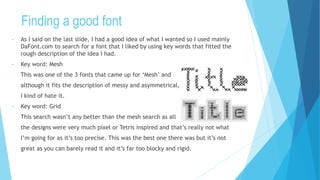
• Key word: Mesh
This was one of the 3 fonts that came up for ‘Mesh’ and
although it fits the description of messy and asymmetrical,
I kind of hate it.
• Key word: Grid
This search wasn’t any better than the mesh search as all
the designs were very much pixel or Tetris inspired and that’s really not what
I’m going for as it’s too precise. This was the best one there was but it’s not
great as you can barely read it and it’s far too blocky and rigid.
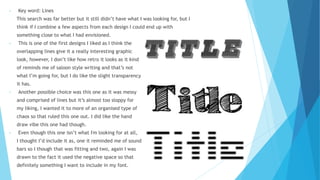
• Key word: Lines
This search was far better but it still didn’t have what I was looking for, but I
think if I combine a few aspects from each design I could end up with
something close to what I had envisioned.
• This is one of the first designs I liked as I think the
overlapping lines give it a really interesting graphic
look, however, I don’t like how retro it looks as it kind
of reminds me of saloon style writing and that’s not
what I’m going for, but I do like the slight transparency
it has.
• Another possible choice was this one as it was messy
and comprised of lines but it’s almost too sloppy for
my liking, I wanted it to more of an organised type of
chaos so that ruled this one out. I did like the hand
draw vibe this one had though.
• Even though this one isn’t what I'm looking for at all,
I thought I’d include it as, one it reminded me of sound
bars so I though that was fitting and two, again I was
drawn to the fact it used the negative space so that
definitely something I want to include in my font.
Making My Own Font
• Ultimately I decided I didn’t like any of the pre-
existing fonts enough to commit to them and use
them on my digipak so I decided to make my own.
• There are a few ways I can do this, one of which is
hand drawing all my letters and scanning them in
so I can turn them into JPEGs in Photoshop.
• Another way would be to just purely use Photoshop
to make my letters, or use a pre-existing font
outline as the basis and working around that.
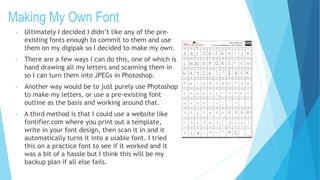
• A third method is that I could use a website like
fontifier.com where you print out a template,
write in your font design, then scan it in and it
automatically turns it into a usable font. I tried
this on a practice font to see if it worked and it
was a bit of a hassle but I think this will be my
backup plan if all else fails.

Font design research

  • 1.
  • 2.
    • The titlefont of my digipak is obviously very important as it will be one of the first things any potential buyer will look at, as I am planning to put my title at the top of my cover so will maximise the likelihood of someone acknowledging the name of my artist/album according to the ‘Z Pattern/Rule’ in advertising. • My font must also be in keeping with the genre of my album and digipak -Indie Pop- so I was thinking about how I could show this through a font and I decided on something kind of messy or slightly unfinished looking to give it a more relaxed feel to mirror that of the genre. This could involve asymmetry and a more sketchy look so the letters aren’t all uniform. Something else I considered was including the use of harsh lines and geometric shapes. This will not only highlight the fact that the letters aren’t all symmetrical, but it will also tie in with the fact that I am planning on using shapes in my image to enhance it and make it more a piece of art, than simply a photograph. Font Style Reasoning
  • 3.
    Finding a goodfont • As I said on the last slide, I had a good idea of what I wanted so I used mainly DaFont.com to search for a font that I liked by using key words that fitted the rough description of the idea I had. • Key word: Mesh This was one of the 3 fonts that came up for ‘Mesh’ and although it fits the description of messy and asymmetrical, I kind of hate it. • Key word: Grid This search wasn’t any better than the mesh search as all the designs were very much pixel or Tetris inspired and that’s really not what I’m going for as it’s too precise. This was the best one there was but it’s not great as you can barely read it and it’s far too blocky and rigid.
  • 4.
    • Key word:Lines This search was far better but it still didn’t have what I was looking for, but I think if I combine a few aspects from each design I could end up with something close to what I had envisioned. • This is one of the first designs I liked as I think the overlapping lines give it a really interesting graphic look, however, I don’t like how retro it looks as it kind of reminds me of saloon style writing and that’s not what I’m going for, but I do like the slight transparency it has. • Another possible choice was this one as it was messy and comprised of lines but it’s almost too sloppy for my liking, I wanted it to more of an organised type of chaos so that ruled this one out. I did like the hand draw vibe this one had though. • Even though this one isn’t what I'm looking for at all, I thought I’d include it as, one it reminded me of sound bars so I though that was fitting and two, again I was drawn to the fact it used the negative space so that definitely something I want to include in my font.
  • 5.
    Making My OwnFont • Ultimately I decided I didn’t like any of the pre- existing fonts enough to commit to them and use them on my digipak so I decided to make my own. • There are a few ways I can do this, one of which is hand drawing all my letters and scanning them in so I can turn them into JPEGs in Photoshop. • Another way would be to just purely use Photoshop to make my letters, or use a pre-existing font outline as the basis and working around that. • A third method is that I could use a website like fontifier.com where you print out a template, write in your font design, then scan it in and it automatically turns it into a usable font. I tried this on a practice font to see if it worked and it was a bit of a hassle but I think this will be my backup plan if all else fails.