Pre-Production
Chloe Ross
Pre-production
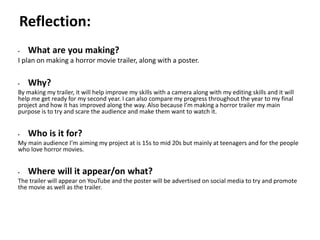
• What are you making?
I plan on making a horror movie trailer, along with a poster.
• Why?
By making my trailer, it will help improve my skills with a camera along with my editing skills and it will
help me get ready for my second year. I can also compare my progress throughout the year to my final
project and how it has improved along the way. Also because I’m making a horror trailer my main
purpose is to try and scare the audience and make them want to watch it.
• Who is it for?
My main audience I’m aiming my project at is 15s to mid 20s but mainly at teenagers and for the people
who love horror movies.
• Where will it appear/on what?
The trailer will appear on YouTube and the poster will be advertised on social media to try and promote
the movie as well as the trailer.
Reflection:
Pre-production: Style sheet
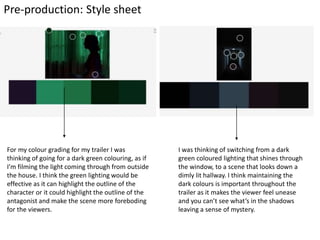
For my colour grading for my trailer I was
thinking of going for a dark green colouring, as if
I’m filming the light coming through from outside
the house. I think the green lighting would be
effective as it can highlight the outline of the
character or it could highlight the outline of the
antagonist and make the scene more foreboding
for the viewers.
I was thinking of switching from a dark
green coloured lighting that shines through
the window, to a scene that looks down a
dimly lit hallway. I think maintaining the
dark colours is important throughout the
trailer as it makes the viewer feel unease
and you can’t see what’s in the shadows
leaving a sense of mystery.
Pre-production: Style sheet
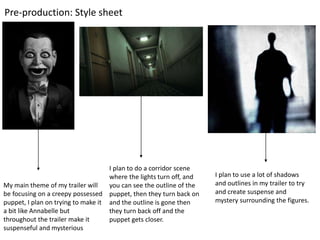
My main theme of my trailer will
be focusing on a creepy possessed
puppet, I plan on trying to make it
a bit like Annabelle but
throughout the trailer make it
suspenseful and mysterious
I plan to do a corridor scene
where the lights turn off, and
you can see the outline of the
puppet, then they turn back on
and the outline is gone then
they turn back off and the
puppet gets closer.
I plan to use a lot of shadows
and outlines in my trailer to try
and create suspense and
mystery surrounding the figures.
Pre-production: Style sheet
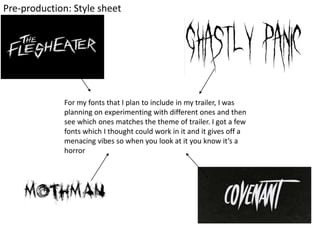
For my fonts that I plan to include in my trailer, I was
planning on experimenting with different ones and then
see which ones matches the theme of trailer. I got a few
fonts which I thought could work in it and it gives off a
menacing vibes so when you look at it you know it’s a
horror
Pre production: layout plan (poster)
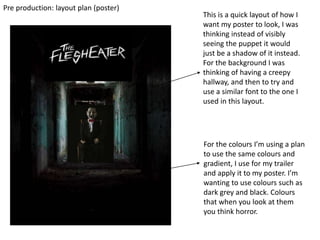
This is a quick layout of how I
want my poster to look, I was
thinking instead of visibly
seeing the puppet it would
just be a shadow of it instead.
For the background I was
thinking of having a creepy
hallway, and then to try and
use a similar font to the one I
used in this layout.
For the colours I’m using a plan
to use the same colours and
gradient, I use for my trailer
and apply it to my poster. I’m
wanting to use colours such as
dark grey and black. Colours
that when you look at them
you think horror.
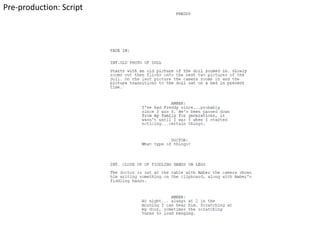
Pre-production: Script
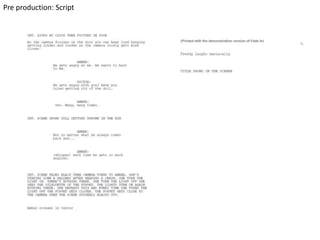
Pre production: Script
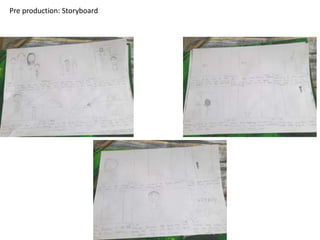
Pre production: Storyboard
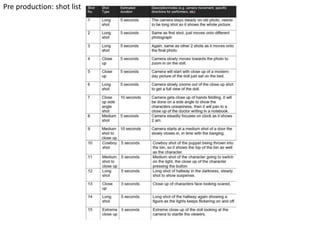
Pre production: shot list
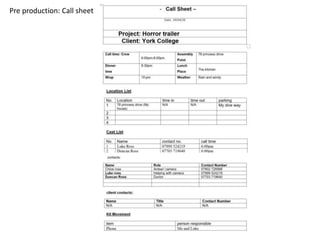
Pre production: Call sheet
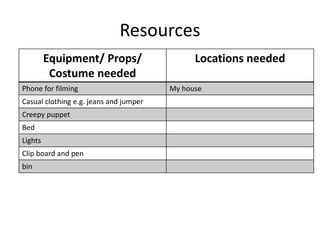
Resources
Equipment/ Props/
Costume needed
Locations needed
Phone for filming My house
Casual clothing e.g. jeans and jumper
Creepy puppet
Bed
Lights
Clip board and pen
bin
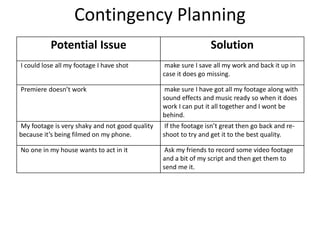
Contingency Planning
Potential Issue Solution
I could lose all my footage I have shot make sure I save all my work and back it up in
case it does go missing.
Premiere doesn’t work make sure I have got all my footage along with
sound effects and music ready so when it does
work I can put it all together and I wont be
behind.
My footage is very shaky and not good quality
because it’s being filmed on my phone.
If the footage isn’t great then go back and re-
shoot to try and get it to the best quality.
No one in my house wants to act in it Ask my friends to record some video footage
and a bit of my script and then get them to
send me it.
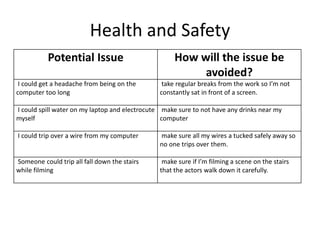
Health and Safety
Potential Issue How will the issue be
avoided?
I could get a headache from being on the
computer too long
take regular breaks from the work so I’m not
constantly sat in front of a screen.
I could spill water on my laptop and electrocute
myself
make sure to not have any drinks near my
computer
I could trip over a wire from my computer make sure all my wires a tucked safely away so
no one trips over them.
Someone could trip all fall down the stairs
while filming
make sure if I’m filming a scene on the stairs
that the actors walk down it carefully.
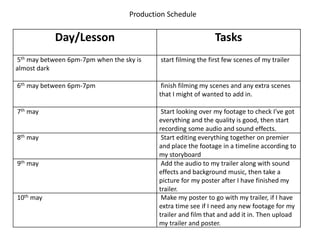
Production Schedule
Day/Lesson Tasks
5th may between 6pm-7pm when the sky is
almost dark
start filming the first few scenes of my trailer
6th may between 6pm-7pm finish filming my scenes and any extra scenes
that I might of wanted to add in.
7th may Start looking over my footage to check I've got
everything and the quality is good, then start
recording some audio and sound effects.
8th may Start editing everything together on premier
and place the footage in a timeline according to
my storyboard
9th may Add the audio to my trailer along with sound
effects and background music, then take a
picture for my poster after I have finished my
trailer.
10th may Make my poster to go with my trailer, if I have
extra time see if I need any new footage for my
trailer and film that and add it in. Then upload
my trailer and poster.

Fmp pre production

  • 1.
  • 2.
    Pre-production • What areyou making? I plan on making a horror movie trailer, along with a poster. • Why? By making my trailer, it will help improve my skills with a camera along with my editing skills and it will help me get ready for my second year. I can also compare my progress throughout the year to my final project and how it has improved along the way. Also because I’m making a horror trailer my main purpose is to try and scare the audience and make them want to watch it. • Who is it for? My main audience I’m aiming my project at is 15s to mid 20s but mainly at teenagers and for the people who love horror movies. • Where will it appear/on what? The trailer will appear on YouTube and the poster will be advertised on social media to try and promote the movie as well as the trailer. Reflection:
  • 3.
    Pre-production: Style sheet Formy colour grading for my trailer I was thinking of going for a dark green colouring, as if I’m filming the light coming through from outside the house. I think the green lighting would be effective as it can highlight the outline of the character or it could highlight the outline of the antagonist and make the scene more foreboding for the viewers. I was thinking of switching from a dark green coloured lighting that shines through the window, to a scene that looks down a dimly lit hallway. I think maintaining the dark colours is important throughout the trailer as it makes the viewer feel unease and you can’t see what’s in the shadows leaving a sense of mystery.
  • 4.
    Pre-production: Style sheet Mymain theme of my trailer will be focusing on a creepy possessed puppet, I plan on trying to make it a bit like Annabelle but throughout the trailer make it suspenseful and mysterious I plan to do a corridor scene where the lights turn off, and you can see the outline of the puppet, then they turn back on and the outline is gone then they turn back off and the puppet gets closer. I plan to use a lot of shadows and outlines in my trailer to try and create suspense and mystery surrounding the figures.
  • 5.
    Pre-production: Style sheet Formy fonts that I plan to include in my trailer, I was planning on experimenting with different ones and then see which ones matches the theme of trailer. I got a few fonts which I thought could work in it and it gives off a menacing vibes so when you look at it you know it’s a horror
  • 6.
    Pre production: layoutplan (poster) This is a quick layout of how I want my poster to look, I was thinking instead of visibly seeing the puppet it would just be a shadow of it instead. For the background I was thinking of having a creepy hallway, and then to try and use a similar font to the one I used in this layout. For the colours I’m using a plan to use the same colours and gradient, I use for my trailer and apply it to my poster. I’m wanting to use colours such as dark grey and black. Colours that when you look at them you think horror.
  • 7.
  • 8.
  • 9.
  • 10.
  • 11.
  • 12.
    Resources Equipment/ Props/ Costume needed Locationsneeded Phone for filming My house Casual clothing e.g. jeans and jumper Creepy puppet Bed Lights Clip board and pen bin
  • 13.
    Contingency Planning Potential IssueSolution I could lose all my footage I have shot make sure I save all my work and back it up in case it does go missing. Premiere doesn’t work make sure I have got all my footage along with sound effects and music ready so when it does work I can put it all together and I wont be behind. My footage is very shaky and not good quality because it’s being filmed on my phone. If the footage isn’t great then go back and re- shoot to try and get it to the best quality. No one in my house wants to act in it Ask my friends to record some video footage and a bit of my script and then get them to send me it.
  • 14.
    Health and Safety PotentialIssue How will the issue be avoided? I could get a headache from being on the computer too long take regular breaks from the work so I’m not constantly sat in front of a screen. I could spill water on my laptop and electrocute myself make sure to not have any drinks near my computer I could trip over a wire from my computer make sure all my wires a tucked safely away so no one trips over them. Someone could trip all fall down the stairs while filming make sure if I’m filming a scene on the stairs that the actors walk down it carefully.
  • 15.
    Production Schedule Day/Lesson Tasks 5thmay between 6pm-7pm when the sky is almost dark start filming the first few scenes of my trailer 6th may between 6pm-7pm finish filming my scenes and any extra scenes that I might of wanted to add in. 7th may Start looking over my footage to check I've got everything and the quality is good, then start recording some audio and sound effects. 8th may Start editing everything together on premier and place the footage in a timeline according to my storyboard 9th may Add the audio to my trailer along with sound effects and background music, then take a picture for my poster after I have finished my trailer. 10th may Make my poster to go with my trailer, if I have extra time see if I need any new footage for my trailer and film that and add it in. Then upload my trailer and poster.

Editor's Notes

  • #4 Use this space to document whatever pre-production work you did for your project. It will vary from person to person and project to project.
  • #5 Use this space to document whatever pre-production work you did for your project. It will vary from person to person and project to project.
  • #6 Use this space to document whatever pre-production work you did for your project. It will vary from person to person and project to project.
  • #8 Use this space to document whatever pre-production work you did for your project. It will vary from person to person and project to project.