Production Reflection
Chloe Ross
Process
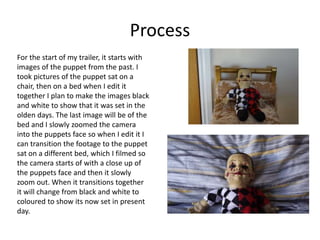
For the start of my trailer, it starts with
images of the puppet from the past. I
took pictures of the puppet sat on a
chair, then on a bed when I edit it
together I plan to make the images black
and white to show that it was set in the
olden days. The last image will be of the
bed and I slowly zoomed the camera
into the puppets face so when I edit it I
can transition the footage to the puppet
sat on a different bed, which I filmed so
the camera starts of with a close up of
the puppets face and then it slowly
zoom out. When it transitions together
it will change from black and white to
coloured to show its now set in present
day.
Process
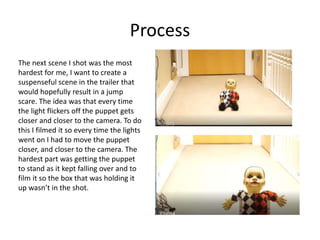
The next scene I shot was the most
hardest for me, I want to create a
suspenseful scene in the trailer that
would hopefully result in a jump
scare. The idea was that every time
the light flickers off the puppet gets
closer and closer to the camera. To do
this I filmed it so every time the lights
went on I had to move the puppet
closer, and closer to the camera. The
hardest part was getting the puppet
to stand as it kept falling over and to
film it so the box that was holding it
up wasn’t in the shot.
Process
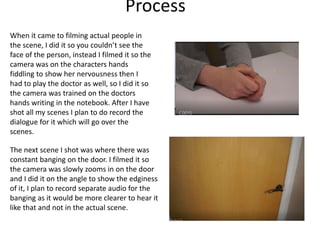
When it came to filming actual people in
the scene, I did it so you couldn’t see the
face of the person, instead I filmed it so the
camera was on the characters hands
fiddling to show her nervousness then I
had to play the doctor as well, so I did it so
the camera was trained on the doctors
hands writing in the notebook. After I have
shot all my scenes I plan to do record the
dialogue for it which will go over the
scenes.
The next scene I shot was where there was
constant banging on the door. I filmed it so
the camera was slowly zooms in on the door
and I did it on the angle to show the edginess
of it, I plan to record separate audio for the
banging as it would be more clearer to hear it
like that and not in the actual scene.
Process
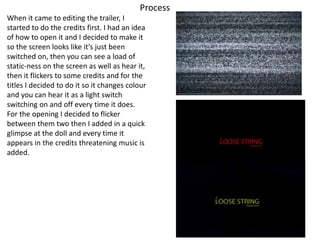
When it came to editing the trailer, I
started to do the credits first. I had an idea
of how to open it and I decided to make it
so the screen looks like it’s just been
switched on, then you can see a load of
static-ness on the screen as well as hear it,
then it flickers to some credits and for the
titles I decided to do it so it changes colour
and you can hear it as a light switch
switching on and off every time it does.
For the opening I decided to flicker
between them two then I added in a quick
glimpse at the doll and every time it
appears in the credits threatening music is
added.
Process
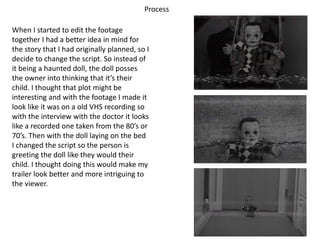
When I started to edit the footage
together I had a better idea in mind for
the story that I had originally planned, so I
decide to change the script. So instead of
it being a haunted doll, the doll posses
the owner into thinking that it’s their
child. I thought that plot might be
interesting and with the footage I made it
look like it was on a old VHS recording so
with the interview with the doctor it looks
like a recorded one taken from the 80’s or
70’s. Then with the doll laying on the bed
I changed the script so the person is
greeting the doll like they would their
child. I thought doing this would make my
trailer look better and more intriguing to
the viewer.
Process
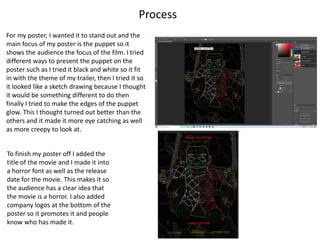
For my poster, I wanted it to stand out and the
main focus of my poster is the puppet so it
shows the audience the focus of the film. I tried
different ways to present the puppet on the
poster such as I tried it black and white so it fit
in with the theme of my trailer, then I tried it so
it looked like a sketch drawing because I thought
it would be something different to do then
finally I tried to make the edges of the puppet
glow. This I thought turned out better than the
others and it made it more eye catching as well
as more creepy to look at.
To finish my poster off I added the
title of the movie and I made it into
a horror font as well as the release
date for the movie. This makes it so
the audience has a clear idea that
the movie is a horror. I also added
company logos at the bottom of the
poster so it promotes it and people
know who has made it.

Production reflection fmp

  • 1.
  • 2.
    Process For the startof my trailer, it starts with images of the puppet from the past. I took pictures of the puppet sat on a chair, then on a bed when I edit it together I plan to make the images black and white to show that it was set in the olden days. The last image will be of the bed and I slowly zoomed the camera into the puppets face so when I edit it I can transition the footage to the puppet sat on a different bed, which I filmed so the camera starts of with a close up of the puppets face and then it slowly zoom out. When it transitions together it will change from black and white to coloured to show its now set in present day.
  • 3.
    Process The next sceneI shot was the most hardest for me, I want to create a suspenseful scene in the trailer that would hopefully result in a jump scare. The idea was that every time the light flickers off the puppet gets closer and closer to the camera. To do this I filmed it so every time the lights went on I had to move the puppet closer, and closer to the camera. The hardest part was getting the puppet to stand as it kept falling over and to film it so the box that was holding it up wasn’t in the shot.
  • 4.
    Process When it cameto filming actual people in the scene, I did it so you couldn’t see the face of the person, instead I filmed it so the camera was on the characters hands fiddling to show her nervousness then I had to play the doctor as well, so I did it so the camera was trained on the doctors hands writing in the notebook. After I have shot all my scenes I plan to do record the dialogue for it which will go over the scenes. The next scene I shot was where there was constant banging on the door. I filmed it so the camera was slowly zooms in on the door and I did it on the angle to show the edginess of it, I plan to record separate audio for the banging as it would be more clearer to hear it like that and not in the actual scene.
  • 5.
    Process When it cameto editing the trailer, I started to do the credits first. I had an idea of how to open it and I decided to make it so the screen looks like it’s just been switched on, then you can see a load of static-ness on the screen as well as hear it, then it flickers to some credits and for the titles I decided to do it so it changes colour and you can hear it as a light switch switching on and off every time it does. For the opening I decided to flicker between them two then I added in a quick glimpse at the doll and every time it appears in the credits threatening music is added.
  • 6.
    Process When I startedto edit the footage together I had a better idea in mind for the story that I had originally planned, so I decide to change the script. So instead of it being a haunted doll, the doll posses the owner into thinking that it’s their child. I thought that plot might be interesting and with the footage I made it look like it was on a old VHS recording so with the interview with the doctor it looks like a recorded one taken from the 80’s or 70’s. Then with the doll laying on the bed I changed the script so the person is greeting the doll like they would their child. I thought doing this would make my trailer look better and more intriguing to the viewer.
  • 7.
    Process For my poster,I wanted it to stand out and the main focus of my poster is the puppet so it shows the audience the focus of the film. I tried different ways to present the puppet on the poster such as I tried it black and white so it fit in with the theme of my trailer, then I tried it so it looked like a sketch drawing because I thought it would be something different to do then finally I tried to make the edges of the puppet glow. This I thought turned out better than the others and it made it more eye catching as well as more creepy to look at. To finish my poster off I added the title of the movie and I made it into a horror font as well as the release date for the movie. This makes it so the audience has a clear idea that the movie is a horror. I also added company logos at the bottom of the poster so it promotes it and people know who has made it.

Editor's Notes

  • #3 Discuss the tools and processes used in your production. Log your thoughts and feelings about your work.
  • #4 Discuss the tools and processes used in your production. Log your thoughts and feelings about your work.
  • #5 Discuss the tools and processes used in your production. Log your thoughts and feelings about your work.
  • #6 Discuss the tools and processes used in your production. Log your thoughts and feelings about your work.
  • #7 Discuss the tools and processes used in your production. Log your thoughts and feelings about your work.