How Your Camera Works
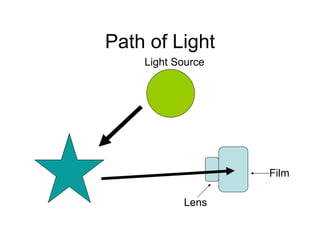
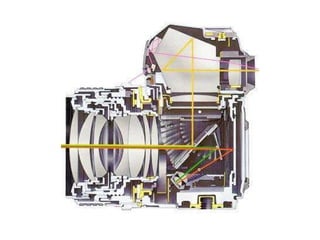
Path of Light Light Source Lens Film
 
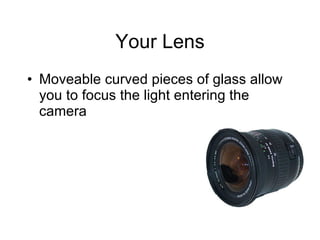
Your Lens Moveable curved pieces of glass allow you to focus the light entering the camera
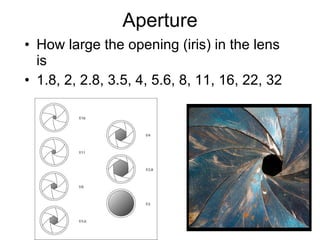
Aperture How large the opening (iris) in the lens is 1.8, 2, 2.8, 3.5, 4, 5.6, 8, 11, 16, 22, 32
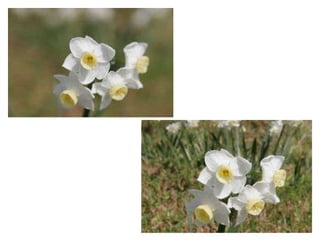
Depth of Field Area of the image that appears in focus from foreground to background Affected by aperture
 
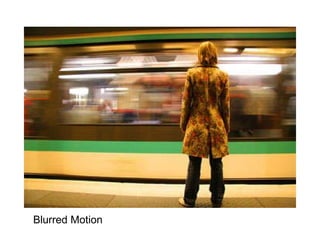
Shutter Controls how long light passes through to the image sensor Can be as short as 1/500 second to 1 second or even minutes Be aware of lighting and it’s affect on the shutter speed Beware of shutter lag
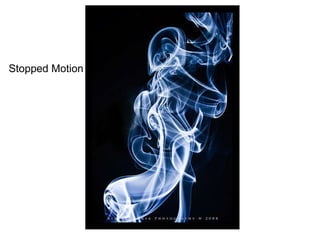
Stopped Motion
Blurred Motion
Film Coated with a light sensitive chemical Chemical reaction occurs when the film is exposed to light Comes in different sensitivities called ISO
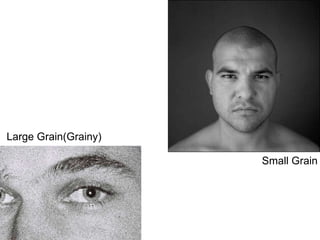
ISO International Standards Organization Measures the sensitivity of the sensor Higher ISO increases light sensitivity, but also increases grain 100, 200, 400, 800, 1600, 3200
Grain As the sensitivity of your film increases, so does the size of your grain This can be seen as an artistic effect, but it does degrade the details in your image
Small Grain Large Grain(Grainy)
Flash To flash or not to flash
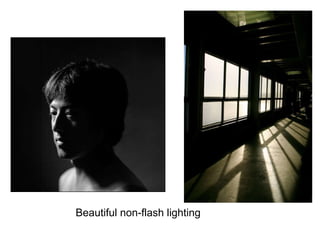
Beautiful non-flash lighting
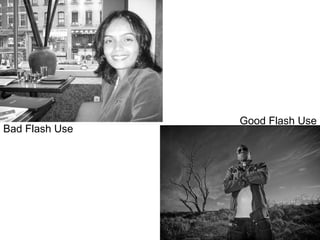
Bad Flash Use Good Flash Use
Shooting Modes
Full Auto Your camera makes all the choices for you except how to frame the shot and when to press the shutter
Program Mode Your camera chooses aperture and shutter speed, but you have the ability to shift the aperture/shutter speed combo
Aperture Priority You choose the aperture and your camera choose an appropriate shutter speed Use this mode for if depth of field is important for your shot
Shutter Priority You decide the shutter speed and your camera chooses an appropriate aperture Use this mode if motion is important
Manual You make all the decisions based on your light meter’s reading On your cameras manual may only include choices on color, ISO, exposure compensation,etc.
Scene Modes Preset Configurations
Portrait Softens the background while keeping your subject in sharp focus
Night Portrait Chooses flash and slower shutter speed to make both background and foreground visible Use in dark conditions when your subject is relatively close to the camera and you want the background to be visible
Landscape Keeps as much in focus as possible Sometimes this setting also sharpens digitally and/or enhances color
Night Landscape This setting turns off the flash and uses a slower shutter speed Requires a tripod
Beach/Snow & Backlight For photographing very bright subjects Sand and snow can be so bright that it confuses your camera-this leads to a too dark photo Backlight-when a very bright light comes from behind your subject This setting chooses an aperture and shutter speed based on the foreground subject May use flash to help lighten foreground
Close Up/Macro Allows for close up shots
Sports Freezes action with a fast shutter speed
Drive Settings One shot Multiple shot blast Self timer

film-How a Camera Works

  • 1.
  • 2.
    Path of LightLight Source Lens Film
  • 3.
  • 4.
    Your Lens Moveablecurved pieces of glass allow you to focus the light entering the camera
  • 5.
    Aperture How largethe opening (iris) in the lens is 1.8, 2, 2.8, 3.5, 4, 5.6, 8, 11, 16, 22, 32
  • 6.
    Depth of FieldArea of the image that appears in focus from foreground to background Affected by aperture
  • 7.
  • 8.
    Shutter Controls howlong light passes through to the image sensor Can be as short as 1/500 second to 1 second or even minutes Be aware of lighting and it’s affect on the shutter speed Beware of shutter lag
  • 9.
  • 10.
  • 11.
    Film Coated witha light sensitive chemical Chemical reaction occurs when the film is exposed to light Comes in different sensitivities called ISO
  • 12.
    ISO International StandardsOrganization Measures the sensitivity of the sensor Higher ISO increases light sensitivity, but also increases grain 100, 200, 400, 800, 1600, 3200
  • 13.
    Grain As thesensitivity of your film increases, so does the size of your grain This can be seen as an artistic effect, but it does degrade the details in your image
  • 14.
    Small Grain LargeGrain(Grainy)
  • 15.
    Flash To flashor not to flash
  • 16.
  • 17.
    Bad Flash UseGood Flash Use
  • 18.
  • 19.
    Full Auto Yourcamera makes all the choices for you except how to frame the shot and when to press the shutter
  • 20.
    Program Mode Yourcamera chooses aperture and shutter speed, but you have the ability to shift the aperture/shutter speed combo
  • 21.
    Aperture Priority Youchoose the aperture and your camera choose an appropriate shutter speed Use this mode for if depth of field is important for your shot
  • 22.
    Shutter Priority Youdecide the shutter speed and your camera chooses an appropriate aperture Use this mode if motion is important
  • 23.
    Manual You makeall the decisions based on your light meter’s reading On your cameras manual may only include choices on color, ISO, exposure compensation,etc.
  • 24.
    Scene Modes PresetConfigurations
  • 25.
    Portrait Softens thebackground while keeping your subject in sharp focus
  • 26.
    Night Portrait Choosesflash and slower shutter speed to make both background and foreground visible Use in dark conditions when your subject is relatively close to the camera and you want the background to be visible
  • 27.
    Landscape Keeps asmuch in focus as possible Sometimes this setting also sharpens digitally and/or enhances color
  • 28.
    Night Landscape Thissetting turns off the flash and uses a slower shutter speed Requires a tripod
  • 29.
    Beach/Snow & BacklightFor photographing very bright subjects Sand and snow can be so bright that it confuses your camera-this leads to a too dark photo Backlight-when a very bright light comes from behind your subject This setting chooses an aperture and shutter speed based on the foreground subject May use flash to help lighten foreground
  • 30.
    Close Up/Macro Allowsfor close up shots
  • 31.
    Sports Freezes actionwith a fast shutter speed
  • 32.
    Drive Settings Oneshot Multiple shot blast Self timer