Issues and opportunities Phil Hardcastle Exploiting the devices of the learner January 10, 2012   |  slide
Quick Poll Do you have Mobile phone for texting and phone Mobile phone with camera and sound recorder Smartphone – all of the above plus internet Laptop/Netbook Tablet device – (ipad or android tablet) January 10, 2012   |  slide
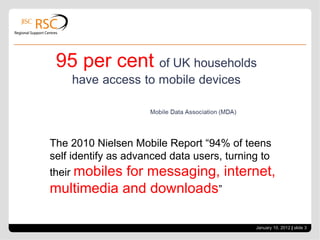
January 10, 2012   |  slide  The 2010 Nielsen Mobile Report “94% of teens self identify as advanced data users, turning to their  mobiles for messaging, internet, multimedia and downloads ”
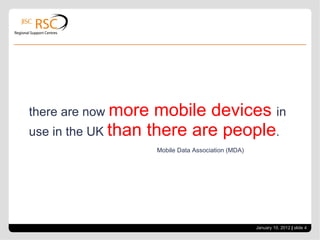
there are now  more mobile devices  in use in the UK  than there are people . Mobile Data Association (MDA)  January 10, 2012   |  slide
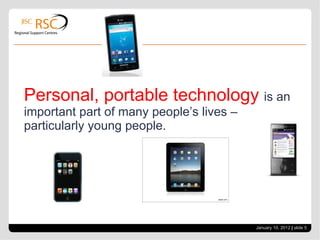
Personal, portable technology  is an important part of many people’s lives – particularly young people. January 10, 2012   |  slide
What’s it used for? Texting E-mail Internet access – Facebook, Twitter, Youtube Maps Apps Photography Video January 10, 2012   |  slide
Ban it or Exploit it? January 10, 2012   |  slide
Problems v Opportunities Distracting Superficial Cost implications for student Fear of theft/bullying Technical problems to enabling access Creating a new digital divide – some don’t have these devices Personal data could be compromised? Who’s responsible if they are a required part of education? January 10, 2012   |  slide
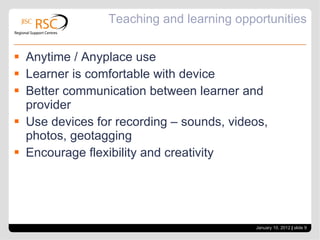
Teaching and learning opportunities Anytime / Anyplace use Learner is comfortable with device Better communication between learner and provider Use devices for recording – sounds, videos, photos, geotagging Encourage flexibility and creativity January 10, 2012   |  slide
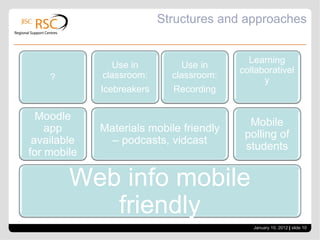
Structures and approaches January 10, 2012   |  slide  Web info mobile friendly Moodle app available for mobile ? Materials mobile friendly – podcasts, vidcast Use in classroom: Icebreakers Use in classroom: Recording Mobile polling of students Learning collaboratively
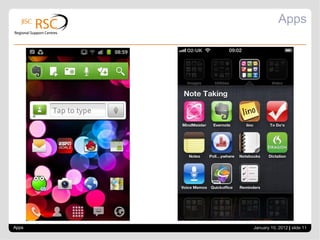
Apps Apps January 10, 2012   |  slide
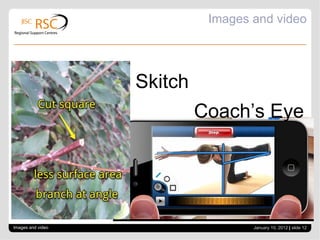
Images and video Images and video January 10, 2012   |  slide  Coach’s Eye Skitch
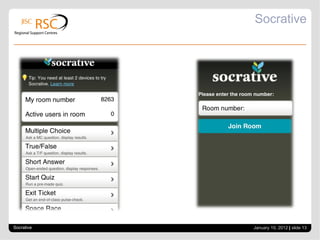
Socrative Socrative January 10, 2012   |  slide
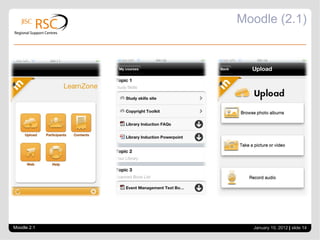
Moodle (2.1) Moodle 2.1 January 10, 2012   |  slide
Mobiles in the classroom Suggested Rules: Never interrupt a lesson Acceptable to use phones to support your classroom work when indicated by the tutor. All phones to Silent. All vibrate mode off. All phones on desk top Permission to answer a call. Bluetooth can be used to transfer files. Using a Twitter HashTag for the course will allow all subject related tweets to be kept. January 10, 2012   |  slide
Resources Khan Academy – 2,700 videos formatted for mobile  http://www.khanacademy.org/ NLN Materials formatted for mobile  www.nln.ac.uk Moodle app - allows moodle pages to be read on a mobile. Revision flashcards for mobile e.g. Quizard Slideshare to re-purpose presentations for use on mobile Socrative student response system -  http://www.socrative.com/ January 10, 2012   |  slide
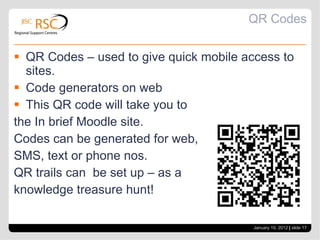
QR Codes QR Codes – used to give quick mobile access to sites. Code generators on web This QR code will take you to the In brief Moodle site. Codes can be generated for web,  SMS, text or phone nos. QR trails can  be set up – as a knowledge treasure hunt! January 10, 2012   |  slide
Uses of mobiles Ice breakers / team building Ask participants to show a picture or song from their mobile that best identifies them With small groups get one person to take photos on their mobile to get a visual record of the group’s activities – group shot, hands, group in action etc Take close ups of group’s eyes – game later is to match eyes to people. Examples from Jackie Gerstein – Mobile Learning http://issuu.com/jackiegerstein/docs/mobile_learning January 10, 2012   |  slide
Tablets Excellence Gateway: Whole college approach to interaction the classroom  http://www.excellencegateway.org.uk/331584 “ Using slates  breaks down barriers  by engaging and including all students at all levels. It brings the interaction and [the] device to the student”. “ Tablets allow for  contextual learning , ie. using mobile devices in the context of learning, for example on a field trip or whilst carrying out an experiment, allowing for technology to be used as and when necessary; rather than during specific times of the day or when the ICT suite is available.” January 10, 2012   |  slide
What are you doing? How do you exploit learner devices? What strategies do you have for managing it? Classroom? Organisational? January 10, 2012   |  slide
Links In brief Moodle page  http://moodle.rsc-em.ac.uk/course/view.php?id=233 2 pdfs Adam Blackwood Mobile Nuggets and Multimedia with Mobiles JISC mobile learning infokit https://mobilelearninginfokit.pbworks.com/w/page/41122430/Home E-safety http://www1.orange.co.uk/safety/ Nielsen Report  http ://blog.nielsen.com/nielsenwire/consumer/kids-today-how-the-class-of-2011-engages-with-media / Jackie Gerstein Mobile Learning  http :// issuu.com/jackiegerstein/docs/mobile_learning Mobile Induction Lesson Mobiles and students with special needs http://theinnovativeeducator.blogspot.com/search/label/Cell%20phones%20in%20Education January 10, 2012   |  slide
App links Mindmeister  http ://www.mindmeister.com/ Evernote  www.evernote.com Lino  http://en.linoit.com/ Polleverywhere  http://www.polleverywhere.com/ Skitch  http://skitch.com/ Coaches Eye  http://www.coachseye.com/ Socrative  www.socrative.com Moodle 2.1 App  http://docs.moodle.org/dev/Mobile_app Khan Academy  www.khanacademy.org nln materials  www.nln.ac.uk Quizard  http://gabysoft.com/Quizard-Smartphone-				Flashcards.aspx Slideshare  http://www.slideshare.net January 10, 2012   |  slide
In brief: Next Month Tuesday February 7 th In brief - Webinars - how can you use them to improve teaching and learning and/or reduce meeting costs? January 10, 2012   |  slide

Exploiting the devices of the learner

  • 1.
    Issues and opportunitiesPhil Hardcastle Exploiting the devices of the learner January 10, 2012 | slide
  • 2.
    Quick Poll Doyou have Mobile phone for texting and phone Mobile phone with camera and sound recorder Smartphone – all of the above plus internet Laptop/Netbook Tablet device – (ipad or android tablet) January 10, 2012 | slide
  • 3.
    January 10, 2012 | slide The 2010 Nielsen Mobile Report “94% of teens self identify as advanced data users, turning to their mobiles for messaging, internet, multimedia and downloads ”
  • 4.
    there are now more mobile devices in use in the UK than there are people . Mobile Data Association (MDA) January 10, 2012 | slide
  • 5.
    Personal, portable technology is an important part of many people’s lives – particularly young people. January 10, 2012 | slide
  • 6.
    What’s it usedfor? Texting E-mail Internet access – Facebook, Twitter, Youtube Maps Apps Photography Video January 10, 2012 | slide
  • 7.
    Ban it orExploit it? January 10, 2012 | slide
  • 8.
    Problems v OpportunitiesDistracting Superficial Cost implications for student Fear of theft/bullying Technical problems to enabling access Creating a new digital divide – some don’t have these devices Personal data could be compromised? Who’s responsible if they are a required part of education? January 10, 2012 | slide
  • 9.
    Teaching and learningopportunities Anytime / Anyplace use Learner is comfortable with device Better communication between learner and provider Use devices for recording – sounds, videos, photos, geotagging Encourage flexibility and creativity January 10, 2012 | slide
  • 10.
    Structures and approachesJanuary 10, 2012 | slide Web info mobile friendly Moodle app available for mobile ? Materials mobile friendly – podcasts, vidcast Use in classroom: Icebreakers Use in classroom: Recording Mobile polling of students Learning collaboratively
  • 11.
    Apps Apps January10, 2012 | slide
  • 12.
    Images and videoImages and video January 10, 2012 | slide Coach’s Eye Skitch
  • 13.
  • 14.
    Moodle (2.1) Moodle2.1 January 10, 2012 | slide
  • 15.
    Mobiles in theclassroom Suggested Rules: Never interrupt a lesson Acceptable to use phones to support your classroom work when indicated by the tutor. All phones to Silent. All vibrate mode off. All phones on desk top Permission to answer a call. Bluetooth can be used to transfer files. Using a Twitter HashTag for the course will allow all subject related tweets to be kept. January 10, 2012 | slide
  • 16.
    Resources Khan Academy– 2,700 videos formatted for mobile http://www.khanacademy.org/ NLN Materials formatted for mobile www.nln.ac.uk Moodle app - allows moodle pages to be read on a mobile. Revision flashcards for mobile e.g. Quizard Slideshare to re-purpose presentations for use on mobile Socrative student response system - http://www.socrative.com/ January 10, 2012 | slide
  • 17.
    QR Codes QRCodes – used to give quick mobile access to sites. Code generators on web This QR code will take you to the In brief Moodle site. Codes can be generated for web, SMS, text or phone nos. QR trails can be set up – as a knowledge treasure hunt! January 10, 2012 | slide
  • 18.
    Uses of mobilesIce breakers / team building Ask participants to show a picture or song from their mobile that best identifies them With small groups get one person to take photos on their mobile to get a visual record of the group’s activities – group shot, hands, group in action etc Take close ups of group’s eyes – game later is to match eyes to people. Examples from Jackie Gerstein – Mobile Learning http://issuu.com/jackiegerstein/docs/mobile_learning January 10, 2012 | slide
  • 19.
    Tablets Excellence Gateway:Whole college approach to interaction the classroom http://www.excellencegateway.org.uk/331584 “ Using slates breaks down barriers by engaging and including all students at all levels. It brings the interaction and [the] device to the student”. “ Tablets allow for contextual learning , ie. using mobile devices in the context of learning, for example on a field trip or whilst carrying out an experiment, allowing for technology to be used as and when necessary; rather than during specific times of the day or when the ICT suite is available.” January 10, 2012 | slide
  • 20.
    What are youdoing? How do you exploit learner devices? What strategies do you have for managing it? Classroom? Organisational? January 10, 2012 | slide
  • 21.
    Links In briefMoodle page http://moodle.rsc-em.ac.uk/course/view.php?id=233 2 pdfs Adam Blackwood Mobile Nuggets and Multimedia with Mobiles JISC mobile learning infokit https://mobilelearninginfokit.pbworks.com/w/page/41122430/Home E-safety http://www1.orange.co.uk/safety/ Nielsen Report  http ://blog.nielsen.com/nielsenwire/consumer/kids-today-how-the-class-of-2011-engages-with-media / Jackie Gerstein Mobile Learning  http :// issuu.com/jackiegerstein/docs/mobile_learning Mobile Induction Lesson Mobiles and students with special needs http://theinnovativeeducator.blogspot.com/search/label/Cell%20phones%20in%20Education January 10, 2012 | slide
  • 22.
    App links Mindmeister http ://www.mindmeister.com/ Evernote  www.evernote.com Lino  http://en.linoit.com/ Polleverywhere  http://www.polleverywhere.com/ Skitch  http://skitch.com/ Coaches Eye  http://www.coachseye.com/ Socrative  www.socrative.com Moodle 2.1 App  http://docs.moodle.org/dev/Mobile_app Khan Academy  www.khanacademy.org nln materials  www.nln.ac.uk Quizard  http://gabysoft.com/Quizard-Smartphone- Flashcards.aspx Slideshare  http://www.slideshare.net January 10, 2012 | slide
  • 23.
    In brief: NextMonth Tuesday February 7 th In brief - Webinars - how can you use them to improve teaching and learning and/or reduce meeting costs? January 10, 2012 | slide