Ten Questions about Mobile
        Learning
  http://tinyurl.com/sunymobile
            David Wicks
    Seattle Pacific University
Augmentation – Not Delivery
“So mLearning is not about
putting e-learning courses
on a phone; you should not
think about mLearning as
delivery of courses.
mLearning is about
augmenting our
learning—and our
performance. This includes
a role in formal learning
and, occasionally can be the
delivery mechanism for a
full learning solution, but the
real opportunity is
augmenting learning and
performance, not learning
delivery.” Kindle Location 590)
   (Quinn, 2011,
Quinn's Four C's of Mobile
         (2011)
1.What is mobile learning?
Which of the following is NOT
 considered mobile learning
        technology?


                 http://www.flickr.com/photos/ekosyste
                 m
2. What are the advantages?


http://www.flickr.com/photos/courosa/
http://www.flickr.com/photos/thomcochrane   (Traxel, 2007)
3. What are the challenges?
4a. Where can (can’t) we make use
       of mobile learning?
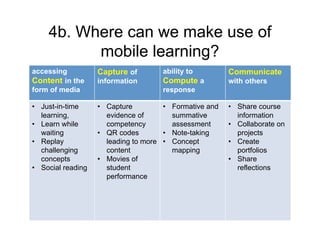
4b. Where can we make use of
          mobile learning?
accessing          Capture of       ability to         Communicate
Content in the     information      Compute a          with others
form of media                       response

• Just-in-time     • Capture         • Formative and   • Share course
  learning,          evidence of       summative         information
• Learn while        competency        assessment      • Collaborate on
  waiting          • QR codes        • Note-taking       projects
• Replay             leading to more • Concept         • Create
  challenging        content           mapping           portfolios
  concepts         • Movies of                         • Share
• Social reading     student                             reflections
                     performance
5. What does the pedagogy look
             like?
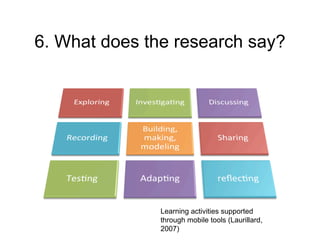
6. What does the research say?


               Learning activities supported
               through mobile tools (Laurillard,
               2007)
7. How is m-learning being
  integrated into learning
  management systems?
8. How is it being integrated
    with social media?
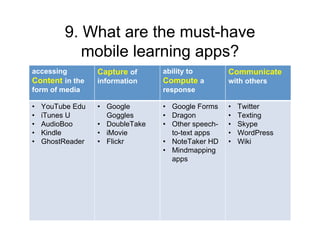
9. What are the must-have
            mobile learning apps?
accessing         Capture of     ability to        Communicate
Content in the    information    Compute a         with others
form of media                    response

•   YouTube Edu   • Google       • Google Forms    •   Twitter
•   iTunes U        Goggles      • Dragon          •   Texting
•   AudioBoo      • DoubleTake   • Other speech-   •   Skype
•   Kindle        • iMovie         to-text apps    •   WordPress
•   GhostReader   • Flickr       • NoteTaker HD    •   Wiki
                                 • Mindmapping
                                   apps
10. How can instructors and
 students be productive with mobile
accessing
                devices?
                     ability to
                      Capture of                             Communicate
Content in the        information         Compute a          with others
form of media                             response
Instructors           Instructors ask     Instructors use    Instructors learn
prepare direct        students to share   speech-to-text     how to text, tweet,
instruction content   video, audio, or    and Google forms   and blog
in formats that       text tips on how    for assessment.
can be consumed       they are being
in chunks using       productive with
mobile devices        mobile apps
Students take         Students capture Students use          Students learn
advantage of JIT      evidence of      mindmapping or        how to share
learning and          competencies met notetaking            documented
available time to                      software for          learning through
learn.                                 classroom notes.      digital portfolio
Comments or Questions?


                             David Wicks
                 Director, Instructional Technology
                     Seattle Pacific University
                          dwicks@spu.edu
                         Twitter: dwicksspu
This work is licensed under the Creative Commons Attribution-Share Alike 3.0 United States License. To
view a copy of this license, visit http://creativecommons.org/licenses/by-sa/3.0/us/ or send a letter to
Creative Commons, 171 Second Street, Suite 300, San Francisco, California, 94105, USA.             16

David Wicks Mobile Learning - SOLsummit 2011

  • 1.
    Ten Questions aboutMobile Learning http://tinyurl.com/sunymobile David Wicks Seattle Pacific University
  • 2.
    Augmentation – NotDelivery “So mLearning is not about putting e-learning courses on a phone; you should not think about mLearning as delivery of courses. mLearning is about augmenting our learning—and our performance. This includes a role in formal learning and, occasionally can be the delivery mechanism for a full learning solution, but the real opportunity is augmenting learning and performance, not learning delivery.” Kindle Location 590) (Quinn, 2011,
  • 3.
    Quinn's Four C'sof Mobile (2011)
  • 4.
  • 5.
    Which of thefollowing is NOT considered mobile learning technology? http://www.flickr.com/photos/ekosyste m
  • 6.
    2. What arethe advantages? http://www.flickr.com/photos/courosa/ http://www.flickr.com/photos/thomcochrane (Traxel, 2007)
  • 7.
    3. What arethe challenges?
  • 8.
    4a. Where can(can’t) we make use of mobile learning?
  • 9.
    4b. Where canwe make use of mobile learning? accessing Capture of ability to Communicate Content in the information Compute a with others form of media response • Just-in-time • Capture • Formative and • Share course learning, evidence of summative information • Learn while competency assessment • Collaborate on waiting • QR codes • Note-taking projects • Replay leading to more • Concept • Create challenging content mapping portfolios concepts • Movies of • Share • Social reading student reflections performance
  • 10.
    5. What doesthe pedagogy look like?
  • 11.
    6. What doesthe research say? Learning activities supported through mobile tools (Laurillard, 2007)
  • 12.
    7. How ism-learning being integrated into learning management systems?
  • 13.
    8. How isit being integrated with social media?
  • 14.
    9. What arethe must-have mobile learning apps? accessing Capture of ability to Communicate Content in the information Compute a with others form of media response • YouTube Edu • Google • Google Forms • Twitter • iTunes U Goggles • Dragon • Texting • AudioBoo • DoubleTake • Other speech- • Skype • Kindle • iMovie to-text apps • WordPress • GhostReader • Flickr • NoteTaker HD • Wiki • Mindmapping apps
  • 15.
    10. How caninstructors and students be productive with mobile accessing devices? ability to Capture of Communicate Content in the information Compute a with others form of media response Instructors Instructors ask Instructors use Instructors learn prepare direct students to share speech-to-text how to text, tweet, instruction content video, audio, or and Google forms and blog in formats that text tips on how for assessment. can be consumed they are being in chunks using productive with mobile devices mobile apps Students take Students capture Students use Students learn advantage of JIT evidence of mindmapping or how to share learning and competencies met notetaking documented available time to software for learning through learn. classroom notes. digital portfolio
  • 16.
    Comments or Questions? David Wicks Director, Instructional Technology Seattle Pacific University dwicks@spu.edu Twitter: dwicksspu This work is licensed under the Creative Commons Attribution-Share Alike 3.0 United States License. To view a copy of this license, visit http://creativecommons.org/licenses/by-sa/3.0/us/ or send a letter to Creative Commons, 171 Second Street, Suite 300, San Francisco, California, 94105, USA. 16