Chapter 6 Addressing the Network - IPV4 Part III
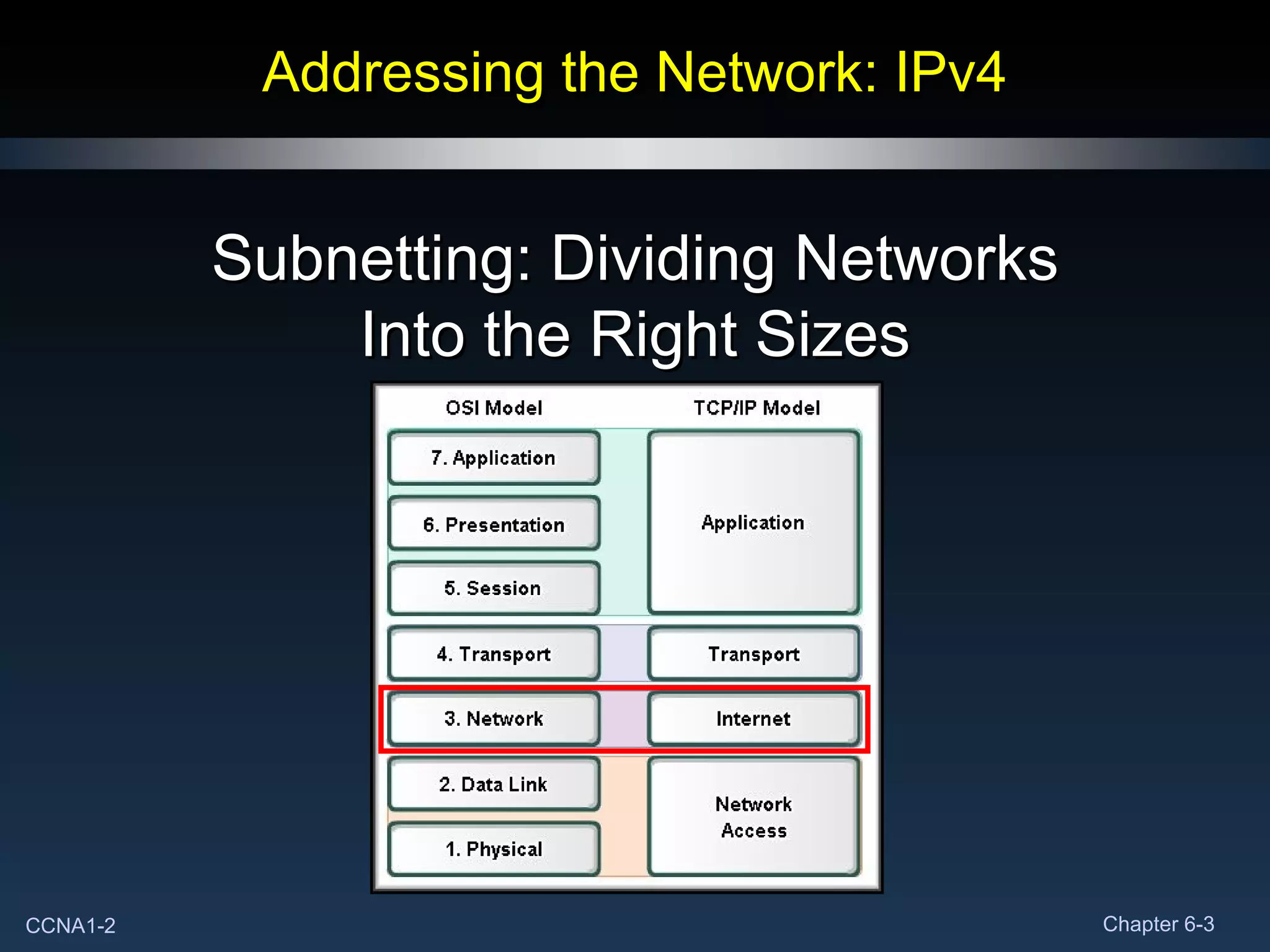
Addressing the Network: IPv4 Subnetting: Dividing Networks Into the Right Sizes
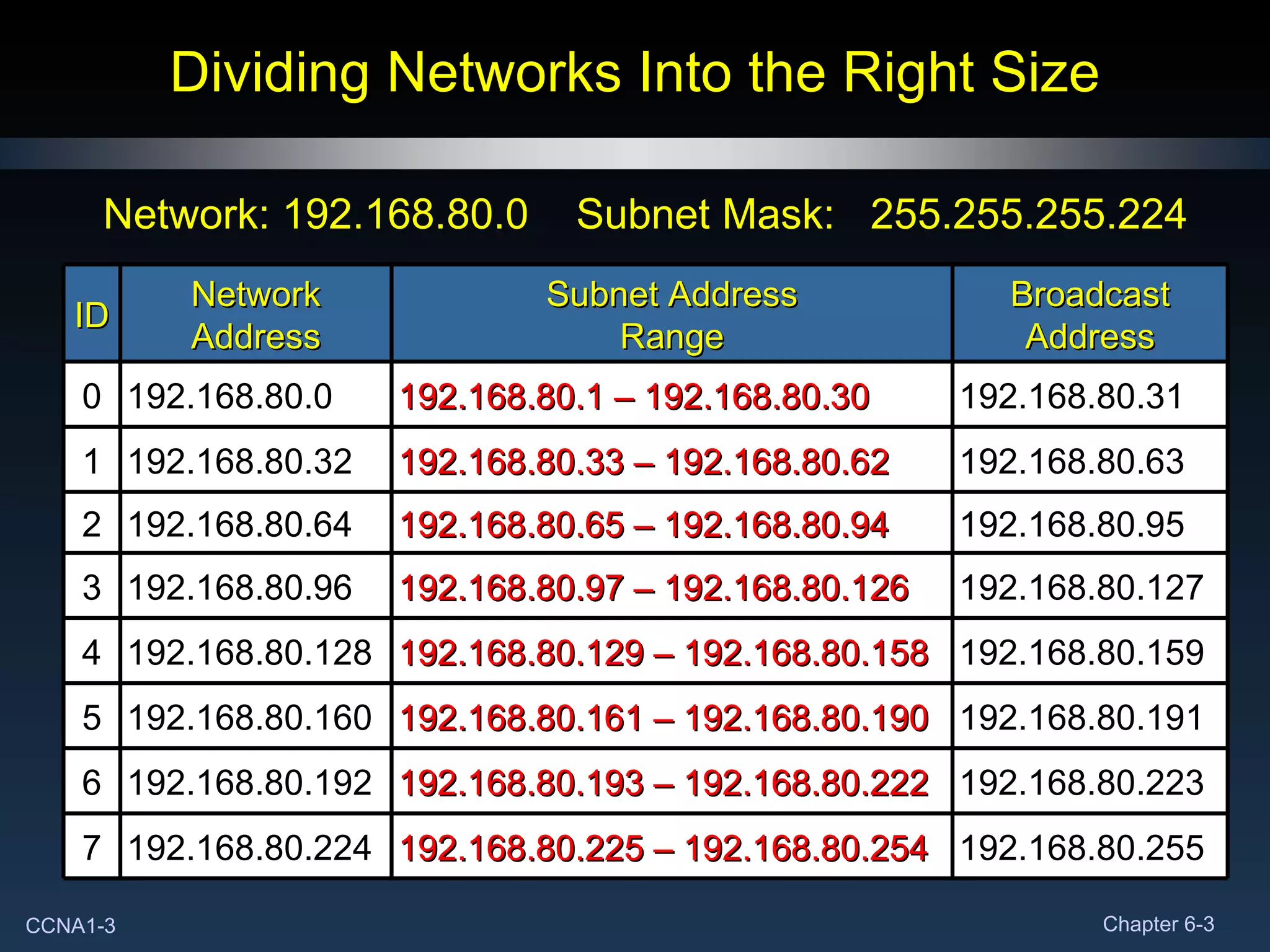
Dividing Networks Into the Right Size Network: 192.168.80.0  Subnet Mask:  255.255.255.224 192.168.80.255 192.168.80.225 – 192.168.80.254 192.168.80.224 7 192.168.80.223 192.168.80.193 – 192.168.80.222 192.168.80.192 6 192.168.80.191 192.168.80.161 – 192.168.80.190 192.168.80.160 5 192.168.80.159 192.168.80.129 – 192.168.80.158 192.168.80.128 4 192.168.80.127 192.168.80.97 – 192.168.80.126 192.168.80.96 3 192.168.80.95 192.168.80.65 – 192.168.80.94 192.168.80.64 2 192.168.80.63 192.168.80.33 – 192.168.80.62 192.168.80.32 1 192.168.80.31 192.168.80.1 – 192.168.80.30 192.168.80.0 0 Broadcast Address Subnet Address Range Network Address ID
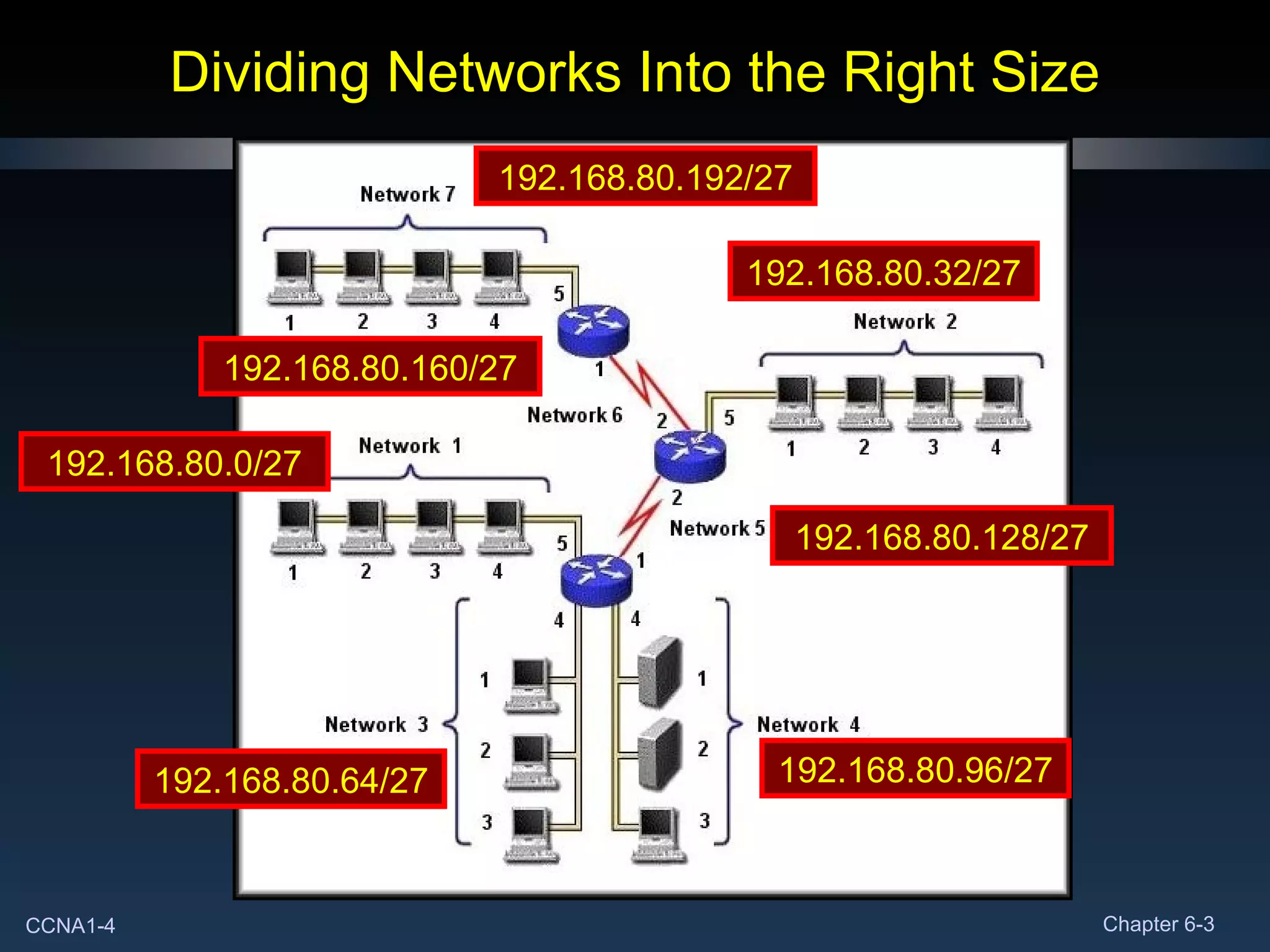
Dividing Networks Into the Right Size 192.168.80.0/27 192.168.80.32/27 192.168.80.64/27 192.168.80.96/27 192.168.80.128/27 192.168.80.160/27 192.168.80.192/27
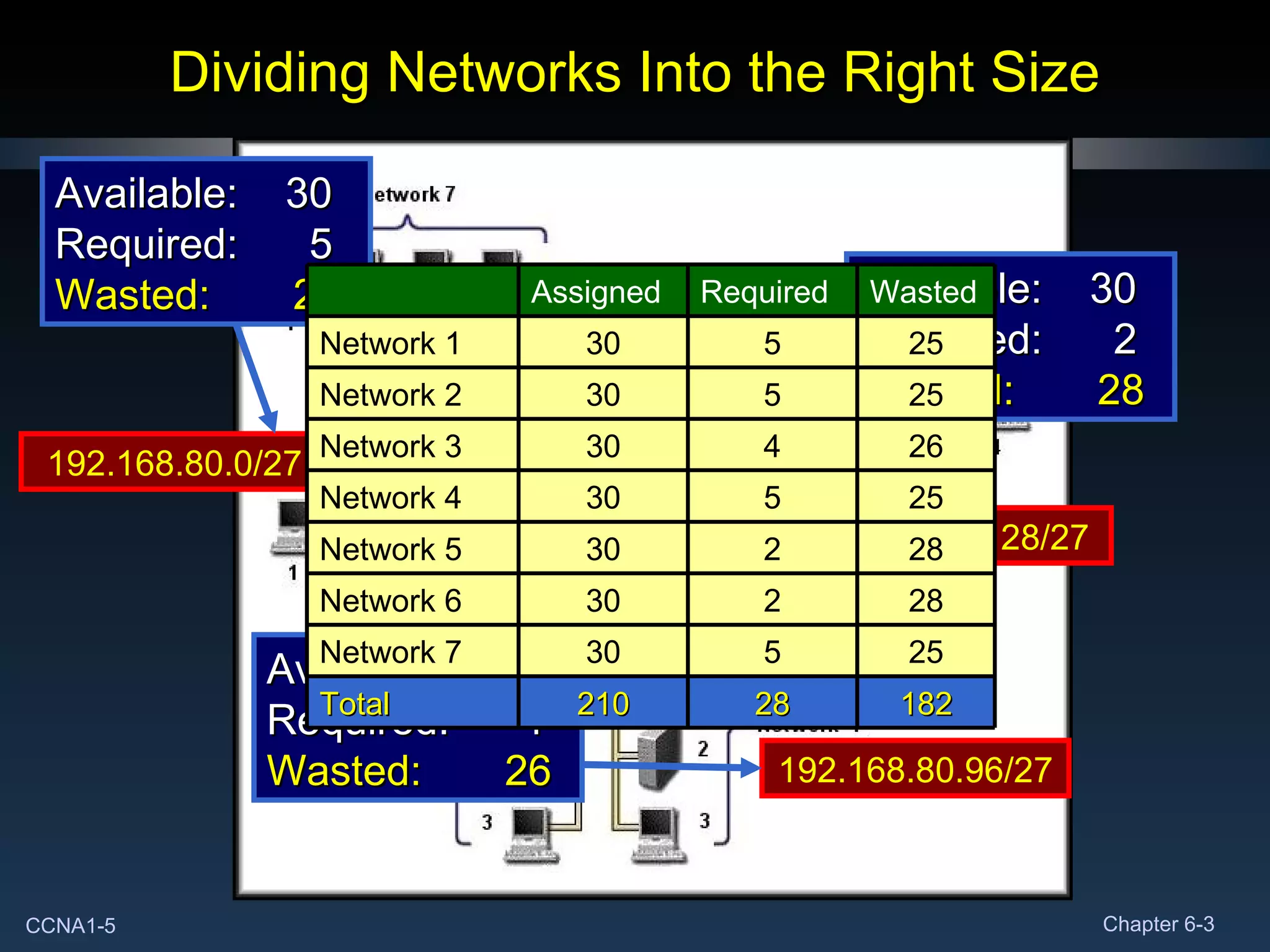
Dividing Networks Into the Right Size 192.168.80.0/27 Available:  30 Required:  5 Wasted:  25 192.168.80.96/27 Available:  30 Required:  4 Wasted:  26 192.168.80.128/27 Available:  30 Required:  2 Wasted:  28 Assigned  Required Wasted Network 1 30 5 25 Network 2 30 5 25 Network 3 30 4 26 Network 4 30 5 25 Network 5 30 2 28 Network 6 30 2 28 Network 7 30 5 25 Total 210 28 182
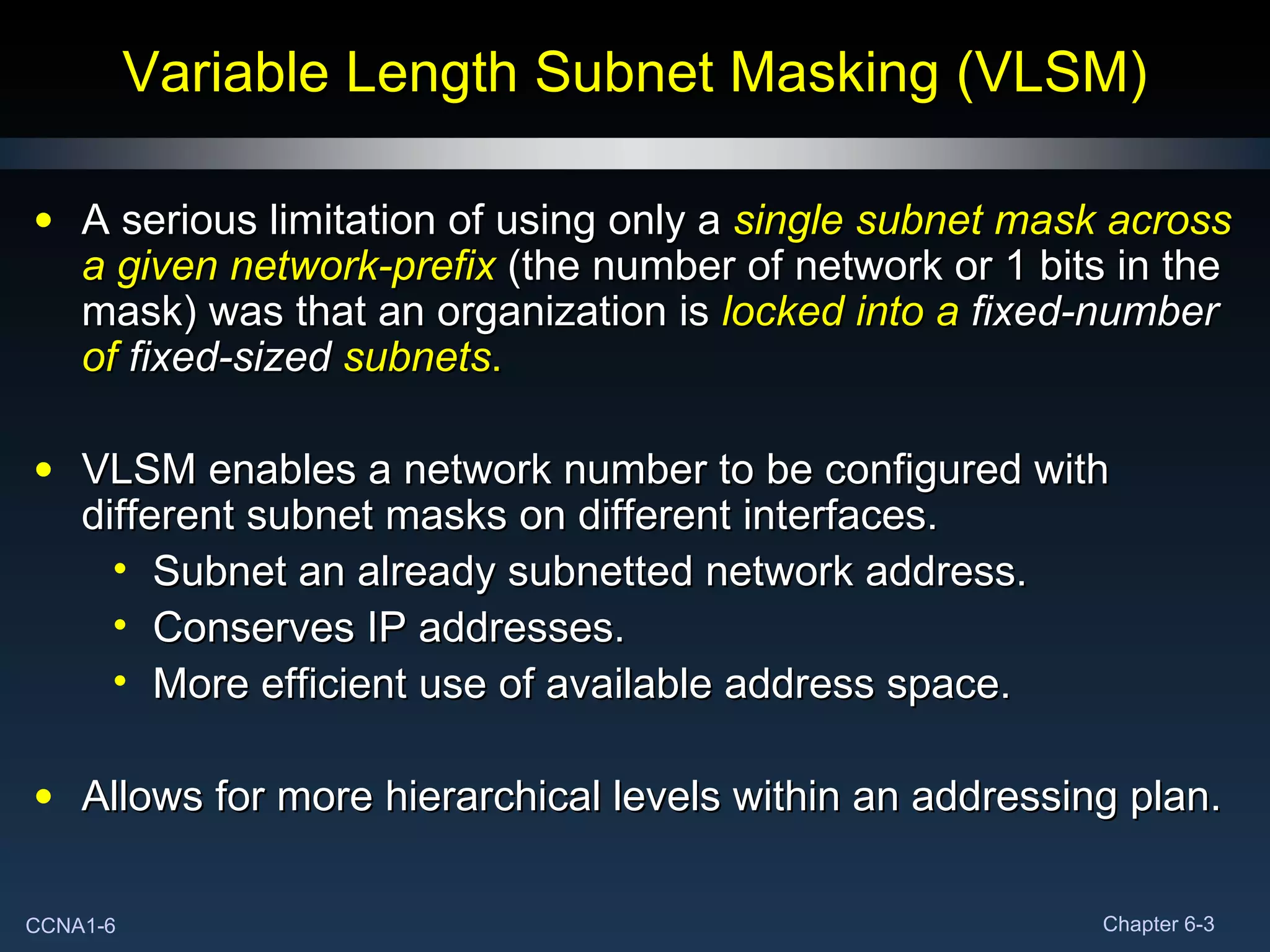
Variable Length Subnet Masking (VLSM) A serious limitation of using only a  single subnet mask across a given network-prefix   (the number of network or 1 bits in the mask) was that an organization is  locked into a  fixed-number  of  fixed-sized  subnets . VLSM enables a network number to be configured with different subnet masks on different interfaces. Subnet an already subnetted network address. Conserves IP addresses.  More efficient use of available address space. Allows for more hierarchical levels within an addressing plan.
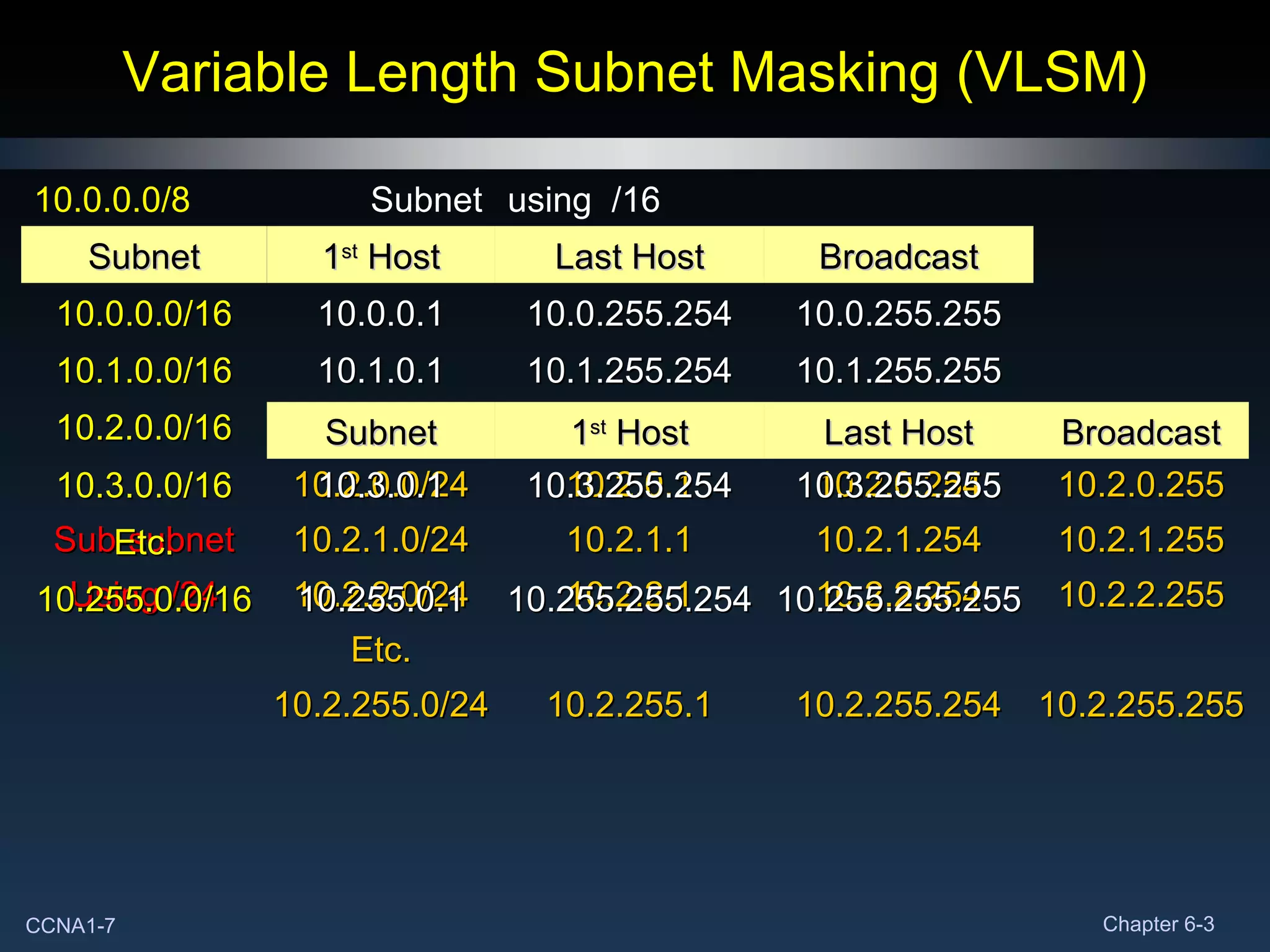
Variable Length Subnet Masking (VLSM) 10.2.0.0/24 10.2.0.1 10.2.0.254 10.2.0.255 Sub-subnet 10.2.1.0/24 10.2.1.1 10.2.1.254 10.2.1.255 Using /24 10.2.2.0/24 10.2.2.1 10.2.2.254 10.2.2.255 Etc. 10.2.255.0/24 10.2.255.1 10.2.255.254 10.2.255.255 10.0.0.0/8 Subnet using  /16 Subnet 1 st  Host Last Host Broadcast 10.0.0.0/16 10.0.0.1 10.0.255.254 10.0.255.255 10.1.0.0/16 10.1.0.1 10.1.255.254 10.1.255.255 10.2.0.0/16 10.2.0.1 10.2.255.254 10.2.255.255 10.3.0.0/16 10.3.0.1 10.3.255.254 10.3.255.255 Etc. 10.255.0.0/16 10.255.0.1 10.255.255.254 10.255.255.255 Subnet 1 st  Host Last Host Broadcast
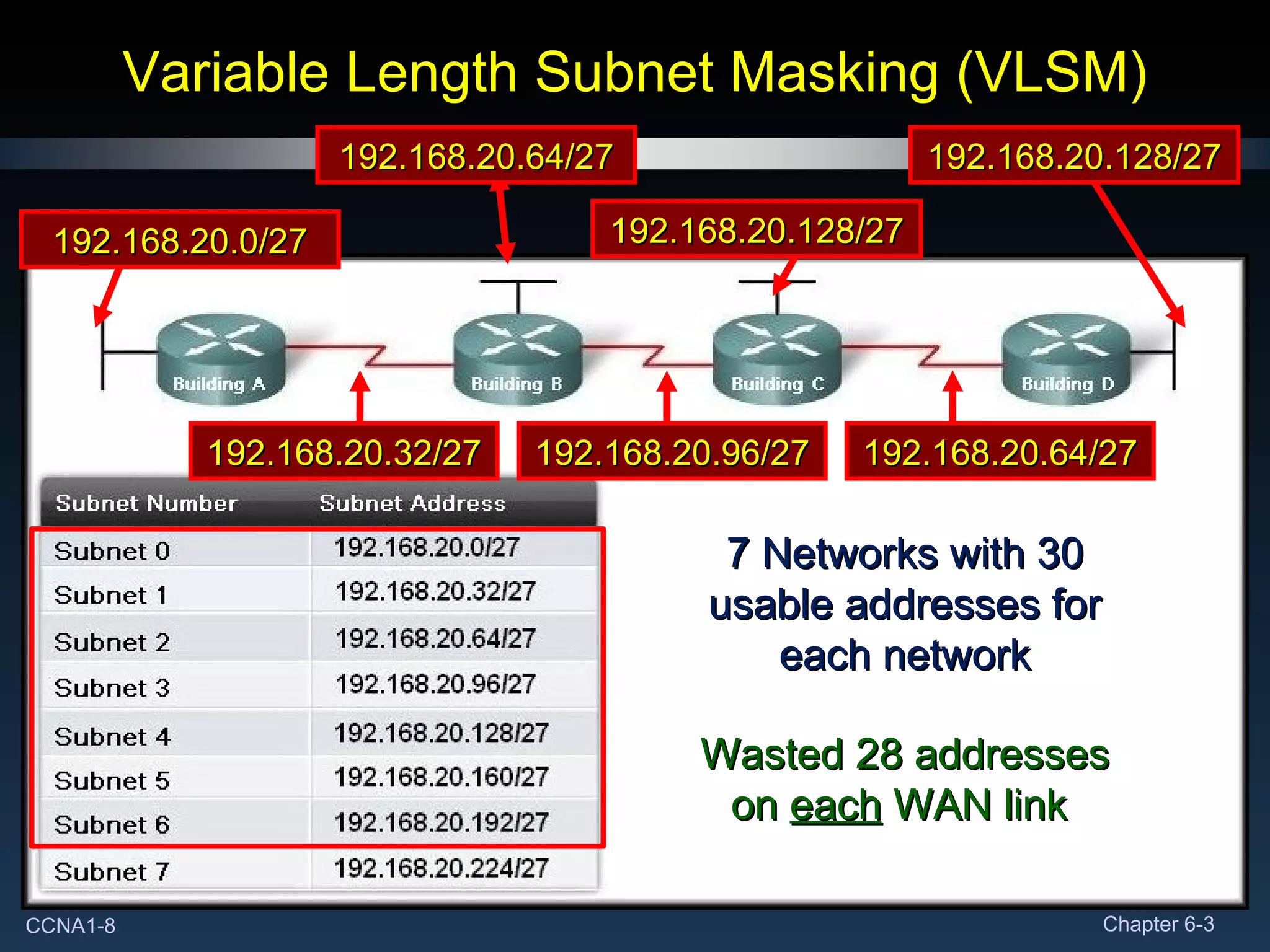
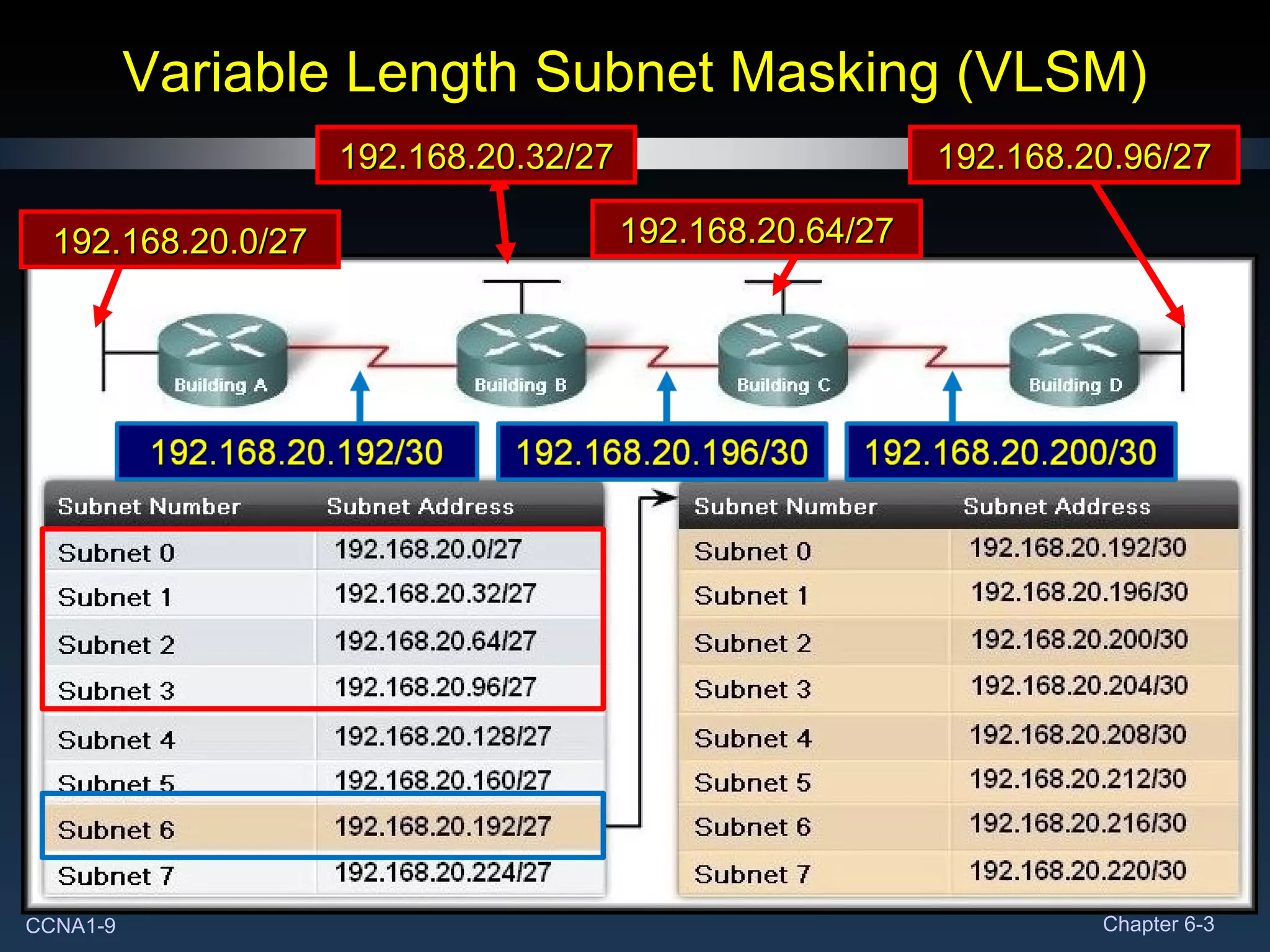
Variable Length Subnet Masking (VLSM) 7 Networks with 30 usable addresses for each network Wasted 28 addresses on  each  WAN link  192.168.20.0/27 192.168.20.32/27 192.168.20.96/27 192.168.20.64/27 192.168.20.64/27 192.168.20.128/27 192.168.20.128/27
Variable Length Subnet Masking (VLSM) 192.168.20.0/27 192.168.20.32/27 192.168.20.64/27 192.168.20.96/27
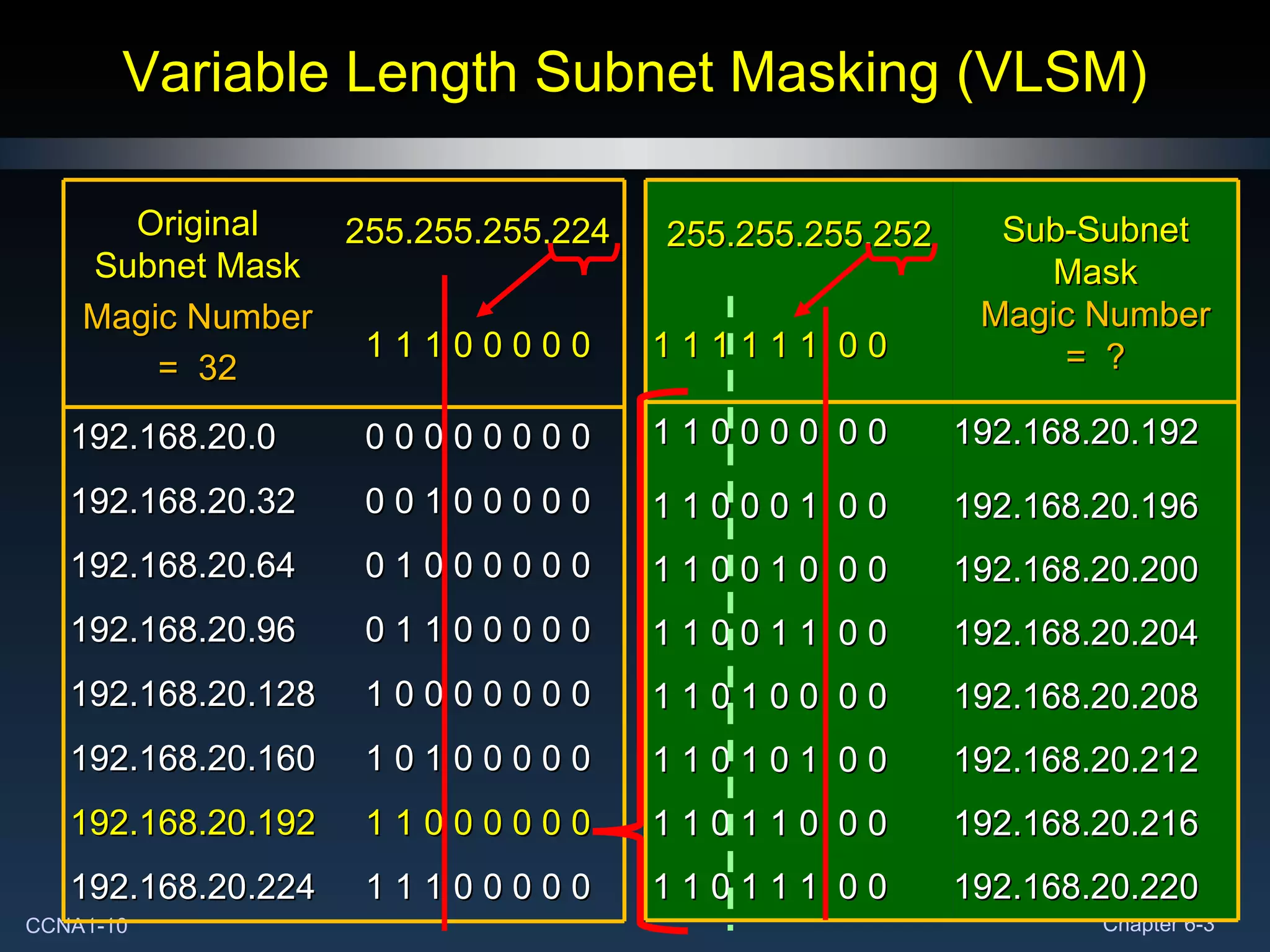
Variable Length Subnet Masking (VLSM) 1 1 0 0 0 0  0 0 192.168.20.192 1 1 0 0 0 1  0 0 192.168.20.196 1 1 0 0 1 0  0 0 192.168.20.200 1 1 0 0 1 1  0 0 192.168.20.204 1 1 0 1 0 0  0 0 192.168.20.208 1 1 0 1 0 1  0 0 192.168.20.212 1 1 0 1 1 0  0 0 192.168.20.216 1 1 0 1 1 1  0 0 192.168.20.220 255.255.255.252 Sub-Subnet Mask Magic Number =  ? 1 1 1 1 1 1  0 0 Original Subnet Mask Magic Number =  32 255.255.255.224 1 1 1 0 0 0 0 0 192.168.20.0 0 0 0 0 0 0 0 0 192.168.20.32 0 0 1 0 0 0 0 0 192.168.20.64 0 1 0 0 0 0 0 0 192.168.20.96 0 1 1 0 0 0 0 0 192.168.20.128 1 0 0 0 0 0 0 0 192.168.20.160 1 0 1 0 0 0 0 0 192.168.20.192 1 1 0 0 0 0 0 0 192.168.20.224 1 1 1 0 0 0 0 0
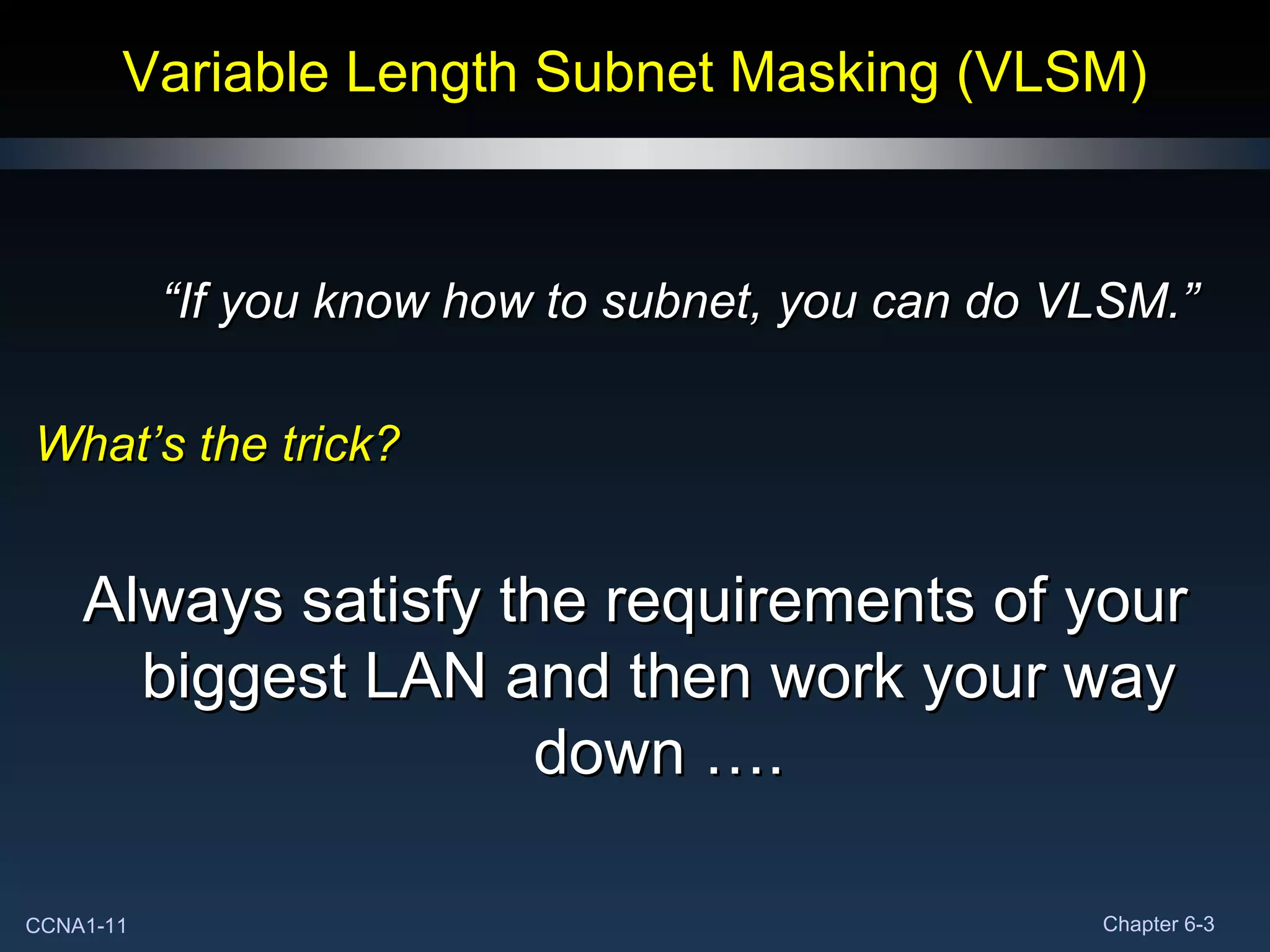
Variable Length Subnet Masking (VLSM) “ If you know how to subnet, you can do VLSM.” What’s the trick? Always satisfy the requirements of your biggest LAN and then work your way down ….
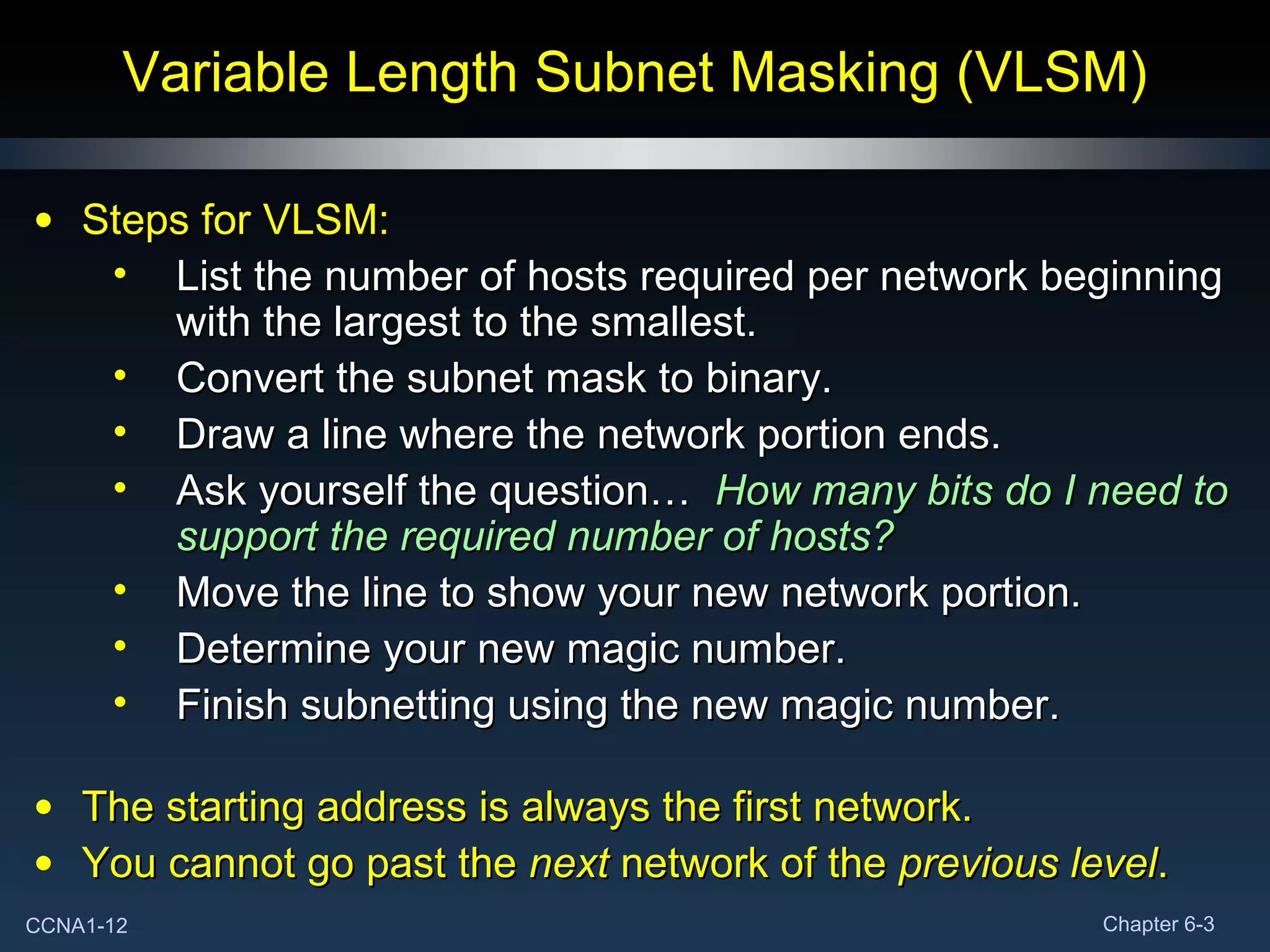
Variable Length Subnet Masking (VLSM) Steps for VLSM: List the number of hosts required per network beginning with the largest to the smallest. Convert the subnet mask to binary. Draw a line where the network portion ends. Ask yourself the question…  How many bits do I need to support the required number of hosts? Move the line to show your new network portion. Determine your new magic number. Finish subnetting using the new magic number. The starting address is always the first network. You cannot go past the  next  network of the  previous level .

Expl net fund_chapter_06_i_pv4_part_3

  • 1.
    Chapter 6 Addressingthe Network - IPV4 Part III
  • 2.
    Addressing the Network:IPv4 Subnetting: Dividing Networks Into the Right Sizes
  • 3.
    Dividing Networks Intothe Right Size Network: 192.168.80.0 Subnet Mask: 255.255.255.224 192.168.80.255 192.168.80.225 – 192.168.80.254 192.168.80.224 7 192.168.80.223 192.168.80.193 – 192.168.80.222 192.168.80.192 6 192.168.80.191 192.168.80.161 – 192.168.80.190 192.168.80.160 5 192.168.80.159 192.168.80.129 – 192.168.80.158 192.168.80.128 4 192.168.80.127 192.168.80.97 – 192.168.80.126 192.168.80.96 3 192.168.80.95 192.168.80.65 – 192.168.80.94 192.168.80.64 2 192.168.80.63 192.168.80.33 – 192.168.80.62 192.168.80.32 1 192.168.80.31 192.168.80.1 – 192.168.80.30 192.168.80.0 0 Broadcast Address Subnet Address Range Network Address ID
  • 4.
    Dividing Networks Intothe Right Size 192.168.80.0/27 192.168.80.32/27 192.168.80.64/27 192.168.80.96/27 192.168.80.128/27 192.168.80.160/27 192.168.80.192/27
  • 5.
    Dividing Networks Intothe Right Size 192.168.80.0/27 Available: 30 Required: 5 Wasted: 25 192.168.80.96/27 Available: 30 Required: 4 Wasted: 26 192.168.80.128/27 Available: 30 Required: 2 Wasted: 28 Assigned Required Wasted Network 1 30 5 25 Network 2 30 5 25 Network 3 30 4 26 Network 4 30 5 25 Network 5 30 2 28 Network 6 30 2 28 Network 7 30 5 25 Total 210 28 182
  • 6.
    Variable Length SubnetMasking (VLSM) A serious limitation of using only a single subnet mask across a given network-prefix (the number of network or 1 bits in the mask) was that an organization is locked into a fixed-number of fixed-sized subnets . VLSM enables a network number to be configured with different subnet masks on different interfaces. Subnet an already subnetted network address. Conserves IP addresses. More efficient use of available address space. Allows for more hierarchical levels within an addressing plan.
  • 7.
    Variable Length SubnetMasking (VLSM) 10.2.0.0/24 10.2.0.1 10.2.0.254 10.2.0.255 Sub-subnet 10.2.1.0/24 10.2.1.1 10.2.1.254 10.2.1.255 Using /24 10.2.2.0/24 10.2.2.1 10.2.2.254 10.2.2.255 Etc. 10.2.255.0/24 10.2.255.1 10.2.255.254 10.2.255.255 10.0.0.0/8 Subnet using /16 Subnet 1 st Host Last Host Broadcast 10.0.0.0/16 10.0.0.1 10.0.255.254 10.0.255.255 10.1.0.0/16 10.1.0.1 10.1.255.254 10.1.255.255 10.2.0.0/16 10.2.0.1 10.2.255.254 10.2.255.255 10.3.0.0/16 10.3.0.1 10.3.255.254 10.3.255.255 Etc. 10.255.0.0/16 10.255.0.1 10.255.255.254 10.255.255.255 Subnet 1 st Host Last Host Broadcast
  • 8.
    Variable Length SubnetMasking (VLSM) 7 Networks with 30 usable addresses for each network Wasted 28 addresses on each WAN link 192.168.20.0/27 192.168.20.32/27 192.168.20.96/27 192.168.20.64/27 192.168.20.64/27 192.168.20.128/27 192.168.20.128/27
  • 9.
    Variable Length SubnetMasking (VLSM) 192.168.20.0/27 192.168.20.32/27 192.168.20.64/27 192.168.20.96/27
  • 10.
    Variable Length SubnetMasking (VLSM) 1 1 0 0 0 0 0 0 192.168.20.192 1 1 0 0 0 1 0 0 192.168.20.196 1 1 0 0 1 0 0 0 192.168.20.200 1 1 0 0 1 1 0 0 192.168.20.204 1 1 0 1 0 0 0 0 192.168.20.208 1 1 0 1 0 1 0 0 192.168.20.212 1 1 0 1 1 0 0 0 192.168.20.216 1 1 0 1 1 1 0 0 192.168.20.220 255.255.255.252 Sub-Subnet Mask Magic Number = ? 1 1 1 1 1 1 0 0 Original Subnet Mask Magic Number = 32 255.255.255.224 1 1 1 0 0 0 0 0 192.168.20.0 0 0 0 0 0 0 0 0 192.168.20.32 0 0 1 0 0 0 0 0 192.168.20.64 0 1 0 0 0 0 0 0 192.168.20.96 0 1 1 0 0 0 0 0 192.168.20.128 1 0 0 0 0 0 0 0 192.168.20.160 1 0 1 0 0 0 0 0 192.168.20.192 1 1 0 0 0 0 0 0 192.168.20.224 1 1 1 0 0 0 0 0
  • 11.
    Variable Length SubnetMasking (VLSM) “ If you know how to subnet, you can do VLSM.” What’s the trick? Always satisfy the requirements of your biggest LAN and then work your way down ….
  • 12.
    Variable Length SubnetMasking (VLSM) Steps for VLSM: List the number of hosts required per network beginning with the largest to the smallest. Convert the subnet mask to binary. Draw a line where the network portion ends. Ask yourself the question… How many bits do I need to support the required number of hosts? Move the line to show your new network portion. Determine your new magic number. Finish subnetting using the new magic number. The starting address is always the first network. You cannot go past the next network of the previous level .