CHAPTER FIVE
VLSM Subnetting
Cont’
• Which Subnetting should be used is depend on objectives and
type of addresses used in network.
FLSM provides easier Subnetting at the cost of IP addresses
while VLSM best utilizes IP addresses at the cost of simplicity.
For private IP addresses, FLSM is the best choice. For public IP
addresses, VLSM is the best option.
2
VLSM Sub-netting
• VLSM (Variable Length Subnet Masks) Sub-netting.
Subnets are variable in size.
Subnets have variable number of hosts.
Subnets use different subnet masks.
It is complex in configuration and administration.
It wastes minimum IP addresses.
It is also known as classless Subnetting.
It supports only classless routing protocols.
3
VLSM Example
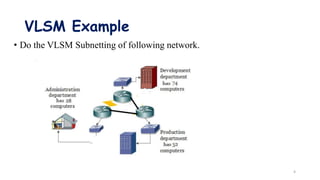
• Do the VLSM Subnetting of following network.
4
Solution
• In this network: -
Development department has 74 computers.
Production department has 52 computers.
Administration department has 28 computers.
All departments are connected with each other via wan links.
Each wan link requires two IP addresses.
The given address space is 192.168.1.0/24.
• Before we perform VLSM Subnetting for this network, let’s
understand how VLSM Subnetting actually works.
5
Con’t
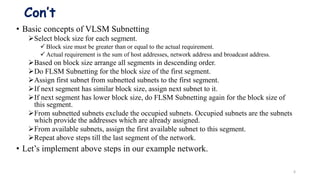
• Basic concepts of VLSM Subnetting
Select block size for each segment.
 Block size must be greater than or equal to the actual requirement.
 Actual requirement is the sum of host addresses, network address and broadcast address.
Based on block size arrange all segments in descending order.
Do FLSM Subnetting for the block size of the first segment.
Assign first subnet from subnetted subnets to the first segment.
If next segment has similar block size, assign next subnet to it.
If next segment has lower block size, do FLSM Subnetting again for the block size of
this segment.
From subnetted subnets exclude the occupied subnets. Occupied subnets are the subnets
which provide the addresses which are already assigned.
From available subnets, assign the first available subnet to this segment.
Repeat above steps till the last segment of the network.
• Let’s implement above steps in our example network.
6
Step by step VLSM Subnetting
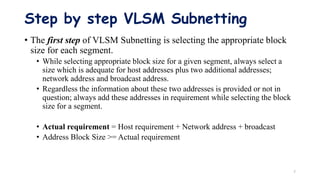
• The first step of VLSM Subnetting is selecting the appropriate block
size for each segment.
• While selecting appropriate block size for a given segment, always select a
size which is adequate for host addresses plus two additional addresses;
network address and broadcast address.
• Regardless the information about these two addresses is provided or not in
question; always add these addresses in requirement while selecting the block
size for a segment.
• Actual requirement = Host requirement + Network address + broadcast
• Address Block Size >= Actual requirement
7
Cont’
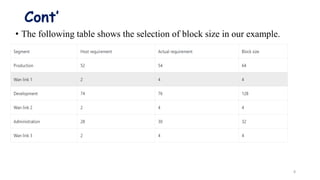
• The following table shows the selection of block size in our example.
8
Cont’
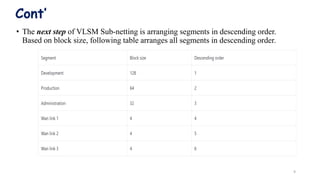
• The next step of VLSM Sub-netting is arranging segments in descending order.
Based on block size, following table arranges all segments in descending order.
9
Con’t
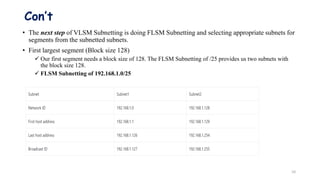
• The next step of VLSM Subnetting is doing FLSM Subnetting and selecting appropriate subnets for
segments from the subnetted subnets.
• First largest segment (Block size 128)
 Our first segment needs a block size of 128. The FLSM Subnetting of /25 provides us two subnets with
the block size 128.
 FLSM Subnetting of 192.168.1.0/25
10
Con’t
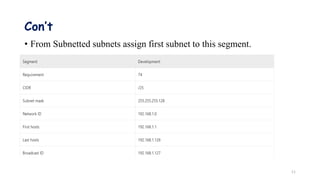
• From Subnetted subnets assign first subnet to this segment.
11
Con’t
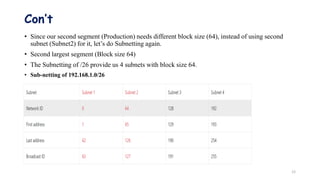
• Since our second segment (Production) needs different block size (64), instead of using second
subnet (Subnet2) for it, let’s do Subnetting again.
• Second largest segment (Block size 64)
• The Subnetting of /26 provide us 4 subnets with block size 64.
• Sub-netting of 192.168.1.0/26
12
Con’t
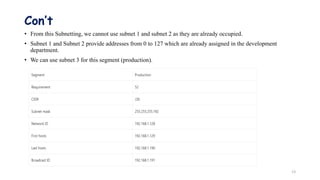
• From this Subnetting, we cannot use subnet 1 and subnet 2 as they are already occupied.
• Subnet 1 and Subnet 2 provide addresses from 0 to 127 which are already assigned in the development
department.
• We can use subnet 3 for this segment (production).
13
Con’t
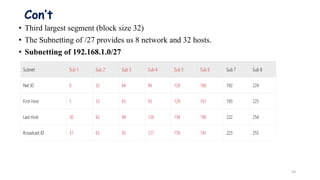
• Third largest segment (block size 32)
• The Subnetting of /27 provides us 8 network and 32 hosts.
• Subnetting of 192.168.1.0/27
14
Con’t
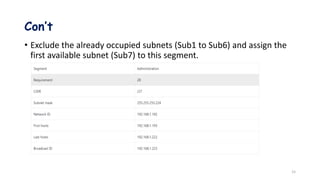
• Exclude the already occupied subnets (Sub1 to Sub6) and assign the
first available subnet (Sub7) to this segment.
15
Con’t
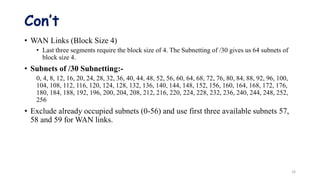
• WAN Links (Block Size 4)
• Last three segments require the block size of 4. The Subnetting of /30 gives us 64 subnets of
block size 4.
• Subnets of /30 Subnetting:-
0, 4, 8, 12, 16, 20, 24, 28, 32, 36, 40, 44, 48, 52, 56, 60, 64, 68, 72, 76, 80, 84, 88, 92, 96, 100,
104, 108, 112, 116, 120, 124, 128, 132, 136, 140, 144, 148, 152, 156, 160, 164, 168, 172, 176,
180, 184, 188, 192, 196, 200, 204, 208, 212, 216, 220, 224, 228, 232, 236, 240, 244, 248, 252,
256
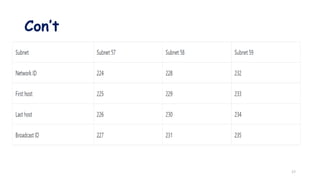
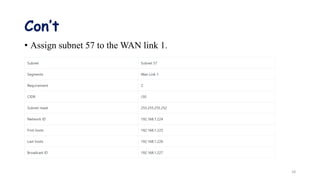
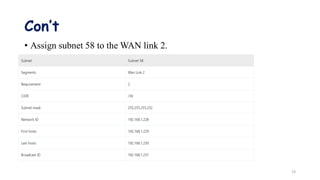
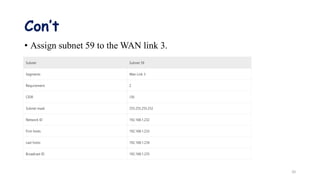
• Exclude already occupied subnets (0-56) and use first three available subnets 57,
58 and 59 for WAN links.
16
Con’t
17
Con’t
• Assign subnet 57 to the WAN link 1.
18
Con’t
• Assign subnet 58 to the WAN link 2.
19
Con’t
• Assign subnet 59 to the WAN link 3.
20
Con’t
• We have assigned IP addresses to all segments. The subnets 60, 61, 62,
63 and 64 are still available for further use.
21
Thank you!!
22

Chapter 5_VLSM.pptx

  • 1.
  • 2.
    Cont’ • Which Subnettingshould be used is depend on objectives and type of addresses used in network. FLSM provides easier Subnetting at the cost of IP addresses while VLSM best utilizes IP addresses at the cost of simplicity. For private IP addresses, FLSM is the best choice. For public IP addresses, VLSM is the best option. 2
  • 3.
    VLSM Sub-netting • VLSM(Variable Length Subnet Masks) Sub-netting. Subnets are variable in size. Subnets have variable number of hosts. Subnets use different subnet masks. It is complex in configuration and administration. It wastes minimum IP addresses. It is also known as classless Subnetting. It supports only classless routing protocols. 3
  • 4.
    VLSM Example • Dothe VLSM Subnetting of following network. 4
  • 5.
    Solution • In thisnetwork: - Development department has 74 computers. Production department has 52 computers. Administration department has 28 computers. All departments are connected with each other via wan links. Each wan link requires two IP addresses. The given address space is 192.168.1.0/24. • Before we perform VLSM Subnetting for this network, let’s understand how VLSM Subnetting actually works. 5
  • 6.
    Con’t • Basic conceptsof VLSM Subnetting Select block size for each segment.  Block size must be greater than or equal to the actual requirement.  Actual requirement is the sum of host addresses, network address and broadcast address. Based on block size arrange all segments in descending order. Do FLSM Subnetting for the block size of the first segment. Assign first subnet from subnetted subnets to the first segment. If next segment has similar block size, assign next subnet to it. If next segment has lower block size, do FLSM Subnetting again for the block size of this segment. From subnetted subnets exclude the occupied subnets. Occupied subnets are the subnets which provide the addresses which are already assigned. From available subnets, assign the first available subnet to this segment. Repeat above steps till the last segment of the network. • Let’s implement above steps in our example network. 6
  • 7.
    Step by stepVLSM Subnetting • The first step of VLSM Subnetting is selecting the appropriate block size for each segment. • While selecting appropriate block size for a given segment, always select a size which is adequate for host addresses plus two additional addresses; network address and broadcast address. • Regardless the information about these two addresses is provided or not in question; always add these addresses in requirement while selecting the block size for a segment. • Actual requirement = Host requirement + Network address + broadcast • Address Block Size >= Actual requirement 7
  • 8.
    Cont’ • The followingtable shows the selection of block size in our example. 8
  • 9.
    Cont’ • The nextstep of VLSM Sub-netting is arranging segments in descending order. Based on block size, following table arranges all segments in descending order. 9
  • 10.
    Con’t • The nextstep of VLSM Subnetting is doing FLSM Subnetting and selecting appropriate subnets for segments from the subnetted subnets. • First largest segment (Block size 128)  Our first segment needs a block size of 128. The FLSM Subnetting of /25 provides us two subnets with the block size 128.  FLSM Subnetting of 192.168.1.0/25 10
  • 11.
    Con’t • From Subnettedsubnets assign first subnet to this segment. 11
  • 12.
    Con’t • Since oursecond segment (Production) needs different block size (64), instead of using second subnet (Subnet2) for it, let’s do Subnetting again. • Second largest segment (Block size 64) • The Subnetting of /26 provide us 4 subnets with block size 64. • Sub-netting of 192.168.1.0/26 12
  • 13.
    Con’t • From thisSubnetting, we cannot use subnet 1 and subnet 2 as they are already occupied. • Subnet 1 and Subnet 2 provide addresses from 0 to 127 which are already assigned in the development department. • We can use subnet 3 for this segment (production). 13
  • 14.
    Con’t • Third largestsegment (block size 32) • The Subnetting of /27 provides us 8 network and 32 hosts. • Subnetting of 192.168.1.0/27 14
  • 15.
    Con’t • Exclude thealready occupied subnets (Sub1 to Sub6) and assign the first available subnet (Sub7) to this segment. 15
  • 16.
    Con’t • WAN Links(Block Size 4) • Last three segments require the block size of 4. The Subnetting of /30 gives us 64 subnets of block size 4. • Subnets of /30 Subnetting:- 0, 4, 8, 12, 16, 20, 24, 28, 32, 36, 40, 44, 48, 52, 56, 60, 64, 68, 72, 76, 80, 84, 88, 92, 96, 100, 104, 108, 112, 116, 120, 124, 128, 132, 136, 140, 144, 148, 152, 156, 160, 164, 168, 172, 176, 180, 184, 188, 192, 196, 200, 204, 208, 212, 216, 220, 224, 228, 232, 236, 240, 244, 248, 252, 256 • Exclude already occupied subnets (0-56) and use first three available subnets 57, 58 and 59 for WAN links. 16
  • 17.
  • 18.
    Con’t • Assign subnet57 to the WAN link 1. 18
  • 19.
    Con’t • Assign subnet58 to the WAN link 2. 19
  • 20.
    Con’t • Assign subnet59 to the WAN link 3. 20
  • 21.
    Con’t • We haveassigned IP addresses to all segments. The subnets 60, 61, 62, 63 and 64 are still available for further use. 21
  • 22.