How are you using media technologies in the
  construction and research, planning and
             evaluation stages?

                Evaluation
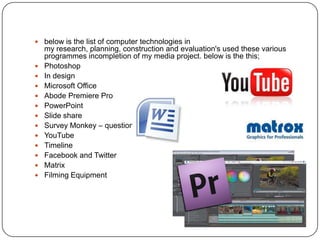
 below is the list of computer technologies in
    my research, planning, construction and evaluation's used these various
    programmes incompletion of my media project. below is the this;
   Photoshop
   In design
   Microsoft Office
   Abode Premiere Pro
   PowerPoint
   Slide share
   Survey Monkey – questionnaire
   YouTube
   Timeline
   Facebook and Twitter
   Matrix
   Filming Equipment
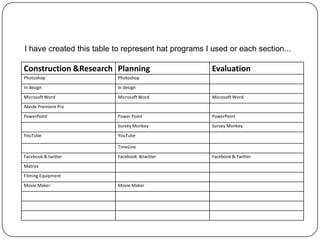
I have created this table to represent hat programs I used or each section...

Construction &Research Planning                       Evaluation
Photoshop                 Photoshop
In design                 In design
Microsoft Word            Microsoft Word              Microsoft Word
Abode Premiere Pro
PowerPoint                Power Point                 PowerPoint
                          Survey Monkey               Survey Monkey
YouTube                   YouTube

                          TimeLine
Facebook & twitter        Facebook &twitter           Facebook & Twitter
Matrox
Filming Equipment
Movie Maker               Movie Maker
   when using the media technological for Photoshop, it was very helpful in completing the
    construction, research and planning, for construction I was able to create
    media institution, like skyline and guidelines which was displayed in my production log, for
    my planning it allowed me to create tables, and edit pictures together, change photo and
    backgrounds needed to create colours and backgrounds altogether Photoshop help keep
    my research clear and high quality helped me to build vital skills
   other media technologies like in design, worked well in-conjunction with Photoshop, by
    using in design in my construction was able to create high definition finish and create
    magazine and poster that look professional this was done by using the margins, and the
    text was not jpeg so had a bigger clearer impact.
   Microsoft would was handy in the sense that it helped with spelling grammar,
    and arranging test appropriate, it was almost like a preview before I posted it on my blog, it
    help with my research, construction and evaluation provided a space to think I write my
    notes and ideas up without them getting lost
   abode premiere pro, was the program use in constructing my media project together, it
    help me to add effects, sound effects, edit the sound add impact. also to edit effects.
    previously I used Windows Movie Maker to edit footage. Adobe Premiere Pro is much
    more advanced software which allows a higher range of editing choices for example
    changing the clips brightness and lighting, sharpening footage, rewinding and slowing
    down clips to create a certain effect became a natural at using it, because I enjoy using
    and learning new technologies. Personally, for my music video the narrative required a
    vision which needed to be in a different tone and pace for the audience to clearly see the
    change in scene. For this I used a sepia filter over clip and created a circular light in the
    centre of all the clips to make it seem hazy and not of reality. This type of editing can not
    be done in Movie Maker.
   power point, power point help my to use less place and have technical media coverage, on
    my blog, it allow me to resent long word documents into a smaller place, in my planning it
    allow me to talk abet props and costumes, characters profile etc, for my planning it
    allowed me present my results in a visual able and appropriate way
 you tube, helped in research by allowing me o view other trailers across
    the boars, and worlds. with different types o horror genre, e.g. Gothic, and
    psychological trailers. because of you tube i was able to view many trailers
    in a short amount of time. you tube made t less time consuming. you
    tube also helped me construct and evaluate by allowing me to be able to
    upload my own videos ands research.
   timeline a new media coverage that I found helped me to produce a top
    range production log, with the begging of my planning research and groups
    meeting shown on the time line. the timeline help shown progression
    across what i achieved in my production log Timeline
   Facebook and Twitter, twitter and Facebook help with the production as it
    allowed me to post my video and gain feedback for a rang of people at a
    cheat affordable price, also it helped to display my media questionnaire
    and people could click on the link and send it around. Twitter and Facebook
    allowed me to gain positive and negative feedback in which all at the end
    contributed to my trailer, research, planning and construction
   Matrox helped in my construction, by allowing me to add in special effects.
    This programme gave me the advantage to bring a more horrific film even
    though we didn’t film in the dark, through construction we were able to add
    in transitional effects and sound transition like overlap .
   Filming Equipment I have had previous experience with camera equipment
    in year 11 when I produced a short film, because this was along time ago I
    wasn’t completely 100% sure and the camera was different from what I
    used before but over time i became more confident and was used with the
    movement of the tripod and experimented during filming with panning and
    titling shots. It also helped with steady the shot so the mise-en-scene was
    framed perfectly within the screen and kept the filming line straight
The range of media available has made it easy to gather
  feedback and present an evaluation of my media trailer.
  by gathering some of my audience feedback from friends
  online, both through Facebook and survey monkey we
  used
useful interactive sources. Others, I filmed using a video
  camera, and edited using Premier Pro. My evaluation has
  been put together using many different forms of digital
  technology – the online presentation website slide shares
  which was very useful for creating animated
  presentations, with easy ways to embed YouTube clips.
  Photoshop was overall very useful in allowing us to easily
  compare and contrast different characteristics of each of
  my created media texts by allowing me to put them
  alongside each other and, using colour selection and
  displaying different fonts, explain my creative process. My
  easy use of PowerPoint documents, whilst in the past
  unable to be shared online, now have online hosts such
  as slideshare.com which enable such documents to be
  uploaded and viewed on the internet – it seems the ability
  to access new types of information over the internet is still

Evaluation - 1

  • 1.
    How are youusing media technologies in the construction and research, planning and evaluation stages? Evaluation
  • 2.
     below isthe list of computer technologies in my research, planning, construction and evaluation's used these various programmes incompletion of my media project. below is the this;  Photoshop  In design  Microsoft Office  Abode Premiere Pro  PowerPoint  Slide share  Survey Monkey – questionnaire  YouTube  Timeline  Facebook and Twitter  Matrix  Filming Equipment
  • 3.
    I have createdthis table to represent hat programs I used or each section... Construction &Research Planning Evaluation Photoshop Photoshop In design In design Microsoft Word Microsoft Word Microsoft Word Abode Premiere Pro PowerPoint Power Point PowerPoint Survey Monkey Survey Monkey YouTube YouTube TimeLine Facebook & twitter Facebook &twitter Facebook & Twitter Matrox Filming Equipment Movie Maker Movie Maker
  • 4.
    when using the media technological for Photoshop, it was very helpful in completing the construction, research and planning, for construction I was able to create media institution, like skyline and guidelines which was displayed in my production log, for my planning it allowed me to create tables, and edit pictures together, change photo and backgrounds needed to create colours and backgrounds altogether Photoshop help keep my research clear and high quality helped me to build vital skills  other media technologies like in design, worked well in-conjunction with Photoshop, by using in design in my construction was able to create high definition finish and create magazine and poster that look professional this was done by using the margins, and the text was not jpeg so had a bigger clearer impact.  Microsoft would was handy in the sense that it helped with spelling grammar, and arranging test appropriate, it was almost like a preview before I posted it on my blog, it help with my research, construction and evaluation provided a space to think I write my notes and ideas up without them getting lost  abode premiere pro, was the program use in constructing my media project together, it help me to add effects, sound effects, edit the sound add impact. also to edit effects. previously I used Windows Movie Maker to edit footage. Adobe Premiere Pro is much more advanced software which allows a higher range of editing choices for example changing the clips brightness and lighting, sharpening footage, rewinding and slowing down clips to create a certain effect became a natural at using it, because I enjoy using and learning new technologies. Personally, for my music video the narrative required a vision which needed to be in a different tone and pace for the audience to clearly see the change in scene. For this I used a sepia filter over clip and created a circular light in the centre of all the clips to make it seem hazy and not of reality. This type of editing can not be done in Movie Maker.  power point, power point help my to use less place and have technical media coverage, on my blog, it allow me to resent long word documents into a smaller place, in my planning it allow me to talk abet props and costumes, characters profile etc, for my planning it allowed me present my results in a visual able and appropriate way
  • 5.
     you tube,helped in research by allowing me o view other trailers across the boars, and worlds. with different types o horror genre, e.g. Gothic, and psychological trailers. because of you tube i was able to view many trailers in a short amount of time. you tube made t less time consuming. you tube also helped me construct and evaluate by allowing me to be able to upload my own videos ands research.  timeline a new media coverage that I found helped me to produce a top range production log, with the begging of my planning research and groups meeting shown on the time line. the timeline help shown progression across what i achieved in my production log Timeline  Facebook and Twitter, twitter and Facebook help with the production as it allowed me to post my video and gain feedback for a rang of people at a cheat affordable price, also it helped to display my media questionnaire and people could click on the link and send it around. Twitter and Facebook allowed me to gain positive and negative feedback in which all at the end contributed to my trailer, research, planning and construction  Matrox helped in my construction, by allowing me to add in special effects. This programme gave me the advantage to bring a more horrific film even though we didn’t film in the dark, through construction we were able to add in transitional effects and sound transition like overlap .  Filming Equipment I have had previous experience with camera equipment in year 11 when I produced a short film, because this was along time ago I wasn’t completely 100% sure and the camera was different from what I used before but over time i became more confident and was used with the movement of the tripod and experimented during filming with panning and titling shots. It also helped with steady the shot so the mise-en-scene was framed perfectly within the screen and kept the filming line straight
  • 6.
    The range ofmedia available has made it easy to gather feedback and present an evaluation of my media trailer. by gathering some of my audience feedback from friends online, both through Facebook and survey monkey we used useful interactive sources. Others, I filmed using a video camera, and edited using Premier Pro. My evaluation has been put together using many different forms of digital technology – the online presentation website slide shares which was very useful for creating animated presentations, with easy ways to embed YouTube clips. Photoshop was overall very useful in allowing us to easily compare and contrast different characteristics of each of my created media texts by allowing me to put them alongside each other and, using colour selection and displaying different fonts, explain my creative process. My easy use of PowerPoint documents, whilst in the past unable to be shared online, now have online hosts such as slideshare.com which enable such documents to be uploaded and viewed on the internet – it seems the ability to access new types of information over the internet is still