Production Log

  Ancillary tasks
Ancillary task 1: Poster
 February 18th
for    my ancillary task firstly I , researched poster and
      deconstructed them to the point where I knew all
      the key codes and conventions. Below is an
      example of what I deconstructed , drag me to hell
 February 20
After analysing the poster, I was able to create a
  template of how I wanted to produce my poster.
  This gave me a overview of what I needed and
  vital elements.
 After taking pictures with my camera, I was able
 to use these images to produce my ancillary task.

Using codes and conventions, I was able to start
 creating my main image.

I compared and analysed three poster, black
   swan, drag me to hell and shutter, which gave me
   a good grounding into what elements to include
   e.g. barcode and pricing.
 Here’s the original photo, before I started editing
 to create, a more scarier and higher impact film
February 23
I started edited the photo by removing her eyes, to
add bigger impact to the photo, although the photo
was already scary from feedback I knew that it was
remunerable so I began on Photoshop
February 23
The photo was also still to dark for a horror poster
so I used a filter called diffuse glow
February 24
i was still not convinced that the picture was
achieving the effect I wanted, her facial expression
needed brighten up, it was to casual and did not
strike fear, so I decided to change her features, I
went on to Google and found a mouth with blood
and which would change the overall look on her
face
I used magic wand and selected the area of mouth
that I wanted and placed it across her mouth, in
replacement of her
I began to use colour replacement, on her
eyelids to add a darker effect to her eyelids
which resemble black swan
 I also added a scar on her face, to make her look
  more ragged, by using a blank canvas and
  selected
 And then I Click the button to create a new layer
  in the LAYERS panel. And Selected Lasso Tool
  in toolbox and make one outline, fill in with red
  colour. Select colour replacement in toolbox to
  add a part of the colour. Then i select
  SmudgeTool to smudged the outline that you
  want it to be.an then added scar lines using
  freedom pen
 Finally I went to Filter -> Texture ->
  Texturizer, and set at a set Scaling to 200%,.
 After I added all these effect the photo still
  needed to be darker, so I added another filter on
  the photo used smudge filter, I then highlighted
  her hair and background and filter that section
  alone. the contrast in her face and hair will be
  even more deeper to get this final photo
To then add my background for my photo I got a
picture of a dark Forrest and I smudged the two
photos together using a smudging tool
After making the main background for my media, I
decided that there was still not enough image to tell
a story
So I logged on to my abode premiere and took
images from the timeline to use on my
magazine, these were the two photos I decided, the
two male victims tied up to create this effect I
change the opacity of the image to 50 % and then
turned it black and white, so it would not take away
attention from the main image
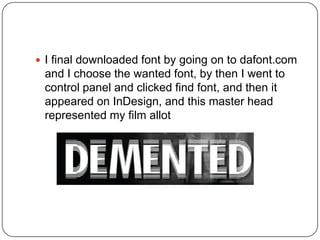
 I final downloaded font by going on to dafont.com
 and I choose the wanted font, by then I went to
 control panel and clicked find font, and then it
 appeared on InDesign, and this master head
 represented my film allot
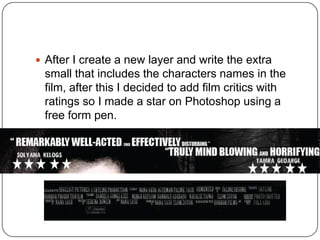
 After I create a new layer and write the extra
 small that includes the characters names in the
 film, after this I decided to add film critics with
 ratings so I made a star on Photoshop using a
 free form pen.

Production log poster

  • 1.
    Production Log Ancillary tasks
  • 2.
    Ancillary task 1:Poster  February 18th for my ancillary task firstly I , researched poster and deconstructed them to the point where I knew all the key codes and conventions. Below is an example of what I deconstructed , drag me to hell
  • 3.
     February 20 Afteranalysing the poster, I was able to create a template of how I wanted to produce my poster. This gave me a overview of what I needed and vital elements.
  • 4.
     After takingpictures with my camera, I was able to use these images to produce my ancillary task. Using codes and conventions, I was able to start creating my main image. I compared and analysed three poster, black swan, drag me to hell and shutter, which gave me a good grounding into what elements to include e.g. barcode and pricing.
  • 5.
     Here’s theoriginal photo, before I started editing to create, a more scarier and higher impact film
  • 6.
    February 23 I startededited the photo by removing her eyes, to add bigger impact to the photo, although the photo was already scary from feedback I knew that it was remunerable so I began on Photoshop
  • 7.
    February 23 The photowas also still to dark for a horror poster so I used a filter called diffuse glow
  • 8.
    February 24 i wasstill not convinced that the picture was achieving the effect I wanted, her facial expression needed brighten up, it was to casual and did not strike fear, so I decided to change her features, I went on to Google and found a mouth with blood and which would change the overall look on her face
  • 9.
    I used magicwand and selected the area of mouth that I wanted and placed it across her mouth, in replacement of her
  • 10.
    I began touse colour replacement, on her eyelids to add a darker effect to her eyelids which resemble black swan
  • 11.
     I alsoadded a scar on her face, to make her look more ragged, by using a blank canvas and selected  And then I Click the button to create a new layer in the LAYERS panel. And Selected Lasso Tool in toolbox and make one outline, fill in with red colour. Select colour replacement in toolbox to add a part of the colour. Then i select SmudgeTool to smudged the outline that you want it to be.an then added scar lines using freedom pen  Finally I went to Filter -> Texture -> Texturizer, and set at a set Scaling to 200%,.
  • 12.
     After Iadded all these effect the photo still needed to be darker, so I added another filter on the photo used smudge filter, I then highlighted her hair and background and filter that section alone. the contrast in her face and hair will be even more deeper to get this final photo
  • 13.
    To then addmy background for my photo I got a picture of a dark Forrest and I smudged the two photos together using a smudging tool
  • 14.
    After making themain background for my media, I decided that there was still not enough image to tell a story So I logged on to my abode premiere and took images from the timeline to use on my magazine, these were the two photos I decided, the two male victims tied up to create this effect I change the opacity of the image to 50 % and then turned it black and white, so it would not take away attention from the main image
  • 15.
     I finaldownloaded font by going on to dafont.com and I choose the wanted font, by then I went to control panel and clicked find font, and then it appeared on InDesign, and this master head represented my film allot
  • 16.
     After Icreate a new layer and write the extra small that includes the characters names in the film, after this I decided to add film critics with ratings so I made a star on Photoshop using a free form pen.