HOW DID YOU USE
MEDIA TECHNOLOGIES
IN THE PLANNING,
RESEARCH,
CONSTRUCTION AND
EVALUATION STAGES?
INTRODUCTION
Throughout my entire coursework, I had to use different
technology platforms and programmes to accomplish my
different texts. All of these programmes had good features
and some bad features, which sometimes caused dilemmas
when doing my coursework. Trying to get a piece exactly how
you want it is near impossible when working with limited
programmes, so I had to make due with the best available.
RESEARCH
Before I started planning and constructing my three media coursework texts, I used technology to research short
films, movie posters, and film reviews. This was required so that I had more of an understand of the tasks
Blogger
Looking through past students blogger pages was one of the most helpful and important research methods that I used
during my own coursework. Sometimes figuring out how to say something or how to lay something out was difficult, and I
had to see what past students had done to enhance my understanding. Blogger is really easy to use as I've been using it since
the begging of AS, so I had no problems at all using it as a research tool.
YouTube
Searching YouTube allowed me to look at real life short films, which helped me greatly as it grew my understanding of what
aspects and conventions are present. I’ve been using YouTube for years, so it was really easy to navigate around. One bad
thing about YouTube was that due to it having so much content, finding specific examples of what you want was sometimes
tricky, due to having to filter through a load of un-needed content.
Google
When doing my research, I needed to search a lot of questions, so obviously first thing that came to head when I needed
answers was Google. Being the biggest search engine around, I chose to use it as I believed it would give me the biggest
range of results, which would further allow me to get as much research as I need. It did have a similar problem to YouTube
though, in the sense that it being so massive required a lot of filtering and time finding the right thing.
PLANNING
When planning for my coursework texts, I got to use a few different media technologies to help me plan out
and draft aspects of my poster, double page spread, and my film.
Rough Drafts
Constantly making drafts and rough sketches of texts, mainly my poster and film review really allowed me to see what aspects
looked good and which parts didn’t look so good. I could easily hand draw sketches, but a lot of the drafts I did ended up being
on programmes such as pages, which was the programme I stuck with throughout production.
Story Boarding
Using a storyboard to plan my film was really helpful to me, and probably the best way I could have drawn out my plot in a way
which was clear to the cast and clear to me. Firstly I had a paper copy of my storyboard so I could see the basic structure myself,
then I went onto a storyboard creator website, which allowed me to digitally recreate the storyboard, which was then uploaded to
my blog in which it was then accessible to the cast of the film.
Blogger
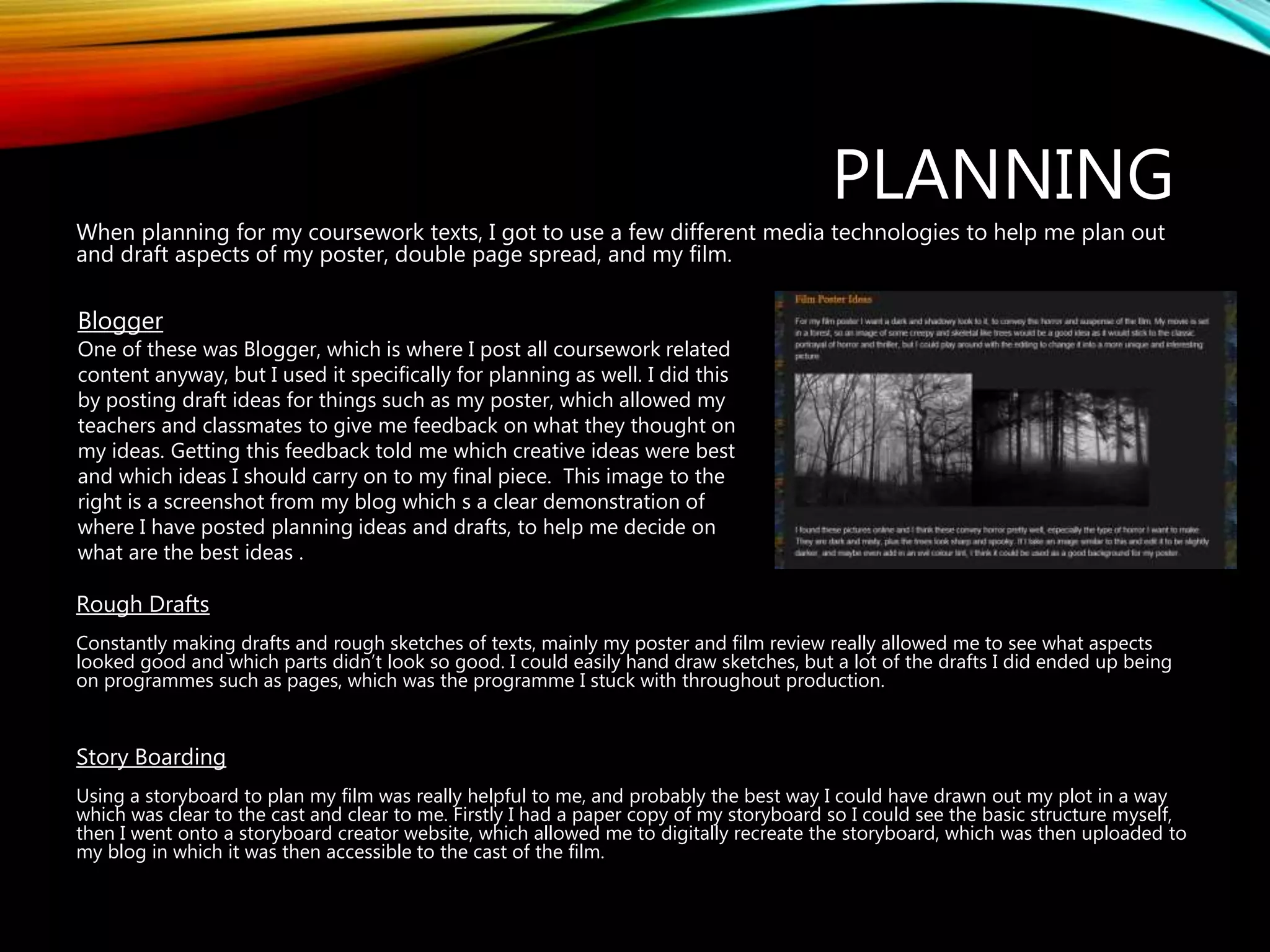
One of these was Blogger, which is where I post all coursework related
content anyway, but I used it specifically for planning as well. I did this
by posting draft ideas for things such as my poster, which allowed my
teachers and classmates to give me feedback on what they thought on
my ideas. Getting this feedback told me which creative ideas were best
and which ideas I should carry on to my final piece. This image to the
right is a screenshot from my blog which s a clear demonstration of
where I have posted planning ideas and drafts, to help me decide on
what are the best ideas .
CONSTRUCTION
When I had to finally make my coursework texts, I had to decide on what software and what
programmes I would be using to construct my film, poster, and review page.
Final Cut Pro
For the editing and the construction of my film, I decided to use final cut pro as it was the
programme recommended by my teachers, and having never attempted to make a film before, I
went along with their suggestion. It turned out to be extremely interesting and allowed me to
include loads of cool editing features, which were rather easy to use. The only bad thing about this
programme was trying to export and upload the final video from there onto YouTube. The whole
class and I had some trouble attempting this, which did become frustrating and time consuming.
Pages
For the construction of my poster and my double page spread, I decided to stick to what I know
and use Pages. I have had experience using this programmed from my AS coursework, so I am
pretty confident using it and using its features effectively. It’s a really good software to use when
creating and designing things such as posters, and I much easier to use than things like publisher
and word. It also looks ten times more professional than word. I had technically zero problems
when using this.
EVALUATION
For the final stage of my coursework, the evaluation questions, I have used a few different
programmes that I have previously never used before.
Prezi
For my first evaluation question, I decided to use Prezi despite having no previous experience with the software,
mainly due to the fact I had heard good things about it, and liked the way they had looked on other previous
students blogs. I got on well with this programme and really enjoyed laying out all the different slides and stuffing
in as much text and information as I could. The only negative point about Prezi was that it took some getting used
to before I was confident in using it creatively.
Blogger
For two of my evaluation questions I just had text and images typed out straight onto blogger as it broke up all the
presentations aby having some big writing pieces in my blog as well. This format was really good to put in a lot of
evaluation as I could write endless amounts on blogger.
Slide share
For my final evaluation (this one), I chose to use PowerPoint to make a presentation. I then transferred this onto
slide share, so that I could easily present it on my blog. I had no problems with these programmes as I have used
them before, and am comfortable with the features of them.

How did you use media technologies in the

  • 1.
    HOW DID YOUUSE MEDIA TECHNOLOGIES IN THE PLANNING, RESEARCH, CONSTRUCTION AND EVALUATION STAGES?
  • 2.
    INTRODUCTION Throughout my entirecoursework, I had to use different technology platforms and programmes to accomplish my different texts. All of these programmes had good features and some bad features, which sometimes caused dilemmas when doing my coursework. Trying to get a piece exactly how you want it is near impossible when working with limited programmes, so I had to make due with the best available.
  • 3.
    RESEARCH Before I startedplanning and constructing my three media coursework texts, I used technology to research short films, movie posters, and film reviews. This was required so that I had more of an understand of the tasks Blogger Looking through past students blogger pages was one of the most helpful and important research methods that I used during my own coursework. Sometimes figuring out how to say something or how to lay something out was difficult, and I had to see what past students had done to enhance my understanding. Blogger is really easy to use as I've been using it since the begging of AS, so I had no problems at all using it as a research tool. YouTube Searching YouTube allowed me to look at real life short films, which helped me greatly as it grew my understanding of what aspects and conventions are present. I’ve been using YouTube for years, so it was really easy to navigate around. One bad thing about YouTube was that due to it having so much content, finding specific examples of what you want was sometimes tricky, due to having to filter through a load of un-needed content. Google When doing my research, I needed to search a lot of questions, so obviously first thing that came to head when I needed answers was Google. Being the biggest search engine around, I chose to use it as I believed it would give me the biggest range of results, which would further allow me to get as much research as I need. It did have a similar problem to YouTube though, in the sense that it being so massive required a lot of filtering and time finding the right thing.
  • 4.
    PLANNING When planning formy coursework texts, I got to use a few different media technologies to help me plan out and draft aspects of my poster, double page spread, and my film. Rough Drafts Constantly making drafts and rough sketches of texts, mainly my poster and film review really allowed me to see what aspects looked good and which parts didn’t look so good. I could easily hand draw sketches, but a lot of the drafts I did ended up being on programmes such as pages, which was the programme I stuck with throughout production. Story Boarding Using a storyboard to plan my film was really helpful to me, and probably the best way I could have drawn out my plot in a way which was clear to the cast and clear to me. Firstly I had a paper copy of my storyboard so I could see the basic structure myself, then I went onto a storyboard creator website, which allowed me to digitally recreate the storyboard, which was then uploaded to my blog in which it was then accessible to the cast of the film. Blogger One of these was Blogger, which is where I post all coursework related content anyway, but I used it specifically for planning as well. I did this by posting draft ideas for things such as my poster, which allowed my teachers and classmates to give me feedback on what they thought on my ideas. Getting this feedback told me which creative ideas were best and which ideas I should carry on to my final piece. This image to the right is a screenshot from my blog which s a clear demonstration of where I have posted planning ideas and drafts, to help me decide on what are the best ideas .
  • 5.
    CONSTRUCTION When I hadto finally make my coursework texts, I had to decide on what software and what programmes I would be using to construct my film, poster, and review page. Final Cut Pro For the editing and the construction of my film, I decided to use final cut pro as it was the programme recommended by my teachers, and having never attempted to make a film before, I went along with their suggestion. It turned out to be extremely interesting and allowed me to include loads of cool editing features, which were rather easy to use. The only bad thing about this programme was trying to export and upload the final video from there onto YouTube. The whole class and I had some trouble attempting this, which did become frustrating and time consuming. Pages For the construction of my poster and my double page spread, I decided to stick to what I know and use Pages. I have had experience using this programmed from my AS coursework, so I am pretty confident using it and using its features effectively. It’s a really good software to use when creating and designing things such as posters, and I much easier to use than things like publisher and word. It also looks ten times more professional than word. I had technically zero problems when using this.
  • 6.
    EVALUATION For the finalstage of my coursework, the evaluation questions, I have used a few different programmes that I have previously never used before. Prezi For my first evaluation question, I decided to use Prezi despite having no previous experience with the software, mainly due to the fact I had heard good things about it, and liked the way they had looked on other previous students blogs. I got on well with this programme and really enjoyed laying out all the different slides and stuffing in as much text and information as I could. The only negative point about Prezi was that it took some getting used to before I was confident in using it creatively. Blogger For two of my evaluation questions I just had text and images typed out straight onto blogger as it broke up all the presentations aby having some big writing pieces in my blog as well. This format was really good to put in a lot of evaluation as I could write endless amounts on blogger. Slide share For my final evaluation (this one), I chose to use PowerPoint to make a presentation. I then transferred this onto slide share, so that I could easily present it on my blog. I had no problems with these programmes as I have used them before, and am comfortable with the features of them.