Evaluation: How did
    you use media
  technologies in the
   construction and
research, planning and
  evaluation stages?
Research
•   During my course I became aware of how lucky I am to have
    access to the Web 2.0 format, as it has allowed me to use
    consumer produced websites such as YouTube and Blogger.
    Websites such as these allow the public to upload user-
    generated content whilst being easy and simple to use.
•   Research was the first stage of the coursework, I explored
    many websites on the Internet using the search engine
    Google. I found a good range of film posters, magazines and
    trailers.
•   This would have given me a major insights to all 3 and will
    have also given me inspiration.
•   I went to the cinema as often as I could to actually watch
    trailers in the cinema to give me the full impact of how
    trailers can actually affect the audience. In the cinema there
    is also posters, billboards and advertisement to promote the
    film. I looked how they made me feel and how they draw the
    audience in.
•   The internet was the biggest source that I use throughout
    my coursework, it has given massive understanding with
    existing media products such as posters and magazines.
YouTube
•   I used YouTube throughout my project for
    research, planning, production, post-production. I think that if it
    hadn’t been for this sight, I wouldn’t have gain so much insight
    on existing products. I spent hours watching trailers to hope it
    would inspire me. YouTube is a site which is free and readily
    available. When I decided to do a thriller I spent many hours
    searching through clips and short films to come up with an idea
    that was going to be suited to my genre. I feel my trailer has
    worked well all thanks to YouTube. When I was doing my
    planning, I was watching some trailers on YouTube to gain ideas
    for the type of shots which were needed for my storyboard. I
    then spent a while looking for suitable soundtracks. I looked on
    all the free copyright websites, some were good but other didn’t
    quite fit. I downloaded effect to make my trailer scarier and add
    realism. I used YouTube 2 MP3 to download the sounds.
•   I used the site YouTube to search for existing trailer, as this site is
    free and readily available. There is also audience feedback on
    each video so I was able to see which one were more successful.
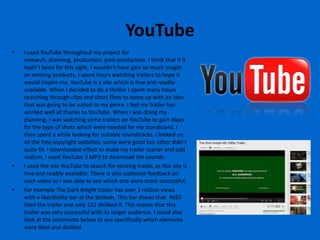
•   For example The Dark Knight trailer has over 3 million views
    with a like/dislike bar at the bottom. This bar shows that 4692
    liked the trailer and only 152 disliked it. This means that this
    trailer was very successful with its target audience. I could also
    look at the comments below to see specifically which elements
    were liked and disliked.
Internet
•   I used Google Chrome because it works
    will with blogger. I do think I used
    Google Chrome in all my tasks enabling
    me to achieve my full potential through
    the use of this browser. By using this
    search engine, it has given me
    everything that I could ever need for my
    research, planning and production.
•   Google was a really useful website, it
    was a good tool for my research because
    it allowed me to search for websites that
    helped me gain useful information and
    also find images I needed such as film
    posters. Google was easy and quick to
    used and it helped me find all the
    information I need form y research.
Blogger
•   I used Blogger the most throughout my project. I
    uploaded all my work to which was really easy and
    useful. It meant I could add videos and images to
    support my written work which a clear heading
    above each post. I really like how I could combine
    this use of technology with my written work to
    support it and make it look creative and interesting
    to read. I feel by using Blogger I have thought more
    about how I represent my work as well as thinking
    about uploading content to the internet. Blogger
    has made me more creative as I have really thought
    about how to display work within a blog post.
    However I did have problems with Blogger, such as
    it was difficult to place images where I wanted and
    sometime I was limited to a smaller size. It also took
    a long time for videos to upload which wasn’t really
    too much of a problem as I could still edit my post
    but it would sometimes crash Blogger meaning I
    would lose my work when it didn’t save. Overall, I
    think Blogger was a really useful tool and I feel it
    was a good way to upload my work.
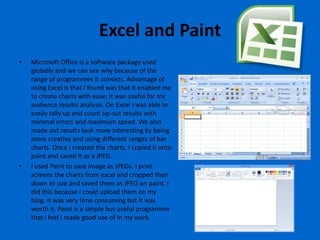
Excel and Paint
•   Microsoft Office is a software package used
    globally and we can see why because of the
    range of programmes it consists. Advantage of
    using Excel is that I found was that it enabled me
    to create charts with ease; it was useful for my
    audience results analysis. On Excel I was able to
    easily tally up and count up out results with
    minimal errors and maximum speed. We also
    made out results look more interesting by being
    more creative and using different ranges of bar
    charts. Once I created the charts, I copied it onto
    paint and saved it as a JPEG.
•   I used Paint to save image as JPEGs. I print
    screens the charts from excel and cropped then
    down to size and saved them as JPEG on paint. I
    did this because I could upload them on my
    blog. It was very time consuming but it was
    worth it. Paint is a simple but useful programme
    that I feel I made good use of in my work.
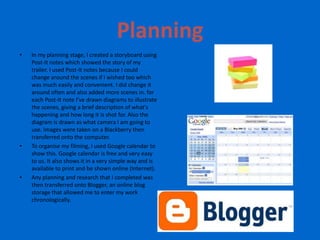
Planning
•   In my planning stage, I created a storyboard using
    Post-It notes which showed the story of my
    trailer. I used Post-It notes because I could
    change around the scenes if I wished too which
    was much easily and convenient. I did change it
    around often and also added more scenes in. for
    each Post-It note I’ve drawn diagrams to illustrate
    the scenes, giving a brief description of what's
    happening and how long it is shot for. Also the
    diagram is drawn as what camera I am going to
    use. Images were taken on a Blackberry then
    transferred onto the computer.
•   To organise my filming, I used Google calendar to
    show this. Google calendar is free and very easy
    to us. It also shows it in a very simple way and is
    available to print and be shown online (Internet).
•   Any planning and research that I completed was
    then transferred onto Blogger, an online blog
    storage that allowed me to enter my work
    chronologically.
Facebook and Email
• I felt that Facebook is a
  great way to communicate
  with others. I use this social
  network to organise
  shooting day with my
  actress by using Facebook
  chat and mail.
• Email was used to contact
  my artist but I also used
  mobile because it quicker
  to communicate and any
  complication I can also ring.
Word
• Work was very important
  during my research, planning
  and evaluation stage. Firstly it
  enabled me to create my
  audience research
  questionnaire. An advantage
  of using Word was that any
  text could be easily changed
  and it detects spelling errors
  and grammatically errors. This
  helps because it makes my
  written work professional
  because it won’t have any
  errors.
Production
•   During my production I used a range of different media
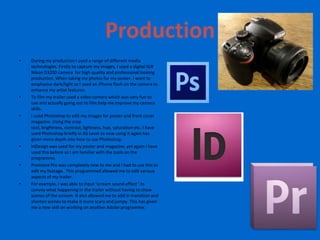
    technologies. Firstly to capture my images, I used a digital SLR
    Nikon D3200 camera for high quality and professional looking
    production. When taking my photos for my poster, I want to
    emphasise dark/light so I used an iPhone flash on the camera to
    enhance my artist features.
•   To film my trailer used a video camera which was very fun to
    use and actually going out to film help me improve my camera
    skills.
•   I used Photoshop to edit my images for poster and front cover
    magazine. Using the crop
    tool, brightness, contrast, lightness, hue, saturation etc. I have
    used Photoshop briefly in AS Level so now using it again has
    given more depth into how to use Photoshop.
•   InDesign was used for my poster and magazine, yet again I have
    used this before so I am familiar with the tools on the
    programme.
•   Premiere Pro was completely new to me and I had to use this to
    edit my footage. This programmed allowed me to edit various
    aspects of my trailer.
•   For example, I was able to input ‘scream sound effect ‘ to
    convey what happening in the trailer without having to show
    scenes of the scream. It also allowed me to add in transition and
    shorten scenes to make it more scary and jumpy. This has given
    me a new skill on working on another Adobe programme.
Premiere Pro
•   Premiere Pro was one of the most important
    pieces of software I used to enable me to create
    my ‘The Watcher’ trailer. Without the editing
    techniques available I wouldn’t have been able
    to import my captured footage from my film
    camera and add several of effects to fit into
    conventions of a thriller. You can see for each
    scene I need a transition effect called ‘Dissolve’.
    The ability of adding this transition helped me
    be creative as it connotes different times of day.
    Furthermore, Premiere Pro allowed me to cut
    and chop footage and increase the pace of the
    trailer.
•   Another aspect which helped me was the
    editing of sound. It let me take out sounds away
    from my footage and add different sound on top
    of my footage. It also let me increase the pace
    of the sound or even slow it down.
•   A possible disadvantage is that I would have to
    regularly save my work because sometimes it
    would crash which would lead to losing my
    work.
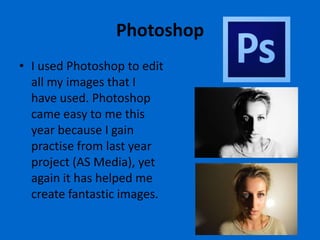
Photoshop
• I used Photoshop to edit
  all my images that I
  have used. Photoshop
  came easy to me this
  year because I gain
  practise from last year
  project (AS Media), yet
  again it has helped me
  create fantastic images.

Evaluation 4

  • 1.
    Evaluation: How did you use media technologies in the construction and research, planning and evaluation stages?
  • 2.
    Research • During my course I became aware of how lucky I am to have access to the Web 2.0 format, as it has allowed me to use consumer produced websites such as YouTube and Blogger. Websites such as these allow the public to upload user- generated content whilst being easy and simple to use. • Research was the first stage of the coursework, I explored many websites on the Internet using the search engine Google. I found a good range of film posters, magazines and trailers. • This would have given me a major insights to all 3 and will have also given me inspiration. • I went to the cinema as often as I could to actually watch trailers in the cinema to give me the full impact of how trailers can actually affect the audience. In the cinema there is also posters, billboards and advertisement to promote the film. I looked how they made me feel and how they draw the audience in. • The internet was the biggest source that I use throughout my coursework, it has given massive understanding with existing media products such as posters and magazines.
  • 3.
    YouTube • I used YouTube throughout my project for research, planning, production, post-production. I think that if it hadn’t been for this sight, I wouldn’t have gain so much insight on existing products. I spent hours watching trailers to hope it would inspire me. YouTube is a site which is free and readily available. When I decided to do a thriller I spent many hours searching through clips and short films to come up with an idea that was going to be suited to my genre. I feel my trailer has worked well all thanks to YouTube. When I was doing my planning, I was watching some trailers on YouTube to gain ideas for the type of shots which were needed for my storyboard. I then spent a while looking for suitable soundtracks. I looked on all the free copyright websites, some were good but other didn’t quite fit. I downloaded effect to make my trailer scarier and add realism. I used YouTube 2 MP3 to download the sounds. • I used the site YouTube to search for existing trailer, as this site is free and readily available. There is also audience feedback on each video so I was able to see which one were more successful. • For example The Dark Knight trailer has over 3 million views with a like/dislike bar at the bottom. This bar shows that 4692 liked the trailer and only 152 disliked it. This means that this trailer was very successful with its target audience. I could also look at the comments below to see specifically which elements were liked and disliked.
  • 4.
    Internet • I used Google Chrome because it works will with blogger. I do think I used Google Chrome in all my tasks enabling me to achieve my full potential through the use of this browser. By using this search engine, it has given me everything that I could ever need for my research, planning and production. • Google was a really useful website, it was a good tool for my research because it allowed me to search for websites that helped me gain useful information and also find images I needed such as film posters. Google was easy and quick to used and it helped me find all the information I need form y research.
  • 5.
    Blogger • I used Blogger the most throughout my project. I uploaded all my work to which was really easy and useful. It meant I could add videos and images to support my written work which a clear heading above each post. I really like how I could combine this use of technology with my written work to support it and make it look creative and interesting to read. I feel by using Blogger I have thought more about how I represent my work as well as thinking about uploading content to the internet. Blogger has made me more creative as I have really thought about how to display work within a blog post. However I did have problems with Blogger, such as it was difficult to place images where I wanted and sometime I was limited to a smaller size. It also took a long time for videos to upload which wasn’t really too much of a problem as I could still edit my post but it would sometimes crash Blogger meaning I would lose my work when it didn’t save. Overall, I think Blogger was a really useful tool and I feel it was a good way to upload my work.
  • 6.
    Excel and Paint • Microsoft Office is a software package used globally and we can see why because of the range of programmes it consists. Advantage of using Excel is that I found was that it enabled me to create charts with ease; it was useful for my audience results analysis. On Excel I was able to easily tally up and count up out results with minimal errors and maximum speed. We also made out results look more interesting by being more creative and using different ranges of bar charts. Once I created the charts, I copied it onto paint and saved it as a JPEG. • I used Paint to save image as JPEGs. I print screens the charts from excel and cropped then down to size and saved them as JPEG on paint. I did this because I could upload them on my blog. It was very time consuming but it was worth it. Paint is a simple but useful programme that I feel I made good use of in my work.
  • 7.
    Planning • In my planning stage, I created a storyboard using Post-It notes which showed the story of my trailer. I used Post-It notes because I could change around the scenes if I wished too which was much easily and convenient. I did change it around often and also added more scenes in. for each Post-It note I’ve drawn diagrams to illustrate the scenes, giving a brief description of what's happening and how long it is shot for. Also the diagram is drawn as what camera I am going to use. Images were taken on a Blackberry then transferred onto the computer. • To organise my filming, I used Google calendar to show this. Google calendar is free and very easy to us. It also shows it in a very simple way and is available to print and be shown online (Internet). • Any planning and research that I completed was then transferred onto Blogger, an online blog storage that allowed me to enter my work chronologically.
  • 8.
    Facebook and Email •I felt that Facebook is a great way to communicate with others. I use this social network to organise shooting day with my actress by using Facebook chat and mail. • Email was used to contact my artist but I also used mobile because it quicker to communicate and any complication I can also ring.
  • 9.
    Word • Work wasvery important during my research, planning and evaluation stage. Firstly it enabled me to create my audience research questionnaire. An advantage of using Word was that any text could be easily changed and it detects spelling errors and grammatically errors. This helps because it makes my written work professional because it won’t have any errors.
  • 10.
    Production • During my production I used a range of different media technologies. Firstly to capture my images, I used a digital SLR Nikon D3200 camera for high quality and professional looking production. When taking my photos for my poster, I want to emphasise dark/light so I used an iPhone flash on the camera to enhance my artist features. • To film my trailer used a video camera which was very fun to use and actually going out to film help me improve my camera skills. • I used Photoshop to edit my images for poster and front cover magazine. Using the crop tool, brightness, contrast, lightness, hue, saturation etc. I have used Photoshop briefly in AS Level so now using it again has given more depth into how to use Photoshop. • InDesign was used for my poster and magazine, yet again I have used this before so I am familiar with the tools on the programme. • Premiere Pro was completely new to me and I had to use this to edit my footage. This programmed allowed me to edit various aspects of my trailer. • For example, I was able to input ‘scream sound effect ‘ to convey what happening in the trailer without having to show scenes of the scream. It also allowed me to add in transition and shorten scenes to make it more scary and jumpy. This has given me a new skill on working on another Adobe programme.
  • 11.
    Premiere Pro • Premiere Pro was one of the most important pieces of software I used to enable me to create my ‘The Watcher’ trailer. Without the editing techniques available I wouldn’t have been able to import my captured footage from my film camera and add several of effects to fit into conventions of a thriller. You can see for each scene I need a transition effect called ‘Dissolve’. The ability of adding this transition helped me be creative as it connotes different times of day. Furthermore, Premiere Pro allowed me to cut and chop footage and increase the pace of the trailer. • Another aspect which helped me was the editing of sound. It let me take out sounds away from my footage and add different sound on top of my footage. It also let me increase the pace of the sound or even slow it down. • A possible disadvantage is that I would have to regularly save my work because sometimes it would crash which would lead to losing my work.
  • 12.
    Photoshop • I usedPhotoshop to edit all my images that I have used. Photoshop came easy to me this year because I gain practise from last year project (AS Media), yet again it has helped me create fantastic images.