Evaluation Question 4
How did you use media technologies
in the construction and research,
planning and evaluation stages?
Research & Planning
Stage
Google
Google was highly important and useful at the this stage as it
was the main search engine I used to conduct my research.
Initially I used this to do my background reading on the horror
genre, as well as look at existing promotional products such as
film trailers and film posters as well as an past issues of
“Empire” and “Total Film Magazine”. I also used this tool to
access Blogger and other important websites, and found the
integration and links between Blogger, Gmail and YouTube
highly useful as it meant my work could be time effective, and
also it was easier to share useful trailers and posters etc that I
found. Google images was also highly important as it meant I
could examine previous magazine covers to gain inspiration
for my own film magazine.
Blogger
Blogger was the tool I used to record my progress during the
research and planning stage. I found this highly useful as it
meant I could keep my research organised, as well as being
able to constantly check back on my work, and then be able to
assess my progress. Blogger was also useful as it allowed me
to share the ideas I had for my promotional package, such as
links to film trailer on YouTube. This meant I could see a
physical idea for my own products before being able to
develop upon them. I liked using Blogger as it was a more
three-dimensional way of producing a port folio, using a
diverse range of presenting materials which are upto date
with advances in the technological world, which I feel it is
always important to do as a media student.
Facebook
I used Facebook along side other media
technologies, right from the beginning of this entire
process, to communicate and share ideas with my
group members, as well as being able to organise
shooting schedules for example. Because of the
immediacy of the interaction on social media, I
used Facebook as a way of previewing both my
main image and finished film poster to a wide range
of audiences, in order to gain feedback. I believe I
would not have been able to collect so much useful
feedback had I not had the use of this at my
disposal.
YouTube
YouTube was handy as it meant my group and I could
watch extensive amounts of film trailers to help
determine what genre of horror film we wanted to
produce (Psychological Horror, Slasher Horror etc). Once
we’d done this, we could then watch even more trailers,
to pick up on the conventions used by the industry to
make effective products. This was also useful in giving us
inspiration for specific ideas for shots, lighting or
scripting. I believe that the development of ideas for our
own product would’ve been a much slower process had
we not been able to have access to such content in the
research and planning stages.
Production Stage
Adobe Indesign
Adobe Indesign was used to help me create my
products at AS Level, so therefore I believe I already
had a good firm skills base before beginning to
produce my promotional package for this year: I
just needed a short period of time to revise my
knowledge. I used this media software technology
to make my film magazine and film poster. I’ve
enjoyed using this programme as it has meant I can
turn all my ideas into a reality without much
compromise thanks to its many tools and functions,
ultimately meaning I can create what I believe to be
two very professional products.
Adobe Photoshop
Photoshop was again used to help produce my
film magazine and film poster, and as I already
had a good background knowledge and skills
base from AS Level, I felt I was comfortable using
this. I mainly used this enhance my severed hand
for my film poster. An example of its use on this
product was where I made the colours more
vibrant, and gave the mud in the image more
depth, and the blood more texture, so they were
more defined and ultimately their visual impact
more prominent. Photoshop has been influential
in helping me make a highly professional and
visually pleasing film poster and film magazine.
Adobe Premiere
Adobe Premiere was entirely new to me before this year’s production
began, so it took a few weeks for me to be able to be comfortable
using this programme. However as we used this during the editing and
post production stages, it meant it did not impact on the effectiveness
of my group’s work, as I had practical lessons before this process
began, so I was fluent enough to use this when we needed it. This
programme was highly useful as it allowed us to upload our footage
and begin experimenting with different ideas as and when we filmed
them. This meant the editing stages were staggered, and more drawn
out which benefitted our product as the post production stages were
not a rush, and creative decisions could be tested before used in the
final product. On reviewing my use of this programme, I believe it to
be preferable to other film editing programmes such as “Windows
Movie Maker” as it has a larger range of effects and tools to help make
a more professional promotional package.
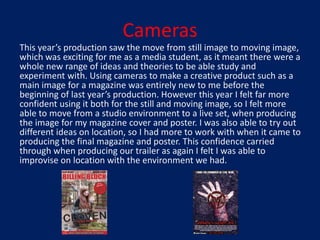
Cameras
This year’s production saw the move from still image to moving image,
which was exciting for me as a media student, as it meant there were a
whole new range of ideas and theories to be able study and
experiment with. Using cameras to make a creative product such as a
main image for a magazine was entirely new to me before the
beginning of last year’s production. However this year I felt far more
confident using it both for the still and moving image, so I felt more
able to move from a studio environment to a live set, when producing
the image for my magazine cover and poster. I was also able to try out
different ideas on location, so I had more to work with when it came to
producing the final magazine and poster. This confidence carried
through when producing our trailer as again I felt I was able to
improvise on location with the environment we had.
Evaluation Stage
Prezi
Prezi was used extensively at AS level to
evaluate my work on my music magazine pages,
and I enjoyed the interactivity it gave as a
presenting tool. After the success at this level, I
decided to carry this on to the evaluating of this
years production. Prezi allows you to present
ideas in a more fun and interesting setting, with
various templates and ability to incorporate
videos and images as an example.
PowerPoint & Slide Share
PowerPoint has always been key to presenting
my ideas as it is simple and time effective to
create whilst still being interesting. I have used
PowerPoint across all areas of production as
presented the findings of my research into
historical Celtic and tribal symbols that formed
part of the mysterious symbol we used in our
film trailer. I then used PowerPoint to display the
feedback from our focus group and now in the
final evaluation stages of my production.

Evaluation question 4

  • 1.
    Evaluation Question 4 Howdid you use media technologies in the construction and research, planning and evaluation stages?
  • 2.
  • 3.
    Google Google was highlyimportant and useful at the this stage as it was the main search engine I used to conduct my research. Initially I used this to do my background reading on the horror genre, as well as look at existing promotional products such as film trailers and film posters as well as an past issues of “Empire” and “Total Film Magazine”. I also used this tool to access Blogger and other important websites, and found the integration and links between Blogger, Gmail and YouTube highly useful as it meant my work could be time effective, and also it was easier to share useful trailers and posters etc that I found. Google images was also highly important as it meant I could examine previous magazine covers to gain inspiration for my own film magazine.
  • 4.
    Blogger Blogger was thetool I used to record my progress during the research and planning stage. I found this highly useful as it meant I could keep my research organised, as well as being able to constantly check back on my work, and then be able to assess my progress. Blogger was also useful as it allowed me to share the ideas I had for my promotional package, such as links to film trailer on YouTube. This meant I could see a physical idea for my own products before being able to develop upon them. I liked using Blogger as it was a more three-dimensional way of producing a port folio, using a diverse range of presenting materials which are upto date with advances in the technological world, which I feel it is always important to do as a media student.
  • 5.
    Facebook I used Facebookalong side other media technologies, right from the beginning of this entire process, to communicate and share ideas with my group members, as well as being able to organise shooting schedules for example. Because of the immediacy of the interaction on social media, I used Facebook as a way of previewing both my main image and finished film poster to a wide range of audiences, in order to gain feedback. I believe I would not have been able to collect so much useful feedback had I not had the use of this at my disposal.
  • 6.
    YouTube YouTube was handyas it meant my group and I could watch extensive amounts of film trailers to help determine what genre of horror film we wanted to produce (Psychological Horror, Slasher Horror etc). Once we’d done this, we could then watch even more trailers, to pick up on the conventions used by the industry to make effective products. This was also useful in giving us inspiration for specific ideas for shots, lighting or scripting. I believe that the development of ideas for our own product would’ve been a much slower process had we not been able to have access to such content in the research and planning stages.
  • 7.
  • 8.
    Adobe Indesign Adobe Indesignwas used to help me create my products at AS Level, so therefore I believe I already had a good firm skills base before beginning to produce my promotional package for this year: I just needed a short period of time to revise my knowledge. I used this media software technology to make my film magazine and film poster. I’ve enjoyed using this programme as it has meant I can turn all my ideas into a reality without much compromise thanks to its many tools and functions, ultimately meaning I can create what I believe to be two very professional products.
  • 9.
    Adobe Photoshop Photoshop wasagain used to help produce my film magazine and film poster, and as I already had a good background knowledge and skills base from AS Level, I felt I was comfortable using this. I mainly used this enhance my severed hand for my film poster. An example of its use on this product was where I made the colours more vibrant, and gave the mud in the image more depth, and the blood more texture, so they were more defined and ultimately their visual impact more prominent. Photoshop has been influential in helping me make a highly professional and visually pleasing film poster and film magazine.
  • 10.
    Adobe Premiere Adobe Premierewas entirely new to me before this year’s production began, so it took a few weeks for me to be able to be comfortable using this programme. However as we used this during the editing and post production stages, it meant it did not impact on the effectiveness of my group’s work, as I had practical lessons before this process began, so I was fluent enough to use this when we needed it. This programme was highly useful as it allowed us to upload our footage and begin experimenting with different ideas as and when we filmed them. This meant the editing stages were staggered, and more drawn out which benefitted our product as the post production stages were not a rush, and creative decisions could be tested before used in the final product. On reviewing my use of this programme, I believe it to be preferable to other film editing programmes such as “Windows Movie Maker” as it has a larger range of effects and tools to help make a more professional promotional package.
  • 11.
    Cameras This year’s productionsaw the move from still image to moving image, which was exciting for me as a media student, as it meant there were a whole new range of ideas and theories to be able study and experiment with. Using cameras to make a creative product such as a main image for a magazine was entirely new to me before the beginning of last year’s production. However this year I felt far more confident using it both for the still and moving image, so I felt more able to move from a studio environment to a live set, when producing the image for my magazine cover and poster. I was also able to try out different ideas on location, so I had more to work with when it came to producing the final magazine and poster. This confidence carried through when producing our trailer as again I felt I was able to improvise on location with the environment we had.
  • 12.
  • 13.
    Prezi Prezi was usedextensively at AS level to evaluate my work on my music magazine pages, and I enjoyed the interactivity it gave as a presenting tool. After the success at this level, I decided to carry this on to the evaluating of this years production. Prezi allows you to present ideas in a more fun and interesting setting, with various templates and ability to incorporate videos and images as an example.
  • 14.
    PowerPoint & SlideShare PowerPoint has always been key to presenting my ideas as it is simple and time effective to create whilst still being interesting. I have used PowerPoint across all areas of production as presented the findings of my research into historical Celtic and tribal symbols that formed part of the mysterious symbol we used in our film trailer. I then used PowerPoint to display the feedback from our focus group and now in the final evaluation stages of my production.