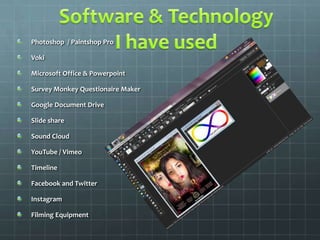
Photoshop / Paintshop Pro
Voki
Microsoft Office & Powerpoint
Survey Monkey Questionaire Maker
Google Document Drive
Slide share
Sound Cloud
YouTube / Vimeo
Timeline
Facebook and Twitter
Instagram
Filming Equipment
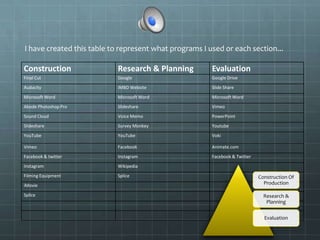
Construction Research & Planning Evaluation
Final Cut Google Google Drive
Audacity IMBD Website Slide Share
Microsoft Word Microsoft Word Microsoft Word
Abode Photoshop Pro Slideshare Vimeo
Sound Cloud Voice Memo PowerPoint
Slideshare Survey Monkey Youtube
YouTube YouTube Voki
Vimeo Facebook Animate.com
Facebook & twitter Instagram Facebook & Twitter
Instagram Wikipedia
Filming Equipment Splice
iMovie
Splice
I have created this table to represent what programs I used or each section...
Construction Of
Production
Research &
Planning
Evaluation
• The use of Photoshop as well as various photo editing software, in term of research and planning, it
helped me create tables and schedules to work with in order to organise my work as well as present it in a
different and unique way, I also edited pictures together, change photos and designs needed to
create colours and backgrounds altogether. I also created my logo, various banners for my blog as well as
the second and final ancillary product for my film, the poster! Photoshop over all was an excellent
program to use for this process as it ensured I created this in a professional and creative manner
throughout the construction stage . Photoshop helped keep my research clear with high quality and also
helped me to build vital skills
• Microsoft would was handy in the sense that it helped with spelling grammar – something that was
convenient, and arranging test appropriately, it was almost like a preview before I posted it on my blog, it
helped with my research, construction and evaluation providing me with a space to think and write my
notes and ideas up without them getting lost
• Final Cut was the program used in constructing my short film altogether, it helped me add effects, sound
effects, edit the sound and impact as well as give me the option to manipulate scenes with filters to
convey meaning. I previously used Windows Movie Maker as well as iMovie to edit footage, however Final
Cut proved to be much more of an advanced software which allowed a higher range of editing choices for
example changing the clips brightness and lighting, sharpening footage, rewinding and slowing down
clips to create a certain effect. I enjoyed playing around with it so much that I became a natural at using it.
For my film , the narrative required a vision which needed to be in a different tone and pace for the
audience to clearly see the change in scene. For this I used a ‘grunge’ filter over clips and created a slower
motion picture over all to make it seem hazy and not of reality. This type of editing can not be done in
Movie Maker or iMovie.
• Other programs such as Slideshare, Sound Cloud and Google Drive allowed me to upload work on to the
internet where I was able to extract work and place it in my blog by copying the HTML code
The website, YouTube, helped in research by allowing me to view other trailers
within my genre. & because of YouTube I was able to also upload and share my
work and post them on social network sites to get maximum traffic.
Social network sites such as Facebook, twitter and also an app on my phone
called Instagram allowed me to broadcast my production after the construction
process as well as post questioners during the research and planning stage.
These sites also act as marketing as it reaches maximum audience. Products go
viral and stimulate word of mouth by its users.
I also used slide share which helped me share PowerPoint presentations as well
as word documents to be uploaded on to the internet. I have done this with
various scripts I have had to write for the film as well as the radio trailer.
I also used technologies such as my Fujifilm SLR camera to take photos of the
actors as evidence for my blog as well as hold a photo shoot for the main
character to complete work for the making of my ancillary product, the poster.
Other equipment such as the professional camera for the final production was
also used by myself with the aid of a tripod to stabilise scenes. I have gained a
variety of skills with these various equipment and now feel very confident
indeed.
The range of media available has made it easy to gather
feedback and present an evaluation of my film trailer. by
gathering some of my audience feedback from friends
online, both through Facebook and survey monkey as well
as social networking apps on my phone such as Instagram.
These are useful interactive sources.
To summarise I have used a variety of technology to research,
plan, construct and evaluate my work to high standards.
The various sources seem to grow and the ability to access
new types of information over the internet is still growing

Question 4 - Techology

  • 2.
    Photoshop / PaintshopPro Voki Microsoft Office & Powerpoint Survey Monkey Questionaire Maker Google Document Drive Slide share Sound Cloud YouTube / Vimeo Timeline Facebook and Twitter Instagram Filming Equipment
  • 3.
    Construction Research &Planning Evaluation Final Cut Google Google Drive Audacity IMBD Website Slide Share Microsoft Word Microsoft Word Microsoft Word Abode Photoshop Pro Slideshare Vimeo Sound Cloud Voice Memo PowerPoint Slideshare Survey Monkey Youtube YouTube YouTube Voki Vimeo Facebook Animate.com Facebook & twitter Instagram Facebook & Twitter Instagram Wikipedia Filming Equipment Splice iMovie Splice I have created this table to represent what programs I used or each section... Construction Of Production Research & Planning Evaluation
  • 4.
    • The useof Photoshop as well as various photo editing software, in term of research and planning, it helped me create tables and schedules to work with in order to organise my work as well as present it in a different and unique way, I also edited pictures together, change photos and designs needed to create colours and backgrounds altogether. I also created my logo, various banners for my blog as well as the second and final ancillary product for my film, the poster! Photoshop over all was an excellent program to use for this process as it ensured I created this in a professional and creative manner throughout the construction stage . Photoshop helped keep my research clear with high quality and also helped me to build vital skills • Microsoft would was handy in the sense that it helped with spelling grammar – something that was convenient, and arranging test appropriately, it was almost like a preview before I posted it on my blog, it helped with my research, construction and evaluation providing me with a space to think and write my notes and ideas up without them getting lost • Final Cut was the program used in constructing my short film altogether, it helped me add effects, sound effects, edit the sound and impact as well as give me the option to manipulate scenes with filters to convey meaning. I previously used Windows Movie Maker as well as iMovie to edit footage, however Final Cut proved to be much more of an advanced software which allowed a higher range of editing choices for example changing the clips brightness and lighting, sharpening footage, rewinding and slowing down clips to create a certain effect. I enjoyed playing around with it so much that I became a natural at using it. For my film , the narrative required a vision which needed to be in a different tone and pace for the audience to clearly see the change in scene. For this I used a ‘grunge’ filter over clips and created a slower motion picture over all to make it seem hazy and not of reality. This type of editing can not be done in Movie Maker or iMovie. • Other programs such as Slideshare, Sound Cloud and Google Drive allowed me to upload work on to the internet where I was able to extract work and place it in my blog by copying the HTML code
  • 5.
    The website, YouTube,helped in research by allowing me to view other trailers within my genre. & because of YouTube I was able to also upload and share my work and post them on social network sites to get maximum traffic. Social network sites such as Facebook, twitter and also an app on my phone called Instagram allowed me to broadcast my production after the construction process as well as post questioners during the research and planning stage. These sites also act as marketing as it reaches maximum audience. Products go viral and stimulate word of mouth by its users. I also used slide share which helped me share PowerPoint presentations as well as word documents to be uploaded on to the internet. I have done this with various scripts I have had to write for the film as well as the radio trailer. I also used technologies such as my Fujifilm SLR camera to take photos of the actors as evidence for my blog as well as hold a photo shoot for the main character to complete work for the making of my ancillary product, the poster. Other equipment such as the professional camera for the final production was also used by myself with the aid of a tripod to stabilise scenes. I have gained a variety of skills with these various equipment and now feel very confident indeed.
  • 6.
    The range ofmedia available has made it easy to gather feedback and present an evaluation of my film trailer. by gathering some of my audience feedback from friends online, both through Facebook and survey monkey as well as social networking apps on my phone such as Instagram. These are useful interactive sources. To summarise I have used a variety of technology to research, plan, construct and evaluate my work to high standards. The various sources seem to grow and the ability to access new types of information over the internet is still growing