Elasticsearch & Lucene for
Apache Spark and MLlib
Costin Leau (@costinl)
Mirror, mirror on the wall,
what’s the happiest team of
us all ?
Briita Weber
- Rough translation from German by yours truly -
Purpose of the talk
Improve ML pipelines through IR
Text processing
• Analysis
• Featurize/Vectorize *
* In research / poc / WIP / Experimental phase
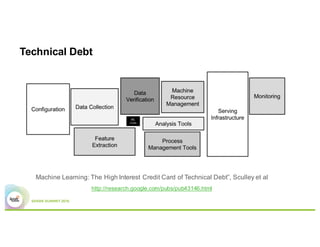
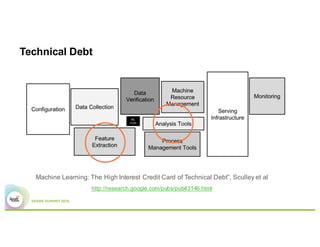
Technical Debt
Machine Learning: The High Interest Credit Card of Technical Debt”, Sculley et al
http://research.google.com/pubs/pub43146.html
Technical Debt
Machine Learning: The High Interest Credit Card of Technical Debt”, Sculley et al
http://research.google.com/pubs/pub43146.html
Challenge
Challenge
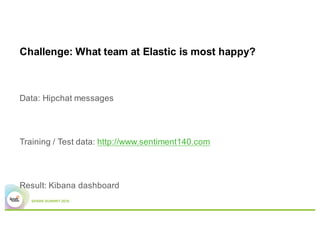
Challenge: What team at Elastic is most happy?
Data: Hipchat messages
Training / Test data: http://www.sentiment140.com
Result: Kibana dashboard
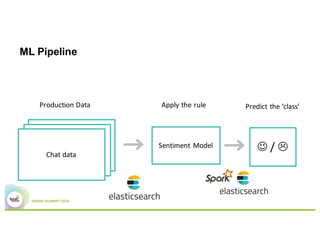
ML Pipeline
Chat data
Sentiment	Model
Production	Data Apply	the	rule Predict	the	‘class’
J /	L
Data is King
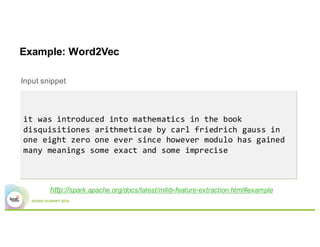
Example: Word2Vec
Input snippet
http://spark.apache.org/docs/latest/mllib-feature-extraction.html#example
it was introduced into mathematics in the book
disquisitiones arithmeticae by carl friedrich gauss in
one eight zero one ever since however modulo has gained
many meanings some exact and some imprecise
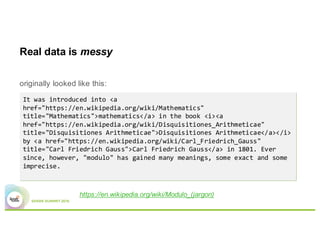
Real data is messy
originally looked like this:
https://en.wikipedia.org/wiki/Modulo_(jargon)
It was introduced into <a
href="https://en.wikipedia.org/wiki/Mathematics"
title="Mathematics">mathematics</a> in the book <i><a
href="https://en.wikipedia.org/wiki/Disquisitiones_Arithmeticae"
title="Disquisitiones Arithmeticae">Disquisitiones Arithmeticae</a></i>
by <a href="https://en.wikipedia.org/wiki/Carl_Friedrich_Gauss"
title="Carl Friedrich Gauss">Carl Friedrich Gauss</a> in 1801. Ever
since, however, "modulo" has gained many meanings, some exact and some
imprecise.
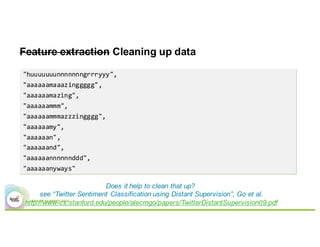
Feature extraction Cleaning up data
"huuuuuuunnnnnnngrrryyy",
"aaaaaamaaazinggggg",
"aaaaaamazing",
"aaaaaammm",
"aaaaaammmazzzingggg",
"aaaaaamy",
"aaaaaan",
"aaaaaand",
"aaaaaannnnnnddd",
"aaaaaanyways"
Does it help to clean that up?
see “Twitter Sentiment Classification using Distant Supervision”, Go et al.
http://www-cs.stanford.edu/people/alecmgo/papers/TwitterDistantSupervision09.pdf
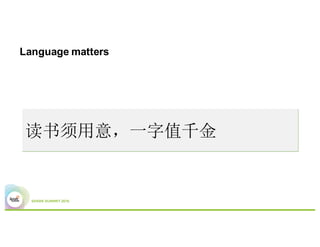
Language matters
读书须用意,一字值千金
Lucene to the rescue!
High-performance, full-featured text search library
15 years of experience
Widely recognized for its utility
• It’s a primary test bed for new JVM versions
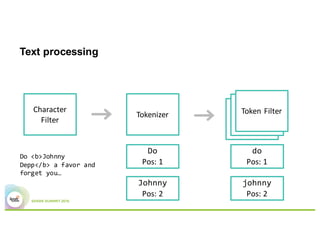
Text processing
Character	
Filter
Tokenizer
Token	FilterToken	FilterToken	Filter
Do <b>Johnny
Depp</b> a favor and
forget you…
Do
Pos:	1
Johnny
Pos:	2
do
Pos:	1
johnny
Pos:	2
Lucene for text analysis
state of the art text processing
many extensions available for different languages, use cases,…
however…
…
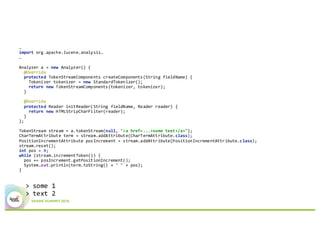
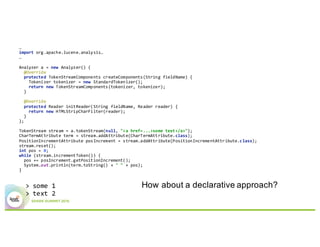
import org.apache.lucene.analysis…
…
Analyzer a = new Analyzer() {
@Override
protected TokenStreamComponents createComponents(String fieldName) {
Tokenizer tokenizer = new StandardTokenizer();
return new TokenStreamComponents(tokenizer, tokenizer);
}
@Override
protected Reader initReader(String fieldName, Reader reader) {
return new HTMLStripCharFilter(reader);
}
};
TokenStream stream = a.tokenStream(null, "<a href=...>some text</a>");
CharTermAttribute term = stream.addAttribute(CharTermAttribute.class);
PositionIncrementAttribute posIncrement = stream.addAttribute(PositionIncrementAttribute.class);
stream.reset();
int pos = 0;
while (stream.incrementToken()) {
pos += posIncrement.getPositionIncrement();
System.out.println(term.toString() + " " + pos);
}
> some 1
> text 2
…
import org.apache.lucene.analysis…
…
Analyzer a = new Analyzer() {
@Override
protected TokenStreamComponents createComponents(String fieldName) {
Tokenizer tokenizer = new StandardTokenizer();
return new TokenStreamComponents(tokenizer, tokenizer);
}
@Override
protected Reader initReader(String fieldName, Reader reader) {
return new HTMLStripCharFilter(reader);
}
};
TokenStream stream = a.tokenStream(null, "<a href=...>some text</a>");
CharTermAttribute term = stream.addAttribute(CharTermAttribute.class);
PositionIncrementAttribute posIncrement = stream.addAttribute(PositionIncrementAttribute.class);
stream.reset();
int pos = 0;
while (stream.incrementToken()) {
pos += posIncrement.getPositionIncrement();
System.out.println(term.toString() + " " + pos);
}
> some 1
> text 2
How about a declarative approach?
Very quick intro to
Elasticsearch
Elasticsearch in 5 3’
Scalable, real-time search and analytics engine
Data distribution, cluster management
REST APIs
JVM based, uses Apache Lucene internally
Open-source (on Github, Apache 2 License)
Elasticsearch in 3’
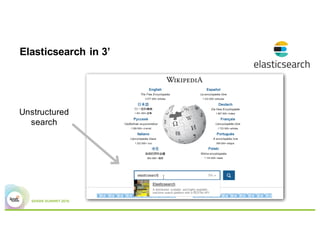
Unstructured
search
Elasticsearch in 3’
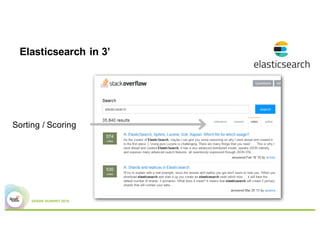
Sorting / Scoring
Elasticsearch in 3’
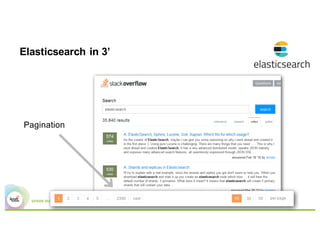
Pagination
Elasticsearch in 3’
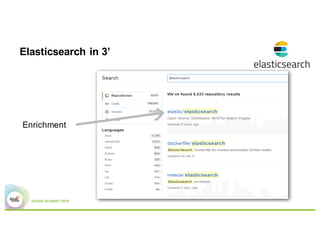
Enrichment
Elasticsearch in 3’
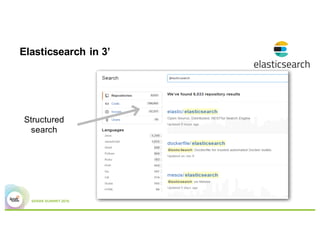
Structured
search
Elasticsearch in 3’
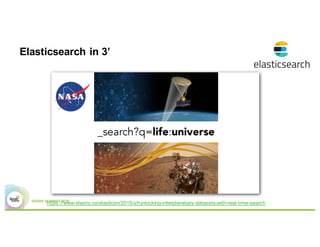
https://www.elastic.co/elasticon/2015/sf/unlocking-interplanetary-datasets-with-real-time-search
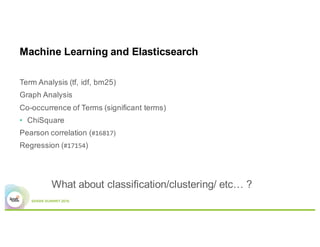
Machine Learning and
Elasticsearch
Machine Learning and Elasticsearch
Term Analysis (tf, idf, bm25)
Graph Analysis
Co-occurrence of Terms (significant terms)
• ChiSquare
Pearson correlation (#16817)
Regression (#17154)
What about classification/clustering/ etc… ?
31
It’s not the matching data,
but the meta that lead to it
How to use Elasticsearch
from Spark ?
Somebody on Stackoverflow
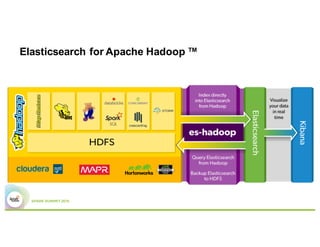
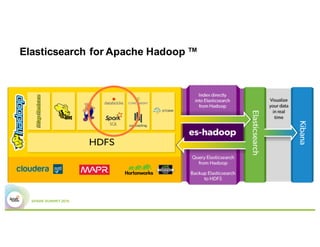
Elasticsearch for Apache Hadoop ™
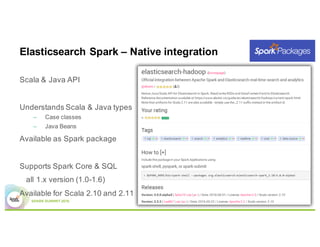
Elasticsearch Spark – Native integration
Scala & Java API
Understands Scala & Java types
– Case classes
– Java Beans
Available as Spark package
Supports Spark Core & SQL
all 1.x version (1.0-1.6)
Available for Scala 2.10 and 2.11
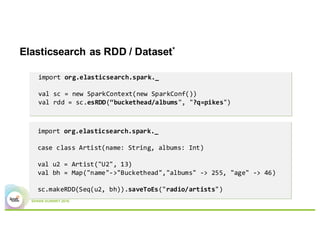
Elasticsearch as RDD / Dataset*
import org.elasticsearch.spark._
val sc = new SparkContext(new SparkConf())
val rdd = sc.esRDD(“buckethead/albums", "?q=pikes")
import org.elasticsearch.spark._
case class Artist(name: String, albums: Int)
val u2 = Artist("U2", 13)
val bh = Map("name"->"Buckethead","albums" -> 255, "age" -> 46)
sc.makeRDD(Seq(u2, bh)).saveToEs("radio/artists")
Elasticsearch as a DataFrame
val df = sql.read.format(“es").load("buckethead/albums")
df.filter(df("category").equalTo("pikes").and(df("year").geq(2015)))
{ "query" :
{ "bool" : { "must" : [
"match" : { "category" : "pikes" }
],
"filter" : [
{ "range" : { "year" : {"gte" : "2015" }}}
]
}}}
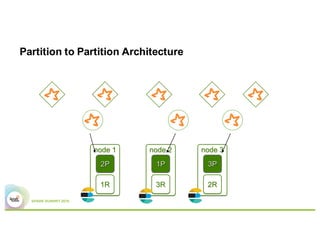
Partition to Partition Architecture
Putting the pieces together
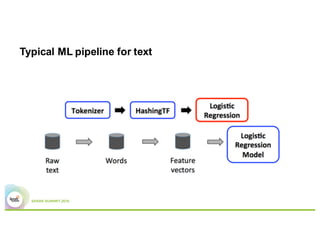
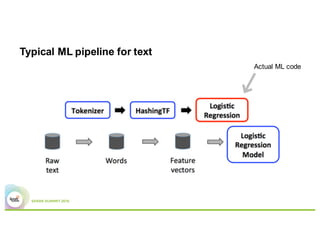
Typical ML pipeline for text
Actual ML code
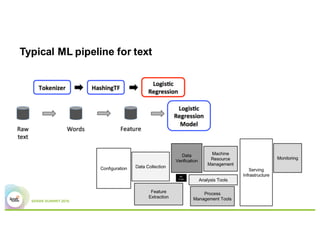
Typical ML pipeline for text
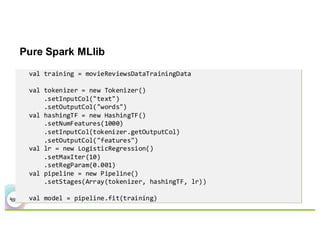
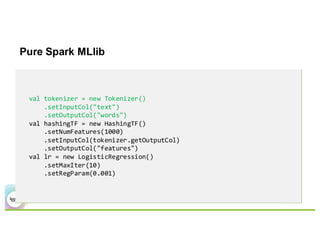
Pure Spark MLlib
val training = movieReviewsDataTrainingData
val tokenizer = new Tokenizer()
.setInputCol("text")
.setOutputCol("words")
val hashingTF = new HashingTF()
.setNumFeatures(1000)
.setInputCol(tokenizer.getOutputCol)
.setOutputCol("features")
val lr = new LogisticRegression()
.setMaxIter(10)
.setRegParam(0.001)
val pipeline = new Pipeline()
.setStages(Array(tokenizer, hashingTF, lr))
val model = pipeline.fit(training)
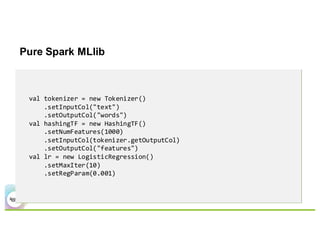
Pure Spark MLlib
val tokenizer = new Tokenizer()
.setInputCol("text")
.setOutputCol("words")
val hashingTF = new HashingTF()
.setNumFeatures(1000)
.setInputCol(tokenizer.getOutputCol)
.setOutputCol("features")
val lr = new LogisticRegression()
.setMaxIter(10)
.setRegParam(0.001)
Pure Spark MLlib
val tokenizer = new Tokenizer()
.setInputCol("text")
.setOutputCol("words")
val hashingTF = new HashingTF()
.setNumFeatures(1000)
.setInputCol(tokenizer.getOutputCol)
.setOutputCol("features")
val lr = new LogisticRegression()
.setMaxIter(10)
.setRegParam(0.001)
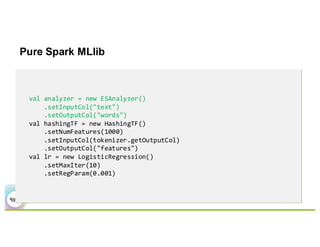
Pure Spark MLlib
val analyzer = new ESAnalyzer()
.setInputCol("text")
.setOutputCol("words")
val hashingTF = new HashingTF()
.setNumFeatures(1000)
.setInputCol(tokenizer.getOutputCol)
.setOutputCol("features")
val lr = new LogisticRegression()
.setMaxIter(10)
.setRegParam(0.001)
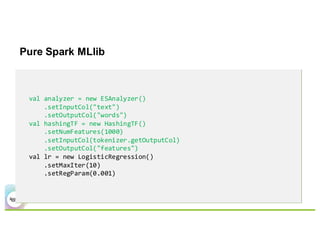
Pure Spark MLlib
val analyzer = new ESAnalyzer()
.setInputCol("text")
.setOutputCol("words")
val hashingTF = new HashingTF()
.setNumFeatures(1000)
.setInputCol(tokenizer.getOutputCol)
.setOutputCol("features")
val lr = new LogisticRegression()
.setMaxIter(10)
.setRegParam(0.001)
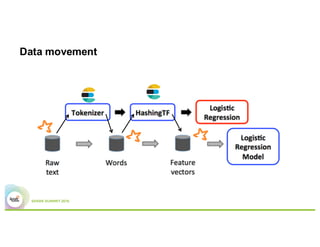
Data movement
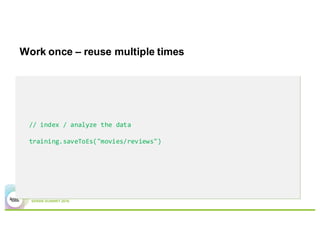
Work once – reuse multiple times
// index / analyze the data
training.saveToEs("movies/reviews")
Work once – reuse multiple times
// prepare the spec for vectorize – fast and lightweight
val spec = s"""{ "features" : [{
| "field": "text",
| "type" : "string",
| "tokens" : "all_terms",
| "number" : "occurrence",
| "min_doc_freq" : 2000
| }],
| "sparse" : "true"}""".stripMargin
ML.prepareSpec(spec, “my-spec”)
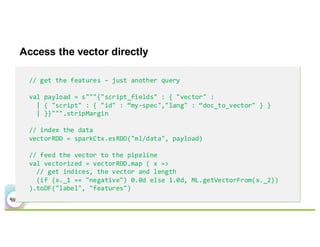
Access the vector directly
// get the features – just another query
val payload = s"""{"script_fields" : { "vector" :
| { "script" : { "id" : “my-spec","lang" : “doc_to_vector" } }
| }}""".stripMargin
// index the data
vectorRDD = sparkCtx.esRDD("ml/data", payload)
// feed the vector to the pipeline
val vectorized = vectorRDD.map ( x =>
// get indices, the vector and length
(if (x._1 == "negative") 0.0d else 1.0d, ML.getVectorFrom(x._2))
).toDF("label", "features")
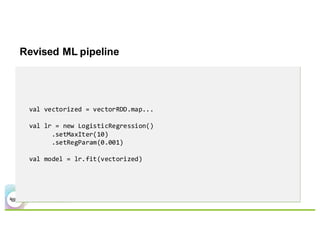
Revised ML pipeline
val vectorized = vectorRDD.map...
val lr = new LogisticRegression()
.setMaxIter(10)
.setRegParam(0.001)
val model = lr.fit(vectorized)
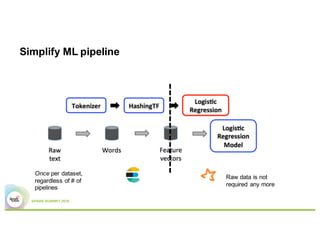
Simplify ML pipeline
Once per dataset,
regardless of # of
pipelines
Raw data is not
required any more
Need to adjust the model? Change the spec
val spec = s"""{ "features" : [{
| "field": "text",
| "type" : "string",
| "tokens" : "given",
| "number" : "tf",
| "terms": ["term1", "term2", ...]
| }],
| "sparse" : "true"}""".stripMargin
ML.prepareSpec(spec)
All this is WIP
Not all features available (currently dictionary, vectors)
Works with data outside or inside Elasticsearch (latter is much faster)
Bind vectors to queries
Other topics WIP:
Focused on document / text classification – numeric support is next
Model importing / exporting – Spark 2.0 ML persistence
Feedback highly sought - Is this useful?
THANK YOU.
j.mp/spark-summit-west-16
elastic.co/hadoop
github.com/elastic | costin | brwe
discuss.elastic.co
@costinl

Elasticsearch And Apache Lucene For Apache Spark And MLlib

  • 1.
    Elasticsearch & Lucenefor Apache Spark and MLlib Costin Leau (@costinl)
  • 2.
    Mirror, mirror onthe wall, what’s the happiest team of us all ? Briita Weber - Rough translation from German by yours truly -
  • 3.
    Purpose of thetalk Improve ML pipelines through IR Text processing • Analysis • Featurize/Vectorize * * In research / poc / WIP / Experimental phase
  • 4.
    Technical Debt Machine Learning:The High Interest Credit Card of Technical Debt”, Sculley et al http://research.google.com/pubs/pub43146.html
  • 5.
    Technical Debt Machine Learning:The High Interest Credit Card of Technical Debt”, Sculley et al http://research.google.com/pubs/pub43146.html
  • 6.
  • 7.
    Challenge: What teamat Elastic is most happy? Data: Hipchat messages Training / Test data: http://www.sentiment140.com Result: Kibana dashboard
  • 8.
    ML Pipeline Chat data Sentiment Model Production DataApply the rule Predict the ‘class’ J / L
  • 9.
  • 10.
    Example: Word2Vec Input snippet http://spark.apache.org/docs/latest/mllib-feature-extraction.html#example itwas introduced into mathematics in the book disquisitiones arithmeticae by carl friedrich gauss in one eight zero one ever since however modulo has gained many meanings some exact and some imprecise
  • 11.
    Real data ismessy originally looked like this: https://en.wikipedia.org/wiki/Modulo_(jargon) It was introduced into <a href="https://en.wikipedia.org/wiki/Mathematics" title="Mathematics">mathematics</a> in the book <i><a href="https://en.wikipedia.org/wiki/Disquisitiones_Arithmeticae" title="Disquisitiones Arithmeticae">Disquisitiones Arithmeticae</a></i> by <a href="https://en.wikipedia.org/wiki/Carl_Friedrich_Gauss" title="Carl Friedrich Gauss">Carl Friedrich Gauss</a> in 1801. Ever since, however, "modulo" has gained many meanings, some exact and some imprecise.
  • 12.
    Feature extraction Cleaningup data "huuuuuuunnnnnnngrrryyy", "aaaaaamaaazinggggg", "aaaaaamazing", "aaaaaammm", "aaaaaammmazzzingggg", "aaaaaamy", "aaaaaan", "aaaaaand", "aaaaaannnnnnddd", "aaaaaanyways" Does it help to clean that up? see “Twitter Sentiment Classification using Distant Supervision”, Go et al. http://www-cs.stanford.edu/people/alecmgo/papers/TwitterDistantSupervision09.pdf
  • 13.
  • 14.
    Lucene to therescue! High-performance, full-featured text search library 15 years of experience Widely recognized for its utility • It’s a primary test bed for new JVM versions
  • 15.
    Text processing Character Filter Tokenizer Token FilterToken FilterToken Filter Do <b>Johnny Depp</b>a favor and forget you… Do Pos: 1 Johnny Pos: 2 do Pos: 1 johnny Pos: 2
  • 16.
    Lucene for textanalysis state of the art text processing many extensions available for different languages, use cases,… however…
  • 17.
    … import org.apache.lucene.analysis… … Analyzer a= new Analyzer() { @Override protected TokenStreamComponents createComponents(String fieldName) { Tokenizer tokenizer = new StandardTokenizer(); return new TokenStreamComponents(tokenizer, tokenizer); } @Override protected Reader initReader(String fieldName, Reader reader) { return new HTMLStripCharFilter(reader); } }; TokenStream stream = a.tokenStream(null, "<a href=...>some text</a>"); CharTermAttribute term = stream.addAttribute(CharTermAttribute.class); PositionIncrementAttribute posIncrement = stream.addAttribute(PositionIncrementAttribute.class); stream.reset(); int pos = 0; while (stream.incrementToken()) { pos += posIncrement.getPositionIncrement(); System.out.println(term.toString() + " " + pos); } > some 1 > text 2
  • 18.
    … import org.apache.lucene.analysis… … Analyzer a= new Analyzer() { @Override protected TokenStreamComponents createComponents(String fieldName) { Tokenizer tokenizer = new StandardTokenizer(); return new TokenStreamComponents(tokenizer, tokenizer); } @Override protected Reader initReader(String fieldName, Reader reader) { return new HTMLStripCharFilter(reader); } }; TokenStream stream = a.tokenStream(null, "<a href=...>some text</a>"); CharTermAttribute term = stream.addAttribute(CharTermAttribute.class); PositionIncrementAttribute posIncrement = stream.addAttribute(PositionIncrementAttribute.class); stream.reset(); int pos = 0; while (stream.incrementToken()) { pos += posIncrement.getPositionIncrement(); System.out.println(term.toString() + " " + pos); } > some 1 > text 2 How about a declarative approach?
  • 20.
    Very quick introto Elasticsearch
  • 21.
    Elasticsearch in 53’ Scalable, real-time search and analytics engine Data distribution, cluster management REST APIs JVM based, uses Apache Lucene internally Open-source (on Github, Apache 2 License)
  • 22.
  • 23.
  • 24.
  • 25.
  • 26.
  • 27.
  • 28.
  • 29.
    Machine Learning andElasticsearch
  • 30.
    Machine Learning andElasticsearch Term Analysis (tf, idf, bm25) Graph Analysis Co-occurrence of Terms (significant terms) • ChiSquare Pearson correlation (#16817) Regression (#17154) What about classification/clustering/ etc… ?
  • 31.
    31 It’s not thematching data, but the meta that lead to it
  • 32.
    How to useElasticsearch from Spark ? Somebody on Stackoverflow
  • 33.
  • 34.
  • 35.
  • 36.
    Elasticsearch Spark –Native integration Scala & Java API Understands Scala & Java types – Case classes – Java Beans Available as Spark package Supports Spark Core & SQL all 1.x version (1.0-1.6) Available for Scala 2.10 and 2.11
  • 37.
    Elasticsearch as RDD/ Dataset* import org.elasticsearch.spark._ val sc = new SparkContext(new SparkConf()) val rdd = sc.esRDD(“buckethead/albums", "?q=pikes") import org.elasticsearch.spark._ case class Artist(name: String, albums: Int) val u2 = Artist("U2", 13) val bh = Map("name"->"Buckethead","albums" -> 255, "age" -> 46) sc.makeRDD(Seq(u2, bh)).saveToEs("radio/artists")
  • 38.
    Elasticsearch as aDataFrame val df = sql.read.format(“es").load("buckethead/albums") df.filter(df("category").equalTo("pikes").and(df("year").geq(2015))) { "query" : { "bool" : { "must" : [ "match" : { "category" : "pikes" } ], "filter" : [ { "range" : { "year" : {"gte" : "2015" }}} ] }}}
  • 39.
  • 40.
  • 41.
  • 42.
    Typical ML pipelinefor text Actual ML code
  • 43.
  • 44.
    Pure Spark MLlib valtraining = movieReviewsDataTrainingData val tokenizer = new Tokenizer() .setInputCol("text") .setOutputCol("words") val hashingTF = new HashingTF() .setNumFeatures(1000) .setInputCol(tokenizer.getOutputCol) .setOutputCol("features") val lr = new LogisticRegression() .setMaxIter(10) .setRegParam(0.001) val pipeline = new Pipeline() .setStages(Array(tokenizer, hashingTF, lr)) val model = pipeline.fit(training)
  • 45.
    Pure Spark MLlib valtokenizer = new Tokenizer() .setInputCol("text") .setOutputCol("words") val hashingTF = new HashingTF() .setNumFeatures(1000) .setInputCol(tokenizer.getOutputCol) .setOutputCol("features") val lr = new LogisticRegression() .setMaxIter(10) .setRegParam(0.001)
  • 46.
    Pure Spark MLlib valtokenizer = new Tokenizer() .setInputCol("text") .setOutputCol("words") val hashingTF = new HashingTF() .setNumFeatures(1000) .setInputCol(tokenizer.getOutputCol) .setOutputCol("features") val lr = new LogisticRegression() .setMaxIter(10) .setRegParam(0.001)
  • 47.
    Pure Spark MLlib valanalyzer = new ESAnalyzer() .setInputCol("text") .setOutputCol("words") val hashingTF = new HashingTF() .setNumFeatures(1000) .setInputCol(tokenizer.getOutputCol) .setOutputCol("features") val lr = new LogisticRegression() .setMaxIter(10) .setRegParam(0.001)
  • 48.
    Pure Spark MLlib valanalyzer = new ESAnalyzer() .setInputCol("text") .setOutputCol("words") val hashingTF = new HashingTF() .setNumFeatures(1000) .setInputCol(tokenizer.getOutputCol) .setOutputCol("features") val lr = new LogisticRegression() .setMaxIter(10) .setRegParam(0.001)
  • 49.
  • 50.
    Work once –reuse multiple times // index / analyze the data training.saveToEs("movies/reviews")
  • 51.
    Work once –reuse multiple times // prepare the spec for vectorize – fast and lightweight val spec = s"""{ "features" : [{ | "field": "text", | "type" : "string", | "tokens" : "all_terms", | "number" : "occurrence", | "min_doc_freq" : 2000 | }], | "sparse" : "true"}""".stripMargin ML.prepareSpec(spec, “my-spec”)
  • 52.
    Access the vectordirectly // get the features – just another query val payload = s"""{"script_fields" : { "vector" : | { "script" : { "id" : “my-spec","lang" : “doc_to_vector" } } | }}""".stripMargin // index the data vectorRDD = sparkCtx.esRDD("ml/data", payload) // feed the vector to the pipeline val vectorized = vectorRDD.map ( x => // get indices, the vector and length (if (x._1 == "negative") 0.0d else 1.0d, ML.getVectorFrom(x._2)) ).toDF("label", "features")
  • 53.
    Revised ML pipeline valvectorized = vectorRDD.map... val lr = new LogisticRegression() .setMaxIter(10) .setRegParam(0.001) val model = lr.fit(vectorized)
  • 54.
    Simplify ML pipeline Onceper dataset, regardless of # of pipelines Raw data is not required any more
  • 55.
    Need to adjustthe model? Change the spec val spec = s"""{ "features" : [{ | "field": "text", | "type" : "string", | "tokens" : "given", | "number" : "tf", | "terms": ["term1", "term2", ...] | }], | "sparse" : "true"}""".stripMargin ML.prepareSpec(spec)
  • 57.
    All this isWIP Not all features available (currently dictionary, vectors) Works with data outside or inside Elasticsearch (latter is much faster) Bind vectors to queries Other topics WIP: Focused on document / text classification – numeric support is next Model importing / exporting – Spark 2.0 ML persistence Feedback highly sought - Is this useful?
  • 58.