GPU Computing With
Apache Spark And
Python
Siu Kwan Lam
Continuum Analytics
• I’m going to use Anaconda throughout this presentation.

• Anaconda is a free Mac/Win/Linux Python distribution:
• Based on conda, an open source package manager
• Installs both Python and non-Python dependencies
• Easiest way to get the software I will talk about today

• https://www.continuum.io/downloads
Overview
• Why Python?
• Using GPU in PySpark
• An example: Image registration
• Accelerate: Drop-in GPU-accelerated functions

• Numba: JIT Custom GPU-accelerated functions
• Tips & Tricks
WHY PYTHON?
Why is Python so popular?
• Straightforward, productive language for system
administrators, programmers, scientists, analysts and
hobbyists
• Great community:
• Lots of tutorial and reference materials
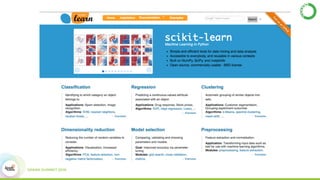
• Vast ecosystem of useful libraries
• Easy to interface with other languages
But… Python is slow!
• Pure, interpreted Python is slow.
• Python excels at interfacing with other languages used in HPC:
• C: ctypes, CFFI, Cython
• C++: Cython, Boost.Python
• FORTRAN: f2py
• Secret: Most scientific Python packages put the speed critical
sections of their algorithms in a compiled language.
Is there another way?
• Switching languages for speed in your projects
can be a little clunky
• Generating compiled functions for the wide range
of data types can be tedious
• How can we use cutting edge hardware, like
GPUs?
IMAGE REGISTRATION
An example for using GPU in PySpark
Image Registration
• An experiment to demonstrate GPU usage
• The problem:
• stitch image fragments
• fragments are randomly orientated, translated
and scaled.
• phase-correlation for image registration
• FFT heavy
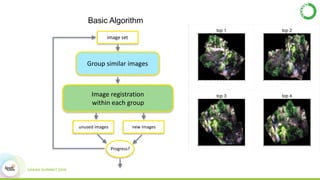
Basic Algorithm
Group	similar	images
Image	registration		
within	each	group
image	set
unused	images new	images
Progress?
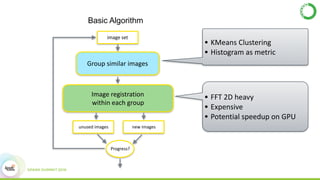
Basic Algorithm
• FFT	2D	heavy	
• Expensive	
• Potential	speedup	on	GPU
• KMeans	Clustering	
• Histogram	as	metric	
Group	similar	images
Image	registration		
within	each	group
image	set
unused	images new	images
Progress?
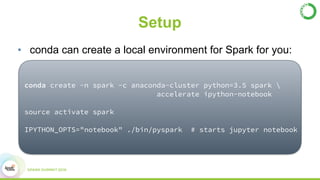
Setup
• conda can create a local environment for Spark for you:
conda create -n spark -c anaconda-cluster python=3.5 spark 

accelerate ipython-notebook
source activate spark
IPYTHON_OPTS="notebook" ./bin/pyspark # starts jupyter notebook
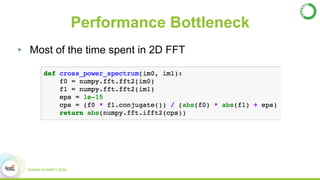
Performance Bottleneck
• Most of the time spent in 2D FFT
ACCELERATE
DROP-IN GPU-ACCELERATED FUNCTIONS
Accelerate
• Commercial licensed
• Hardware optimized numerical functions
• SIMD optimized via MKL
• GPU accelerated via CUDA
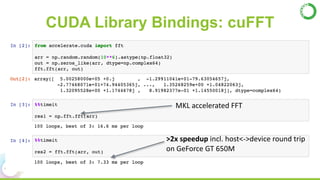
CUDA Library Bindings: cuFFT
>2x	speedup	incl.	host<->device	round	trip	
on	GeForce	GT	650M
MKL	accelerated	FFT
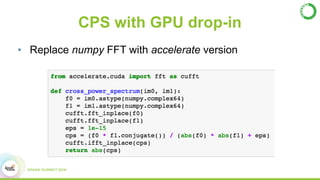
CPS with GPU drop-in
• Replace numpy FFT with accelerate version
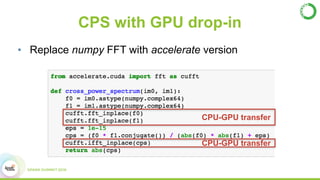
CPS with GPU drop-in
• Replace numpy FFT with accelerate version
CPU-GPU transfer
CPU-GPU transfer
NUMBA
JIT CUSTOM GPU-ACCELERATED FUNCTIONS
Numba
• Opensource licensed
• A Python JIT as a CPython library
• Array/numerical subset
• Targets CPU and GPU
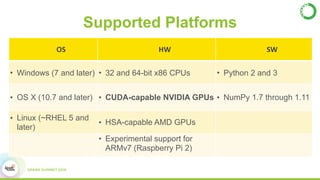
Supported Platforms
• Experimental support for ARMv7 (Raspberry Pi 2)
OS HW SW
• Windows (7 and later) • 32 and 64-bit x86 CPUs • Python 2 and 3
• OS X (10.7 and later) • CUDA-capable NVIDIA GPUs • NumPy 1.7 through 1.11
• Linux (~RHEL 5 and
later)
• HSA-capable AMD GPUs
• Experimental support for
ARMv7 (Raspberry Pi 2)
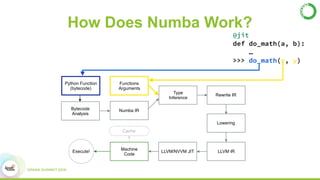
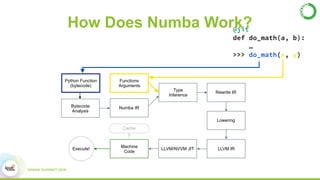
How Does Numba Work?
Python Function
(bytecode)
Bytecode
Analysis
Functions
Arguments
Numba IR
Machine
Code
Execute!
Type
Inference
LLVM/NVVM JIT LLVM IR
Lowering
Rewrite IR
Cache
@jit
def do_math(a, b):
…
>>> do_math(x, y)
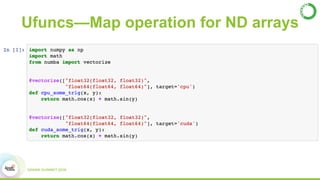
Ufuncs—Map operation for ND arrays
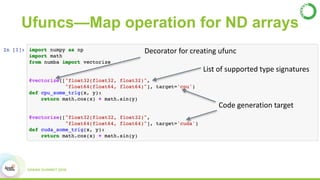
Decorator	for	creating	ufunc
List	of	supported	type	signatures
Code	generation	target
Ufuncs—Map operation for ND arrays
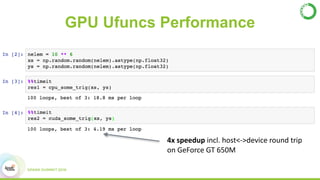
GPU Ufuncs Performance
4x	speedup	incl.	host<->device	round	trip	
on	GeForce	GT	650M
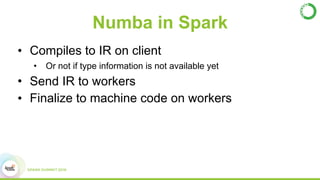
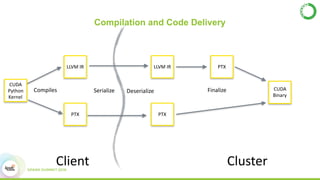
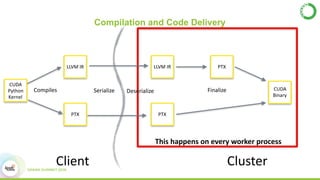
Numba in Spark
• Compiles to IR on client
• Or not if type information is not available yet
• Send IR to workers
• Finalize to machine code on workers
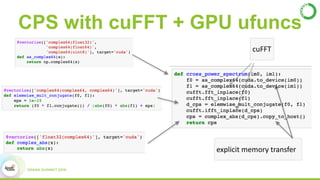
cuFFT
explicit	memory	transfer
CPS with cuFFT + GPU ufuncs
TIPS & TRICKS
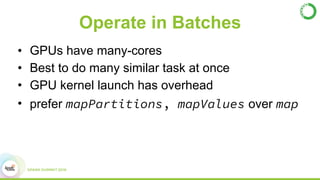
Operate in Batches
• GPUs have many-cores
• Best to do many similar task at once
• GPU kernel launch has overhead
• prefer mapPartitions, mapValues over map
Under-utilization of GPU
• PySpark spawns 1 Python process per core
• Only 1 CUDA process per GPU at a time
• Under-utilize the GPU easily
• GPU context-switching between processes
Under-utilization of GPU (Fix)
• nvidia-cuda-mps-control
• Originally for MPI
• Allow multiple process per GPU
• Reduce per-process overhead
• Increase GPU utilization
• 10-15% speedup in our experiment
Summary
• Anaconda:
• creates Spark environment for experimentation
• manages Python packages for use in Spark
• Accelerate:
• Pre-built GPU functions within PySpark
• Numba:
• JIT custom GPU functions within PySpark
THANK YOU.
email: slam@continuum.io
Extras
NUMBA: A PYTHON JIT COMPILER
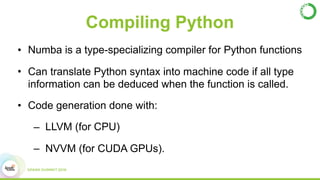
Compiling Python
• Numba is a type-specializing compiler for Python functions
• Can translate Python syntax into machine code if all type
information can be deduced when the function is called.
• Code generation done with:
– LLVM (for CPU)
– NVVM (for CUDA GPUs).
How Does Numba Work?
Python Function
(bytecode)
Bytecode
Analysis
Functions
Arguments
Numba IR
Machine
Code
Execute!
Type
Inference
LLVM/NVVM JIT LLVM IR
Lowering
Rewrite IR
Cache
@jit
def do_math(a, b):
…
>>> do_math(x, y)
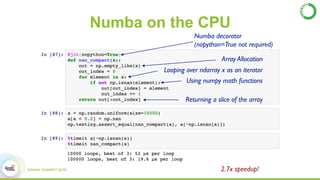
Numba on the CPU
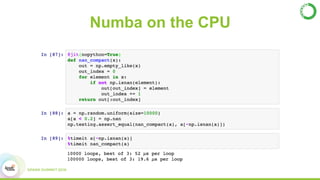
Array Allocation
Looping over ndarray x as an iterator
Using numpy math functions
Returning a slice of the array
2.7x speedup!
Numba decorator

(nopython=True not required)
Numba on the CPU
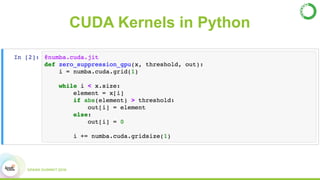
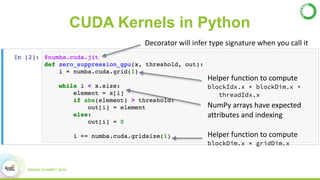
CUDA Kernels in Python
Decorator	will	infer	type	signature	when	you	call	it
NumPy	arrays	have	expected	
attributes	and	indexing
Helper	function	to	compute

blockIdx.x * blockDim.x +

threadIdx.x
Helper	function	to	compute

blockDim.x * gridDim.x
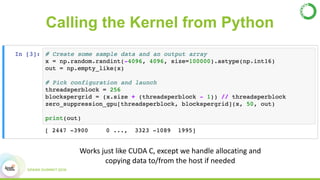
Calling the Kernel from Python
Works	just	like	CUDA	C,	except	we	handle	allocating	and	
copying	data	to/from	the	host	if	needed
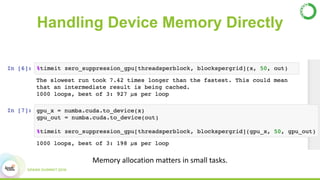
Handling Device Memory Directly
Memory	allocation	matters	in	small	tasks.
NUMBA IN SPARK
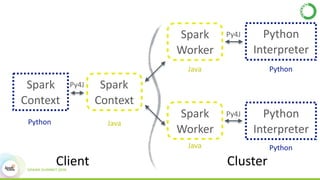
Spark	
Context
Spark	
Context
Spark	
Worker
Python	
Interpreter
Spark	
Worker
Python	
Interpreter
Python Java
Java
Java
Python
Python
Client Cluster
Py4J
Py4J
Py4J
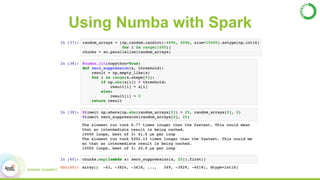
Using Numba with Spark
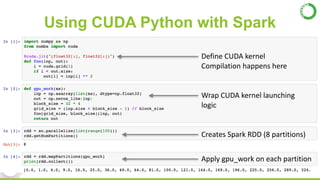
Using CUDA Python with Spark
• conda can create a local environment for Spark for you:
Define	CUDA	kernel	
Compilation	happens	here
Wrap	CUDA	kernel	launching	
logic
Creates	Spark	RDD	(8	partitions)
Apply	gpu_work	on	each	partition
Compilation and Code Delivery
Client Cluster
CUDA	
Python	
Kernel
LLVM	IR
PTX
LLVM	IR PTX
PTX
CUDA	
Binary
Compiles Serialize FinalizeDeserialize
Compilation and Code Delivery
Client Cluster
CUDA	
Python	
Kernel
LLVM	IR
PTX
LLVM	IR PTX
PTX
CUDA	
Binary
Compiles Serialize FinalizeDeserialize
This	happens	on	every	worker	process

GPU Computing With Apache Spark And Python