Frustration-Reduced
PySpark
Data engineering with DataFrames
Ilya Ganelin
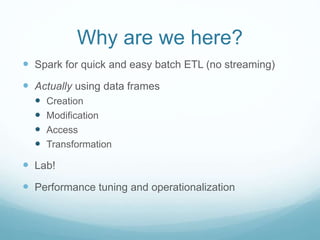
Why are we here?
 Spark for quick and easy batch ETL (no streaming)
 Actually using data frames
 Creation
 Modification
 Access
 Transformation
 Lab!
 Performance tuning and operationalization
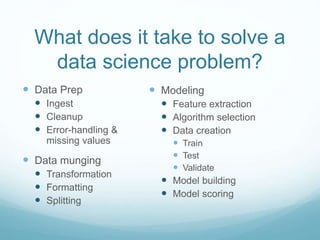
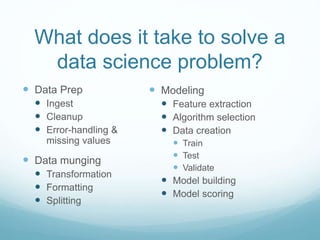
What does it take to solve a
data science problem?
 Data Prep
 Ingest
 Cleanup
 Error-handling &
missing values
 Data munging
 Transformation
 Formatting
 Splitting
 Modeling
 Feature extraction
 Algorithm selection
 Data creation
 Train
 Test
 Validate
 Model building
 Model scoring
Why Spark?
 Batch/micro-batch processing of large datasets
 Easy to use, easy to iterate, wealth of common
industry-standard ML algorithms
 Super fast if properly configured
 Bridges the gap between the old (SQL, single machine
analytics) and the new (declarative/functional
distributed programming)
Why not Spark?
 Breaks easily with poor usage or improperly specified
configs
 Scaling up to larger datasets 500GB -> TB scale
requires deep understanding of internal configurations,
garbage collection tuning, and Spark mechanisms
 While there are lots of ML algorithms, a lot of them
simply don’t work, don’t work at scale, or have poorly
defined interfaces / documentation
Scala
 Yes, I recommend Scala
 Python API is underdeveloped, especially for ML Lib
 Java (until Java 8) is a second class citizen as far as
convenience vs. Scala
 Spark is written in Scala – understanding Scala helps you
navigate the source
 Can leverage the spark-shell to rapidly prototype new
code and constructs
 http://www.scala-
lang.org/docu/files/ScalaByExample.pdf
Why DataFrames?
 Iterate on datasets MUCH faster
 Column access is easier
 Data inspection is easier
 groupBy, join, are faster due to under-the-hood
optimizations
 Some chunks of ML Lib now optimized to use data
frames
Why not DataFrames?
 RDD API is still much better developed
 Getting data into DataFrames can be clunky
 Transforming data inside DataFrames can be clunky
 Many of the algorithms in ML Lib still depend on RDDs
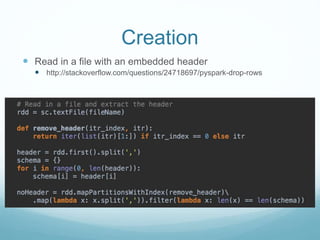
Creation
 Read in a file with an embedded header
 http://stackoverflow.com/questions/24718697/pyspark-drop-rows
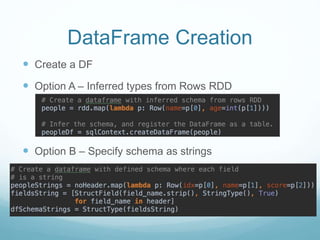
 Create a DF
 Option A – Inferred types from Rows RDD
 Option B – Specify schema as strings
DataFrame Creation
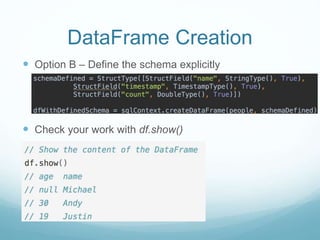
 Option C – Define the schema explicitly
 Check your work with df.show()
DataFrame Creation
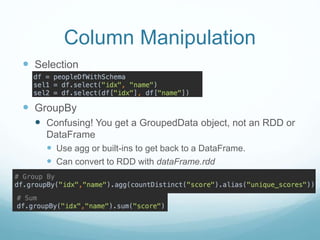
Column Manipulation
 Selection
 GroupBy
 Confusing! You get a GroupedData object, not an RDD or
DataFrame
 Use agg or built-ins to get back to a DataFrame.
 Can convert to RDD with dataFrame.rdd
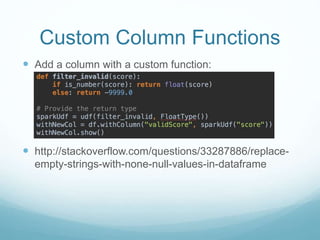
Custom Column Functions
 Add a column with a custom function:
 http://stackoverflow.com/questions/33287886/replace-
empty-strings-with-none-null-values-in-dataframe
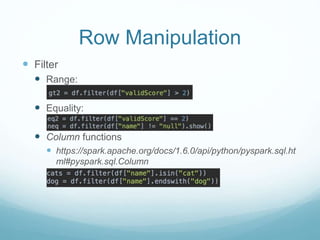
Row Manipulation
 Filter
 Range:
 Equality:
 Column functions
 https://spark.apache.org/docs/1.6.0/api/python/pyspark.sql.ht
ml#pyspark.sql.Column
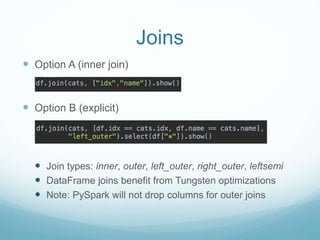
Joins
 Option A (inner join)
 Option B (explicit)
 Join types: inner, outer, left_outer, right_outer, leftsemi
 DataFrame joins benefit from Tungsten optimizations
 Note: PySpark will not drop columns for outer joins
Null Handling
 Built in support for handling nulls/NA in data frames.
 Drop, fill, replace
 https://spark.apache.org/docs/1.6.0/api/python/pyspark.
sql.html#pyspark.sql.DataFrameNaFunctions
What does it take to solve a
data science problem?
 Data Prep
 Ingest
 Cleanup
 Error-handling &
missing values
 Data munging
 Transformation
 Formatting
 Splitting
 Modeling
 Feature extraction
 Algorithm selection
 Data creation
 Train
 Test
 Validate
 Model building
 Model scoring
Lab Rules
 Ask Google and StackOverflow before you ask me 
 You do not have to use my code.
 Use DataFrames until you can’t.
 Keep track of what breaks!
 There are no stupid questions.
Lab
 Ingest Data
 Remove invalid entrees or fill missing entries
 Split into test, train, validate
 Reformat a single column, e.g. map IDs or change
format
 Add a custom metric or feature based on other columns
 Run a classification algorithm on this data to figure out
who will survive!
What problems did you
encounter?
What are you still confused
about?
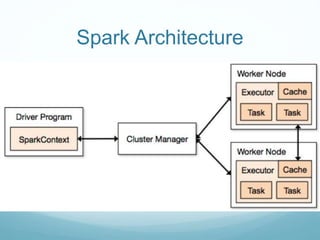
Spark Architecture
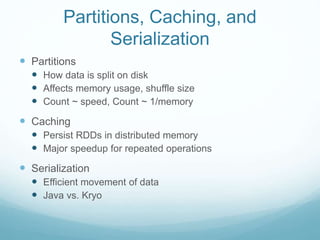
 Partitions
 How data is split on disk
 Affects memory usage, shuffle size
 Count ~ speed, Count ~ 1/memory
 Caching
 Persist RDDs in distributed memory
 Major speedup for repeated operations
 Serialization
 Efficient movement of data
 Java vs. Kryo
Partitions, Caching, and
Serialization
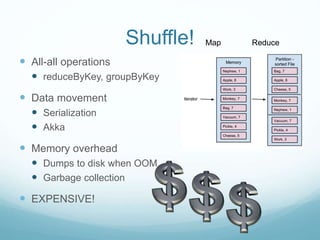
Shuffle!
 All-all operations
 reduceByKey, groupByKey
 Data movement
 Serialization
 Akka
 Memory overhead
 Dumps to disk when OOM
 Garbage collection
 EXPENSIVE!
Map Reduce
What else?
 Save your work => Write completed datasets to file
 Work on small data first, then go to big data
 Create test data to capture edge cases
 LMGTFY
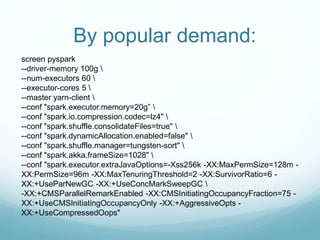
By popular demand:
screen pyspark
--driver-memory 100g 
--num-executors 60 
--executor-cores 5 
--master yarn-client 
--conf "spark.executor.memory=20g” 
--conf "spark.io.compression.codec=lz4" 
--conf "spark.shuffle.consolidateFiles=true" 
--conf "spark.dynamicAllocation.enabled=false" 
--conf "spark.shuffle.manager=tungsten-sort" 
--conf "spark.akka.frameSize=1028" 
--conf "spark.executor.extraJavaOptions=-Xss256k -XX:MaxPermSize=128m -
XX:PermSize=96m -XX:MaxTenuringThreshold=2 -XX:SurvivorRatio=6 -
XX:+UseParNewGC -XX:+UseConcMarkSweepGC 
-XX:+CMSParallelRemarkEnabled -XX:CMSInitiatingOccupancyFraction=75 -
XX:+UseCMSInitiatingOccupancyOnly -XX:+AggressiveOpts -
XX:+UseCompressedOops"
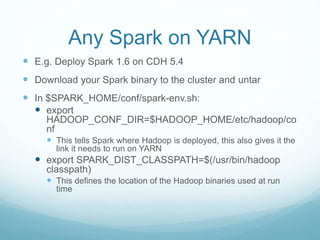
Any Spark on YARN
 E.g. Deploy Spark 1.6 on CDH 5.4
 Download your Spark binary to the cluster and untar
 In $SPARK_HOME/conf/spark-env.sh:
 export
HADOOP_CONF_DIR=$HADOOP_HOME/etc/hadoop/co
nf
 This tells Spark where Hadoop is deployed, this also gives it the
link it needs to run on YARN
 export SPARK_DIST_CLASSPATH=$(/usr/bin/hadoop
classpath)
 This defines the location of the Hadoop binaries used at run
time
References
 http://spark.apache.org/docs/latest/programming-guide.html
 http://spark.apache.org/docs/latest/sql-programming-guide.html
 http://tinyurl.com/leqek2d (Working With Spark, by Ilya Ganelin)
 http://blog.cloudera.com/blog/2015/03/how-to-tune-your-apache-
spark-jobs-part-1/ (by Sandy Ryza)
 http://blog.cloudera.com/blog/2015/03/how-to-tune-your-apache-
spark-jobs-part-2/ (by Sandy Ryza)
 http://www.slideshare.net/ilganeli/frustrationreduced-pyspark-data-
engineering-with-dataframes

Frustration-Reduced PySpark: Data engineering with DataFrames

  • 1.
  • 2.
    Why are wehere?  Spark for quick and easy batch ETL (no streaming)  Actually using data frames  Creation  Modification  Access  Transformation  Lab!  Performance tuning and operationalization
  • 3.
    What does ittake to solve a data science problem?  Data Prep  Ingest  Cleanup  Error-handling & missing values  Data munging  Transformation  Formatting  Splitting  Modeling  Feature extraction  Algorithm selection  Data creation  Train  Test  Validate  Model building  Model scoring
  • 4.
    Why Spark?  Batch/micro-batchprocessing of large datasets  Easy to use, easy to iterate, wealth of common industry-standard ML algorithms  Super fast if properly configured  Bridges the gap between the old (SQL, single machine analytics) and the new (declarative/functional distributed programming)
  • 6.
    Why not Spark? Breaks easily with poor usage or improperly specified configs  Scaling up to larger datasets 500GB -> TB scale requires deep understanding of internal configurations, garbage collection tuning, and Spark mechanisms  While there are lots of ML algorithms, a lot of them simply don’t work, don’t work at scale, or have poorly defined interfaces / documentation
  • 7.
    Scala  Yes, Irecommend Scala  Python API is underdeveloped, especially for ML Lib  Java (until Java 8) is a second class citizen as far as convenience vs. Scala  Spark is written in Scala – understanding Scala helps you navigate the source  Can leverage the spark-shell to rapidly prototype new code and constructs  http://www.scala- lang.org/docu/files/ScalaByExample.pdf
  • 8.
    Why DataFrames?  Iterateon datasets MUCH faster  Column access is easier  Data inspection is easier  groupBy, join, are faster due to under-the-hood optimizations  Some chunks of ML Lib now optimized to use data frames
  • 9.
    Why not DataFrames? RDD API is still much better developed  Getting data into DataFrames can be clunky  Transforming data inside DataFrames can be clunky  Many of the algorithms in ML Lib still depend on RDDs
  • 10.
    Creation  Read ina file with an embedded header  http://stackoverflow.com/questions/24718697/pyspark-drop-rows
  • 11.
     Create aDF  Option A – Inferred types from Rows RDD  Option B – Specify schema as strings DataFrame Creation
  • 12.
     Option C– Define the schema explicitly  Check your work with df.show() DataFrame Creation
  • 13.
    Column Manipulation  Selection GroupBy  Confusing! You get a GroupedData object, not an RDD or DataFrame  Use agg or built-ins to get back to a DataFrame.  Can convert to RDD with dataFrame.rdd
  • 14.
    Custom Column Functions Add a column with a custom function:  http://stackoverflow.com/questions/33287886/replace- empty-strings-with-none-null-values-in-dataframe
  • 15.
    Row Manipulation  Filter Range:  Equality:  Column functions  https://spark.apache.org/docs/1.6.0/api/python/pyspark.sql.ht ml#pyspark.sql.Column
  • 16.
    Joins  Option A(inner join)  Option B (explicit)  Join types: inner, outer, left_outer, right_outer, leftsemi  DataFrame joins benefit from Tungsten optimizations  Note: PySpark will not drop columns for outer joins
  • 17.
    Null Handling  Builtin support for handling nulls/NA in data frames.  Drop, fill, replace  https://spark.apache.org/docs/1.6.0/api/python/pyspark. sql.html#pyspark.sql.DataFrameNaFunctions
  • 18.
    What does ittake to solve a data science problem?  Data Prep  Ingest  Cleanup  Error-handling & missing values  Data munging  Transformation  Formatting  Splitting  Modeling  Feature extraction  Algorithm selection  Data creation  Train  Test  Validate  Model building  Model scoring
  • 19.
    Lab Rules  AskGoogle and StackOverflow before you ask me   You do not have to use my code.  Use DataFrames until you can’t.  Keep track of what breaks!  There are no stupid questions.
  • 20.
    Lab  Ingest Data Remove invalid entrees or fill missing entries  Split into test, train, validate  Reformat a single column, e.g. map IDs or change format  Add a custom metric or feature based on other columns  Run a classification algorithm on this data to figure out who will survive!
  • 21.
    What problems didyou encounter? What are you still confused about?
  • 22.
  • 24.
     Partitions  Howdata is split on disk  Affects memory usage, shuffle size  Count ~ speed, Count ~ 1/memory  Caching  Persist RDDs in distributed memory  Major speedup for repeated operations  Serialization  Efficient movement of data  Java vs. Kryo Partitions, Caching, and Serialization
  • 25.
    Shuffle!  All-all operations reduceByKey, groupByKey  Data movement  Serialization  Akka  Memory overhead  Dumps to disk when OOM  Garbage collection  EXPENSIVE! Map Reduce
  • 26.
    What else?  Saveyour work => Write completed datasets to file  Work on small data first, then go to big data  Create test data to capture edge cases  LMGTFY
  • 27.
    By popular demand: screenpyspark --driver-memory 100g --num-executors 60 --executor-cores 5 --master yarn-client --conf "spark.executor.memory=20g” --conf "spark.io.compression.codec=lz4" --conf "spark.shuffle.consolidateFiles=true" --conf "spark.dynamicAllocation.enabled=false" --conf "spark.shuffle.manager=tungsten-sort" --conf "spark.akka.frameSize=1028" --conf "spark.executor.extraJavaOptions=-Xss256k -XX:MaxPermSize=128m - XX:PermSize=96m -XX:MaxTenuringThreshold=2 -XX:SurvivorRatio=6 - XX:+UseParNewGC -XX:+UseConcMarkSweepGC -XX:+CMSParallelRemarkEnabled -XX:CMSInitiatingOccupancyFraction=75 - XX:+UseCMSInitiatingOccupancyOnly -XX:+AggressiveOpts - XX:+UseCompressedOops"
  • 28.
    Any Spark onYARN  E.g. Deploy Spark 1.6 on CDH 5.4  Download your Spark binary to the cluster and untar  In $SPARK_HOME/conf/spark-env.sh:  export HADOOP_CONF_DIR=$HADOOP_HOME/etc/hadoop/co nf  This tells Spark where Hadoop is deployed, this also gives it the link it needs to run on YARN  export SPARK_DIST_CLASSPATH=$(/usr/bin/hadoop classpath)  This defines the location of the Hadoop binaries used at run time
  • 29.
    References  http://spark.apache.org/docs/latest/programming-guide.html  http://spark.apache.org/docs/latest/sql-programming-guide.html http://tinyurl.com/leqek2d (Working With Spark, by Ilya Ganelin)  http://blog.cloudera.com/blog/2015/03/how-to-tune-your-apache- spark-jobs-part-1/ (by Sandy Ryza)  http://blog.cloudera.com/blog/2015/03/how-to-tune-your-apache- spark-jobs-part-2/ (by Sandy Ryza)  http://www.slideshare.net/ilganeli/frustrationreduced-pyspark-data- engineering-with-dataframes

Editor's Notes

  • #3 Get a sense for familiarity with Spark
  • #4 Ask the class for involvement here!
  • #6 Ask the class for involvement here!