Graphic 
Materials
Graphics 
 Graphics (from Greek γραφικός graphikos, 'something written' e.g. 
autograph) are visual images or designs on some surface, such as a 
wall, canvas, screen, paper, or stone to inform, illustrate, or 
entertain. 
 In contemporary usage it includes: pictorial representation of data, as 
in computer-aided design and manufacture, in typesetting and the 
graphic arts, and in educational and recreational software. 
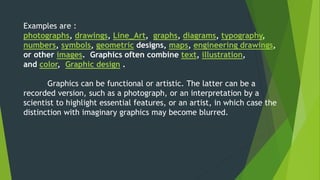
Examples are : 
photographs, drawings, Line_Art, graphs, diagrams, typography, 
numbers, symbols, geometric designs, maps, engineering 
drawings, or other images. Graphics often 
combine text, illustration, and color, Graphic design .
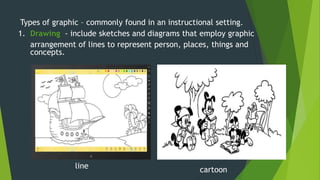
Types of graphic – commonly found in an instructional setting. 
1. Drawing - include sketches and diagrams that employ graphic 
arrangement of lines to represent person, places, things and 
concepts. 
cartoon 
line
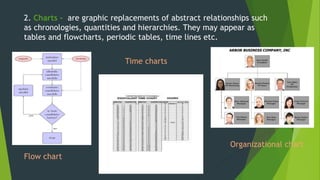
2. Charts - are graphic replacements of abstract relationships such 
as chronologies, quantities and hierarchies. They may appear as 
tables and flowcharts, periodic tables, time lines etc. 
Flow chart 
Time charts 
Organizational chart
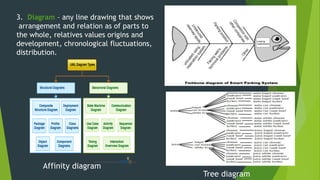
3. Diagram – any line drawing that shows 
arrangement and relation as of parts to 
the whole, relatives values origins and 
development, chronological fluctuations, 
distribution. 
Affinity diagram 
Tree diagram
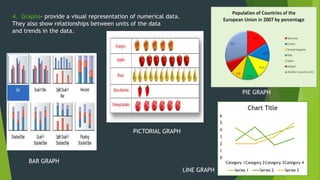
4. Graphs- provide a visual representation of numerical data. 
They also show relationships between units of the data 
and trends in the data. 
6 
5 
4 
3 
2 
1 
0 
Chart Title 
Category 1Category 2Category 3Category 4 
Series 1 Series 2 Series 3 
BAR GRAPH 
PICTORIAL GRAPH 
PIE GRAPH 
LINE GRAPH
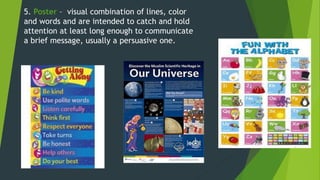
5. Poster – visual combination of lines, color 
and words and are intended to catch and hold 
attention at least long enough to communicate 
a brief message, usually a persuasive one. 
Circ 
ular 
- 
grap 
hs to 
sho 
w 
dire 
ctio 
nal 
data 
and 
cycli 
cal 
patt 
erns 
in 
data 
.
Examples are : 
photographs, drawings, Line_Art, graphs, diagrams, typography, 
numbers, symbols, geometric designs, maps, engineering drawings, 
or other images. Graphics often combine text, illustration, 
and color, Graphic design . 
Graphics can be functional or artistic. The latter can be a 
recorded version, such as a photograph, or an interpretation by a 
scientist to highlight essential features, or an artist, in which case the 
distinction with imaginary graphics may become blurred.
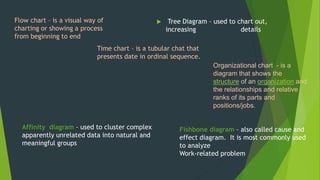
Flow chart – is a visual way of 
charting or showing a process 
from beginning to end 
 Tree Diagram – used to chart out, 
increasing details 
Organizational chart - is a 
diagram that shows the 
structure of an organization and 
the relationships and relative 
ranks of its parts and 
positions/jobs. 
Time chart – is a tubular chat that 
presents date in ordinal sequence. 
Affinity diagram – used to cluster complex 
apparently unrelated data into natural and 
meaningful groups 
Fishbone diagram – also called cause and 
effect diagram. It is most commonly used 
to analyze 
Work-related problem
Audiovisual 
The term audiovisual (AV, or A/V) may refer to works with both 
a sound and a visual component, the production or use of such works, or the 
equipment used to create and present such works. Slide-tape presentations, 
films, and television programs are examples of audiovisual presentations, as 
are most major church services and other live theatre productions. 
Business presentations are also often audiovisual. In a typical presentation, 
the presenter provides the audio by speaking, and supplements it with a 
series of images projected onto a screen, either from a slide projector, or 
from a computer connected to a projector using presentation software. 
In the developed world, there has been a huge uptake of computer-based 
audiovisual equipment in the education sector, with many schools and 
higher educational establishments installing projection equipment and often 
using interactive whiteboard technology.
Type of audio visual 
PowerPoint (or equivalent) 
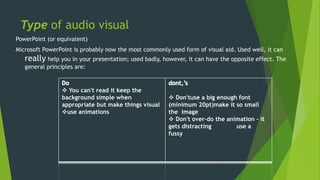
Microsoft PowerPoint is probably now the most commonly used form of visual aid. Used well, it can 
really help you in your presentation; used badly, however, it can have the opposite effect. The 
general principles are: 
 You can't read it keep the 
background simple when 
appropriate but make things visual 
use animations 
 Don'tuse a big enough font 
(minimum 20pt)make it so small 
the image 
 Don't over-do the animation - it 
gets distracting use a 
fussy
Overhead projector slides/transparencies 
Overhead projector slides/transparencies are displayed on the overhead projector (OHP) - 
a very useful tool found in most lecture and seminar rooms. The OHP projects and 
enlarges your slides onto a screen or wall without requiring the lights to be dimmed. 
White or black board 
White or black boards can be very useful to help explain the sequence of ideas or 
routines, particularly in the sciences. Use them to clarify your title or to record your key 
points as you introduce your presentation (this will give you a fixed list to help you recap 
as you go along)..
Paper handouts 
Handouts are incredibly useful. Use a handout if your information is too 
detailed to fit on a slide or if you want your audience to have a full record 
of your findings 
Flip chart 
A flip chart is a large pad of paper on a stand. It is a very useful and 
flexible way of recording information during your presentation
Video (DVD or VHS) 
Video gives you a chance to show stimulating visual information. Use video to 
bring movement, pictures and sound into your presentation. Always make sure 
that the clip is directly relevant to your content. Tell your audience what to look 
for. Avoid showing any more film than you need. 
Artefacts or props 
Sometimes it can be very useful to use artefacts or props when making a 
presentation (think of the safety routine on an aeroplane when the steward shows 
you how to use the safety equipment). If you bring an artefact with you, make sure 
that the object can be seen and be prepared to pass it round a small group or move 
to different areas of a large room to help your audience view it in detail. 
Remember that this will take time and that when an audience is immersed in 
looking at an object, they will find it hard to listen to your talk. Conceal large 
props until you need them; they might distract your audience's attention.
The importance of audio visual materials 
in teaching and learning 
 On the other hand teaching can simply be defined as an act of impacting knowledge 
in a group. But learning is a complex process, and can also be describe as a change 
in attitude, thinking or relatively permanent change in behavior overtime. 
 The use of audio visual materials as teaching aids has increased in recent years; 
thanks to technological advancement. Today's technology offers many choices to 
teachers, lecturers and curriculum developers who wish to capitalize on the new 
generation’s appetite for multimedia presentations. According to studies and 
research, some teachers claim that whenever they teach with some learning aids, 
their students get more stimulated because the learning aids help students to 
become more attentive. In addition, student's positive attitude generates more 
interest for the lessons they teach, and as a result students participate better in the 
class.
Below are some of the importance of audio visual 
materials in teaching and learning: 
1 .Audio visual material arouses learner's interest. Students get anxious and develop a 
learning habit when the teaching method or medium appear real to them and are not 
abstract. The material helps the teacher or the instructor to present his/her lessons 
clearly and effectively and this in turn catches the attention of the pupils. 
2 .Instructional materials are important because with them learners have a clear view of 
what is being taught. 
3 .Audio visual materials guide learners / students to learn well and it reduces the stress 
involved in the process of teaching and learning. 
4 .Audio visual aids in the classroom enhance teaching methods and improve student's 
comprehension.
5. Teaching materials help to get the attention of the students, makes the class 
more realistic and it gives a viewpoint or key point on the topic 
6 .Instructional materials give proficiency to teachers and also help students to get 
the true picture of what is being taught. 
In conclusion, people learn in different ways. Some people are good in retaining 
information passed to them orally, while some others are extraordinarily good in 
retaining information through what they read and others through pictures and 
some other means. But generally, findings and statistics have shown that the best 
means of facilitating or enhancing good teaching and learning is through the use of 
instructional materials which encompass audio visual materials like radio, charts 
and projectors of various kinds.

Educational Technology Graphic/Audio Visual Materials

  • 1.
  • 2.
    Graphics  Graphics(from Greek γραφικός graphikos, 'something written' e.g. autograph) are visual images or designs on some surface, such as a wall, canvas, screen, paper, or stone to inform, illustrate, or entertain.  In contemporary usage it includes: pictorial representation of data, as in computer-aided design and manufacture, in typesetting and the graphic arts, and in educational and recreational software. Examples are : photographs, drawings, Line_Art, graphs, diagrams, typography, numbers, symbols, geometric designs, maps, engineering drawings, or other images. Graphics often combine text, illustration, and color, Graphic design .
  • 3.
    Types of graphic– commonly found in an instructional setting. 1. Drawing - include sketches and diagrams that employ graphic arrangement of lines to represent person, places, things and concepts. cartoon line
  • 4.
    2. Charts -are graphic replacements of abstract relationships such as chronologies, quantities and hierarchies. They may appear as tables and flowcharts, periodic tables, time lines etc. Flow chart Time charts Organizational chart
  • 5.
    3. Diagram –any line drawing that shows arrangement and relation as of parts to the whole, relatives values origins and development, chronological fluctuations, distribution. Affinity diagram Tree diagram
  • 6.
    4. Graphs- providea visual representation of numerical data. They also show relationships between units of the data and trends in the data. 6 5 4 3 2 1 0 Chart Title Category 1Category 2Category 3Category 4 Series 1 Series 2 Series 3 BAR GRAPH PICTORIAL GRAPH PIE GRAPH LINE GRAPH
  • 7.
    5. Poster –visual combination of lines, color and words and are intended to catch and hold attention at least long enough to communicate a brief message, usually a persuasive one. Circ ular - grap hs to sho w dire ctio nal data and cycli cal patt erns in data .
  • 8.
    Examples are : photographs, drawings, Line_Art, graphs, diagrams, typography, numbers, symbols, geometric designs, maps, engineering drawings, or other images. Graphics often combine text, illustration, and color, Graphic design . Graphics can be functional or artistic. The latter can be a recorded version, such as a photograph, or an interpretation by a scientist to highlight essential features, or an artist, in which case the distinction with imaginary graphics may become blurred.
  • 9.
    Flow chart –is a visual way of charting or showing a process from beginning to end  Tree Diagram – used to chart out, increasing details Organizational chart - is a diagram that shows the structure of an organization and the relationships and relative ranks of its parts and positions/jobs. Time chart – is a tubular chat that presents date in ordinal sequence. Affinity diagram – used to cluster complex apparently unrelated data into natural and meaningful groups Fishbone diagram – also called cause and effect diagram. It is most commonly used to analyze Work-related problem
  • 10.
    Audiovisual The termaudiovisual (AV, or A/V) may refer to works with both a sound and a visual component, the production or use of such works, or the equipment used to create and present such works. Slide-tape presentations, films, and television programs are examples of audiovisual presentations, as are most major church services and other live theatre productions. Business presentations are also often audiovisual. In a typical presentation, the presenter provides the audio by speaking, and supplements it with a series of images projected onto a screen, either from a slide projector, or from a computer connected to a projector using presentation software. In the developed world, there has been a huge uptake of computer-based audiovisual equipment in the education sector, with many schools and higher educational establishments installing projection equipment and often using interactive whiteboard technology.
  • 11.
    Type of audiovisual PowerPoint (or equivalent) Microsoft PowerPoint is probably now the most commonly used form of visual aid. Used well, it can really help you in your presentation; used badly, however, it can have the opposite effect. The general principles are:  You can't read it keep the background simple when appropriate but make things visual use animations  Don'tuse a big enough font (minimum 20pt)make it so small the image  Don't over-do the animation - it gets distracting use a fussy
  • 12.
    Overhead projector slides/transparencies Overhead projector slides/transparencies are displayed on the overhead projector (OHP) - a very useful tool found in most lecture and seminar rooms. The OHP projects and enlarges your slides onto a screen or wall without requiring the lights to be dimmed. White or black board White or black boards can be very useful to help explain the sequence of ideas or routines, particularly in the sciences. Use them to clarify your title or to record your key points as you introduce your presentation (this will give you a fixed list to help you recap as you go along)..
  • 13.
    Paper handouts Handoutsare incredibly useful. Use a handout if your information is too detailed to fit on a slide or if you want your audience to have a full record of your findings Flip chart A flip chart is a large pad of paper on a stand. It is a very useful and flexible way of recording information during your presentation
  • 14.
    Video (DVD orVHS) Video gives you a chance to show stimulating visual information. Use video to bring movement, pictures and sound into your presentation. Always make sure that the clip is directly relevant to your content. Tell your audience what to look for. Avoid showing any more film than you need. Artefacts or props Sometimes it can be very useful to use artefacts or props when making a presentation (think of the safety routine on an aeroplane when the steward shows you how to use the safety equipment). If you bring an artefact with you, make sure that the object can be seen and be prepared to pass it round a small group or move to different areas of a large room to help your audience view it in detail. Remember that this will take time and that when an audience is immersed in looking at an object, they will find it hard to listen to your talk. Conceal large props until you need them; they might distract your audience's attention.
  • 15.
    The importance ofaudio visual materials in teaching and learning  On the other hand teaching can simply be defined as an act of impacting knowledge in a group. But learning is a complex process, and can also be describe as a change in attitude, thinking or relatively permanent change in behavior overtime.  The use of audio visual materials as teaching aids has increased in recent years; thanks to technological advancement. Today's technology offers many choices to teachers, lecturers and curriculum developers who wish to capitalize on the new generation’s appetite for multimedia presentations. According to studies and research, some teachers claim that whenever they teach with some learning aids, their students get more stimulated because the learning aids help students to become more attentive. In addition, student's positive attitude generates more interest for the lessons they teach, and as a result students participate better in the class.
  • 16.
    Below are someof the importance of audio visual materials in teaching and learning: 1 .Audio visual material arouses learner's interest. Students get anxious and develop a learning habit when the teaching method or medium appear real to them and are not abstract. The material helps the teacher or the instructor to present his/her lessons clearly and effectively and this in turn catches the attention of the pupils. 2 .Instructional materials are important because with them learners have a clear view of what is being taught. 3 .Audio visual materials guide learners / students to learn well and it reduces the stress involved in the process of teaching and learning. 4 .Audio visual aids in the classroom enhance teaching methods and improve student's comprehension.
  • 17.
    5. Teaching materialshelp to get the attention of the students, makes the class more realistic and it gives a viewpoint or key point on the topic 6 .Instructional materials give proficiency to teachers and also help students to get the true picture of what is being taught. In conclusion, people learn in different ways. Some people are good in retaining information passed to them orally, while some others are extraordinarily good in retaining information through what they read and others through pictures and some other means. But generally, findings and statistics have shown that the best means of facilitating or enhancing good teaching and learning is through the use of instructional materials which encompass audio visual materials like radio, charts and projectors of various kinds.